

Many brands and creators are active on both X (formerly Twitter) and LinkedIn, and they often want to share the same content on both platforms. However, posting the same update separately each time can quickly become repetitive and time-consuming.
➡️ Fortunately, it is possible to integrate Twitter with a LinkedIn company page and share your content across both platforms automatically.
The easiest way to do this is by using Circleboom Twitter.

Circleboom Twitter is an official X Enterprise Developer, and it allows you to connect your X account and LinkedIn company page in one dashboard.
Once connected, you can create your content using the X Post Planner and automatically share the same post across multiple platforms, including LinkedIn, Facebook, Bluesky, Threads, and Instagram at the same time.
This makes managing your social media accounts much easier and saves a lot of time.
What Circleboom Twitter Lets You Do
Circleboom Twitter helps you manage multiple social media accounts from a single place. Instead of posting separately on each platform, you can create one post and share it everywhere.
With Circleboom Twitter, you can:
✅ Connect your X account and LinkedIn company page
✅ Create posts using the X Post Planner
✅ Automatically cross-post your tweets to other platforms
✅ Share the same content on LinkedIn, Facebook, Bluesky, Threads, and Instagram
✅ Schedule posts for later or publish them instantly
✅ Manage multiple social accounts from one dashboard
This means you can create your content once and distribute it across several platforms without repeating the same steps every time.
How to Integrate Twitter with a LinkedIn Company Page
Connecting your accounts and sharing posts across platforms only takes a few minutes.
Step #1: Go to Circleboom Twitter and Log In
Open your browser and go to Circleboom Twitter.
If you don’t have an account, sign up and connect your Twitter/X profile in just a few clicks.

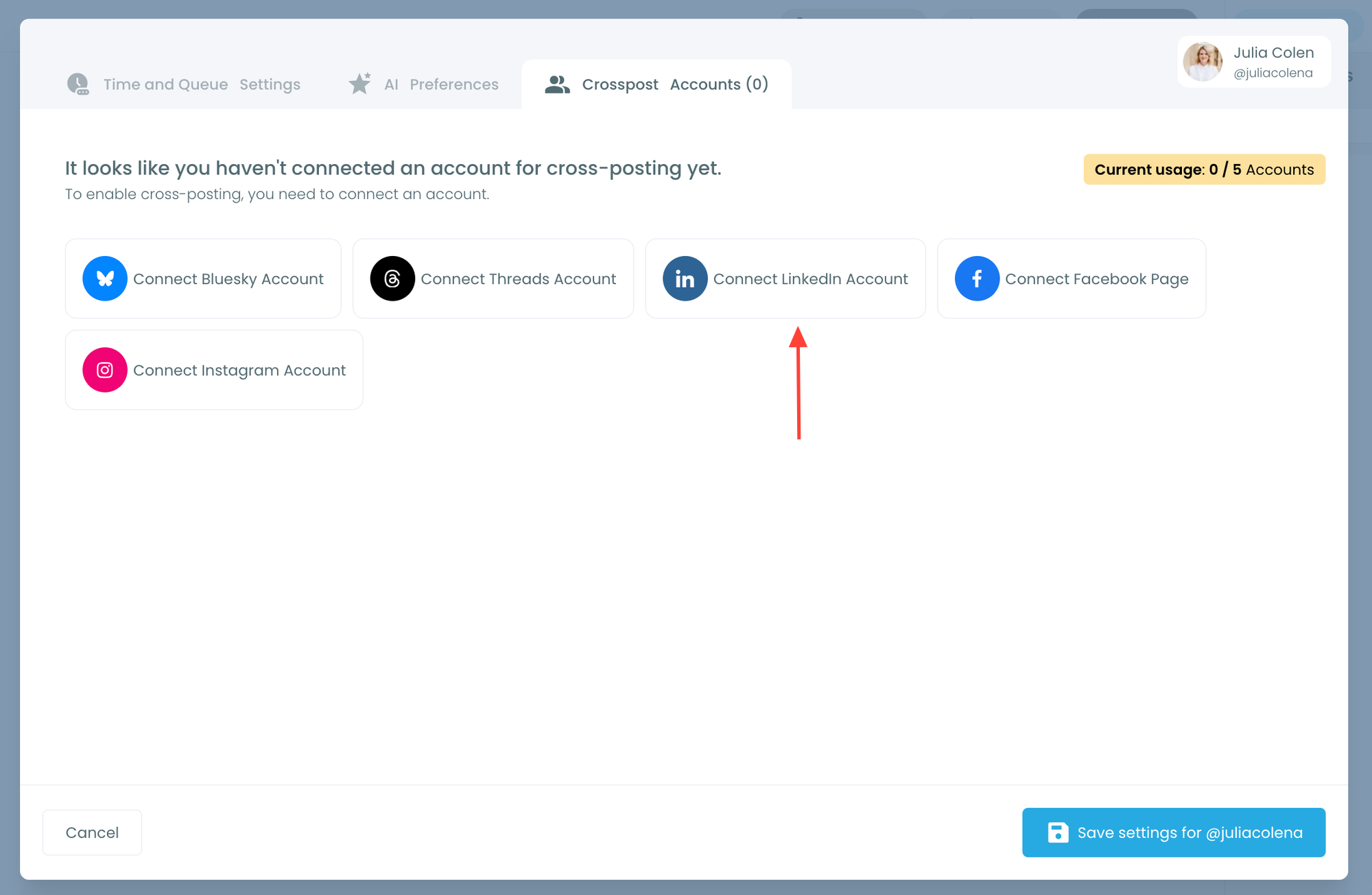
Step #2: Open Account Settings and Go to “Crosspost Accounts” Tab
Within Account Settings, switch to the Crosspost Accounts tab.
You’ll see cross-posting options for: Bluesky, Threads, LinkedIn, Facebook
Click on the platform(s) you want to connect.
Step #3: Create and Post a Tweet
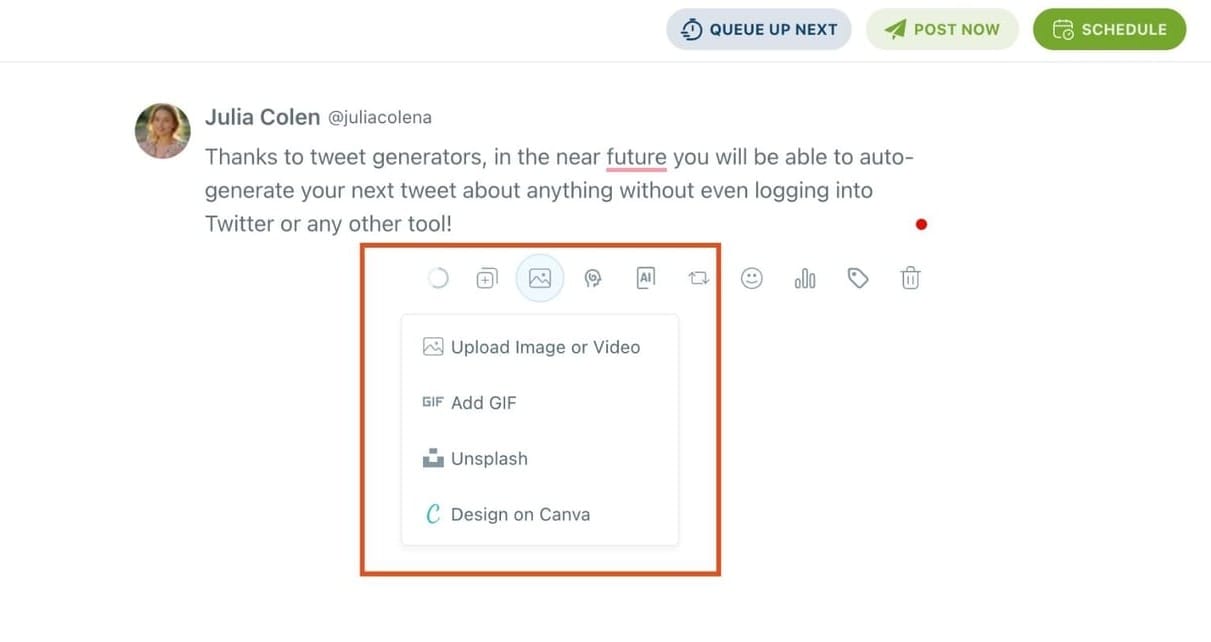
Head to the X Post Planner and create your tweet.
You can upload images or videos, add a GIF, pull high-quality photos directly from Unsplash, or design something custom using Canva, all without leaving Circleboom.
These media options are available under the image icon in the editor.
Step #4: Use AI to write and improve your text
You can create a new tweet or rewrite your tweet with the AI Tweet Generator to make it more punchy, add emojis or hashtags, fix grammar, rephrase for clarity, or even continue writing where you left off.
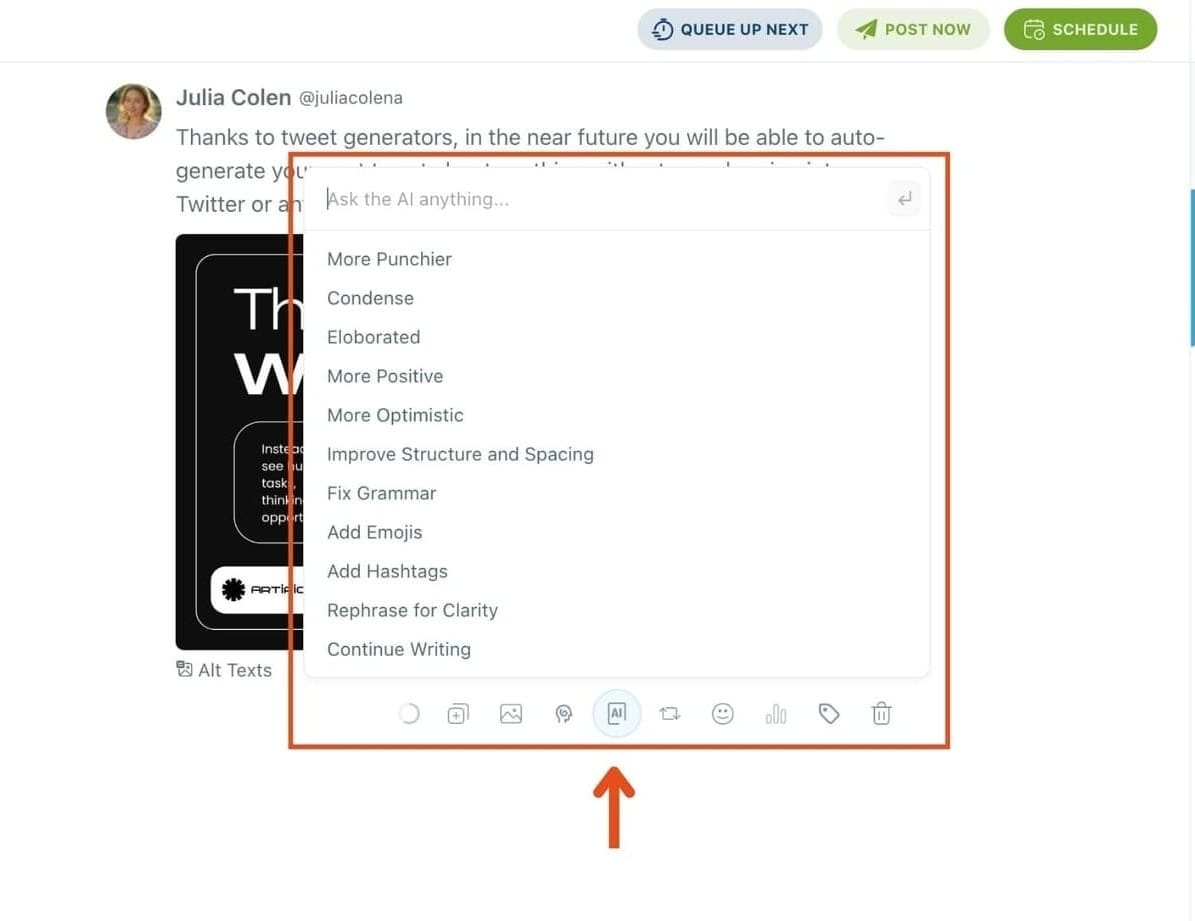
The AI tools are designed to match your tone, whether you want something professional, casual, or energetic.
Step #5: Set auto-repost to increase visibility
You can turn on the Auto Repost feature to reshare your tweet automatically.
Set how long to wait before reposting, when to un-post it, and how many times to repeat the cycle.
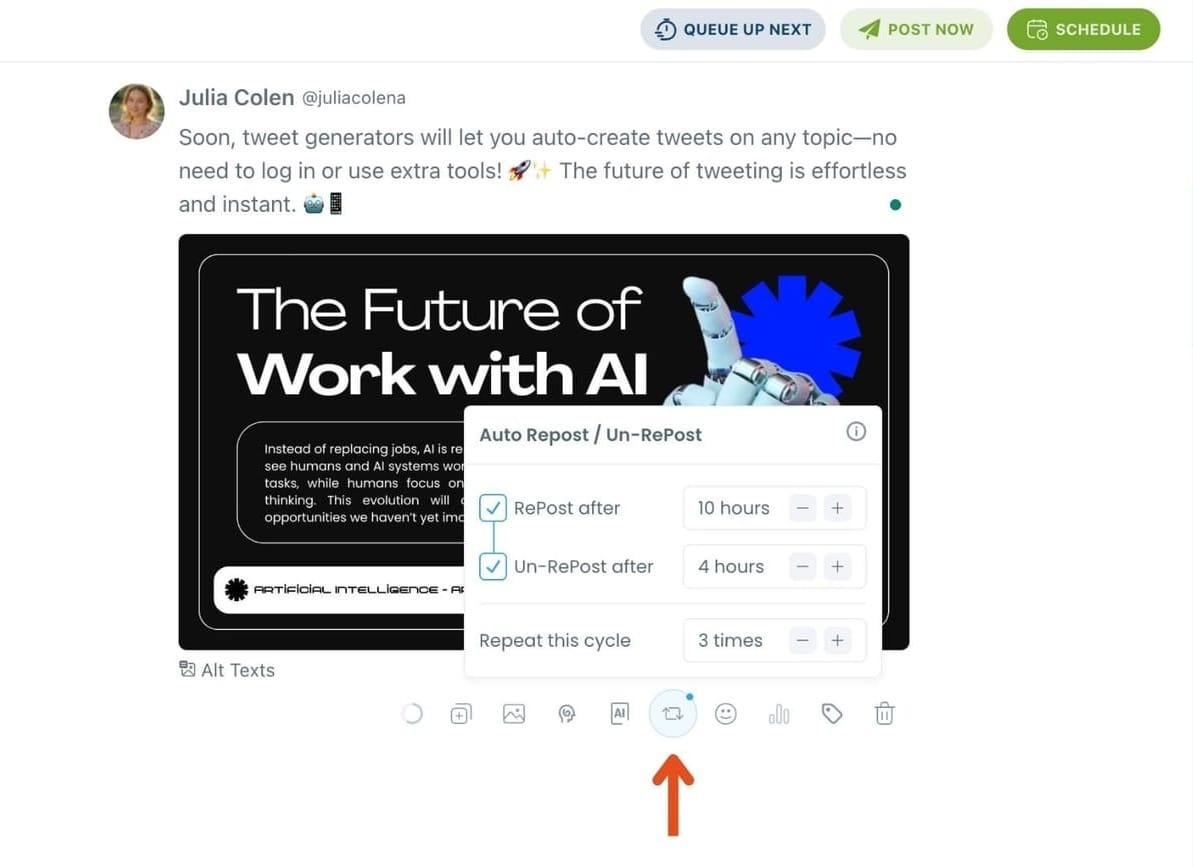
This is a useful way to reach followers across different time zones without any manual effort.
Step #6: Post or schedule your tweet
Once your tweet is ready, you can choose to post it immediately or click the green “Schedule” button to post it later.
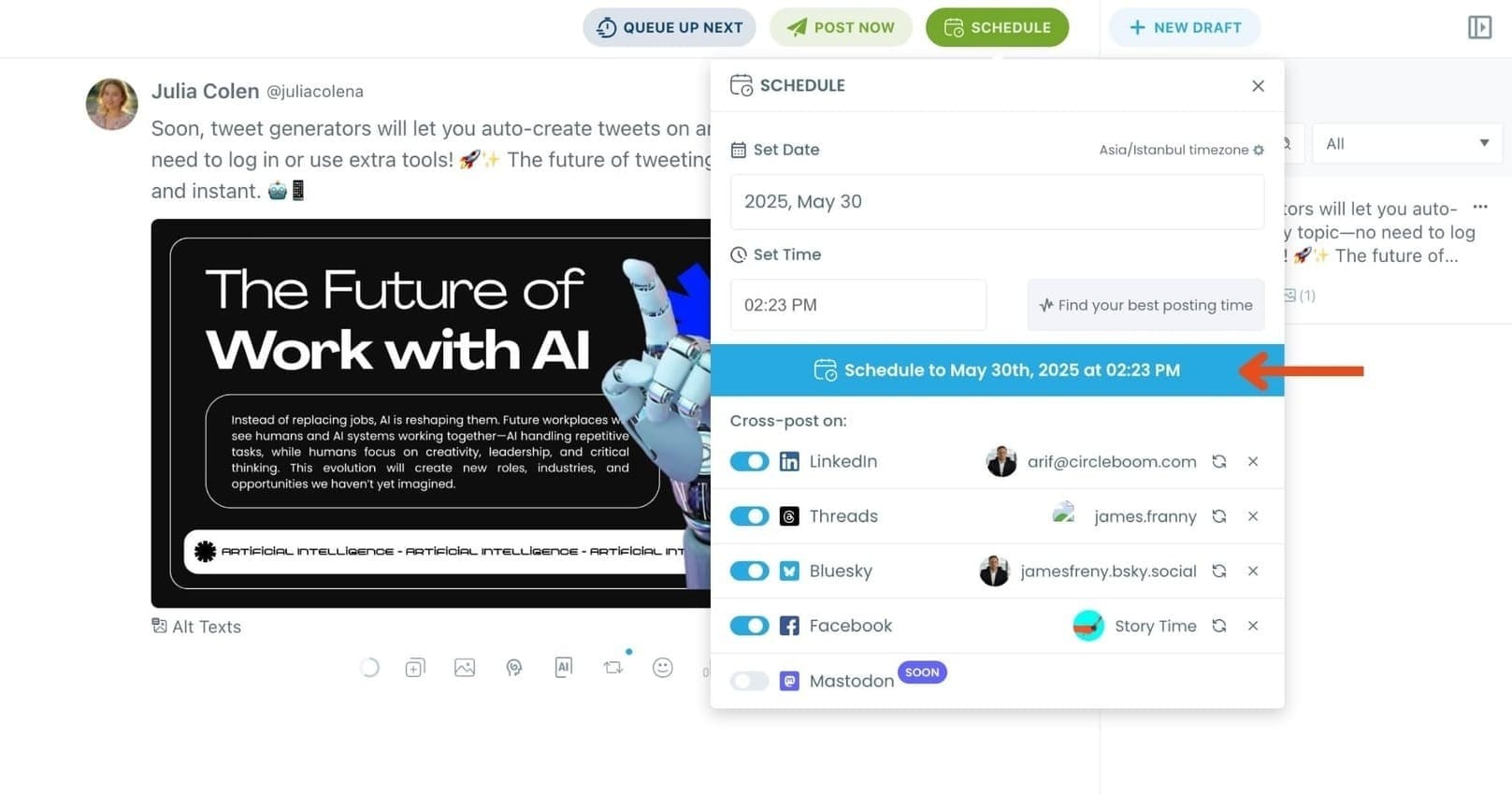
You can choose the exact date and time or let Circleboom suggest the best posting time based on your audience activity.
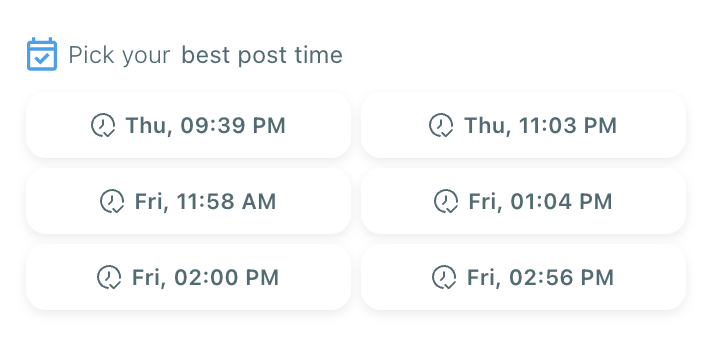
Your tweet will be automatically published at the optimal moment.
Why Integrate Twitter with a LinkedIn Company Page?
There are several reasons why many brands choose to integrate these platforms.
First, it saves time. Instead of manually posting the same content multiple times, integration allows you to publish it once and distribute it everywhere.
Second, it helps maintain consistency. Your messaging, updates, and announcements remain aligned across platforms.
Third, it helps you reach different audiences. While some people follow your brand on X, others may only see your updates on LinkedIn.
By sharing the same content on both platforms, you increase the chances of reaching a wider audience without extra work.
For businesses, founders, marketers, and social media managers, this type of automation can significantly simplify daily social media tasks.
Benefits of Using Circleboom Twitter for This
Using Circleboom Twitter to integrate your accounts offers several advantages.
➡️ You can create one post and automatically distribute it across multiple platforms. This eliminates the need to copy and paste the same content repeatedly.
➡️ Everything can be managed from one dashboard, making it easier to organize and plan your social media activity.
➡️ You can also schedule posts in advance, allowing you to maintain a consistent posting schedule without needing to log in every day.
Another important advantage is reliability. Circleboom Twitter is an official X Enterprise Developer, which means it works with the official APIs and operates in compliance with platform policies.
Who Should Use This Integration?
Integrating X with a LinkedIn company page can be useful for many different users.
- Social media managers can save time when managing multiple accounts.
- Small businesses can stay active on multiple platforms without extra effort.
- Marketing teams can maintain consistent messaging across channels.
- Agencies managing several brands can simplify their workflows.
- Startup founders and creators who regularly post on both X and LinkedIn can also benefit from this integration.
Anyone who wants to keep their social media presence active across platforms while reducing manual work will find this approach useful.
Conclusion
Yes, you can integrate Twitter with a LinkedIn company page.
Instead of manually posting the same content on multiple platforms, you can connect your accounts and automate the process.
With Circleboom Twitter, you can create your content in the X Post Planner and automatically share it across LinkedIn, Facebook, Bluesky, Threads, and Instagram at the same time.
This makes social media management faster, simpler, and much more efficient while helping you stay active across multiple platforms with less effort.

