
Do fake followers hurt your reach on Twitter, or do they just sit in your follower count doing nothing? They hurt it through three channels you can measure, and removing them changes some of those numbers but not all of them.
The short answer, channel by channel.Fake followers inflate the follower count your engagement rate is divided by, so real reactions look smaller.They sit silent in the first group of followers a post reaches, which weakens the early signal X uses to widen distribution.They make your audience look weaker to brands and dilute what creators earn from real reach.
Circleboom flags suspicious followers on Twitter for your review through X's official Enterprise API access. To check your own account, start with do fake followers hurt your reach on Twitter.
Why fake followers are hard to see on X
X shows you a follower count and a follower list, but it offers no native way to separate real followers from inauthentic ones. A bot account that followed you after a viral post looks, in that list, like any other row.
The only clue is a ratio that slowly gets worse.
Bots arrive in two patterns. Some come in waves after a viral post, a giveaway or a trending-topic moment, when follow-bots pile onto whatever is getting attention. Others trickle in during normal use and build up over months.
The wave is easy to date; the trickle is the one nobody notices until a quarterly review.
That is what makes the question tricky. Most people notice the symptom first: followers keep growing while likes and replies stay flat or drop. The natural guess is a content problem, and the account owner changes formats, posting times and topics while the real cause stays in the audience.
Circleboom reviews your full follower list, flags the accounts with bot-like signals, and lets you decide what to do with each one. If the symptom sounds familiar, you can find the fake followers hurting your Twitter reach before changing anything about your content.
Three channels where bot followers hurt Twitter reach
Fake followers hurt reach on Twitter in three separate ways, and each one shows up in a different number. Treating them as one vague "bots are bad" problem is why most cleanups are judged on the wrong metric.
| Channel | What bots do | What you can measure |
|---|---|---|
| Engagement-rate denominator | Add to follower count, never to interactions | Engagement rate per post, before and after cleanup |
| First-audience signal | Sit silent in the first group of followers shown a post | Raw likes, replies and reposts in a post's first wave |
| Credibility and payouts | Make the audience look inauthentic and add no paid engagement | Brand audience checks, creator payout and RPM trend |
The denominator row is the easiest to prove with arithmetic. Here is the worked example from Circleboom's product documentation.
An account with 1,500 followers that gets 50 interactions per post has an engagement rate of (50 ÷ 1,500) × 100 = 3.33%.
If 1,000 of those followers are bots, the 500 real followers are engaging at (50 ÷ 500) × 100 = 10%.
The audience is three times more engaged than the number says. The posts are fine; the follower count is padded.
How the first-audience channel cuts reach
The first-audience row works through distribution. A new post is shown to a group of followers first, and their reactions tell X whether to show it more widely. Bots in that group cannot react, so they cap the early signal before anyone reads the post.
X's own For You timeline recommendations page explains that For You mixes posts from accounts you follow with recommended posts from accounts you don't. Reaching people outside your follower list is where reach grows, and Circleboom's product notes tie that step to strong early engagement.
X does not publish the size of that first group or how each reaction is weighted. The effect is a direction, not a number you can quote.
How the credibility channel costs you deals
The third row is the one brands see. A partner checking a creator's audience looks at who follows, not only how many. In Circleboom's illustrative example, a brand reviewing a creator with 50,000 followers finds 30% bots and moves on, while the same creator with a clean audience reads as a safe partner.
One boundary matters here. Clean the audience because it is the honest picture, and say what period and basis your numbers use when you share them. A cleanup timed only to make a sponsor report look stronger misrepresents the metric.
To record the denominator channel on your own posts, a Twitter tweet engagement calculator gives you the per-post rate to record before any cleanup.
Will your engagement rate go up after you remove fake followers?
Your engagement rate goes up by arithmetic the moment the divisor shrinks, but your reach does not automatically follow. Those are two different outcomes, and confusing them is the most common mistake after a cleanup.
Circleboom's action documentation gives a clean example of the rate effect.
Removing 3,000 Fake/Bot and Inactive followers from 12,000 turns 60 engagements per tweet from 0.5% into about 0.67%.
That gain comes entirely from the shrinking count, which is why a higher rate alone proves nothing about reach. Silent accounts that drag the numbers down are the subject of Twitter scarecrows, the silent engagement killers you need to remove. The rate is the first thing they distort.
To see whether reach improved, compare raw reactions, not percentages. Take similar posts from the weeks before and after the cleanup and line up likes, replies and reposts per post.
Rising raw numbers in the first wave point to a healthier first audience. A rate that climbs while raw reactions hold steady means the cleanup corrected the metric, not the distribution.
For a wider read of audience health than the bot share alone, the Twitter quality score rates the account as a whole.
Score your posts before the cleanup: a podcast walk through seven causes of low Twitter engagement, so you can rule out the ones a bot cleanup will never touch.
Do bot followers lower X creator payouts?
They can, because bots add nothing to the engagement that creator payouts follow. Circleboom's product notes describe bot likes and views as not counting toward payouts, and the same silent accounts weaken the early engagement that pushes posts into For You.
Circleboom has documented this with creators, including a global public figure. The full story is in the case study on how we worked with X content creators to skyrocket monetization. Bots, locked and inactive accounts had lowered the active share of each audience, and that diluted payouts.
After removing them, follower counts dropped, engagement rate rose by 55%, and RPM went up.
There is also a rule side. X's creator monetization standards say creators who earn on X must not artificially inflate engagement, under X's platform manipulation and spam policy.
Bought followers and bought engagement sit on the wrong side of that line. Cleaning bots out of an audience moves the account toward the honest numbers those standards expect.
How Circleboom finds fake followers on Twitter
Circleboom's Fake/Bot Followers view pulls your full follower list from X and flags accounts where several suspicious signals line up at once. Circleboom is a verified Enterprise partner of X, so the follower records come from X itself and are not stitched together by a scraper that drops accounts.
No single signal flags an account. The classification looks for overlap:
- Few tweets for the account's age.
- A follower-to-following ratio below 0.05.
- A very recent creation date.
- A missing photo, bio or real-looking username.
- Inactive or low-engagement behavior.
The result is a sortable list headed "Displaying your N Fake/Bot of [total] followers," with each row showing tweets, join date, following, followers, follow ratio and engagement tier. The buttons above it handle Remove Follower, Follow and Add to List for whatever you select.
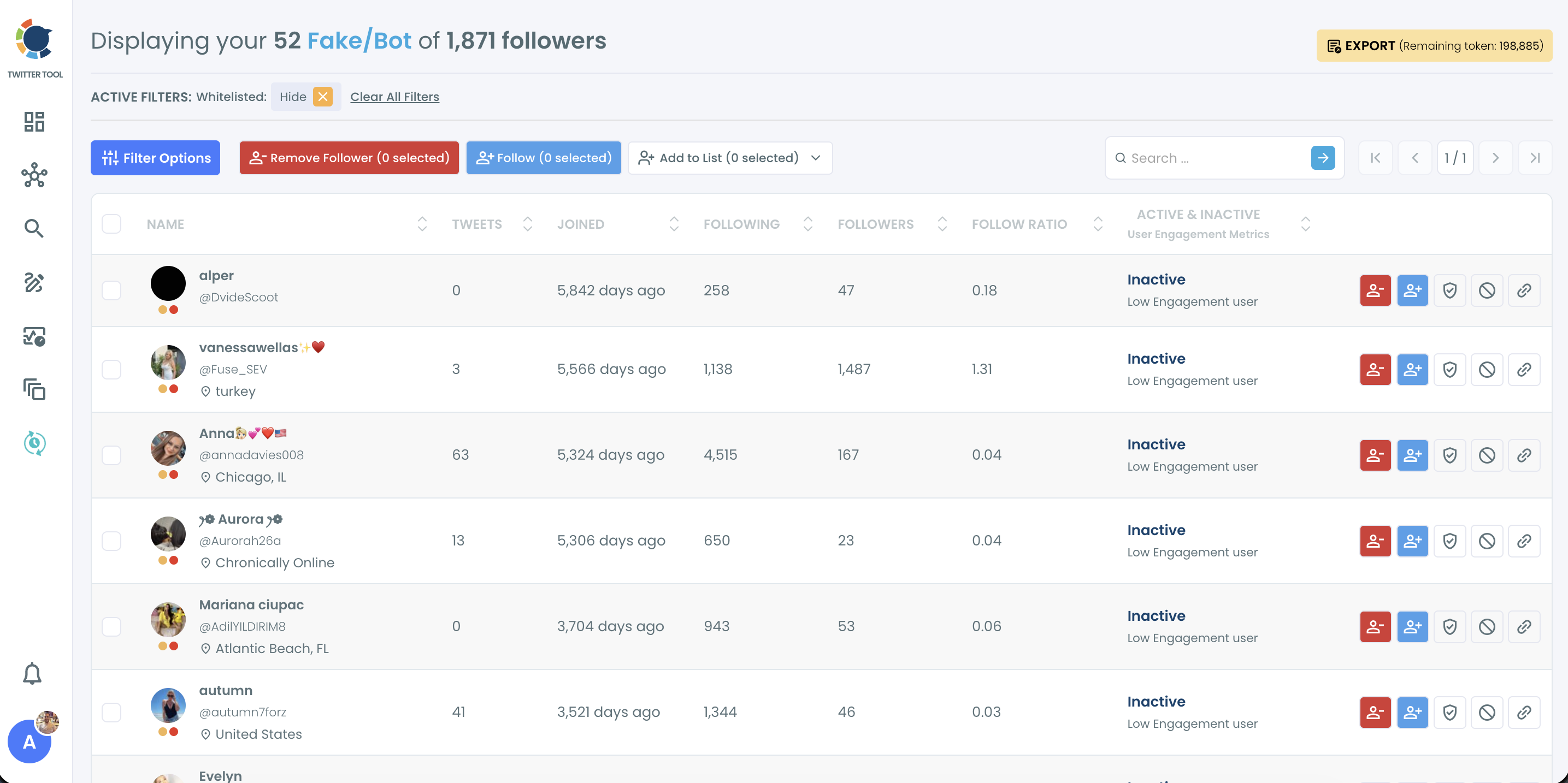
Each flagged row is a candidate for review, not an X verdict on that account. When the list looks right to you, remove fake Twitter followers from the same screen.
To test one suspicious profile instead of a whole audience, the Twitter bot checker handles a single account. Circleboom's Fake/Bot Following view runs the same check on the accounts you follow, which is a separate cleanup from this one.
What a fake follower cleanup looks like on X
A safe cleanup moves from detection to a decision you make, account by account or in batches. The flow in Circleboom has four parts:
- Sort the Fake/Bot list by follow ratio or tweet count so the clearest cases sit at the top.
- Open the profile of any borderline row and whitelist real contacts so no bulk action can reach them.
- Select the confirmed accounts and click Remove Follower to stage them in the removal queue.
- Start the Circleboom Remove Twitter/X Followers Extension and keep the browser open while it works.
The extension removes accounts gradually and pauses on its own for 1 to 20 minutes when X's rate limit is near, then continues. A selection is not a removal until the extension has processed it.
Wondering whether inactive accounts belong in the same sweep as spam? The answer to can I remove inactive and spam followers on Twitter covers both groups.
Can't you just remove or block bots yourself on X?
You can, one account at a time, and that is where the manual route stops working.
X lets you remove a follower or block an account from a profile in the app or on the web. X's block and report tools handle single accounts, not a full audience review.
Manual tools also cannot tell you whether bot followers hurt reach on your account, because they never show the share.
The bigger limit is visibility. X does not give you your complete follower list in a form you can filter, so you cannot sort by follow ratio or join date to find the bot cluster in the first place. Why native removal feels so limited is unpacked in why can't I remove followers on Twitter.
Unlike removing bots one profile at a time on X, Circleboom lists every follower in one filterable view and removes the selected accounts in a single paced action. Blocking one by one is free, but it turns into whack-a-mole the moment a second wave arrives.
The time cost is the part people underestimate. In a Circleboom case study, checking more than 1,000 followers for bots by hand looked like about 12 hours of scrolling, or the cost of a virtual assistant.
The bulk view turns that into one review-and-remove session, with the choice to block some accounts and simply remove others.
A fake follower checklist for protecting Twitter reach
Fake followers hurt reach through the rate, the first audience and your credibility, so the fix has to be measured in all three places. Run it in this order:
- Record engagement rate and raw reactions for your last ten posts.
- Log in to Circleboom and open Fake/Bot Followers to read your flagged share.
- Whitelist real contacts, then remove the confirmed bots through the extension.
- Compare raw reactions on your next ten similar posts against the first list.
- Repeat the scan after every giveaway, viral post or follower spike.
→ Run the check on whether fake followers hurt your Twitter reach
Fake followers and reach FAQ
How many of my Twitter followers are actually bots?
Read the page title of Circleboom's Fake/Bot Followers view and divide the flagged number by your total. That share is the accounts flagged for review, so treat it as an upper estimate until you have checked the borderline rows. It is also the first number to know before asking how much fake followers hurt your reach.
Should I block fake followers or just remove them?
Remove them when the problem is low-quality audience, and block them only when they are abusive, scam-like or keep coming back. Removal ends the follow but lets the account follow again; a block through Circleboom's Mass Block extension stops it from following or interacting at all.
Is every account in the Fake/Bot list definitely a bot?
No. The list flags likely suspicious accounts, and some real people land there: a brand support account, a parody account or someone who never added a photo. Review borderline rows and whitelist anyone you know before removing.
Can I keep a record of the accounts before I remove them?
Yes. Export the selected accounts as a CSV from the same view before you stage them. Export uses Circleboom tokens, and the remaining count shows next to the Export button.
Do the 400 and 800 daily limits apply to removing followers?
No. Circleboom's 400-per-day and 800-per-day safety limits belong to Follow and Unfollow. Remove Follower is paced differently: the Chrome extension works through the queue gradually and pauses for 1 to 20 minutes whenever X's rate limit comes close.