

There are times when you don’t want your following list to be visible to everyone.
This can happen for many reasons. You might be researching competitors, following accounts for inspiration, tracking industry news, or simply trying to keep your network strategy private. In all of these cases, the same question naturally comes up:
Does protecting your Twitter (X) account hide your following list?
The answer isn’t a simple yes or no. It actually depends on who you want to hide it from.
 Arif Akdogan
The Short Answer Is It Depends
If your goal is to hide your following list from non-followers, then yes, protecting your account does exactly that.
❌ However, if your goal is to hide your following list from everyone, including the people you approve as followers, then protecting your account is not enough.
Understanding this distinction is important, because many users turn on account protection expecting full privacy, only to realize later that their following list is still visible to approved followers.
What Actually Happens When You Protect Your Twitter (X) Account
When you switch your account to protected, Twitter changes how your profile works in several important ways.
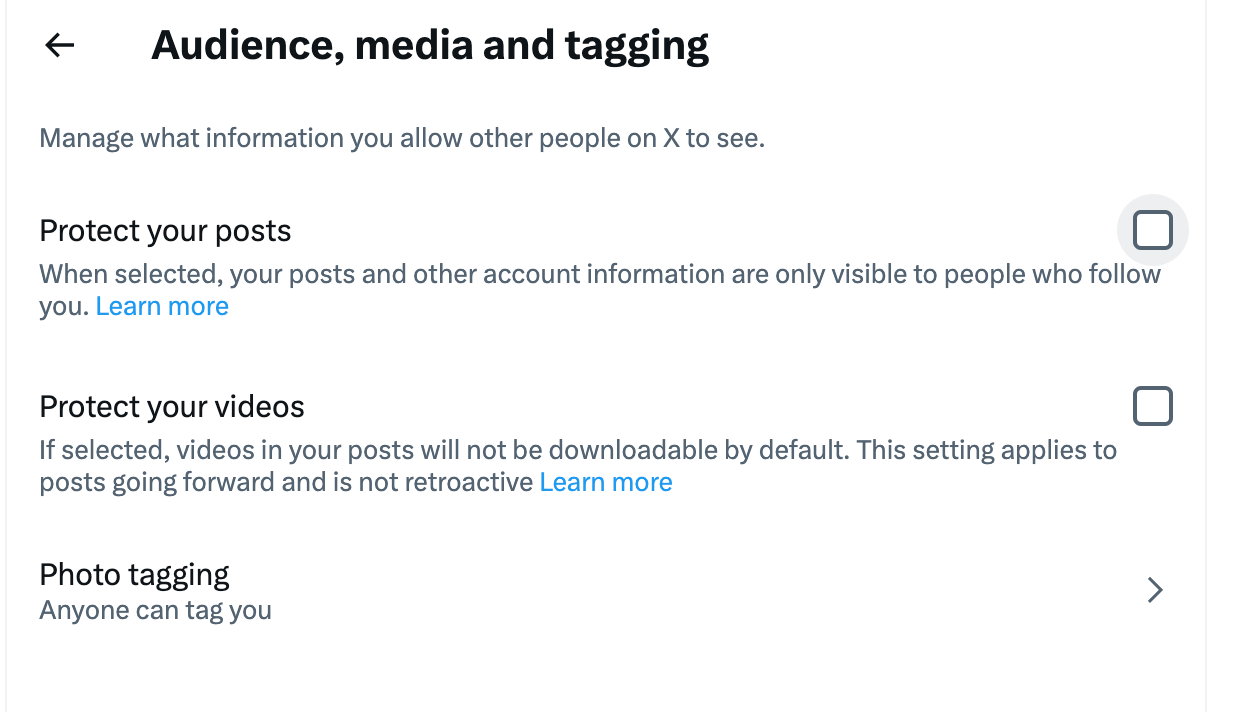
First, your tweets stop being public. This means your posts are no longer visible to people who are not following you, and they won’t appear in public timelines, search results, or hashtag feeds.
Second, anyone who wants to follow you must send a follow request. You get to decide who can see your content by approving or rejecting these requests.
From a visibility perspective, this also affects your follower and following lists:
🟢 Non-followers can no longer see your tweets
🟢 Non-followers can no longer see who you follow or who follows you
However, and this is the part many people miss, once someone is approved as a follower, they can still:
🔴 View your tweets
🔴 See your followers
🔴 See your full following list
So while protecting your account improves privacy, it does not completely hide your following activity from everyone. It simply limits access to approved followers.
Can You Hide Your Following List From Everyone?
With Twitter’s built-in settings, the answer is no.
There is no native option that allows you to hide your following list from approved followers while still using your account normally. If someone follows you and you approve them, they can see who you follow.
That’s where a different approach becomes necessary.
If your real goal is to keep your following list private while still keeping track of accounts you care about, the most effective solution is Twitter Lists.
 Altug Altug
Why Twitter Lists Are the Real Solution
Twitter Lists allow you to monitor accounts without following them.
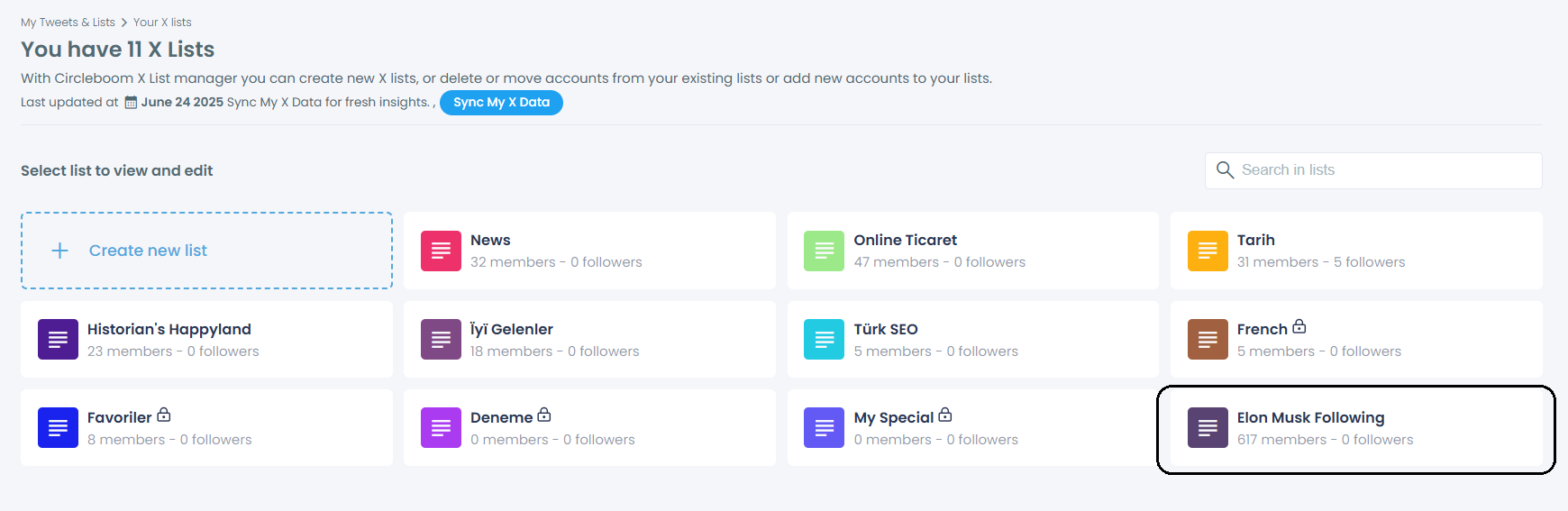
This means you can:
- Add accounts to a private list
- Unfollow those accounts
- Keep your following count low, or even at zero
- Still see their tweets through the list timeline
From the outside, your profile looks clean and minimal. There’s no visible trail of who you’re watching or tracking. At the same time, you don’t lose access to the information you need.
This makes lists the only reliable workaround if you want to hide your following activity from everyone, including your own followers.
Why Doing This Manually on Twitter Is Not Practical
While Twitter does support lists natively, the manual process is frustrating and slow.
You have to:
- Create a list
- Visit profiles one by one
- Add each account individually
- Constantly switch between tabs
I tried doing this manually once, and honestly, I lost track of what I was doing halfway through. When you’re dealing with more than a few accounts, it quickly turns into a mess of open tabs and repeated clicks.
This approach simply doesn’t scale.
How I Manage This Properly With Circleboom Twitter
To avoid all of that manual work, I use Circleboom Twitter.

Circleboom Twitter is an official X (Twitter) Enterprise Developer, which means it works directly with X’s API and follows platform-approved limits and rules.
What makes it especially useful is how clearly it displays your entire network. Instead of guessing or opening profiles one by one, Circleboom shows all your followers and followings in organized lists, along with details that Twitter itself doesn’t surface clearly.
For each account, you can see: total tweet count, follower and following numbers, account join date, activity status, signals that indicate fake, bot, or spam behavior
This makes it much easier to decide who you actually want to track and who you don’t.
Beyond analysis, Circleboom also supports mass actions, such as:
➡️ Bulk follow
And most importantly for this use case, it allows you to create Twitter Lists with a single click.
Instead of opening profiles one by one, you can select multiple accounts at once, add them to a private list, and manage everything from a single screen.
Step-by-Step: How to Hide Your Following List Using Twitter Lists
Step #1: Log in to your Circleboom Twitter account.
If you don't have a Circleboom account, you can create one in seconds to manage your Twitter with the excellent features of Circleboom Twitter.

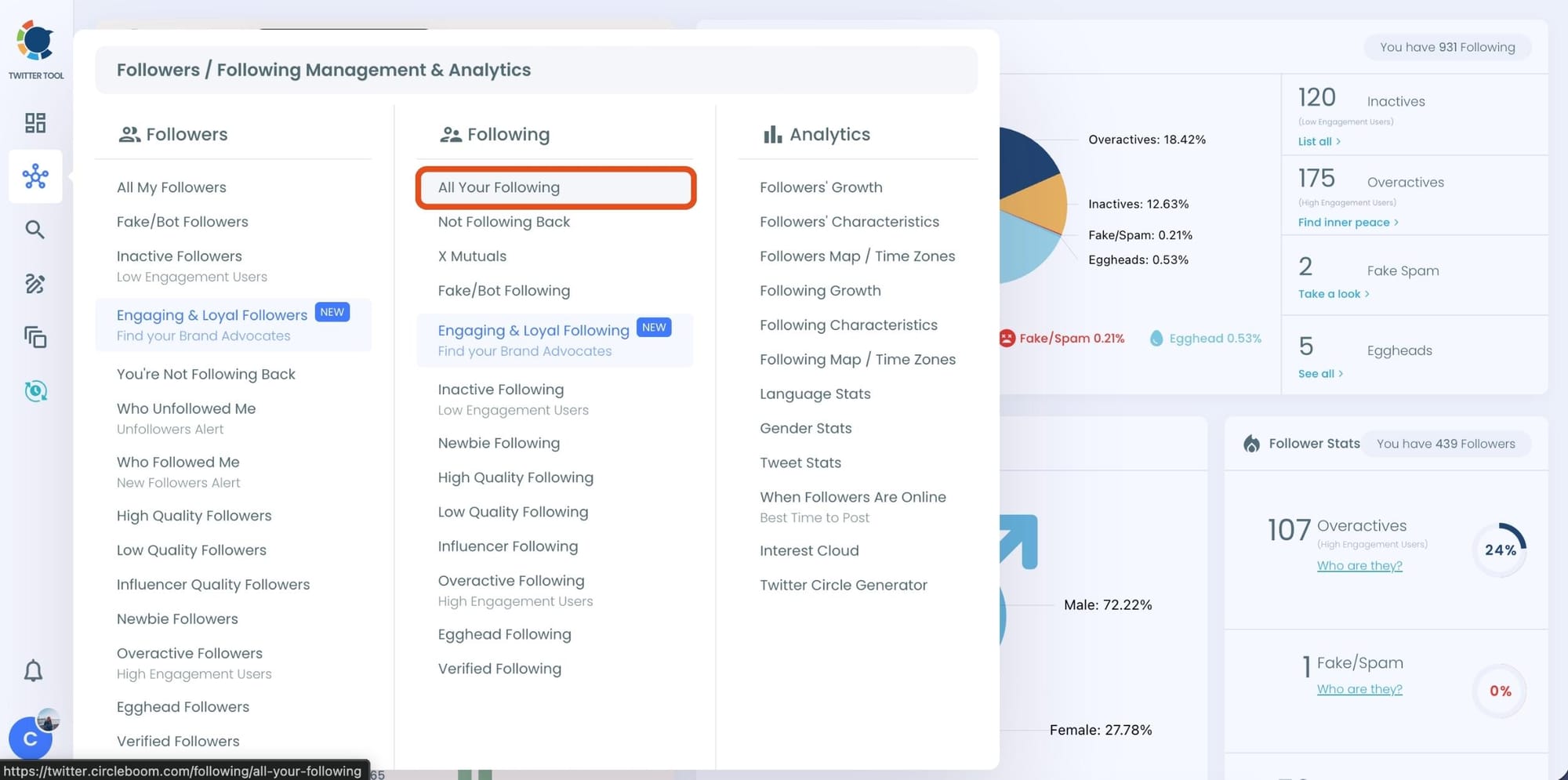
Step #2: Navigate to the left menu and find "Following" there.
Then you should click on "All Your Following". Circleboom will list all your Twitter friends.
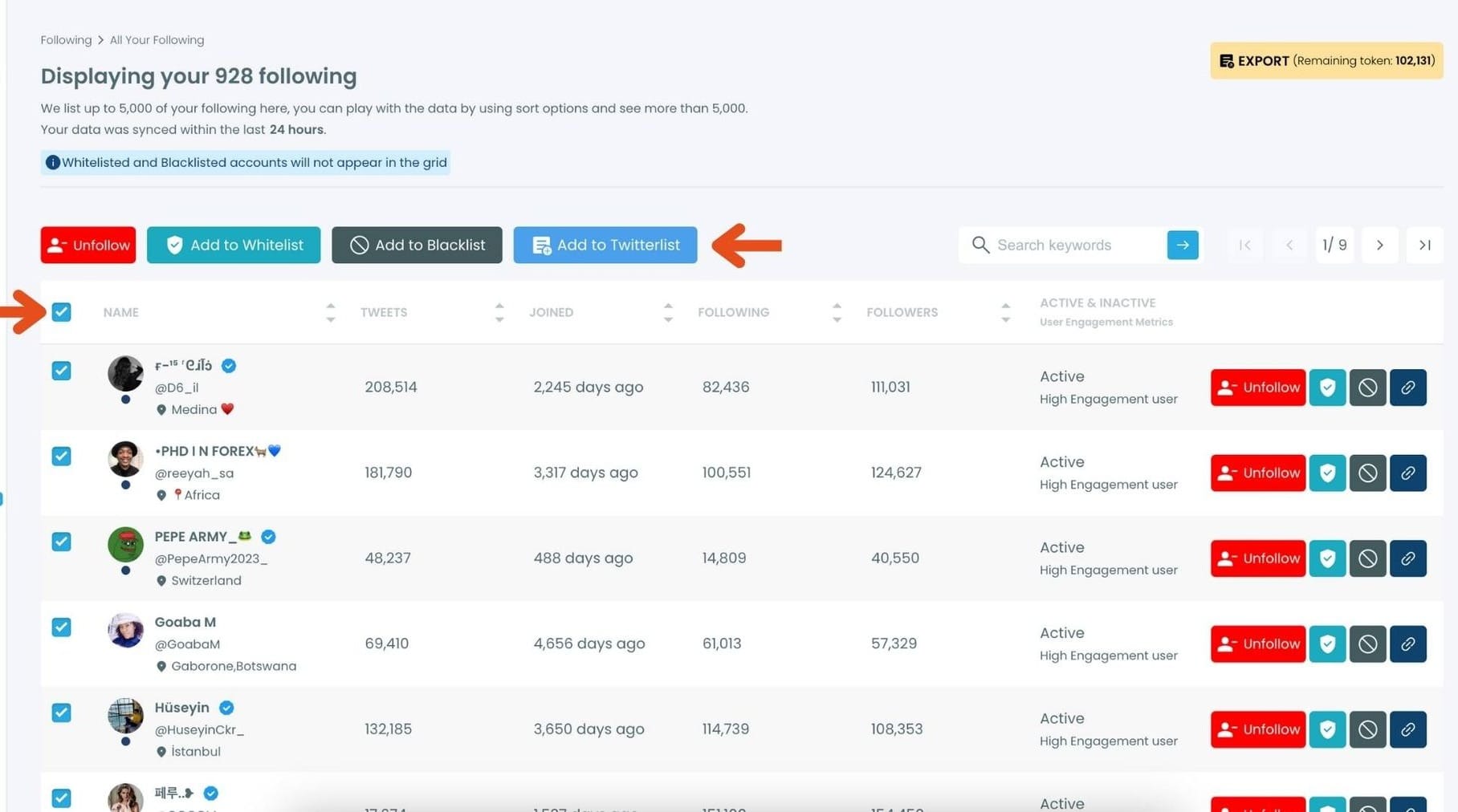
Step #3: Here is the list of your following. You can select all of them or some.
Once you select them, you can click on the "Add to Twitterlist" button ( blue one ). You can create a new Twitter list or add them in bulk to an existing list.
Create a new Twitter list or add your following to an existing list.
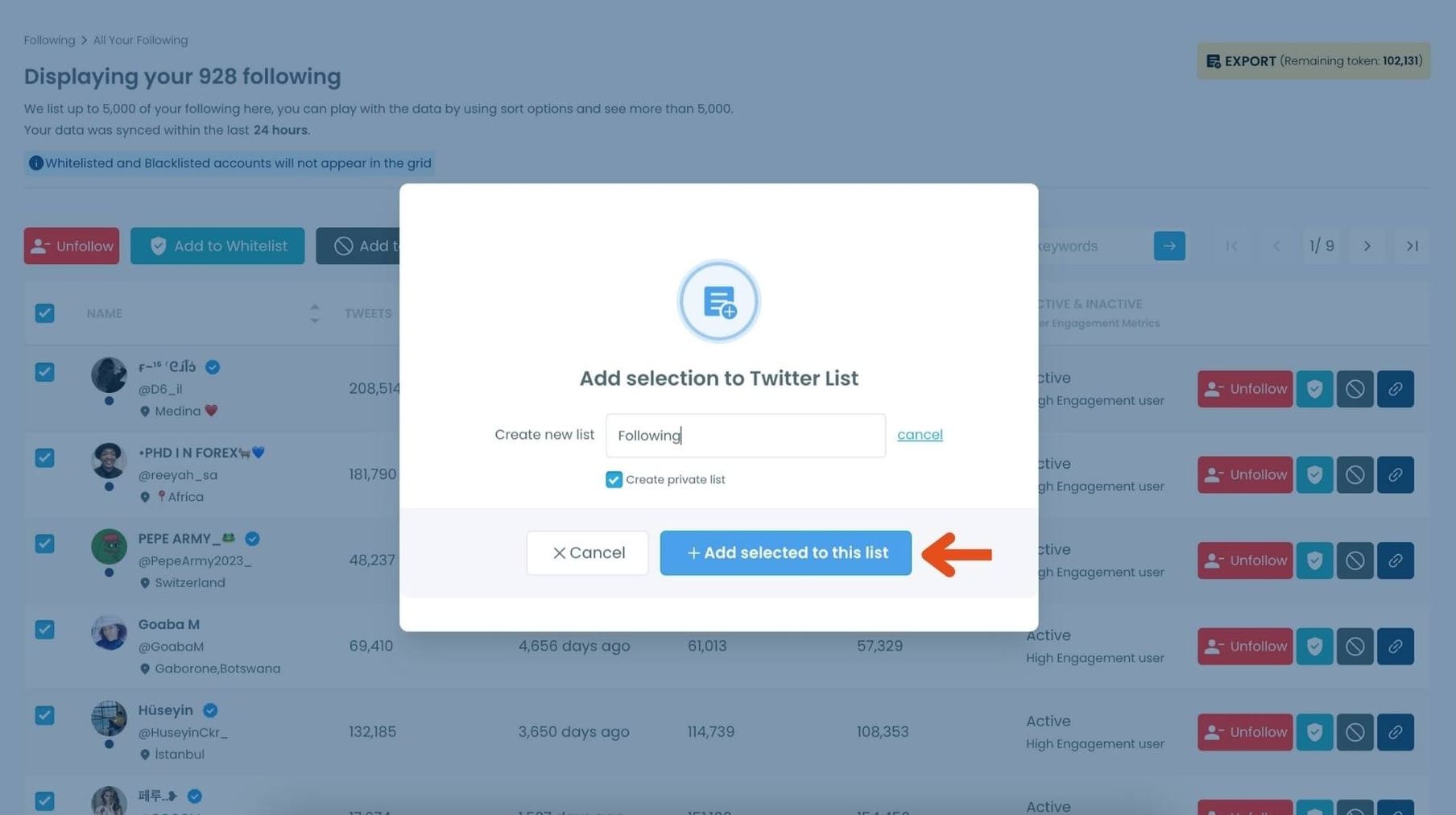
Now all your following are on the new private list.
The next step is unfollowing them.
Step #4: By clicking to red Unfollow button, you can unfollow all the followings.

Final Thoughts
Protecting your Twitter (X) account does hide your following list from non-followers, but it does not hide it from people you approve as followers.
If your goal is full privacy while still staying informed, Twitter Lists combined with unfollowing are the only practical solution.
With the right workflow and the right tools, you can keep your profile clean, your following count minimal, and your information flow completely under your control, without sacrificing visibility or functionality.
%20Account%20Hide%20Your%20Following%20List%3F)
