

The fastest way to drive traffic from Twitter in 2026 is to post the right shape of content on the right cadence, with the link in the position the algorithm rewards rather than punishes.
Most accounts that complain about zero traffic are running tactics from 2018 (single tweet, link in the body, posted once) which X's link-suppression behavior has flattened repeatedly. The replacement is threaded content with the link below the fold, scheduled in batches, and re-amplified across platforms.
Circleboom's Twitter scheduling and content stack (built on official Enterprise developer access) handles the thread structure, the schedule, the cross-posting to LinkedIn and Threads, and the analytics that show which posts actually clicked.
→ Run the Twitter traffic engine
The full workflow is below: thread shape, link placement, cadence, and the analytics loop that closes it.
Why Most Twitter Posts Drive Zero Traffic
X's algorithm reads tweets that contain external links and reduces their reach by a measurable margin compared to tweets without links.
The mechanic is not a secret; it is consistent with every platform that competes with the destination of the click. The practical result for an operator is that a tweet with a link in the body line gets surfaced to roughly 30% to 60% of the impressions a comparable text-only tweet would have earned.
The fix has two parts. The first part is structural: post the link in the second tweet of a thread, not the first. The first tweet acts as a hook with no link, the second tweet delivers the link, and the algorithm scores the first tweet's distribution before the link is visible to its scoring layer.
The second part is volume: post often enough that the cumulative impressions across the week multiply the click-through opportunity, even when individual tweets convert at a low rate.
A practitioner running seven website-traffic plays inside an X campaign describes the same two principles applied across one quarter.
 Arif Akdogan
The Three Tactics That Actually Drive Clicks
Three tactics consistently produce the highest click-through rate per impression on X for accounts under 100k followers.
- Threads with a hook tweet plus a link in tweet 2. The hook earns the impressions; the link inherits the engagement-rate score.
- RSS-fed evergreen distribution. Old blog posts auto-published as new tweets pull steady tail traffic without manual effort.
- Cross-platform amplification. The same post, scheduled to LinkedIn and Threads simultaneously, multiplies the audience without multiplying the work.
Each of these tactics maps to a Circleboom feature, and each is documented in the article on generating website traffic with a zero marketing budget, which covers the same three motions at the operating level.
How to Drive Traffic from Twitter (Step by Step)
The setup runs in two phases: the content engine and the analytics loop. The first phase produces the volume; the second phase tells you what is working so you can do more of it.
Hands-on demo: how the Bulk Schedule plus Auto Retweet workflow runs from one queue.
The flow, in order.
Set up the publishing engine
- Log in to Circleboom Twitter and connect your X account through OAuth.
- Open the X Post Planner menu to land in the scheduling and AI-content workspace.
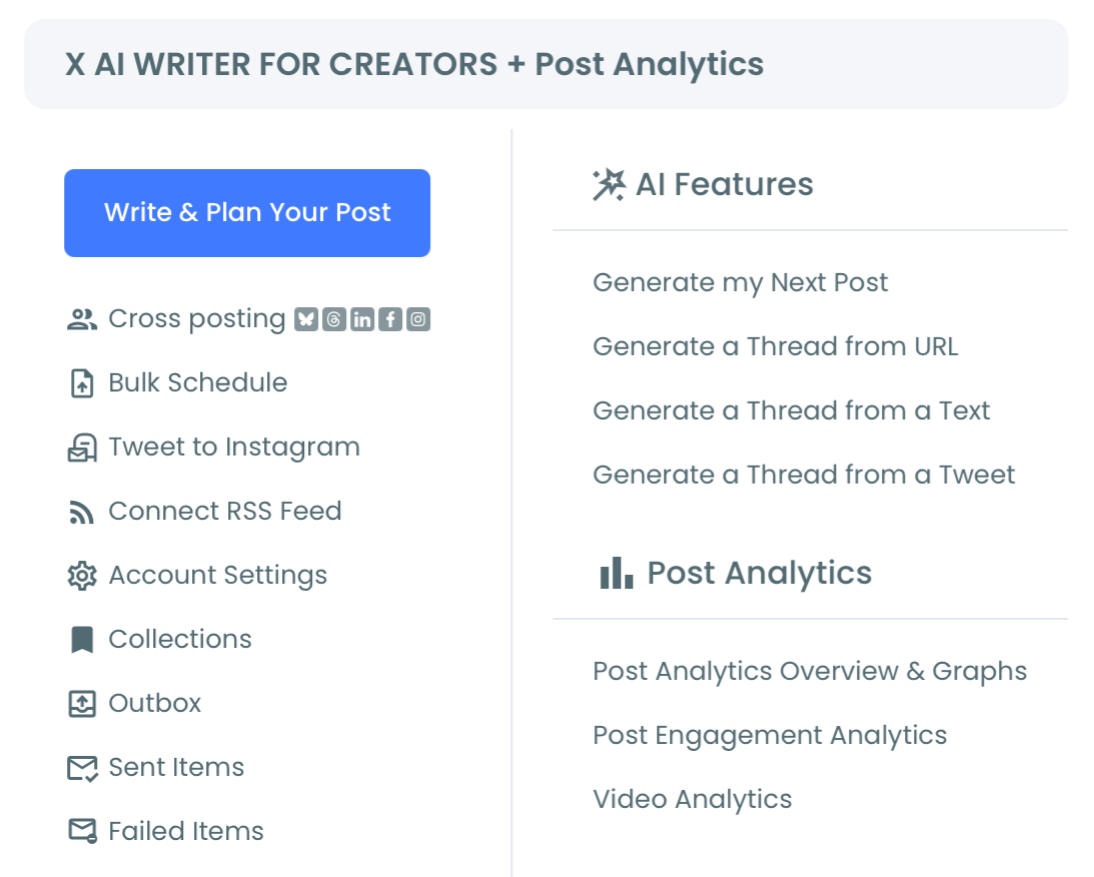
- Build a 14-day rolling content queue with a mix of single tweets, threads, and AI-generated posts pulled from your blog or product pages.
Add the auto-distribution layer
- Connect your blog's RSS feed to the RSS-to-Twitter automation so new posts auto-publish as tweets.
- Enable Auto Retweet on top performers so the highest-engagement posts recycle into different time-zone audiences automatically.
Close the analytics loop
- Track click-through rate weekly in the Engagement Analytics view to identify which post shapes drive the most traffic.
That sequence is what compounds. The publishing engine creates the volume, the auto-distribution layer multiplies it, and the analytics loop tells you what to keep doing. Skip the analytics step and you are guessing about which tweet shapes work.
What "Driving Traffic" Actually Looks Like at Scale
A practitioner running the workflow above on a 5,000-follower X account typically sees outbound clicks rise from 50 a month to 600 to 1,200 a month within 60 days, depending on the click-bait quality of the linked content.
The math is grounded in two effects: the thread-shape lift (roughly 1.4x to 2x the click-through rate of a flat tweet with a link in the body), and the cumulative impression multiplier from posting twice a day instead of three times a week (roughly 4x to 5x the impression base).
The two effects multiply. Operators who post once a week with a link in the body see no change because both effects are absent.
Operators who run the full Circleboom stack see a step-change because both effects are present and reinforcing. The behavior is consistent with the data on content-marketing strategies that boost blog traffic, which describes the same compounding at the campaign level.
Why Cross-Posting Doubles the Effect
The single most underused traffic tactic is cross-posting. The same tweet, scheduled to LinkedIn and Threads at the same time, often outperforms its X reach on either secondary platform alone.
 infocircleboom.com
LinkedIn's algorithm rewards link-bearing posts when the post text adds context, and Threads is still in the early-distribution phase where reach is artificially generous. The net effect is that one piece of content earns three platforms' worth of impressions for the same author effort.
Circleboom's cross-posting publishes to X plus Instagram, Facebook, LinkedIn, Threads, and Bluesky in one action, from one composer, on one schedule. The article on cross-posting tweets to Instagram Stories covers the same flow extended to the visual side, which is worth running on tweets that have natural visual content.
What Kills Traffic (and How to Avoid It)
Three failure modes account for most accounts that produce content but earn no clicks.
- Link in the first tweet of a thread. The hook gets the link's reach penalty rather than the link tweet inheriting the hook's engagement-rate signal. The fix is to put the link in tweet 2.
- Posting at the wrong time. Scheduling tweets when your audience is offline produces wide impressions but no clicks. Use the Followers Online dashboard to find the time-zone-weighted peak windows.
- Single-platform-only distribution. Skipping the cross-post step leaves 50% to 80% of the available reach on the table. The cross-post takes one extra click in the composer.
A separate failure mode worth flagging: accidentally driving traffic to bot followers. Accounts that have not audited their follower base recently are publishing into a half-bot audience that does not click, which compresses the click-through rate without telling the operator why.
The Bottom Line
The 2026 traffic-driving workflow on X is structural, not aspirational. Thread shape plus volume plus cross-posting plus analytics. Each piece is a Circleboom feature, all on one dashboard, all running on the same Enterprise-tier access X uses internally.
→ Open the traffic-driving workflow now
Common Questions About Driving Traffic from Twitter
Does X actually penalize tweets with links?
X's algorithm de-prioritizes link-bearing tweets compared to text-only tweets in the same impression context. The penalty is consistent and measurable; the workaround is to put the link in the second tweet of a thread so the hook earns the distribution.
How long until I see traffic increase?
Most accounts see measurable click-through rate improvement within two weeks of switching to the thread-plus-link-in-tweet-2 shape and within four weeks of adding RSS auto-distribution. The cumulative volume effect compounds over 60 to 90 days.
Do I need a large account to drive traffic?
No. Accounts under 5,000 followers can drive 500 to 1,000 outbound clicks a month with the right structural setup. Follower count is less important than post shape, cadence, and cross-platform distribution.
Is automation through Circleboom safe for the account?
Yes. Circleboom is an official X Enterprise Developer company and every action runs through the same official endpoints X uses internally, with rate-limit pacing built in.






