

A few days ago, I noticed something strange on my Twitter feed.
My impressions were dropping, replies felt quieter, and the overall engagement didn’t match the number of followers I had. It wasn’t about the content — I was posting consistently. The real issue was the quality of the audience.
That’s when I realized one uncomfortable truth: not every follower is a real person.
Twitter is full of amazing real users… and also thousands of fake, bot, or low-quality accounts that silently attach themselves to profiles. And the worst part? Many of them look more “real” than ever thanks to AI.
So how do you distinguish a real user from a fake one?
Let’s break it down.
 Harshita Agrawal
What Does a Fake Twitter Account Usually Look Like?
A few years ago, spotting a bot was easy.
They were almost cartoonishly obvious:
- No profile photo
- Weird usernames with random numbers
- Zero tweets
- Following thousands, followed by almost no one
- Retweeting the same links again and again
These still exist — but fake accounts have evolved.
⚠️ Today, many bots look almost perfect:
- AI-generated profile photos that look like real people
- Clean bios and locations
- Tweets that sound natural
- Small but consistent engagement
- Human-like posting patterns
Some of them even reply like real people.
➡️ You can’t always trust your eyes anymore.
What Does a Real Account Actually Look Like?
Real Twitter users give off a completely different signal:
- They have a natural mix: tweets, replies, retweets
- Their timeline makes sense, with real interests
- Their bio feels personal, not generated
- Their follower–following ratio looks believable
- They have long-term activity, not sudden bursts
- Their engagement is organic, not artificially inflated
In short: real users leave “human traces.”
Fake ones imitate them — but not perfectly.
And spotting these differences manually is almost impossible at scale — especially if you have hundreds or thousands of followers.
That’s why many creators and businesses use tools like Circleboom Twitter to automatically analyze their audience. Circleboom reads these “human traces” for you by checking activity patterns, timeline behavior, profile completeness, follower ratios, and engagement signals.
It highlights real users, flags suspicious ones, and helps you understand the true makeup of your audience so you don’t waste time guessing.
Because once you know who’s real, you can finally build a strategy that reaches real humans — not noise.
Why Manually Checking Accounts Doesn’t Work Anymore
This was the part that surprised me the most.
I tried checking accounts one by one.
I thought I was smart enough to detect who was fake… until I realized I wasn’t.
AI-generated profile photos look real.
AI-written tweets sound natural.
Bot networks act like communities.
Detecting them manually is not only slow — it’s unreliable.
Some fake accounts are designed to look exactly like genuine users.
And some inactive accounts appear fake even though they’re not.
That’s when I stopped guessing and used a tool instead.
That’s when I stopped guessing and used a tool instead — because manual judgment just isn’t enough anymore.
Modern bot accounts are built with LLMs, realistic photos, and coordinated engagement patterns. You simply can’t out-detect that level of sophistication on your own.
This is where Circleboom Twitter becomes invaluable.
It analyzes signals humans miss — posting patterns, interaction behavior, timeline irregularities, growth spikes, language models, and dozens of micro-indicators — and then classifies accounts with far more accuracy than manual checking ever could.
Instead of spending hours scrolling through profiles and still getting it wrong, Circleboom gives you a clear, data-driven view of who’s real, who’s inactive, and who’s artificially boosting your follower count.
It replaces guesswork with intelligence — and saves you from making decisions based on misleading followers.
The Best Way to Detect Fake Accounts: Circleboom Twitter
Circleboom Twitter has become the easiest and smartest way to separate real users from fake ones.
It’s an Enterprise X Customerwas and built specifically to analyze followers safely.

Here’s what it does automatically:
✔ Analyzes your followers and followings
It scans your entire audience and finds:
- Fake users
- Bot accounts
- Inactive accounts
- Spammy, suspicious profiles
- Mass-follow/unfollow users
- Accounts with credibility issues
✔ Works on any account you search
You can also check the followers of a competitor or influencer.
 Altug Altug
✔ Shows everything in a clean report
Circleboom highlights which accounts are real, fake, inactive, risky, or low quality.
✔ Lets you take action instantly
Right from the dashboard you can:
And everything complies with Twitter’s official rules and API limits — so your account stays safe.
I used it to analyze my entire follower list, and within minutes, I found dozens of fake accounts I didn’t know existed.
I removed them easily without any manual checking.
How to Identify & Remove Fake Accounts with Circleboom Twitter
Here’s the simple flow:
Step #1: Go to the Circleboom Twitter website and log in with your credentials.
If you’re a new user, sign up—it’s quick and easy!

Step #2: On the left-side menu, click on the Followers section. A dropdown menu will appear. Select Fake/Bot Followers to see the full list of your followers.
If you want to remove specific accounts, such as inactive users, you can directly select these categories from the dropdown menu instead of viewing all followers.
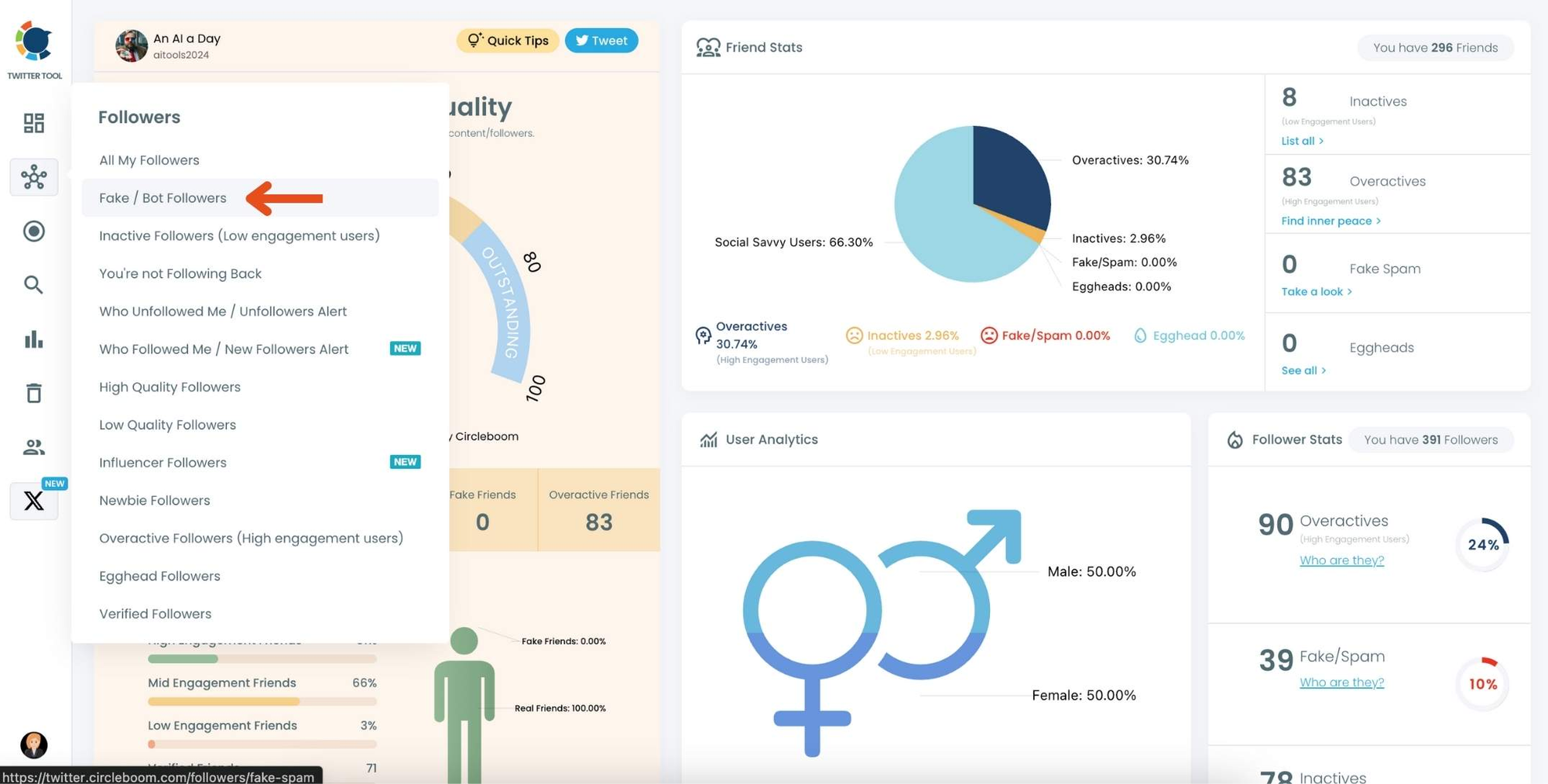
Step #3: You will see a complete list of your fake/bot followers.
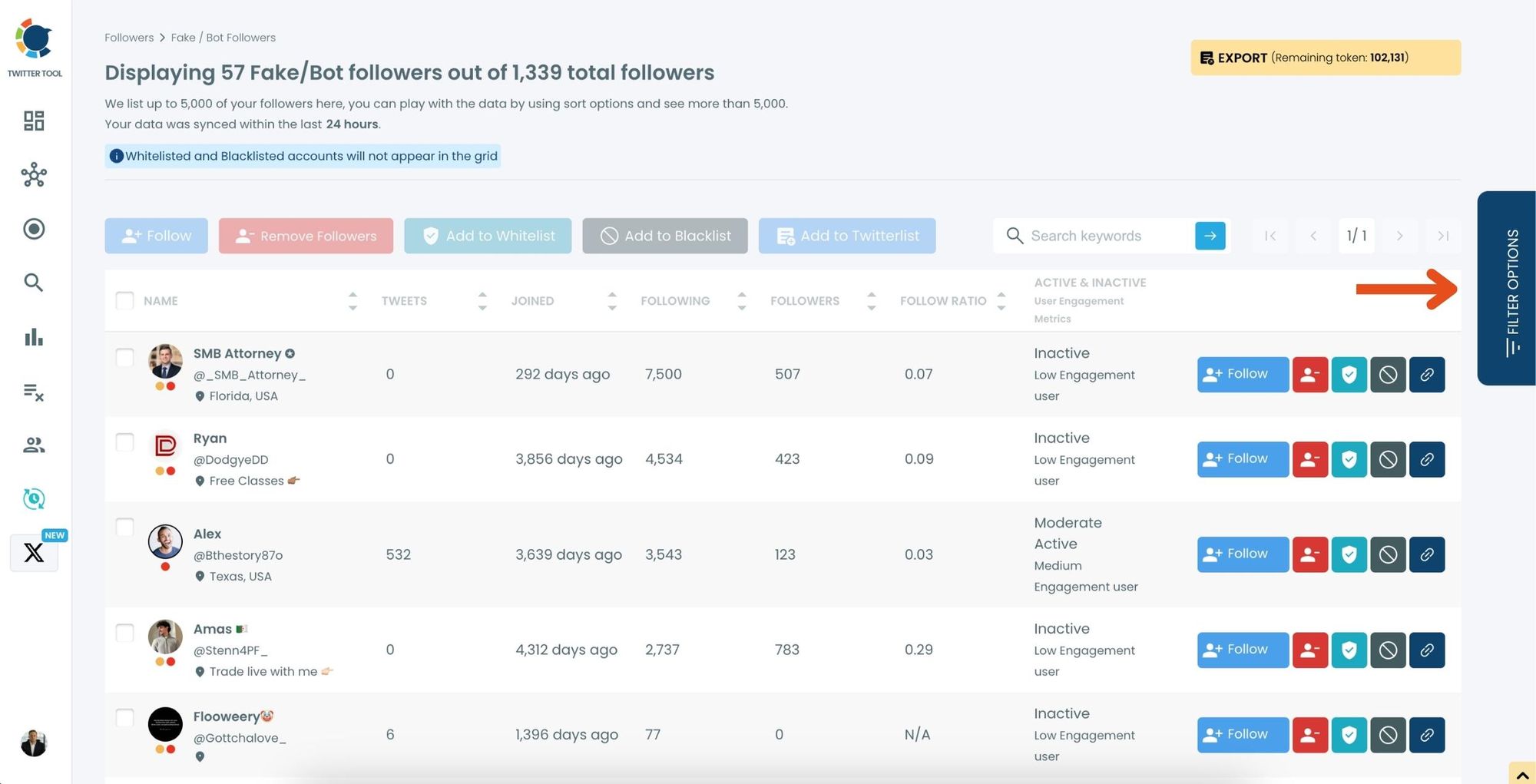
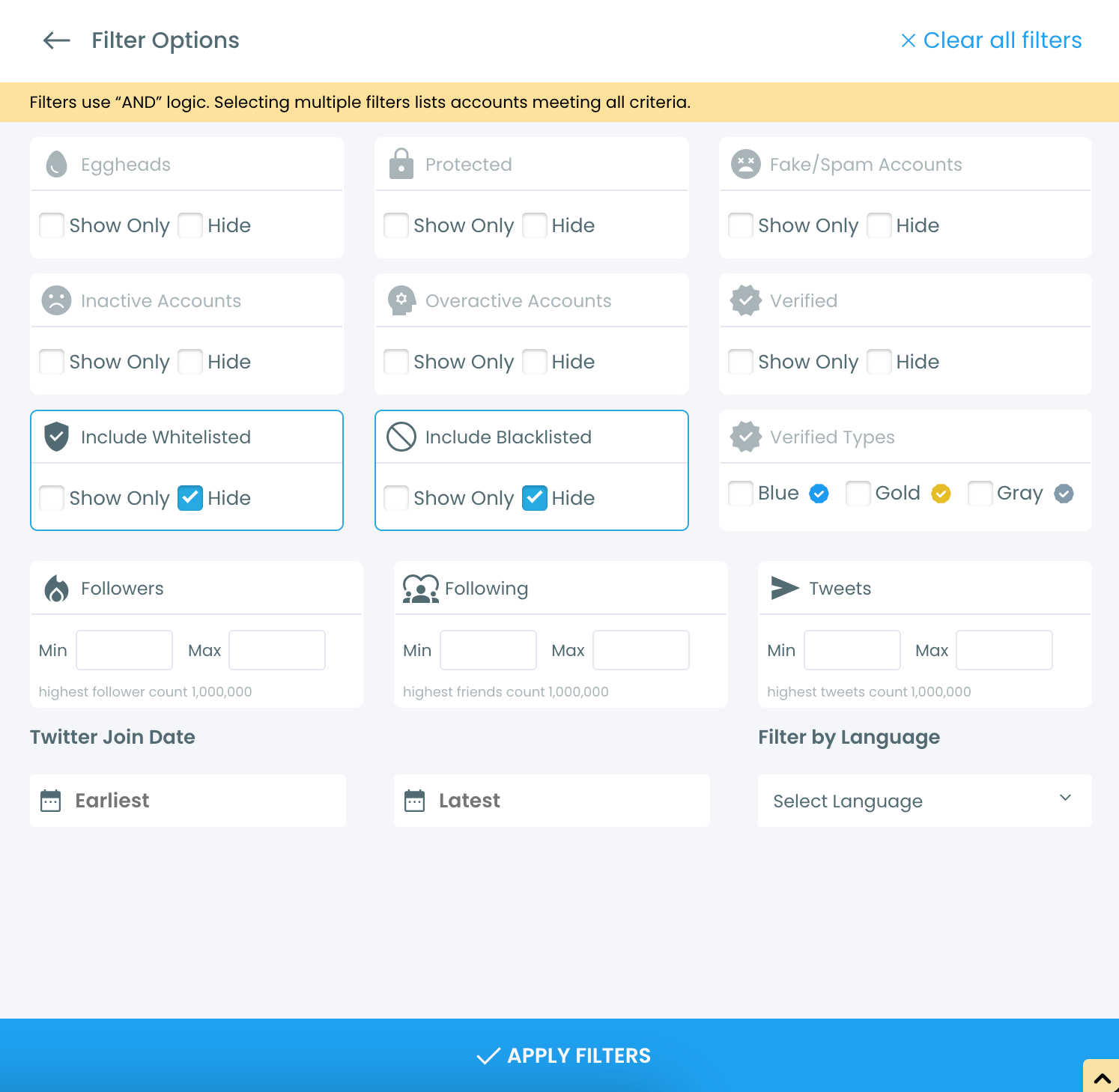
Use the Filter Options on the right-hand side to refine your list. You can filter followers based on engagement levels, fake/spam accounts, inactivity, verification status, and more.
Step #4: Browse through your followers and check the boxes next to the users you want to remove.
You can also select multiple users at once. Once you have selected the users, click on the Remove Followers button at the top.
Alternatively, you can remove individual followers by clicking the red remove icon next to their name on the right side of the list.
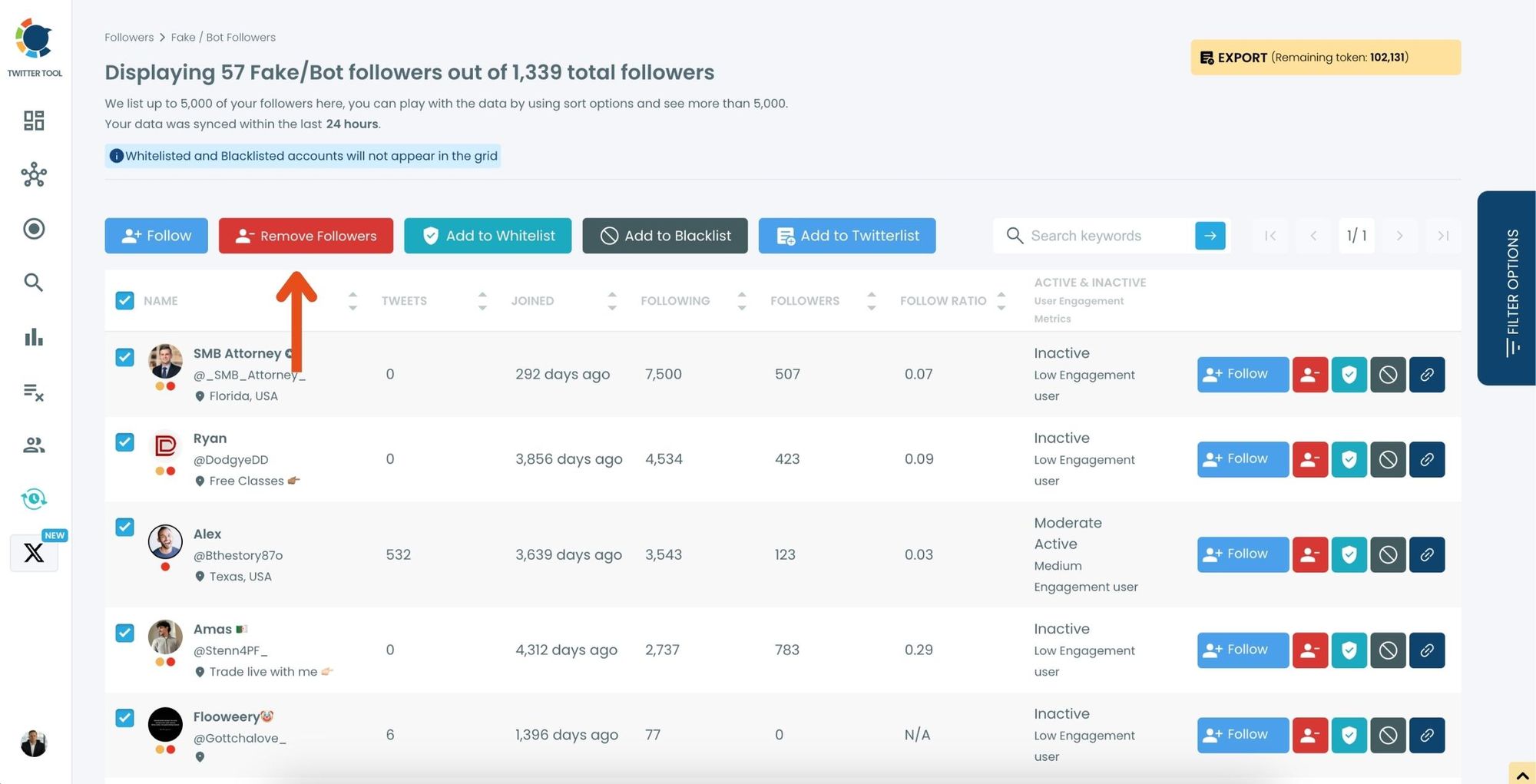
A confirmation message will appear asking if you are sure you want to remove the selected followers. Click ''Remove Followers''.
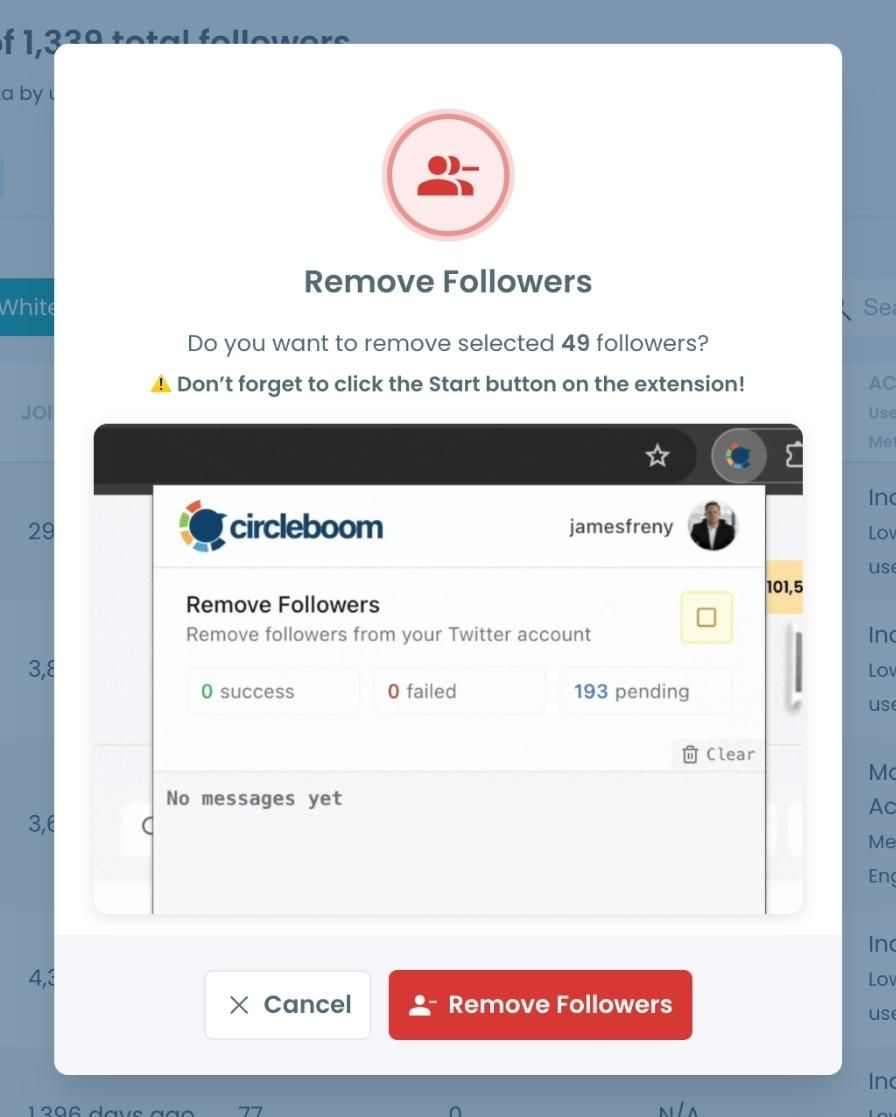
Step #5: Since the removal action is processed via the Circleboom Remove Twitter/X Followers extension, you need to install it to complete the process.
Click on Download the Extension and install it from the Chrome Web Store.
Once installed, you can easily remove followers.

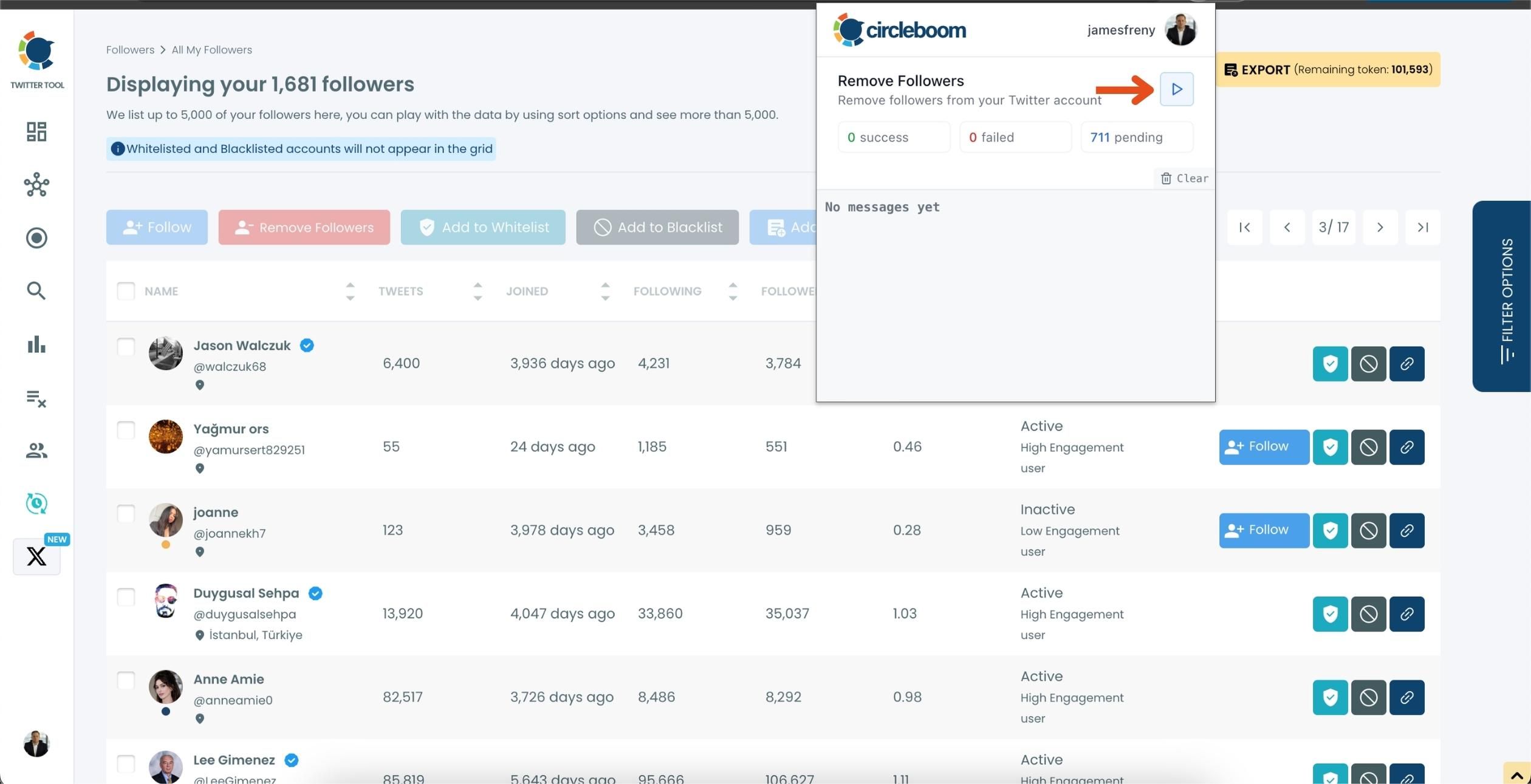
Step #6: After installing the extension, Circleboom will automatically add all your removal requests to the extension queue.
Click on the Start button to begin the removal process.
The extension will process your requests and remove the selected followers.
That's it!
Your selected followers are now removed automatically.
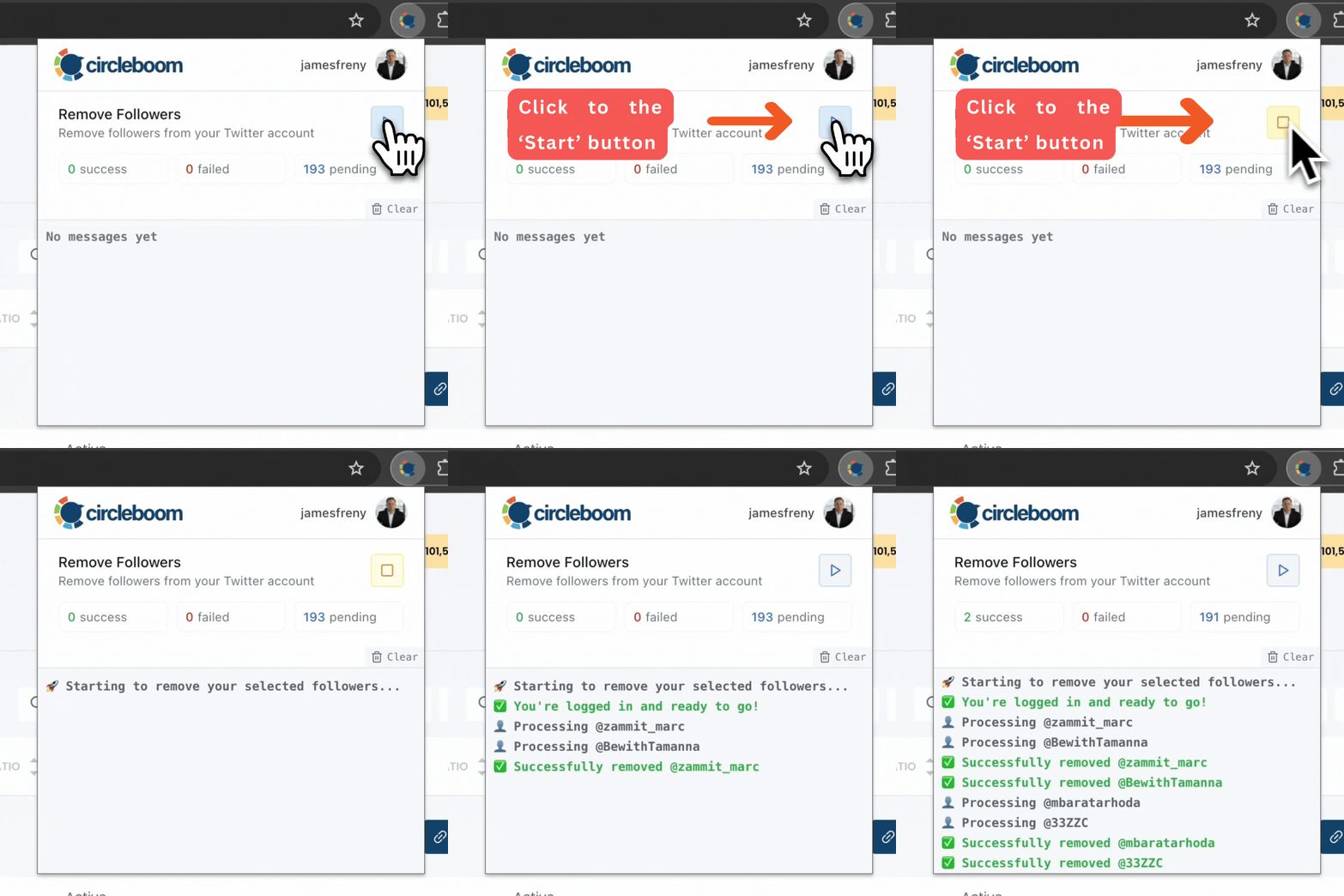
⚠️ Important Warning: Once the removal process begins, do not close your Chrome browser or the Circleboom tab. The tool will automatically remove followers in the background, but if you close the tab or exit Chrome, the process will stop.
If you need a more detailed guide check this video ⬇️
To prevent unwanted unfollows, there is also a whitelist feature embedded into Circleboom.
You can read more about “How to Whitelist My Twitter Followers.” You can also manage your Twitter lists with Circleboom.
Final Thoughts
The quality of your audience matters more than the quantity.
A fake follower doesn’t help your reach, your engagement, or your credibility — it only pulls your metrics down.
But in today’s world, where AI can generate realistic identities, manually distinguishing real accounts from fake ones is nearly impossible.
Circleboom Twitter gives you a clean, accurate, and safe way to analyze your audience and remove low-quality accounts instantly.
It helped me clean up my followers — and the difference in engagement was noticeable.

