

A little while ago, I needed to analyze the complete tweet history of a certain X account. Not just a handful of recent posts — I needed everything they had ever tweeted. I wanted to understand how often they tweeted, which topics got the most engagement, and how their posting behavior changed over time.
Naturally, I opened their profile and began scrolling… and scrolling… and scrolling.
It didn’t take long for me to accept the truth:
Exporting someone else’s tweet history manually is impossible.
And Twitter doesn’t give you any built-in option for it.
You can download your own archive, but when it comes to another user’s tweets, you’re stuck.
That’s when I turned to Circleboom Twitter — and within seconds, I had a clean, beautifully structured CSV file on my desktop containing every tweet from that account, complete with engagement metrics, timestamps, media information, and more.
 Kevin Frank
Why Someone Might Need This (and Why I Did)
Sometimes you need more than just a quick look at a user’s timeline.
Maybe you’re analyzing a niche community, researching a topic, looking at a competitor’s posting habits, studying trends, or keeping track of statements from someone influential.
In my case, I simply needed clarity. I wanted the full picture — a complete, sortable dataset of tweets instead of endless scrolling.
Twitter doesn’t offer that.
But Circleboom does.
The Problem with Twitter’s Limitations
Twitter is great for browsing, but terrible for deep analysis.
You can’t:
🔴 download someone else’s tweet history
🔴 extract engagement metrics in bulk
🔴 sort their tweets by likes, retweets, impressions, or creation date
🔴 get a clean XLS/CSV file to study
Even when you try advanced search filters, you still hit the same wall — no export button, no structured data, no way to work with tweets outside the platform.
So if you need real data, you have to look beyond Twitter itself.
The Solution: Circleboom Twitter — an Official X Developer Partner
Circleboom Twitter solved my entire problem with a single export.
Because it’s an official developer partner of X, it works safely and directly through the official API, which means the data is accurate, complete, and fully compliant with platform rules.

And the export it provides is not some messy spreadsheet. It’s an extremely clean, detailed CSV containing exactly the kind of information you would expect from a professional analytics tool.
Every row is a tweet.
Every tweet includes:
- the tweet’s unique PostId
- the user’s profile details
- the exact timestamp (CreatedAt)
- the language
- impressions
- likes, replies, retweets, quotes
- bookmark counts
- whether the tweet had media
- the tweet type (tweet, reply, retweet)
- and of course, the full tweet text
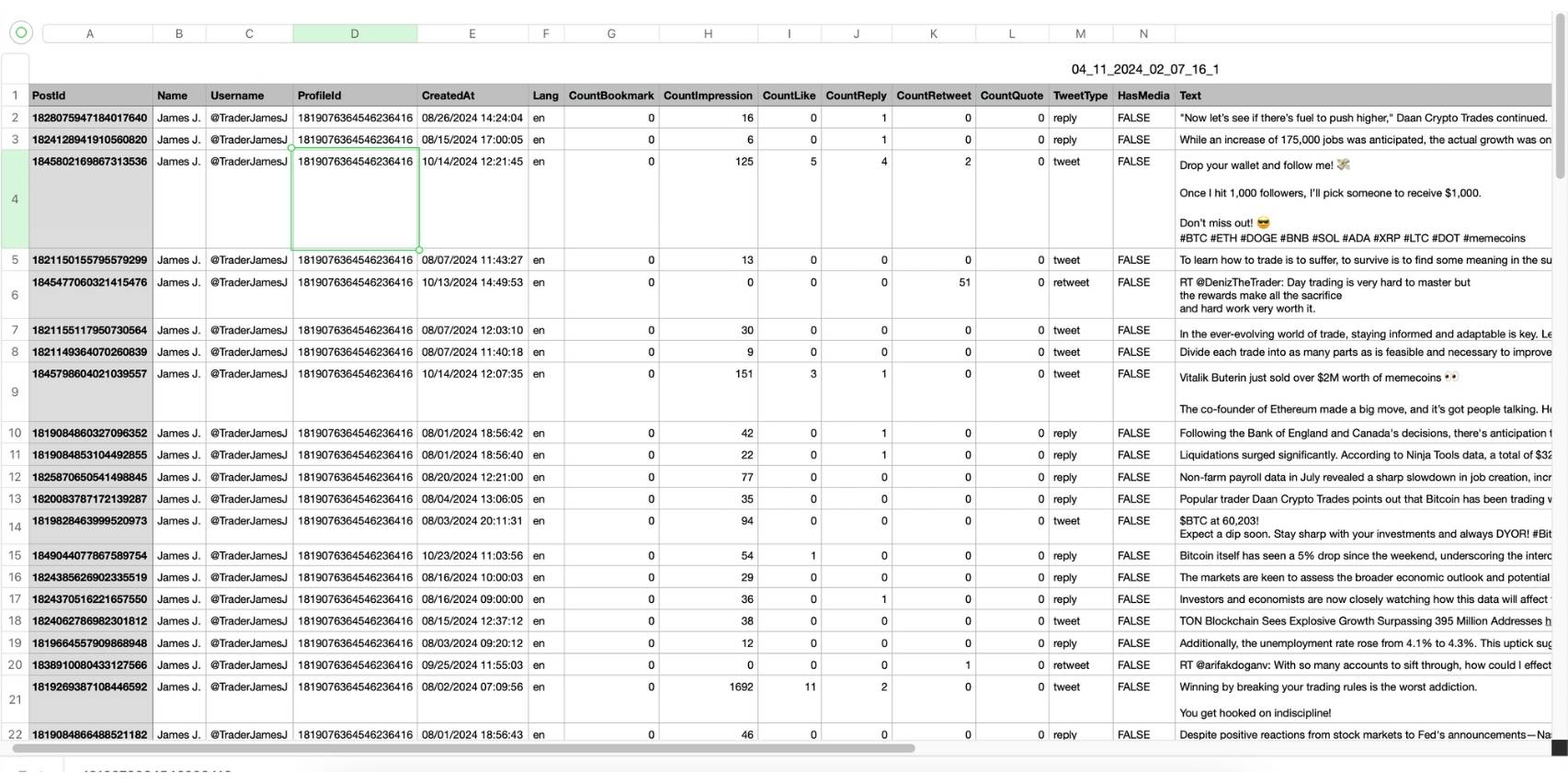
Looking at the file feels like examining a well-organized database — not a chaotic dump of information.
You can sort by impressions, filter by reply count, compare tweet performance over time, or isolate tweets about a specific topic.
It’s the kind of clarity Twitter simply doesn’t give you.
How I Exported an Entire Tweet History Using Circleboom (Step-by-Step)
The process is surprisingly simple.
Step #1: Enter the Username
On the Circleboom export page, type in the Twitter/X username of the account you want to export tweets from (without the “@” symbol) and click on the blue “Search” button.

Step #2: Confirm the Tweet Count
Circleboom will display the total number of tweets available for export from the selected account. Review this information, then click the “Next” button to proceed with the export process.

Step #3: Enter Your Email Address
Enter the email address where you’d like to receive the exported tweet file. Circleboom also recommends creating an account for easy access to your export file at any time. After entering your email, click the “Next” button to continue.

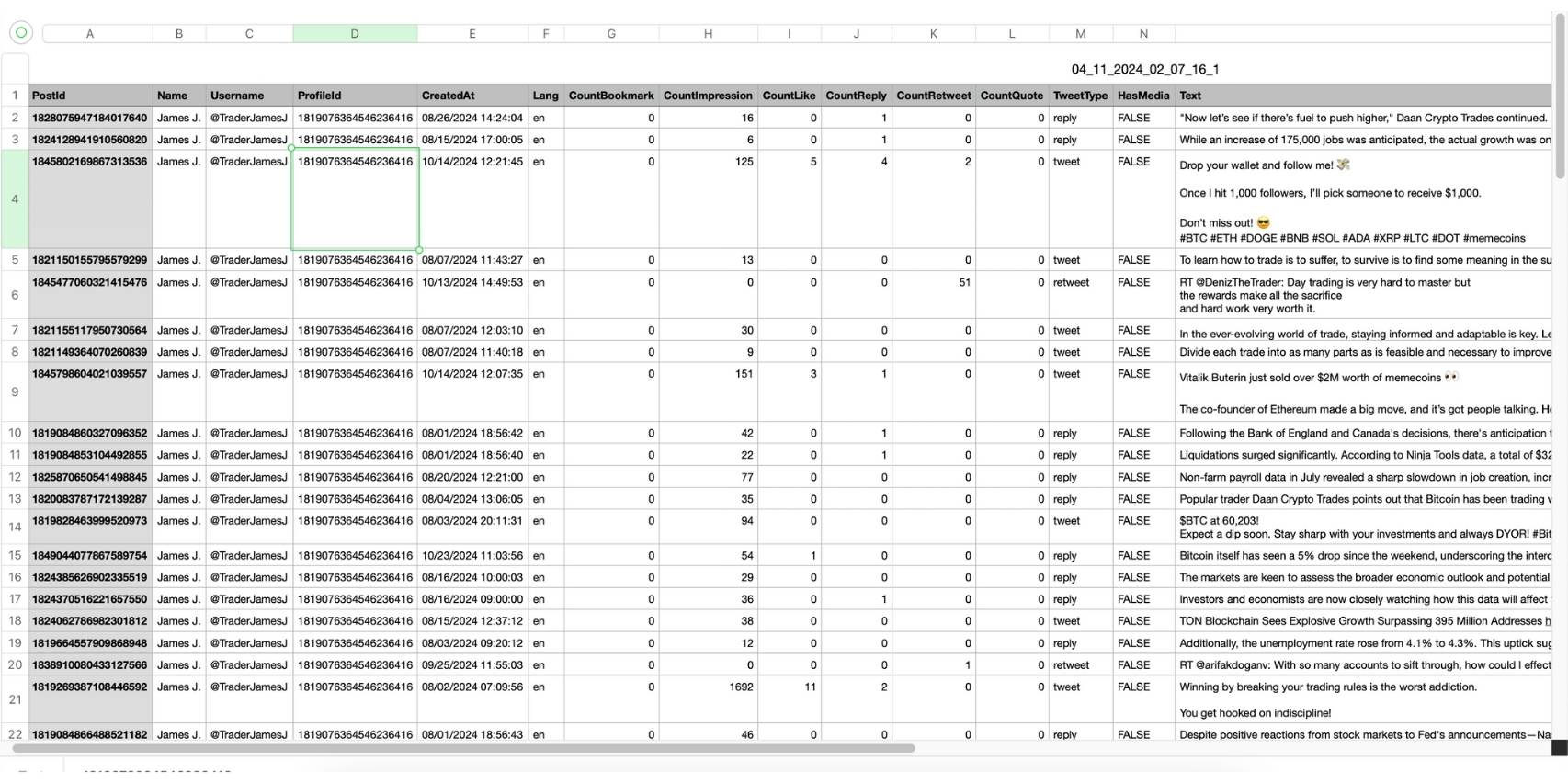
Step #4: After entering your email address, Circleboom sends the exported tweets in a CSV format directly to your inbox.
This CSV file includes essential details like Post ID, username, tweet text, engagement metrics (likes, retweets, replies), language, and timestamps, making it easy to review, analyze, or archive the tweets.
What Makes This CSV So Valuable
The exported file isn’t just a list of tweets — it’s a complete engagement database.
You see impressions, likes, retweets, replies, quotes, bookmarks, timestamps… all perfectly aligned.
This means you can:
🟢 build charts and graphs
🟢 filter by engagement
🟢 identify trends
🟢 measure consistency
🟢 compare tweet types
🟢 track changes over time
🟢 create reports
🟢 build a personal dataset for research or content strategy
It’s more than convenience — it’s insight.
| What to Check | Why It Matters | What It Tells You |
|---|---|---|
| Sort by Impressions / Likes | Finds the account’s best-performing tweets instantly | Shows what topics, formats, or posting times work best |
| Filter by Tweet Type (Tweet/Reply/Retweet) | Each type performs differently | Reveals whether the account grows through original tweets, conversations, or curation |
| Check “HasMedia” (TRUE/FALSE) | Media often boosts engagement | Helps compare performance of text-only posts vs. tweets with photos/videos |
| Group by Date or Month | Shows posting consistency | Highlights activity spikes, inactive periods, and seasonal patterns |
| Compare Engagement Ratios | Engagement vs. impressions gives clearer insight | Helps detect strong tweets with low impressions or weak tweets with high impressions |
 Arif Akdogan
Final Thoughts
If you’ve ever needed the full tweet history of a public X account, you already know Twitter doesn’t make it possible. Scrolling endlessly or copying tweets by hand simply isn’t an option.
Circleboom Twitter fixes this problem instantly.
Because it is an official X developer partner, it gives you safe access to detailed, structured tweet data. And it doesn’t just give you the texts — it gives you the engagement numbers, the timestamps, the media info, and everything you need to understand the account clearly.
Whether you’re researching, analyzing, studying, or archiving, Circleboom gives you a complete dataset in one click.
👉 If you want to export all tweets of any Twitter/X user to Excel or CSV, Circleboom Twitter is easily the most reliable and powerful way to do it.
%20User%20to%20Excel%20or%20CSV%3F)
