

On X, the following list is presented as a simple scrollable feed. For each account, you usually see only a few basic elements: the profile name, the username, a short bio snippet, and sometimes a small label like “Follows you” if the account follows you back.
What X does not clearly explain is how this list is ordered.
From user behavior and observation, the order seems to be influenced by multiple internal factors rather than a single clear rule. These can include:
- Your interaction history with certain accounts
- Mutual following relationships
- Accounts X considers “relevant” or “important” to you
- Algorithmic signals based on engagement
The result is a list that feels inconsistent and unpredictable. It is not strictly chronological, not sorted by follower count, not alphabetical, and not something you can control.
Most importantly, there is no option to change the sorting order.

X Does Not Give You a True Management View
Another issue becomes obvious once your following count grows.
Even though X may show that you are following hundreds or thousands of accounts, the interface does not feel designed to let you review or audit that list properly. Scrolling through it gives you only surface-level information, and it’s very easy to miss patterns, low-quality accounts, or accounts you no longer want to follow.
In practice, X:
🔴 Does not let you sort your followings by follower count
🔴 Does not let you sort by activity or account age
🔴 Does not provide filters for bots or spam
🔴 Does not allow bulk actions
🔴 Does not allow exporting the list
You’re expected to click into profiles one by one and make decisions manually, which becomes unrealistic very quickly.
 Fatih Kemal Oksuzoglu
Why It Feels Like You’re Not Seeing Everything
Many users also notice that the following list doesn’t always feel complete.
Even if all accounts are technically there, the way X loads and displays them can make it feel fragmented.
Certain types of accounts appear more frequently, while others are buried deeper in the list. There’s no clear indicator that tells you when you’ve truly reviewed everything.
So while X may technically hold the full list, it does not provide a practical way to see, sort, or analyze it as a whole.
Why I Needed Sorting (And Why X Wasn’t Enough)
My need was actually very simple.
I wanted to sort my followings by follower count so I could see which of the accounts has low followers. This is useful for understanding your network, spotting valuable connections, and identifying accounts that matter most.
But on X, this isn’t possible.
There is no “sort by followers” option. There’s no advanced view. There’s no way to extract that data and look at it properly. And once you realize that, you also realize that other useful questions can’t be answered either.
Questions like:
➡️ Which followings are inactive?
➡️ Which ones look suspicious or spammy?
➡️ Which accounts are low quality and no longer worth following?
None of this can be answered efficiently inside X itself.
The Tool I Use to Sort Followings: Circleboom Twitter
To actually gain control over my following list, I use Circleboom Twitter.

Circleboom Twitter is an official X Enterprise Developer, which means it works directly with X’s API and follows platform-approved limits. This makes it both reliable and safe for account management.
The biggest difference compared to X’s native interface is visibility.
With Circleboom Twitter, you can view the full following list of any account, not just your own. This includes public accounts, competitors, creators, or brands you want to analyze.
And instead of showing only usernames, Circleboom provides full contextual data for every account, such as:
- Total tweet count
- Follower number
- Following number
- Follow/follower ratio
- Account join date
- Activity status (active, inactive, overactive)
- Labels indicating fake, bot, or spam-like behavior
These details simply do not exist in X’s native following view, but they are essential if you want to make informed decisions.
Managing and Sorting From One Screen
Once the data is visible, Circleboom turns your following list into something you can actually work with.
From the same screen, you can:
✅ Sort followings by follower count, tweet count, ratio, or activity
✅ Filter out bot, spam, or inactive accounts
✅ Follow or unfollow accounts in bulk
✅ Block or remove accounts
✅ Add selected accounts to Twitter Lists
✅ Export the full following list for deeper analysis
Instead of endlessly scrolling and guessing, everything becomes structured and controllable.
Step-by-Step: How to Sort Your Followings on X Using Circleboom Twitter
Step #1: Open “All Your Following” in Circleboom Twitter
After logging in to Circleboom Twitter, head to the Followers / Following Management & Analytics section.
From the Following column, click All Your Following.
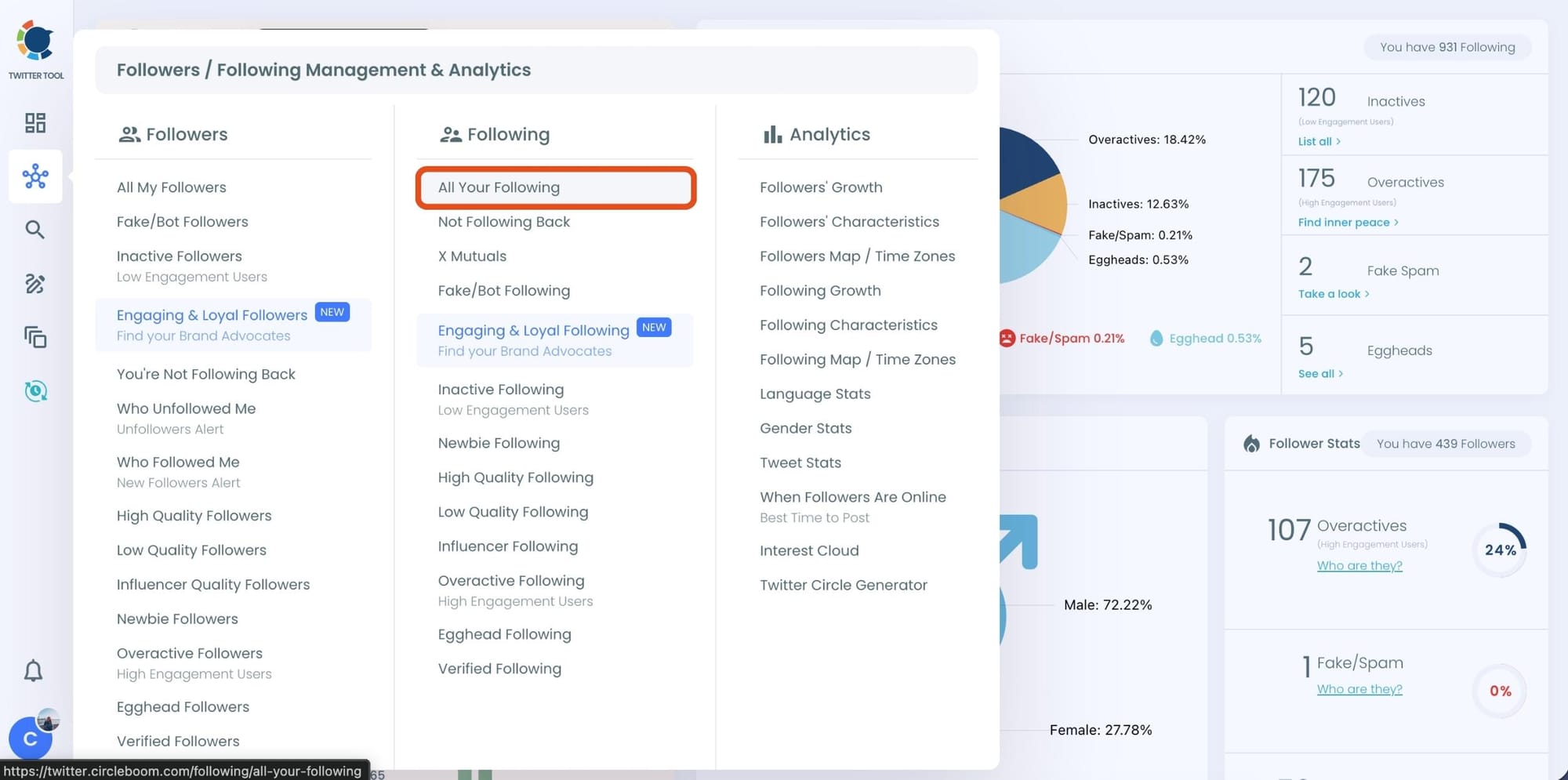
This instantly loads your entire following list, something Twitter itself never fully shows.
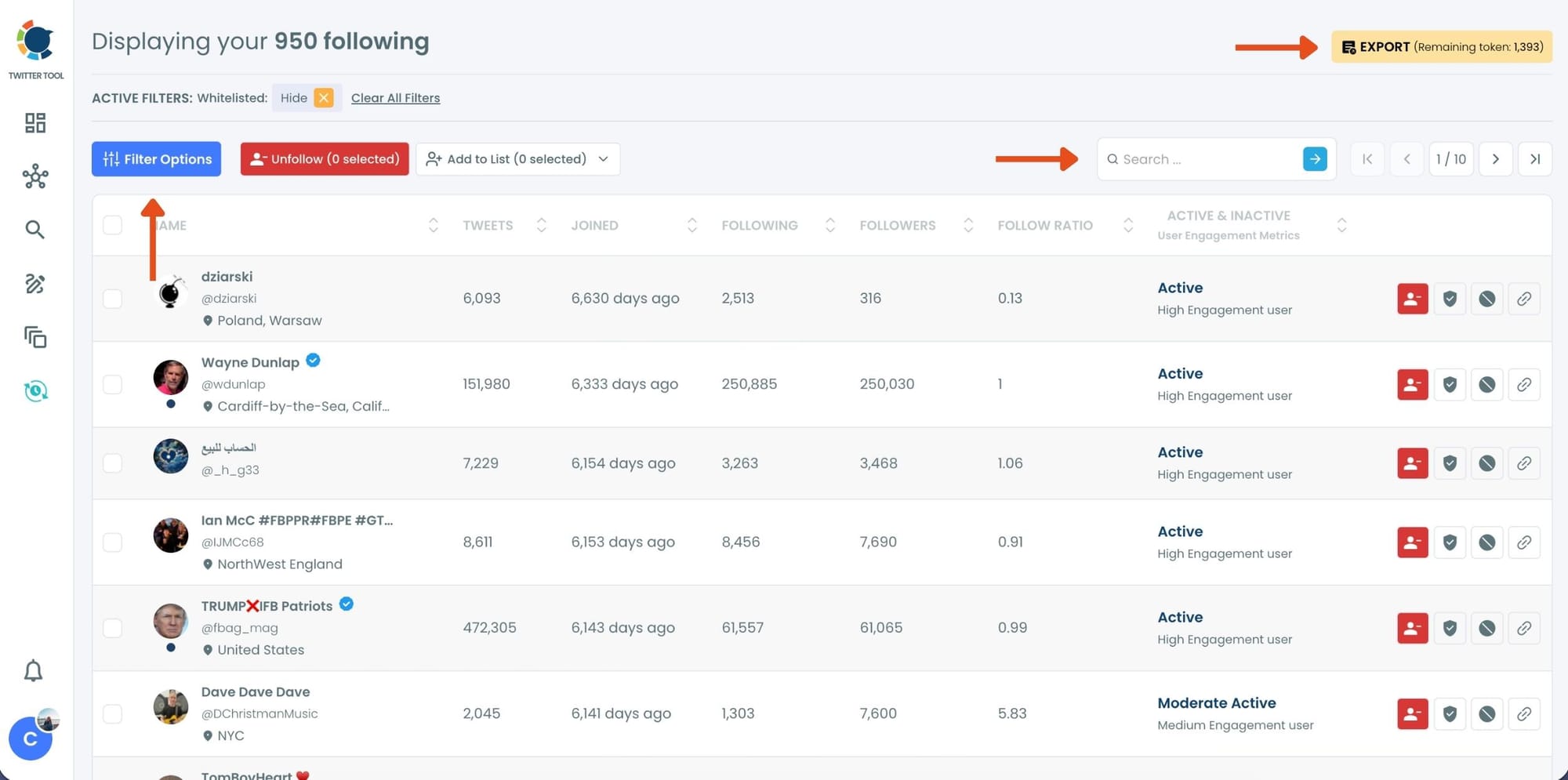
Step #2: View Detailed Stats for Every Following
Once the list loads, Circleboom displays much more than usernames.
For each account, you can see:
- Total tweet count
- Follower and following numbers
- Follow/follower ratio
- Account join date
- Activity status (active, moderate, inactive)
This is where the real difference starts. Twitter hides most of this context, but here it’s visible for every account, making meaningful sorting possible.
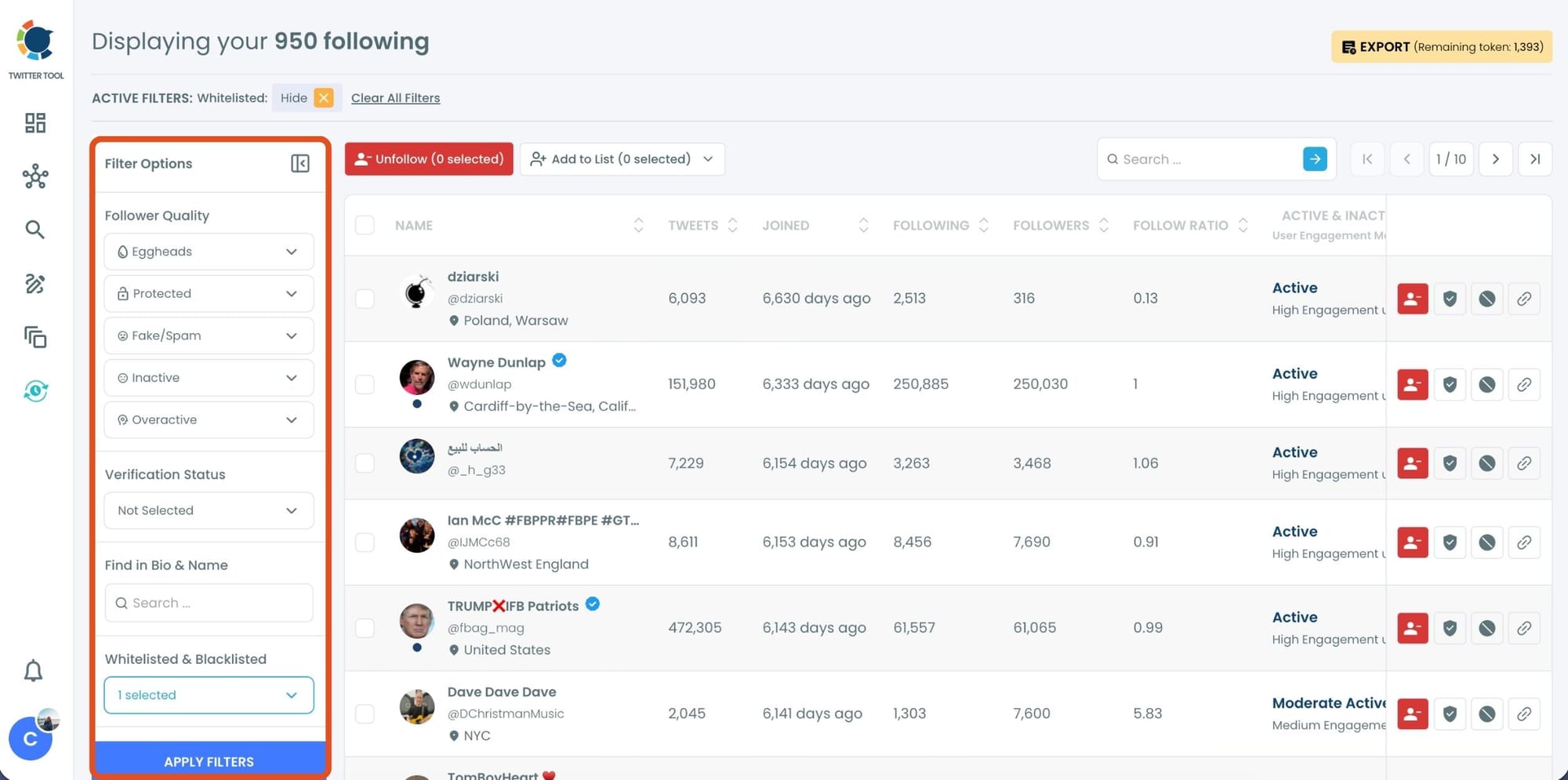
Step #3: Use Filter Options to Sort and Clean Your Following
On the left side, open Filter Options.
Here, you can filter and sort your following list based on quality signals, such as:
- Fake or spam accounts
- Inactive users
- Overactive accounts
- Egghead profiles
- Protected accounts
Instead of guessing who’s worth keeping, Circleboom flags low-quality accounts automatically. You can narrow your list down to only the profiles that actually matter.
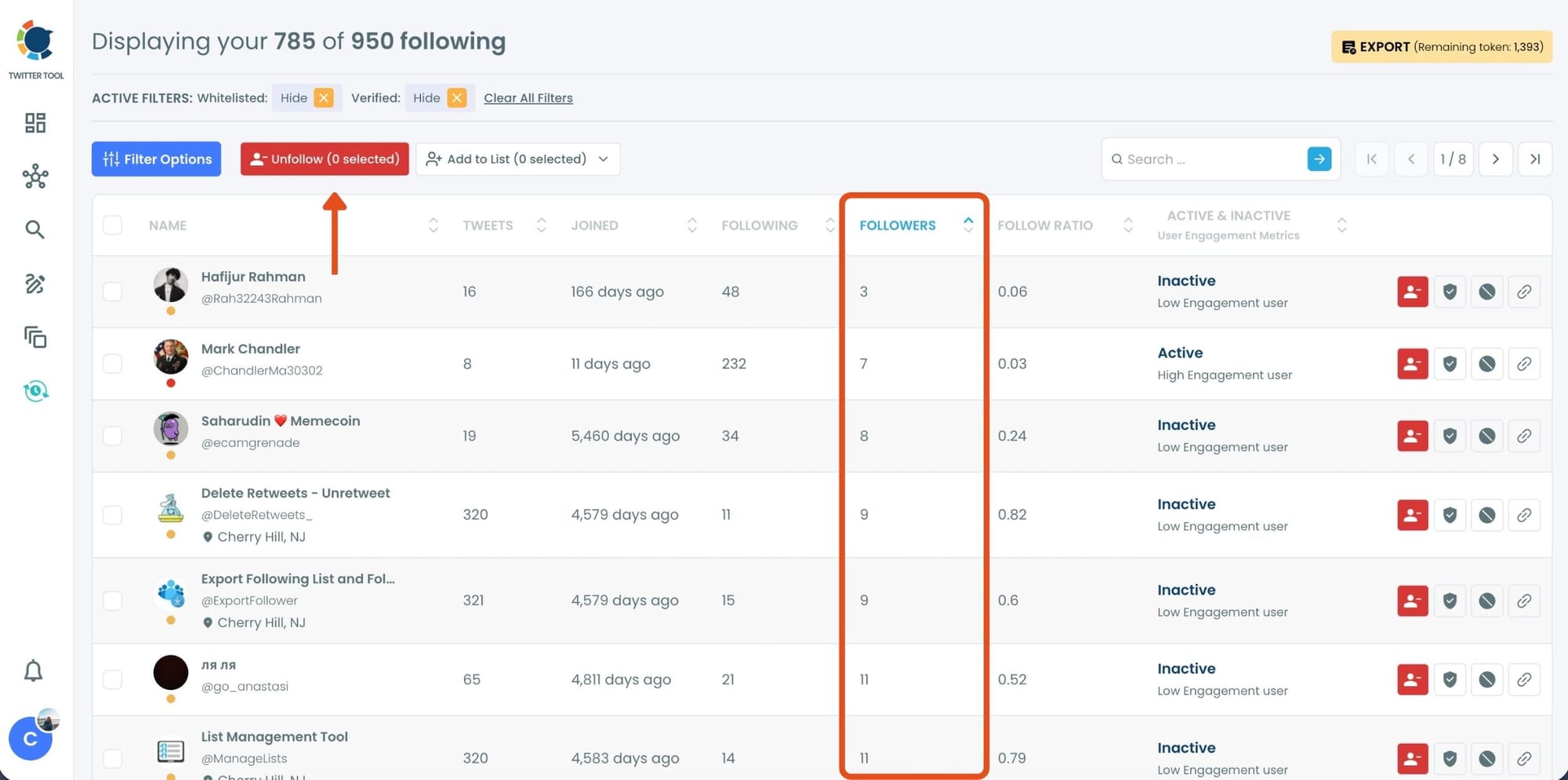
Step #4: Sort by Metrics That Matter to You
After applying filters, you can sort the list directly from the table, by follower count, following count, join date, or activity level.
This is especially useful when you want to:
- Find the most or least followed accounts you’re following
- Identify low-impact or spammy profiles
- Prepare a clean export for deeper analysis
Everything happens on a single screen, without jumping between tabs or profiles.
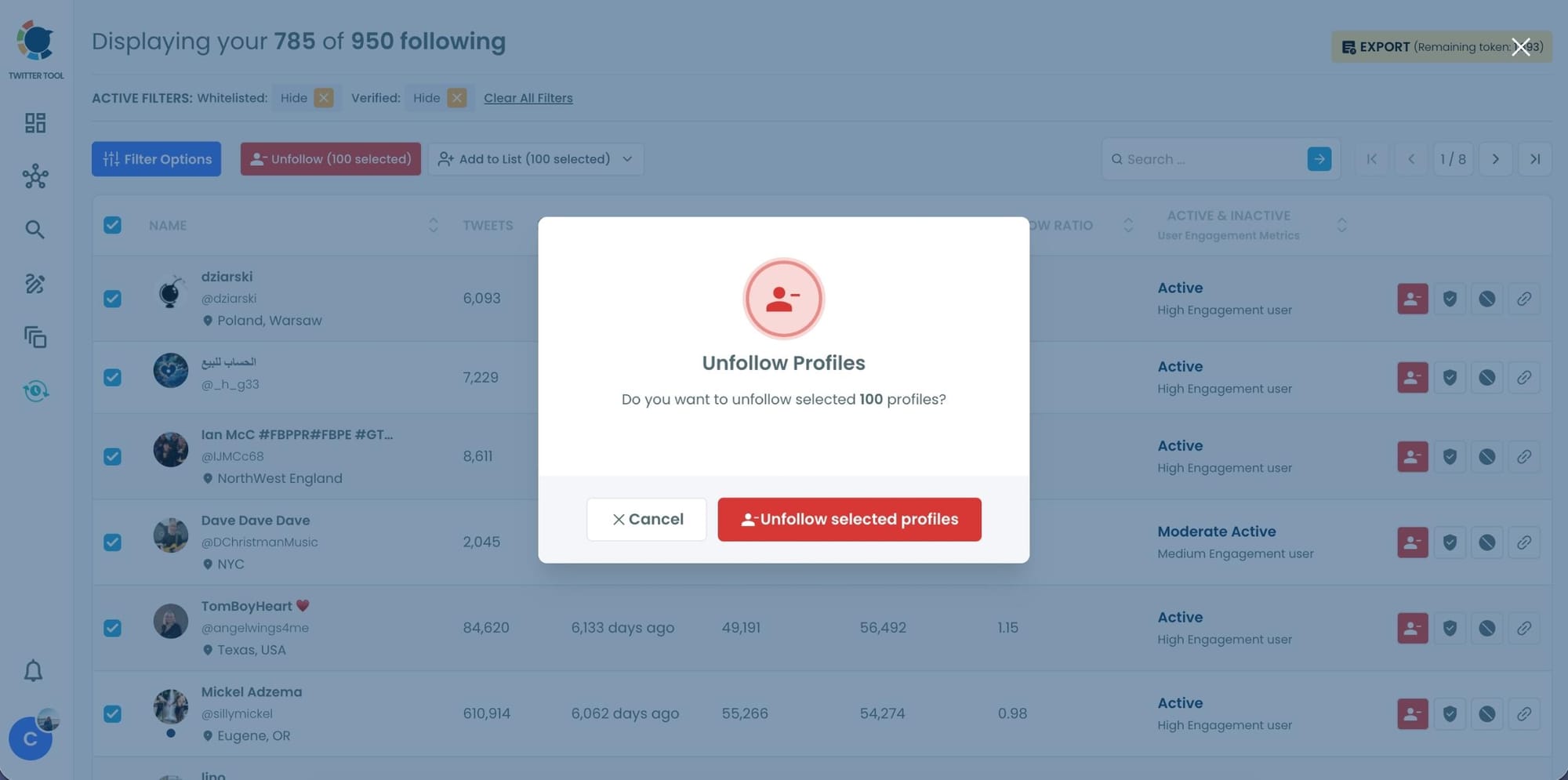
Step #5: Take Action in Bulk (Unfollow, List, or Export)
Once your list is sorted and filtered, you can select accounts and take action instantly.
With one click, you can:
- Unfollow selected profiles
- Add them to a Twitter List in bulk
- Export the data for further analysis
No manual profile visits. No repeating the same action hundreds of times.
What Happened Once I Could Sort Properly
Originally, I only wanted to find the least-followed accounts in my following list.
But once I sorted by follower count, patterns became obvious. I started noticing accounts that were inactive, suspicious, or clearly not adding value anymore. Some had extremely low activity, others showed bot-like behavior.
So the process naturally expanded:
- I filtered out bot and spam accounts
- Unfollowed low-quality profiles in bulk
- Exported the cleaned list to analyze it further
What started as a simple sorting task turned into a full network cleanup, something that would have been nearly impossible to do inside X alone.
Final Thoughts
X shows your following list in a way that looks simple, but it is not designed for serious management or analysis. There is no real sorting, no filtering, and no way to understand the quality of your network at scale.
If you want to actually see, sort, and clean your followings, especially by follower count or account quality, you need a tool that provides full visibility and control.
That’s why I use Circleboom Twitter. It turns a basic following list into actionable data and makes managing your network realistic instead of frustrating.


%3F)
