Instagram did not publish a new, lower hashtag limit for 2026: its own help page still says up to 30 per post. The number worth changing is the one you choose inside that ceiling, and for most posts it is a focused mix well under 30.
How many hashtags should I use on Instagram? Instagram documents a limit of 30 hashtags per post, and no Instagram or Meta page states a cut to 5. Circleboom Publish enforces that same ceiling in its Instagram composer and bulk-adds relevant hashtags to each post with its Hashtag Generator, so the set you schedule is matched to the post instead of copied from the last one.
→ Choose how many hashtags to use on Instagram
The sections below cover the limit, the mix and where the tags go.
The Instagram hashtag limit in 2026: still 30 per post
The Instagram hashtag limit is 30 tags per post. Instagram's help page on how to use hashtags on Instagram states that a post can carry up to 30 tags. The same page adds that a comment with more than 30 tags on a single photo or video will not post.
A different number has been circulating. Several tool vendors' blogs claim Instagram cut the cap to 5 in late 2025 or early 2026.
None of them links to an Instagram or Meta page that says so, and the help page above still reads 30.
The limit did not change on any Instagram page we could find; what changed is that relevance matters more than count.
That second half is the useful part. A post with five tags that describe it will usually do more than a post with 30 tags that describe the account in general.
If you are trying to decide how many hashtags to use on Instagram, start from that idea rather than from the cap. Then let the Instagram hashtag generator suggest tags that describe the post.
Where the "cut to 5" claim comes from
The 5-tag story mixes two different things. One is a rule, which would have to appear on an Instagram or Meta page. The other is advice, usually drawn from a vendor's own study of which posts performed best with fewer tags.
Advice can be reasonable without being a rule.
The safe reading for planning is simple. Treat 30 as the hard ceiling, because that is what Instagram documents, and treat a short, matched set as good practice, because that is what the advice and the platform's own logic both point to. A mix built to describe the post works at 5 tags and at 25.
If Instagram ever does publish a lower cap, a matched set survives the change. A pasted block of 30 does not.
Why hashtag fit matters more than hashtag count on Instagram
Hashtags are Instagram's built-in discovery route. They put a post in front of people who do not follow the account yet but are browsing or searching a topic the post belongs to. That is the whole reason to use them.
A tag only does that job when the post matches it. Someone browsing a houseplant tag who lands on a photo of a coffee mug scrolls past, and the tag earned nothing.
So how many hashtags you should use on Instagram is really a question about fit: how many tags can this post honestly claim?
The same logic explains why a smaller set can outperform a full one. Every extra tag that does not match the post adds characters and noise without adding anyone who would stop for it. Trimming those tags costs nothing in reach that was real.
Most accounts never ask it, because researching tags for every post is slow. The result is one of two habits. Hashtags get skipped entirely, or the same handful gets reused on every post until it describes nothing in particular.
What the Circleboom Publish composer allows in an Instagram caption
Circleboom Publish's Instagram composer allows up to 30 hashtags and 20 @ tags inside a 2,200-character caption. These are the same ceilings the product applies to every Instagram post you schedule through it, so a set that fits the composer also fits Instagram's documented limit.
Circleboom Publish is a publishing suite that writes, tags and schedules Instagram posts from one composer. The Hashtag Generator sits in that composer's toolbar beside the AI writing button and the emoji picker.
The three ceilings work together:
- 30 hashtags per caption.
- 20 @ tags per caption.
- 2,200 characters per caption, hashtags included.
That last point catches people. Hashtags are not free space. Every tag eats characters from the same 2,200 that your hook and message need.
A quick illustrative calculation shows how much. If an average tag runs about 15 characters plus a space, a full set of 30 takes roughly 480 characters. That is more than a fifth of the caption gone before you write a word about the post.
The ceilings also matter when the same post goes to more than one network. Check the caption length and the tag count against Instagram's limits before sending, because a caption written for a roomier platform can arrive on Instagram already over the line.
How many hashtags should you use on Instagram within that limit?
Use as many hashtags as stay relevant to that one post, built from three layers. The mix that holds up across niches looks like this:
- A few popular, general tags that give the post size.
- Smaller, industry-specific tags that give it relevance.
- One branded tag that belongs to the account and its community.
Take a plant shop posting a photo of a new monstera. Broad tags like #nature or #plantsofinstagram add reach. Narrower ones about houseplant care or urban gardening put the post in front of people who browse exactly that. A shop tag collects every customer photo in one place.
The popular layer is where accounts overdo it. A post that wears only giant tags disappears in them, because the tag pages are too crowded for one photo to hold attention. The smaller layer does more of the finding.
For the wider strategy behind choosing each layer, the ultimate Instagram hashtags guide is the longer read.
Which tags to drop from an Instagram mix
The tags that hurt the mix are easy to spot once you look per post. They describe the account in general, a product the photo does not show, or a season that has already passed. A generator that starts from the post's own content leaves fewer of those behind, and the review step removes the rest.
In practice, the answer to how many hashtags to use on Instagram usually lands well under 30. A simple product shot has fewer honest tags than a launch post that covers a whole collection. The count follows the content.
Reusing one fixed set on every post breaks the mix, because a block written for the account cannot describe each photo.
Reels follow the same logic: the same toolbar and the same ceiling apply when you schedule a Reel through the Instagram Reels scheduler.
What happens when an Instagram post goes past 30 hashtags?
Anything past 30 does not go through. On Instagram's side, a comment with more than 30 tags will not post. In the Circleboom Publish composer, the caption holds a maximum of 30 hashtags, so the set has to be trimmed before it can be scheduled.
The trim matters most when a generator is involved. A hashtag generator can suggest more tags than fit. Say the Hashtag Generator suggests 35 tags for a post: you keep the 30 most relevant and drop five.
That cut is useful. It forces a ranking. The five that go are usually the broadest, the ones that drift off-topic, or the ones that repeat an idea another tag already covers.
The rule for the generated set is to review it against two things: the 30-tag ceiling, and the post itself.
Swap out any tag that reads as off-topic for that specific photo, even when the total is already under 30.
Here is an illustrative case. The plant shop's monstera post gets 35 suggestions. Two are about flowers the photo does not show, one is about vegetables, and two are so broad they describe half the app. Those five go first, and the remaining 30 all point at the plant, its care and the shop.
You can build a relevant Instagram hashtag set per post this way, rather than trusting a long list blindly.
Should hashtags go in the Instagram caption or the first comment?
Hashtags work in either place, and the choice is about space and readability. In the caption, they count toward the 2,200-character limit. In the first comment, they leave the caption free for the hook and the message.
Instagram's caption ceiling is tight once tags pile up. The breakdown of the Instagram caption character limit shows how fast a long caption plus 30 tags runs out of room.
The first comment has its own ceiling. Instagram's help page on errors when adding a comment says a single comment cannot include more than 30 hashtags or more than 5 @ mentions.
So moving tags to the comment does not raise the limit; it only moves the tags.
Circleboom Publish lets you write that first comment in the same composer and schedule it with the post. Tick "Enter first comment" on an Instagram Post, write the tags there, and they go live together.
Pick the spot for your Instagram tags
The right spot depends on the post you are writing:
| Your post | Where the tags go | Why |
|---|---|---|
| Short caption, a few tags | In the caption | Plenty of room under 2,200 characters |
| Long caption that tells a story | In the first comment | Keeps the message readable and inside the limit |
| Post likely to draw lots of comments | In the first comment | Your own comment claims the top slot first |
The first comment also protects the post. The top comment is what people read after the caption, and writing it yourself keeps a random reply from framing the post.
If you keep tags in the caption, separate them from the message. Spacing the tag block a few lines below the text is easier with an Instagram line break generator, so the caption reads like a caption first.
How to choose how many hashtags to use on Instagram for each post
To choose the right hashtags for an Instagram post, write the caption, let a generator propose a set based on that post, then trim it to the tags that describe it and stay under 30. The four steps below run that loop inside Circleboom Publish, from login to a scheduled post.
- Log in to Circleboom and open the "Instagram Specific or Reels" card on the dashboard to reach the Instagram composer.
- Write the caption first in the "What do you want to post" field, with your photo attached. The generator reads the post's own content, so a written caption gives it more to work with; it adds tags and does not write the caption itself.
- Open the Hashtag Generator from the toolbar, search a topic or browse Discover Hashtags, tick the tags that fit, and click "Add selected hashtags." Untick anything that drifts from the photo before you add the set.
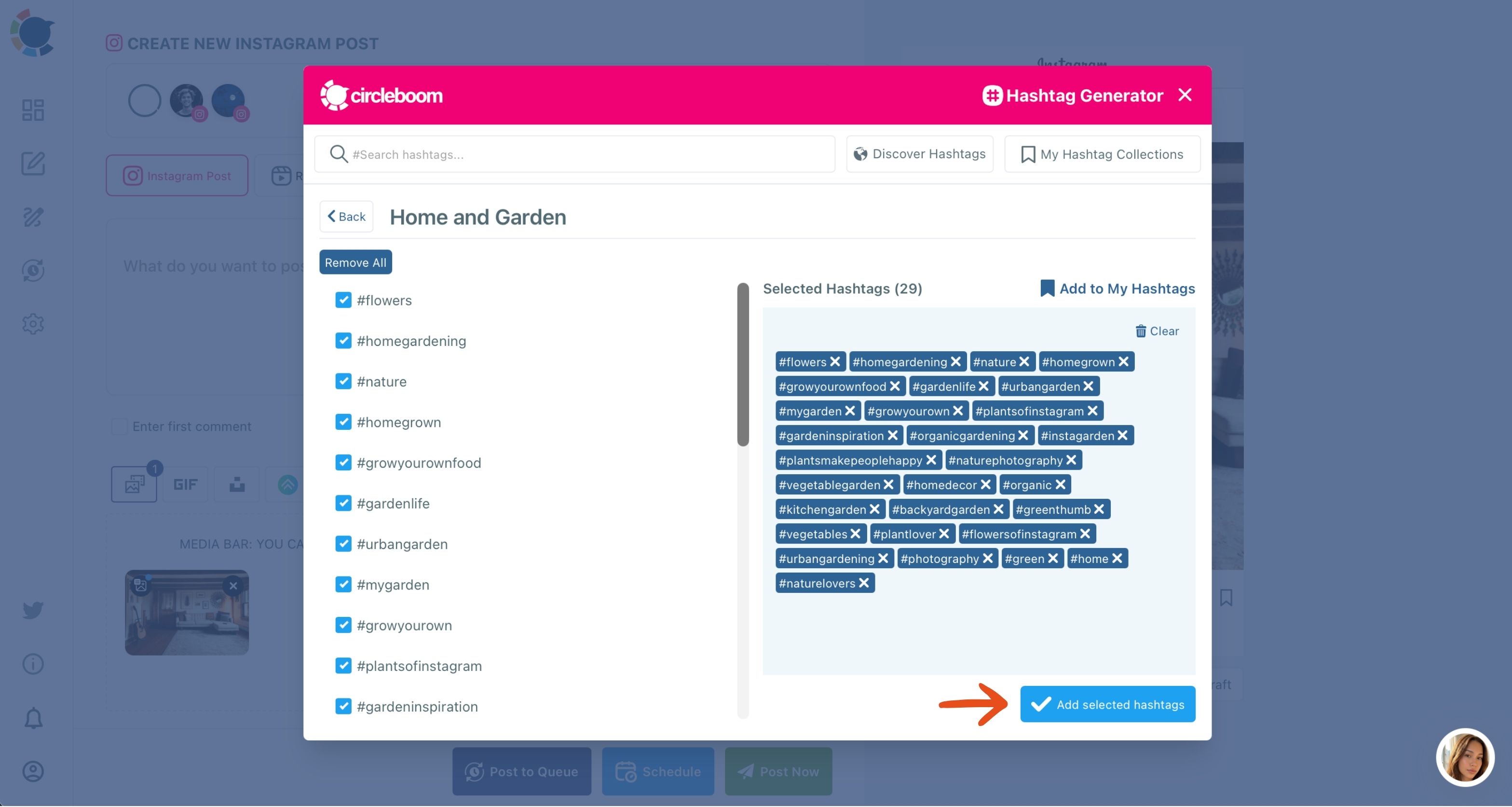
- Review the set against 30 tags and 2,200 characters, remove anything off-topic, move overflow to the first comment if the caption feels crowded, then schedule the post.
The order matters because each step narrows the next one: the caption tells the generator what the post is about, the generator replaces hand research, and the review keeps the final set inside Instagram's ceiling and on topic.
In short: caption, generate, trim, schedule.
Once the post is ready, the timing comes next: scheduling Instagram posts in Circleboom Publish includes a "Pick your best post time" panel built from your own followers' activity.
Accounts that post to more than one network can keep the same per-post tagging habit there. The hashtag generator for social media brings the same idea to the other platforms Circleboom Publish schedules to, each with its own limits.
The Instagram hashtag answer in one place
Instagram's documented limit is 30 hashtags per post, with no Instagram page stating a lower 2026 cap. Circleboom Publish holds captions to 30 hashtags, 20 @ tags and 2,200 characters, and its Hashtag Generator proposes a set from each post's content that you trim to the most relevant tags.
So how many hashtags should you use on Instagram in practice? The practical number is the mix: popular tags for size, niche tags for relevance and one branded tag, cut to what the post can honestly claim. A smaller, matched set gives each post a better chance with new viewers than a full block of 30 copied from the last post.
→ Work out how many hashtags each Instagram caption needs
What People Ask about the Instagram hashtag limit
Can too many hashtags get my Instagram account shadowbanned?
No Instagram page sets a hashtag count that triggers a shadowban. The safer pattern is a focused mix per post instead of the same long block every time, and keeping out tags Instagram restricts; see banned Instagram hashtags before reusing an old list.
Is it better to research Instagram hashtags by hand or use a generator?
A generator is faster and keeps the research step from being skipped. Circleboom Publish's Hashtag Generator bulk-adds tags based on the post's content, and you still review the set before publishing.
How many @ tags can an Instagram caption hold?
The Circleboom Publish composer allows up to 20 @ tags in an Instagram caption. A single comment on Instagram can hold no more than 5 @ mentions, per Instagram's own help page.