
Yes. You can schedule one Instagram Story for four branch accounts at once, as long as all four are selected in the same Instagram composer.
A bakery with four branch accounts can select all four in the Circleboom Publish Instagram composer, open the Story Post tab, add one image or video with a music track and schedule it once for every branch. Circleboom Publish schedules Instagram Stories for multiple accounts in one publish action, so a weekend offer reaches all four branches at the same hour.
→ Schedule Instagram Stories for multiple accounts in one sitting
The harder question is when the same Story should go to all four, and the answer depends on what the Story shows.
Why Instagram Stories are hard to keep up across four bakery branches
Stories are built for posting live from a phone, one account at a time, which is the opposite of what a multi-branch bakery needs. Each branch account wants a fresh Story every morning, and nobody behind the counter has time to post four of them at opening.
The math shows the size of the problem. Four branches posting one Story a day is 28 Stories a week. Posted live, that is 28 interruptions at the busiest hour of the day.
Instagram's own help page notes that the Instagram app holds up to five accounts with switching between them, so four branches fit in one phone.
Switching still means building the same Story four times.
The phone can hold four accounts; it cannot post to four at once.
That gap is where a scheduler earns its place. The ability to schedule Instagram Stories for multiple accounts turns a daily availability problem into one weekly planning session.
If you have only ever posted Stories live, the explainer can you schedule Instagram Stories covers what scheduling a Story changes compared with the app.
Should all four bakery branches post the same Instagram Story?
Sometimes. A brand-wide Story, such as a holiday closing notice or a new seasonal loaf available everywhere, can go to all four branches as one identical Story.
Daily Stories should differ per branch, because repeating identical Stories reads as duplicate content to Instagram and as old news to followers.
The split for a bakery looks like this:
| Story type | Same for all four? | Why |
|---|---|---|
| Holiday hours | Yes | One fact, every branch |
| New seasonal product | Yes | Launch is brand-wide |
| Today's fresh bake | No | Each counter differs |
| Branch event | No | Only one location hosts |
The rule of thumb is simple. If a customer of one branch would never see the other branches' Stories, one shared Story is fine now and then. If the same followers browse several branch accounts, give each its own image or a different track with Add Music.
One shared Story is a tool for announcements, not a daily habit.
How Circleboom Publish schedules one Story for every branch account
Circleboom Publish connects all four branch accounts to one dashboard, and its Instagram composer lets you tick any number of them for one Story on the Story Post tab.
Circleboom is an official X (Twitter) Enterprise developer, verified on X's customer directory, the kind of approved access a business wants before connecting four storefront accounts to any tool.
A Story on Circleboom Publish takes one image or video, formatted for Instagram's full-screen, 24-hour Story surface. The Add Music library sits inside the same window, browsable by genre, tempo and mood, so a scheduled Story keeps the soundtrack a live one would get from the app's music sticker.
Account selection belongs to the Instagram composer itself, and Story Post is one of its tabs. Branch accounts can be ticked one by one or saved as a Share Group, which is how Circleboom handles multiple Instagram accounts.
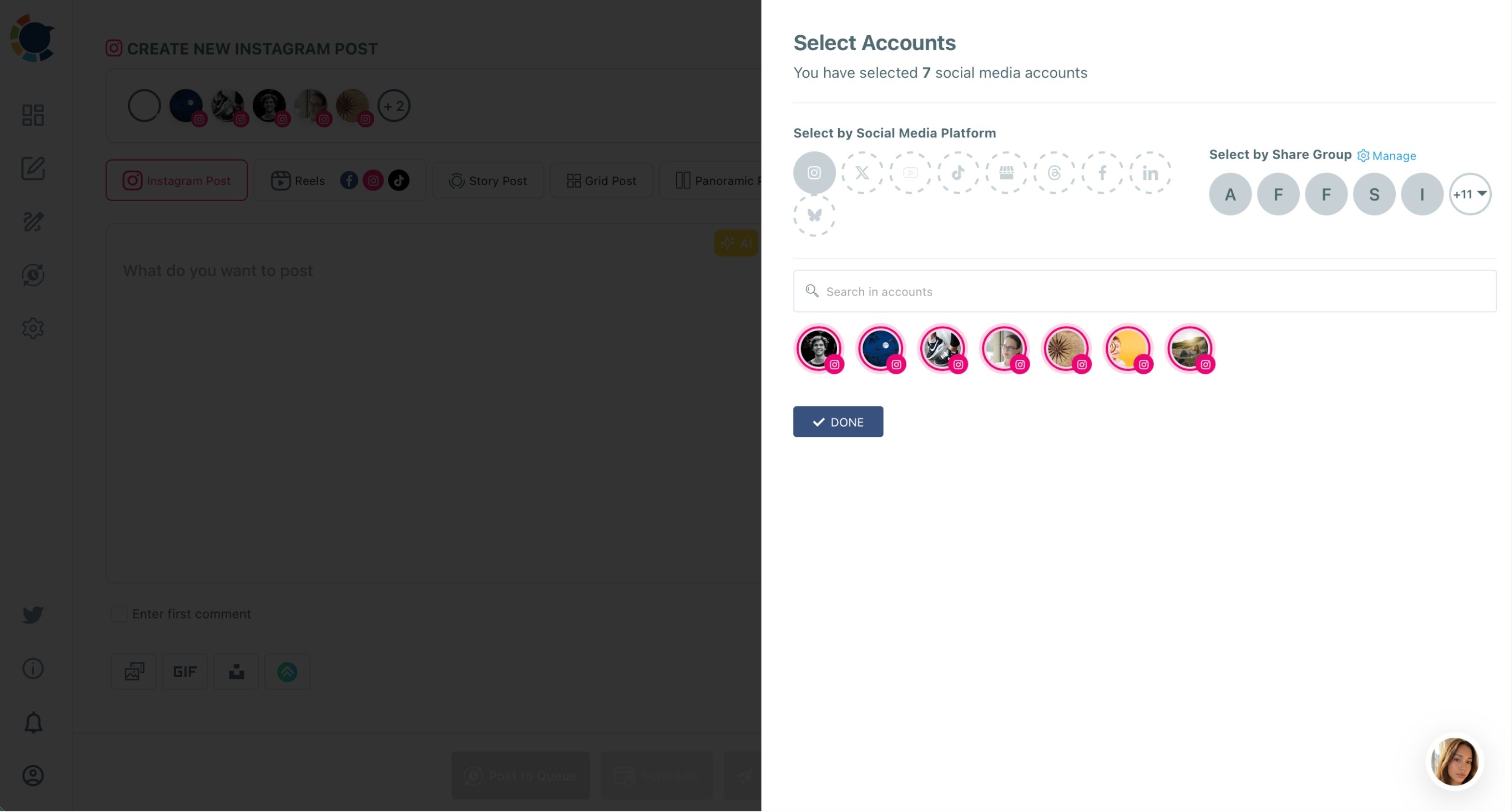
The difference from the app is when the branch choice happens. In the app, you pick an account four times. In the composer, you pick all four once and build the Story a single time.
You can plan one Instagram Story for every branch account from that window.
One minute with the Instagram Story scheduler, from the upload to a set publishing time.
How to schedule Instagram Stories for multiple accounts
To schedule one Instagram Story for several accounts, select every branch account in the Instagram composer, open the Story Post tab, then upload the Story, add music and set a time once. The selection decides where the Story goes.
The process below runs in three phases and takes a bakery about 20 minutes for a week of Stories.
Connect the branch Instagram accounts and group them
- Log in to Circleboom and connect each branch's Instagram professional account under Settings, then Manage Social Accounts.
- Save all four branches as a Share Group under Settings, then Manage Share Groups, named "All branches."
Build the Instagram Story on the Story Post tab
- Open the Instagram composer, choose Select by Share Group and pick "All branches," then select the Story Post tab.
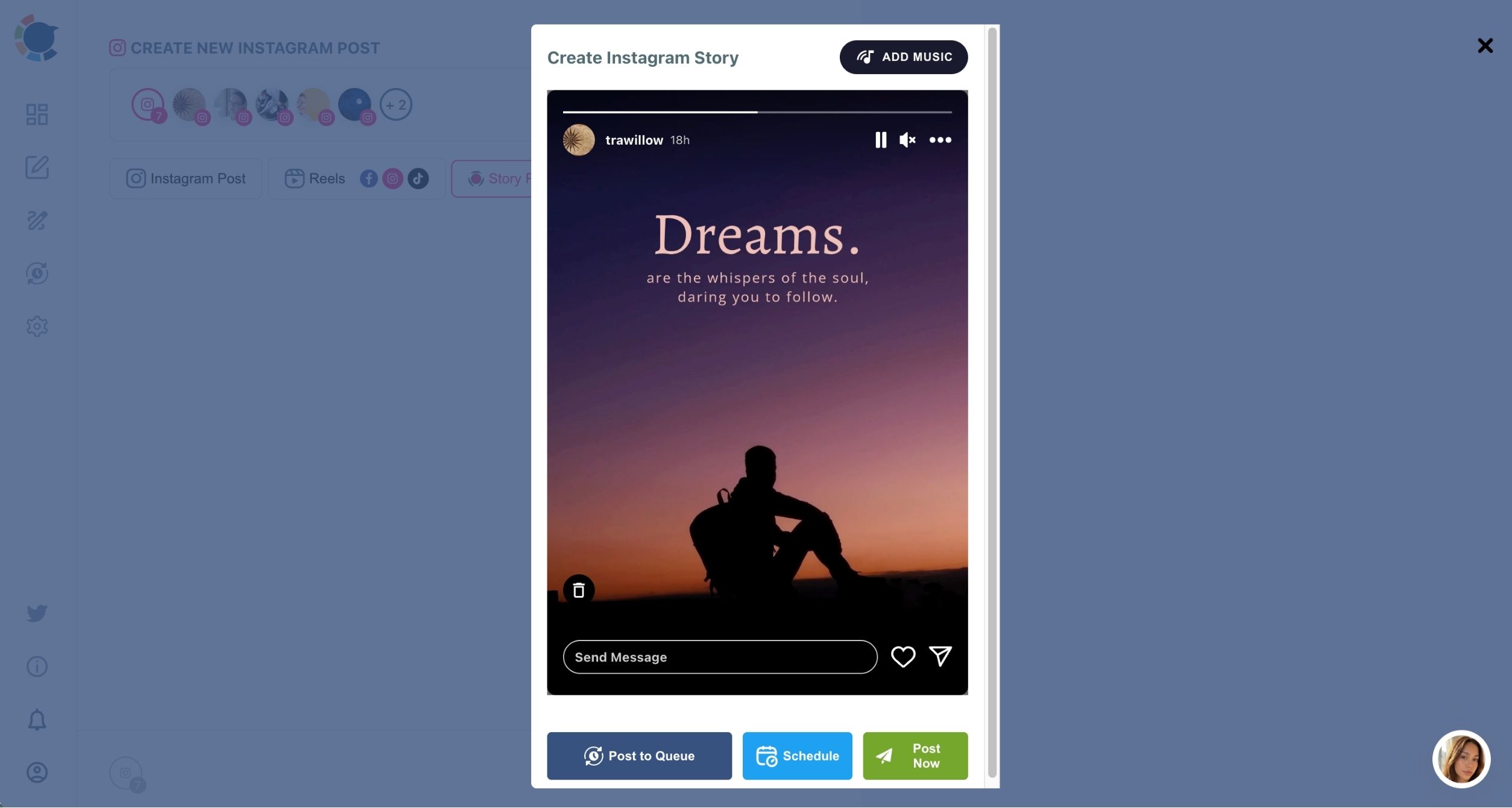
- Upload one image or video and add a track with Add Music, filtering by mood for the feel of the bake.
Schedule and confirm the week
- Preview the Story, then click Schedule and pick a date and one of the suggested best-time slots.
- Open the Outbox in Calendar View and filter by Share Group to confirm all four branches carry the Story.
The "All branches" group does the remembering. With it picked at step 3, the image, the track and the time reach all four accounts together, and no branch is left out because someone forgot to switch.
Can a scheduled Instagram Story also go to Facebook or TikTok?
No. The Story Post tab is Instagram-only, so a scheduled Instagram Story does not cross-post to other platforms. Cross-posting to TikTok, YouTube and Facebook belongs to the Reels post type.
For a bakery that wants the same clip of croissants coming out of the oven on every platform, the better route is a Reel. The Instagram Reels scheduler sends one upload to Instagram plus the branches' Facebook Pages, TikTok and YouTube accounts in one action.
A multi-branch food business can use both. Stories carry the daily, short-lived updates on Instagram. Reels carry the clips worth showing to people who do not follow any branch yet.
What fits in a scheduled Instagram Story for a bakery
A scheduled Story takes one image up to 8 MB or one video up to 300 MB. It does not take a multi-image carousel, so a "five pastries this week" idea needs five separate Stories or a feed carousel instead.
Phones record in 4K by default, and a 4K clip of the bread counter can pass 300 MB. Exporting at 1080p brings it well under the limit with no visible loss on a phone screen.
Music is optional but worth it, because a silent Story is easy to skip. The guide on what to do when you can't add music on an Instagram Story covers the usual reasons the in-app music option goes missing. Adding the track inside Circleboom skips that step.
Planning a week of Instagram Stories for every branch
Batch the week once, on the slowest day, because that is when the ability to schedule Instagram Stories for multiple accounts pays off most. Prepare the shared announcements as one Story for all four branches, then prepare each branch's daily bake Story with its own photo, and schedule each into that account's suggested best time.
A four-branch week might look like this:
- Two shared Stories for all branches: the weekend offer and the new seasonal loaf.
- Five daily Stories per branch, each showing that counter's own bake.
- Music on every Story, chosen by mood.
That is 22 Stories built instead of 28, because the two shared ones are built once each instead of four times.
Each branch's suggested slots are built from that branch's own audience, which is why the best time to post on Instagram can differ between a station branch and a high street branch.
For ideas that suit a food counter, the list of creative Instagram Story ideas is a good place to fill a slow week.
Letting each branch manager schedule their own Instagram Stories
Branch managers can schedule Stories for their own branch without seeing the other three. In Team Management, the owner is the Admin with access to every account, and each manager joins as a User with only their branch's Instagram account assigned. Anything a User schedules waits in Waiting for Approval until the Admin approves it.
For a bakery, that split matches how the work happens. The manager at each counter knows what came out of the oven today and can take the photo. The owner keeps brand control and checks the week's Stories in one review instead of chasing four group chats.
A rejected Story can carry a comment, such as "use the morning light shot," so the fix is clear.
Share Groups and Teams do different jobs. A Share Group is a one-click bundle for selecting accounts in the composer. A Team is what decides who may post to which account.
Managers bring the fresh content; the owner keeps the final say.
Checking that every branch Instagram Story went out
After the week is scheduled, the Outbox shows what is waiting, and two more views show what happened. Sent Items lists every Story that was published. Failed Items lists every Story that was scheduled but not published, each with the specific error reason, such as a disconnected account.
A five-minute check each morning catches problems while the Story still matters. A failed opening-hours Story at 7 a.m. is useful to fix at 7:05 and useless by noon.
When the reason points to a lost connection, reconnecting that branch's account in Manage Social Accounts is the place to start.
When a Story worked well, Share Again on Sent Items copies it into an editable version. Change the photo or the track and it becomes a new Story rather than a repeat.
Which Instagram Story plan fits your bakery branches
Pick the plan by what each Story shows and who sees it:
- If the Story is a brand-wide fact, such as holiday hours, schedule one Story for all four branches with the "All branches" group.
- If the Story shows a branch's own counter or event, schedule it for that branch only, with its own photo.
- If the same followers browse several branches, vary the image or the track with Add Music even on shared announcements.
- If the clip should also reach Facebook or TikTok, make it a Reel instead of a Story.
Circleboom Publish keeps all four branch accounts in one calendar, so you can schedule Instagram Stories for multiple accounts and see the whole week in one view instead of four phones.
For the wider growth picture, the guide on how to increase the followers of a cafe on Instagram pairs well with a steady Story plan.
→ Plan your next week of Stories for every branch account
Multi-branch Instagram Story FAQ
Can I add a poll or question sticker to a scheduled Story?
A scheduled Story from Circleboom Publish carries one image or video and an optional music track; sticker tools are not part of the Story Post tab. A Story that depends on a poll or a question box is one to post live from the Instagram app.
How long does a scheduled Instagram Story stay up?
A scheduled Story behaves like any other Story and stays visible for 24 hours after it goes live. The guide on how to use Instagram Stories covers highlights for keeping one longer.
What is the biggest mistake multi-branch businesses make with Stories?
A common one is sending the same daily Story to every branch for weeks. Followers who follow two branches see it twice, and the accounts start to look automated, so keep identical Stories for real announcements.