How do you analyze someone's Twitter account when all you have is their handle? You read three things the profile page does not show: who is really in their audience, how they actually post, and how their posts perform per post, in that order.
Manual: open the profile, scroll their posts, guess from the follower count and a few likes, then try to remember what you saw last month. Circleboom: type the handle into X Account Analysis and read a dated report on that account's audience, posting behavior and engagement, built from X's official API at Enterprise level.
→ Analyze someone's Twitter account from their handle
Then read it against the reason you looked them up in the first place.
Why a profile visit tells you so little about an X account
A profile shows the totals that are easiest to inflate and hardest to interpret. Follower count, following count and the latest posts are all there; the composition behind them is not.
The follower count is cumulative. It holds every account that ever followed and never left, including people who stopped logging in years ago and accounts that were created in bulk.
The visible posts are a sample you did not choose. The feed shows the newest posts first, so one quiet week or one viral post can shape your impression of the whole account.
The Following tab is more honest than it looks, because it is the one list the account owner picked. But scrolling it by hand stops being useful after a few hundred names.
What you see on a profile is what the account shows you, not what it is.
That gap is why "I checked their profile" is rarely enough before a partnership, a pitch or a hire. It is also why the old question of how to audit someone else on Twitter keeps coming back: the profile was never built to answer it.
What you can and cannot see about someone else's account
Most of the evidence you need is public. X's developer documentation lists likes, replies, reposts, quotes, bookmarks and impressions as public metrics on posts. Followers and following lists of public accounts are public too.
Some numbers stay with the owner. The same documentation marks link clicks and profile clicks as non-public metrics, available only for posts you own.
So when you analyze someone's Twitter account, you can measure audience composition, posting habits, engagement and impressions yourself. Traffic numbers you have to ask for.
If your interest is narrower, two older guides go deeper on single layers: how to analyze someone's tweets and how to analyze someone's Twitter followers.
Start with the question you need answered
The same report answers different questions depending on which section you read first. Reading it top to bottom without a question is how people end up quoting the wrong number.
Circleboom's own guidance for the report gives a reading order per question. Here it is in short form:
| Your question | Read first | Then check | Common trap |
|---|---|---|---|
| Is their audience real? | Audience Quality | Drill-down counts | Treating a label as a verdict |
| Is it the right audience? | Geography and language | Bio keywords | Reading the following side as audience |
| How do their posts perform? | Engagement summary | Top 5 tweets | Quoting the headline row alone |
| How do they work? | Posting behavior | Content type and format | Copying a format used twice |
The trap column matters as much as the first two. Each one is a correct number read in the wrong place.
How Circleboom reads someone else's X account
With Circleboom's X Account Analysis tool, you can run a full report on any X account by typing its handle. The account does not need to be connected to Circleboom, and you do not need any access to it.
Circleboom retrieves that account's followers, following and recent posts through X's official Enterprise APIs, the same access X grants the companies in its Enterprise customer listing. No scraping is involved, which matters when the whole point is to see the account as it is, not a partial copy of it.
The report is laid out in 9 sections: the essentials at a glance, audience quality, demographics and geography, posting behavior, content type and format, engagement, Impression/Views, content leaderboards and video performance.
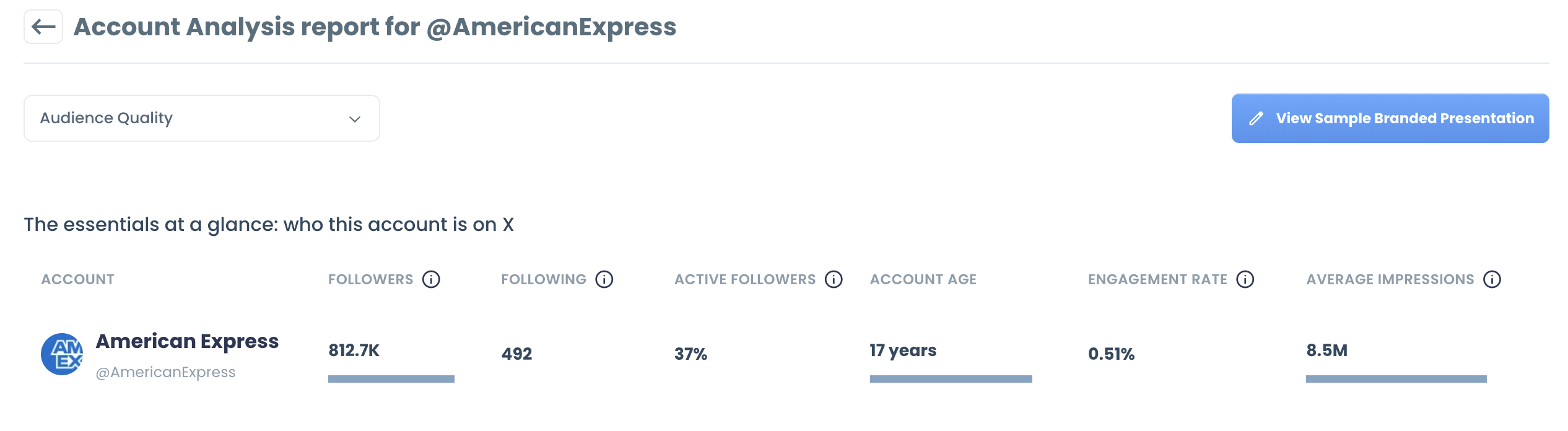
Every analysis carries a date and is saved. The account you analyzed today can be read again next month, and the two reports sit next to each other in time.
You can analyze someone's Twitter account with X Account Analysis and follow the steps below as you go.
How to analyze someone's Twitter account with Circleboom
The flow is: start the report on their handle, then read it in the order your question needs. Seven steps, two phases.
Start the report on their handle
- Log in to Circleboom Twitter with your own X account.
- Go to the Followers / Following Management & Analytics menu and open X Account Analysis Report under Analytics.
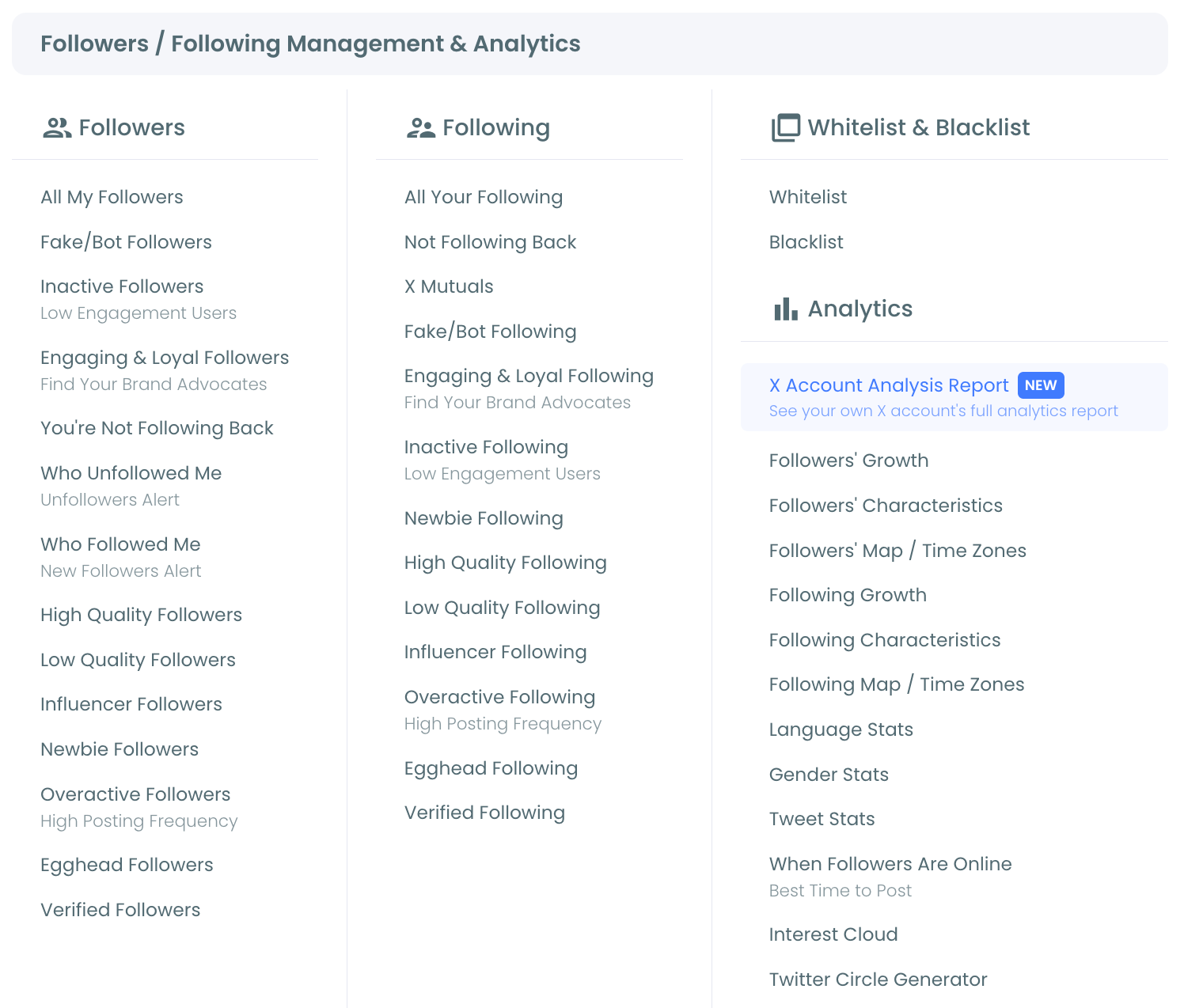
- Type the handle of the account you want to analyze and click Start Account Analyses.
- Choose Just this once for a one-off read, or Keep it up to date every month to get a new dated report on the same account each month.
Read it in the order your question needs
- Read Audience Quality first for the Human vs Fake/Bot, Active vs Inactive and quality tier splits behind the follower count. The signals behind those labels are the same ones used to check if someone's Twitter followers are fake or real.
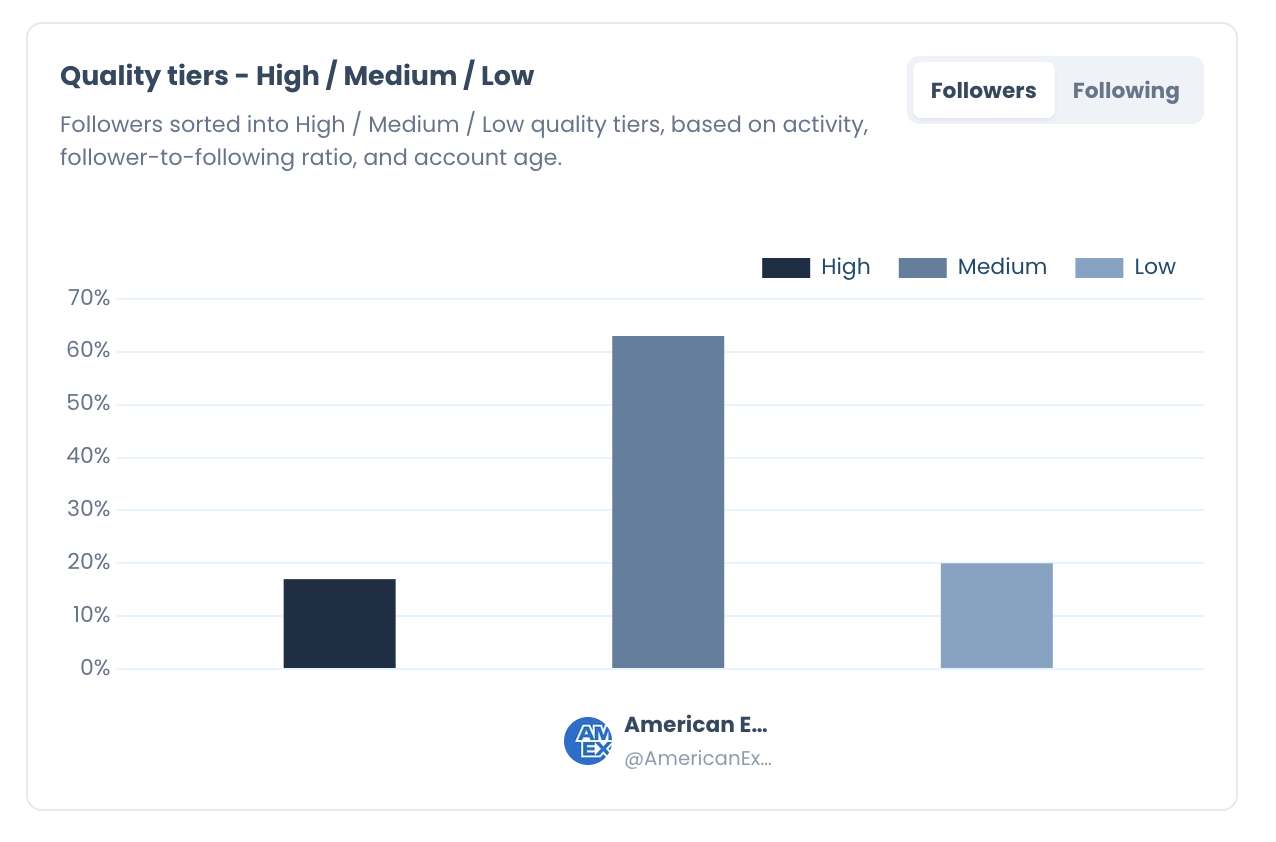
- Flip the Followers / Following toggle to compare the audience the account attracted with the network it chose.
- Read Posting behavior, then the Engagement summary and Top 5 Tweets by Engagements to see how the account works and how its posts land.
Audience comes first because every later number is measured on that audience. A strong engagement rate on a hollow audience and a strong one on a real audience lead to different decisions.
In short: type the handle, start the analysis, read audience, flip the toggle, then read posting and engagement.
Read the follower side against the following side
The single most useful move when you analyze someone's account is the Followers / Following toggle. It switches every Audience Quality and demographics panel between the two lists.
The following list is chosen by the account. The follower list is not. When the two point in different directions, the account is attracting a different crowd from the one it is building toward.
The Audience bio keywords panel shows this quickly. It is a word cloud of the terms that appear most in the bios of the account's followers, and in the Following view, of the accounts it follows.
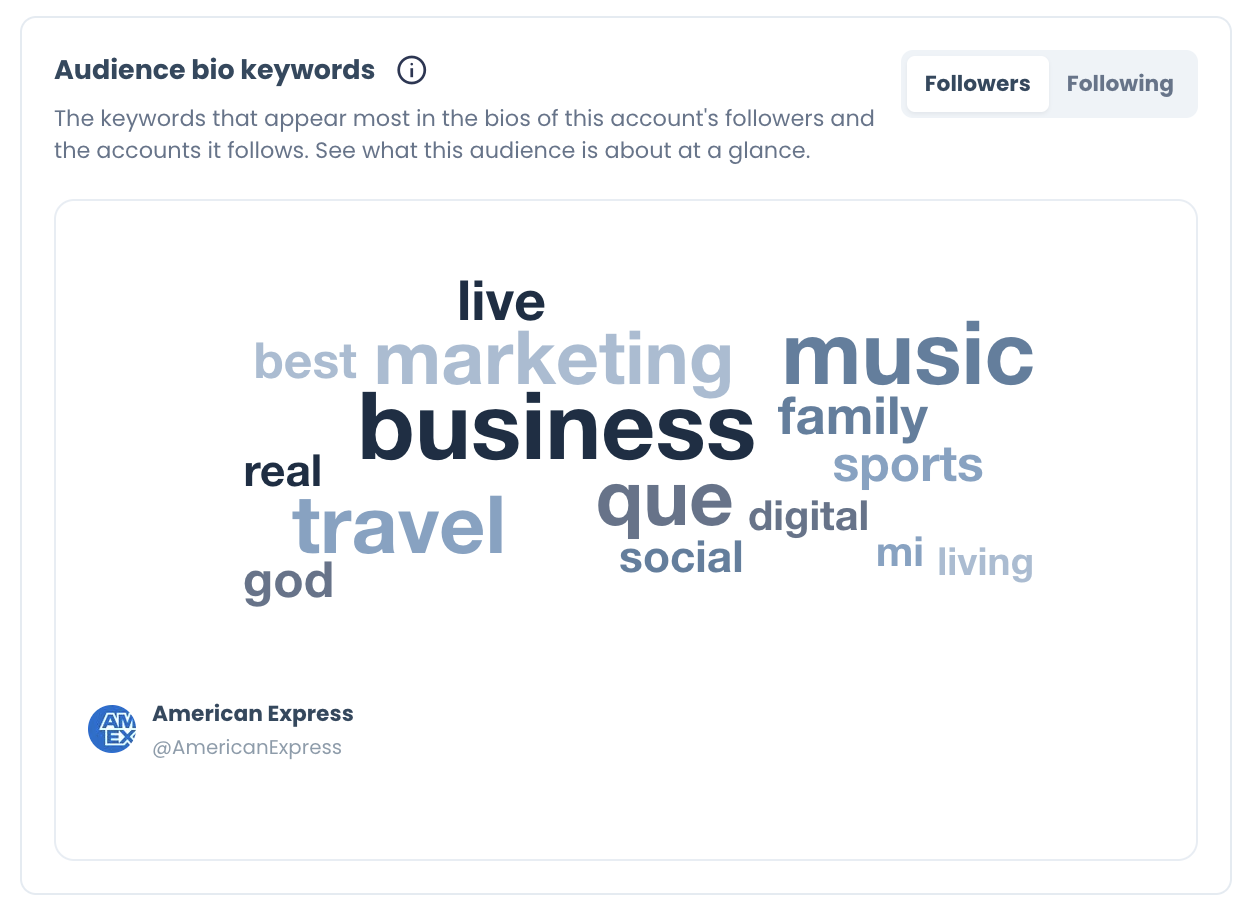
Here is an illustrative case. A founder's following side reads "investor, SaaS, founder, product". Their follower side reads "crypto, giveaway, NFT, airdrop". Same account, two audiences, and only one of them is the one the founder wants.
Bio terms are self-descriptions, not confirmed interests, so treat the cloud as a direction, not a census.
One caution: the contrast needs a following list of some size. An account that follows very few people can show near-empty panels in the Following view, which says nothing about its audience.
If you want the raw lists instead of the report, analyzing someone's followers and following covers that route.
What the posting record says about how they work
Posting behavior is where an account's habits show, and habits predict more than a single good month.
The Posts per day panel puts two bars side by side: Lifetime Average and Last 30 Days Average. A large gap means current output is far from the account's long-run habit, up or down.
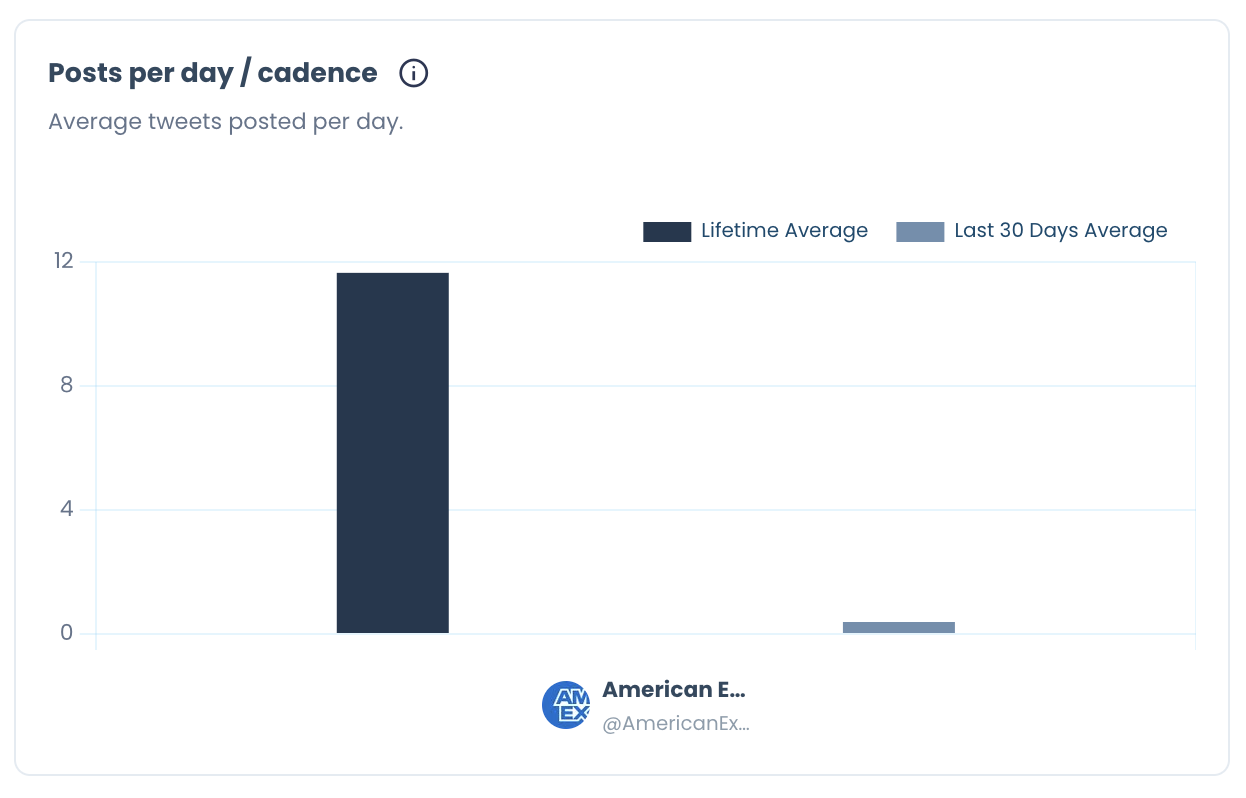
Posting consistency labels the last 30 days as Steady or Burst, with a coefficient of variation in the form "Burst · CV 2.97". A higher value means spikier posting. Bursts can be campaigns or events, so read them with the dates.
The Original / Reply / RT / Quote split shows whether the account broadcasts, shares other people's posts or grows through conversation.
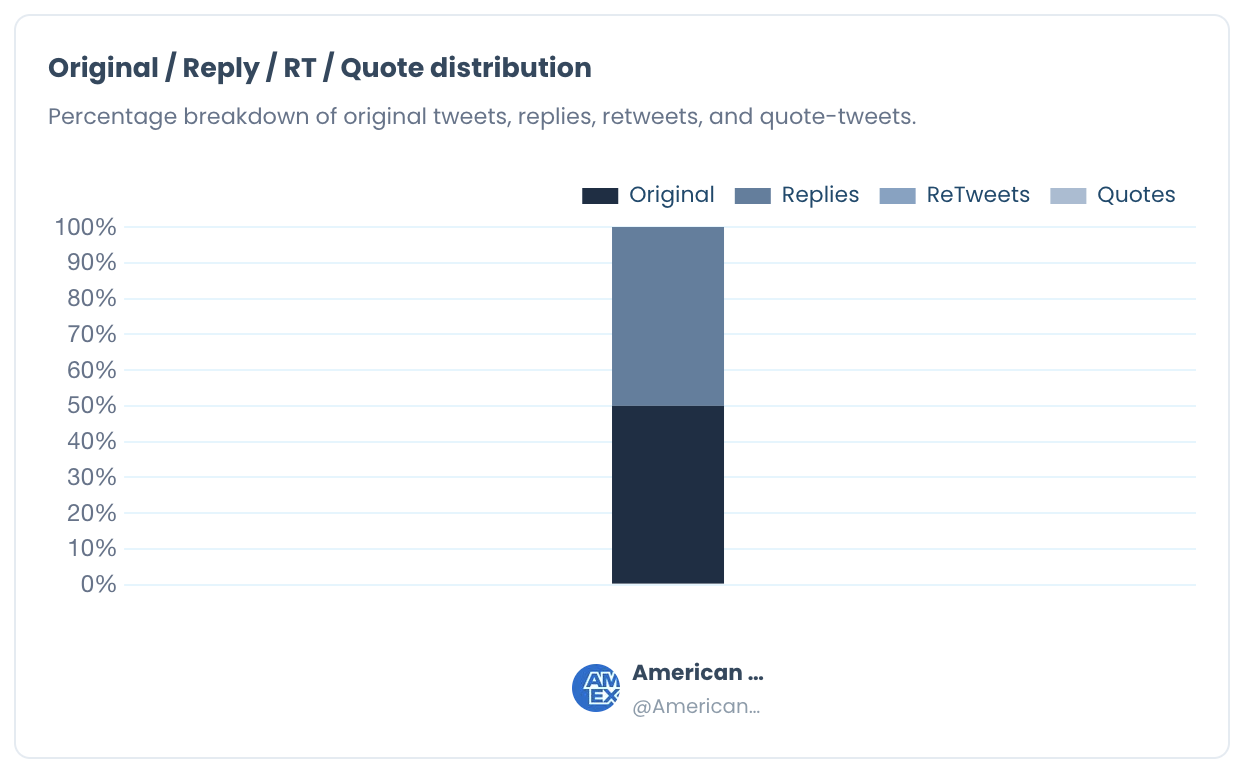
An account that mostly replies and an account that mostly broadcasts are doing different jobs, even at the same follower count.
Neither style is better in general. It matters only against what you want from the account: a partner who starts conversations or one who reliably publishes.
How their posts actually perform, per post
Engagement is the section people jump to first, and the one most often misread. The Engagement summary shows the account's average likes, reposts, replies, quotes, bookmarks and total engagement per post over the last 90 days, plus an engagement rate calculated as total engagement divided by total impressions.
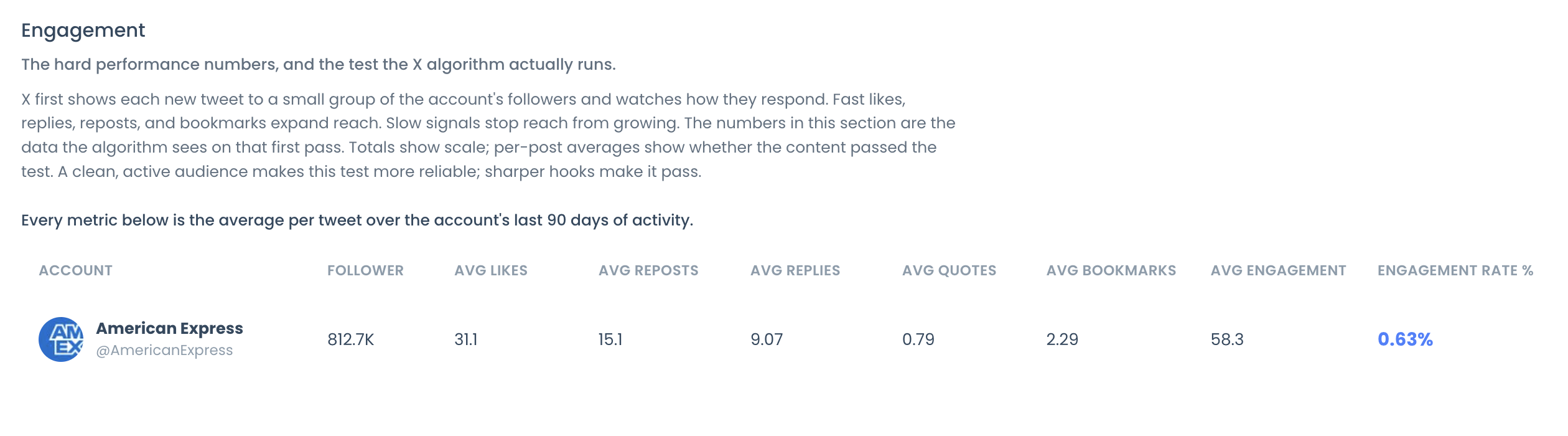
Two checks keep that row honest.
First, compare it with Top 5 Tweets by Engagements. If one post carries most of the total, the average describes that post more than the account.
Second, read the rate against the Impression/Views charts for the same months. A high rate on very few impressions is a small denominator, not a strong account.
Per-post averages tell you about the account; monthly totals mostly tell you how often it posted.
The benchmarks in what a good engagement rate on Twitter looks like give you a frame for the number, and the same impression-based logic applies to any account you look up.
When the person is a rival rather than a partner, the questions shift toward content and timing, which is the angle in how to analyze your competitor's Twitter account.
When one report on one account is not enough
A single report answers "what is this account like today". Some decisions need a little more:
- The same account over time. The monthly plan builds a dated history, which turns "they seem to be growing" into something you can check.
- Several accounts at once. Put them side by side in X Competitor Analysis, which reads your account and your competitors in one report.
- Shared followers between two accounts. Compare X Accounts shows the followers they have in common.
- Follow activity as it happens. Track Someone's X Account alerts you to recent follows, unfollows and follower changes, which is how you see someone's recent following activity on Twitter without checking the profile every day.
Most people need only the first one. The others exist for the moment a single report raises a second question.
Which reading fits why you looked them up
Your next step depends on why you opened the account in the first place:
- If you are vetting a partner or influencer, read Audience Quality and Geography first, then the Engagement summary.
- If you are researching a prospect before a pitch, read Posting behavior and Content type and format, and save the report as the baseline if the deal closes.
- If you are watching a competitor, read the leaderboard and posting record, and put the account on the monthly plan.
- If you are checking a candidate or a new contact, read the essentials row and Audience Quality, and leave it there.
The report is the same in every case. Only the order you read it in changes.
→ Analyze someone's Twitter account before your next decision
A handle is enough to start
A profile visit gives you the account's own presentation. A report gives you its audience, habits and results, with a date on them.
Circleboom reads that evidence for any public handle, from records retrieved by an Official X Enterprise Developer. Decide what you want to know, then read the section that answers it.
→ Run X Account Analysis on someone's X account
Analyzing someone else's X account: common questions
Do I need the person's password or permission to run the report?
No. You type the handle, and the account does not need to be connected to Circleboom. The report reads the account's public records through X's official API.
Can I see their link clicks or profile visits?
No. X keeps link clicks and profile clicks private to the account owner. If you need them for a partnership, ask the person to share screenshots from their own analytics.
Can I keep a record of how the account changes?
Yes. Choose Keep it up to date every month, and each month adds a new dated report you can read against the earlier ones.
Can I share the analysis with my team?
Yes. Create Your Presentation turns the report into a branded export with its date, ready to attach to a brief or a pitch.