

X is still one of the best places on the internet.
You can open your timeline and instantly find:
- experts sharing real insights,
- creators posting genuinely funny content,
- niche communities talking about anything you’re into,
- breaking news faster than most platforms.
But there’s another side of X that keeps getting worse.
AI-slop accounts. Bot accounts. Spam profiles that tweet nonstop, follow you out of nowhere, reply under every post, and slide into your DMs like they own the place.
 Altug Altug
And the worst part?
They don’t just exist. They actively try to attach themselves to your account.
So if you’ve been wondering how to stop unwanted followers from messing with your experience on X, this is the cleanest solution:
Block them. And do it at scale.
The “Unwanted Follower” Problem on X Is Bigger Than It Looks
At first, spam followers look harmless.
It’s just another random follow notification. Another weird reply. Another “Hey mate, check this out” DM.

But after a while, the pattern becomes obvious.
You’re not dealing with real people.
You’re dealing with accounts that are designed to:
- farm engagement,
- push shady links,
- bait you into DMs,
- comment generic nonsense under tweets,
- inflate their presence by attaching themselves to active users.
These accounts don’t add value to your timeline.
They exist to extract value from it.
What Do These Spam/Bot Followers Usually Look Like?
Most unwanted followers follow the same profile template.
Here are common signs:
- Low-effort profiles: no real bio, no real personality, random emojis
- Weird usernames: random letters + numbers, generated-looking handles
- Nonstop posting: dozens of tweets every day, often copied or AI-generated
- Generic replies: “Great point!” / “So true!” / “This is amazing!” under everything
- Suspicious behavior: follow you → immediately DM you
- Follower/following imbalance: following thousands of people with almost no followers
Sometimes they’re obvious.
But sometimes they look almost normal, which is what makes the problem annoying.
Because that leads to the next issue…
 Arif Akdogan
The Hazards of Keeping Fake and Bot Followers Around
This isn’t just about your follower count looking messy.
Unwanted followers create real problems, especially as your account grows.
1) They pollute your replies and mentions
One good tweet can turn into a comment section full of spam.
And when real people show up, the conversation gets buried.
2) They fill your DMs with junk
Scam links. Fake collaboration offers. “Investment opportunities.”
If you’re unlucky, it turns into impersonation attempts or phishing.
3) They mess with your engagement quality
Even if bots don’t engage much, they distort what’s happening on your account.
You start seeing activity that doesn’t represent real human interest.
4) They make your account look low-quality
This one hurts silently.
When someone visits your profile and sees spammy replies everywhere, it changes how your account feels—whether you like it or not.
5) They waste your attention every single day
This might be the biggest cost.
You didn’t join X to play “spot the bot” every morning.
Why Blocking Is the Best Way to Get Rid of Them
If you want the cleanest solution, blocking is the move.
Because blocking isn’t just hiding the problem.
It shuts it down.
When you block someone on X:
- they can’t interact with you,
- they can’t reply to your posts,
- they can’t DM you,
- they basically disappear from your account’s ecosystem.
It’s a hard boundary.
And that’s exactly what spam accounts deserve.
The Only Problem: Manual Blocking Is a Nightmare
Blocking works.
But doing it manually is where most people give up.
Here’s the reality:
The hardest part isn’t blocking…
It’s detecting who’s actually fake.
Because to do it manually, you have to:
- click profiles one by one,
- check their content,
- judge if they’re real,
- decide,
- block,
- repeat… endlessly.
And even if you block 20 accounts today, you’ll probably get new ones next week.
So unless you want to waste hours on this, you need a better workflow.
The Real Solution: Detect → Review → Mass Block
The smart way to handle this is simple:
- Detect spam/bot followers automatically
- Review the list quickly
- Mass block them in bulk
This is exactly why I use Circleboom Twitter.
How I Block Fake & Bot Followers in One Click With Circleboom Twitter
Circleboom Twitter is an official X Enterprise developer, and it’s built for exactly this kind of follower management problem.

Instead of forcing you to guess who’s real or fake, Circleboom:
- analyzes your followers and followings,
- identifies suspicious and bot-like accounts,
- and lets you take bulk actions (like mass block) instantly.
So you’re not manually cleaning one profile at a time.
You’re cleaning your audience like a system.
Step-by-Step: How to Mass Block Unwanted Followers with Circleboom Twitter
Here’s the full process from start to finish.
Step #1: Go to your Circleboom Twitter dashboard.
If you don’t have an account yet, sign up — it only takes a minute.

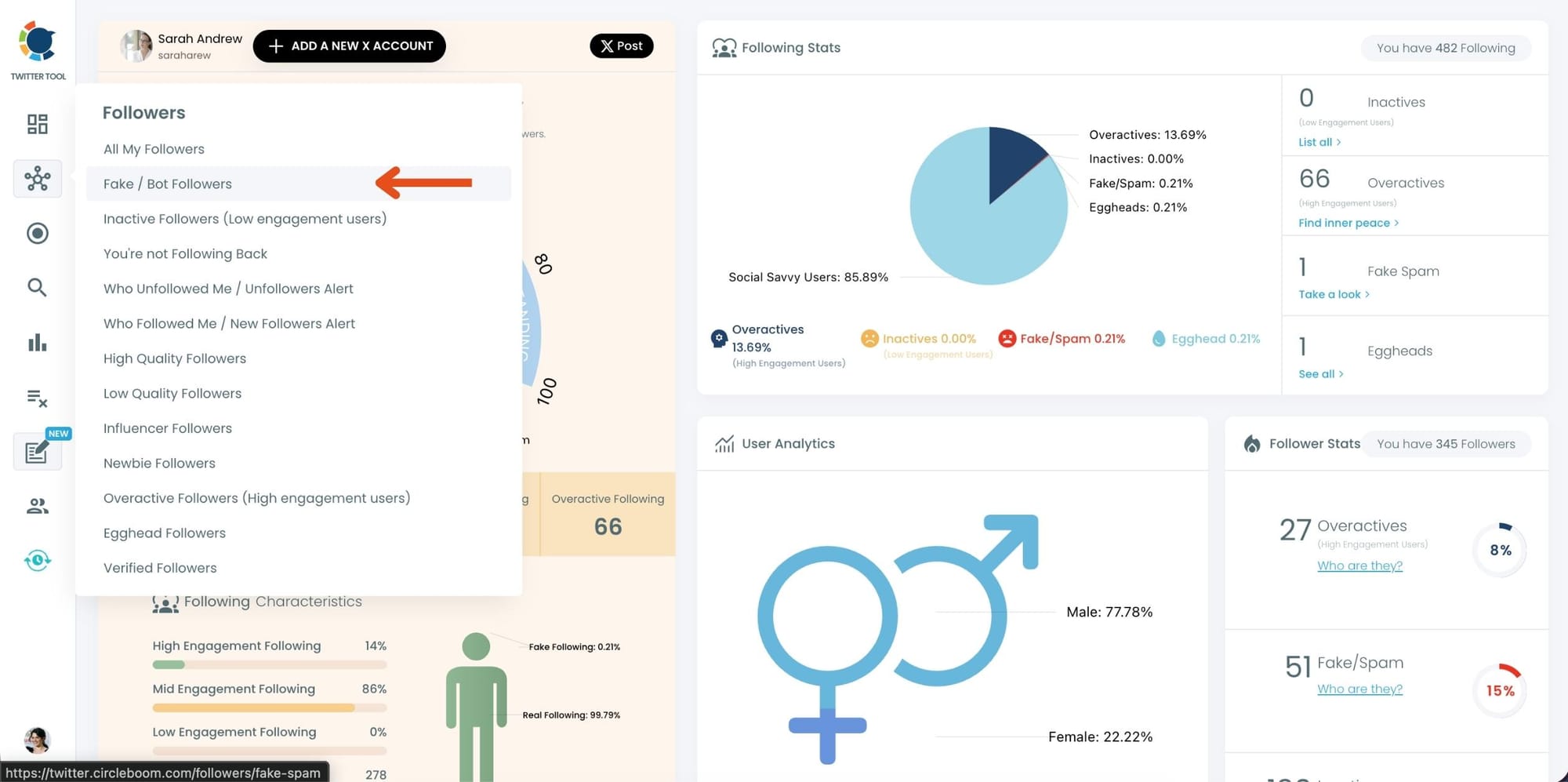
Step #2: From the left-hand menu, hover over “Followers.”
Then, click on “Fake/Bot Followers.”
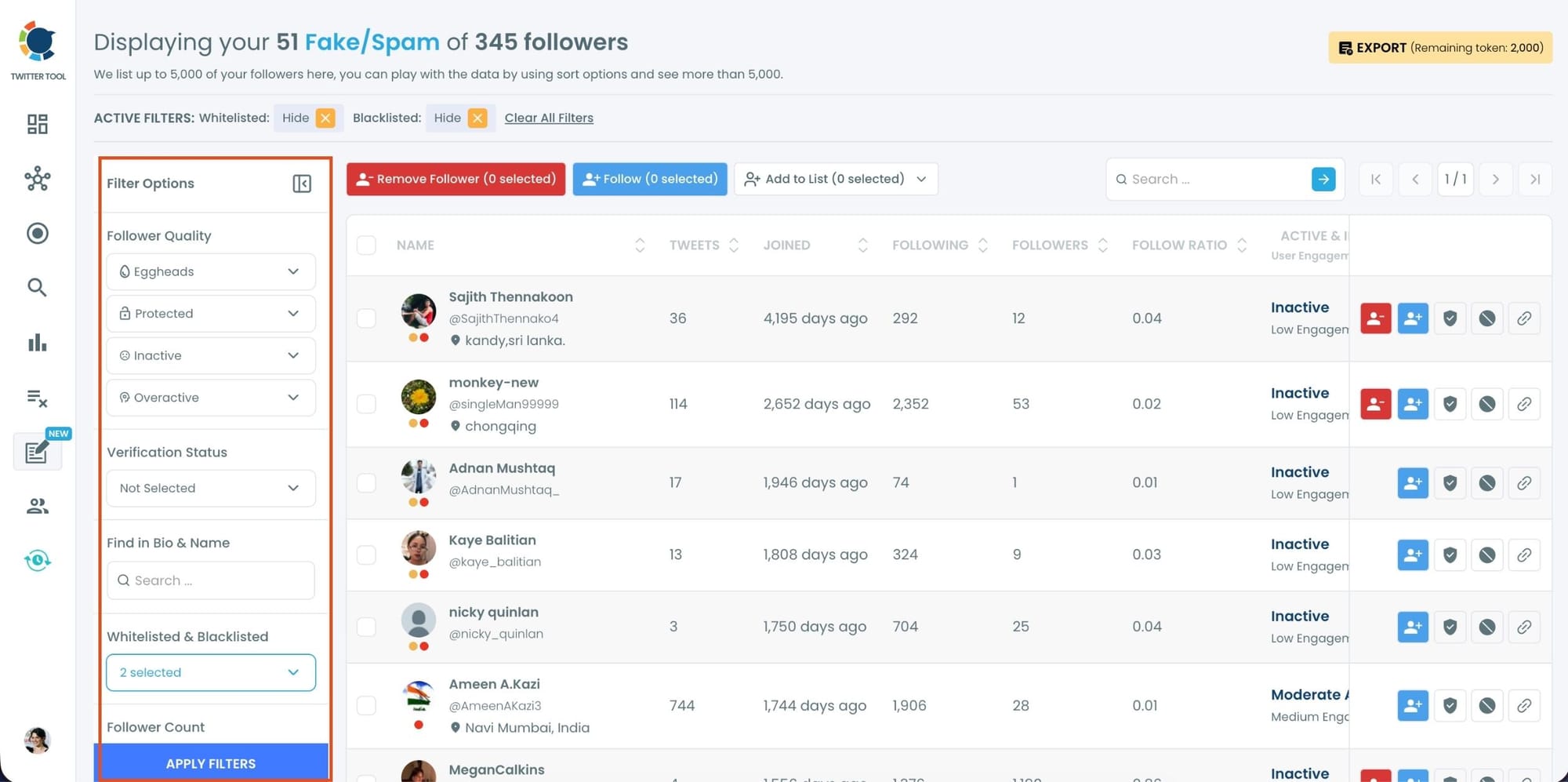
Step #3: Circleboom will automatically analyze your followers and list the ones that look fake, bot, or spammy.
You can also use additional filters to narrow down your results — for example, filter by activity level, profile image, verification, or language.
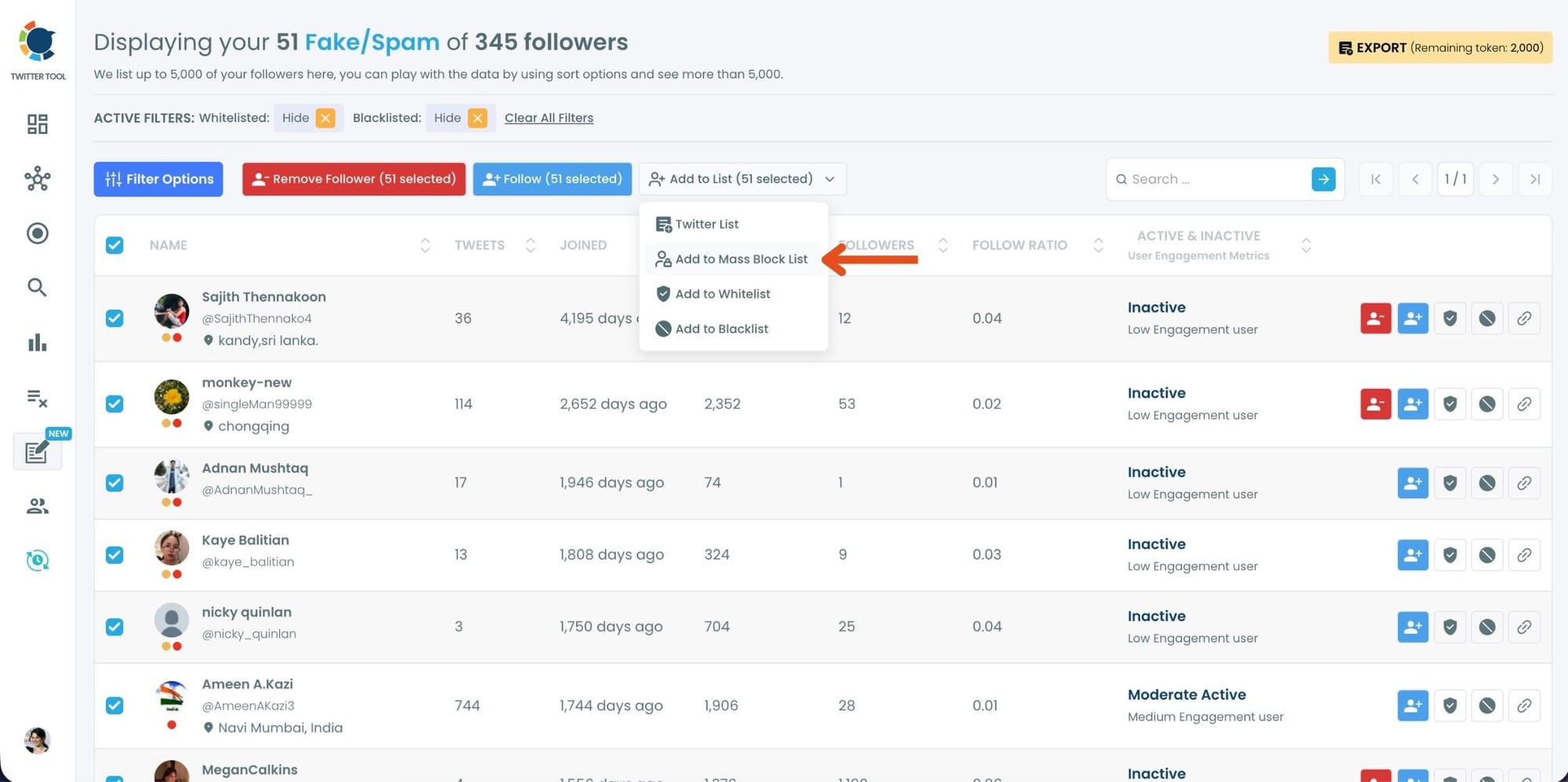
Step #4:After reviewing the list, select the accounts you want to block.
You can choose some or all of them, then click “Add to Mass Block List.”
Step #5: A pop-up window will appear, asking you to download Circleboom’s Twitter Mass Block Extension.
If you haven’t installed it yet, click “click here” to get it.
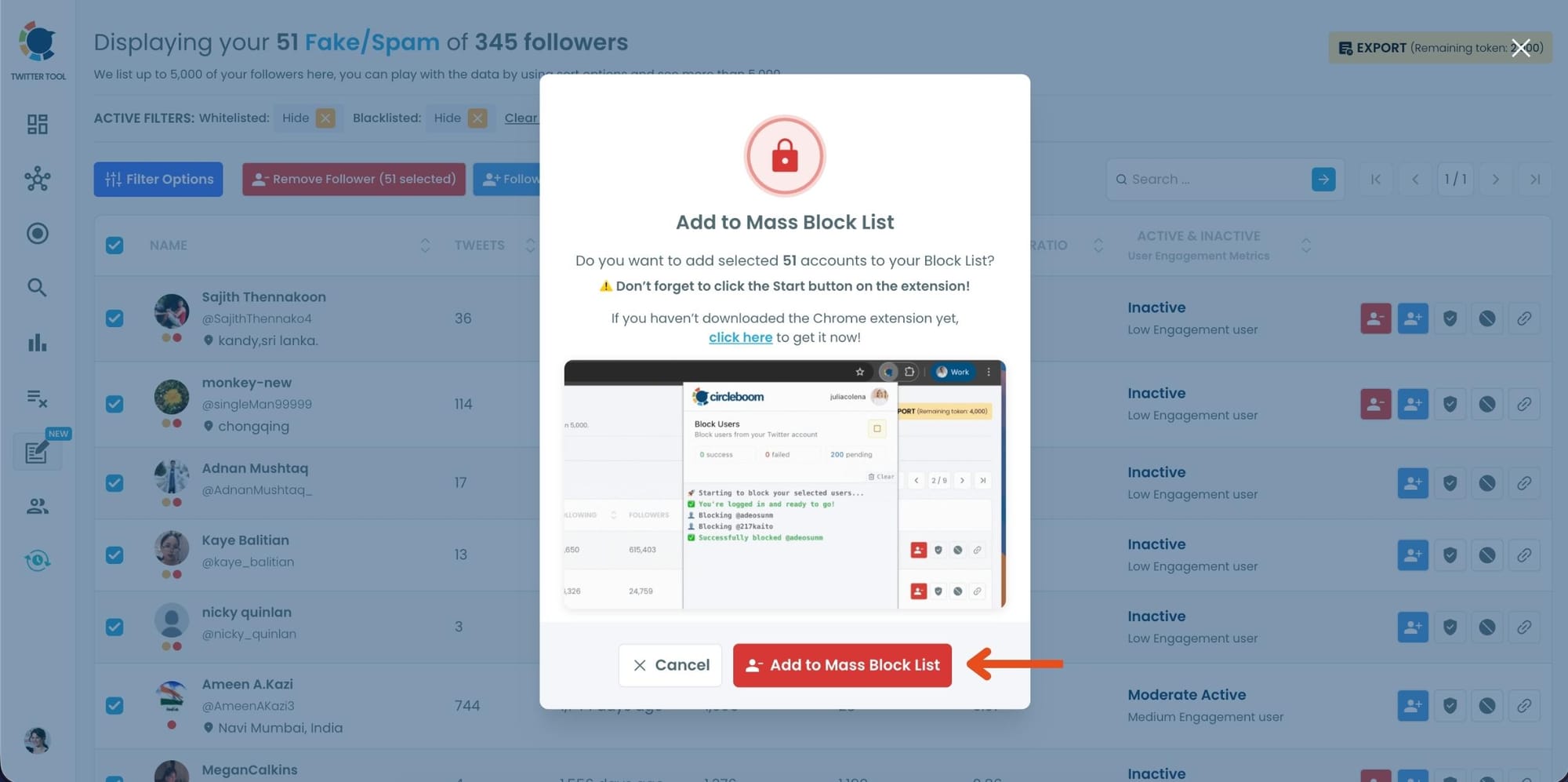
If it’s already installed, just click “Add to Mass Block List.”
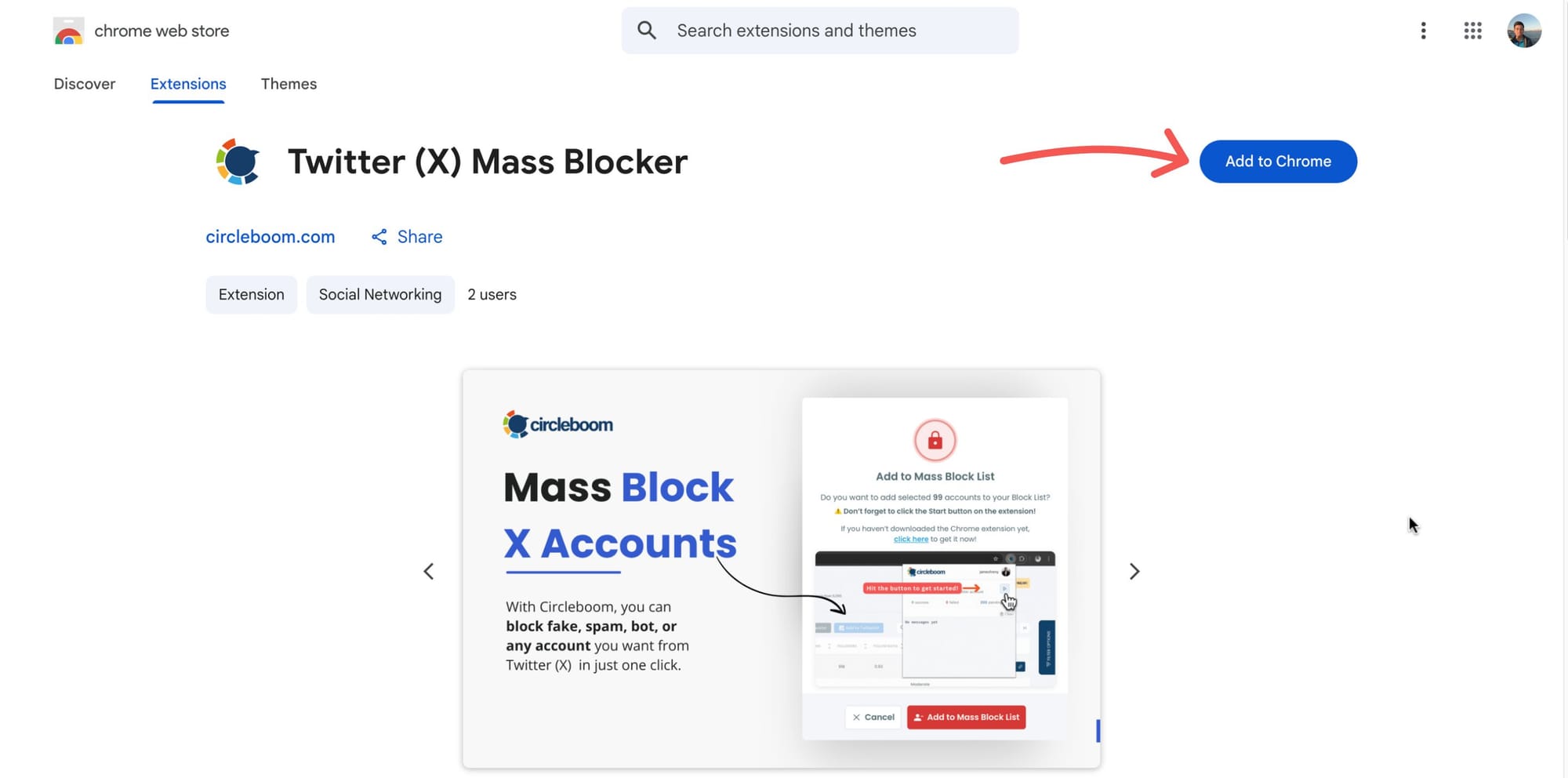
Step #6: You’ll be redirected to the Chrome Web Store.
Click “Add to Chrome” to install the extension.
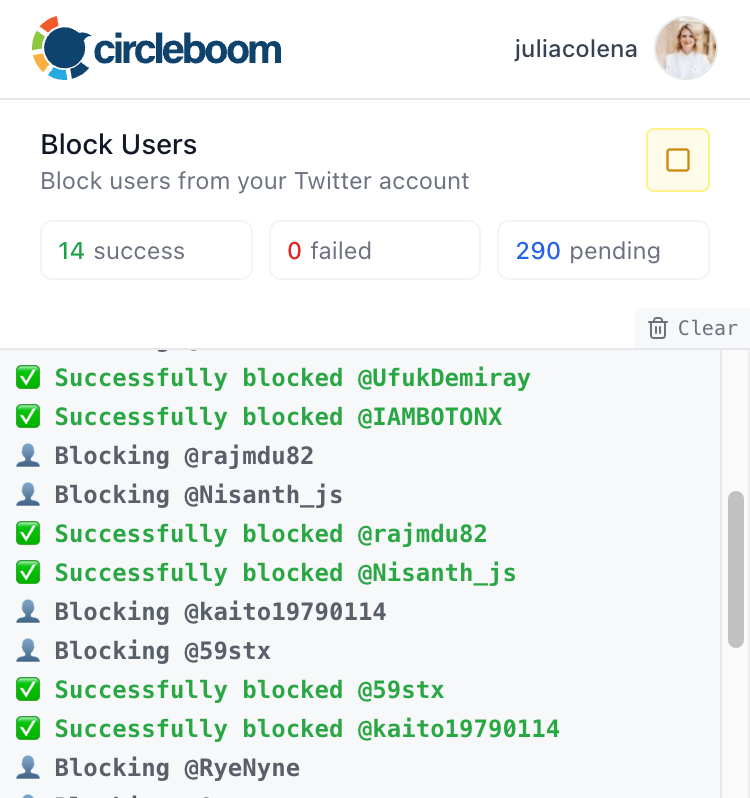
After that, you can start mass blocking, process will continue automatically.
How to Keep Your X Account Clean Long-Term
Blocking once is great.
But if you want to keep your account protected, treat it like routine maintenance.
Here are simple habits that help:
- Do a cleanup after viral tweets
Viral reach often attracts bot waves. - Don’t reply to obvious spam
Engagement is fuel. Don’t feed it. - Make audience hygiene a routine
Even once per week is enough.
Circleboom makes this easy because detection + bulk action takes minutes.
Final Thoughts: Blocking Isn’t “Harsh” — It’s a Filter
Blocking unwanted followers doesn’t make you rude.
It makes you intentional.
You’re protecting:
- your attention,
- your content,
- your real followers,
- and the quality of your experience on X.
And once you stop trying to do it manually, the process becomes effortless.
If your notifications are getting crowded with bots, AI-slop replies, and spam DMs, mass blocking is the fastest way to take control again.
And Circleboom Twitter makes that entire cleanup process simple:
detect them automatically → select → block in bulk → move on with your life.






%20do!)