
Skip the review and a bulk block catches real people along with the scammers. Skip the bulk step and crypto bots on Twitter keep filling your replies faster than anyone can block them by hand.
The fix is a fixed order, and every step below exists to protect the one after it.
What is the safe way to block crypto bots on Twitter in bulk?
Build a source list, filter it, whitelist known contacts, add the remainder to the Mass Block List and start the Chrome extension. Circleboom pulls those lists on X through official X Enterprise APIs and leaves every block for you to confirm.
→ Add reviewed crypto bot accounts to your Mass Block List
Why the order matters when you block crypto bots
Order matters because a block is strong and a bulk block is strong many times over.
The usual mistake is starting with the biggest list available and selecting everything, which treats a scam account's audience as if every follower were guilty.
X itself offers one route: visit a profile, block it, move on. That is safe and far too slow for a coordinated spam wave.
Circleboom on Twitter sits at the other end, turning any public account's followers, or a post's retweeters, into a table you can filter.
Speed is no longer the constraint in that table, which makes selection the risky part.
Each step removes a kind of mistake before the next step can multiply it.
Be clear about one more thing before you start. No filter in the product is labeled "crypto."
The method combines Fake/Bot signals with bio keywords and a manual check, so crypto spam gets caught by how it behaves and what it says.
Mass block crypto bots on X with that expectation and you will read the list properly.
For the broader mechanics, how to mass block followers on Twitter covers the general case.
Does mass blocking work on your phone?
No. Blocks run through the Twitter X Mass Blocker extension, which needs Google Chrome on a desktop computer, so phones and other browsers are out.
Closing the browser or the extension before the queue ends stops the process.
Have these ready before the first search:
- Google Chrome on a desktop, with the extension added from the Chrome Web Store listing.
- A session you can leave open, since a large queue takes time.
- Search tokens, because each follower or following search spends one, and retweeter retrieval spends tokens per tweet URL queued.
Circleboom's page on how to install the Mass Block Twitter X extension walks through the setup.
Check that the publisher reads Circleboom Inc. before adding anything to your browser.
Plan the time as well. Circleboom's average is about 10 accounts per minute, so an illustrative 300-account list takes about half an hour before any pauses.
Start it when Chrome can stay open and undisturbed.
Which action fits crypto bots: block, remove or mute?
Block accounts that are scam, spam or repeatedly unwanted; remove accounts that only lower quality; mute when you want quiet.
Picking the right action first can save you a whole cleanup, because the three do different things to the account.
| Action | Effect on the bot | Reversal |
|---|---|---|
| Mute | Hidden from you, still a follower | Unmute |
| Remove Follower | Leaves your followers, can return | It re-follows on its own |
| Block | Cannot follow, reply or message | Unblock |
The difference between muting and blocking on Twitter is easy to underrate. Muted bots stay in your follower count, so the audience numbers stay inflated.
Remove Follower is the softer tool for accounts that do no harm. It runs through its own extension, separate from the blocker.
Reserve blocking for clear unwanted segments. Inactive strangers usually call for something softer, while a token shill who keeps returning has earned the block.
Choosing crypto words for the bio search
Build the keyword list from your own replies, not from a generic list of crypto terms. Read a handful of the spam replies you want gone and note the words that repeat.
Those words are what this particular wave says about itself, and they will beat anything you guess.
Test each word before you trust it. Run one term, then read the first rows of the result.
If the accounts look real, the word is too broad, so pair it with a poor Follow Ratio or a recent Join Date.
"Token" alone will catch developers and traders. "Token" plus a follow ratio near zero is a far smaller and far stronger list.
When a group stays unclear after that, do not force a decision. Add those accounts to your Blacklist or export them, then come back.
A flagged account costs nothing while it waits, and the Blacklist can feed the Mass Block queue later without another search.
How to block crypto bots on Twitter in bulk
Here's the flow, in order: three stages, each with its own job.
Choose a source list that can contain the bots
- Log in to Circleboom Twitter and connect your X account.
- Navigate to the Essential Toolbox menu.
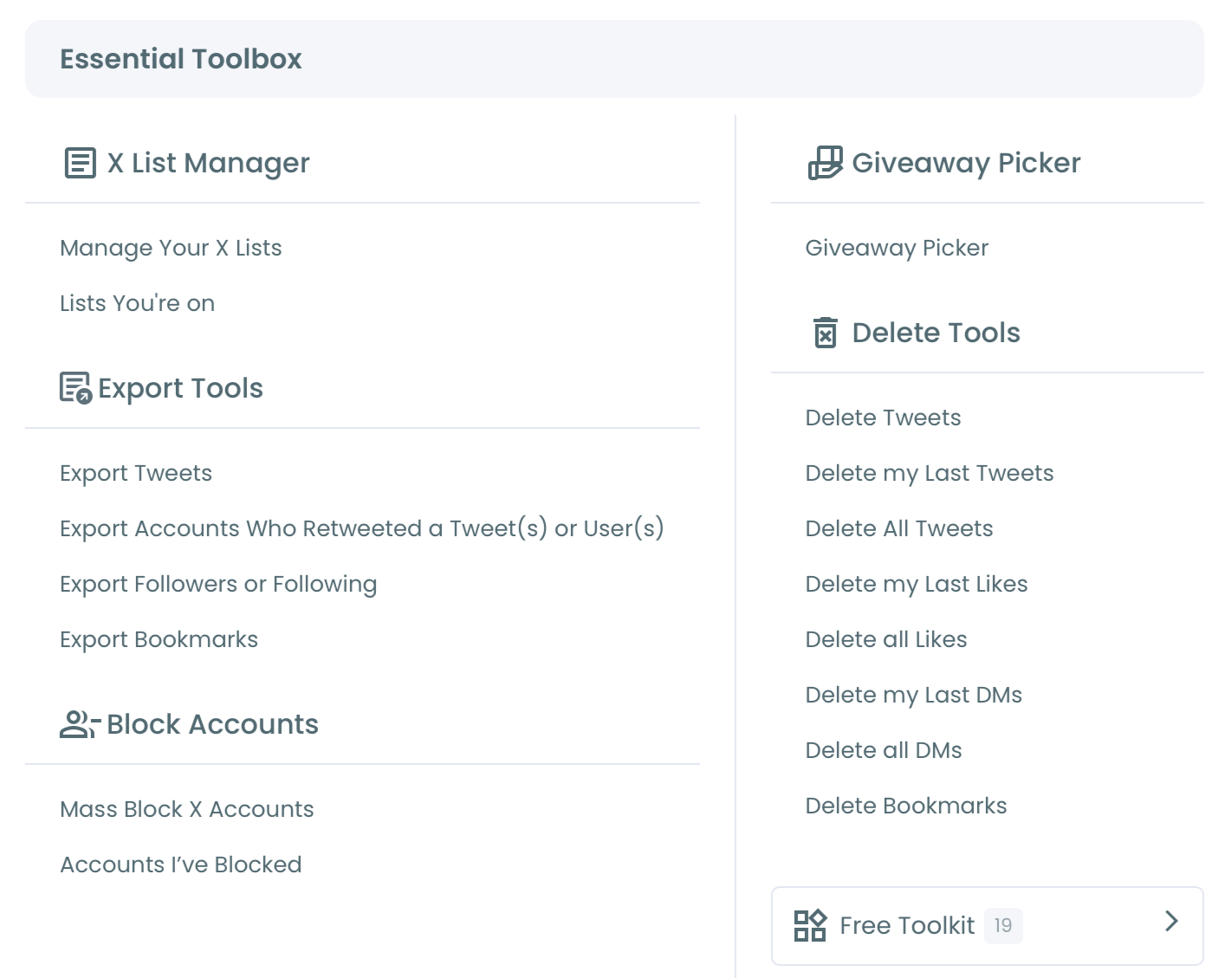
- Open Mass Block X Accounts under Block / Unblock Accounts, select Display Followers or Display Following, enter a public username and run the search. Results display up to 2,500 accounts per search; sort options can expose more.
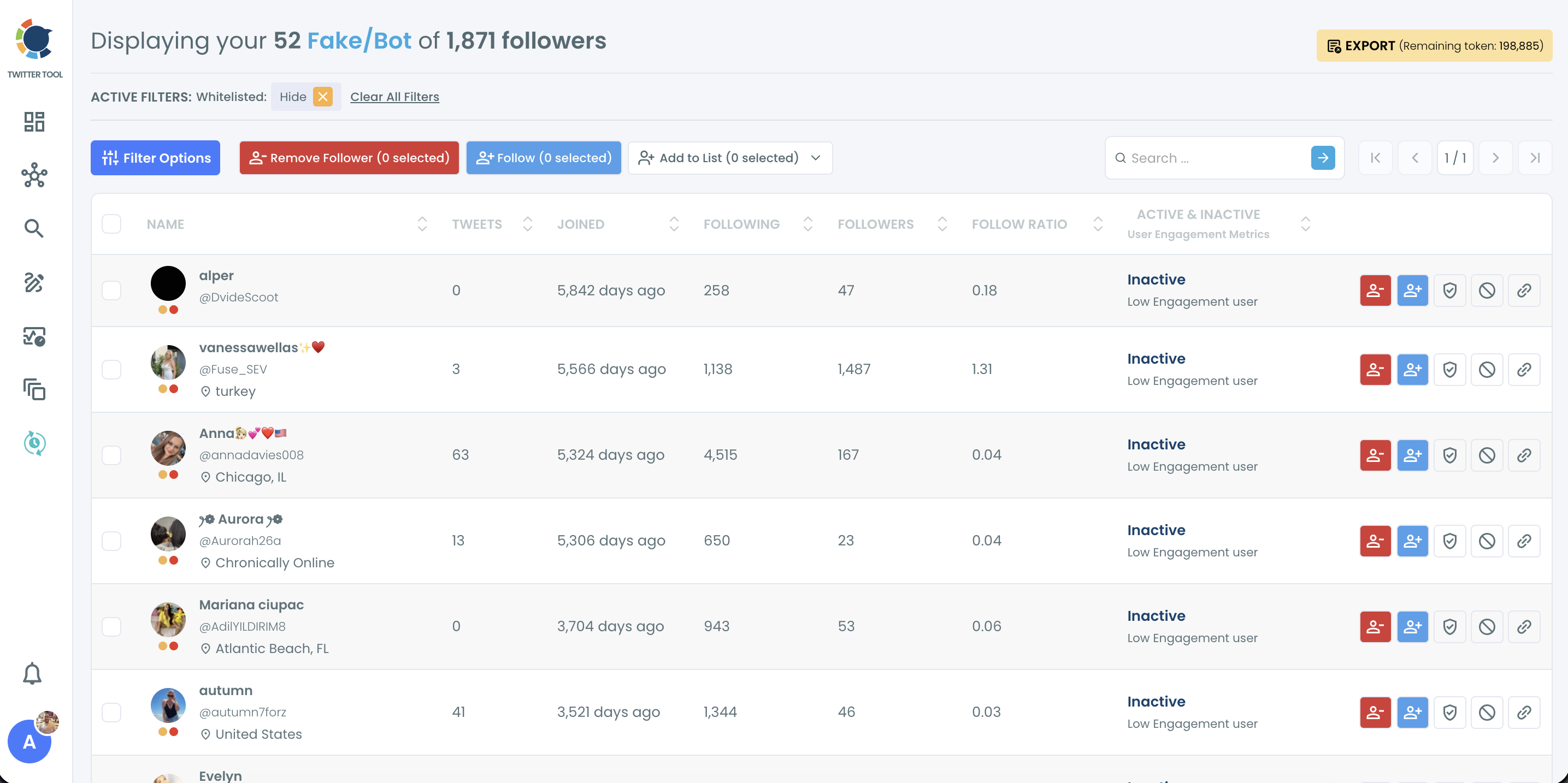
For bots already inside your own audience, start from Fake/Bot Followers instead, under the Followers menu. Its Add to List dropdown has the same Add to Mass Block List option.
Filter and whitelist before anyone gets selected
- Open Filter Options and set Fake/Bot and Eggheads under Follower Quality.
- Add crypto words in Find in Bio & Name, drawn from the spam you see: airdrop, presale, signals. A word match is a lead, not proof.
- Tighten with Follow Ratio and Join Date, since very low ratios and recent accounts are stronger signals together than apart.
- Open a sample of profiles and leave out any contact, customer or partner you recognize. Accounts already on your Whitelist stay out of bulk actions, so whitelist regulars wherever they appear in Circleboom.
One tip for choosing between the two lists. The Fake/Bot Followers panel has Language and Engagement dropdowns, so if a spam wave is in one language, start from that route.
Confirm the list and start the extension
- Select the remaining accounts and click Add to Mass Block List (N selected).

- Open the Twitter X Mass Blocker extension, review the list that appears there and click Start.
- Keep the browser open while the extension blocks accounts one by one.
That sequence holds up because adding an account only stages it, so a mistake caught before Start costs nothing.
Filters cut the list, the whitelist protects people you know, and the pop-up and the Start button each ask for your confirmation.
Quick walkthrough: filtering your followers down to spammy accounts, adding them to the Mass Block List and starting the extension.
The walkthrough starts from All My Followers, one more route into the same list.
Whichever route you use, processing stays gradual: when X's rate limit is reached, the extension pauses for 1 to 20 minutes and resumes by itself.
Those pauses are the safety feature, so resist running extra sessions to get around them, since that risks triggering X's automated restrictions.
Now you have the method. Trust is the remaining question: Circleboom is an official X Enterprise Developer, so the lists you review come from approved access, not scraping.
When the list is ready, you can block crypto spam accounts in bulk from there.
Can you block everyone who retweeted a crypto scam post?
Yes, through the Accounts who retweeted a tweet tab, and it is often the sharper source. A retweeter took an action on that exact post, so the list ties to the scam itself rather than to a general audience.
Paste the tweet URL and click Add Block List. You can queue several posts into the Block Cart, which suits a scam that spread across a few tweets. Then click Get X Retweeters for Blocking and review the table.
Treat the cart's total as an estimate. The total is theoretical, and duplicates, locked, suspended or spam accounts mean the listed number will not always match what X shows.
The same review rule holds. Filter for low-quality, new or Fake/Bot accounts and add only confirmed amplifiers.
A post that reached a broad audience gets real people retweeting it too, sometimes to warn others, so export or sample that list before deciding.
Blocking an account does not tell X about the scam, which is why a separate guide on how to report a Twitter spammer exists for the worst offenders.
What happens if a real person gets blocked by mistake?
The block can be reversed, one selection at a time, but no batch undo exists for a finished run. Reversal has its own feature and its own extension.
The Mass Unblock route works like this:
- Open Accounts I've Blocked / Unblock in the Essential Toolbox and find the account.
- Select it and click Unblock Users, which sends it to the separate Mass Unblock Twitter extension.
- Open that extension and click Start.
Finding the name is the first job. The post on how to find your blocked list on Twitter and unblock in bulk explains that view in more depth.
It also serves as the record of your run, since Mass Block shows no separate summary screen when it finishes.
Prevention is cheaper. Exporting the candidates from the results view, which uses tokens, gives you a dated list from before any block was applied.
That record matters most on a team account, where someone may later ask why a certain name was blocked.
A run can also stop partway. Internet drops or a closed tab can fail individual actions.
The extension's Failed tab lets you block accounts for failed actions with Start All, so no list rebuilding is needed.
What a cleaner reply section gets you
A finished run shows up in three places:
- Replies get quieter, because those accounts can no longer reach you.
- Your follower count drops toward real people, since a block also ends the follow.
- Engagement rate reads more honestly, because bots no longer inflate the audience it is measured against.
Be careful with what you promise yourself, though. Cleanup changes who is in your audience; it does not guarantee more reach.
Treat a run as a repeat job, usually after a viral post or a giveaway, because that is when crypto bots tend to arrive.
A wider Twitter follower audit is the natural follow-up when you want to see what else came in.
For a single account you are unsure about, the fake Twitter account checker gives a second look.
Your crypto bot cleanup checklist
Before you start the next run, confirm these:
- The extension is installed in desktop Chrome and you can leave the browser open.
- Your source is the narrowest list that fits: a post's retweeters over a whole follower base.
- Fake/Bot, Find in Bio & Name and a profile sample have all been applied.
- Known contacts are whitelisted.
- You have checked Accounts I've Blocked once the run ends.
→ Run your reviewed crypto bot block list
Mass Block FAQ for crypto spam cleanup
Can I block crypto reply bots on X that don't follow me?
Only if they also appear in a list, because Circleboom's Mass Block sources on X are followers, following and retweeters. The method to block multiple Twitter accounts needs a list behind it, so block a reply-only bot on its profile and check who it promotes.
Can I block all the followers of a crypto scam account?
Yes, if the account is public: search its username under Display Followers, filter, review and add the confirmed accounts. Circleboom can reach another user's entire follower list, but real people follow scam accounts too, so filter before selecting.