

Scam accounts on X rarely act alone.
Most of them are part of a network. They look very similar, same style of profile, similar bios, similar behavior. The names are different, but the accounts feel almost identical.
And once one of them finds you, others usually follow.
It often starts with a single follow or a DM. Then more accounts from the same network begin to appear. They reply to your tweets, send messages, or try to get your attention in different ways.
I liked a photo accidentally, then suddenly my Chat got filled with OF girls:
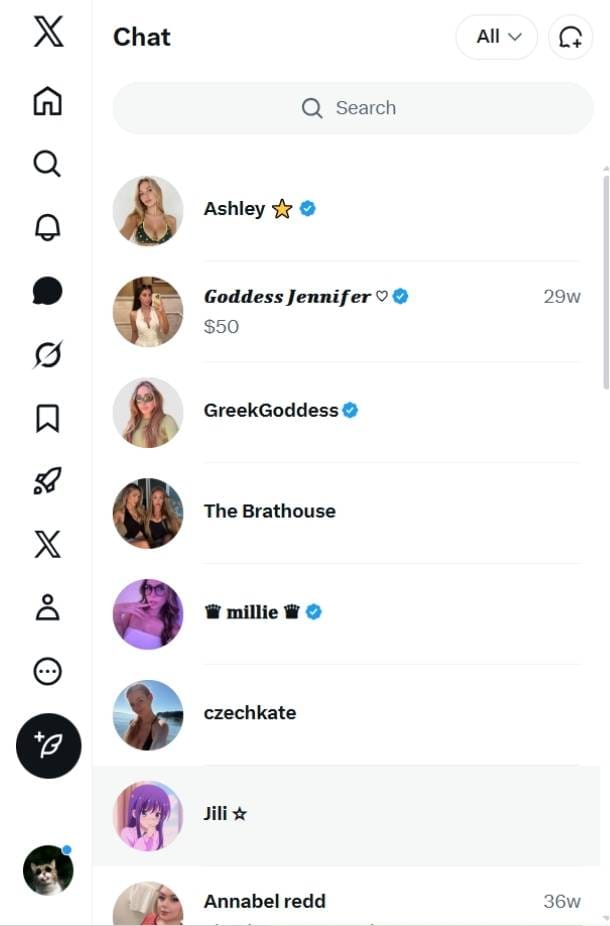
At that point, blocking just one account is not enough.
That’s why I started blocking the entire network instead of individual accounts. And the easiest way to do that was using Circleboom Twitter.
Why Blocking One Scam Account Is Not Enough
Scam accounts usually operate in groups.
They follow each other, interact with the same content, and often target the same users. So when one account reaches you, it’s very likely that others from the same network will do the same.
You might notice patterns like:
- Similar profile photos or no profile image at all
- Repetitive usernames with slight variations
- Very low or very high following numbers
- Strange or generic bios
- Multiple accounts engaging with you in a short time
Blocking one account only removes that single profile. But the rest of the network stays active and can keep reaching you.
That’s why a more effective approach is to identify and block the connected accounts as well.
What Is Circleboom Twitter?
Circleboom Twitter is an official X Enterprise Developer, which means it works directly with X’s official APIs and follows platform rules safely.

Instead of handling accounts one by one, Circleboom helps you work with entire groups of accounts.
With Circleboom Twitter, you can:
🟢 View a user’s full followers list
🟢 View a user’s full following list
🟢 Analyze retweeters of a tweet
🟢 Review accounts with detailed data
🟢 Select and block multiple accounts at once
 infocircleboom.com
This is important because scam accounts usually exist inside these networks. They follow each other, appear in the same lists, and often engage with the same content.
So instead of chasing them individually, you can look at the bigger picture.
How to Block Scam Networks on Twitter (X) with Circleboom Twitter
Here’s exactly how I did it when I wanted to remove an entire toxic and dangerous accounts from my feed:
Step #1: Go to your Circleboom Twitter dashboard.
If you don’t have an account yet, create one — it takes only a minute.

Step #2: On the left-hand menu, scroll down and click on “Mass Block X
Accounts” under the Essential Toolbox section.

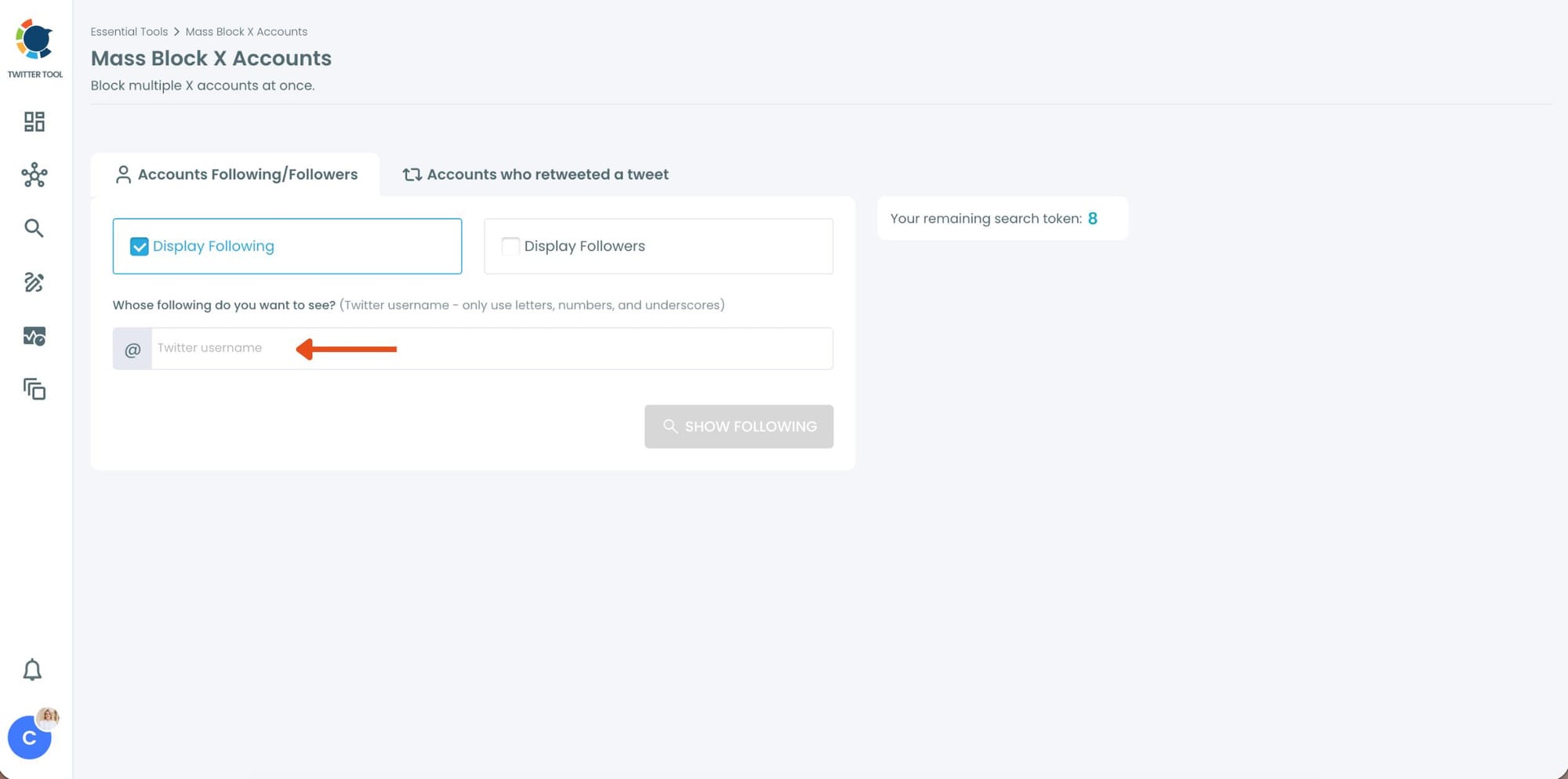
Step #3: You’ll be directed to the Account Search module.
Here, you’ll see two options:
- “Display Followers” → to block the followers of a specific Twitter account.
- “Display Following” → to block the accounts that a specific user follows.
Choose one based on your preference.
Enter the Twitter username of the account whose followers or followings you want to block.
Step #4: Circleboom will instantly list all the followers or followings of that account.
You can browse through the list, review profiles, or directly select all accounts to block them.
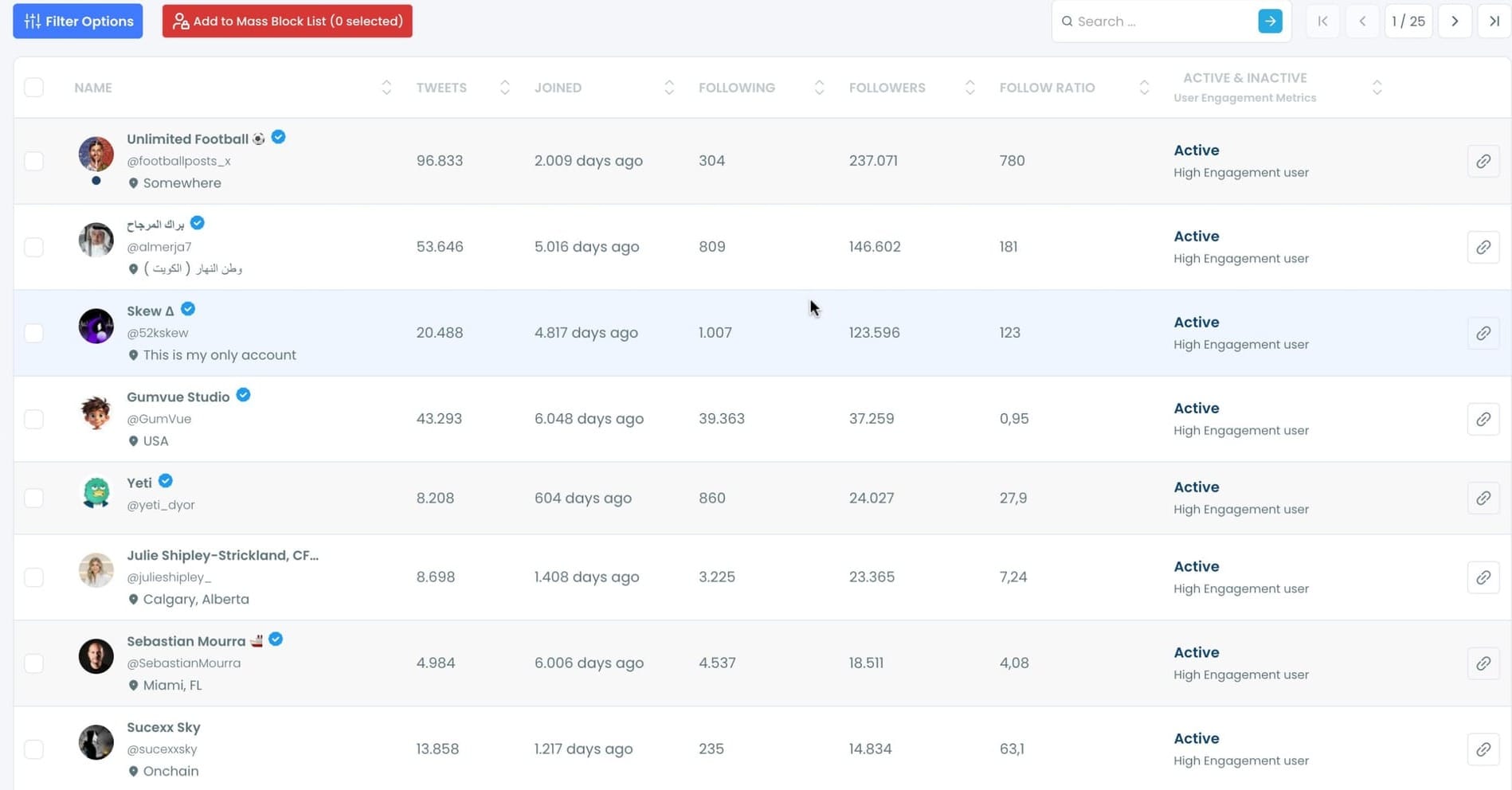
Step #5: Once you’ve made your selection, click on “Add to Mass Block List.”
A pop-up will appear asking you to download Circleboom’s Twitter Mass Block Extension if you haven’t already.
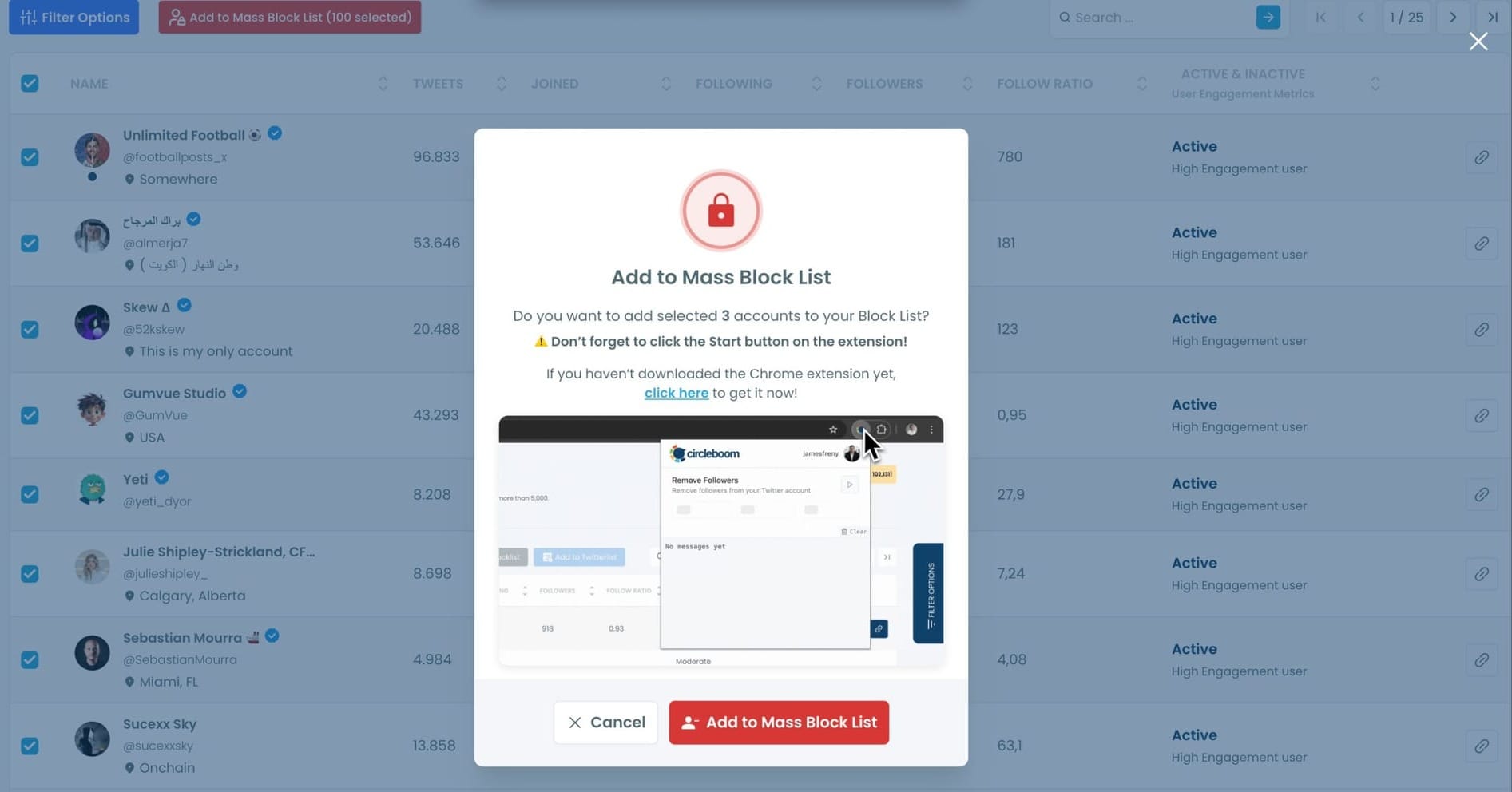
If you already have it, simply confirm by clicking “Add to Mass Block List.”
Step #6:You’ll be redirected to the Chrome Web Store.
Click “Add to Chrome” to install the extension.
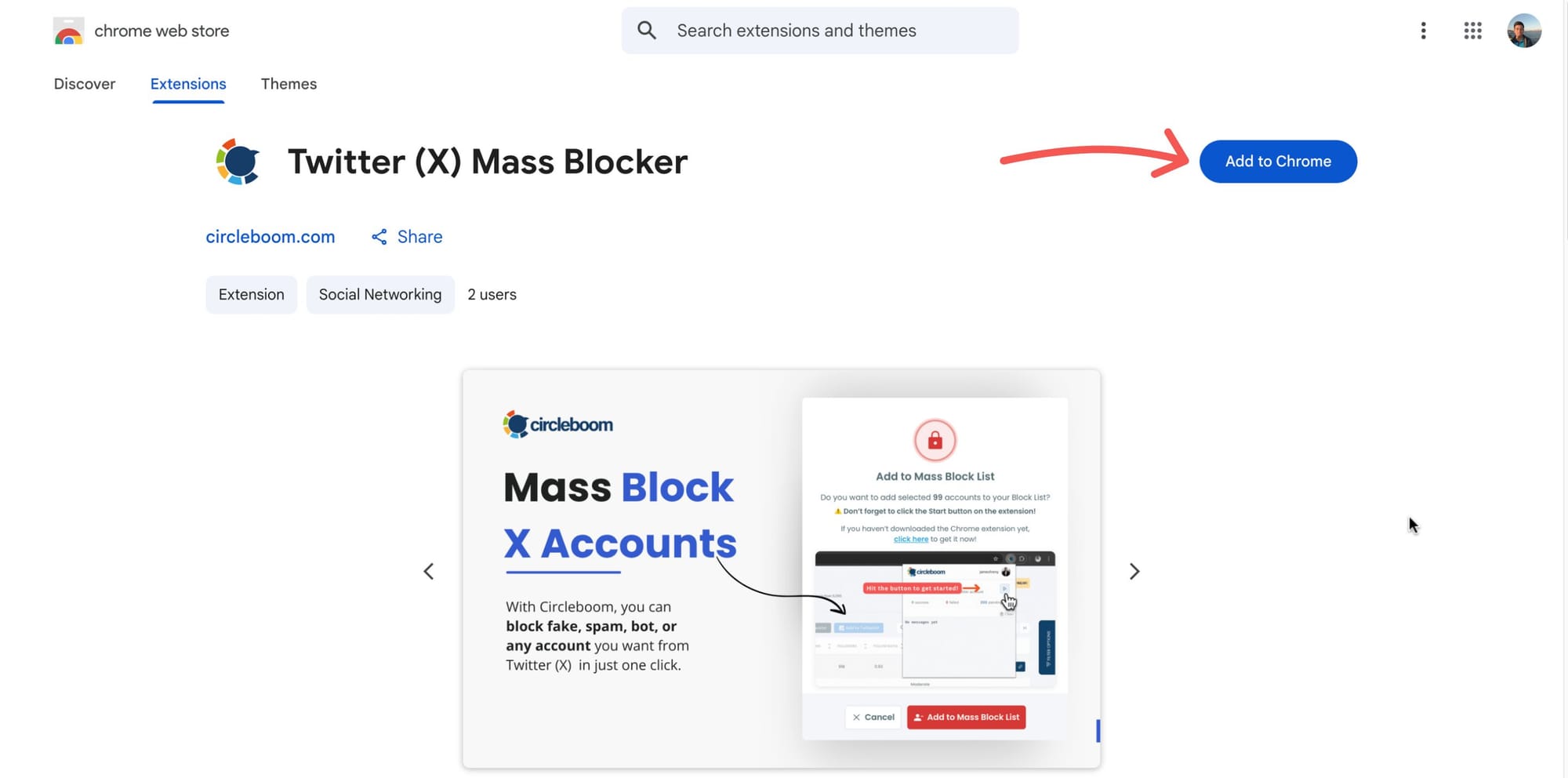
After that, you can start mass blocking, and the process will continue automatically.
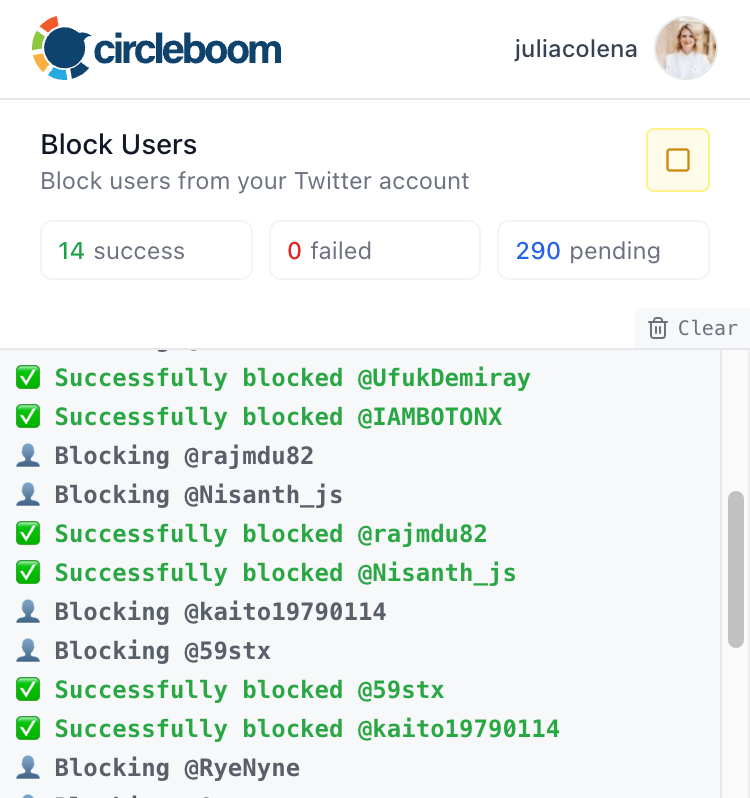
Now you can mass block the followers or followings of any Twitter/X account safely, easily, and in seconds, all with Circleboom Twitter.
How Circleboom Helps You Identify Scam Networks
When you open a suspicious account’s followers or following list with Circleboom, you don’t just see usernames.
You see structured account data.
📌 This makes it much easier to understand what kind of accounts you are dealing with.
You can review things like:
- Activity level
- Follower and following counts
- Profile quality
- Fake or bot signals
- Inactive or overactive behavior
This is where patterns become obvious.
Instead of guessing, you start noticing clusters of accounts that behave in the same way. These are often part of the same scam network.
Harshita Agrawal
How Filters Help You Avoid Blocking Real People
Not every account in a suspicious network is fake.
Some real users might follow or interact with those accounts without realizing what they are.
That’s why filtering is important.
Circleboom Twitter allows you to filter and narrow down the list. Instead of blocking everyone, you can focus on accounts that show clear signs of being fake or bot-like.
For example, you can filter accounts based on quality signals and identify those that look suspicious.
This helps you:
- Avoid blocking real users
- Focus only on problematic accounts
- Clean your account more accurately
In my case, I filtered the list to show fake/bot accounts, which made it much easier to identify the actual scam profiles.
My Experience Blocking a Scam Network
One scam account reached out to me.
At first, I blocked it like usual. But shortly after, similar accounts started appearing. More DMs, more replies, more follows.
Arif Akdogan
That’s when I realized it wasn’t just one account.
I checked the account’s network using Circleboom Twitter. I looked at its followers and following lists, and the pattern was clear. Many accounts looked almost identical.
Then I applied filters to narrow them down and focused on fake/bot accounts.
After identifying them, I blocked all of them at once.
And that was it.
The problem stopped.
Why This Matters for Account Safety
Blocking scam networks is not just about convenience. It directly improves your account experience.
➡️ It helps reduce spam DMs.
➡️ It stops repeated scam replies.
➡️ It prevents new accounts from the same network reaching you.
➡️ It keeps your notifications cleaner.
Most importantly, it saves your time.
Instead of constantly reacting to new scam accounts, you remove the source of the problem.
Conclusion
Scam accounts on X usually work in networks. That’s why blocking one account is rarely enough.
If you want to stop the problem completely, you need to identify and block the connected accounts as well.
With Circleboom Twitter, you can review a user’s followers, following list, or retweeters, filter out fake or bot accounts, and block them all at once.
Instead of dealing with scam accounts one by one, you solve the problem at its source.
)
