

There is a clear moment in the life of a Twitter account when content creation stops being the main challenge.
Ideas are flowing, drafts are ready, and sometimes a full week or even an entire month of tweets is already written. At that stage, the frustration no longer comes from not knowing what to post, but from the process of actually getting that content published.
Uploading tweets one by one feels harmless at first. Each action is small and familiar. However, when this process is repeated over and over again, it slowly becomes the most inefficient part of managing an account.
What should be a straightforward execution step turns into a repetitive task that consumes time, attention, and mental energy. Bulk uploading tweets exists precisely to eliminate this unnecessary friction.
When writing tweets isn’t the problem anymore
As soon as content planning becomes intentional, the way tweets are created naturally shifts. Tweets are no longer written in isolation or at the last minute. Instead, they are produced in batches, often organized by:
- content theme or topic cluster
- campaign or announcement timeline
- posting frequency and audience activity patterns
This is a healthy evolution. It means content strategy is becoming more deliberate. The problem appears when execution fails to evolve alongside planning.
Tweets sit in documents or spreadsheets, fully written and ready, while the act of uploading them remains slow and manual.
At this point, the disconnect becomes obvious. Content is being created at scale, but publishing is still treated as a one-by-one task. The result is a growing backlog of ready content that never quite makes it onto the timeline as consistently as planned.
Why manual tweet uploading does not scale over time
Uploading tweets individually is not inherently wrong, but it does not scale. The process demands repeated attention for tasks that add no creative value. Each tweet requires the same checks, the same confirmations, and the same interface interactions.
When this process is repeated dozens of times, several issues begin to surface:
🔴 cognitive fatigue caused by constant repetition
🔴 increased likelihood of small but impactful mistakes
🔴 a tendency to postpone uploading after partial completion
🔴 loss of motivation once the task feels purely mechanical
These problems do not appear immediately. They accumulate slowly. Over time, manual uploading becomes the reason content plans are delayed, interrupted, or abandoned altogether. Posting becomes inconsistent not because of poor planning, but because execution demands too much ongoing effort.

The moment bulk uploading becomes necessary
Bulk uploading usually becomes relevant at a very specific turning point. This happens when content creation moves away from daily improvisation and toward structured planning. At that stage, uploading tweets individually starts to feel misaligned with how content is actually produced.
This moment often arrives when:
- content is planned weekly or monthly instead of daily
- campaigns require multiple coordinated tweets across days
- more than one X account is managed
- consistency becomes more important than spontaneity
At this point, bulk uploading is no longer a convenience. It becomes a requirement for maintaining the rhythm and structure that planning introduces. Without it, execution remains the weakest link in the workflow.
The tool I use to bulk upload tweets
This is where Circleboom Twitter becomes part of the workflow.

Circleboom Twitter is an official X Enterprise developer, which provides confidence in terms of platform compatibility and long-term reliability. More importantly, it is built around structured content workflows rather than isolated posting actions.
With Circleboom, bulk uploading allows prepared tweets as CVS file to be handled as a group instead of as individual tasks. Content that already exists in a structured form can be uploaded together, reviewed together, and scheduled together.
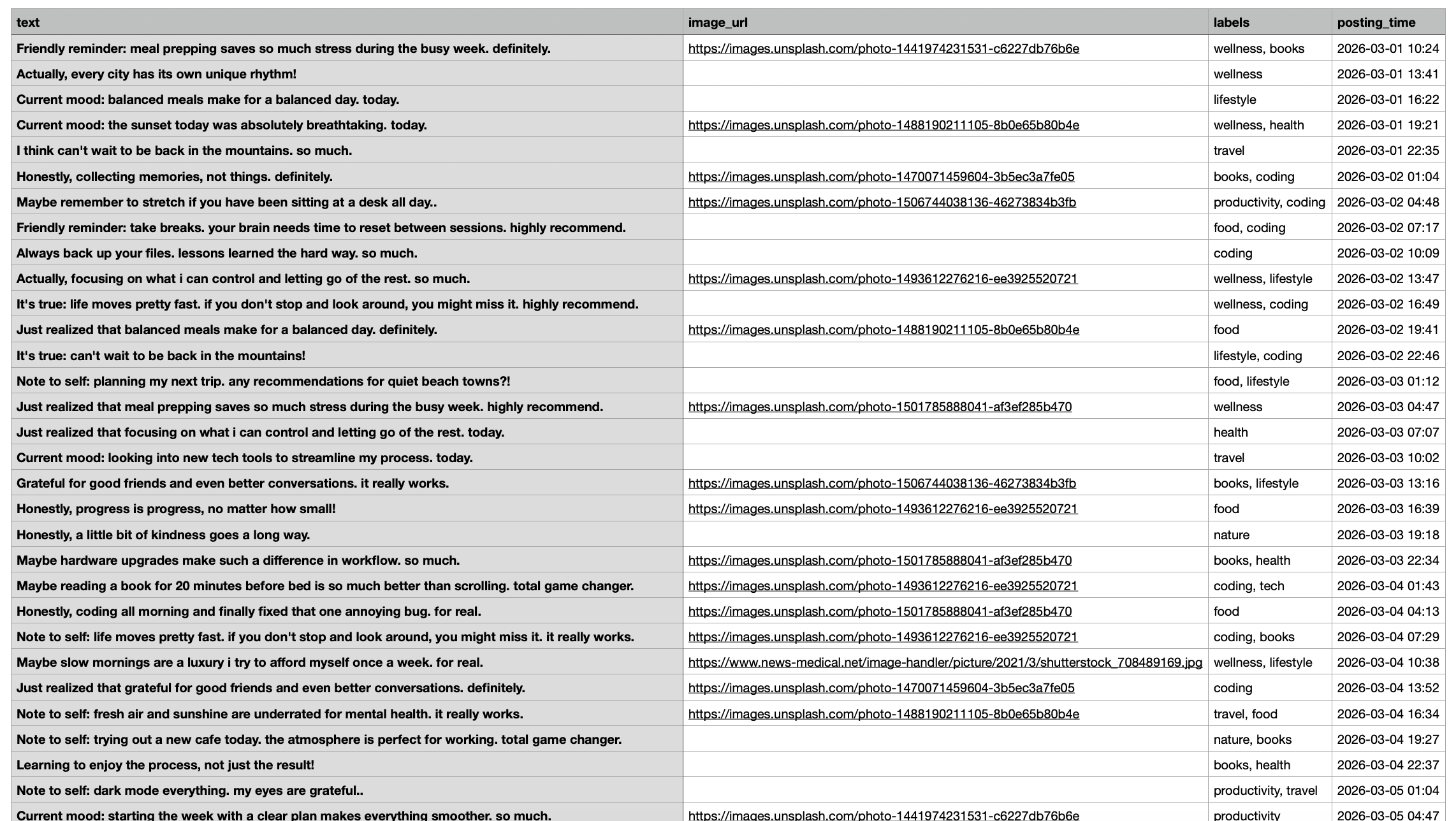
This approach removes the repetitive layer from posting and replaces it with a controlled, intentional process that fits naturally into content planning routines.
Instead of spending time executing the same action repeatedly, attention can shift back to higher-value decisions such as content quality, timing strategy, and overall consistency.
 infocircleboom.com
What bulk uploading tweets actually means in practice
Bulk uploading is often misunderstood as an automated process where control is sacrificed for speed. In practice, it does the opposite. Bulk uploading introduces structure without removing oversight.
Tweets are prepared in advance using a clear, structured format. When uploaded, all content is displayed in a single view, making it easier to:
- review messaging consistency across multiple tweets
- identify formatting or spacing issues early
- adjust timing to avoid overcrowding the timeline
- make improvements before anything is published
This high-level visibility is difficult to achieve when tweets are uploaded one by one. Bulk uploading shifts the focus from reactive posting to proactive management.
How to Bulk Upload Tweets with Circleboom Twitter
Step #1: After logging in to Circleboom Twitter, click Bulk Schule.
This opens the bulk scheduling interface and allows you to import multiple tweets at once instead of creating them one by one.

Step #2: Upload your CSV file
Upload your CSV file by dragging it into the upload area or selecting it from your computer.
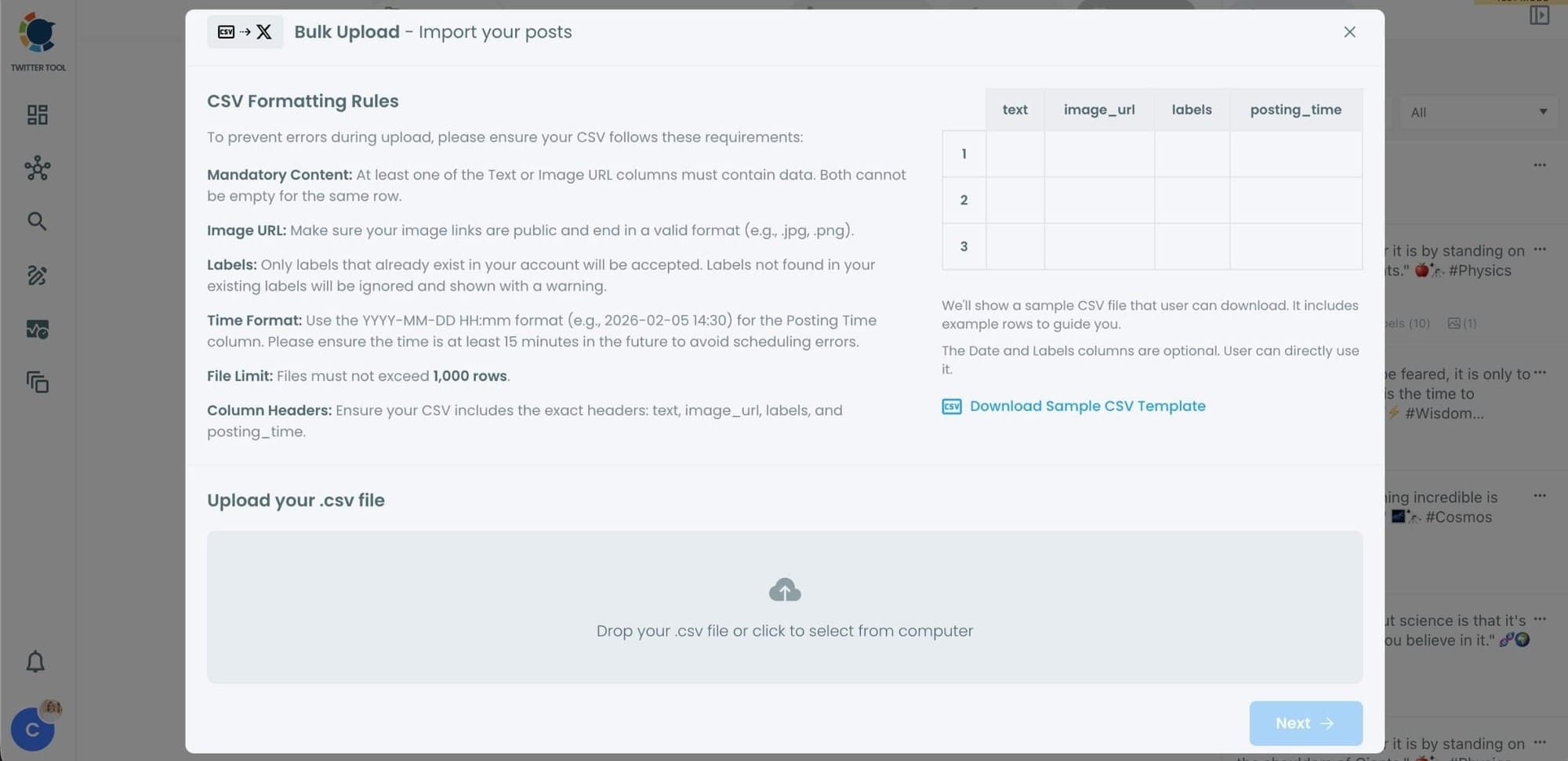
Before uploading, make sure your CSV file follows the required format.
Your file should include the correct column headers, and each row should represent a single tweet.
You can include tweet text, image URLs, labels, and posting times.
Preparing the file in the correct format prevents errors during scheduling.
Step #3: Review your imported tweets
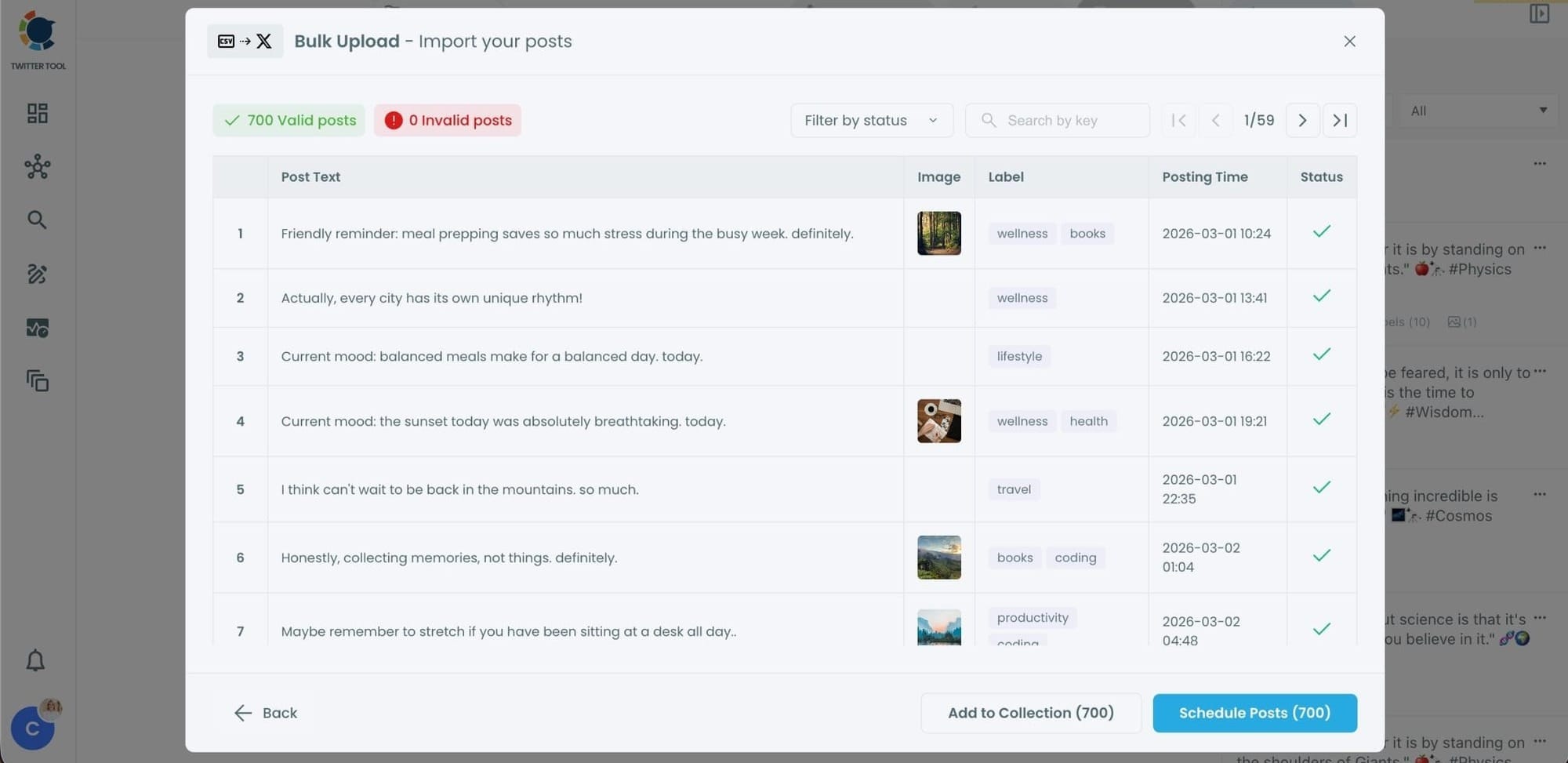
After uploading the CSV file, Circleboom shows all your tweets in a preview list.
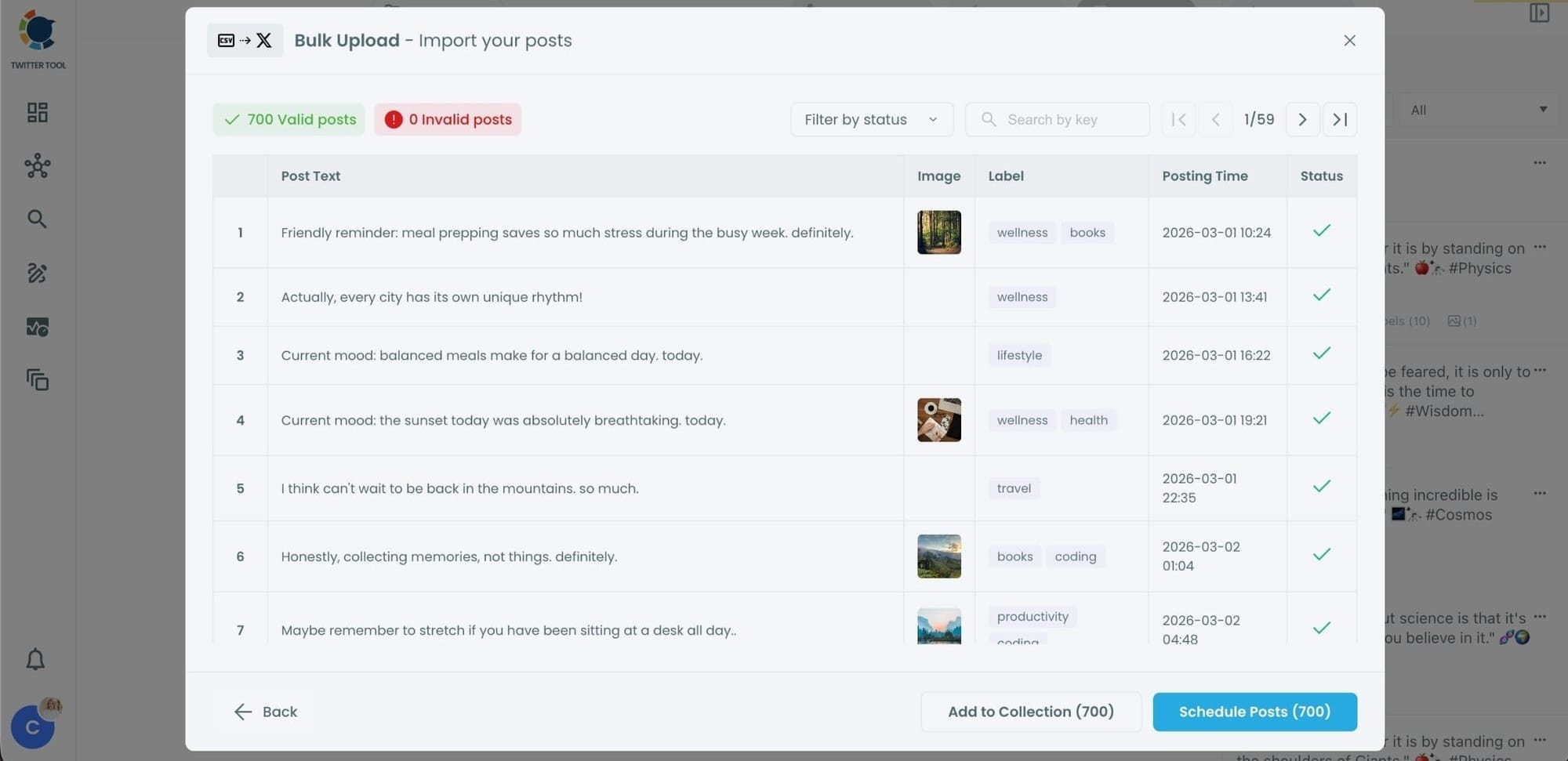
At this stage:
- Valid tweets are marked clearly
- Invalid tweets are shown with the reason for the error
- You can also add tweets to Collections if you want to organize or reuse them later
This step helps you catch and fix problems before anything is scheduled.
Step #4: Schedule all tweets at once
Once everything looks correct, click Schedule Posts.
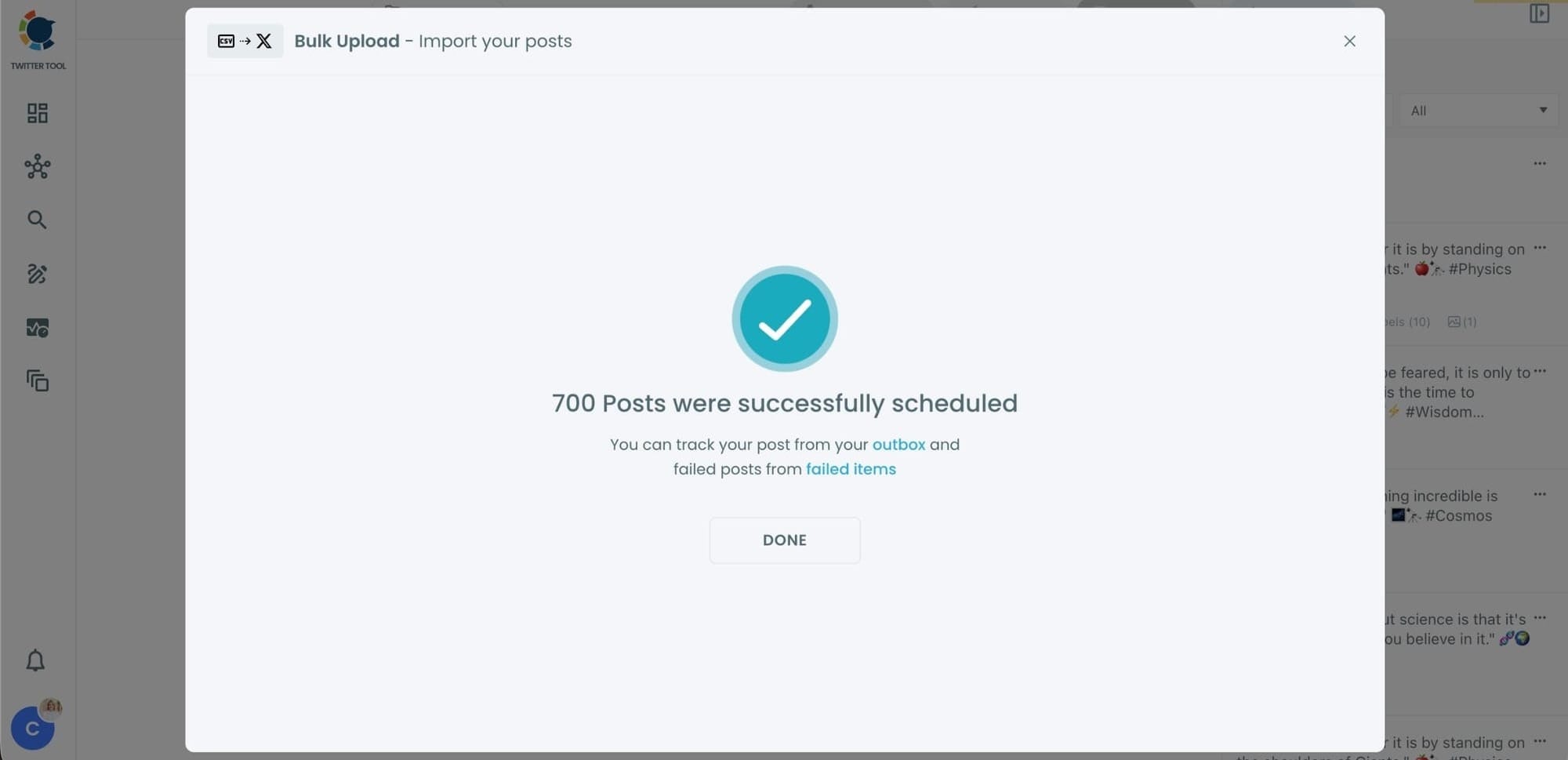
Circleboom automatically schedules all valid tweets based on the posting times in your CSV file.
Even hundreds of tweets can be scheduled in seconds, without manual work.
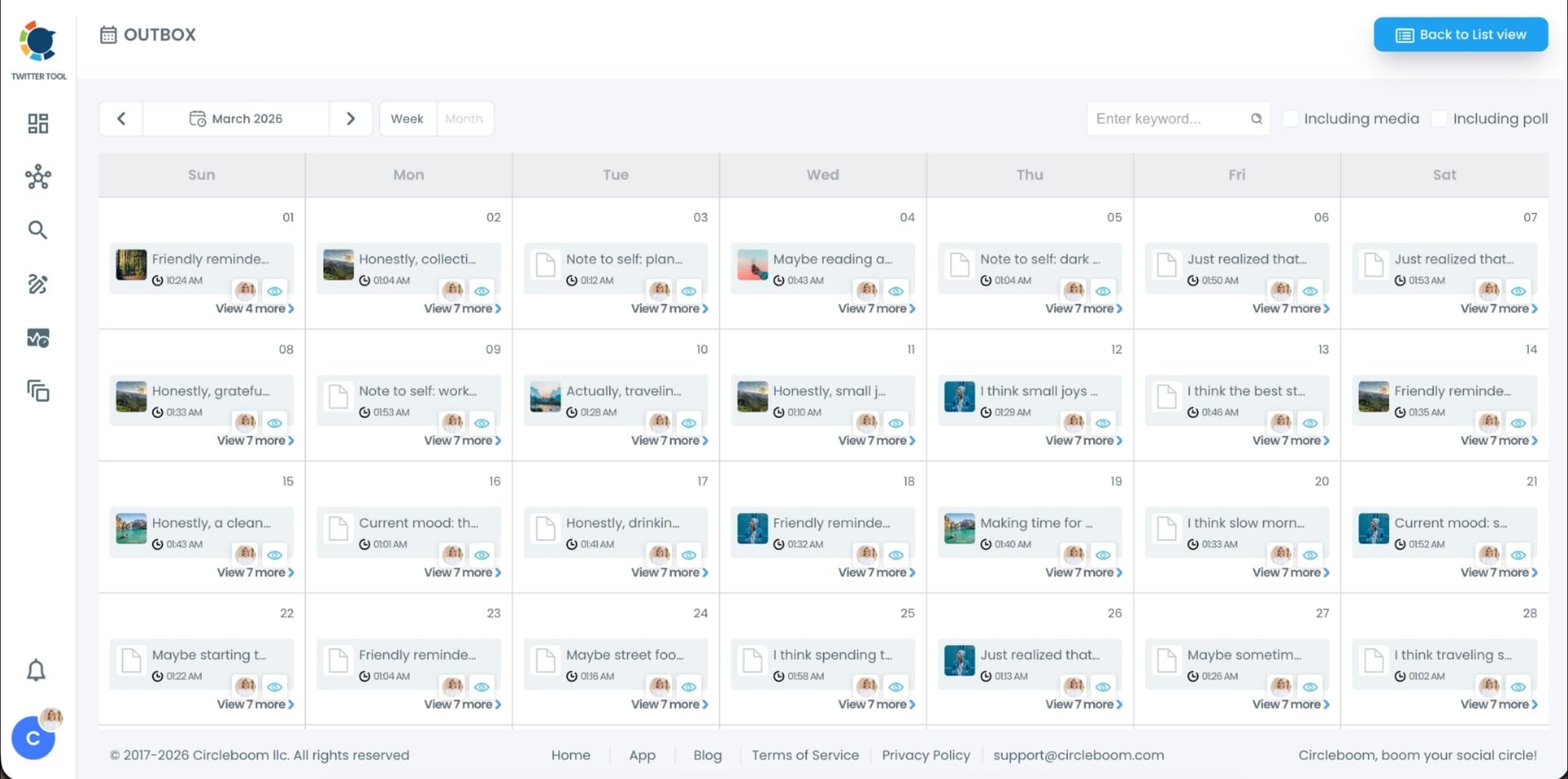
Step #5: Manage scheduled tweets from the Outbox
After scheduling, all your tweets appear in the Outbox and calendar view.
From here, you can:
- See all scheduled tweets by date and time
- Make changes if needed
- Edit or remove scheduled posts
- Keep track of your content easily
This gives you full control even after bulk scheduling is completed.
What changes after switching to bulk uploading
Once bulk uploading becomes part of the workflow, the overall experience of managing an X account changes noticeably. Posting stops being something that needs daily attention and becomes a task handled during dedicated planning sessions.
This shift produces several long-term benefits:
✅ reduced daily stress related to posting
✅ fewer last-minute decisions or rushed uploads
✅ better alignment between planning and execution
✅ more consistent publishing without constant monitoring
Over time, this creates a calmer, more predictable posting routine. Content planning starts to feel complete only when execution is finished, not when tweets are merely written.
Common issues to watch for when bulk uploading tweets
Even with an efficient workflow, attention to detail remains important. Bulk uploading makes review easier, but it does not eliminate the need for careful checks. Some common points to review include:
➡️ correct time zones and scheduling logic
➡️ consistent formatting and tone across tweets
➡️ valid, public image links when media is used
➡️ reasonable spacing between similar posts
Taking time to review the full batch prevents confusion and avoids the need for corrections after scheduling.
 Harshita Agrawal
Bulk uploading as part of a sustainable content system
Bulk uploading is most effective when it fits into a broader content system. Content is planned intentionally, written in batches, uploaded in groups, and scheduled in advance. Each step supports the next, creating a workflow that is both efficient and sustainable.
When execution finally matches planning, content strategies stop feeling fragile. Posting becomes reliable rather than reactive. Bulk uploading is the mechanism that allows this alignment to happen.
From repetitive uploads to a scalable posting workflow
Uploading tweets one by one may work in the early stages, but it does not support long-term consistency or growth. As content planning matures, execution methods must evolve alongside it.
Bulk uploading with Circleboom Twitter transforms posting from a series of repetitive actions into a scalable, repeatable workflow.
When tweets are uploaded and managed in batches, content planning turns into a system that works quietly in the background, allowing attention to be focused on strategy, engagement, and improvement rather than mechanics.
)
