
You want a yes or no: does this person follow that account? X shows you the lists, but it gives you no search box inside them, so the answer hides somewhere in a long scroll.
That gap matters when the answer feeds a real decision, like a pitch, a partnership or a hire.
To check if someone follows an account on Twitter, open one side of the relationship, either the person's following list or the account's follower list, and search that list for the other username. Circleboom loads either list for any public X account and lets you search it by name or username, through X's Enterprise API access.
→ Check if someone follows an account on Twitter from one list
The guide below shows which side to search, the six steps, and what a "no" can mean.
Why checking one follow on X takes longer than it should
Every follow on X has two ends. Person A follows account B, so A appears in B's follower list and B appears in A's following list.
Either list holds the answer, so to check if someone follows an account on X you only need to read one of them.
The trouble is reading those lists on X. You can open someone's Following tab, but you cannot type a name into it, filter it or sort it, and the list stops loading after a point. On a profile that follows a few thousand accounts, you scroll and hope.
It is tempting to give up halfway and guess. A guess made from half a list leans toward "probably not," because the part of the list where the name sat was never reached.
A missing name in a list you did not finish is not a "no." It is an unfinished check.
The fix is a list you can search.
You can check if someone follows an account on X in one search instead of scrolling. The rest of this guide shows how to do it on the right side of the relationship.
Which list should you search to check if someone follows an account?
Search the shorter of the two lists. The answer is the same from both ends, so the only question is which end gets you there faster and more reliably.
Circleboom's results table lists up to 2,500 accounts. The page itself says you can use the sort options to see more than 2,500, but a list that fits inside the table is the cleanest check you can run.
Here is how the choice usually plays out:
| Situation | Search this list | Search for |
|---|---|---|
| Person follows few, account is big | Person's following | Account's username |
| Account is small, person follows many | Account's followers | Person's username |
| Both lists are small | Either one | The other username |
| Both lists are large | The shorter one | The other username, then sort |
Take an illustrative case. An investor you want to pitch follows 640 accounts. The competitor you are curious about has 46,000 followers.
Searching the competitor's followers means a table that shows 2,500 of 46,000, about one in eighteen. Searching the investor's following list means the full 640 sit inside the table.
Same question, but only one side gives you the whole list at once.
Compare the two counts on the profiles before you load anything. When the account you are checking is a popular one, the person's following list is likely to be the short side.
How to check if someone follows an account on Twitter with Circleboom
Circleboom holds Enterprise API access listed in X's developer documentation, so the lists it loads come straight from X's records instead of a scraper that can skip entries.
For a yes-or-no question, that completeness is the whole point: a scraped list that drops a few rows can turn a real "yes" into a false "no."
The feature behind this check is Followers / Following Search, the same tool you would use to search Twitter followers of any public account. It works for any pair of public accounts: yours and someone else's, or two accounts you have no connection to at all.
That second case is where it earns its place. You can find out whether one account follows another on X even when neither account is yours. On X itself, the only way to do that is to scroll.
A journalist checking whether a spokesperson follows a rival brand, or an agency checking whether a target creator follows a client, runs the same search.
Six steps, in two phases:
Load the shorter list
- Log in to Circleboom Twitter with your X account through official OAuth.

- Open the Advanced X Search menu in the left sidebar.
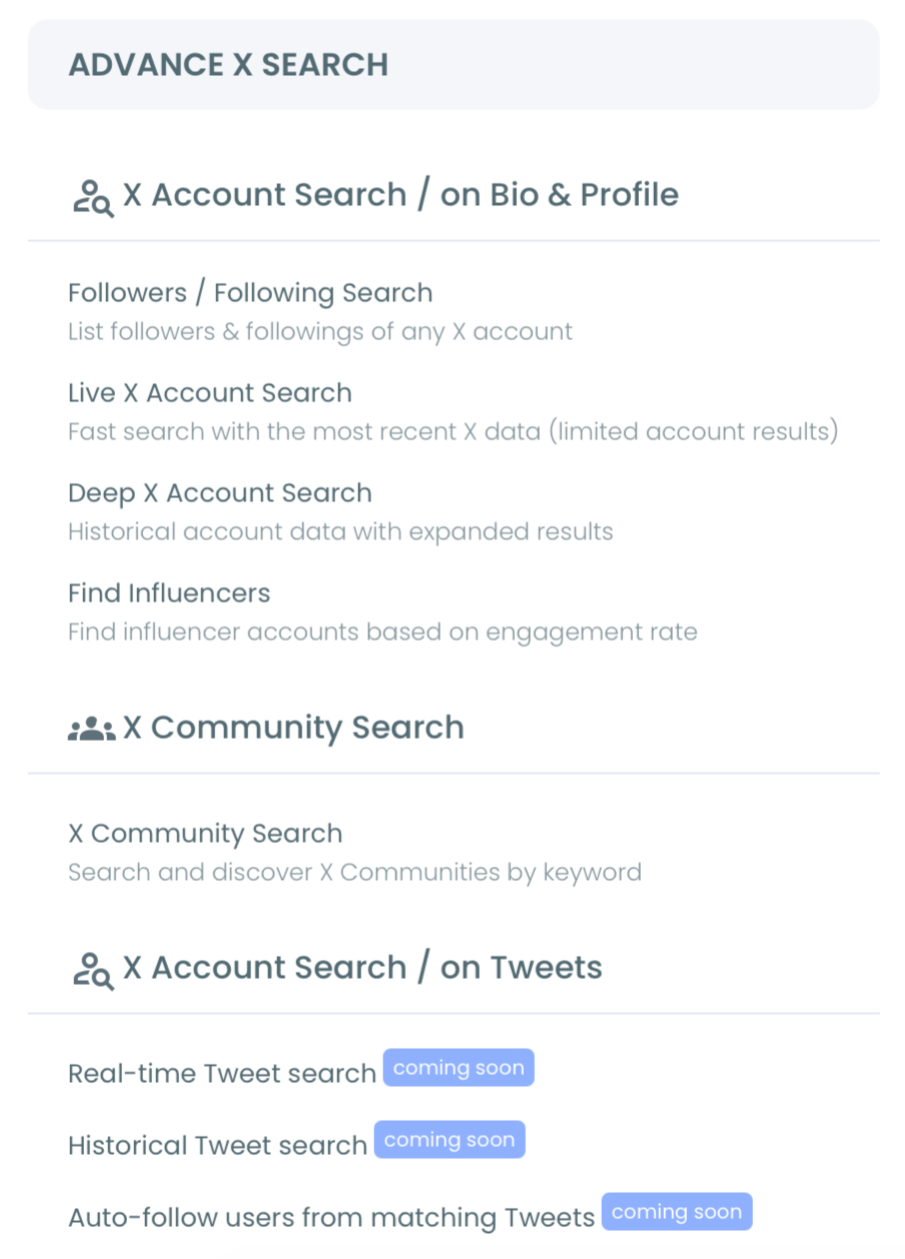
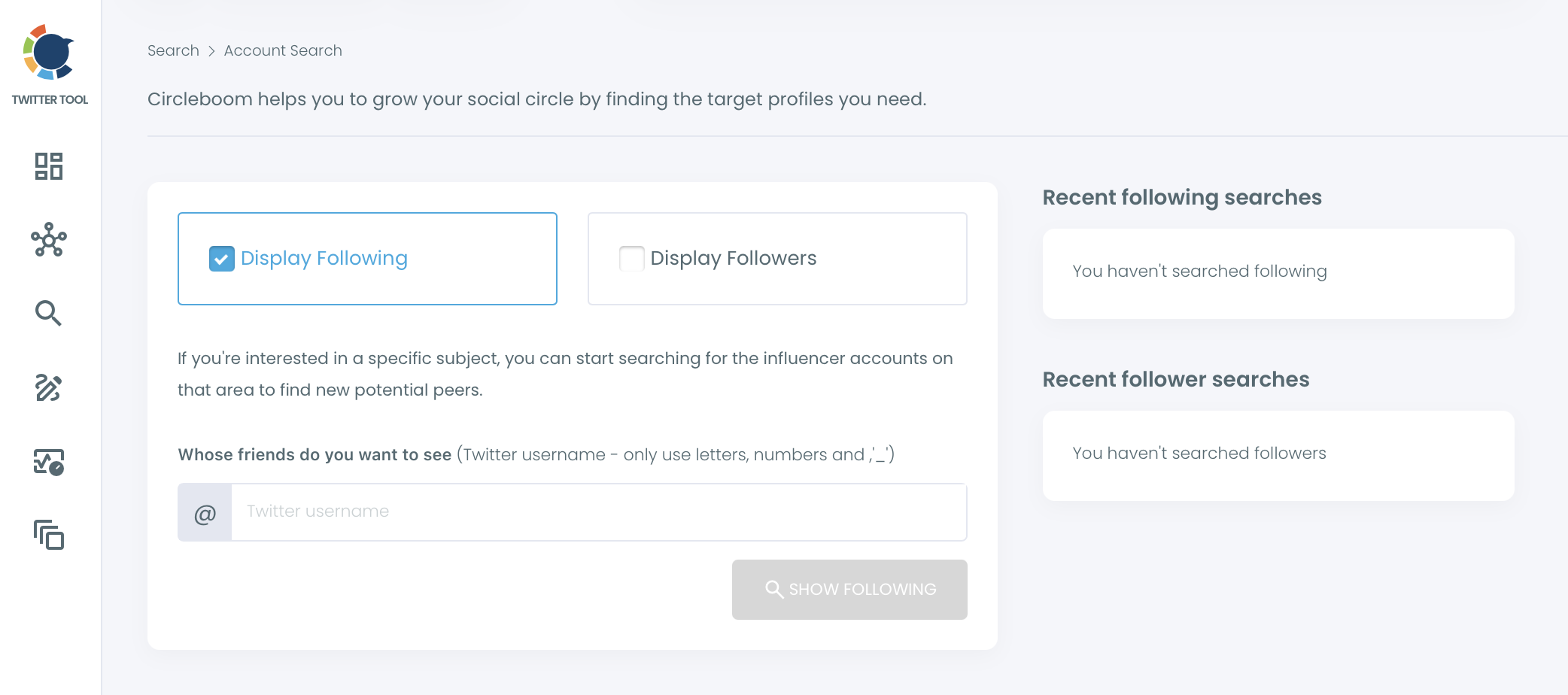
- Choose Followers / Following Search, select Display Following, type the person's username and click Show Following. Use Display Followers and the account's username instead when the account's follower list is the shorter one.
Search the list and read the answer
- Read the header before you search. It says "Displaying [username]'s N following," and N tells you whether the whole list fits inside the 2,500-row table.
- Type the other username into the search bar above the grid and click the blue search button next to it.
- Open the matching row's profile with the link icon on the right if you want to confirm the account on X itself.
A row with the username means yes. No row, on a list that fits inside the table, means no at the moment the list was loaded.
Reading the header first is what keeps the answer honest. It tells you whether you searched the whole list or only part of it, before you trust an empty result.
Circleboom's Twitter follower viewer, used to search and analyze another account's followers on X:
The input field accepts letters, numbers and underscores only, so type the handle without the @ sign.
The Recent searches panel on the right keeps your last following and follower searches, which saves time when you check the same person against several accounts.
Can you check if someone follows an account on X without a tool?
Yes, for small accounts. Open the person's profile on X, tap Following and scroll until you find the account or reach the end. On a profile that follows a hundred accounts, that works fine.
It breaks on bigger lists. X does not show the complete list when you scroll another account's followers or following, and it offers no search, filter or sort inside that view. You cannot tell whether you reached the end or the list simply stopped loading.
For anything past a few hundred accounts, a manual check can only prove "yes." It cannot prove "no."
The broader topic of reading follow relationships on X, beyond a single pair, is covered in who follows who on Twitter.
Why an account may be missing from someone's following list on X
When you check if someone follows an account on X and the search comes back empty on a complete list, the person does not follow that account right now. Before you act on it, rule out the three cases that make a "no" misleading.
The account is private
Followers / Following Search works on public accounts only. A protected account returns no data, so you cannot load its follower list or its following list.
If the person is private, search from the other end instead: load the public account's follower list and look for the private person's username there. If both accounts are private, the check cannot be run.
The list changed after you loaded it
The table shows the list as it was when Circleboom retrieved it. Follows change constantly, and the feature keeps no history of follower or following changes, so a search tells you about now, not about last month.
Something sits between you and the account
If the account you are checking is yours and the other person seems to have vanished from your view, a block is one explanation. That situation has its own check, explained in how to check if someone blocked you on Twitter.
How to know if they follow the account later
A one-time search to check if someone follows an account on Twitter answers today's question. When the answer is "not yet" and the timing matters, you need a record of when the follow happens.
That job belongs to a different Circleboom feature, Track Someone's X Account's Following and Followers. You choose the person's username, pick Followings as the tracking option, and Circleboom compares snapshots of that list over time.
Each new follow is stored as a dated change, and email reports arrive daily or weekly, depending on the frequency you choose.
It is a subscription per tracked account that uses Tracking Tokens, and it works on snapshots, so a follow appears after the next scheduled check, not the second it happens.
This is useful when a follow is a signal you are waiting for. A founder who wants to know when an investor starts following their company, or a PR lead watching whether a reporter follows a client, gets the answer by email instead of re-running the search. The post on the who follows whom follower tracker explains that tracking setup.
What to do once you know who follows the account on Twitter
The search table is not only a viewer. Every row carries the same actions you have elsewhere in Circleboom, so a confirmed "yes" can turn into a next step without leaving the page.
A few common moves:
- Follow the account yourself with the person icon on its row.
- Add it to an X List from the Add to List menu, to watch its posts without following.
- Export the loaded list as a CSV when you need a record for a client or a teammate.
If the person you checked is a leader in your niche, their following list is often worth more than the single answer. Following the accounts they follow fills your timeline with relevant voices fast.
The walkthrough on how to follow all the people one account is following on Twitter covers that route.
Filter out Fake/Bot and Inactive accounts first. Bulk follows run at 50 every 15 minutes with a safety limit of 400 per day, and the rest of the queue continues the next day.
When the question grows from one person to two, for example whether two investors both follow your competitor, a comparison of their following lists shows the accounts they have in common. Compare Twitter accounts for that wider view.
Your checklist for a reliable answer
When you check if someone follows an account on Twitter, the right list and a glance at the header do most of the work. The order below keeps the result trustworthy:
- Pick the shorter list: the person's following, or the account's followers.
- Load it with Display Following or Display Followers in Followers / Following Search.
- Check the header count against the 2,500-row table.
- Search the other username in the bar above the grid.
- Treat an empty result as "no for now," and set up tracking if the timing matters.
The answer you get comes from X's own records, read through approved access, so a "yes" is a yes and a "no" on a complete list is a no.
→ Run your own check of who follows an account on Twitter
Follow check FAQ for X accounts
Does the follow check work when one of the X accounts is mine?
Yes, but your own lists have a better home. Circleboom routes your own follower and following lists to All My Followers and All My Following. Inside Followers / Following Search, the person icon on each row also shows Unfollow for any account you already follow.
Does following an account on X mean they work together or endorse it?
No. A follow shows that someone chose to see an account's posts, and that is all it proves. It is a research lead, not evidence of employment, partnership, endorsement or buying intent, so read the profiles before drawing a conclusion.
Can I save the result of a follow check on Twitter?
Yes. The Export button on the results page downloads the loaded list as a CSV, and it uses search tokens from the balance shown on the button. A saved file keeps the list as it looked on the day you checked.
What if the person changed their Twitter username?
Search the handle they use now. The table lists each account by the username it had when Circleboom loaded the list, so an old handle will not find a match.