X gives you one delete button per conversation, so an inbox that has grown for years means hundreds of separate deletes. The tools that connect through X's API can only see the last 30 days of messages, which is why an API-only cleaner stops at last month. The full history sits in one file inside your X archive, and that file is the route to an empty inbox.
How do you clear your entire DM history on X?
Request your X archive, upload its direct-messages.js file to Circleboom's Delete All DMs, set any accounts to keep, and confirm the count. Circleboom deletes every DM conversation in your X inbox back to account creation through X's Enterprise API access, and removes each one from your side of the inbox.
→ Clear your entire DM history on X from one archive file
Why X makes a full DM wipe so slow
X has no bulk delete for messages. Its own help page on Direct Messages describes two actions: delete a single message, or delete an entire conversation from your inbox. Both work on one thread at a time.
That is fine for one awkward chat. It falls apart when you want to clear your entire DM history on X after years of use. Every brand collaboration, every support thread, every spam wave and every old group chat is a separate conversation, and each one needs its own delete.
The second limit is less visible. Tools that connect to your account through X's API can read your direct messages from the last 30 days only. Anything older is out of reach for a normal connection, so an "inbox cleaner" that never asks for your archive can only ever clear last month.
You can wipe every DM conversation in bulk once the older messages come from a different source. Your X archive is that source.
What a DM delete on X does not remove
A DM delete on X clears your inbox and nothing else. X's help page states that a deleted message or conversation is deleted from your account only, and the other people in the conversation can still see it. Any method you use, including this one, clears your inbox, not theirs.
Group chats add one more wrinkle on the manual route. The same X page explains that deleting a group conversation means leaving that group, so you can no longer take part in it. Clearing an inbox full of old group threads by hand therefore also means walking out of each group, one at a time.
Last 30 days or every DM: which cleanup do you need?
Pick the tool by how far back the problem goes. Circleboom has two DM deletion features, and they answer different jobs:
| Your situation | Circleboom feature | What it reaches | Filters |
|---|---|---|---|
| Spam or clutter from last month | Delete My Last DMs | Last 30 days, through the API | Exclude some accounts |
| Years of conversations to remove | Delete All DMs | Full history, through your archive | Date, keyword, media, URL, exclude |
The recent tool needs no archive and runs as soon as the page loads. The full tool needs the archive, but it reaches every conversation back to the day the account was created, and it gives you four filters instead of one.
If your goal is only to tidy last month, the 30-day tool is enough.
When the old threads are the real worry, read how to delete old DMs on X and follow the archive route below. It assumes you want the whole inbox gone, or close to it.
When you need to clear your entire DM history on X, the 30-day window is the wrong tool, however fast it runs.
Save the Twitter DMs you still need before the wipe
Deletion through Delete All DMs is permanent. The confirmation screen says so in red, and there is no undo afterwards. So before you clear your entire DM history on X, the first job is deciding what has to survive.
Go through the inbox with three questions:
- Does any thread hold a commitment, an invoice, a contract term or an approval you may need to show later?
- Is a client, partner or customer still talking to you here?
- Do teammates who share the account rely on any of these conversations?
Anything that answers yes either goes on your keep list or gets recorded outside X first. For the second option, see how a Twitter DM downloader can export and clean up your messages before the delete runs.
Your X archive also keeps a copy. Once you download it, the direct-messages.js file on your computer is the record of everything you had, and Circleboom's documentation notes that the local archive is the only record left after the operation.
Keep that file somewhere safe instead of deleting it with your downloads folder.
Get your X archive and find direct-messages.js
You cannot clear your entire DM history on X without the archive, and it is the step that takes the longest.
Request it from your X settings: open Settings and privacy, then Your account, then Download an archive of your data, and verify your password.
X's page on how to download your X archive says it may take a few days to prepare the download. The same page asks you to confirm your email address before requesting it.
Request it first, then do the rest of the planning while you wait.
When the email arrives, download the ZIP and extract it. Inside the data folder you will find a file named direct-messages.js. That single file is what you upload. Do not upload the whole ZIP.
Circleboom's help center walks through the same steps with screenshots, on the page about how to download your Twitter history archive. The file must come from the X account connected to your Circleboom subscription, so download it while logged in to that account.
How Circleboom's Delete All DMs handles the whole inbox
Delete All DMs reads your direct-messages.js file and deletes the conversations in it from your inbox, all the way back to account creation. It uses a three-step wizard: Start, Upload, Filter.
The upload is the difference. Because the file holds every message you ever sent or received, the feature can reach conversations that no API connection can see.
Circleboom then works on your account through access X has approved, since it holds Enterprise-level API access granted by X. For a job this sensitive, that means your login and your messages are handled inside X's rules rather than by a script that imitates your clicks.
With no filters, Delete All DMs deletes every uploaded message, which is a full reset.
With filters, you can clear the entire DM history on your X account except the conversations you decided to keep. Four filters shape the result:
- Date range. A start and an end date, both included, defaulting to your first and last DM.
- Any Keyword. Matches words in the message text.
- Media or URL. Delete only DMs that carry media, or only DMs that carry a link.
- Exclude some accounts. Every conversation with the usernames you add survives the run.
Archive to empty inbox in one recording: the direct-messages.js upload, the filter step and the confirmed count before anything is deleted.
How to clear your entire DM history on X, step by step
The run takes eight steps in three short phases, and only the last click changes anything on your account.
Connect your account and open Delete All DMs
- Log in to Circleboom Twitter with the same X account your archive came from.

- Open the Essential Toolbox menu in the left sidebar and go to Delete Tools.
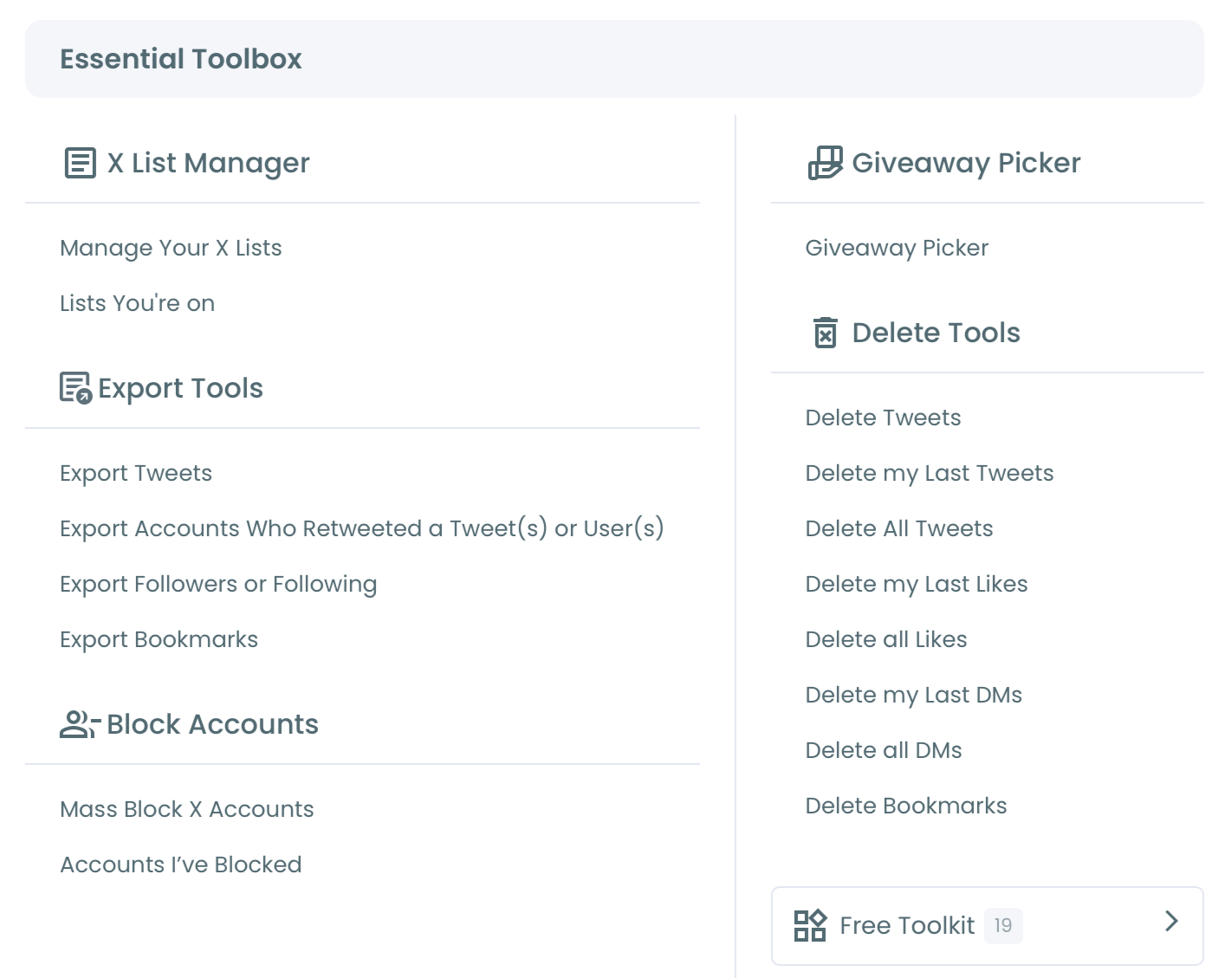
- Choose Delete All DMs and click Start to open the upload step.
Upload the DM file and decide what stays
- Drop your direct-messages.js file from the archive's
datafolder into the upload area. If the file is larger than 100 MB, follow the extra preparation step the page links to before uploading.
- Check the uploaded total, shown as "You have uploaded N DMs." Every uploaded DM is selected by default.
- Add the usernames to keep under Exclude some accounts, and set date, keyword or media and URL filters only if you want less than a full wipe.
Approve the count and confirm
- Read the number in the Approve & Delete panel on the right, then click Delete my DMs.
- Confirm in the Delete DMs? window by clicking Delete DMs. The deletion then runs and cannot be undone.
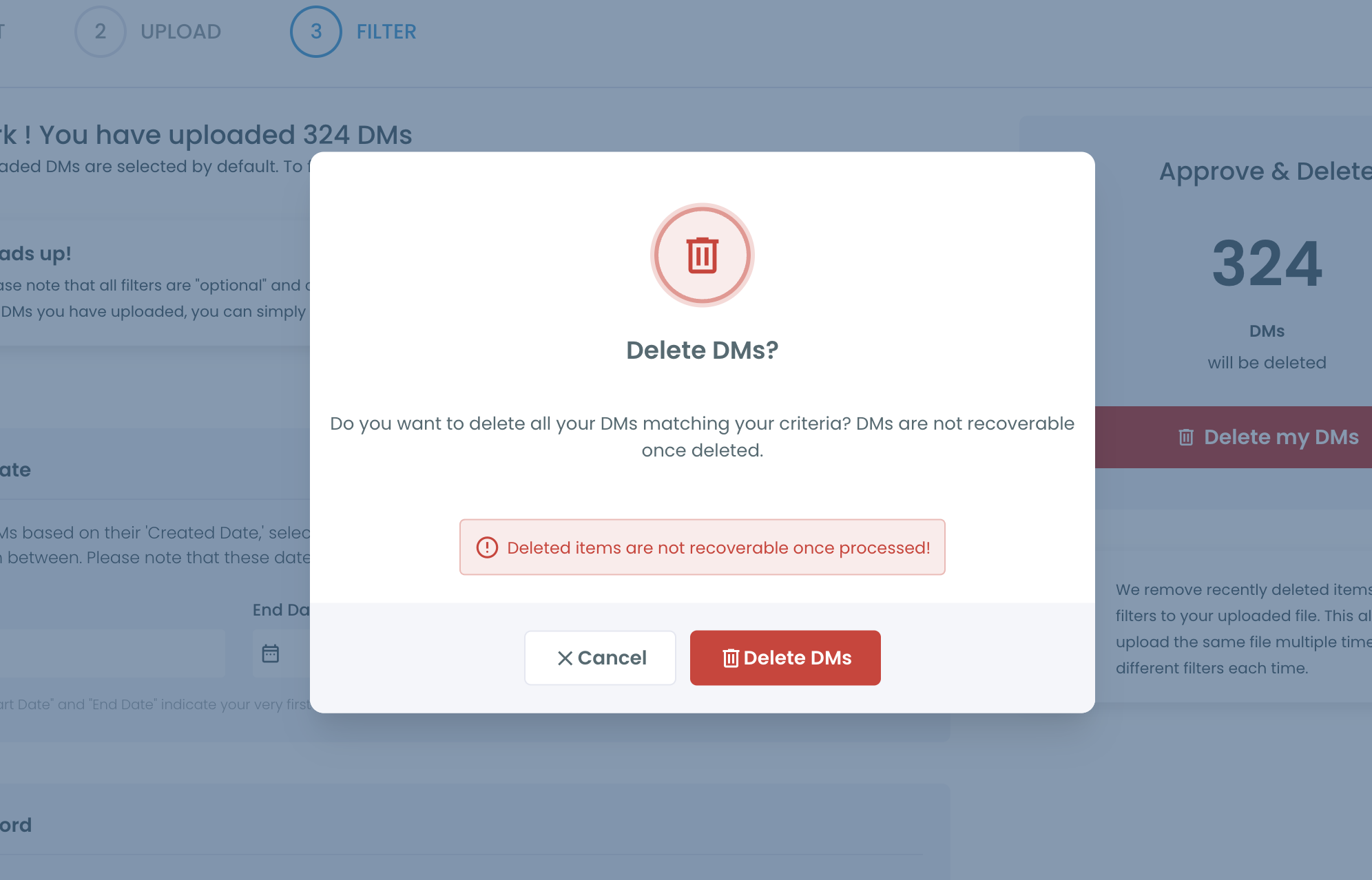
The keep list comes before the count, and the count comes before the confirmation, so the only number you approve is one you already shaped.
On a job that cannot be reversed, that order is your safety net.
Run the wipe in stages instead of one pass
A full reset does not have to be one click.
You can clear your entire DM history on X in three passes and check each one. Circleboom lets you upload the same direct-messages.js file again in a new session, and it removes recently deleted items before applying your new filters. Messages you already cleared do not come back into the count.
That turns one risky decision into a sequence of smaller, safer ones:
- Clear the links first. Tick "Delete only DMs with URL" to remove phishing and link spam while every text conversation stays.
- Clear the scam campaigns. Use Any Keyword with the words the spam repeats, such as "airdrop" or "giveaway."
- Clear the rest. Upload the file once more, keep your Exclude some accounts list, and delete everything else.
Start with the link pass on any inbox that has seen a spam wave, because it removes the riskiest messages while every real conversation stays.
Each pass shows its own count before you confirm. If a number looks wrong, you stop there, and nothing in later passes has run yet.
A staged wipe lets you check three small counts instead of trusting one large one.
The same logic protects business accounts. Circleboom's own example is excluding five client accounts so years of project conversations survive while everything else is cleared.
Your keep list is the real decision in a full wipe; the delete button only carries it out.
Why deleted X DMs can show up again after the reset
A DM you still see after the wipe was most likely never in the run. Two causes are worth checking before anything else.
The first is timing. Your archive is a snapshot from the day X prepared it. Messages that arrived after that date are not in direct-messages.js, so a full run cannot touch them.
The fix is simple: clear recent arrivals with the 30-day tool, or request a fresh archive.
The second is your own filters. A conversation with an account on your keep list, or a message outside the date range you set, stays by design. Upload the same file again with the filter removed, and the remaining messages join the count while the ones you already cleared stay out of it.
For a longer list of causes, read about why deleted Twitter DMs keep coming back on X. Then use the steps below if the returning messages are spam.
Stop the same spam accounts from filling your X inbox again
Clearing old spam removes the messages, not the senders.
If bot accounts sent most of it, they can message you again tomorrow. Circleboom's documentation pairs the two jobs: clear the inbox, then remove or block the bot followers who sent the spam so they cannot keep sending it.
Blocking is the stronger option, because a blocked account cannot send you new messages. Circleboom's Mass Block X accounts page lists accounts you can review and add to one block list. Its Chrome extension then works through that list at a steady pace inside your own X session.
If the problem is noise rather than abuse, your X settings may be enough. The guide on how to snooze Twitter DM notifications and clear out spam messages covers the lighter route.
People who reset their inbox are often cleaning the whole account at the same time. When the tweets need to go too, the clear Twitter history page uses the same archive, with a different file from the same data folder.
A full X inbox reset, summed up
To clear your entire DM history on X, request your archive, upload its direct-messages.js file to Delete All DMs, put the conversations you need on the keep list, and confirm the count. X deletes one conversation at a time and API connections reach only 30 days, so the archive is the one route that covers every message back to account creation.
Two habits make the result last. Save or exclude anything with business value before you confirm, because the deletion is permanent. Then deal with the senders, so the spam you just cleared does not return next week.
The whole run happens through Circleboom's approved X access, on a file you control, with a count you see before anything is deleted.
→ Erase your full X DM history with Delete All DMs
Wiping every X DM: questions after the plan
Does clearing my DMs delete them for the other person too?
No. Deletion is one-sided on X, so the other person keeps their copy of every conversation. No tool can remove messages from someone else's inbox, as Circleboom's page on whether deleting DMs removes them for the other person too explains.
What if my direct-messages.js file is over 100 MB?
Files larger than 100 MB need one extra preparation step before upload, and the Delete All DMs page links to a guide for it. Circleboom's page on how to upload Twitter archive files larger than 100 MB explains how to compress a large archive file. If the upload still fails, [email protected] can help.
Can I keep a few conversations while everything else goes?
Yes. Add those usernames under Exclude some accounts before you confirm. Their conversations are skipped even when they match your date range or other filters, and the Approve & Delete count drops to reflect them.