A tweet is a line of text in a feed, and an Instagram Story is a full-screen vertical picture. That mismatch is why many people end up screenshotting the tweet, cropping it on their phone and posting a blurry rectangle on a black background.
The tweet deserves a format built for Stories.
To share a tweet on an Instagram Story, convert it into a vertical card instead of posting a screenshot. Circleboom turns tweets you write on X into styled Instagram Stories through X's Enterprise API access, with a live preview of the layout and theme before anything goes out.
→ Share a tweet on your Instagram Story as a styled card
The setup, the settings that keep a Story readable and the mistakes to skip are below.
Why a Twitter screenshot makes a weak Instagram story
A screenshot carries everything you do not want on a Story: the phone's status bar, the reply and like icons, a font sized for a feed and empty bars above and below. A horizontal crop then has to be padded or zoomed to fill a vertical screen, and the words end up small in the middle.
The difference is visible at a glance. A tweet card built for the Story format puts the text large and centred, with your profile photo and username in place, so it reads like content made for Instagram rather than a copy dragged in from somewhere else.
People often ask whether they can repost a tweet as an Instagram Story at all. The answer depends on how much manual work you accept. The screenshot route works for a one-off, but it costs a crop, a resize and an upload every single time.
Design apps are the other manual route. A template can look sharp, and a breakdown of which Canva template works best for Twitter posts on Instagram shows the options.
You still retype or paste the tweet into the template for each Story, though.
Both manual routes share one problem: the design work repeats with every tweet.
If you want to share your tweets as Instagram Stories without the design step, the card has to be generated from the tweet itself. That is how Circleboom's Tweet to Instagram lets you share a tweet on an Instagram Story in one publish action.
What you need before a tweet can become an Instagram story
Two things need to be in place before you can share a tweet on Instagram Story: a connected Instagram account and a tweet that stands on its own.
The account connection happens once. In Circleboom, open Account Settings, select the Crosspost Accounts tab and click the Instagram connect button. The help article on connecting accounts for cross posting walks through the same flow.
If you are unsure how the two platforms fit together in the first place, the explainer on how to link X to Instagram covers the basics.
The tweet matters as much as the setup. A Story is seen for a few seconds by people who were not part of your X conversation, so some tweets survive the move and some do not:
- Good candidates: a clear opinion, a short tip, a quote, an announcement, a number with a point.
- Weak candidates: replies, tweets that only make sense inside a thread, and posts built around an @mention or an X-only joke.
- Risky candidates: very long tweets, because long text can shrink inside the card depending on the layout.
Treat the second list as a hard no. A reply turned into a Story shows half a conversation to an audience that never saw the first half.
How Circleboom turns an X post into an Instagram story
Circleboom converts a tweet into an Instagram-ready visual and publishes it to Instagram as a Post, a Story or a Reel, whichever format you pick. For a Story, the output is a vertical, full-screen card that shows your tweet text with your profile photo and username, and optionally the tweet's engagement numbers.
The conversion happens inside the X Post Planner. When you switch Instagram on in the Post Now or Schedule options, you open a "Preview & Settings for Instagram Cross-Post" pop-up. It lets you choose the format, then one of five layouts (Standard, Quote, Bubble, Fab, Nova) and one of eight themes (Light, Dark, Night, Autumn, Blue, Green, Yellow, Sapphire).
The preview updates as you change each setting, so what you see is what Instagram gets.
Your X account connects through approved access, since Circleboom is one of X's official Enterprise developers. That keeps the X side of the workflow inside the rules, while Instagram receives a finished image rather than a link it has to render.
Compared with the screenshot routine, nothing is cropped and nothing is designed by hand. You publish tweets as Instagram Stories straight from the composer, and the same action can post the tweet on X at the same moment.
Under two minutes: a tweet composed, previewed as an Instagram Story with a new layout and theme, then scheduled.
How to share a tweet on Instagram story with Circleboom
Seven steps take a tweet from the composer to a published Story, grouped into three short phases.
Open the composer with your tweet ready
- Open Circleboom Twitter and sign in with your X account.

- Navigate to the X Post Planner menu in the left sidebar.

- Write the tweet in the composer, or paste the line you want to reuse, and keep it short enough to read on a phone at a glance.
Choose the story format in the Instagram preview
- Click Post Now or Schedule and switch Instagram on in the cross-post options, with your connected Instagram account selected.
- Open the Instagram preview and settings pop-up and select Story as the format.
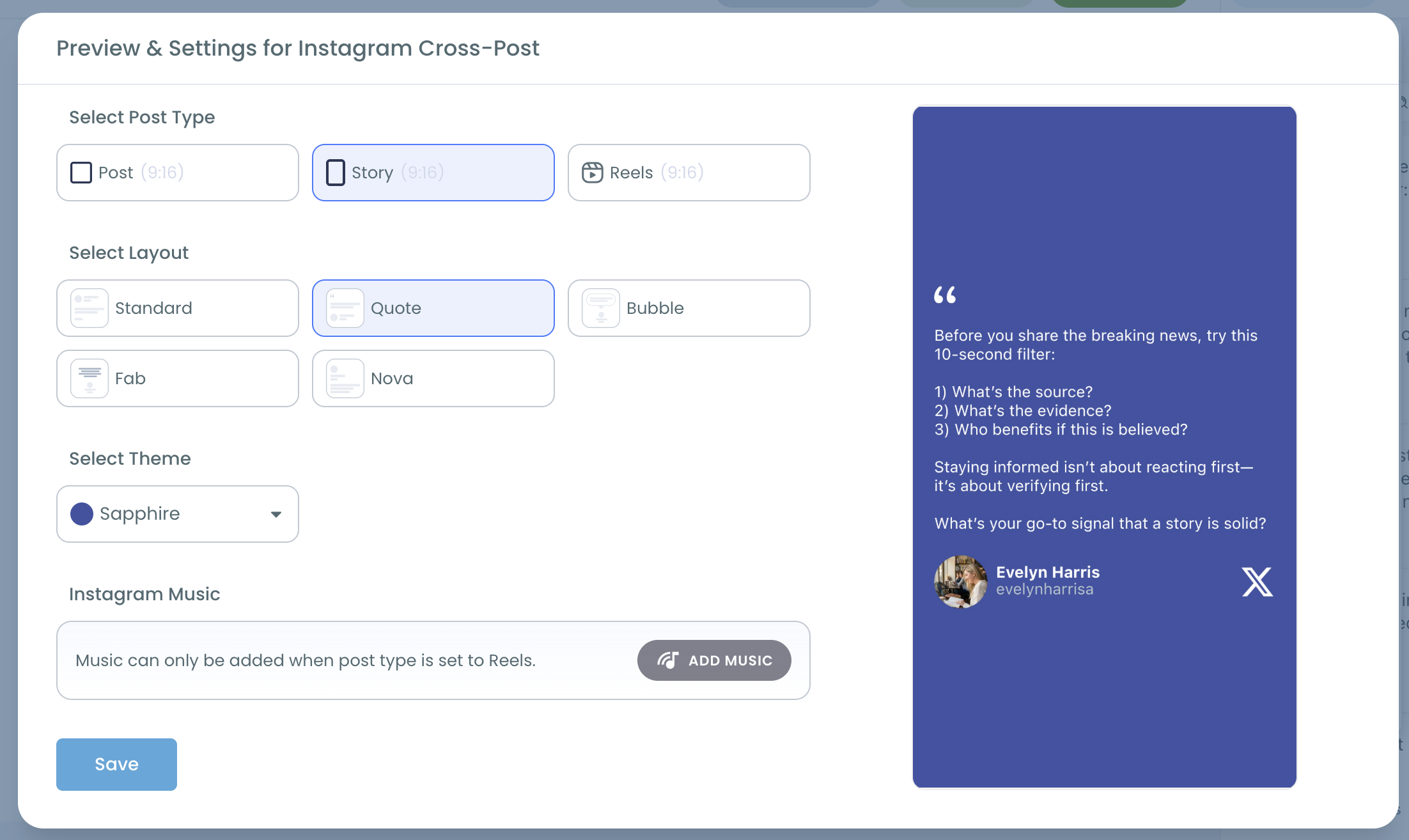
- Pick a layout and a theme, check the live preview, then click Save.
Publish the story now or at a set time
- Post now, or set a date and time and schedule it. Scheduled posts need to be at least 15 minutes ahead, and Find your best posting time suggests six slots.
Choosing the format before you pick a layout matters because the Story preview is vertical, so a layout that looks fine as a feed post can crowd the frame once it stretches to full screen. Saving the settings before you schedule locks in exactly what the preview showed.
What happens when a scheduled X post and its story go out
At the scheduled time, Circleboom publishes the tweet on X and sends the Story card to Instagram together.
Every destination in one cross-post shares the same publish time, so you cannot hold the Story back an hour while the tweet goes out now. If the timing has to differ, plan the tweet for the moment that suits your Instagram audience as well.
The Instagram connection has to stay authorized for this to work. If it expires or is revoked, the post to Instagram fails at its scheduled time while the tweet still publishes on X. Reconnect it from the Crosspost Accounts tab when that happens, and the account stays in place for future posts.
This is also why the review happens before you confirm. Once you share a tweet on an Instagram Story through a scheduled cross-post, the submission is final, and the Instagram version cannot be edited afterwards.
Should a tweet go to your Instagram story or your feed?
Send a tweet to your Story when it is timely and to your feed when it should stay findable.
The two places work differently: feed posts reach followers in their feed and stay on your profile grid, while Stories appear at the top of the app and leave after a day unless you keep them in a highlight.
A simple way to decide:
- Story: launch-day news, an event that is happening now, a reminder with a deadline, a reaction to today's conversation.
- Feed post: a tip, a framework or a quote people may want to find again next month.
Some tweets earn both, since one tweet can reach more than one part of Instagram. You can share a tweet on an Instagram Story today and turn a strong evergreen one into a feed post on another day.
Reels are a third format with their own reach, and they deserve a separate decision.
Which layout and theme read best in an Instagram story?
The best layout is the one that keeps your words large in the vertical preview, and that depends on how long the tweet is. Long tweet text can reduce readability inside the card depending on the layout and theme, so the preview is where you decide, not after the Story is live.
Each time you share a tweet on Instagram Story, give that preview a few seconds before you save.
A few rules of thumb help:
- Size first, style second. If you squint at the preview on a laptop, a phone will be worse.
- Pick one layout and one theme and keep them. The same look on every Story makes your posts recognizable before the text is read.
- Match the theme to your brand colours rather than to the tweet's mood; consistency beats variety on a Story tray.
- Trim X shorthand like "RT", hashtags piled at the end and @handles that mean nothing on Instagram.
For styling ideas past these basics, see how to share an X post on Instagram Story and make it look amazing.
How long a tweet story stays on Instagram
A tweet shared as a Story follows Instagram's normal Story rules. Instagram's help center on when an Instagram story disappears states that photos and videos shared to a story leave Feed, your profile and Direct after 24 hours, unless you add them as a highlight.
That 24-hour window changes how you should pick tweets. A Story is a short-lived slot, so it suits timely tweets: a launch day, a live event, a deadline, an opinion on today's news.
Evergreen tips still work, but if a card deserves to stay, add it to a highlight from the Instagram app once it is live.
Build a weekly story habit from your best tweets on X
The most useful way to share tweets on Instagram Stories is as a routine, not a one-off.
Each week, pick your two or three strongest tweets and turn them into Stories. Your Instagram audience then gets a steady stream of proven ideas without you creating anything new for that platform.
"Strongest" should come from data, not memory. Twitter engagement analytics ranks your tweets by engagement, and a tweet that already earned replies on X is a safer Story than an untested one.
A Story built from a proven tweet starts with an advantage that a fresh idea does not have: the message has already been tested on real readers.
Planning both versions together keeps the message consistent. The X Post Planner holds the tweet, its schedule and its Instagram settings in one place. The Story becomes part of the plan instead of an afterthought on a busy day.
If you later want the same tweets on Instagram in other formats, read how to automatically repost from Twitter to Instagram.
Four checks before your next Twitter post becomes a story
Before you share a tweet on Instagram Story again, run these four points:
- Connect Instagram once in the Crosspost Accounts tab and confirm it shows as connected.
- Skip replies and thread fragments; choose tweets that stand alone.
- Select Story in the preview first, then the layout and theme, and save.
- Keep one layout and one theme across all your Stories so they look like yours.
Get those four right and every tweet you pick becomes a Story in a single publish action.
→ Start sharing tweets to your Instagram Story
Instagram story from a tweet: your questions
Can I edit a story after I schedule it?
No. Scheduled or published Instagram posts cannot be edited after submission in Circleboom, so check the preview, the layout and the text before you confirm.
Will a long tweet fit in a story?
It fits, but long text can become hard to read inside the card depending on the layout and theme. Shorten the tweet or switch to a layout with more room before you save.
Does the story show my X username and profile photo?
Yes. The card Circleboom generates contains the tweet text, your profile photo and username, and optionally the tweet's engagement numbers.
Can I send one tweet to two Instagram accounts?
Not in a single post. Circleboom selects one account per platform for each post, and the usage counter in the Crosspost Accounts tab shows how many accounts your plan allows.