
Leave Twitter bot likes alone and the accounts behind them stay where they are: in your follower list, in the first audience of every post, and often in your message requests. The likes are only the part you can see. The steps below find the followers responsible, separate the real people from the scripts, and remove what is left.
Twitter bot likes come from fake accounts that want to look real and want your attention, and many of them follow you as well. Circleboom finds the fake and bot followers on your X account through official Enterprise APIs and removes the ones you confirm, in bulk. A bot that only liked a tweet is not in that list, so check it alone or block it on X.
→ Twitter bot likes
The five red flags further down decide which followers go first.
What Twitter bot likes cost when you leave them alone
Ignored bot likes cost you clean data first and a clean audience second. Each one is a small thing, which is exactly why they pile up.
The notification tab goes first. When half the likes on a post come from blank profiles, you can no longer read the tab to see what landed with real people.
Your follower list takes the next hit. A bot that follows you is counted in your audience, shown your posts, and never does anything a reader would do.
The inbox often follows. Circleboom's documentation notes that spam DMs, scam replies and phishing links mostly come from bot accounts in the follower list.
The mistake I see most often is treating this as a notification problem and reaching for mute. Muting hides the symptom and leaves every one of those accounts in place. The better move is to deal with Twitter bot likes where they originate, which is the follower list.
What a bot gains by liking a post on X
Bots like posts on X because a like is cheap proof of life and it puts the account in front of a real person. That is the whole logic behind Twitter bot likes. A script that likes ordinary posts builds a history that looks human, and each like drops the account's name into someone's notifications.
That notification is the point. A curious tap leads to the profile and its link, and a polite follow-back gives the bot a real follower.
Some of these accounts monitor keywords and hashtags, which is why a post that uses a popular one attracts them within seconds. Others work in groups and like each other's targets to look established.
X does act against this. The company has described its methods in a post on how Twitter is fighting spam and malicious automation. It covers how spam and automated accounts are detected and removed.
Detection at the platform level still leaves plenty behind, and X does not publish a number for how many slip through. The wider reasons belong to a separate subject, why Twitter allows millions of scam accounts to operate. For your own account, the practical answer is to remove the ones that reached you.
Which bots you can remove in bulk on Twitter, and which you cannot
You can remove in bulk the bots that follow you, and you cannot bulk-handle a bot that only liked a tweet. That split decides everything else in this guide.
Circleboom's Fake/Bot Followers view pulls your complete follower list from X and isolates every account that shows fake, spam or bot-like signals. It works on followers. It has no list of who liked a particular tweet.
So the tool acts on the bots that follow you, and a like from a non-follower is handled one account at a time.
For that one account, run it through the bot checker for Twitter accounts if you want evidence, or block it on X.
The follower side is where the volume is. With one view, you can find and remove bot followers on Twitter that would take hours to inspect profile by profile.
That is not a figure of speech. In a Circleboom case study, checking more than 1,000 followers for bots by hand looked like about 12 hours of scrolling. Bulk detection listed the suspicious accounts for review in one workflow instead.
A word on trust before you connect an account. Circleboom is a verified Enterprise partner of X, so follower data arrives through X's own channels with your authorization. Nothing is scraped, and your account stays within the platform's rules.
Keep one caution in mind as well. A flag is a likelihood built from several signals, so the list is something to review and never something to delete blind.
What each row of the flagged list tells you
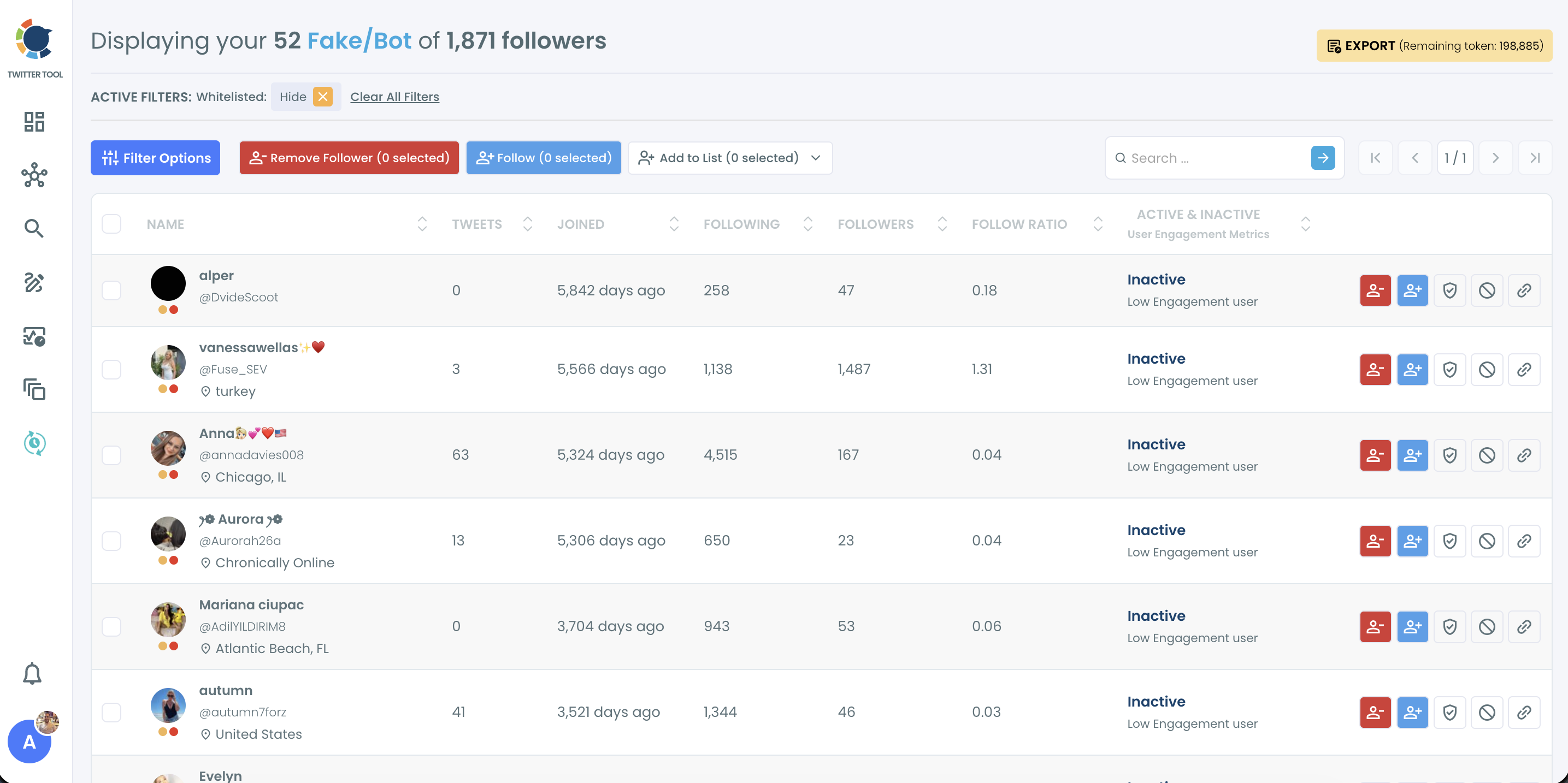
Every flagged follower is shown with the same columns, and each one answers a different question about the account:
- Tweets: how much the account has ever posted. Very low or very high counts for its age are warning signs.
- Joined: how long ago the account was created, shown in days.
- Following and Followers: who it follows against who follows it.
- Follow Ratio: the two numbers as one figure. Values below 0.1 point strongly to mass-follow behavior.
- Active and Inactive: Circleboom's engagement label for the account.
All of the columns sort in both directions. That matters later, because the accounts behind your bot likes rarely look suspicious on one column alone.
What do you need installed before removing bot followers on X?
You need one thing beyond a Circleboom login: the Circleboom Remove Twitter/X Followers extension for Chrome. Without it, you can list and select bot followers, but nothing is removed from X.
The reason is how removal works. Clicking Remove Follower in Circleboom stages the selected accounts in a queue. The extension is what carries out each removal, and it does so only while Chrome is open and your Circleboom session is active at the same time.
Installing it takes two clicks. On the extension's Chrome page, click Add to Chrome, then confirm with Add Extension in the pop-up. Circleboom's help center walks through it under how to install the Circleboom Remove Twitter/X Followers Chrome extension.
Three conditions have to hold while a removal runs:
- The extension is installed and active in Chrome.
- Your Circleboom session is signed in at the same time.
- The browser stays open until the queue is finished.
Closing the browser early interrupts the run, and the remaining accounts wait in the queue.
If you have ever tried this natively and hit a wall, the background on why you can't remove followers on Twitter in bulk explains the gap this extension fills.
How to deal with Twitter bot likes by removing bot followers
The removal run from start to finish: flagged followers selected once and cleared by the extension with no further clicks.
The process runs in three phases: open the list, triage it, then remove what you confirmed.
Open the list of bots that follow you
- Log in to Circleboom Twitter and connect the X account that is collecting the bot likes.
- Go to the Followers and Following menu, where every follower type is listed.

- Select Fake/Bot Followers. The title line states how many of your followers were flagged out of your total, and every flagged account gets its own row.
Triage the flagged followers by the five red flags
- Open Filter Options and work through the red flags in the order below. Each filter narrows the list to one kind of suspicious account, and the Active Filters bar shows what you are looking at.
The five red flags of a bot follower, in triage order, with the filter that isolates each:
| Order | Red flag | Where to isolate it |
|---|---|---|
| 1 | No profile photo | Eggheads, under Follower Quality |
| 2 | Follows thousands, followed by a handful | Follow Ratio, with a low maximum |
| 3 | Repeats one tweet or link again and again | Overactive, under Follower Quality |
| 4 | Created days or weeks ago, already busy | Join Date, set to a recent range |
| 5 | Gibberish username such as "abc123xyz789" | No filter: read the names as you review |
- Count the flags on each account before you decide. An account with no photo, the username "j483hf92", 4,000 followings, 12 followers and a join date last week ticks four boxes and is a clear removal candidate. An account with one weak signal deserves a second look.
- Whitelist every account you recognize. Use the Whitelist icon on the row, or Add to List and then Whitelist for a group. Open Profile on a row shows the account on X when the columns are not enough.
Remove the confirmed bots in a paced batch
- Select the confirmed rows and click Remove Follower. The button label shows the number selected, and a confirmation pop-up reminds you to press Start in the Chrome extension.
- Press Start in the extension and leave the browser open. The extension removes the accounts one by one and pauses automatically when X's rate limit is reached.
Triage sits in the middle because a flag is only a likelihood, and the removal that follows it is final. Filters do the mechanical sorting, your eyes catch what filters cannot, and the whitelist protects real people before a single account is staged.
Two checks are worth ten seconds before step 7. Confirm that the Active Filters bar matches the group you meant to select, and confirm that the count on the button matches what you expect.
Expect pauses during a large batch. A message says the removing process will continue in a stated number of minutes and asks you to keep the browser open. Those breaks last between 1 and 20 minutes and are there to help protect your account.
The order of the red flags is deliberate. The first four can be isolated with a filter, so they clear the bulk of the list quickly. The fifth needs a human read, so it comes last, when the list is short enough to scan.
After the queue finishes, reopen the list. If the same patterns have reappeared, the wave is still active and a second pass is due.
How to clear the spam DMs those bots left on Twitter
Removing a bot follower stops new spam from that account, but it does not delete the messages already sitting in your inbox. Those need their own cleanup.
Circleboom's documentation splits the job in two. Remove Follower or Mass Block stops new spam at the source. Delete All DMs, a separate Circleboom feature, clears what has already arrived.
Order matters here. Clear the followers first, then the inbox, or the same accounts will refill it while you work.
If the volume of message notifications is the more urgent annoyance, you can quiet it while the removal queue runs. The settings route is covered under how to snooze Twitter DM notifications and clear out spam messages.
One detail from the product notes is worth repeating as an illustration, not a promise. An account receiving 20 spam DMs a week from bot followers sees that number fall once those followers are removed or blocked.
When to remove, when to block, and when to check again on X
Remove by default, block when an account is harmful, and look again after every spike. Those three rules cover almost every case after the first cleanup.
Removal takes an account out of your audience but does not stop it from following again. Some accounts are abusive, scam-like or simply keep returning. Add those to the Mass Block list from the same view, then run Twitter Mass Block on the batch.
Blocks are also the reversible choice. A removed follower cannot be restored from Circleboom, while a block can be lifted later from the Accounts I've Blocked view.
For the routine, Circleboom's guidance is to scan about monthly and after any campaign, giveaway or viral post. Follower spikes attract bots, and they are easiest to catch in the same week.
If a giveaway brings 2,000 new followers, for example, a scan that week catches the bot wave before it settles into your baseline and your bot likes climb again.
After a spike, the follower type that lists newly created Twitter accounts among your followers is the quickest place to look. Newness and a thin profile together tell you more than either one does alone.
Bot cleanup is a habit with a short first session, not a single event.
Once the backlog is gone, the Twitter bot likes that remain are few enough to handle as they appear.
What waiting costs your Twitter account
Without a cleanup, the bots that like your posts keep their seat in your audience. Your notifications stay cluttered, the rate you use to judge your content stays weighed down, and spam keeps a way in.
With one, the list of people who follow you starts to mean what it says. Your numbers describe readers, and your notifications show reactions you can learn from.
The mistake I would steer you away from is waiting for X to do it. Platform enforcement is real, but it runs on its own schedule and it does not know which of your followers you want.
Start with the flagged list, work through the five red flags, and protect the accounts you know before you remove anything. Twitter bot likes do not stop because you ignore them; they stop when the accounts behind them lose their place in your audience.
→ Find the followers sending your Twitter bot likes
What to know about removing bot followers safely
Will my reach go up after I remove bot followers?
It may, but nothing guarantees it. Removing bot followers makes your engagement rate more accurate, because the same interactions are measured against a smaller, real audience. In Circleboom's example, 200 engagements on 20,000 followers is 1.0%, and after about 4,000 flagged followers are removed it is roughly 1.25%. Reach also depends on content and timing, so measure the result instead of assuming it.
Can't I just remove or block bot followers by hand on X?
You can, one account at a time. X's Following FAQs cover the Remove this follower option. X does not give you your complete follower list to filter, though, so a manual pass does not scale past a handful of accounts. The wider subject has its own post, how to get rid of Twitter bots.
How long does it take to remove a few hundred bot followers?
Plan for the browser to stay open for a while. Circleboom's help page, How long would it take to remove my followers, gives an average of 10 followers per minute. Automatic pauses of 1 to 20 minutes are added whenever X's rate limit is reached.