

At one point, I needed to download someone’s tweets for research.
It was a fairly active account that regularly posted useful insights and threads. I wanted to analyze their content, review older tweets, and keep a record of some information they shared.
The first thing I tried was the obvious approach: checking if Twitter (X) had an option to download someone’s tweets.
❌ It doesn’t.
There is no built-in feature that lets you export another account’s tweets as a file. You can scroll through tweets and read them, but if you want to collect them in bulk, Twitter simply doesn’t provide a button for that.
The second idea was manually copying tweets.
But that quickly becomes unrealistic. If an account has hundreds or thousands of tweets, manually copying and pasting them one by one would take hours.
That’s when it becomes clear that if you need tweet data, you need a way to download tweets in bulk.
Why downloading tweets in bulk is sometimes necessary
There are many situations where exporting tweets makes sense.
For example:
- researching a specific topic
- analyzing someone’s content strategy
- collecting examples for a project
- saving valuable threads or insights
- studying engagement patterns
When you have tweets saved as a file, you can easily analyze or search them later.
But without an export tool, getting that data is very difficult. If you want to download tweets in bulk, you need an advanced tool to achieve this without any problem.
The safest way to export tweets: Circleboom Twitter
To download tweets in bulk, I use Circleboom Twitter.

Circleboom Twitter is an official X Enterprise Developer, which means it works with the official platform infrastructure instead of relying on risky scraping methods.
Many tools on the internet claim to export tweets, but they often rely on scraping techniques or unofficial access methods. That can make them unreliable, unsafe, or inconsistent.
Circleboom is different because it uses official access, which makes the process much more trustworthy and stable.
With Circleboom, you can export any account’s tweets easily.
 infocircleboom.com
All you need to do is enter the username of the account whose tweets you want to export, and Circleboom will generate a file containing those tweets.
Once the export is ready, the file is either sent directly to your email or made available on your Circleboom dashboard for downloading tweets in bulk.
This makes collecting tweet data extremely simple.
How to download tweets in bulk with Circleboom Twitter
Here is how you can export tweets using Circleboom.
The process is surprisingly simple.
Step #1: Enter the Username
On the Circleboom export page, type in the Twitter/X username of the account you want to export tweets from (without the “@” symbol) and click on the blue “Search” button.

Step #2: Confirm the Tweet Count
Circleboom will display the total number of tweets available for export from the selected account. Review this information, then click the “Next” button to proceed with the export process.

Step #3: Enter Your Email Address
Enter the email address where you’d like to receive the exported tweet file. Circleboom also recommends creating an account for easy access to your export file at any time. After entering your email, click the “Next” button to continue.

Step #4: After entering your email address, Circleboom sends the exported tweets in a CSV format directly to your inbox.
This CSV file includes essential details like Post ID, username, tweet text, engagement metrics (likes, retweets, replies), language, and timestamps, making it easy to review, analyze, or archive the tweets.
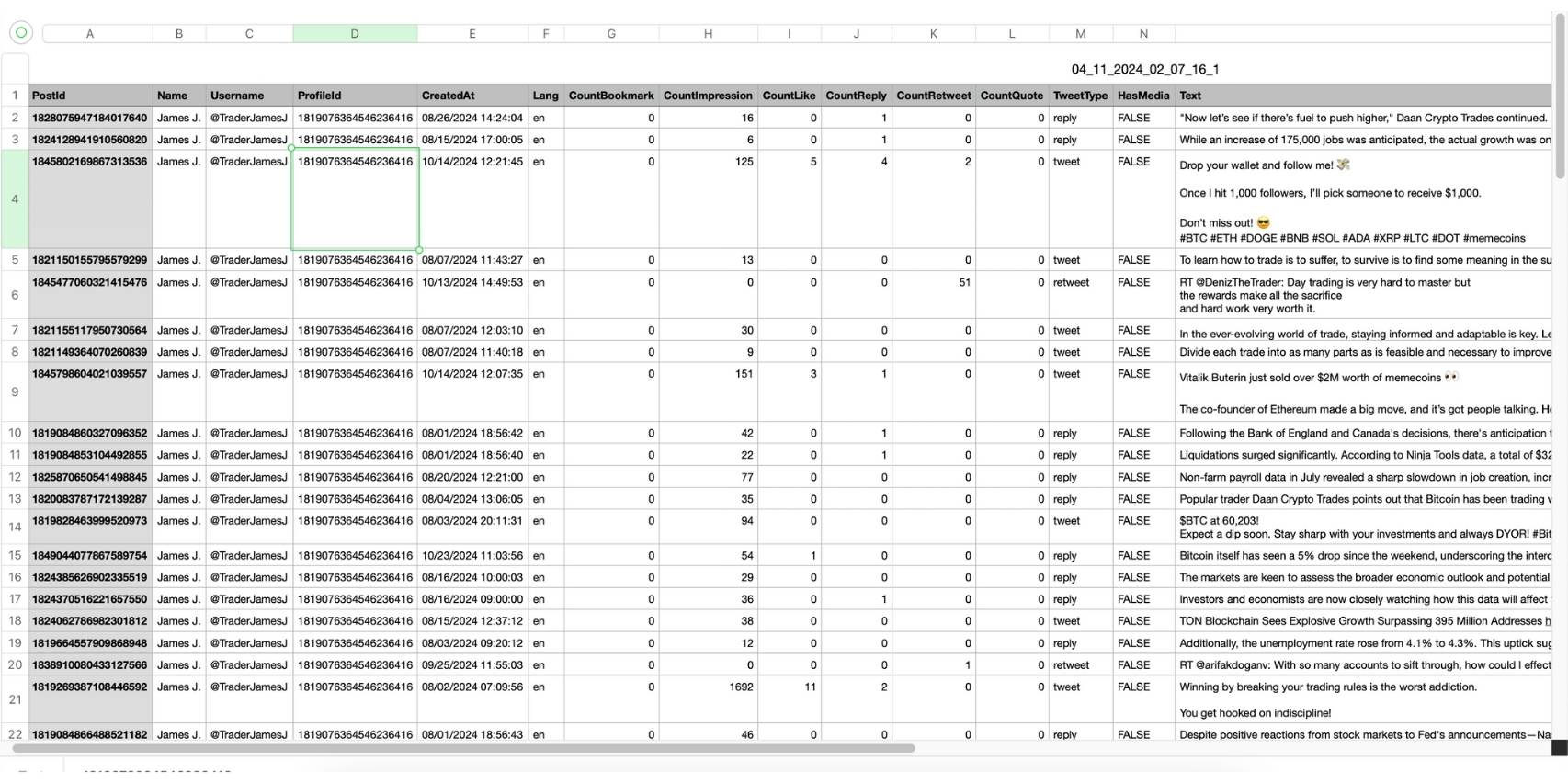
This allows you to access large numbers of tweets in a structured and searchable format.
You made it. You download tweets in bulk with Circleboom.
Exporting followers or following lists
Sometimes downloading tweets is not the only thing you need.
For example, you might want to analyze an account’s audience or understand who they interact with.
Circleboom Twitter also allows you to export:
🟢 someone’s full follower list
 infocircleboom.com
 infocircleboom.com
This can be helpful for research, influencer analysis, or audience insights.
Final thoughts
Downloading tweets in bulk is not something Twitter provides natively. If you want to collect tweets from an account, manually copying and pasting them is simply not practical.
Using a dedicated tool is the only realistic solution.
Circleboom Twitter, an official X Enterprise Developer, provides a reliable way to export tweets quickly and safely. By simply entering a username, you can generate a file containing that account’s tweets and download it directly to your device.
And if you need more data, Circleboom also allows you to export follower and following lists.
Instead of manually copying tweets one by one, you can download them in bulk and organize them easily for research, analysis, or archiving.

