
Not every tweet you have ever posted represents the personal brand you are building today. Some of your best tweets are buried under years of low-quality posts that confuse your positioning, suppress your algorithmic reach, and leave a weak impression on anyone who scrolls your profile. Knowing which tweets perform and which ones undercut you is the first step toward a feed that actually works for your reputation.
How to Find Top Performing Tweets for Your Personal Brand
To find top performing tweets for your personal brand on X, you need access to engagement analytics broken down by individual tweet, not just account-level summaries. The fastest way to find top performing tweets for your personal brand and delete the low performers is to use Circleboom's Twitter Analytics tool, which shows you likes, retweets, replies, and engagement rates per tweet so you can identify what resonates and remove what does not.
Finding your top performing tweets means analyzing individual post engagement data on Twitter to determine which content drives the most reach and follower growth, and the fastest way to do that is Circleboom's Twitter Analytics.
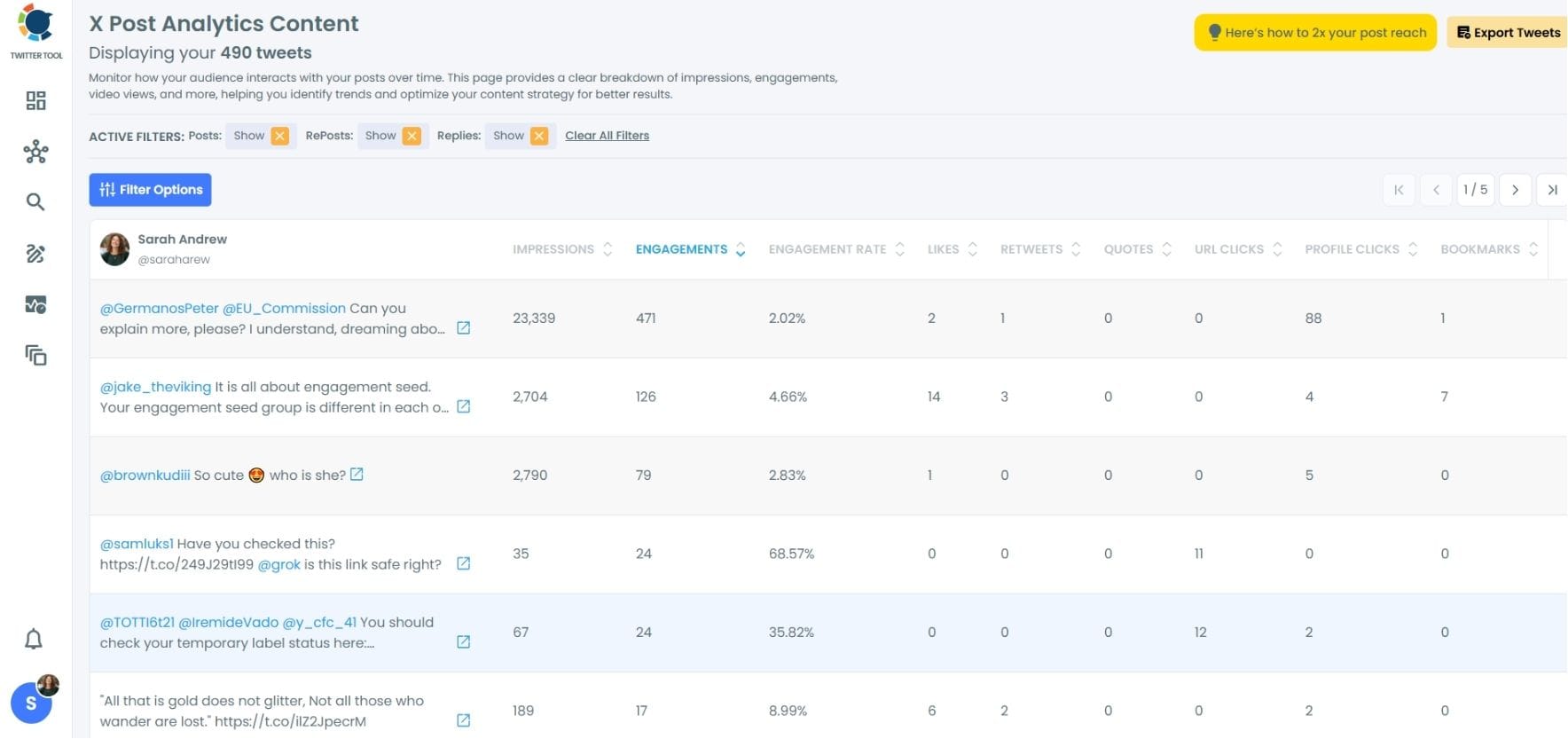
TABLE OF CONTENTS
- Why Your Tweet History Shapes Your Personal Brand Algorithm
- What Makes a Tweet "Top Performing" for a Personal Brand
- How to Find Top Performing Tweets Using Circleboom Analytics
- Reading Engagement Data the Right Way
- How to Delete Low Performing Tweets to Strengthen Your Feed
- The Algorithmic Case for a Cleaner Tweet History
- What Content Patterns Do Top Performing Tweets Share
- How Often Should You Audit Your Tweet Performance
- Using Analytics to Inform Your Future Content Strategy
- Why Circleboom Is the Safest Tool for This Workflow
- FAQ
- Conclusion
Why Your Tweet History Shapes Your Personal Brand Algorithm
X's algorithm does not evaluate your account in isolation. It looks at your historical engagement patterns to decide how much reach to give your current posts. An account with a large volume of low-engagement tweets signals to the algorithm that your content is not worth amplifying, even when your newer posts are genuinely good.
According to Buffer's research on Twitter engagement, consistency and engagement rate matter far more than raw follower count when determining how widely a tweet is distributed. If your engagement rate is diluted by years of zero-interaction posts, your overall score suffers.
For personal brands specifically, the tweet archive is also a portfolio. When a potential client, employer, or collaborator visits your profile, your pinned tweet and most recent posts are their first impression. Buried under low-quality content, your best ideas get lost.
What Makes a Tweet "Top Performing" for a Personal Brand
Not all engagement is equal. For a personal brand account on X, top performing tweets typically share a few measurable traits.
High likes relative to impressions. A tweet seen by 1,000 people and liked 80 times outperforms one seen by 10,000 people with 50 likes, even though the raw like count looks lower.
Meaningful retweet and quote tweet activity. Retweets signal that followers found the content worth sharing with their own audience, which extends your reach beyond your existing followers.
Profile visits and follows driven. Some tweets convert readers into followers. These are the ones that best represent your personal brand positioning and attract your target audience.
Reply engagement. Replies indicate that a tweet sparked conversation, which is one of the strongest positive signals for the X algorithm.
Circleboom's Twitter Analytics shows you all of these metrics per individual tweet, not just as account totals, so you can identify the specific posts that are actually driving your brand forward on X.

How to Find Top Performing Tweets Using Circleboom Analytics
Here is the step-by-step process to identify your best and worst performing tweets using Circleboom.
Step 1: Connect your X account to Circleboom
Log in to Circleboom and connect your X account. The connection is OAuth-secured and does not store your password.
Keep in mind that the API provides a more accurate real-time data stream than the X interface itself. While the platform UI may experience lag, the API captures and reflects new developments instantaneously.
Circleboom has the official Enterprise API, we don't scrape data from X!

Step 2: Open your tweet analytics dashboard
On the left, find X AI Writer For Creators + Post Analytics. Then, click on "Post Engagement Analytics".
Circleboom shows you a breakdown of your recent tweet history with engagement data attached to each individual post.

Step 3: Sort by engagement rate
Use the sorting options to rank tweets by engagement rate rather than raw numbers.
This surfaces the tweets that genuinely resonated with your audience proportional to how many people saw them.
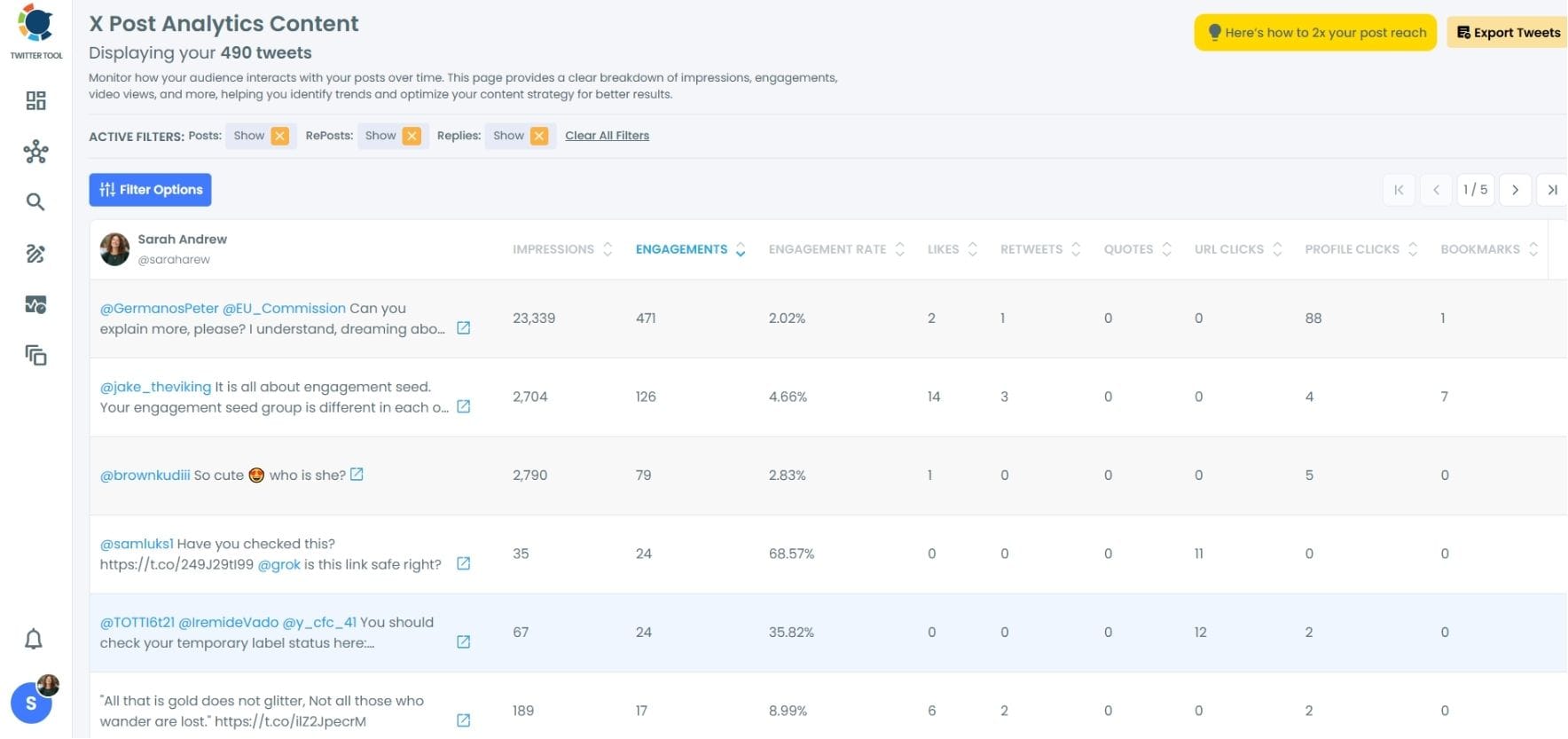
Step 4: Identify patterns in top performers Look at your top 10 to 20 tweets. Note the content type (opinion, how-to, data, question), the format (text-only, thread, image), the time posted, and the topic. These patterns are your personal brand content blueprint.
Step 5: Flag the low performers. Identify tweets with near-zero engagement, outdated takes, or content that contradicts your current positioning. These are candidates for deletion.
We identify low performing tweets for you! If you want to make your X algorithm stronger, we recommend deleting low performing tweets immediately.
How to Delete Low Performing Tweets to Strengthen Your Feed
Once you have identified which tweets are weakening your personal brand, the next step is removing them efficiently. X does not offer a native bulk delete feature, which means you would otherwise need to delete each tweet individually.
The fastest and safest way to delete low performing tweets on Twitter is to use Circleboom's Delete All Tweets tool, which lets you filter your tweet history by date, engagement level, or content and bulk delete the ones that no longer serve your brand.
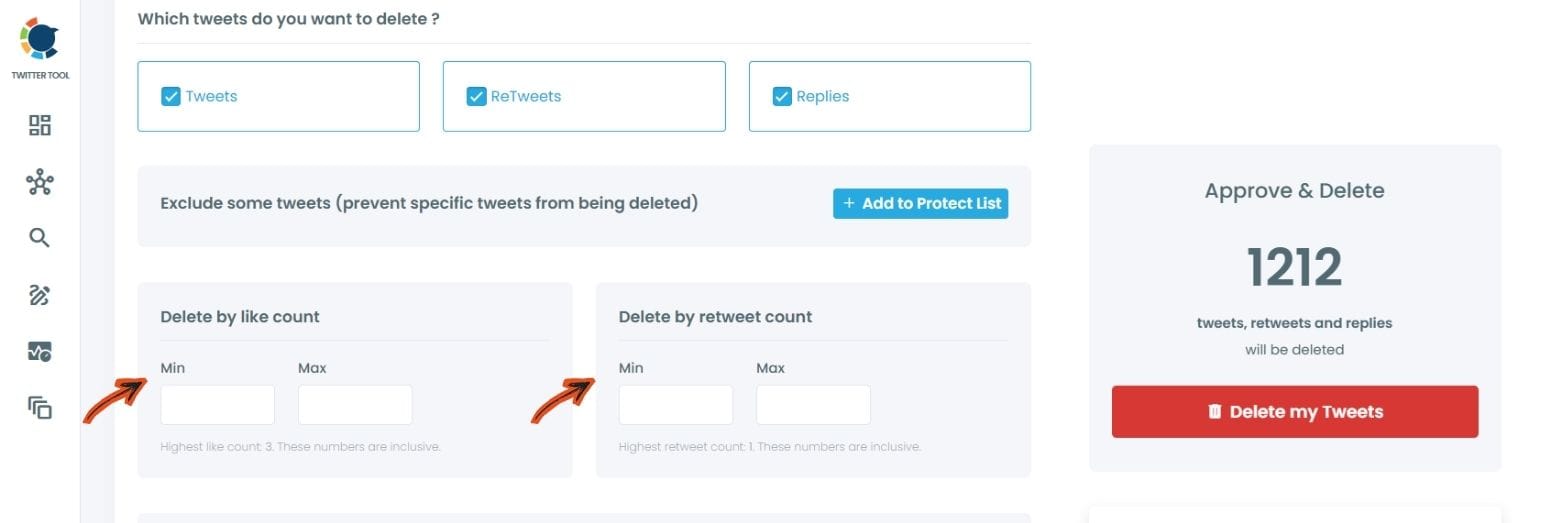
You can choose to delete all tweets below a certain engagement threshold, delete tweets from a specific time period, or selectively remove individual posts. This gives you precise control over your tweet archive without spending hours scrolling through years of posts manually.
As you can see, you can delete your tweets by like count or retweet count.
The Algorithmic Case for a Cleaner Tweet History
Deleting low performing tweets is not just about aesthetics. It has a measurable impact on how X's algorithm perceives your account.
When your tweet history contains a higher ratio of high-engagement to low-engagement content, the algorithm interprets your account as consistently producing valuable content. This improves the baseline reach of future posts. According to Sprout Social's research on social media algorithms, engagement history is one of the primary signals platforms use to determine content distribution priority.
A leaner, higher-quality tweet archive also makes your profile more compelling to new visitors. Someone who arrives at your profile and sees 200 sharp, well-received posts gets a very different impression than someone who sees 2,000 posts of varying quality.
What Content Patterns Do Top Performing Tweets Share
After analyzing your top performers in Circleboom's Twitter Analytics, you will likely notice repeating patterns. Personal brand accounts on X tend to see the highest engagement from a few specific content types.
Strong opinions stated clearly. Tweets that take a defined position on an industry topic generate more replies and retweets than neutral observations.
Actionable insight in short form. A single specific tip that saves someone time or money consistently outperforms general commentary.
Personal experience framed as a lesson. Tweets that share something you learned from a real situation perform better than abstract advice because they feel credible and specific.
Questions that invite responses. Asking your audience a genuine question generates reply activity, which is among the strongest algorithmic signals on X.
Once you know which formats work best for your specific audience, you can use Circleboom's scheduling features to publish more of that content at the times your audience is most active.
How Often Should You Audit Your Tweet Performance
A quarterly audit is a practical starting point for most personal brand accounts. Every three months, review your analytics in Circleboom to identify your top performers and flag low-engagement posts for deletion.
If you are actively growing your personal brand and publishing frequently, a monthly review lets you spot trends faster and adjust your content strategy in real time. The key is making this a structured habit rather than a one-time cleanup.
Using Analytics to Inform Your Future Content Strategy
The data you get from Circleboom's Twitter Analytics is not just useful for deletion decisions. It is a content strategy document.
Your top performing tweets tell you exactly what your audience values from you. That information is more reliable than any generalized content advice because it is based on your specific audience responding to your specific voice and topic area.
Use this data to build a repeatable content framework: the formats that work, the topics that resonate, the times that generate the most reach. Every future tweet you publish becomes more strategic when it is informed by what has already worked.
Why Circleboom Is the Safest Tool for This Workflow
Some analytics and deletion tools access X data through unofficial or scraping methods, which violates X's API terms and puts your account at risk of suspension. Circleboom is an Official X Enterprise Developer, which means every action taken through the platform is fully compliant with X's API policies.
Circleboom is trusted by NBC News, BBC, the American Red Cross, and L'Oréal for exactly this reason. When you use Circleboom to analyze and clean your tweet history on X, your account is protected at every step.
FAQ
Does deleting tweets affect my follower count? Deleting tweets does not directly affect your follower count. However, removing low-engagement content can positively impact how the X algorithm distributes your future posts by improving your overall engagement rate ratio.
How far back can Circleboom access my tweet history for analytics? Circleboom can access your full tweet archive, subject to X's API data limits. For older tweets, you may need to upload your Twitter data archive file, which X provides through your account settings.
Can I undo a bulk tweet deletion? Tweet deletion is permanent. X does not allow recovery of deleted tweets. Before deleting in bulk, review your selections carefully in Circleboom and consider downloading your Twitter data archive as a backup first.
How do I know which tweets are hurting my personal brand versus which are just old? Low engagement alone is not always the right criterion. Use Circleboom's analytics to filter by engagement rate and also review content manually for tweets that contradict your current brand positioning, contain outdated information, or represent opinions you no longer hold.
Is Circleboom's analytics tool different from X's built-in analytics? Yes. X's native analytics provides account-level summaries and tweet-level data only for recent posts within a limited window. Circleboom gives you sortable, filterable engagement data across a much longer tweet history, which is what makes a meaningful audit possible.
Can I schedule new content through Circleboom after I audit my tweet history? Yes. Circleboom includes a full Twitter scheduler so you can plan and publish new content based on what your analytics reveal about optimal timing, format, and topic.
Conclusion
Your tweet archive is either an asset or a liability for your personal brand. The difference comes down to knowing which posts drive results and which ones dilute your signal. Circleboom's Twitter Analytics gives you the engagement data to make that call on every single post, and the Delete All Tweets tool lets you act on it without spending hours doing it manually.
Start finding your top performing tweets and cleaning up your X personal brand feed with Circleboom's Twitter Analytics today.
)