

At one point, I wanted to get a full list of my Twitter followers.
The idea was simple. I wanted to analyze my audience, see who was following me, and keep a record of it in a spreadsheet. I thought Twitter would easily allow me to download a list of my followers.
But it doesn’t.
Twitter (X) lets you see your followers on your profile page, but it doesn’t provide an option to download them as a list. You can scroll through the followers page, but it keeps loading more users endlessly and there is no way to export the data.
This makes it difficult if you want to actually analyze your followers or keep a record of them.
For example, if you want to review your audience, identify inactive accounts, or simply store your followers in an Excel file, Twitter does not give you the tools to do it.
That’s why I needed another solution.
Why having a follower list can be useful
Getting a follower list is not just about curiosity.
There are many practical reasons why people want to export their followers.
For example, you might want to:
➡️ analyze the quality of your followers
➡️ track audience growth over time
 infocircleboom.com
➡️ identify inactive or fake accounts
➡️ keep a backup record of your followers
➡️ perform research on a specific account
When your followers are saved in a spreadsheet, you can filter, sort, and analyze the data easily.
But since Twitter doesn’t provide this option natively, you need a tool that can export the data.
Exporting followers with Circleboom Twitter
To solve this problem, I used Circleboom Twitter.

Circleboom Twitter is an official X Enterprise Developer, which means it works with Twitter using official infrastructure rather than unreliable scraping methods.
With Circleboom, you can export follower lists easily.
The platform allows you to export:
- your own followers
- your following list
- another account’s followers
- another account’s following list
 Kevin Frank
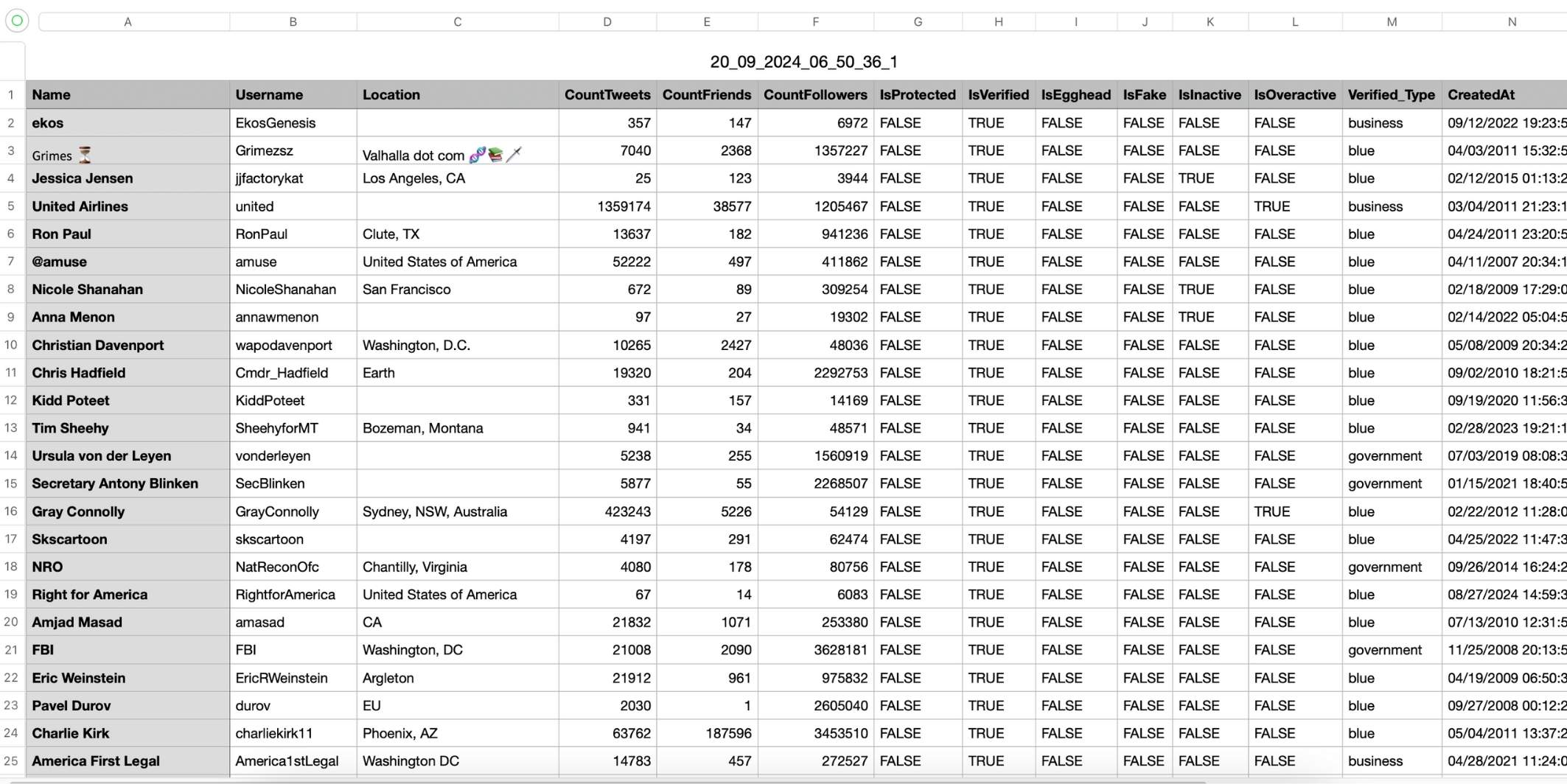
The exported file is provided as a clean CSV or Excel file, which makes it easy to analyze.
What I found especially useful is that the export includes detailed information about each account.
For example, the file can include:
- Twitter ID
- username
- account creation date
- follower count
- following count
- tweet count
- activity indicators
- signals that may suggest fake or inactive accounts
Having all this information in a spreadsheet makes analysis much easier than simply scrolling through Twitter.
How to export your Twitter followers list
Here is how you can export your follower list using Circleboom Twitter.
Step #1: Go to the Circleboom Export Twitter Followers List Window:
First, navigate to the Circleboom "Export Twitter Followers List" window.
Here, you’ll need to enter the Twitter username of the account whose follower list you want to export. This can be your own account or any other Twitter user’s account. After entering the username, click the 'Search' button.

Step #2: Choose the List You Want to Export: Circleboom offers two options: you can export either the followers or the following list of the account you searched for.
In this case, since we only want to export the follower list, select "Export Twitter/X Followers" and click 'Next'.

Step #3: Provide Your Email to Receive the CSV File: Circleboom will send the exported follower list to your email in a CSV format.
Enter your email address in the provided field and click 'Next'.

Step #4: Receive the Follower List via Email: Congratulations! Circleboom will send you the follower list of the account you searched for in just a few minutes.
You’ll now have access to all the details of the account’s followers in a downloadable CSV file.
Automatic follower analysis and bulk actions
Another helpful feature of Circleboom is that it can analyze your followers automatically.
 Arif Akdogan
Instead of manually reviewing thousands of accounts, Circleboom can categorize followers and help identify things like:
- inactive accounts
- suspicious or fake followers
- low-quality accounts
Once this analysis is complete, you can take actions directly from the dashboard.
For example, Circleboom allows you to:
These bulk actions save a lot of time, especially if you are managing a large Twitter account.
Final thoughts
Twitter does not provide a built-in way to download a full list of your followers. While you can see followers on your profile page, there is no option to export them as a structured list.
If you want to analyze your audience or keep a record of your followers, exporting them to a spreadsheet is the most practical solution.
Tools like Circleboom Twitter, an official X Enterprise Developer, make this process easy by allowing you to export follower lists as clean CSV or Excel files. Once the data is downloaded, you can analyze your audience, track follower information, and even take actions like removing fake followers or managing accounts in bulk.
Having a proper follower list gives you much more control over your Twitter audience than simply scrolling through the followers page.

