

X gives you no switch that hides only your following list. The realistic answer is to shrink your public following on purpose: move the accounts you want to keep watching into a private Twitter List, then unfollow them so they drop off your visible list.
On X, the only native way to hide who you follow is to protect your whole account, which also locks your posts behind approval. The practical alternative is curation. Circleboom moves the accounts you follow into private Twitter Lists and unfollows them in bulk through safe, official access under X's rules, so your public following list stays short while your feed keeps every source.
→ hide your following list on X
Below is the exact workflow, plus when going fully private is the better call.

Why X Has No Button to Hide Only Your Following List
Your following list is public by default, and X treats it as part of your open profile. There is no privacy toggle that hides who you follow while leaving your posts visible. Anyone who visits your profile can open the Following tab and read the entire list, top to bottom. That open visibility is why so many users ask whether anyone can see who you follow on X.
You have two honest paths, and they solve different problems.
The first path is protecting your account. Turning on Protect your posts, per X's public and protected posts settings, hides your following and follower lists from anyone who is not an approved follower. It also locks every post behind a follow request, so it is a heavy trade. Your approved followers still see who you follow, which means protection hides the list from strangers, not from your existing audience.
The second path is curation, and it is the one most people actually want. Instead of hiding the list, you make it small and intentional. You keep monitoring every account you care about through a private Twitter List, then unfollow them publicly. That approach lets you prevent people from seeing your following list on X without losing a single source from your feed.
What Your Following List Tells a Visitor
A following list reads like an unedited timeline of your attention. It carries follows from old follow-for-follow campaigns, accounts from a research project that ended months ago, brands you engaged with once, and interests you have since dropped. None of that was meant as a public statement, yet a visitor treats the whole pile as one.
That is why curation beats hoping nobody looks. A short, deliberate following list signals focus and current priorities. A bloated one signals noise and drift. Trimming it is not about secrecy so much as making the public signal match who you are now.
The catch is scale. Doing this by hand means opening each profile, adding the account to a List, then unfollowing, one at a time.
Circleboom removes that friction. As an Official X Enterprise Developer, it pulls your full following list, builds the private List in one action, and paces the unfollows so your account stays safe. You can start the whole cleanup here: trim your public following list.
How to Hide Your Following List on X (Step by Step)
To hide your following list on X the practical way, pull your entire following into one view, move the accounts you want to keep into a private Twitter List, then unfollow them in bulk. The private List preserves your monitoring, and the unfollow shrinks the public list a visitor sees. The workflow below runs that loop in two phases.
Pull your full following list into one view
- Log in to Circleboom Twitter and connect your X account with official OAuth.
- Open the Follower & Following menu to load every account you follow.

- Select All My Following to see the complete list as a sortable, filterable table with tweet counts, follow ratios, and activity signals for each account.
Move the keepers into a private List, then unfollow
- Whitelist the accounts you never want to touch so a bulk action can never catch a partner, client, or close contact.
- Select the accounts you still want to watch, then choose Add to List and Create New Twitter List with the visibility set to Private. They now live in a List only you can see, and X notifies no one.
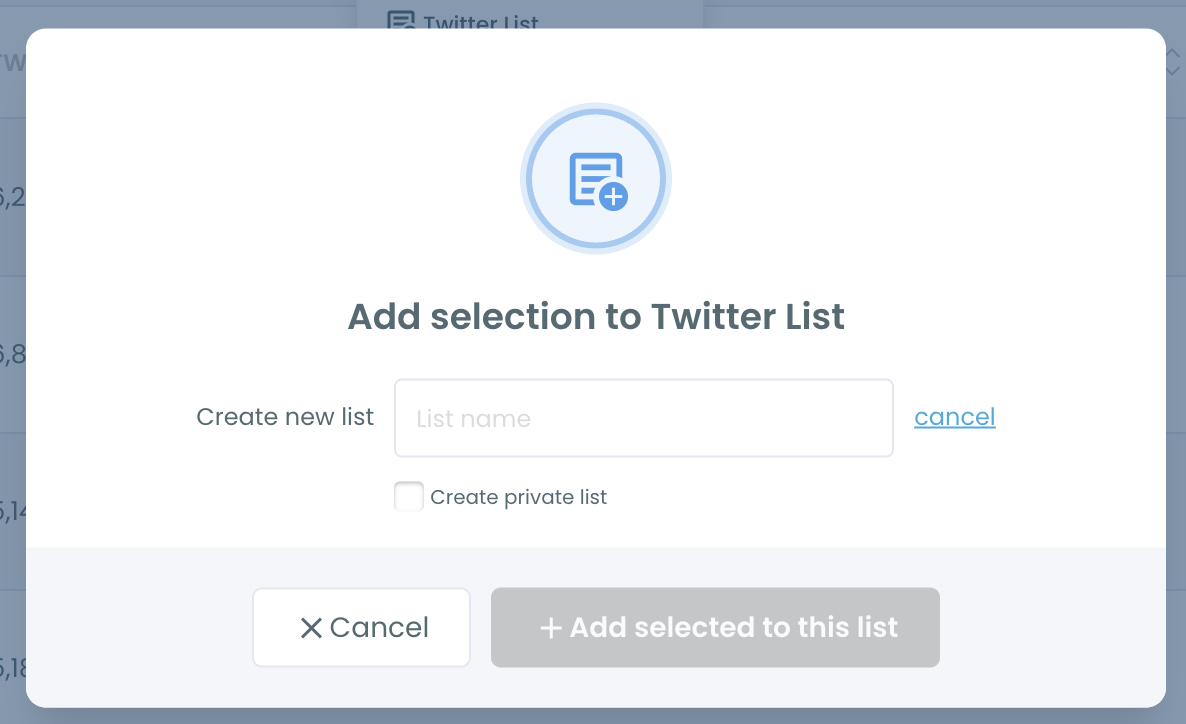
- Select that same set and run Unfollow in bulk so the accounts leave your public following while staying inside your private List.
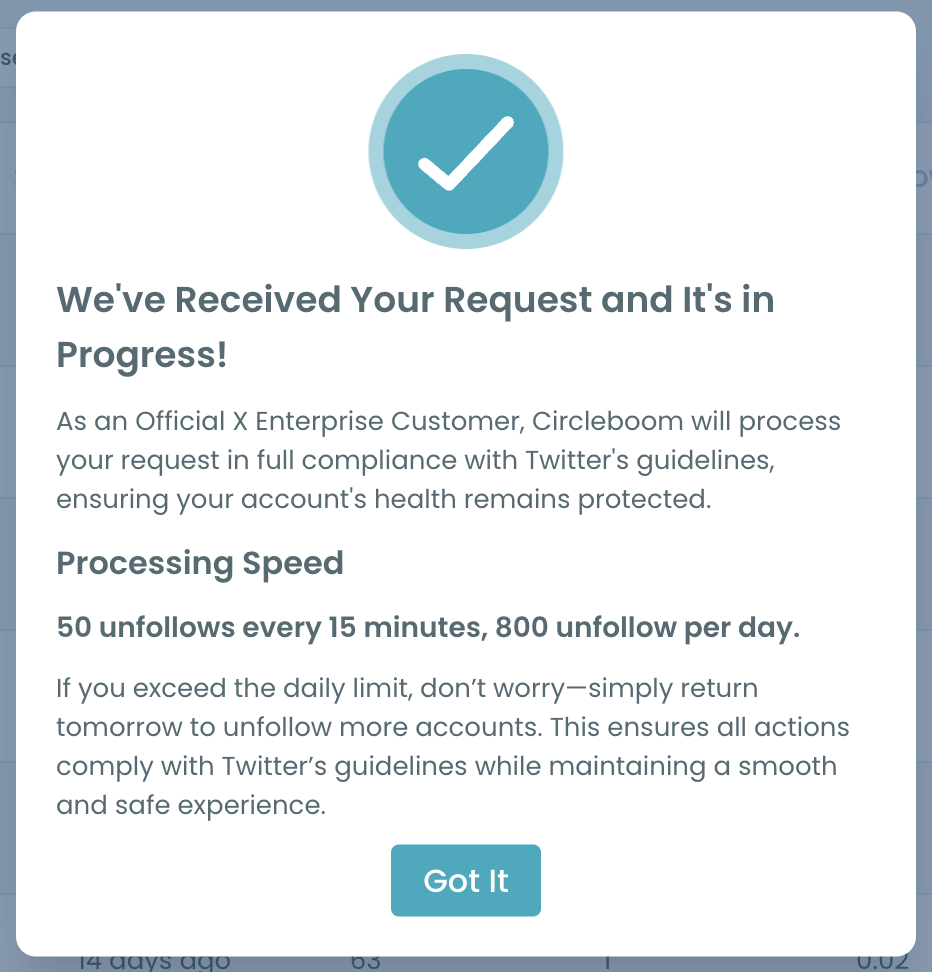
That order is what keeps the process safe. The whitelist protects your must-keep accounts before anything destructive runs, the private List captures your monitoring before you unfollow, and the bulk unfollow is paced under X's limits of 50 every 15 minutes and up to 800 per day. Skip the List step and you lose the feed value you were trying to protect.
See it live: the private-List trick that hides who you follow without cutting off your feed.
Private Lists vs. Going Fully Private
Both methods reduce what a visitor learns about you, but they cost different things.
Protecting your account hides the following list from strangers instantly, with zero cleanup. It also gates your reach: no one can see your posts, quote you, or find you without a follow request. For a brand or creator who wants visibility, that price is usually too high.
Curation keeps you fully public and reads as a deliberate, professional profile. The trade is the upfront work, which is exactly what Circleboom compresses into a few clicks, so you can curate your public following list in a single session.
The reason the method works at all comes down to how private Lists behave, and this explainer on whether Twitter Lists are public covers the detail that matters: a private List is visible only to you, and adding an account sends no notification.
There is also a middle setting many people miss. You do not have to unfollow everyone. Keep the two-way relationships that define your network, and only move the one-directional or stale follows into a private List. A quick pass to check your mutual followers on Twitter shows which connections are reciprocal before you decide what leaves the public list.
Keep New Follows From Rebuilding the Pile
Trimming once is easy to undo by accident. Within a month, a fresh round of research follows and one-off taps can rebuild the clutter you just cleared. The habit that prevents it is simple: route accounts you only want to watch straight into a private List instead of following them.
While you are auditing, it also helps to prune the accounts that add nothing. Filter All My Following for inactive or low-quality profiles and mass unfollow the Twitter accounts that no longer earn a place.
If your priority is tidying one-directional relationships, Circleboom's view of accounts not following you back isolates them in one screen so you can decide which to keep and which to move.
You can manage the whole structure, private Lists included, inside the Twitter List Manager, so building, renaming, and pruning your monitoring feeds never becomes a manual chore.
Keep a Record Before You Unfollow
Unfollowing in bulk is irreversible on your side: Circleboom cannot restore a following relationship automatically once it is gone. That is not a reason to hesitate, but it is a reason to keep a record. Before you run the batch, export the selected segment as a CSV so you have every username, bio, and account detail saved.
If you ever want to rebuild part of the list, that file is your source of truth. It also doubles as a periodic snapshot of how your following changes over time, which is useful well beyond this one cleanup. Exporting first costs nothing and turns an irreversible action into a reversible one on your end.
The Bottom Line
X will not hand you a switch to hide only your following list, so the win comes from shrinking that list while keeping your feed. Move the accounts you care about into a private List, unfollow them in bulk, and your public profile shows a short, intentional following while you quietly monitor everyone behind the scenes. Because Circleboom runs every action through safe, official access, none of it risks your account.
→ keep your following list private on X
Questions About Your Following List Privacy
Can I hide my following list on X without making my account private?
Not with a native setting. X has no toggle that hides only who you follow. The workaround is to move accounts into a private Twitter List and unfollow them, which removes them from your public following while you keep watching their posts.
Does anyone get notified when I add them to a private List?
No. X does not notify an account when you add it to a private List, and private Lists are invisible to everyone but you. That is what lets you unfollow publicly and monitor privately at the same time.
Is it safe to unfollow that many accounts at once?
Yes, when it is paced. Circleboom processes unfollows within X's limits of 50 every 15 minutes and up to 800 per day, and it queues the rest automatically. Whitelist your important accounts first so a bulk unfollow never removes someone you meant to keep.
Will unfollowing hurt the accounts I still want to see?
No. Unfollowing only removes them from your timeline, and your private List keeps their posts in one dedicated feed. You lose nothing you set up to monitor, and the accounts are not blocked or alerted.
)
