
An independent bookstore on Bluesky rarely stops at one account. There is the shop itself, a children's corner with its own story-time crowd, and a used-and-rare account for collectors.
Every author event belongs on all three.
Logging in and out three times for each announcement is where most small shops give up and let two accounts go quiet.
Logging in to each account: three separate sessions per announcement, with the same text retyped and pasted each time. Circleboom Publish: one Bluesky composer selects all three accounts and sends, schedules or queues the same post to every one of them in a single action.
→ Post to multiple Bluesky accounts from one composer
The steps below use a three-account bookstore, but the flow is identical for ten.
Why three Bluesky accounts turn into three jobs
Bluesky's own app posts from one account at a time. To share the same author event on the shop, kids' and rare-books accounts, a manager posts it, switches accounts, pastes it again, switches once more and repeats.
The arithmetic gets heavy fast. Say the bookstore wants one daily post on each account across 20 working days a month. Done natively, that is 60 separate posts, and every one of them means a login, a switch and a paste.
So the smaller accounts slide. The kids' corner posts on Mondays, the rare-books account posts when someone remembers, and the event of the month reaches a third of the audience it could have reached.
On a still-growing network, a quiet account loses ground that is cheap to win back early and expensive to win back later.
The fix is to post to multiple Bluesky accounts from one place. When you post to multiple Bluesky accounts at once, those 60 posts become 20 sends, because each daily update goes to all three accounts in one action.
If you are still deciding whether a second or third account is worth opening, the guide on whether you can have multiple Bluesky accounts covers the setup side first.
The part that trips people up: X works differently
Circleboom Publish gives Bluesky the exact same composer as X, and on X that composer accepts only one X account per post. That is a deliberate safeguard, since X's spam detection can suspend accounts that receive identical posts at the same moment.
Bluesky has no such restriction.
In the same composer, you can select as many Bluesky accounts as you have connected and publish to all of them together. It is the one real behavioral difference between the two networks inside Circleboom, so never carry X's one-account rule over to Bluesky, or the other way around.
What Circleboom Publish does for a multi-account Bluesky shop
Circleboom Publish lets you post to multiple Bluesky accounts in one send: you open the Bluesky composer, select every account the post should reach, and publish, schedule or queue it once. The same composer brings AI writing, threads, the Hashtag Generator, scheduling at each account's best time and Auto Repost.
Before handing over any account, it helps to know who is holding it. Circleboom is an official X Enterprise developer, so the company connects accounts through approved platform access rather than workarounds. The bookstore's Bluesky accounts then sit in the same dashboard as everything else the shop runs.
Three things make the composer fit a small team:
- Any number of Bluesky accounts per post, with no X-style limit.
- Share Groups that save a recurring selection, such as "all three shop accounts," as one click.
- Per-account timing, because Best Time to Post is computed for each Bluesky account from its own followers.
That last point matters more than it looks. The kids' corner audience is parents who scroll in the evening; collectors of rare books may read at lunch.
One schedule does not fit both.
To manage multiple Bluesky accounts this way, you connect each account once and then treat the whole set as one publishing surface.
A 1:40 run through Circleboom Publish's Bluesky composer: writing the post, AI edits, hashtags, and scheduling at a suggested best time.
Check Bluesky's limits before you send to every account
When you post to multiple Bluesky accounts, a post that breaks a limit fails on every one of them, so check the limits once, before the send. Bluesky's 2 MB image limit is the tightest in Circleboom's whole platform set:
| Item | Bluesky limit |
|---|---|
| Text | 300 characters |
| Images | up to 4, 2 MB each |
| Video | up to 10 minutes, 300 MB |
| Alt text | not available |
The image limit catches bookstores most often. A phone photo of a new-arrivals table is usually 3 to 8 MB, so compress it under 2 MB before uploading, or the post will not go out.
Circleboom's page on media limitations for social platforms keeps the full, current list.
The image side of a post has its own walkthrough: how to post images on Bluesky and schedule them.
Text is the second trap. A 450-character note about a signed first edition will not fit, so either shorten it with the AI writer or split it into a two-post thread with "Add another post."
How to post to multiple Bluesky accounts at once
The flow has three phases: connect the accounts once, write and select in the Bluesky composer, then schedule with Auto Repost switched on. After the first setup, one announcement takes a few minutes.
Connect every bookstore Bluesky account once
- Log in to Circleboom Publish and open the gear-icon Settings menu.
- Choose Manage Social Accounts and click CONNECT NEW ACCOUNT for each Bluesky account: the shop, the kids' corner and the rare-books account.
- Create a Share Group under Settings, then Manage Share Groups, holding all three, so later posts start with one click.
Write once and tick all three accounts in the Bluesky composer
- Click the Bluesky Specific card on the dashboard, or pick Bluesky Specific Post in the sidebar's Create New Post menu.
- Open Select Accounts, filter by Bluesky, and tick the three accounts, or pick your Share Group under Select by Share Group.
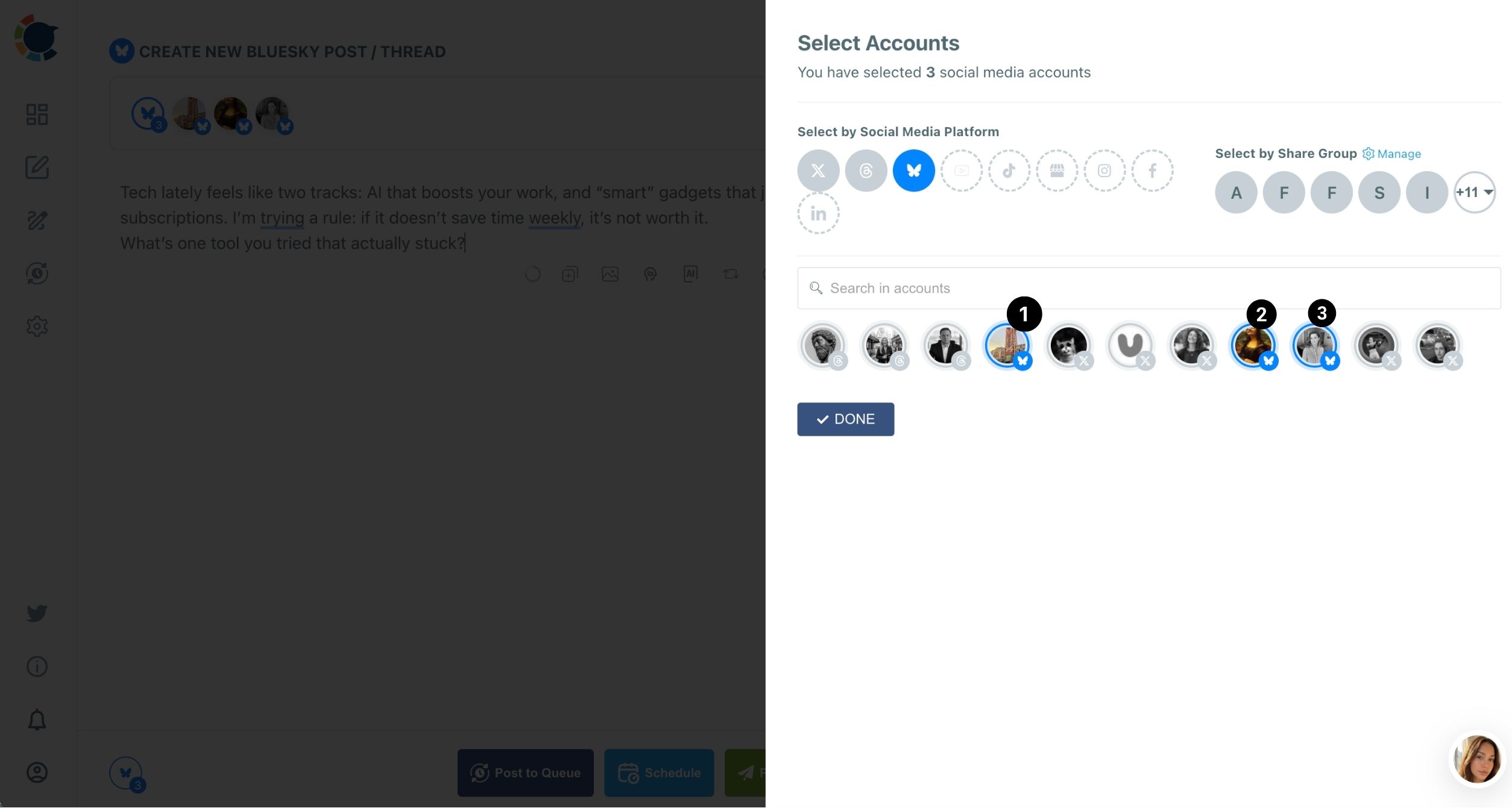
- Write the post under 300 characters, and attach up to 4 images of 2 MB or less.
Schedule the Bluesky post and let it resurface
- Set Auto Repost in the toolbar before sending: RePost after, Un-RePost after and Repeat this cycle.
- Click Schedule and choose a date and a "Pick your best post time" slot, or click Post to Queue to drop it into each account's next open slot.
Selecting the accounts before writing keeps the 300-character and 2 MB limits in view for every destination at once.
Turning on Auto Repost before the send matters because it cannot be added after the post is published.
When each Bluesky account needs its own wording
A single send when you post to multiple Bluesky accounts suits shared news: an author signing, holiday hours, a store-wide sale.
Daily posts are different. Duplicate content is bad for reach on every network, Bluesky included, and identical posts across several accounts can look like spam to people who follow more than one of them.
The practical rule for a bookstore:
- Store-wide news: one post, all three accounts, one send.
- Daily posts: a version per account, each written for its own audience.
- Reused X posts: rephrased before they go to Bluesky, never pasted as they are.
The AI Bluesky Post Writer does the rewriting inside the composer. Give it the base post and ask for a version for parents, or one that leads with the edition details for collectors. The AI Bluesky post generator comes with a Circleboom membership, so there is no separate AI subscription to pay for.
Each account's identity helps too. A shop whose handle is its own website reads as more trustworthy. Bluesky's own guide on setting your website as your username treats a domain handle as one form of verification. The steps for doing it are in the guide on how to change your Bluesky handle to your brand.
Same news, one send. Daily voice, one version per account.
Give staff access to the Bluesky accounts without sharing passwords
A bookstore rarely has one person posting. The events coordinator handles readings, a part-timer runs the kids' corner, and the owner wants to see everything before it goes out.
A Share Group alone does not give anyone access; it only groups accounts for faster selection. Access comes from team management: each person gets a role over a scoped set of accounts, and a User's posts wait for Admin approval before they publish.
For the bookstore, that means the kids' corner part-timer sees and posts only to the kids' account, while the owner reviews everything in one Outbox. The broader case for this setup is laid out in social media management for one business with multiple team members.
Schedule a week of Bluesky posts for every account in one sitting
Once you can post to multiple Bluesky accounts in one action, the next habit is batching. Prepare the week's posts one after another in the composer, give each its own date and time in the Schedule modal, and check the spread in the Outbox's List or Calendar View.
Timing deserves its own check per account. Best time to post on Bluesky suggestions are computed for each account from its own followers' activity, separately from any X account. The kids' corner and the rare-books account can each get slots that suit their readers.
The Queue makes this automatic. Each account keeps its own recurring time slots in Time and Queue Settings, and Add Best Times to Post fills them with that account's suggested times, so every Post to Queue lands in the right slot for each account.
After a few weeks, look at which posts are growing each account. The tactics in how to get followers on Bluesky pair well with a steady multi-account schedule.
Let Auto Repost bring Bluesky posts back for readers who missed them
A Bluesky post fades from timelines quickly. Auto Repost brings it back on a timer: for an author event, a cycle that reposts every few hours, a few times over, reaches readers checking in the morning, at lunch and in the evening.
Keep the delays modest and use it only on posts worth seeing twice. If a post that used to get replies suddenly goes quiet on one account, the Bluesky shadowban checker guide shows how to test for a reach limit before changing anything else.
Your first week running three Bluesky accounts: a checklist
To post to multiple Bluesky accounts at once, you do a setup job one time, then keep a short habit each week. Before the first event post goes out:
- Connect all three Bluesky accounts and save them as one Share Group.
- Compress every photo under 2 MB and keep each post under 300 characters.
- Send store-wide news to all accounts together; write daily posts per account.
- Fill each account's Queue with Add Best Times to Post.
- Turn on Auto Repost before sending anything worth a second look.
Run that list once and the shop's quieter accounts start posting as often as the main one.
→ Send your next post to every Bluesky account at once
Questions about posting to several Bluesky accounts
Can I send one post to my Bluesky accounts and other platforms together?
Yes. The universal Create New Post on All Platforms composer lets you select Bluesky accounts alongside other networks in one send. Keep that version within Bluesky's 300 characters and 2 MB images, or post a shorter version from the Bluesky Specific composer.
How many Bluesky accounts can I connect?
There is no per-post limit on Bluesky accounts, but the total number of connected accounts is capped by your plan. Manage Social Accounts shows how much of your allowance is used.
What happens if a scheduled post fails on one account?
It appears under Failed Items with the specific error reason, often an image over 2 MB or text over 300 characters. Fix the cause, then use Share Again to send it.