How do you launch a product on Twitter when one announcement has to reach people who have never heard of you? You prepare three things before launch day: the niche voices who should see it first, the hours your own followers are online, and a launch sequence that is already scheduled.
Three launch assets, ready before the announcement.
• A reviewed shortlist of niche influencers, saved to a private Twitter List.
• Launch-day posting slots taken from your own followers' activity and checked against your time zone.
• A scheduled launch sequence with planned reposts, so the news reaches more than one activity window.
Circleboom finds influencers by keyword, reads when your followers are online and schedules every launch post on X through X's Enterprise API access. Schedule the announcement sequence to launch a product on Twitter.
Why a product launch on Twitter is decided before launch day
A launch tweet has a short life. It goes out, collects whatever attention arrives in its first stretch, and sinks under newer posts.
When you launch a product on Twitter, the result of that short window depends on decisions you made weeks earlier: who already knows your account, what time the post goes live, and whether anything brings it back later.
Many teams spend their prep time on the announcement copy. The failure looks like this: a polished thread, posted when the founder finished writing it, to an audience that had no warm connection to anyone relevant in the niche.
The copy was fine. The setup around it was missing.
The announcement is the last step of the launch, not the first.
Why two days of preparation is not enough
Starting late has a concrete cost. An account that begins replying to niche voices two days before launch is a stranger to all of them on the day it asks for attention. The same account, replying for two or three weeks, is a name they have already seen in their own mentions.
That changes how you plan. Instead of one task on launch day, you get three tasks spread across the three weeks before it. Each one uses a different part of Circleboom, and each one has a limit or a setting that decides how early you need to start.
You can plan the posts that launch your product on X in one queue once the first two tasks are done.
Some teams skip the relationship work and pay creators to post instead. Whether that trade suits your launch is a separate decision. The case for and against is laid out in should you hire Twitter influencers: pros and cons.
This guide covers the version you run yourself.
What a launch-ready Twitter account has in place
Before you launch a product on Twitter, a launch-ready account has three assets in place. Circleboom builds all three on X from one dashboard:
- An audience map. Find Influencers searches X accounts by keyword and returns up to 5,000 influencer profiles per search, sorted into High, Mid and Low Engagement tiers.
- A clock. When Followers Are Online shows a day-by-hour bubble chart of your own followers' activity, and the same data feeds Best Time to Post slots in the scheduler.
- A queue. X Post Planner holds the teaser, the launch thread and the follow-ups, each scheduled for a chosen slot, with Auto Retweet cycles set in the same editor.
Done by hand, the audience map alone means opening profile after profile in browser tabs and guessing at engagement. Find Twitter Influencers puts the candidates in one table with follower count, following count, follow ratio and engagement class side by side.
Circleboom is named on the Enterprise customer page of X's developer docs. The searches, follows and scheduled posts in this plan run through access X approved rather than through scraping. That matters during a launch, when the account is about to get more attention than usual and you want nothing questionable attached to it.
When the three assets exist, you can prepare the launch queue for your Twitter product announcement in one sitting and stop thinking about timing on the day itself.
Which time zone do Twitter best-time slots use?
The hours in When Followers Are Online and in the Best Time to Post slots are shown in the time zone set for your connected Circleboom account, not in your audience's time zone. Circleboom's help page on what time zone is being used for best time to tweet states this directly. To change it, open the Time and Queue Settings tab in Account Settings.
This detail decides whether your launch lands on time.
Say your account is set to London and the largest bubble on the chart sits at 14:00. That is 14:00 London time, which is 09:00 in New York. If you read it as New York time and convert it again, the launch post goes out five hours late, in the middle of the US afternoon.
Check the time zone setting once, before you read the chart, and never convert a displayed hour twice.
The chart itself is built from your followers' own activity, not from platform averages. A generic best-time article may say mornings; your followers may peak at night. For a deeper look at reading the chart, see find when your Twitter followers are online.
A short run-through of the influencer side: how a keyword search, a follower cap and the engagement tiers narrow a niche down to reachable accounts.
How to launch a product on Twitter in three weeks
The steps below run backward from the launch date, in three phases, and each phase starts as early as its slowest part requires.
Build the influencer shortlist three weeks out
- Log in to Circleboom Twitter and authorize the X account you will launch from.
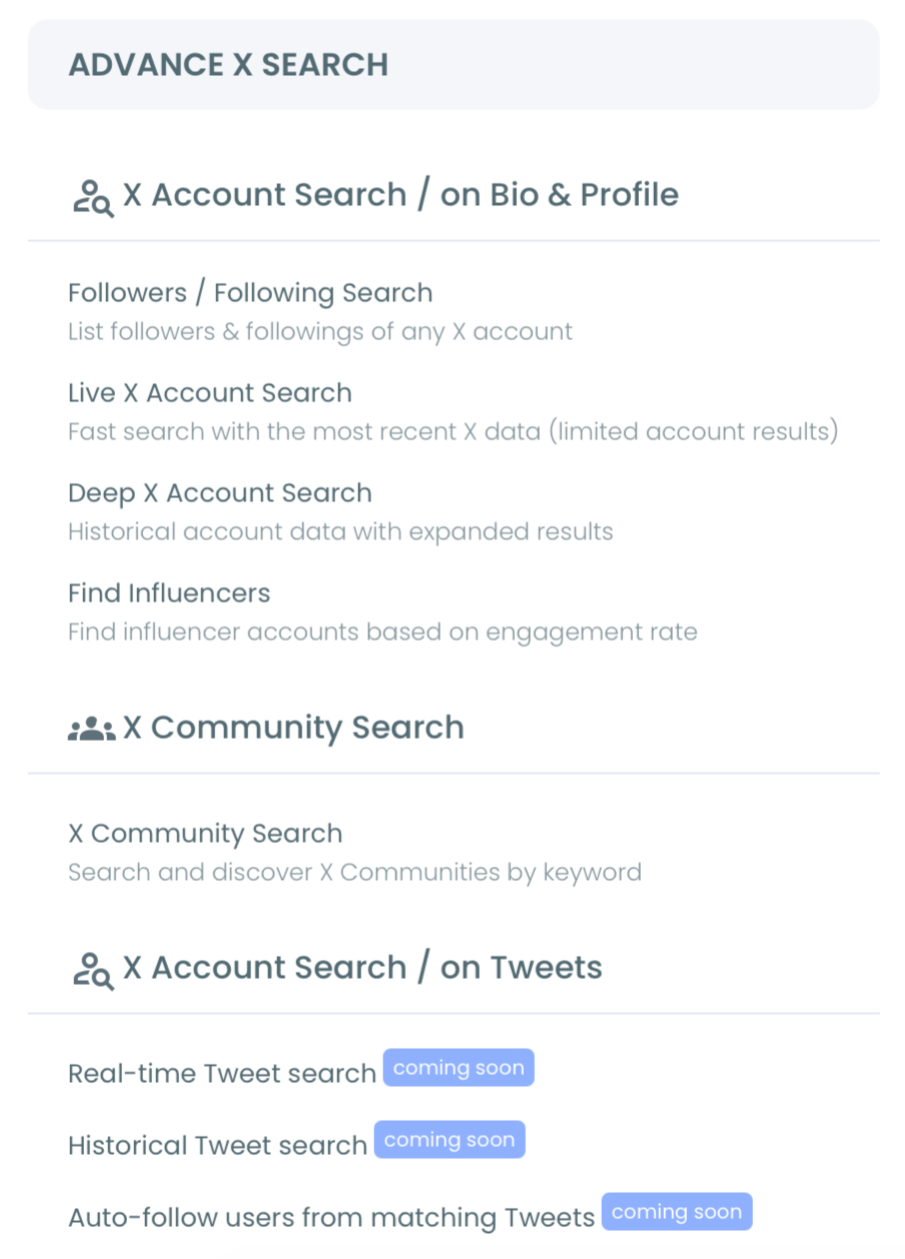
- Go to the Advanced X Search menu from the left sidebar.
- Open Find Influencers and search your niche keyword. For a screenwriting app, "cinema" is a fair start. Keep all three engagement tiers checked for the first pass, then click Search.
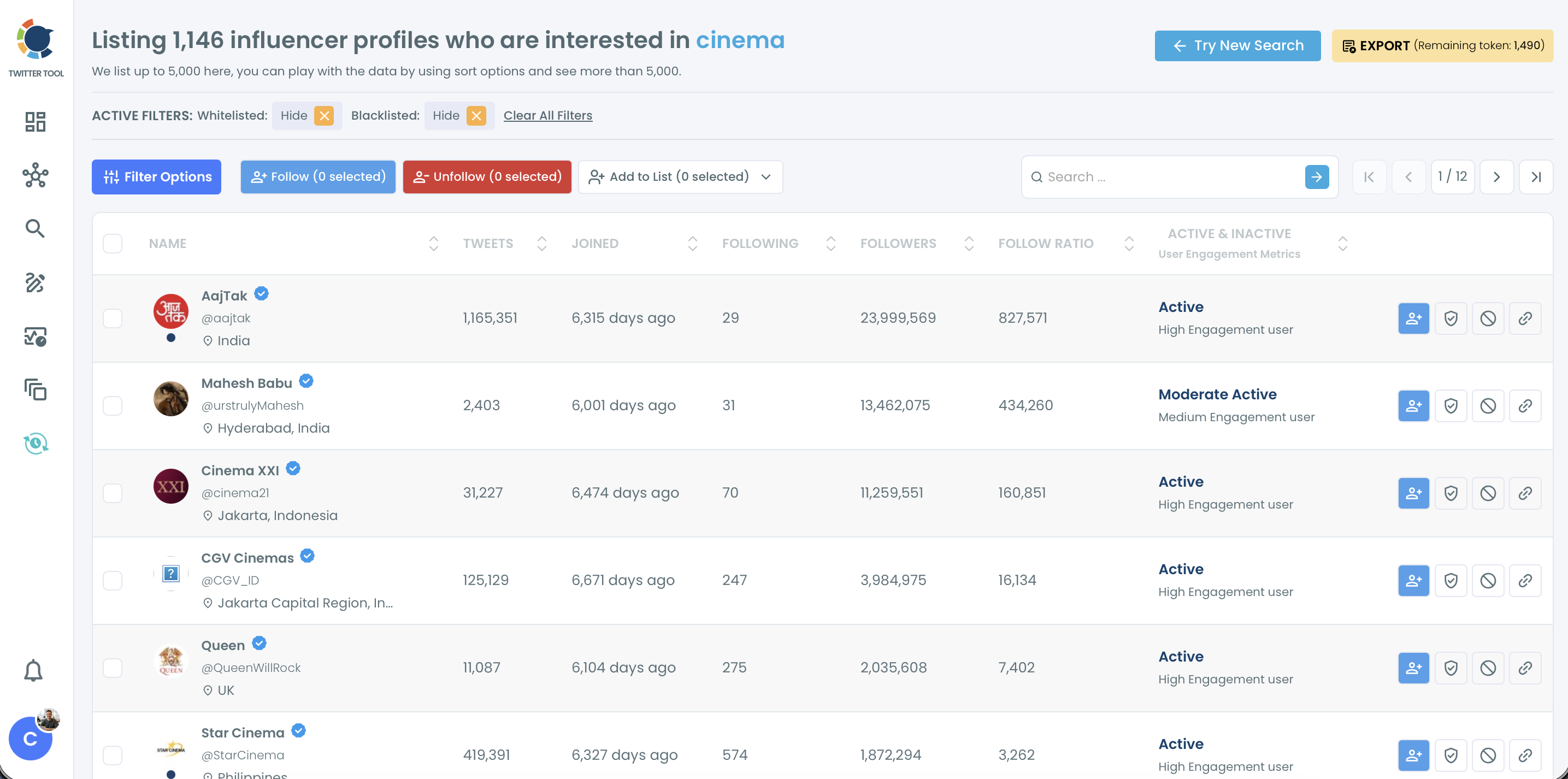
- Narrow the list with Filter Options. Set a follower range such as 5,000 to 50,000, add a language and a location if your launch targets one market, and use Find in Bio & Name to keep accounts that write about your exact topic.
- Save finalists to a private Twitter List with Add to List, and follow only the handful you will reply to every day. Read each finalist's recent posts before either step.
Pick launch-day slots ten days out
- Open When Followers Are Online under the Followers and Following analytics and find the largest bubbles on the day you plan to launch.
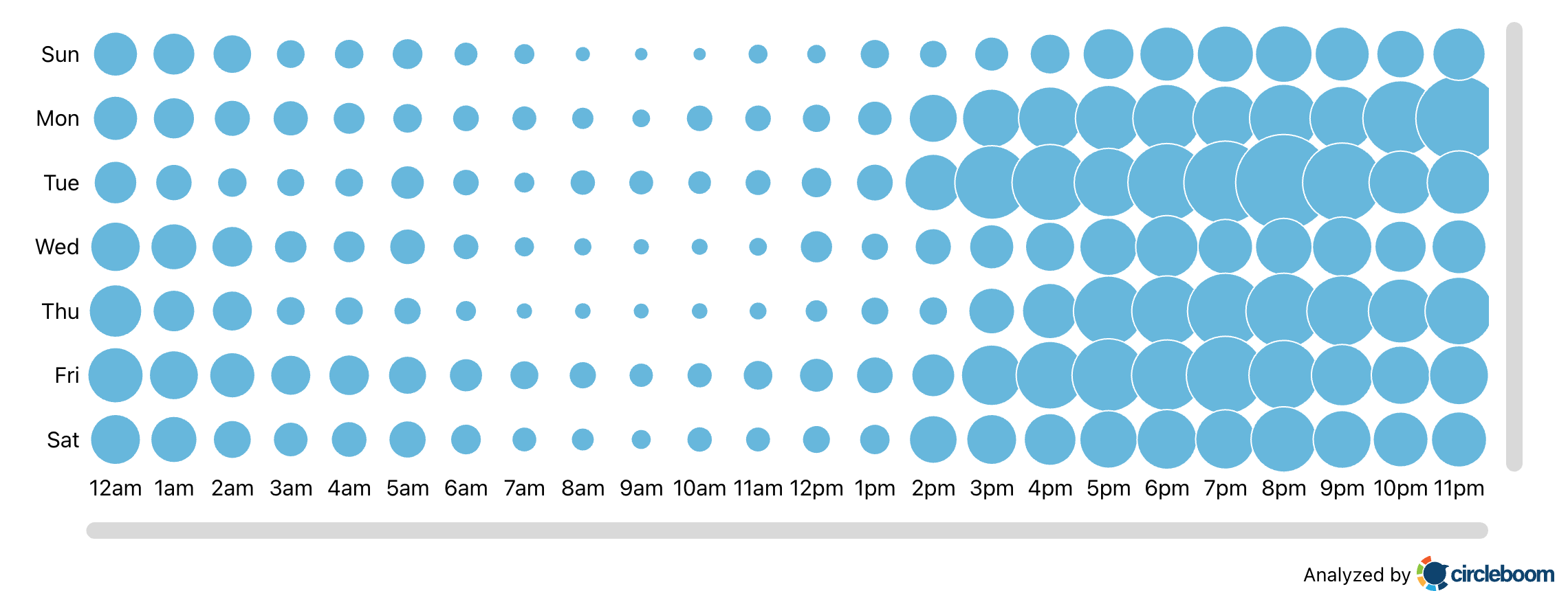
- Confirm the account time zone in Time and Queue Settings, then write down a primary slot for the announcement and a secondary slot for the follow-up.
Load the launch sequence a week out
- Open X Post Planner and write the sequence: a teaser, the launch thread built with Add another post, and one or two follow-up posts that answer the questions you expect.
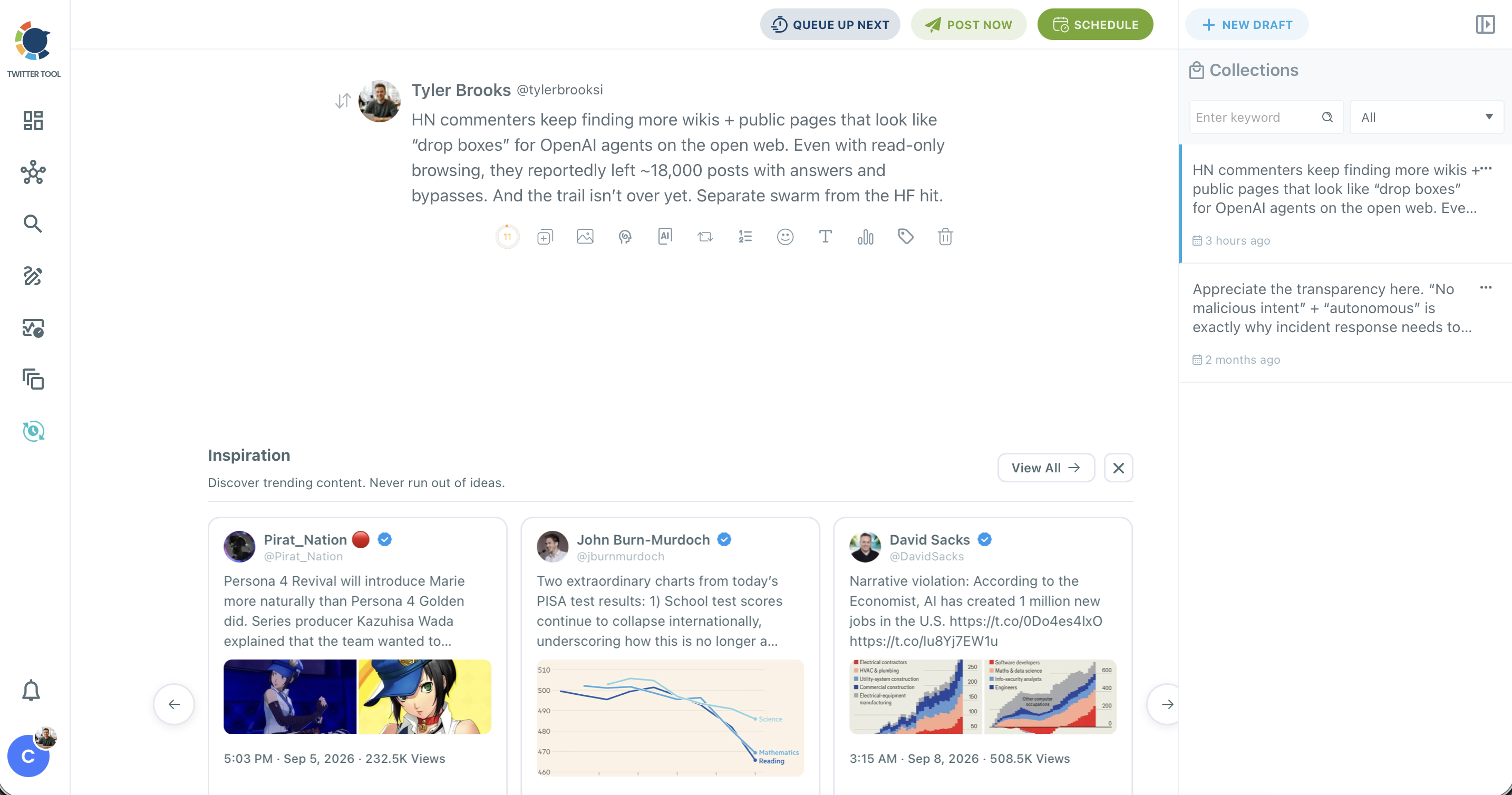
- Click Schedule, then Find your best posting time, and pick the suggested slot that matches the one you noted in step 7. Every scheduled post must be at least 15 minutes in the future.
- Open the Auto Repost / Un-RePost panel on the launch thread and set RePost after, Un-RePost after and Repeat this cycle before you confirm the schedule.
The order follows the clock: relationships take weeks, slots take one check, and the queue takes one afternoon. Start the slow part first and the fast parts never become the bottleneck, even when launch week brings surprises.
Is it safe to follow influencers in bulk before a launch?
Yes, when you keep it selective and paced. Circleboom processes Follow actions at up to 50 every 15 minutes, with a daily safety limit of 400, and any remaining queue continues automatically the next day. You confirm every bulk follow in a pop-up before anything runs.
Those limits rarely bind the shortlist you build to launch a product on Twitter. If you keep 40 finalists and decide to follow 12 of them, the whole batch finishes inside the first 15-minute window. The pacing exists for larger runs, so the account never shows a sudden spike of activity.
Before you follow anyone, protect the accounts that matter. Whitelist your partners, early customers and team members, so a later cleanup or bulk action never touches them by mistake.
Each bulk action applies only to the accounts you selected, and the button label shows the count, so read that number before you confirm.
The bigger risk is relevance, not volume.
Following 300 accounts two days before launch fills your feed with strangers and gives none of them a reason to notice you. Follow the dozen you will reply to, and keep the rest in a private list so you can read their posts without changing who you follow. Twitter List Manager handles that list once it exists.
If you are still deciding which accounts belong on the shortlist at all, find Twitter influencers for your brand walks through brand fit in more depth.
Tier choice matters too. When you launch a product on Twitter to a narrow audience, fit beats size: a niche account with 15,000 relevant followers can be worth more than a general account with 500,000 followers who never cared about your category.
How to keep a launch post in front of followers after day one
Posting the announcement once is the default way to launch a product on Twitter, and it leaves every offline follower out. Set Auto Retweet on the launch thread so it comes back in a second activity window.
The cycle runs from the Auto Repost / Un-RePost panel in X Post Planner. RePost after sets the delay, Un-RePost after removes the repost later so it does not stack on your profile, and Repeat this cycle sets how many rounds run.
A worked case: the account is set to London, and the launch thread goes out at 14:00, which is 09:00 in New York. RePost after 6 hours brings it back at 20:00 London, 15:00 New York, in front of the US afternoon crowd who missed the morning post. Un-RePost after 2 hours clears it again.
Every repost has to stay true at the moment it appears. A thread that says "available today" should not resurface three days later. Keep cycles inside the period your launch claims are valid.
If plans change, Circleboom's help page on how to stop an auto retweet cycle shows the Cancel Auto-RT option for posts already sent.
The Auto Retweeter page shows the same cycle settings outside the launch context, for evergreen posts you want to keep in rotation after the launch week ends.
Which launch step on Twitter fits your timeline?
Where you start depends on how many days remain before you launch a product on Twitter:
- Three weeks or more: build the shortlist first, follow a small set, and spend two weeks replying to their posts before you announce anything.
- About ten days: skip new follows, put your finalists in a private list, and read the chart for launch-day slots this week.
- Under a week: write and schedule the sequence today, pick slots from Find your best posting time, and add one Auto Retweet cycle to the launch thread.
- Launch already live: set a repost cycle on the announcement for your next strong activity window and reply to every early comment.
In every branch, the scheduled queue is the piece that keeps launch day calm, because the posts go out on time whether you are watching or not. Each of these steps runs through the same approved X access described earlier.
→ Start scheduling the posts that launch your product on Twitter
Launch prep questions on Twitter: threads, ads and tokens
How long can a launch thread be in Circleboom?
A thread scheduled through Circleboom can hold up to 25 tweets, and each tweet follows its own character and media limits. A tweet can carry up to 4 images, one GIF or one video, and a poll cannot share a tweet with media.
Can I turn my influencer shortlist into an X ads audience?
Yes, if the list is large enough. X's help page on list custom audiences accepts X @usernames and user IDs in a .csv file. An audience needs at least 100 matched X users before it can run.
Find Influencers exports results as a CSV, so export the wider filtered result set rather than a 20-account shortlist. The post on exporting Twitter followers for hyper-targeted ads covers that route.
Does searching for influencers on Circleboom use tokens?
Yes. Each Find Influencers search uses your search token balance, which is shown at the top right of the search page, and exporting results also uses tokens.