
Why are accounts with random numbers in their name following me on X, and should I remove them? Often they are brand-new accounts that never changed the handle they signed up with, and only some of them are bots.
Why do accounts with a name and a string of digits follow you on X?
Many are new accounts that kept a username X suggested at sign-up, so the digits alone prove nothing about who runs them. Circleboom checks your Twitter followers for the signals that do matter (follow ratio, tweet count, account age and profile completeness) through X's Enterprise API and lists the likely fakes for your review.
→ Remove the random number accounts following you on Twitter that fail the check
Why do so many new X accounts have numbers in their username?
New X accounts carry numbers because the plain version of almost every name is already taken, and a new user has to pick from what is left. Random number accounts following me on Twitter is a question whose answer starts at the sign-up screen, not with a bot farm.
X's help page on signing up with X says the platform offers "a few available suggestions" for the username when you create an account. You can also choose your own instead.
Plenty of people take the suggestion and move on. Plenty of people never return to that setting.
X does not say how its suggestions are built, but its rules for handles help explain why digits turn up so often. X's username registration rules set these limits:
- A username can be 15 characters at most.
- Only letters, numbers and underscores are allowed.
- Handles held by suspended or deactivated accounts are not freed up.
- X does not release inactive usernames.
Read together, those four rules point to a likely outcome, even though X never spells it out. A handle like @maria or @jsmith was claimed years ago, the 15-character cap leaves little room for creativity, and the only other characters allowed are numbers and the underscore.
So a new account named Maria Lopez can easily end up as something like @MariaLopez84721.
The handle is the one field a new user is most likely to leave exactly as it was.
That is why it tells you so little about the person behind it.
Are accounts with random numbers in their name bots?
No, not by that fact alone.
A name followed by digits is the default look of a new account on X. That new account can belong to a real person who just joined, a lurker who reads but never posts, or a customer who signed up to follow your brand.
Bots often look the same, because whoever creates them in bulk also takes the fastest path through sign-up.
That overlap is what makes the question confusing. The digits are shared by both groups, so they cannot separate them.
Circleboom's detection model for X followers treats an auto-generated-looking username as one signal that adds weight only when it lines up with others. Its documentation is explicit that no single signal is enough to classify an account, and that a flagged list is a set of candidates, not a verdict.
It also helps to know that "bot" covers more than one thing. Some automated accounts post weather updates or news headlines in the open. The difference between bots and automated accounts on Twitter matters when you decide what to remove.
Maybe the real question is why strangers follow you at all. That one has its own answer in why random people follow you on Twitter, and bots are only part of it.
The five signals that separate a real new account from a bot on X
A real new account and a bot can share a handle shape, but they rarely share a behavior pattern. Circleboom classifies each X follower by reading these signals from its profile, and you can read the same signals yourself:
| Signal | Bot-like pattern | Real new account |
|---|---|---|
| Follow ratio | Follows thousands, has a handful of followers | Follows dozens, few followers yet |
| Tweet count | Zero, or hundreds in a burst | A few posts or replies |
| Account age | Days old, already following 2,000 | Days old, following a few accounts |
| Profile photo | Default egghead image | Usually a photo or avatar |
| Bio and name | Empty, or repeated text | Short bio, real-looking name |
The table shows why the number in the name gets demoted. Every row describes something the account did or did not do after sign-up, while the handle describes only what it accepted at sign-up.
Circleboom's documentation flags a follow ratio below 0.05 as a common threshold for suspicion. An account that follows 2,000 profiles and has 40 followers sits at 0.02, which is the kind of structure mass-follow tools leave behind.
Treat the digits as a tiebreaker, never as the verdict.
An account with a numbered handle, no photo, no tweets, a two-week-old join date and 3,000 followings ticks four other boxes and is a clear removal candidate. An account with a numbered handle, a photo, ten replies and 45 followings is probably a person who has not bothered to rename themselves.
That distinction is exactly what you lose when you remove followers by eye. You can review the random number accounts following you on Twitter in one filtered list instead of opening each profile and guessing.
When a wave of number-handle accounts follows you at once
A cluster of near-identical number-handle followers arriving in a short window is a much stronger warning than any single account.
Circleboom's documentation puts it plainly: one suspicious account may be a false positive, while a cluster of new accounts with no photos, low tweet counts and extreme following behavior is a stronger sign of bot or spam activity.
Waves tend to follow visibility. A post that travels, a mention from a large account, a giveaway or a trending topic can all pull a burst of follows, and bots that follow en masse arrive with the real people.
The useful check is account age. When most of the new arrivals were created within days of each other, the pattern points to batch creation rather than a crowd of people who happened to join at once.
Circleboom's newly created Twitter accounts (newbies) view isolates followers whose accounts are recent. The Joined column in every follower list also shows each account's age as a relative duration, such as "12 days ago".
Account age and follow date are two different things. Join Date tells you how old an account is; it does not tell you when that account followed you.
A spike on its own is also not proof of who caused it. Review the pattern, then decide.
Act within the first week after a spike.
Circleboom's guidance is to review the growth change promptly, while the suspicious new accounts are still concentrated among recent followers and easy to compare with the timing of the spike.
How to check a single suspicious follower on Twitter
To check one follower, open the profile and read the same five signals: photo, bio, tweet count, join date and the following-to-followers balance. That takes about a minute per account, which is fine for one or two names and slow for fifty.
For a faster read on a single handle, three Circleboom checkers each answer one part of the question:
- Twitter Bot Checker for a bot-likelihood read on one account.
- Fake Twitter Account Checker for a fake-profile read.
- Twitter Join Date Checker for the exact creation date of the account.
Inside Circleboom, every row in a follower list also has an Open Profile action that opens the account on X in a new tab, so you can inspect a borderline case without losing your place.
If you are checking because something feels off across the whole list, a broader Twitter bot follower check is the better starting point than auditing names one at a time.
How Circleboom finds the fake ones among your followers
Circleboom retrieves your full follower list from X, scores each account against several signals at once and puts the likely fakes into one sortable table called Fake/Bot Followers. You review that table, protect anyone you know and remove the rest.
Circleboom pulls those follower records through X's official Enterprise APIs, the same access X grants the companies named in its Enterprise customer listing. Your account data is read from X itself, not scraped from public pages. That source matters here, because a classification is only as good as the profile fields it reads.
The page title tells you the size of the problem in one line, in the form "Displaying your 52 Fake/Bot of 1,871 followers".
If that ratio is the number you actually want, start with how many of your X followers are bots.
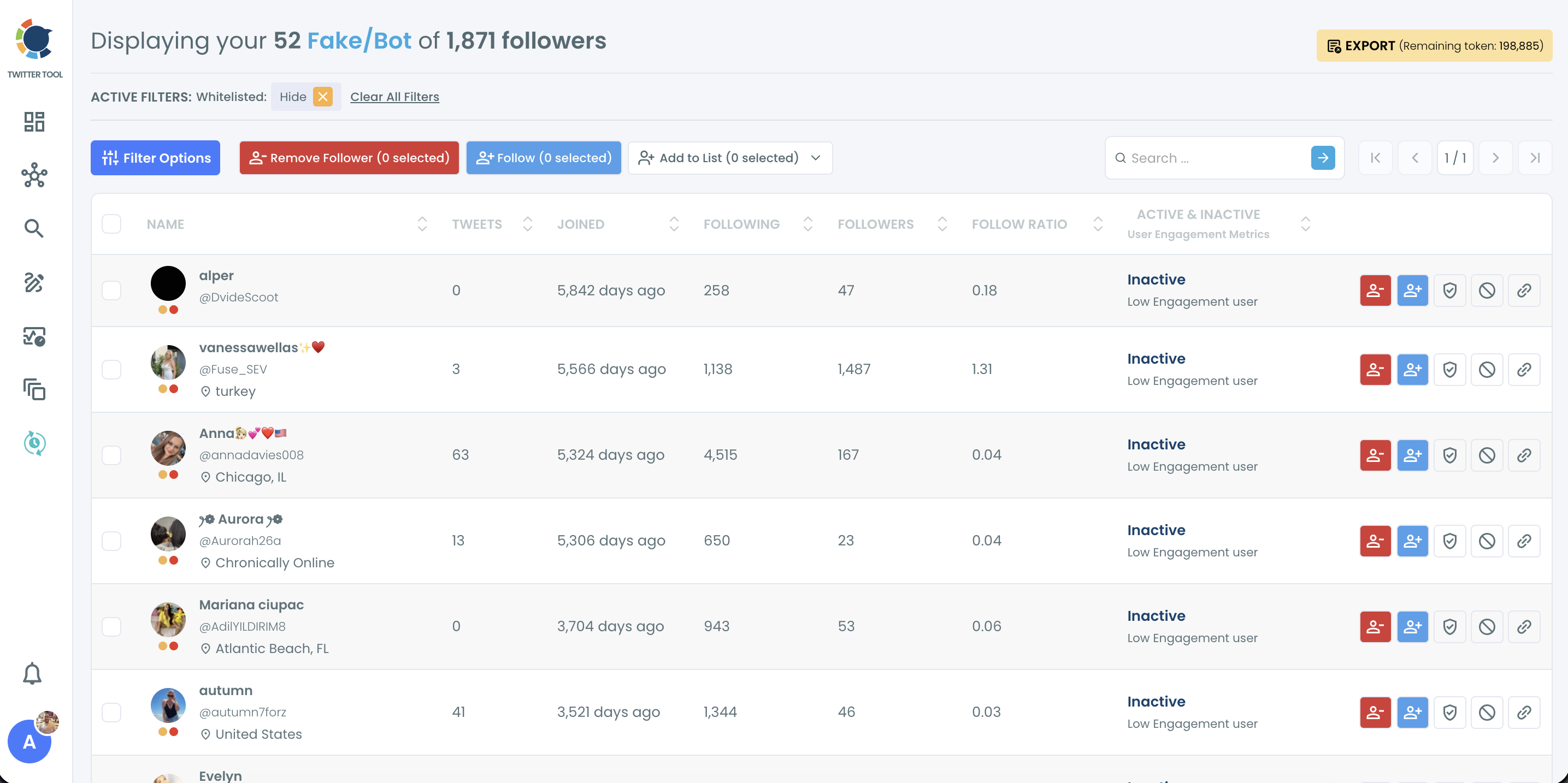
Each flagged row carries the columns you need to judge it: tweets, joined, following, followers, follow ratio and an Active or Inactive engagement tier. Every column sorts, so the most suspicious structures can come to the top first.
On X itself you can remove a follower one at a time, but X does not give you the complete follower list in a form you can filter.
Circleboom lists every follower in one view and removes the selected accounts in bulk.
Want the list in front of you? You can clean out the random number accounts following you on Twitter that look fake from the same screen.
How to remove random number accounts following you on Twitter
To remove random number accounts that are actually fake, open the Fake/Bot Followers list, rank it by the signals that matter, protect the real accounts and send the rest to removal. The removal itself runs through the Circleboom Remove Twitter/X Followers Chrome extension, gradually and with automatic pauses. The six steps below cover it in two phases.
Hands-on look: a full bot purge, from the Fake/Bot filter to the Chrome extension clearing the queue.
Open the flagged list in Circleboom
- Log in to Circleboom Twitter and connect the X account you want to clean.

- Go to the Followers and Following menu in the left sidebar.
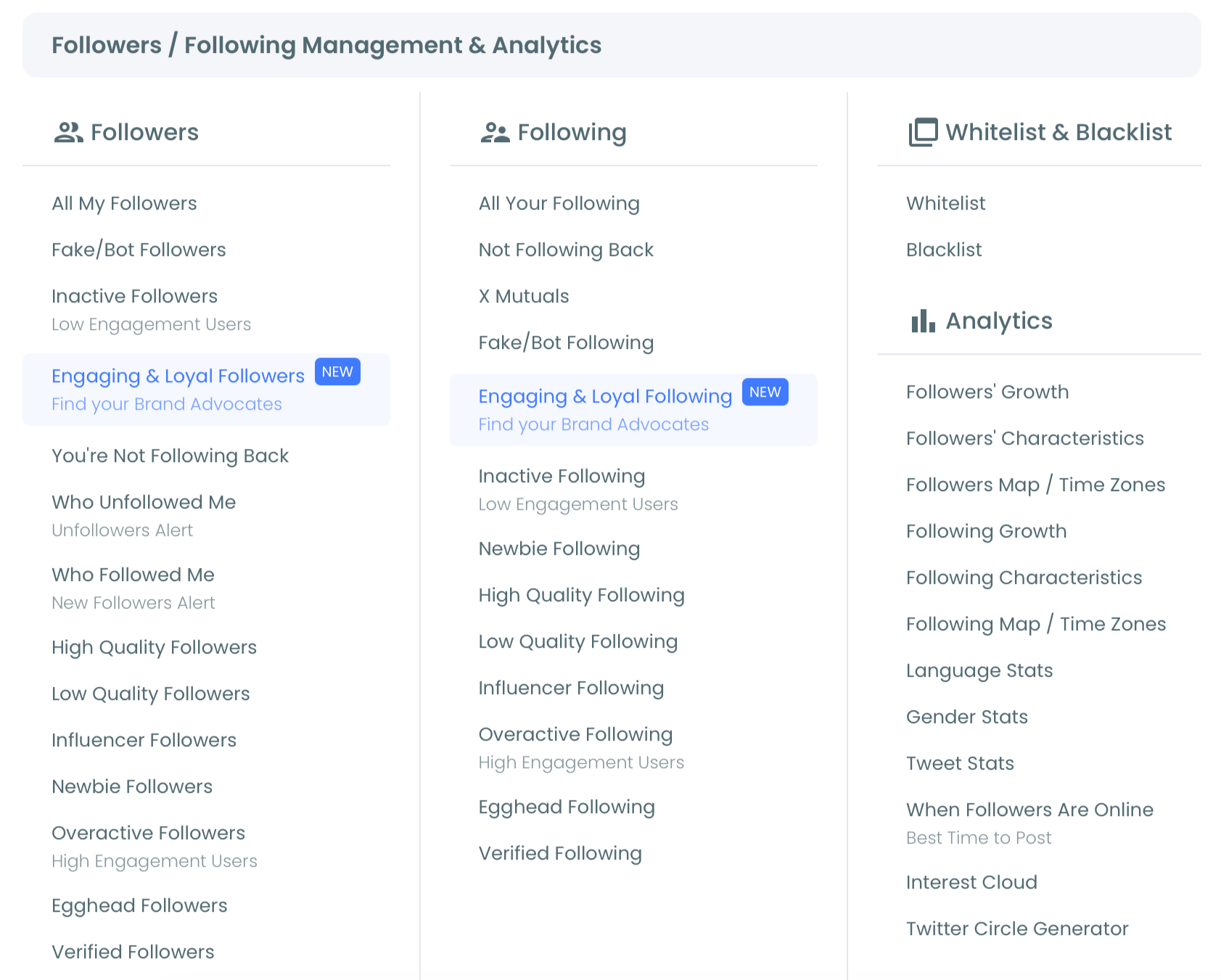
- Open Fake/Bot Followers under the Followers section to load every account the model flagged.
Rank, protect, then remove
- Sort by Follow Ratio, ascending, and add a recent Join Date or a low Tweet Count from Filter Options to bring the clearest cases to the top.
- Whitelist the accounts you recognize, such as a customer or colleague with a numbered handle, so no bulk action can touch them.
- Select the confirmed accounts and click Remove Follower, then open the Chrome extension and click Start; keep the browser open while it works.
Sorting before selecting is what keeps a numbered handle from being judged on the digits alone, and the whitelist step means a real person who never renamed their account stays put.
The extension then works through the queue gradually, pausing automatically when X's rate limit is reached, instead of firing every removal at once.
In short: open Fake/Bot Followers, sort, whitelist, select, then press Start in the extension.
Should you remove or block number-handle followers on X?
Remove them when they are simply fake or inactive; block them when they spam, scam or keep coming back.
Removal ends the follower relationship, but the account can follow you again later, so it is the lighter tool for quiet bots that only inflate your count.
Blocking is stronger. A blocked account cannot follow you again or interact with your account.
Circleboom handles it in bulk through Mass Block, which runs through its own Chrome extension. You can send the same accounts there from the Fake/Bot Followers list with Add to List, then Add to Mass Block List.
The practical rule from Circleboom's guidance is to keep blocking for harmful, abusive or coordinated accounts, and to use removal for low-quality audience cleanup.
A follower that is merely a dormant number handle does not need a block. One that sends phishing links in your replies does.
The walkthrough on how to block Twitter X bots picks up from here for the blocking side.
Which fix fits what your follower list shows
Your next action depends on what the list shows, not on how the handles look:
- If a numbered account has a photo, a bio and some posts, leave it. It is most likely a person who kept their sign-up handle.
- If it matches several bot signals at once, remove it from the Fake/Bot Followers list.
- If a whole wave arrived in days with recent join dates, run the list now, filtered by Join Date, before the wave settles into your baseline.
- If the same accounts spam you or follow you again after removal, move them to Mass Block.
Whichever branch you are on, the digits are never the reason to act; the behavior is.
When you are ready to sort the real followers from the fakes, start here.
→ Clear the random number accounts following you on Twitter that turn out to be bots
What to know about number-handle followers on X
Will removing a lot of followers at once hurt my X account?
Circleboom processes removals gradually through its Chrome extension and pauses automatically for 1 to 20 minutes whenever X's rate limit is reached, which is designed to help protect your account. Removing unwanted followers changes your audience composition; it does not guarantee more reach or immunity from X restrictions.
Can I stop accounts with random numbers from following me on Twitter?
Not completely, because any public account can follow you. What works is a routine: Circleboom recommends running Fake/Bot Followers after every spike and as a regular check, and using Mass Block for accounts that keep returning.
What if a real customer has a numbered handle?
Whitelist them before any cleanup. Whitelist status in Circleboom carries across every feature, so a whitelisted account is excluded from bulk removal, bulk unfollow and Mass Block.