

Many giveaway posts on X explain the prize in detail and the rules in half a line. The half line is what gets tested when the winner is announced, because entrants who did not win want to know who counted and how the pick was made.
This guide covers both sides of Twitter giveaway rules: the guidelines X publishes for promotions, and the fairness lines you add to your own post, followed by a draw that tests each entry against them.
What this guide covers.
- The promotion guidelines X sets for giveaways, plus the rules worth adding to your own post.
- A step-by-step draw in Circleboom that checks every entrant against those rules.
- How to show your audience that the winner was picked at random.
Circleboom collects the entrants of a giveaway post on X through X's Enterprise API and picks winners at random from the accounts that met your conditions. Start here → run a draw that follows your Twitter giveaway rules.
Why a giveaway without written rules is hard to defend
A giveaway draws a crowd that is watching the outcome. When the rules are vague, every outcome looks arbitrary to the people who lost, and a host has nothing to show them except a name.
Three gaps leave a draw open to dispute:
- The post never says which actions count as an entry.
- The host cannot see every entrant, so the pick comes from a partial list.
- Nothing stops an account created for the giveaway from winning it.
I treat Twitter giveaway rules as the brief for the draw. If a condition is not written in the post, it should not decide who wins, and if it is written in the post, the draw should check it for every entrant.
A Twitter giveaway picker turns that brief into filters, which is the difference between a rule you announced and a rule you can prove.
X's guidelines limit how a giveaway post can ask for entries
X's help page on running promotions on X is the platform's own list of X giveaway rules. It confirms that a giveaway can reward posting an update, following an account, or using a hashtag, and it recommends that hosts state a few limits up front:
- Entering with multiple accounts makes a person ineligible.
- No rule rewards duplicate posting, such as the most reposts winning.
- One person, one entry per day.
- A requested hashtag must be relevant to the post it appears on.
- Paid X features, meaning payments or content monetization, are never a required way to enter.
These points sit under the X Rules, which is why the duplicate-post point matters: repeated identical updates break those rules for the entrants who post them.
Rules to add that X's guidelines leave to you
X's page says nothing about how the winner is picked. Add these lines to the giveaway post yourself:
- The exact entry actions, including how many friends to tag.
- The closing time for entries.
- The number of winners and substitutes.
- How the draw works, such as a random pick from eligible entrants.
- Where and when the result will be announced.
If a rule is in the post, the draw should check it. If the draw cannot check it, it should not be a rule.
Should entrants meet all conditions or any one?
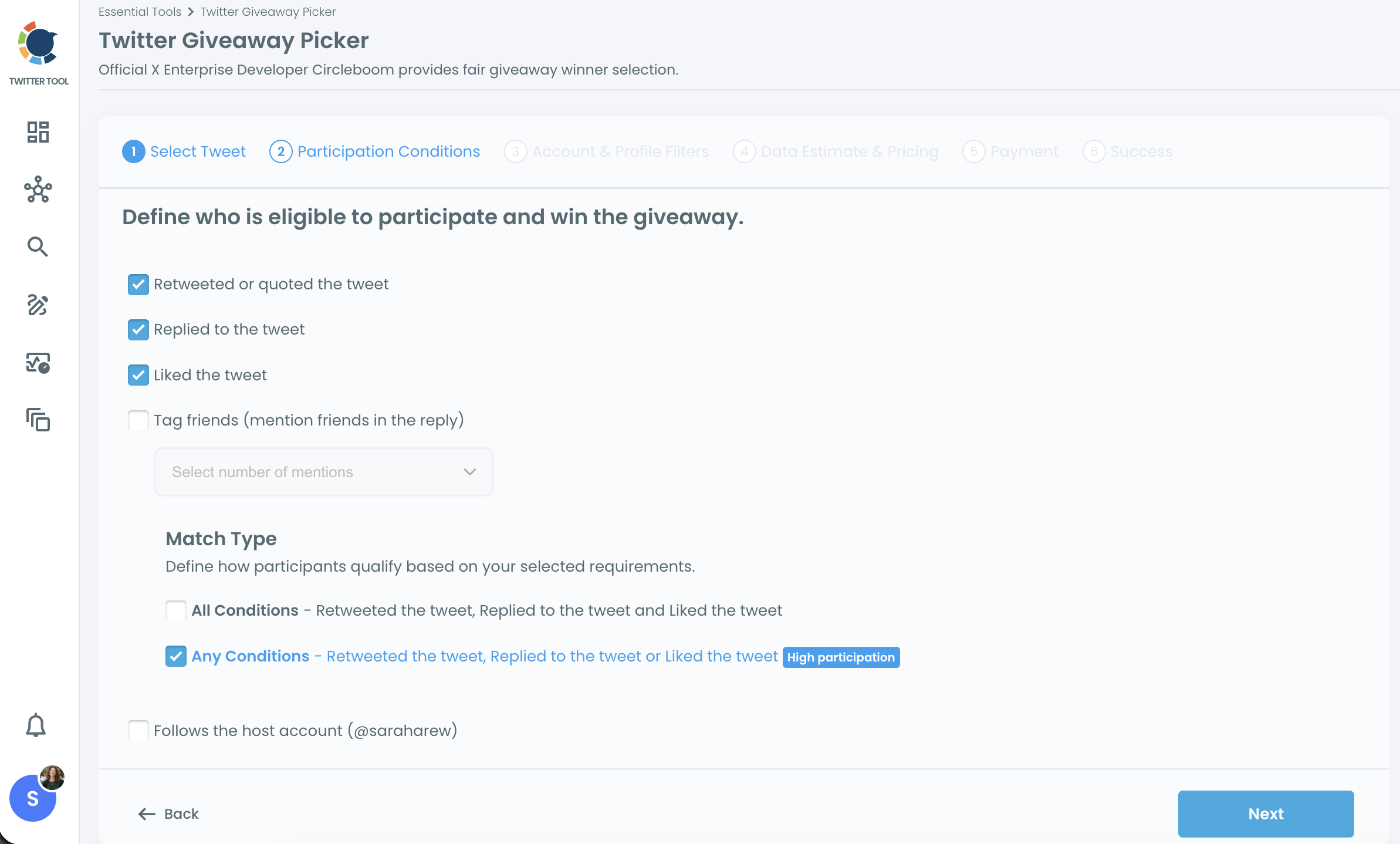
Match the choice to what your Twitter giveaway rules promised. In Circleboom's Giveaway Picker, the All Conditions match type counts only entrants who met every condition you ticked, and the Any Conditions match type counts anyone who met at least one.
All Conditions is labeled "High engagement" in the product. It fits a post that says "repost, reply, and follow to enter." Any Conditions fits a post that says "repost or reply to enter," where either action is a full entry.
The trade-off is pool size. Every extra condition under All Conditions shrinks the eligible pool, and too few conditions can let low-intent entrants in.
The balance to strike is strictness against participation, which in practice means asking only for the actions that serve the giveaway's goal.
Take a post that asks for a repost and a reply, as an illustration. Under All Conditions, an entrant who only reposted is out. Under Any Conditions, that entrant is in. The wording "and" or "or" in your post decides the match type, so choose the word before you choose the setting.
How strict to make a first giveaway
For an audience that has never entered one of your giveaways, I start with one or two actions and Any Conditions. A wide pool gives the first draw more credibility than a narrow one, and the quality filters can still remove weak accounts after collection.
Save All Conditions for a later giveaway, when the audience already knows the format and the prize justifies asking for more. Either way, write the choice into the post so entrants know whether one action is enough.
Can you see every entrant before you draw?
Not through X's own interface. X lets you peek at some of the people behind a like or repost count, never the complete, sortable list, and X's promotion guidelines add that public search may not show every entry.
Repost giveaways feel this limit hardest, since the reposter list is usually the entry list. See why you can't see who retweeted a post for that side of it.
Reply giveaways fare a little better. X's page notes that entries mentioning your account show up in your Notifications timeline, which covers tag-a-friend replies but tells you nothing about likes or reposts.
Likes have the same limit. If your giveaway asks for a like, the question of who liked your tweets needs a better answer than the preview gives.
A complete entrant list through the X API
Circleboom retrieves the participant list through the X API and is listed among X's Enterprise customers. The draw therefore starts from the engagement record itself.
Only viral posts, with likes or reposts in the hundreds of thousands, can exceed what the API returns, and then the count covers the retrieved portion.
You can also export the accounts that retweeted a post as a separate list, which gives you a record kept apart from the draw. A Twitter retweet list extractor is the broader idea behind that export.
With the rules written and the full list reachable, the draw itself is the easy part. Circleboom's Giveaway Picker walks you through it in six stages that begin with a pasted link and end with a results grid.
How to follow Twitter giveaway rules from post to draw
The steps below assume your giveaway post is live with its rules written in, and that entries have closed.
Sign in as the giveaway host
- Log in to Circleboom Twitter as the giveaway's host, the same X profile that published it.
- Choose Giveaway Picker from the Essential Toolbox menu.

-
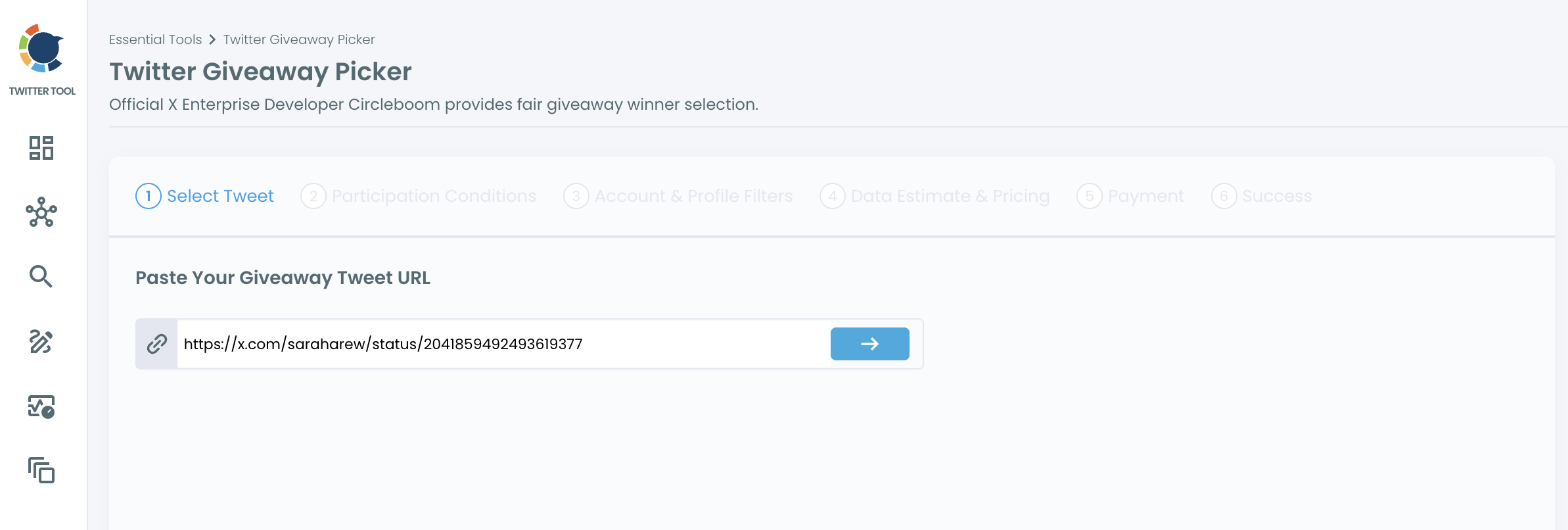
Click Create a new Smart Giveaway, paste the giveaway post URL, and confirm the preview.
Turn the published rules into conditions
-
Tick the conditions your post named: Retweeted or quoted, Replied, Liked, or Tag friends with its mention count.
-
Set Match Type to All Conditions or Any Conditions, and tick Follows the host account if following was a rule.
-
Review the data estimate and pricing, then complete the payment for this campaign.
Filter the pool, then draw
-
Review the collected participants, then apply account and profile filters such as Fake/Spam, Egghead, Inactive, and Join Date.
-
Click I'M READY TO SELECT THE WINNERS and enter the number of winners and substitutes your post announced.
-
Click DRAW WINNERS, then download the winner card or share it on X.
Setting conditions before filters keeps the draw tied to what entrants read, and filtering after collection lets you see the full pool before deciding how strict to be. The random pick comes last, so nothing you adjust can steer it toward a name.
On screen: a Twitter giveaway picker run from the post link to a randomly chosen winner.
Step 7 is where bot accounts leave the pool. If one entrant still looks doubtful after filtering, the fake Twitter account checker examines a single profile before you announce anything.
The signals behind those filters are the same ones a Twitter bot checker looks for, so it helps to know what they mean before you decide which to hide.
How to prove your X giveaway draw was fair
Share the evidence, not just the name. The Giveaway Picker's draw step summarizes the eligible participant count, the participation conditions, and the filters applied, and states that every winner is chosen transparently and randomly, with no manual intervention.
The result is a branded winner card showing the winners' profile photos and @usernames. It can be downloaded or shared directly on X. Posting it as a reply under the original giveaway post puts it where entrants will look.
Three habits make the proof stronger:
- Export the participant list from the results grid before you draw, so you have the eligible pool on record.
- Announce the substitutes rule in the post, and use it if a winner is ineligible or does not respond.
- Keep the conditions and filters the same from one giveaway to the next, so results stay comparable.
A consistent process is its own proof: an audience that saw the same method last time has a reason to trust it this time.
What to write in the winner announcement
The card shows who won. The announcement text should show how. Include these points in the post that carries the card:
- The giveaway post the entries came from.
- The conditions an entry had to meet, in the same words as your giveaway rules.
- The number of eligible entrants from the draw summary.
- The filters applied before the draw, such as hiding Fake/Spam accounts.
- The substitute rule, and when a winner has to reply by.
If a result is questioned later, the participant list you exported before the draw is what settles it. That file shows the eligible pool at the moment of selection, with each entrant's account details, which a screenshot of the winner card cannot show.
One limit shapes the timing. A draw cannot be rerun inside its campaign, and the participant list is a snapshot taken at collection, so collect after entries close and review the pool before you draw.
Five checks make the next X giveaway draw defensible
Run through this list before the next giveaway post goes live:
- Write X's guidelines into the post: one account, one entry a day, no duplicate-post rewards, relevant hashtags, no paid entry.
- Name the exact entry actions, using "and" or "or" to match the match type you will set.
- State when entries close, how many people win, who stands in as backup, and how the pick is made.
- Collect entrants after the deadline, filter the pool, then draw once.
- Post the winner card under the original giveaway post.
The posts around the giveaway matter too. The X Post Planner can schedule the reminders and the winner announcement so they go out on time without a manual post at the deadline.
A follow-to-enter rule also leaves a new-follower wave behind. Monitoring new followers without notifications is the easier way to watch who arrives during and after the giveaway.
Rules written before the first entry make the draw the least interesting part of the giveaway, which is exactly where it belongs.
→ Draw winners who meet your X giveaway rules
Running an X giveaway: frequently asked questions
Can I require entrants to follow my account?
Yes. X's promotion guidelines allow a prize for following a particular account. In Circleboom's Giveaway Picker, the Follows the host account condition checks follows only for the account you connected to Circleboom, so keep the follow rule to that account.
Will a giveaway bring fake followers to my account?
It can. A follow-to-enter rule brings a spike of new followers, and some follow only to enter. After the giveaway, Circleboom's Who Followed Me and Fake/Bot Followers features show who arrived and which of them carry bot signals.
Can I change the filters after the winners are drawn?
Not inside the same campaign. A completed draw stays as it is, so trying other filters requires setting up a fresh campaign on the same giveaway post URL.
What does a Circleboom giveaway draw cost?
You pay per campaign, and the price follows the data volume estimate you see before paying. Checking follows against your own connected account costs nothing extra on top of the Circleboom subscription.

