X doesn't expose follow timestamps. That structural gap, baked into the platform's API since the legacy mobile environment was retired in late 2020, leaves anyone interested in follow-event timing with one realistic path: forward monitoring.
The workflow below is the practitioner's version of that monitoring, built around Circleboom's Track Someone's X Followings tool. It scales from a few targets to a few dozen without changing shape.
What this guide gives you.A schedule-based monitoring workflow that surfaces every new follow with a dated timestamp.The exact configuration steps for Circleboom's Track Someone's X Followings tool.A cadence plan for managing 5 to 50 monitored accounts in under an hour per week.
Built on the snapshot-diff model, delivered through official X Enterprise APIs. Start with someone started following someone on Twitter.
Why the workflow has to be forward-looking
X's API doesn't carry follow timestamps for historical events. The X Developers community discussion on follow-date access makes this explicit; the follower joining-date thread reaches the same conclusion through different questions.
The implication is structural. No tool can retrieve when account A followed account B if the event happened before the monitoring started. Every tool that claims to do so is either misrepresenting the action or operating outside sanctioned API access.
The how to track other people's activity on X overview covers the broader monitoring conceptual model. This guide is the operational version: what to configure, what cadence to expect, how to scale.
What you'll need before starting
Three prep items, all free or built-in:
- A Circleboom Twitter account with the X account connected through OAuth.
- The target handles you want to monitor (5 to 50 is the typical range).
- A weekly 15 to 30 minute window for reading the dated log.
No extension required, no developer registration on your side, no separate API key.
How to track when someone started following someone (full workflow)
The flow runs in three phases: configure the targets, let the snapshots accumulate, read the dated record.
Phase 1: Configure the monitor
- Log in to Circleboom Twitter and connect the X account using official OAuth.
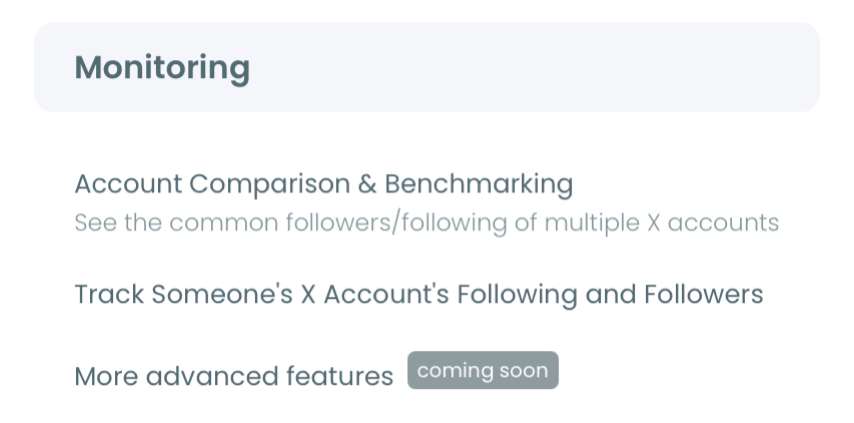
- Open the Monitoring menu and pick the Track Someone's X Followings sub-tool.
- Add target handles one at a time. Public accounts work; private accounts are out of scope per platform policy.
- Confirm the snapshot cadence. The default cadence is generally daily; check that it matches your analysis needs.
Phase 2: Let snapshots accumulate
- Wait for the first week of snapshots. Until two snapshots exist per target, the diff cannot generate. Day one is setup; day two onward is data.
- Add or remove targets as needed. New additions start their own snapshot history; removed targets stop snapshotting but retain their existing log.
Phase 3: Read the dated record
- Open the dated log inside Circleboom. Each new follow appears as a row with the snapshot timestamp, the new account's handle, and the new account's profile context.
- Apply filters as needed. Date range, target handle, and new-follow account properties (verified, follower count, account age) help narrow large logs.
- Export the record for archival or downstream analysis. CSV format is standard.
That sequence is what makes the workflow scalable. The login earns sanctioned API access, the configuration step bounds the scope, the snapshot phase is the part that requires patience, and the read step is where the analysis happens. Skip the cadence verification in step 4 and the data granularity may not match what your use case needs.
Hands-on demo: configuring the monitor and reading the dated record for a target account.
Cadence plans for different account counts
The right monitoring cadence depends on how many targets you're tracking and how time-sensitive the data is.
- 5 targets, low time-sensitivity. Weekly read window, daily snapshots. 15 minutes per week.
- 10 to 20 targets, moderate time-sensitivity. Twice-weekly reads, daily snapshots. 30 minutes per week.
- 20 to 50 targets, high time-sensitivity. Daily reads, daily snapshots. 60 to 90 minutes per week.
- 50+ targets. Export the log to CSV and analyze offline; the in-app interface is best for under 50.
The reason per-target time scales sub-linearly is that the dated log organizes events chronologically across all targets, not separately per target. A weekly scan reads the "last 7 days of new follows across the whole monitored set" in one view rather than opening each target's log separately. The marginal time cost of adding a 21st target to a 20-target monitor is closer to the cost of adding a single dated row than to the cost of building a parallel record. That's why the workflow scales meaningfully past the manual-tracking ceiling.
For users who hit the 50-target ceiling and need more, the CSV export route is what unlocks larger-scale analysis. The in-app view stays useful up to about 50 targets; beyond that, exporting weekly and pulling the CSV into a database or external analysis tool is the natural next step.
For users running the workflow alongside their own follower tracking, the Twitter follower trackers overview covers the parallel use case (monitoring inbound new followers on your own account). The Circleboom Twitter follower tracker tool runs the same snapshot-diff model in the inverse direction.
The daily, weekly, monthly tracking cadence breakdown compares the time investment versus data granularity tradeoff in more depth.
Safety and platform compliance
Circleboom is an official X Enterprise Developer company. Every snapshot request runs through sanctioned X API endpoints, rate-limited by X itself, fully compliant with platform terms.
The monitored accounts don't know they are being observed. X does not notify users when their public following list is read, just as it doesn't notify when public tweets are viewed. The data is public-facing by platform design; the monitoring just structures it.
For users wanting to extend the discipline to inbound follower events, the check new followers tool and the who unfollowed me workflow cover the complementary directions of follow-event monitoring.
What to do next (action checklist)
- Choose your initial target list. Five accounts is plenty for a first deployment.
- Configure the monitor with daily cadence. Adjust later if granularity needs to change.
- Calendar a weekly read window. The 15-to-30 minute scan is the only recurring time investment.
- Add to the target list incrementally. Doubling from 5 to 10 targets does not double the time spent.
- Plan for month-three patience. The data is thin in month one and inflection-worthy by month six.
For users tracking specific accounts for competitive intelligence or investment signals, the how to track someone else's new followers explainer covers the cross-section of the new-follower direction.
→ Start tracking when someone started following someone on Twitter
What to Know Before You Start
Will the monitoring miss follows that happen between snapshots?
No. Even at daily cadence, the next snapshot picks up every follow that happened during the interval. The timestamp reflects the snapshot moment, not the exact follow moment.
Can I monitor accounts I'm not following?
Yes. Public accounts are observable regardless of whether you follow them. The monitor reads the public following list.
Does this work if the target makes their account private later?
The monitor stops collecting once the account becomes private; existing data remains in the dated log. New events on the now-private account are not retrievable.
How granular can the timestamp get?
Down to the snapshot cadence. A daily cadence gives day-precision; finer cadence (where supported) gives hour-precision.
Does the export include the new follower's bio and follower count?
Yes. The dated log captures profile context at the moment of detection, including the new account's bio, follower count, account age, and verification status.