
Most outreach lists start the same way: find accounts whose bio contains a job title or keyword and treat that as the target. The problem is that a bio describes who someone was when they wrote it. A tweet describes what they are actively thinking, asking, or struggling with right now.
The accounts most worth reaching for outreach are rarely the ones who declared the right identity in their profile description. They are the ones who expressed the intent you care about in a specific tweet, in the last week, in their own words. Building a targeted outreach list from Real-time Tweet Search means starting from behavioral evidence, accounts that posted a buying signal, a competitor complaint, a direct question, or a pain point you can answer, rather than from declared attributes that may have been accurate months ago.
Circleboom's Real-time Tweet Search captures every tweet matching a keyword or topic from a start date you set, then surfaces the accounts behind those tweets as a deduplicated, filterable, actionable list, ready to follow, export, or add to a list directly from the same view.
→ build a targeted Twitter outreach list with tweet search
Why bio-based lists miss the accounts most worth reaching
A bio-based search finds accounts that describe themselves in a way that matches your keyword. That is a useful starting point but a weak signal for outreach timing. The person who wrote "social media manager" in their bio two years ago is in a different situation than the person who tweeted "our scheduling tool just stopped working, need alternatives" yesterday. The first is theoretically relevant. The second is actively in the market right now.
X's native search does not help you find the second person at any useful scale. Native search returns a mixed feed of recent and relevant tweets with no way to filter by engagement quality, switch from tweet view to account view, set a precise date range, or export what you find. You can read the results but you cannot turn them into a list.
The cost of that limitation is a systematic bias toward outreach based on demographic fit rather than behavioral intent. Demographic fit gets you in front of the right type of person. Behavioral intent gets you in front of the right type of person at exactly the right moment. The difference in response rate between the two is not small.
 infocircleboom.com
What the right search query looks like for outreach
The most effective outreach searches are built around the language your target accounts actually use in the moment you care about, not the language that describes them generally.
A pain point expressed in the first person tends to outperform a category keyword. "My Twitter engagement has dropped" finds accounts in a specific problem state. "Social media manager" finds everyone who identifies that way, regardless of what they need right now. A competitor mention with a negative framing finds accounts actively evaluating alternatives. A direct question about your category finds accounts in active research mode.
The goal is to match the language someone uses when they are expressing the exact signal that makes them worth reaching. That signal almost never appears in a bio. It appears in a tweet, in a specific window of time, and Real-time Tweet Search is what captures it before the window closes.
How to use Twitter search to build a targeted outreach list
Circleboom runs Real-time Tweet Search through the official X Enterprise API, collecting public tweets matching your criteria from the start date you set.

Because Circleboom is an official X Enterprise Developer, the collection runs on sanctioned API access with no scraping, the accounts in your outreach list come from compliant, authorized data retrieval.
1. Log in and connect your account Log in to Circleboom Twitter and authorize your X account through OAuth. This establishes the Enterprise API connection that powers the tweet collection.
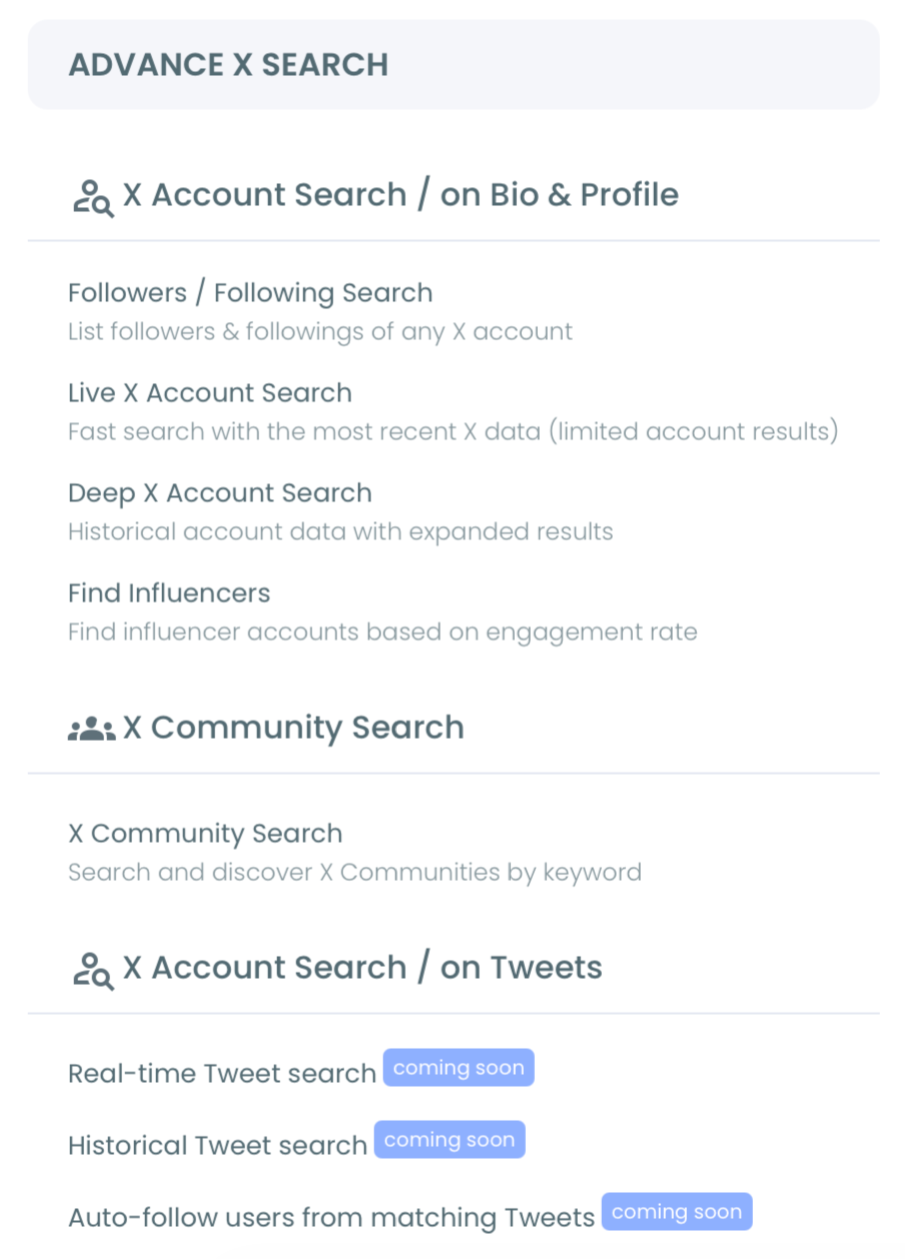
2. Open Real-time Tweet Search Navigate to Advanced X Search and select Real-time Tweet Search. The input flow uses natural language, describe the kind of tweet you are looking for in plain English and the system displays AI-suggested query variations you can select or refine before the search runs.
3. Set the start date Choose how far back the collection begins: Last 24 Hours, Last 7 Days, Last 30 Days, or a custom date. For outreach timing, the start date determines how fresh the signal is. A pain point expressed in the last seven days is an active, open problem. The same pain point expressed thirty days ago may already be resolved.
4. Apply filters to qualify the accounts Use the filter panel to narrow the collection before reviewing results. Set a minimum engagement threshold (likes or retweets) to filter out zero-reach posts that no audience saw. Select Keyword Match Type, exact phrase to find the specific wording you defined, or contains to pick up variations. Add Exclude terms to remove irrelevant matches. Select a language if your outreach is market-specific. Toggle off Replies to focus on original posts rather than responses to other conversations.
5. Switch to Profile View and review the list Results load in two views. Tweet View shows the matching posts themselves with engagement data. Profile View shows the deduplicated list of unique accounts that posted those tweets, each account appears once regardless of how many matching tweets they authored, with follower count, engagement tier, and follow ratio attached. Profile View is your outreach list. Every account in it is there because of something they actually posted, not because of how they described themselves.
6. Follow, export, or add to a Twitter List From Profile View, act on the list directly. Follow accounts you want to engage with immediately. Add the full list to a Twitter List for ongoing relationship tracking. Export as CSV for use in a broader outreach workflow outside Circleboom. For high-volume outreach against a consistently active keyword, Auto Follow from matching keyword follows accounts meeting your criteria automatically as new matching tweets appear.
That sequence moves from search definition to qualified list in one flow. The search log stores every past collection so you can return to previous results without re-consuming tokens, useful when the outreach window spans multiple sessions.
What the Profile View gives you that tweet browsing doesn't
The fundamental shift that makes Real-time Tweet Search useful for outreach is the move from a tweet view to an account view. Browsing search results natively shows you tweets. What outreach requires is accounts, deduplicated, enriched, and ready to act on.
Profile View handles the deduplication automatically. An account that posted three matching tweets this week appears once in the list, not three times. Each row in the view includes follower count, follow ratio, and engagement tier alongside the username, signals that let you quickly separate high-value accounts from low-quality noise without opening individual profiles. A filter for engagement tier narrows the list to accounts that actually have an active, engaged following, so your outreach goes to accounts where engagement is real.
The export capability is what connects the Circleboom workflow to a broader outreach process. A CSV of every account that posted about your target pain point in the last seven days, filtered by engagement quality and language, is a more precise outreach list than almost any other source, because every account on it demonstrated the specific intent you are targeting through recent public behavior.
Outreach timing is as important as targeting
The broader pattern behind building outreach lists from tweet search is that the value of a prospect degrades quickly once the signal that made them relevant has passed. A tweet expressing a buying signal, a competitor frustration, or a direct question has a short window when outreach is most relevant, the person is actively in the problem state the outreach addresses. That window is days, sometimes hours. Historical lists and bio-based searches can only be used reactively, after the window has often already closed.
Real-time Tweet Search solves the timing problem by collecting the signal while it is live and letting you act on it within the same session. Setting the start date to the last seven days and checking the results every few days keeps the outreach list current. For event-based outreach, a competitor's outage, a conference hashtag, a product announcement, starting the collection at the moment the event begins captures the accounts expressing intent in real time, before the shared context fades.
This is what separates outreach with Real-time Tweet Search from outreach with a static prospect list. A static list is always aging. A live keyword search is always current. The best outreach lists are not built once and used indefinitely, they are built fresh against the signal that is most alive right now.
The mistake to avoid
The most common mistake when building an outreach list from tweet search is searching a broad keyword and treating every account in the results as a qualified prospect without filtering. A search for "social media tool" returns everyone who has ever mentioned the category. A search for "looking for a social media tool" returns accounts expressing an active need. The first list is enormous and mostly irrelevant. The second is small and precise.
Narrow the query before running the collection, not after. Use exact phrase matching for the specific signal you care about. Add exclude terms to remove adjacent but irrelevant conversations. Set a minimum engagement threshold so low-reach posts that no one saw do not dilute the list with accounts that expressed the signal to an empty room.
The second mistake is following every account in the Profile View without reviewing. Auto Follow from matching keyword is powerful for high-volume outreach but should always have engagement filters applied first. An account with a matching tweet, zero followers, and an inactive status is not worth following. Stack the filters before you act, and whitelist the accounts that score well so they survive any future cleanup.
Frequently Asked Questions
How is this different from searching Twitter bios for outreach targets?
Bio search finds accounts that described themselves in a relevant way. Tweet search finds accounts that expressed a specific intent through recent behavior. The two approaches surface different people: bio search is demographic, tweet search is behavioral. For outreach timing, behavioral evidence from the last seven days is a stronger signal than a bio that may have been written months ago.
How do I make sure the accounts in my outreach list are high quality?
Apply engagement tier and follower count filters in Profile View before reviewing the list. The engagement tier filter surfaces accounts that have an active, engaged following, which matters both for the quality of the outreach relationship and for whether their signal was visible to a real audience. Set a minimum engagement threshold on tweets during the search to filter out posts that reached no one.
Can I use this for outreach around a live event or conference?
Yes. Set the start date to the event's start time and use the event hashtag or specific keywords as your search input. Real-time Tweet Search collects every account posting matching content from that moment forward. Profile View gives you the deduplicated list of active participants, a targeted engagement list for the duration of the event while the shared context creates natural conversation openings.
What happens to the results after I close the session?
Results are stored in the search log. You can return to previous collections without re-consuming tokens, the stored results are accessible from the log for review, filtering, and action in future sessions. For an ongoing outreach keyword, running fresh collections periodically adds new accounts to the workflow as new matching tweets appear.
The Bottom Line
The best outreach list is not built from who someone says they are, it is built from what they said last week, in their own words, about the exact problem your outreach addresses.
Using Twitter search to build a targeted outreach list means defining the behavioral signal you care about, collecting the accounts that expressed it in real time, qualifying them by engagement quality, and acting while the window is still open. Every account in the Profile View earned its place through something they actually posted. That is a different foundation for outreach than a bio keyword match, and it produces a different result.