
The accounts worth reaching rarely announce themselves. They mention your topic in a bio, drop it in a tweet from eight months ago, or quietly build authority in a niche you care about. Finding them by hand is hopeless. To find Twitter accounts by keyword at any real scale, you need a search that reads bios and old tweets, then lets you keep what it finds.
What this guide gives you.A keyword search that reads bios and historical tweets on X, not just recent posts.Filters that turn thousands of raw results into a precise, targeted list.A way to follow, list, or export the accounts you find in one place.
Built on Circleboom's Deep X Account Search and your keyword. Start here to find Twitter accounts by keyword.
 infocircleboom.com
Why Keyword Account Search Matters
Most people reach for native search and give up when it returns a thin, recent slice. The platform is built for browsing, and it favors accounts with complete profiles when you look for people, as X explains in its guide to finding people. That is fine for finding one person and useless for building a list of hundreds.
The real goal is rarely a single account. It is a segment: everyone in a niche, every prospect who fits a profile, every voice in a community. A keyword is the fastest way to define that segment, but only if the search reads deeply enough to catch the quiet members and lets you export the result.
Deep keyword search turns a vague intention, reach people who care about my topic, into a concrete, filtered, exportable list you can actually work.
What the Search Reads
Circleboom's Deep X Account Search matches your keyword against two things: account bios and historical tweets. That dual read is what makes it thorough. A loud account states its niche in the bio; a selective expert only reveals it through years of posts. Reading both catches the whole spectrum.
It also reads depth, not just recency. A live search returns the accounts active this week; a deep search returns up to 5,000 accounts from a much larger historical dataset. For research or outreach, that breadth is the difference between a sample and a map.
How to Find Twitter Accounts by Keyword
The process runs in two phases. Work them in order so you understand the result before you act on it.
Search by keyword
- Log in to Circleboom Twitter and connect your X account with secure OAuth.

- Open the Advanced X Search menu to reach the keyword search tools.
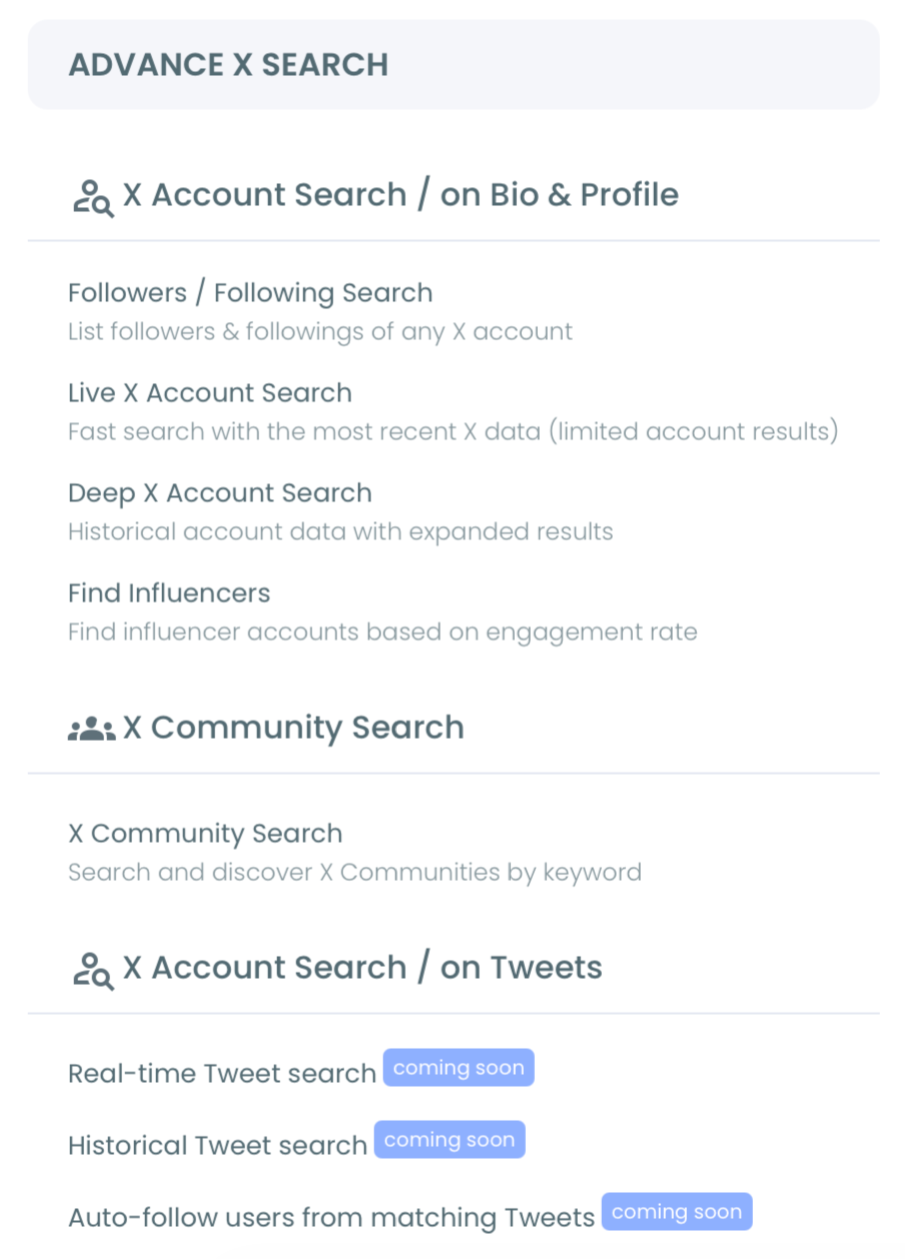
- Run a Deep X Account Search for your keyword so it scans bios and historical tweets.
Filter, then act on the list
- Apply filters for follower count, engagement tier, verification, and location.
- Sort the results by the column that matters most for your goal, such as followers or join date.
- Follow, add to a list, or export the accounts that fit, and save the search to rerun later.
Working the phases in order keeps the list useful. You read the full set of matches first, then narrow with intent, instead of acting on a half-seen pile of accounts.
Watch how to find targeted people by bio and profile keywords:
How the Search Stays Safe and Complete
Circleboom is an official X Enterprise Developer company, so every search runs through sanctioned access rather than scraping.

That matters for completeness as much as safety: authorized access returns full, accurate profile data, where a scrape would return a broken, partial picture.
It also means the actions you take afterward stay compliant. When you follow accounts from the results, Circleboom paces the follows within X's limits, around 50 every 15 minutes and up to 400 a day, so a large follow campaign never looks aggressive to the platform.
Filters That Sharpen a Keyword
A keyword alone is blunt. The filters are what make the list precise, and a few combinations do most of the work.
For influencer discovery, set a high follower-count floor and an active engagement tier. For prospecting, drop the follower floor and add a location or language filter to scope by market. For niche research, leave the filters loose and read the whole distribution to understand how crowded the topic is.
You can also combine searches. Running the same keyword with a join-date filter isolates newer or older accounts, and the broader Twitter advanced search approach shows how to stack criteria. To go back in time on a single profile, searching Twitter history covers the tweet-level view.
Common Mistakes to Avoid
The first mistake is over-filtering on the first pass. Tightening every filter before you have seen the results hides good accounts you did not know to look for. Start wide, then narrow.
The second mistake is treating one keyword as the whole search. Most niches use several terms, so run a few related keywords and combine the results for full coverage. The guide to searching influencers by location shows how a second dimension changes the list entirely.
The third mistake is letting a good search evaporate. Export the list or save the search, because a repeatable query is an asset. Pair it with bio and profile search and the advanced search filters to keep refining the same audience over time.
Deep Search or Live Search: Which to Use
Circleboom offers two keyword searches, and knowing when to use each saves real time. Deep X Account Search reads historical data and returns up to 5,000 accounts, which makes it the right tool whenever coverage matters: building an outreach list, mapping a niche, or finding the established voices who post rarely.
Live search does the opposite job. It returns a smaller set of currently active accounts, which is what you want when recency matters more than breadth, such as seeing who is talking about a topic right now or joining a live conversation. The two are complementary, not competing.
A practical workflow uses both. Run a deep search first to build the full population of a niche, then run a live search to see which of those accounts are active this week and worth engaging immediately. The deep search gives you the map; the live search tells you where the movement is on it. Together they cover both the long-term shape of a topic and its current pulse, which is exactly what a serious research or outreach effort needs.
Your Next Move
You now have a repeatable search. Run this short loop:
- Search your keyword and read the full set of matches.
- Filter to the segment you actually want.
- Export or follow the list, then save the search to run again.
Do it once and a niche you used to guess at becomes a concrete, named list of accounts you can reach.
→ Run your keyword account search
What to Know Before You Start
Will this find accounts that don't use my keyword in their bio?
Yes. The search reads historical tweets as well as bios, so it catches accounts that revealed their interest through what they posted rather than what they wrote in their profile. That is what separates a deep search from a simple bio lookup.
How is this different from native X search?
Native search leans recent and does not let you filter account results by follower count or export them. The deep keyword search reads historical data, returns up to 5,000 accounts, and lets you filter, sort, and export the whole set, so it builds lists instead of just showing them.
Can I use the results for outreach or ads?
Yes. Export the filtered accounts as a CSV and the list feeds straight into a CRM, an outreach sequence, or an ad audience. One keyword search can seed an entire campaign instead of a day of manual copying.
How many keywords should I search?
Most niches need a few. Run the main term first, then add related keywords and combine the results, because people describe the same interest in different ways. Cross-referencing accounts that appear under multiple keywords gives you the most precise targets.