

The phrases that find people asking for advice on X are short request openers such as "any recommendations for", "looking for a tool to", "what do you use for" and "switching from". Search them as exact phrases next to a category keyword. The phrase is only half of the search, because the time window decides whether the person is still waiting for an answer.
What this page answers.Which request phrases to search and what to pair them with.Why a recent start date matters more than the wording.How live results, archive results and X's own search differ.
Circleboom finds tweets asking for advice on X from a chosen start date through official X Enterprise APIs and lists the accounts behind them. Start with a Twitter recommendation search.
Which phrases find people asking for advice on X?
Request openers find them. A request opener is the first few words people use when they ask their timeline to choose for them, and four of them are documented for this use in Circleboom's product guidance:
- "any recommendations for"
- "looking for a tool to"
- "what do you use for"
- "switching from"
- Shorter variants such as "recommendations for", "need a tool" and "any alternative"
A Twitter recommendation search is a query that combines one or more of these openers with a category keyword, for example "what do you use for" with "email marketing". The opener identifies the intent. The category keyword identifies whether the intent concerns you.
Three rules keep the query clean:
- Search each opener as an exact phrase, since the same words scattered through a tweet mean nothing.
- Exclude replies, so the result is the question and not the answers beneath it.
- Add exclude terms for the off-topic requests your opener also catches, such as people asking what to watch or read.
Circleboom applies those rules to live tweets on Twitter and returns the matches as a sortable list. An advice request search on X built this way reads more like an inbox of open questions than a page of search results.
Why the time window matters more than the phrase on Twitter
A recommendation search is a phrase search plus a time window, and the window carries more of the value. The same sentence posted this week and posted a year ago are two different things: one belongs to a person who is choosing, the other to a person who chose.
Search syntax cannot tell those two apart. An exact phrase matches both tweets equally well. Only the date separates a buying moment from a record of one.
The phrase tells you what someone wanted. The window tells you whether they still want it.
This is why Circleboom's Real-time Tweet Search asks for a start date and collects forward from it. Matching tweets posted after the search is set up are included, so the result keeps growing while the search is active. A start date placed too far back makes the search act like a historical one and returns a less current set than intended.
What the buying moment looks like in the data
An open request has a recent creation time and a low reply count. A closed one is older and usually has a visible thread under it. Circleboom's tweet view shows both values for every match, so the state of each request is readable from the row.
Impressions add a third reading. A request with many impressions and few replies has been seen widely and answered by almost no one, which is the best position a helpful reply can start from. Sort the tweet view by creation time first, then scan the reply and impression columns together.
All of these counts reflect the moment of retrieval. In a live conversation they keep changing, so treat them as a snapshot.
Circleboom is one of the companies on X's official Enterprise developers list, so those rows come from X's source records. For a timing-sensitive search that is a practical benefit: scraping-based tools can miss tweets, and the tweet they miss may be the one posted an hour ago.
How to choose the window for your category
Set the window to the time a request in your category usually stays open. There is no published figure for this, so reason from how the purchase works. A question about a free app tends to be settled the same day, because trying the answer costs nothing. A question about software a team has to approve can stay open for days.
Start narrow. If the first recommendation search returns too few tweets, move the start date back a step and compare. The point at which the results begin to fill with answered threads is the edge of your window.
With the window set, a Twitter recommendation search returns people you can still help.
How to run a Twitter recommendation search in Circleboom
To run a recommendation search, combine request openers with a category keyword, set a recent start date, choose how many tweets to collect, and read the matching tweets before the accounts. Circleboom's Real-time Tweet Search handles each of those in one guided flow. The six steps below use its advanced mode, which suits a query made of several phrases.
Build the query from openers and a category keyword
- Open Circleboom Twitter and connect your X account.

- Go to the Advanced X Search menu and select Real-time Tweet Search in the X Account Search on Tweets group.

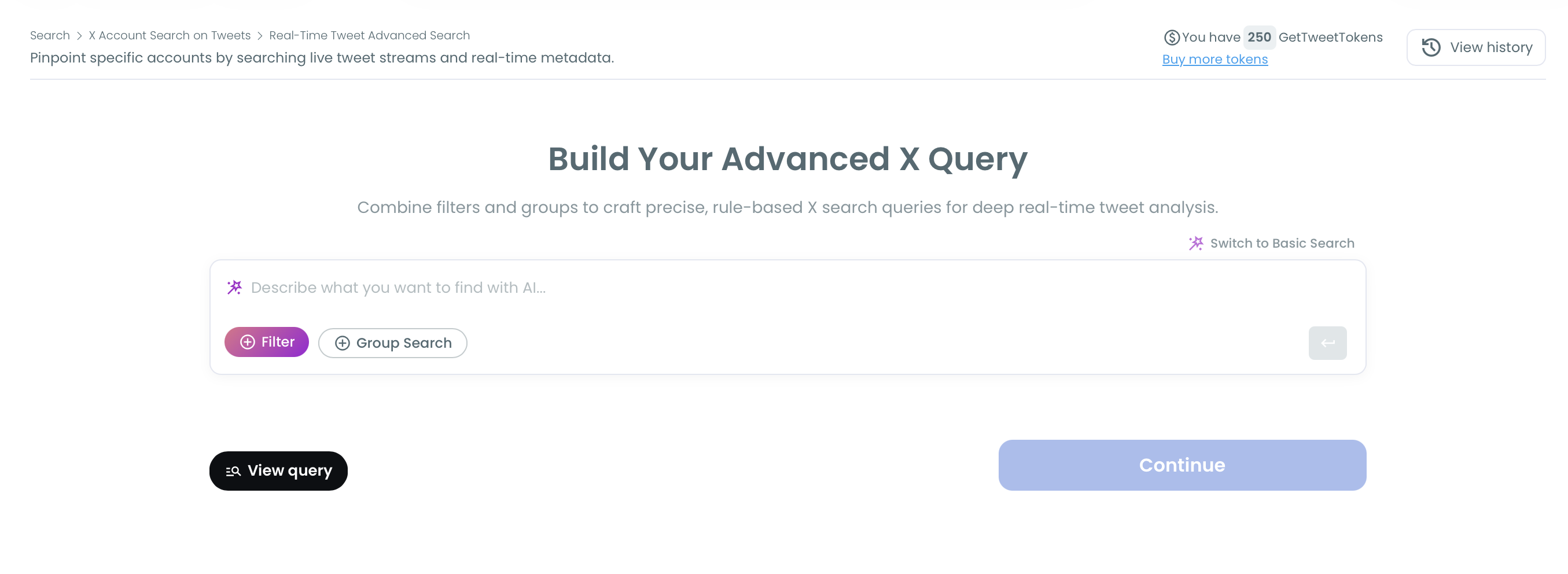
- Switch to Advanced Search and describe the query. Type the openers and the category keyword into the AI box, or add them with the Filter and Group Search buttons. Click "View query" to check what will run, then Continue.
Set the window, collect and read
- Choose a recent start date. Pick the point after which a request could still be open in your category.
- Select the number of tweets to collect and run the search. The number sets the size of the collection; it is separate from the count of unique accounts you will get.
- Read the tweet view, then click "Display Profiles of this search". The tweet view shows each request with its engagement counts and creation time. The profile view shows each asker once, with follower count, follow ratio and activity label.
The sequence holds because each step removes a different kind of waste: the query removes off-topic tweets, the date removes settled ones, and reading the tweet before the profile removes accounts that matched a phrase without meaning it.
In one line: openers plus category, recent start date, sized collection, the request before the asker.
Filters that cut noise from a request query on X
Filters remove the matches that are technically correct and practically useless. The Filters panel in Real-time Tweet Search holds a dozen filter groups, among them media type, verified accounts and minimum or maximum engagement.
For a recommendation search, four of the others do most of the cleaning:
- Match type set to exact phrase, for the openers.
- Replies excluded, to keep the original question.
- Language set to the one you can answer in.
- Links excluded, since a request with a link is often a promotion.
Broad category words return large, noisy sets when a topic is trending. In that case add exclude terms before raising the tweet count, and avoid drawing conclusions from a single busy window.
Are old recommendation requests on X still worth finding?
Old requests are worth finding for research and for slower prospecting, and rarely worth a reply. The person who asked months ago has almost always chosen, so an answer now arrives after the decision.
They still carry information. Past requests show how your category words the question, which products get named, and whether a current burst of requests is new or part of a recurring pattern. Circleboom's guidance also treats accounts that posted a request in recent months as a qualified outreach list, which is a different motion from replying in the thread.
Live window, past archive and X's own search compared
The comparison below joins the search syntax with the timing of the buying moment. The first two columns are Circleboom searches; the third is X's own advanced search.
| Live window from a recent start date | Past archive | X's own advanced search | |
|---|---|---|---|
| What it returns | Matching tweets from the start date forward, including tweets posted after setup, as a tweet view and a deduplicated profile view | A fixed set from a closed past date range that does not change after the search runs | A page of matching tweets inside X |
| Who it suits | Someone who wants to answer while the request is open | Someone studying how a category asks, or building a slower outreach list | Someone checking by hand from time to time |
| What you can still do with the result | Reply in time, follow selectively, add to a list, export | Learn the vocabulary and contact the account later; a thread reply is late | Read and reply one tweet at a time; nothing is saved or listed |
When to choose the archive over the live window
Choose the archive when the past is the signal. A new product entering a category, for example, benefits from reading a year of requests before writing a single reply. Circleboom's Twitter historical data search covers that closed past range.
Choose the live window when the reply is the goal. X's developer documentation has its own recent search quickstart for queries limited to a recent period. The same split exists at the API level: recent and archive are separate jobs.
Tutorial for the archive side: Circleboom's own video on searching historical tweets on Twitter/X.
The two searches work well in sequence. The archive run happens once, to learn the wording. The live recommendation search runs from then on. If you only need a few older posts and no dataset, the simpler ways to search old tweets on Twitter may be enough.
What Twitter's own advanced search can and cannot do with request tweets
X's advanced search can find request tweets, and it costs nothing to try. The X Help Center entry for X advanced search describes fields for an exact phrase, for any of several words and for dates, which together express a basic request query.
The limit is what happens after the results load. Native search shows live tweets, but it does not turn them into a workflow. The reader still has to do four things by hand:
- Identify the accounts behind the tweets.
- Judge which of them fit.
- Save or export the ones worth keeping.
- Act before the moment passes.
For an occasional check, that is acceptable. If you only want to see whether anyone in your niche asked for advice this week, learn how to use Twitter advanced search and stop there.
For a repeated recommendation search, the manual steps add up. Each run starts from zero, and nothing links one day's findings to the next. Circleboom's own advanced search for Twitter keeps each search in a log, shows the askers as accounts, and lets you follow, list or export them from the result.
Catching people who ask about your own brand on Twitter
The same method works on your own name. Replace the category keyword with your brand or product name, pair it with question wording such as "anyone used" or "does it support", and run it from a recent start date.
These tweets differ from category requests in one useful way. The asker already knows you exist and is one answer away from trying the product or dropping it. Circleboom's guidance calls them outreach openings, because a quick and helpful reply reaches the person before a competitor or an outdated answer does.
A brand search also has an audience beyond the asker. Everyone reading the thread sees whether the brand answered, and how.
Brand questions as research
Collected over a few weeks, brand questions show what your pages fail to explain. If the same "does it support" question keeps appearing, the answer belongs on the product page. Category requests do similar work for positioning, which is the idea behind using Twitter as a market research tool.
Two cautions keep this honest. A search collects public tweets up to the number you chose, so treat it as a sample of what was said about you. And reading the tweet is still your job: the search finds the question, it does not score the mood behind it.
If the need is mentions of your handle more than questions about your product, Circleboom has a dedicated page to track Twitter mentions.
Checklist for a first recommendation search on X
A first search needs a short list of decisions made in advance. Work through these before you open the tool:
- Write down three or four request openers and one category keyword.
- List the exclude terms your category attracts.
- Decide how many days a request stays open, and use that as the start date.
- Pick a modest tweet count for the first run.
- Decide what happens to the askers: a reply, a follow, a list or an export.
The phrase finds the request and the window finds the moment. A recommendation search that respects both gives you fewer results than a broad keyword search, and nearly all of them are people you can still answer.
→ Open a live recommendation search on Twitter
Recommendation search on X: FAQ
What should I say when I reply to someone asking for a recommendation?
Start with the question the person asked, and bring up your own product only where it is a real answer to it. Circleboom's guidance asks for a genuine, helpful reply and warns against a hard pitch. Speed helps too: a useful reply posted while the thread is active reaches the people watching it.
Write each reply for that tweet; Circleboom finds the requests and does not send replies for you. For doing this at volume, see the post on how to automate Twitter outreach.
Can I automatically follow the people who post these requests?
Yes. Circleboom's profile view has an Auto Follow from matching keyword action that follows the accounts behind matching live tweets, using the filters you set. Set engagement thresholds and quality filters first, because it follows every matching account continuously. Circleboom processes follows 50 at a time every 15 minutes, up to 400 a day, and anything left in the queue carries over to the next day.
What do I need before I can run a search on X?
A connected X account and a GetTweetTokens balance. A search in Circleboom uses tokens in proportion to the number of tweets it collects, and the balance is shown on the setup screen, so you can size the first run before it starts.

