Your follower count drops… but nothing tells you why.
No notification. No list. No explanation.
Twitter (X) doesn’t inform you when someone unfollows you, which makes it almost impossible to understand what’s happening behind your audience changes. You just see the number go down, without knowing who left or when it happened.
That’s the frustrating part.
But it doesn’t have to be that way.
With Circleboom Twitter’s Unfollow Tracker, you can see exactly who unfollowed you, track your recent unfollowers, and take action instantly.
Circleboom Twitter Unfollow Tracker: A Better Way to See Who Unfollowed You
With Circleboom Twitter’s “Who Unfollowed Me” feature, you don’t have to guess anymore.
Circleboom is an official X Enterprise Developer, which means it works directly with X’s official APIs.
This ensures the data you see is accurate, reliable, and up-to-date, not delayed or incomplete.

Instead of trying to track changes manually, Circleboom gives you a clear and structured view of your unfollowers.
Here’s what you can do:
🟢 See recent unfollowers in a dedicated dashboard
🟢 Identify exactly which accounts unfollowed you
🟢 Track changes in your audience over time
🟢 Unfollow them at once if you want to clean your following list
And it goes one step further.
Circleboom also allows you to set unfollower alerts. You can receive daily or weekly email reports showing the list of people who unfollowed you.
This means you don’t even need to check manually, the updates come directly to you.
This turns something unclear into something you can actually measure and manage.
How to Use Circleboom’s Twitter Unfollow Tracker
Tracking your unfollowers with Circleboom is simple and takes only a few minutes.
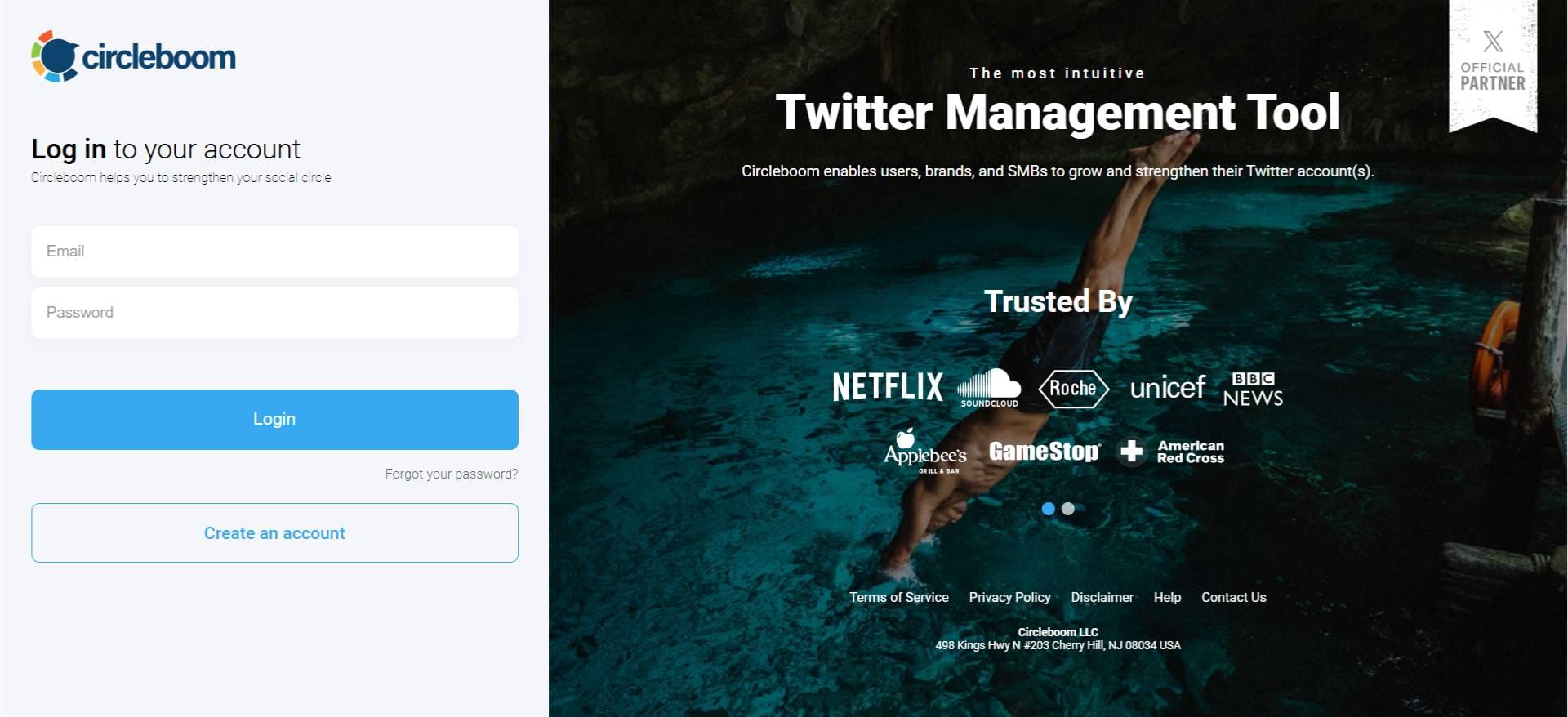
Step#1: As the first step, please go to Circleboom Twitter and login with your active e-mail address.
If you haven't got a Circleboom account yet, you can get one in almost no time!
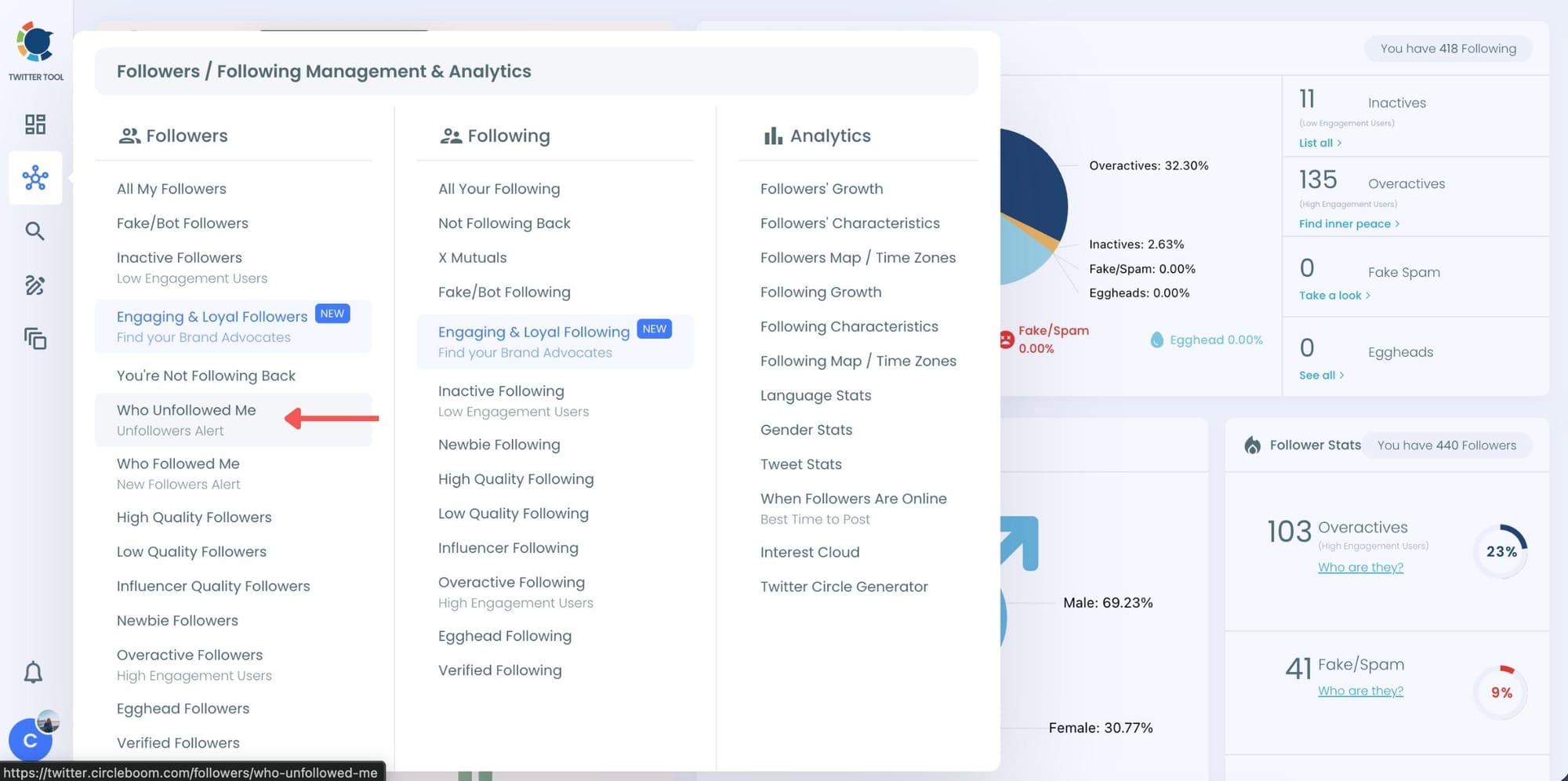
Step#2: You will see the "Followers" tab on the left. Navigate to it!
Then you will see the "Who Unfollowed Me?" option there.
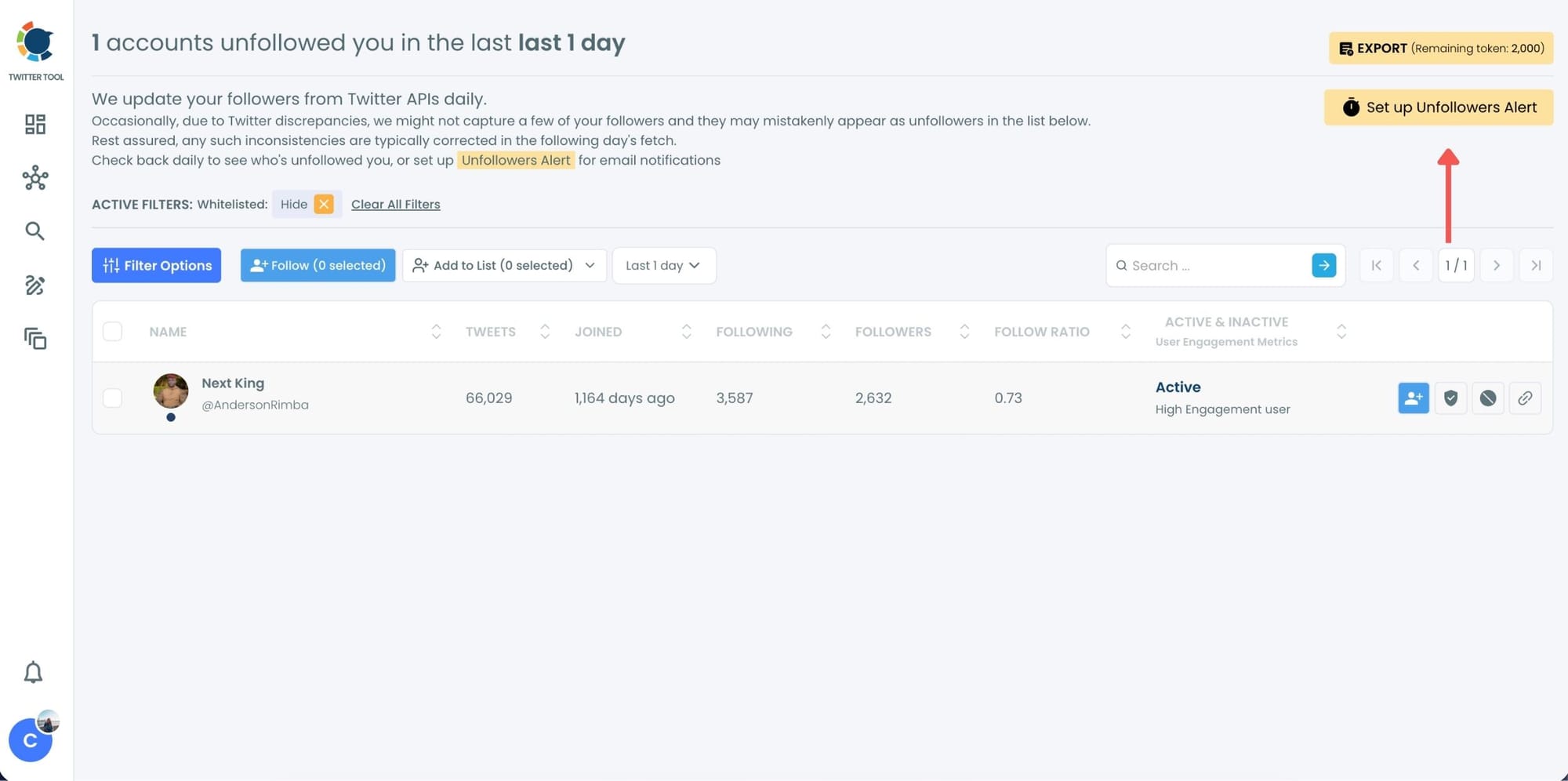
Step #3: You will be able to check your Twitter unfollowers. If you wish, you can visit their Twitter profile and unfollow them!
Here are your Twitter unfollowers identified by Circleboom, you can unfollow them her with one click.
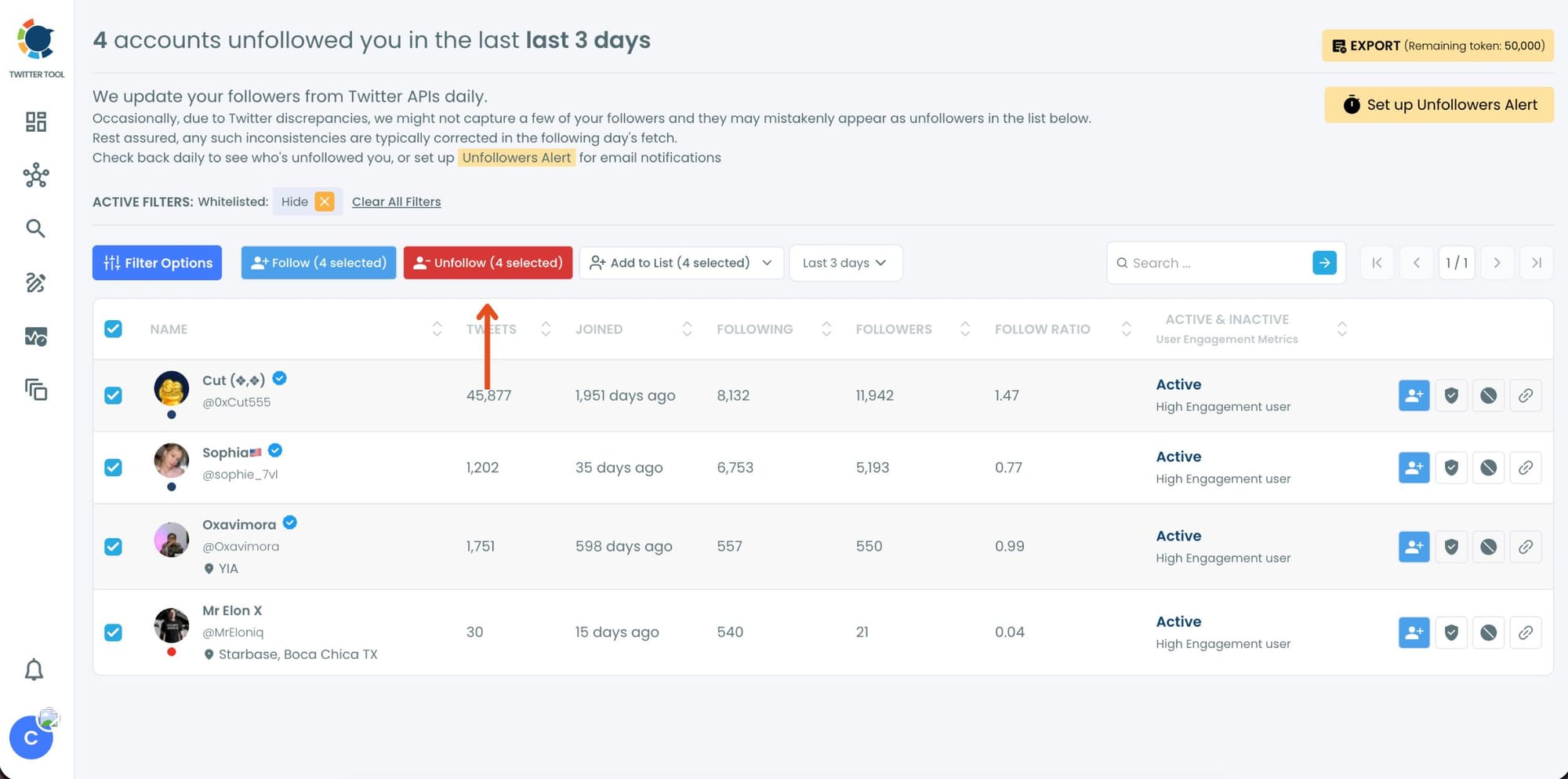
And, you can set up "Unfollowers Alert" to get weekly or monthly email summaries of who unfollowed you on Twitter!
Why Twitter Doesn’t Show Unfollowers Clearly
Twitter keeps things simple on the surface, but that simplicity comes with limitations.
You only see your follower count change.
❌ No alert when someone unfollows you
❌ No history of follower changes
❌ No breakdown of daily losses
❌ No list of accounts that left
If your follower count drops by 10, you just see “-10.” You don’t know who those 10 people were or what caused it.
Trying to track this manually would require constantly checking profiles and comparing lists, which is unrealistic, especially as your account grows.
That’s why an unfollow tracker becomes essential.
 Arif Akdogan
Why Tracking Twitter Unfollowers Matters
At first, it might feel like just curiosity.
But tracking unfollowers actually gives you valuable insights that can improve how you use Twitter.
1. Understand Audience Behavior
When you can see who unfollowed you, and when, patterns start to appear.
- Did people leave after a certain type of post?
- Are you posting too often or not enough?
- Are specific topics causing drop-offs?
Without tracking, you’re guessing. With data, you can adjust your strategy.
2. Keep Your Following List Clean
Over time, you may end up following many accounts that no longer follow you back.
Without a tracker, you won’t even notice this.
With Circleboom, you can:
- Identify accounts that unfollowed you
- Review them quickly
- Unfollow them at once
This helps you maintain a more balanced and relevant network.
3. Save Time and Stay Updated Automatically
Manually checking who unfollowed you is not scalable.
Even for small accounts, it takes time. For larger accounts, it becomes impossible.
With Circleboom’s unfollower alerts, you don’t even need to check the dashboard regularly. You can receive daily or weekly email summaries of your unfollowers, making the process completely automated.
Set Up Unfollower Alerts (Daily or Weekly)
If you don’t want to check manually, Circleboom also offers Unfollower Alerts.
These alerts:
- Track unfollowers automatically
- Send you daily or weekly email reports
- Show exactly who unfollowed you during that period
How to Set Up Alerts:
1. Choose Unfollower Alert
2. Select daily or weekly frequency
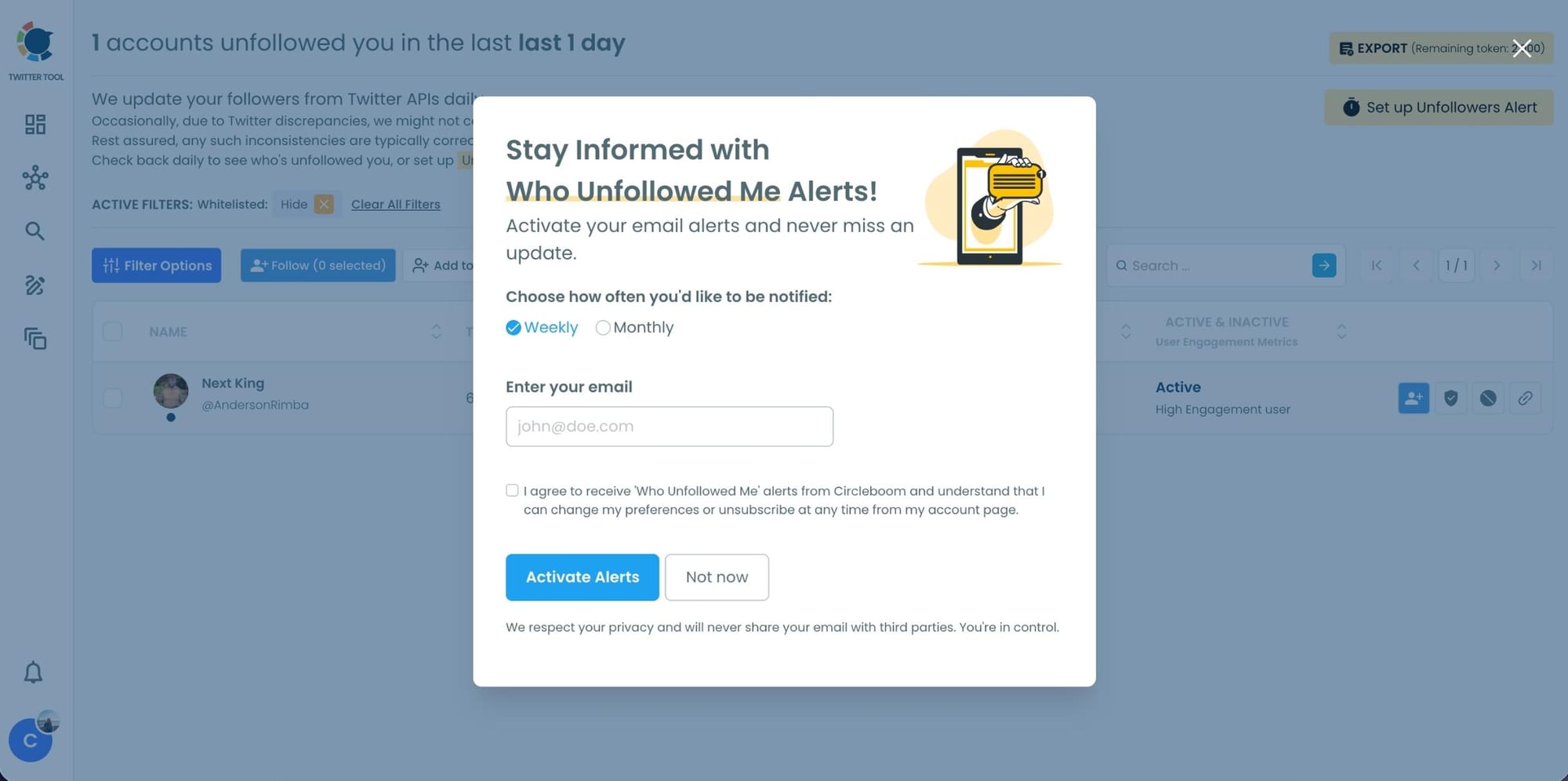
3. Receive email updates without logging in
It turns unfollowers from a surprise into routine data.
4. Track Real Growth, Not Just Numbers
Growth is not just about gaining followers.
It’s also about understanding losses.
If you only focus on how many followers you gain, you miss what’s happening on the other side. Unfollow tracking gives you a complete picture of your account’s performance.

More Than Tracking: Manage Unfollowers in One Place
Circleboom doesn’t just show you who unfollowed you, it lets you act on it.
You can:
- View all unfollowers in an organized dashboard
- Select multiple accounts easily
- Unfollow them all at once
This is especially useful if you want to:
- Remove one-sided follow relationships
- Improve your follower/following ratio
- Keep your network more relevant
Instead of reacting late, you stay in control.
Conclusion
So, does Twitter notify you when someone unfollows you?
No.
But that doesn’t mean you have to stay in the dark.
With Circleboom Twitter’s Unfollow Tracker, you can see exactly who unfollowed you, track daily changes, receive automatic email alerts, and manage your following list without effort.
As an official X Enterprise Developer, Circleboom provides accurate data and a reliable way to monitor your audience.
Because growing on Twitter isn’t just about gaining followers.
It’s about understanding who stays, who leaves, and staying one step ahead.