Why do the same accounts follow you, leave, and follow you again on Twitter? Usually it is a ratio tactic, and sometimes the "unfollow" was never a person's decision at all.
People unfollow and refollow on Twitter mostly to collect a follow-back, drop it so their own following count stays low, and repeat the move when they want your attention again. Some apparent cycles are not people: X hides spam accounts, and a one-day data gap can mark a follower as gone. Circleboom records which accounts unfollowed you on X, by time window, through official X Enterprise API access.
→ why people unfollow and refollow on Twitter
The table below sorts every cause by what it looks like in your own data.
What the unfollow and refollow cycle on Twitter looks like
The unfollow and refollow cycle is a loop in which one account follows you, waits for you to follow back, unfollows, and later follows you again. From your side it shows up as the same names in your new-follower notifications and a follower count that dips and recovers without an obvious reason.
The difficulty is that X shows only half of the loop. It notifies you about new followers. It does not notify you when someone leaves, and it gives you no history of who left or when, so a cycle is invisible unless something records the departures.
That record is what Circleboom provides. Its Who Unfollowed Me list on X compares your follower snapshots day by day and names every account that is no longer there. That lets you catch accounts that unfollow and refollow on Twitter instead of guessing from the count.
Where X draws the line on follow churn
The behavior also has a rules side. X's rules on authenticity name follow churn, meaning following and then unfollowing large numbers of accounts to inflate a follower count, as prohibited.
A person who trims their feed is not doing that. An account that runs the loop on hundreds of people is.
Follow-then-unfollow behavior in general, including one-time departures, is covered in why do people follow then unfollow you on Twitter X. This article stays on the repeat loop.
Five reasons accounts unfollow and refollow on X, and what each one looks like
Not every return is the same event. The useful question is not "why did they do it" in the abstract but "what does this cause look like in a dated unfollow list, and what should I do about it?" The table answers both.
| Reason | What the dated unfollow list shows | Response |
|---|---|---|
| Ratio tactic | The same account appears as an unfollower in more than one window, usually with a large following count and a carefully balanced follow ratio | Unfollow back, label it, and stop following back by reflex |
| Renewed attention | A departure followed weeks later by a fresh follow notification from the same name, often around a busy posting period | Treat the new follow as a request you can decline |
| Feed cleanup | A single departure, often an inactive or low-engagement account, with no return or a return months later | No response needed; this is normal churn |
| X hiding a spam account | Several low-quality or brand-new accounts gone at once, in the same window | Let them go; X removed them, they did not choose to leave |
| One-day data discrepancy | A name that appears as an unfollower one day and drops off the list after the next daily fetch | Wait a day before acting on any bulk selection |
Reading the table against your own list
I read the table from the bottom up when a familiar name appears. Could it be a data gap? Then I wait a day. Could X have hidden it? Then the account usually looks brand new and arrives in a batch of similar ones.
Only after both checks fail do I treat the name as a person making a choice, and only a name that repeats across windows gets treated as a cycler.
Two rows describe a tactic. The remaining three describe ordinary habits or no human choice at all.
The table matters because the responses are opposite. Unfollowing back is right for a ratio cycler and pointless for a hidden spam account. Waiting a day costs nothing for a data discrepancy and is the only correct move there.
The ratio and attention rows up close
The ratio row is the one people search about. A cycler wants to look like a profile that many people follow and that follows few. Each follow-back they collect pushes their follower count up; each unfollow they send keeps their following count down.
The loop exists because enough people reciprocate without checking.
The renewed-attention row is subtler. Returning to someone who followed back before is a low-effort way to land in their activity tab again.
Whether the refollow is timed to land a new notification is a common guess; X documents nothing about it, so keep it a guess. What you can document is the pattern itself: the same handle, leaving and arriving, with dates on both sides.
Is it a real unfollow, or did X remove the account?
Sometimes it is neither a cycle nor a choice. Two non-human causes produce the same symptom as a person leaving, and both are worth ruling out before you respond.
The first is platform action. X's own help page on following on X explains that a follower who disappears may have unfollowed you, deactivated their account, or been hidden by X for spam.
From time to time X also removes large numbers of bot and fake accounts, which makes follower counts drop for many accounts at once.
Timing helps separate the human cases too. If unfollows cluster within a day or two of one specific post, and the accounts had followed you for a long time, the content probably drove them away, which points to a strategy question rather than a cycle. If departures spread evenly across weeks with no link to any post, that is normal churn.
If the departures in a window are mostly very new accounts with very low follow ratios and no profile photos, the drop is platform-driven and says nothing about how people see you. The question of does Twitter randomly remove followers has a fuller answer if your count fell sharply.
When the unfollow is a one-day data gap
The second cause is a data gap. Circleboom updates follower data from the X API once a day, and occasional discrepancies in that data can make a few accounts appear as unfollowers when they never left. Circleboom states this on the Who Unfollowed Me page itself, and such inconsistencies are typically corrected in the following day's fetch.
A name that vanishes from the unfollower list after one day was never gone.
That is why the safest habit is to review the list before any bulk action. Give a surprising name one more daily sync before you treat it as a cycler. A bulk unfollow that still contains a data-gap name would drop someone who never left you, and that small mistake can cost a real relationship.
How Circleboom exposes repeat cyclers on X
Circleboom turns follower departures on X into a dated list you can read across time windows, which is the only way a repeat cycle becomes visible.
Circleboom is an official X Enterprise partner. Its follower snapshots come from X's own data through the official API, so you work from the platform's records rather than a scraper's guesses.
Using the time period dropdown on Twitter
The time period dropdown above the list is the main control. It offers ten windows, Last Week, Last 4 weeks and Last 3 months among them, and the list refreshes the moment you pick one.
For a suspected cycler, the inline search bar does the rest: type the handle, then change the window and look again.
Whenever a familiar follower reappears, check the name against the dated record of unfollows and refollows on Twitter.
The page itself shows the daily update note at the top, the Set up Unfollowers Alert button, the period dropdown and the Follow, Unfollow and Add to List buttons above the account table.
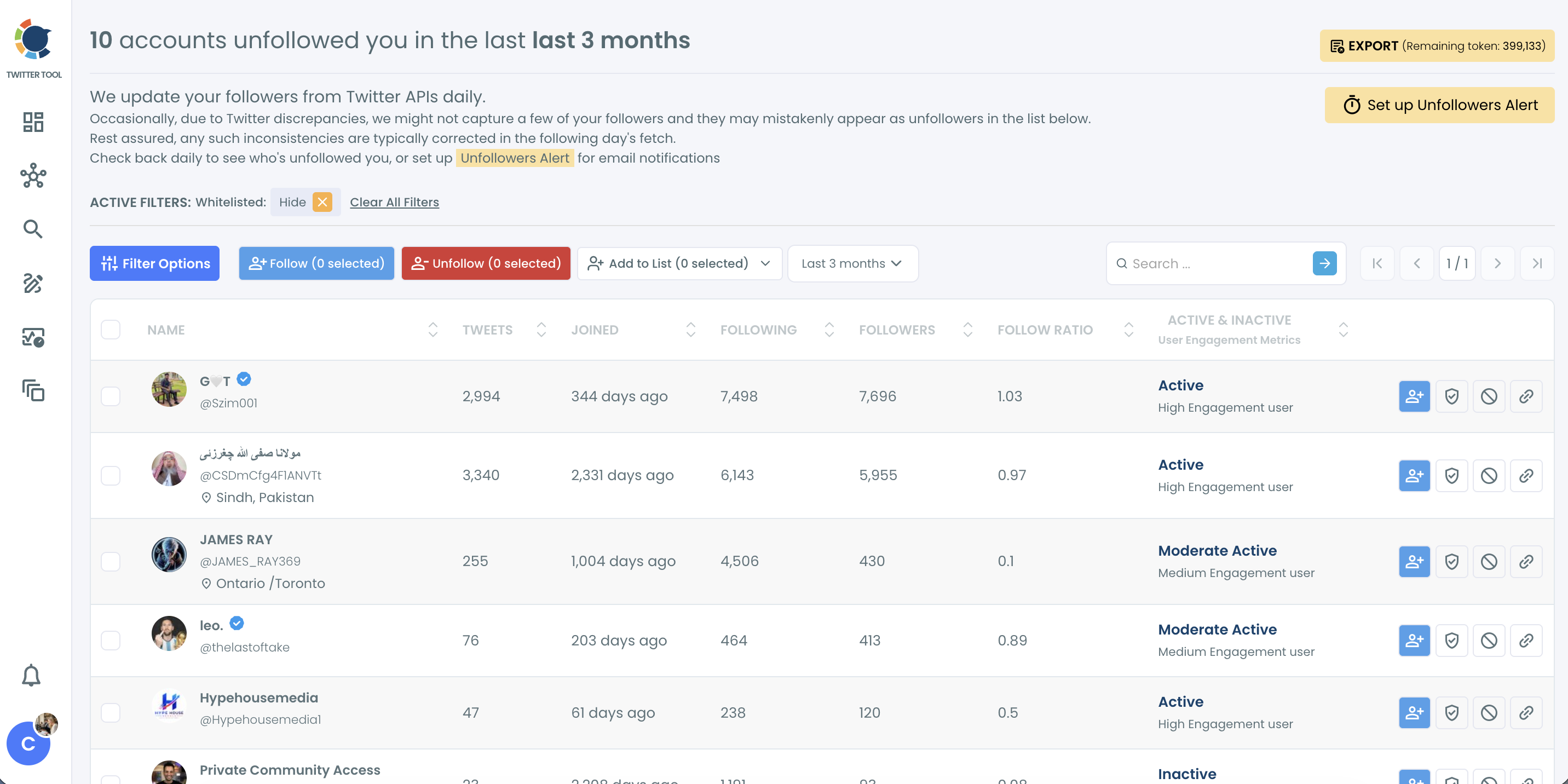
Each row carries the context a judgment needs:
- Tweet count and join date, which separate long-standing accounts from fresh ones.
- Following and follower counts, which show whether an account follows thousands.
- Follow ratio, the number a ratio cycler is trying to protect.
- An Active and Inactive classification with an engagement level.
A Filter Options panel narrows the list further, for example by follow ratio or join date. The judgment about who is cycling stays with you.
Two views that sit beside the list
Two adjacent views complete the picture. The Twitter unfollowers alert sends a Weekly or Monthly email summary of new unfollowers. A returning name then gets noticed without opening the dashboard.
On the other side of the loop, a list of new followers on Twitter shows who just arrived. Holding the two lists against each other is how a name moves from "familiar" to "confirmed."
The unfollower checker in motion: how Circleboom lists the accounts that left your Twitter profile, so a returning name stands out.
Should you block or soft-block a Twitter account that keeps cycling?
Usually neither. For most repeat cyclers, unfollowing back and not following them again is enough, because the loop depends on your follow-back and stops when you withhold it. Block only when the account also harasses you or keeps returning after you stop reciprocating.
That calibration matters. Chasing every unfollower wastes attention. The data is there to show where an audience stopped fitting, and retaliation adds nothing. A person who left once and came back months later is not a threat to anyone.
The middle option is a soft block: you block an account and immediately unblock it, which removes it from your followers without leaving a block in place. For the mechanics, see what is soft blocking on Twitter. An account removed that way can still follow you again later.
Unfollowing back at a safe pace
When you decide to unfollow back, Who Unfollowed Me lets you select the accounts you still follow and unfollow them in one batch after a confirmation pop-up. Circleboom paces unfollows at 50 every 15 minutes with an 800-per-day safety limit, and any remaining queue resumes automatically the next day.
Blocking the ones that keep coming back
For the persistent cases, each row has a block action, and the Add to List dropdown includes Add to Mass Block List for several accounts at once.
Mass blocking runs through the Circleboom Chrome extension, which processes the queue gradually and pauses on its own when X's rate limit is reached; the browser needs to stay open while it works.
Before blocking anyone in bulk, look at the quality of the accounts involved. The Twitter follower quality and following quality view shows whether a cluster of cyclers is mostly fake or inactive accounts. That changes whether blocking is worth the effort.
A bulk block can be reversed. Blocks applied through Mass Block can be lifted later from Accounts I've Blocked / Unblock, where you select the accounts and run the separate Mass Unblock extension. That makes a defensive block reasonable during a burst of cycling, with a review once it passes.
Your unfollow and refollow checklist for Twitter
The whole response fits in five moves, and most accounts only ever need the first three:
- Check a familiar name in a short window and a long window before deciding it is cycling.
- Give any surprising unfollower one more daily sync before acting on it.
- Unfollow back the confirmed cyclers you still follow, and stop following them back by reflex.
- Block only the accounts that harass you or keep returning after you stop reciprocating.
- Set a Weekly or Monthly unfollowers alert so the next round shows up on its own.
Run the checklist through a dated list instead of memory, and the loop stops working the moment you see it.
→ See who unfollows and refollows you on X
Unfollow and refollow FAQ
How do I clear the one-sided follows a cycler leaves behind?
Unfollow them back in a paced batch from Who Unfollowed Me, after hiding any whitelisted accounts you want to keep. For a wider cleanup of everyone who does not follow you, how do I unfollow everyone on X who doesn't follow me without getting a ban covers the safe approach.
How do I find out who keeps unfollowing and refollowing me?
Open Who Unfollowed Me in Circleboom, set a long window such as Last 3 months, and search the names you recognize from new-follower notifications. A name that appears as an unfollower more than once, or right after a recent follow, is cycling you.
How far back can I look for repeat unfollowers?
Up to one year. The period dropdown in Who Unfollowed Me goes from Last 1 day to Last year, and the default view is Last 1 day.
Can I export the list of people who unfollowed me?
Yes. Who Unfollowed Me exports the selected accounts as a CSV file, which uses Circleboom's export tokens; the remaining token count is shown next to the Export button.
Can I remove a follower who already unfollowed me?
No. Remove Follower only applies to accounts that still follow you, and an unfollower no longer does. The cleanup action on that list is Unfollow, for accounts you still follow.