

X (formerly Twitter) is one of the fastest ways to follow what’s happening in the world.
Breaking news often appears there before it reaches traditional media. You can track events in real time, follow experts, and stay updated instantly.
But there’s a downside...
There is too much fake news and misinformation on X.
And it’s getting harder to spot.
With AI-generated content, fake accounts now look realistic. They have profile photos, consistent posting behavior, and even engagement that makes them seem trustworthy.
If you don’t actively control what you see, it’s very easy to get lost in a mix of real and false information.
 Arif Akdogan
Why Misinformation Spreads So Easily on X
The problem is not just the content, it’s how the platform works.
Based on general platform behavior and Circleboom’s internal observations:
- False or misleading content spreads up to 2–3x faster than verified information
- Bots and coordinated accounts amplify posts to make them look credible
- AI-generated tweets make fake accounts harder to detect
- Viral tweets prioritize speed, not accuracy
This creates an environment where:
The more you consume without filtering, the more misinformation you see.
That’s why combating fake news on X is not about avoiding the platform.
It’s about controlling your inputs.
The First and Most Important Step: Clean Your Following List
Everything starts with one simple truth:
Your timeline is shaped by who you follow.
If you follow:
- fake accounts
- bot profiles
- low-quality content creators
your timeline will be filled with noise and misinformation.
And today, this is more dangerous than ever.
Because fake accounts no longer look fake.
They:
- use AI-generated profile photos
- post regularly
- mimic real user behavior
- engage with trending topics
But behind the scenes, many of them are bots or low-quality accounts spreading unreliable content.
 Arif Akdogan
Why Cleaning Your Following Is Critical
Circleboom’s internal analysis shows:
- Users with a high percentage of low-quality accounts in their following list see
up to 60% more low-trust content in their timeline - Cleaning even 20–30% of poor-quality accounts significantly improves content quality
That means:
If you don’t clean your following, you are actively feeding misinformation into your own timeline.
The Easiest Way to Clean Your Following: Circleboom Twitter
Manually checking hundreds or thousands of accounts is not realistic.
This is where Circleboom Twitter becomes essential.

Circleboom Twitter is an official X Enterprise Developer, and it provides advanced analysis tools for your account.
It helps you:
✅ Analyze your entire following list
✅ Detect:
✅ Understand who you are actually following
Instead of guessing, you get clear, categorized data.
How to Remove Fake and Bot Accounts with Circleboom Twitter
Here’s how to clean your following step by step:
Step #1: Log in to your Circleboom Twitter dashboard.
From the left-side menu, go to Followers / Following Management & Analytics, then click on All Your Following.
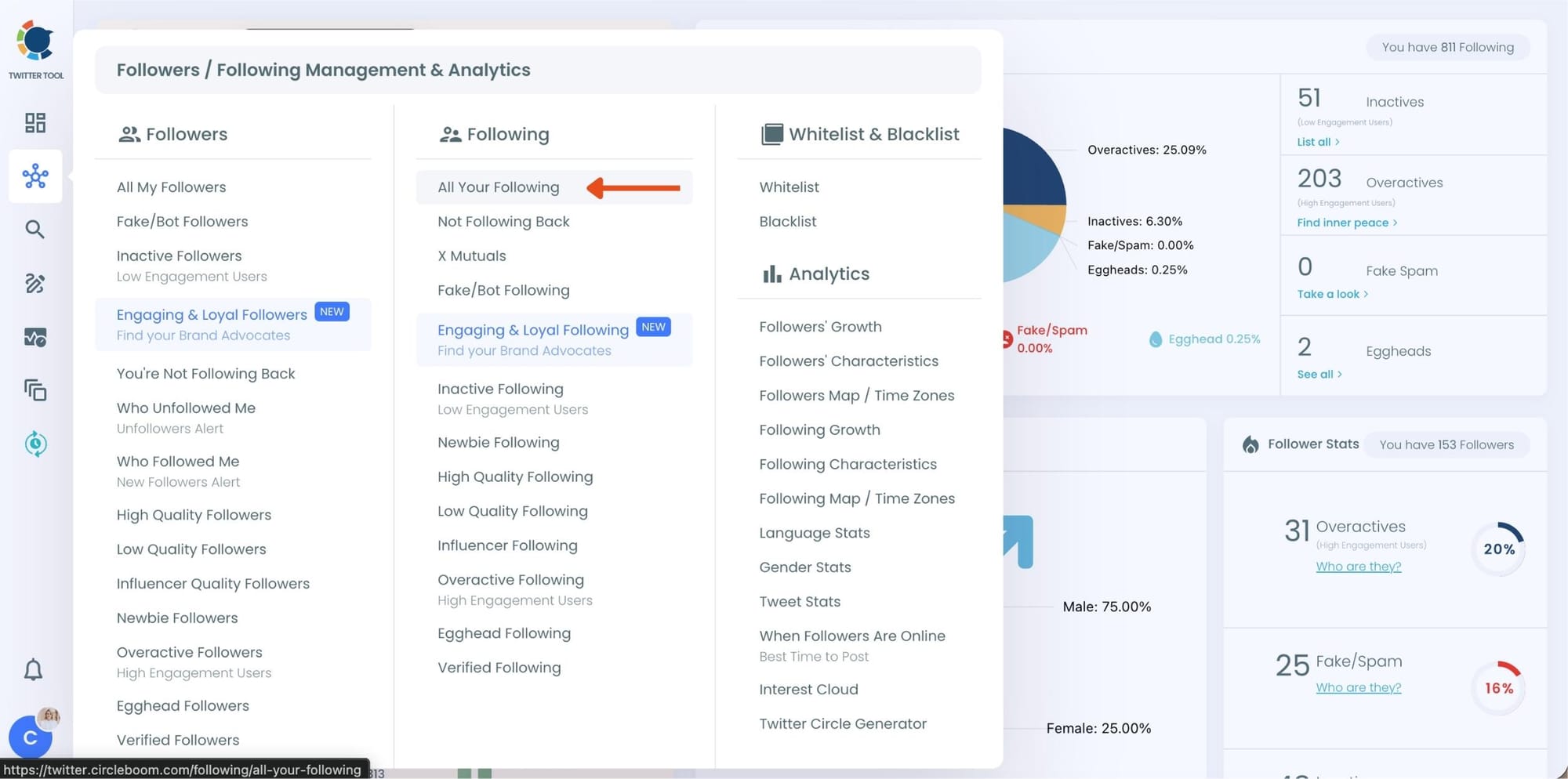
At this point, Circleboom loads your entire following list and displays each account with detailed metrics such as tweet count, join date, follower and following numbers, follow ratio, and activity level.
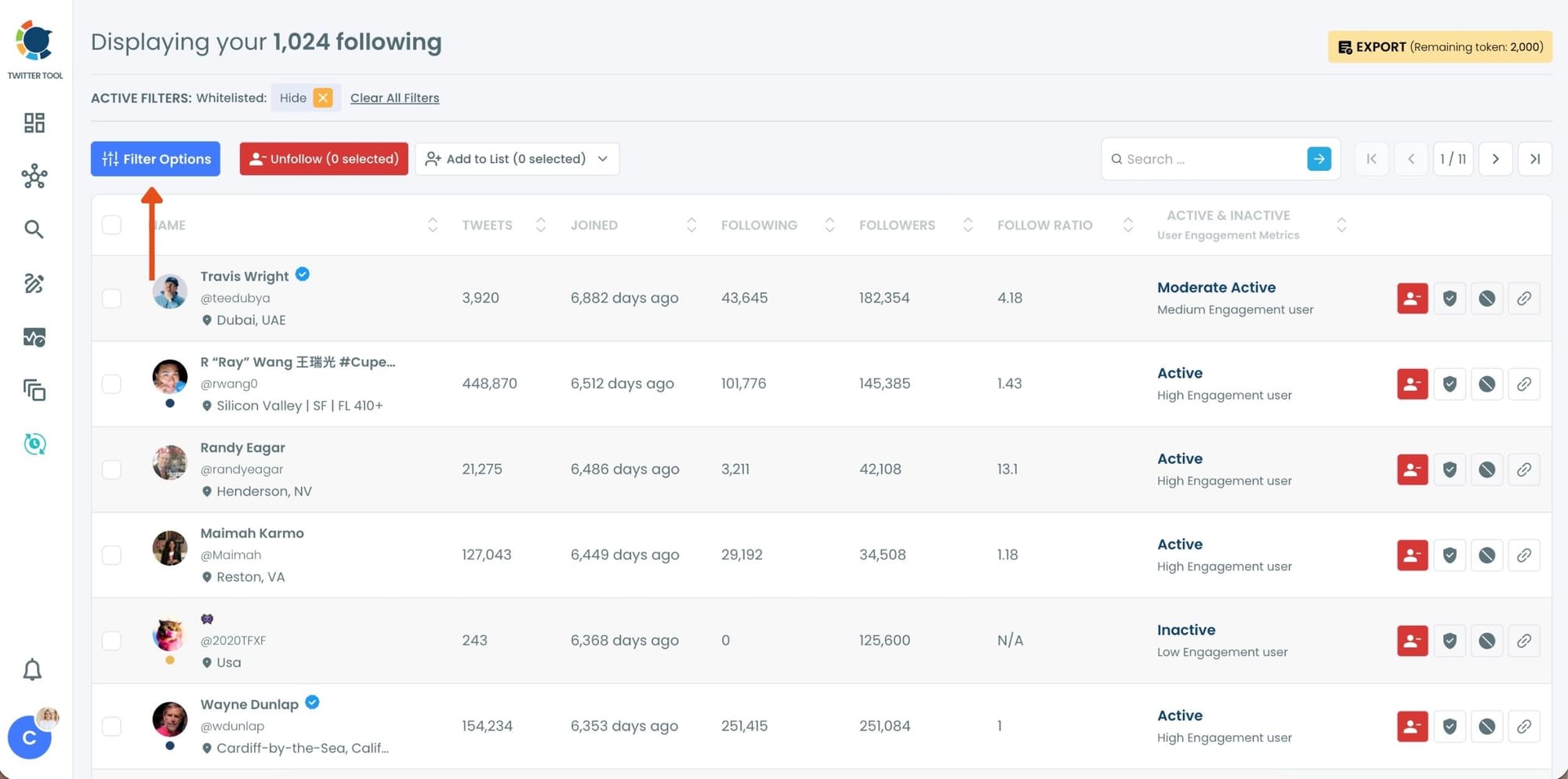
Step #2: Once your following list is visible, click on Filter Options at the top of the page.
Inside the filter panel, use the Follower Quality section to define what you want to see.
Select Fake/Spam and enable Show only. You can also adjust additional quality filters depending on how strict you want the cleanup to be.
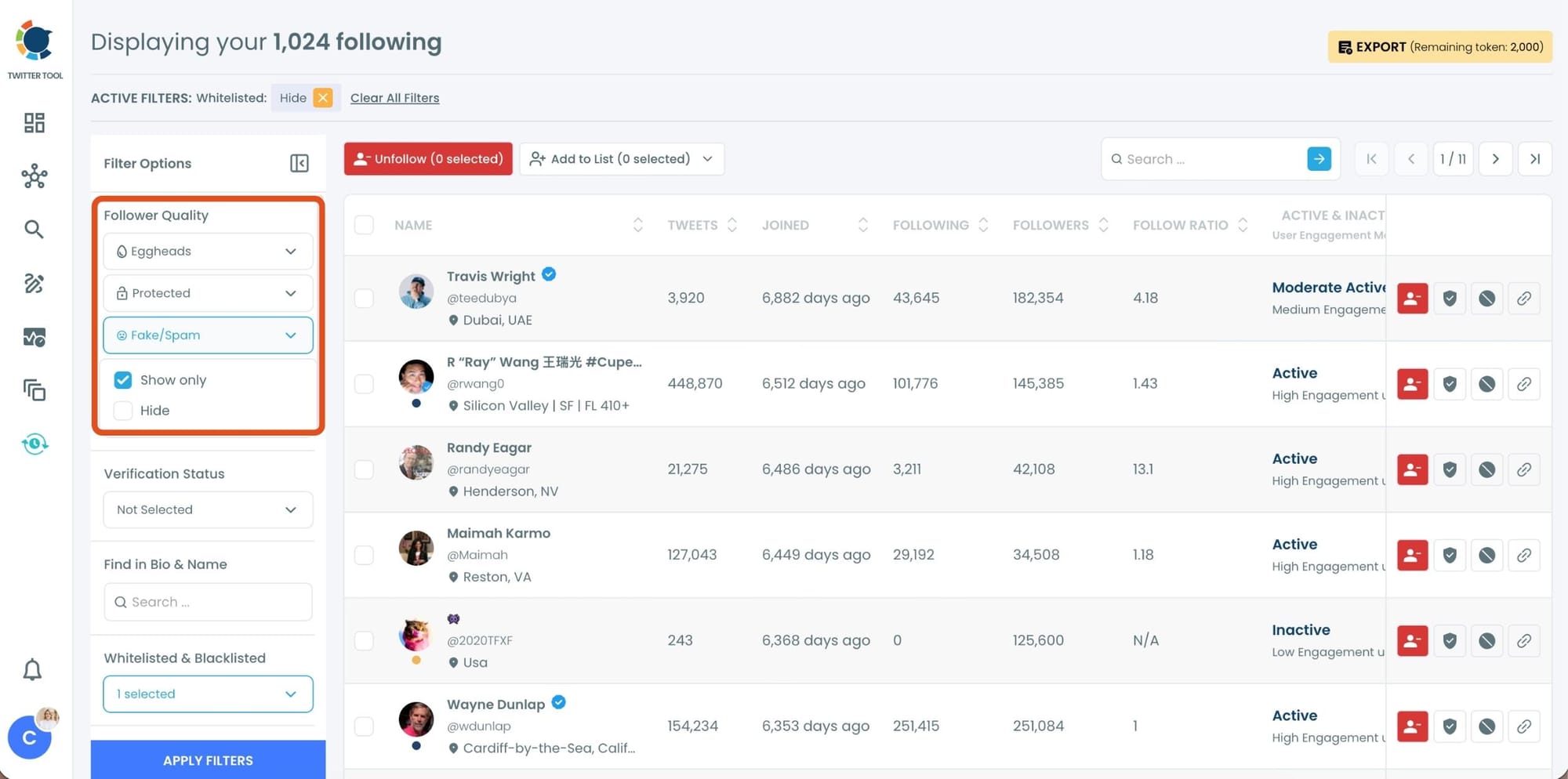
After setting your filters, apply them. Circleboom now lists only fake and low-quality following accounts.
Step #3: Circleboom now shows only low-quality or fake following accounts, each clearly labeled with engagement and activity indicators.
Select the accounts you want to remove by using the checkboxes on the left. You can select multiple accounts at once.
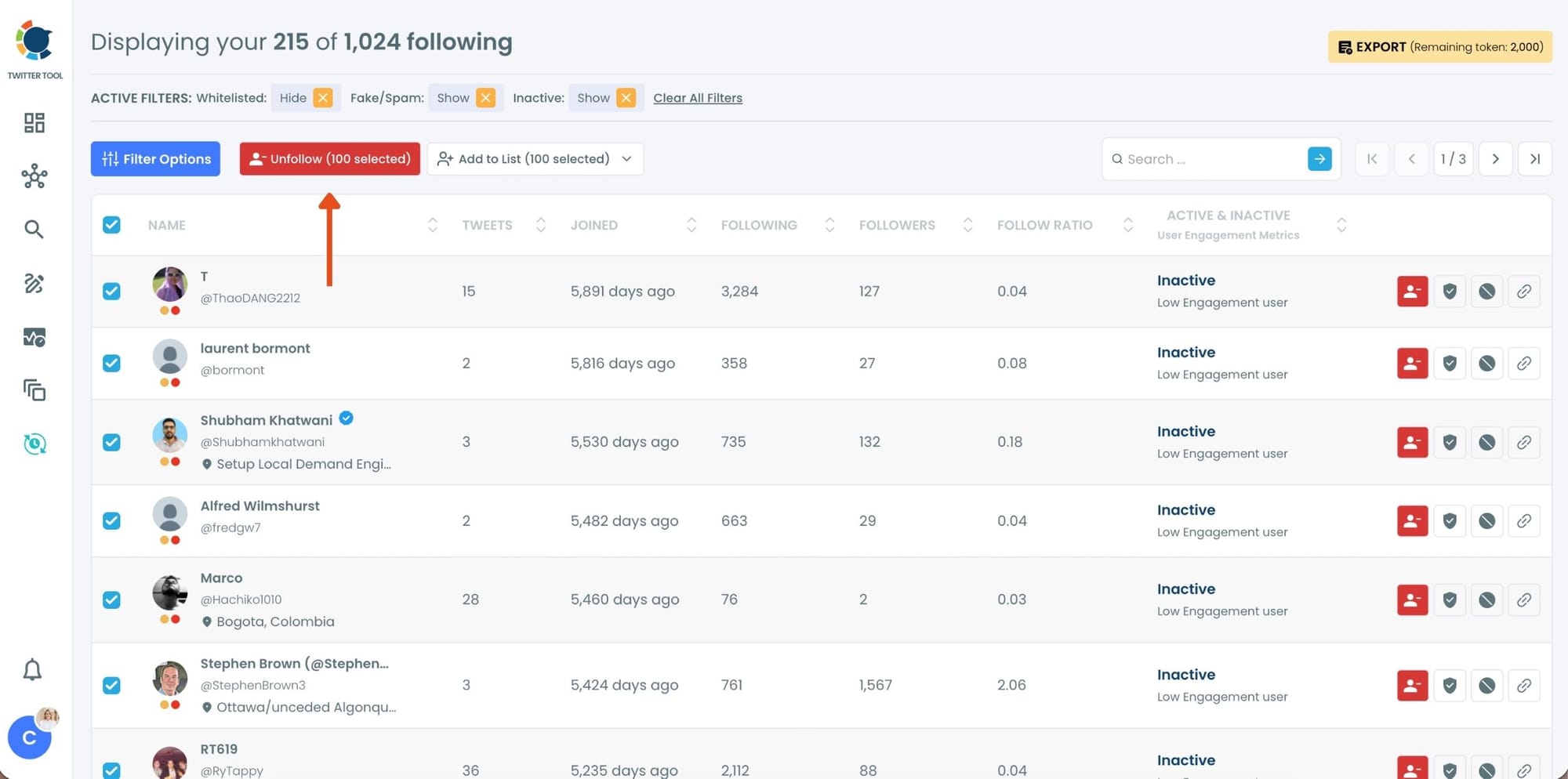
Click the red Unfollow button at the top of the list after making your selection.
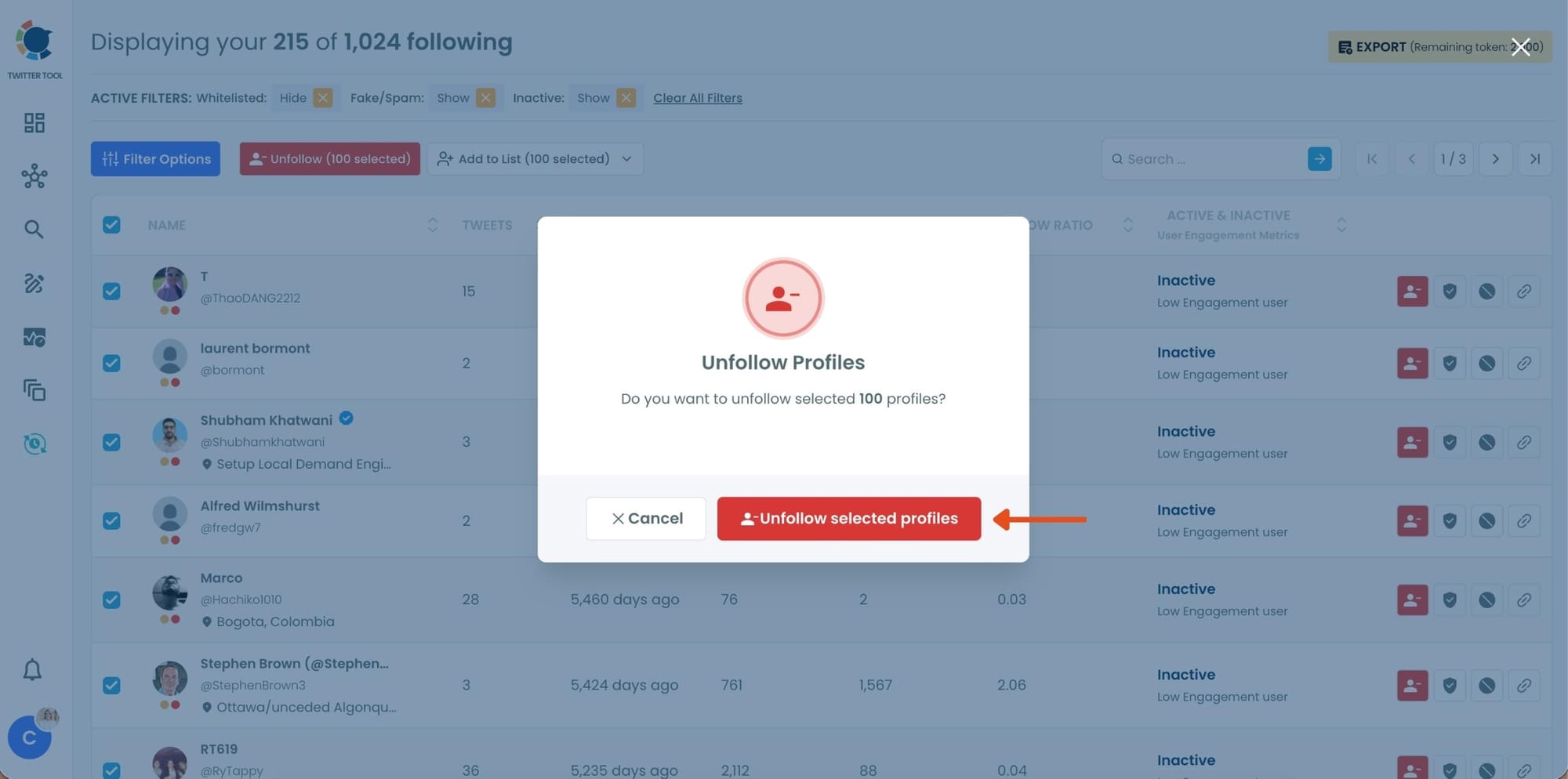
Step #4: Circleboom will show a confirmation pop-up to prevent accidental unfollow actions.
Confirm the action by clicking Unfollow selected profiles.
What This Changes
After cleaning your following:
- Your timeline becomes more relevant
- You see fewer misleading posts
- Engagement improves
- Your overall experience becomes more trustworthy
Circleboom data shows that users who clean their following regularly:
➡️ reduce exposure to low-quality content by 40–60%
➡️ improve timeline relevance significantly within days
The Second Strategy: Build Your Own Trusted News Feed
Cleaning your following removes bad sources.
But it’s not enough.
You also need to prioritize good sources.
This is where Twitter Lists come in.
Why Twitter Lists Are So Powerful Against Misinformation
Instead of relying on your main timeline (which is algorithm-driven), you can create your own custom feed.
With Twitter Lists, you:
- choose exactly which accounts to include
- filter out noise
- focus only on trusted sources
This creates a controlled environment where:
You consume information intentionally, not passively.
The Problem with the Default Timeline
Your main feed:
- mixes all types of content
- includes algorithmic suggestions
- amplifies viral (not necessarily accurate) tweets
Even if you follow good accounts, their content can get lost.
The Solution: Create Curated News Lists
By building lists, you can:
- Follow verified journalists
- Add trusted news organizations
- Include industry experts
- Group sources by topic
And most importantly:
Avoid exposure to random, low-quality, or misleading content.
How to Create Twitter Lists with Circleboom Twitter
Creating lists manually can be slow. Circleboom Twitter makes it fast and scalable.
For instance, I created a Twitter List to follow the latest news and announcements from official accounts. As you know, there are too many scammers, so it's important to follow the right accounts.
Let me show you how:
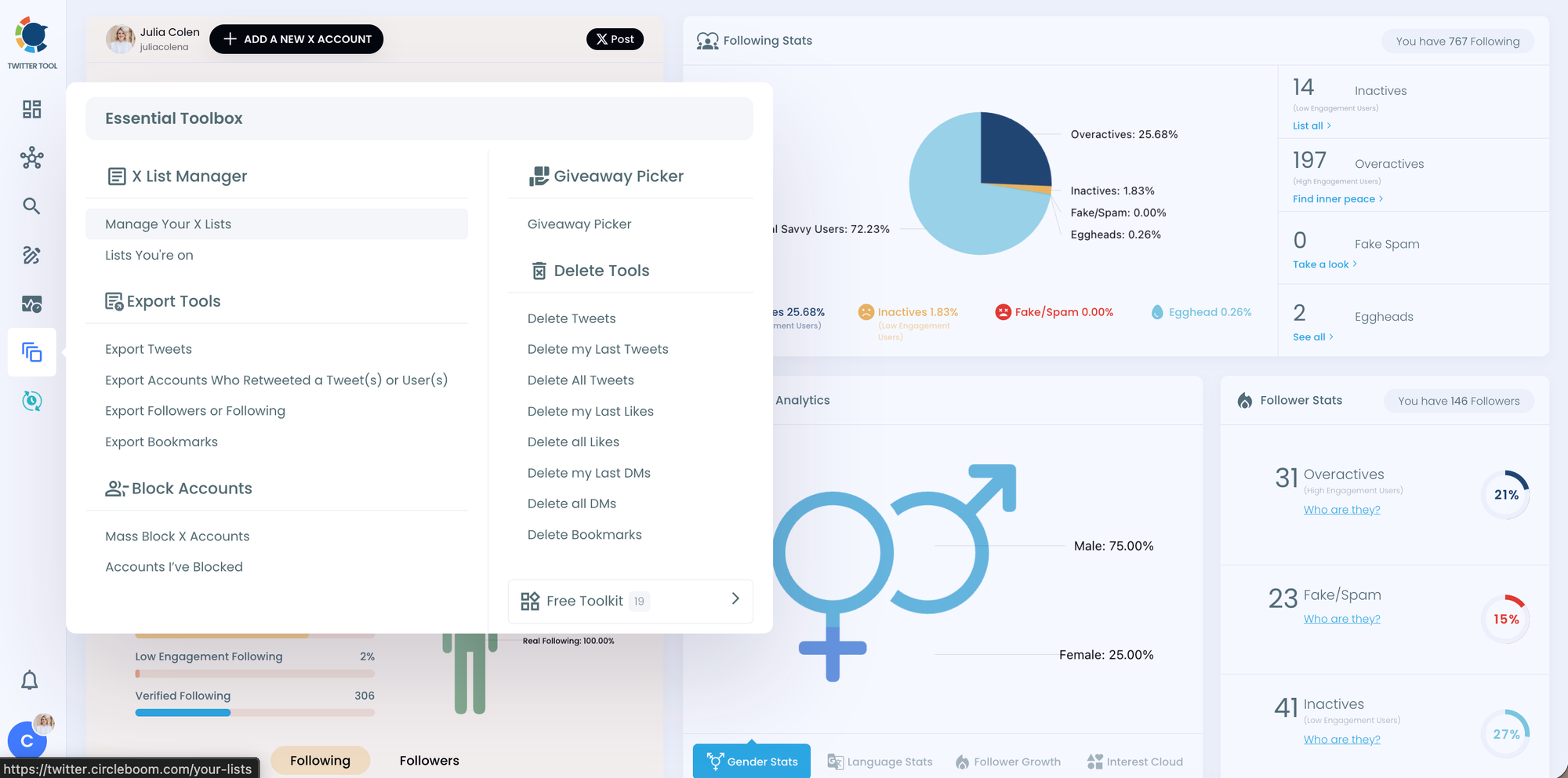
Step #1: In the Circleboom dashboard, locate and click on the section labeled "Essential Toolbox" from the side menu.
Click on "Manage Your X Lists" to access the list management section.
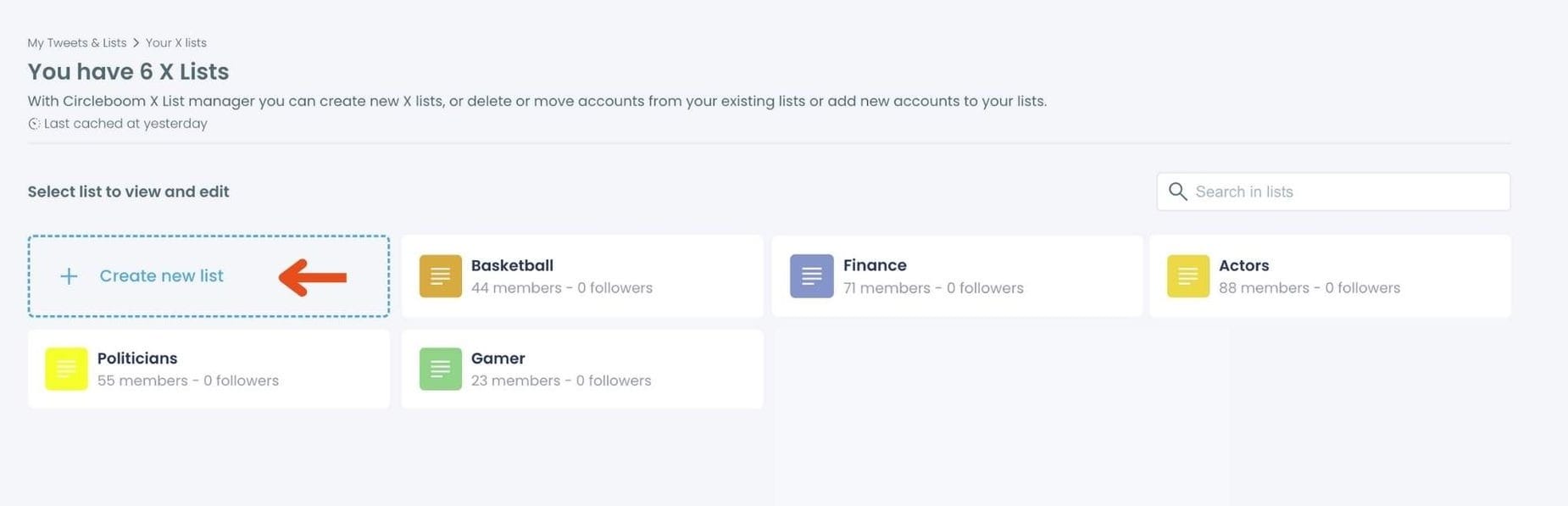
Step #2: On the main Twitter X Lists page, click the "Create new list" option (indicated by the plus sign).
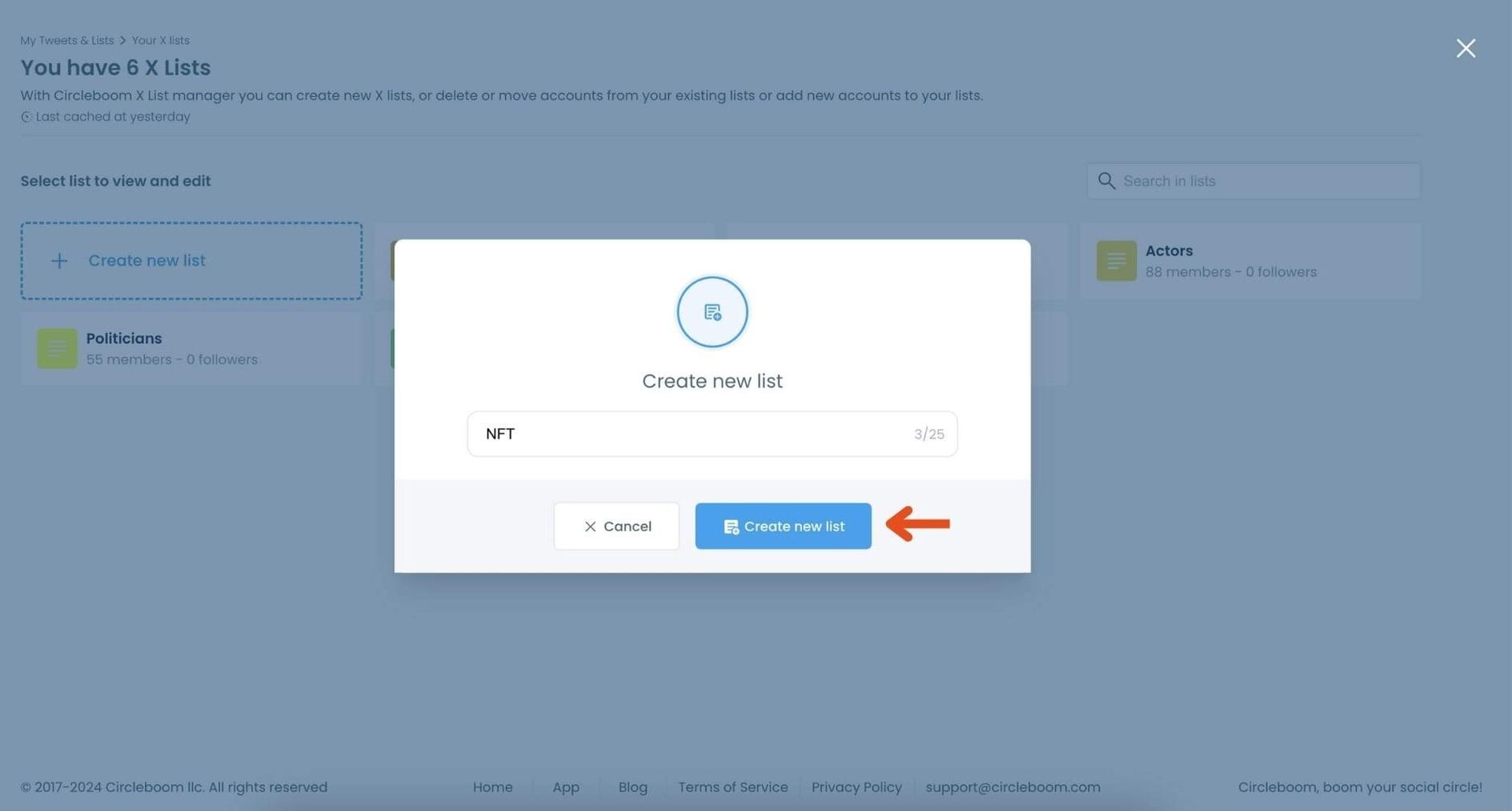
In the pop-up window, enter a name for your new list. For example, if you’re creating a list for NFT accounts, type "NFT" in the text field.
Click on "Create new list" to finalize and create your Twitter X List.
Step #3: Click on the "Add or import new accounts" button at the top of the page.
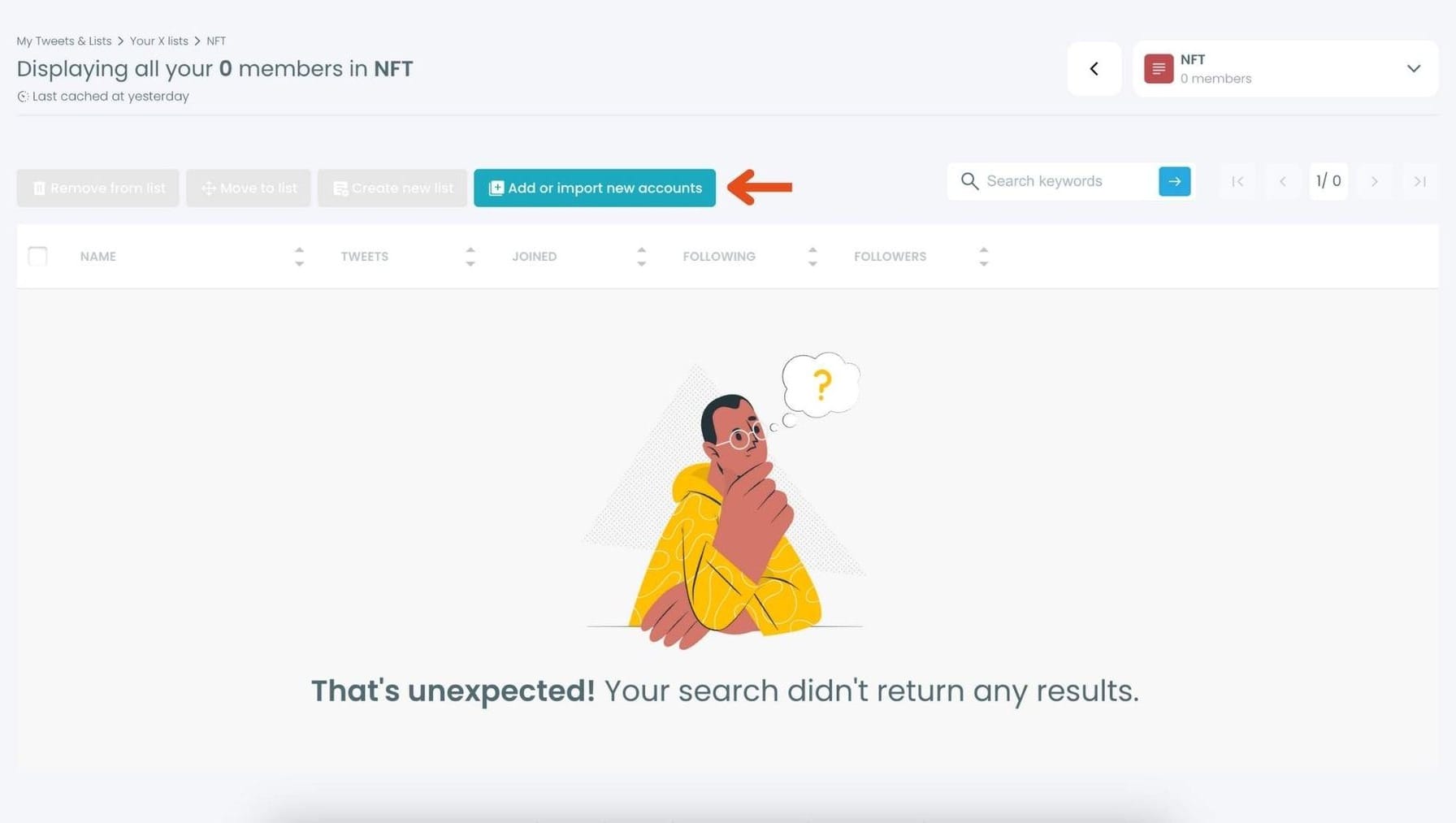
In the dialog box that appears, enter the usernames or account IDs you want to add, separated by commas.
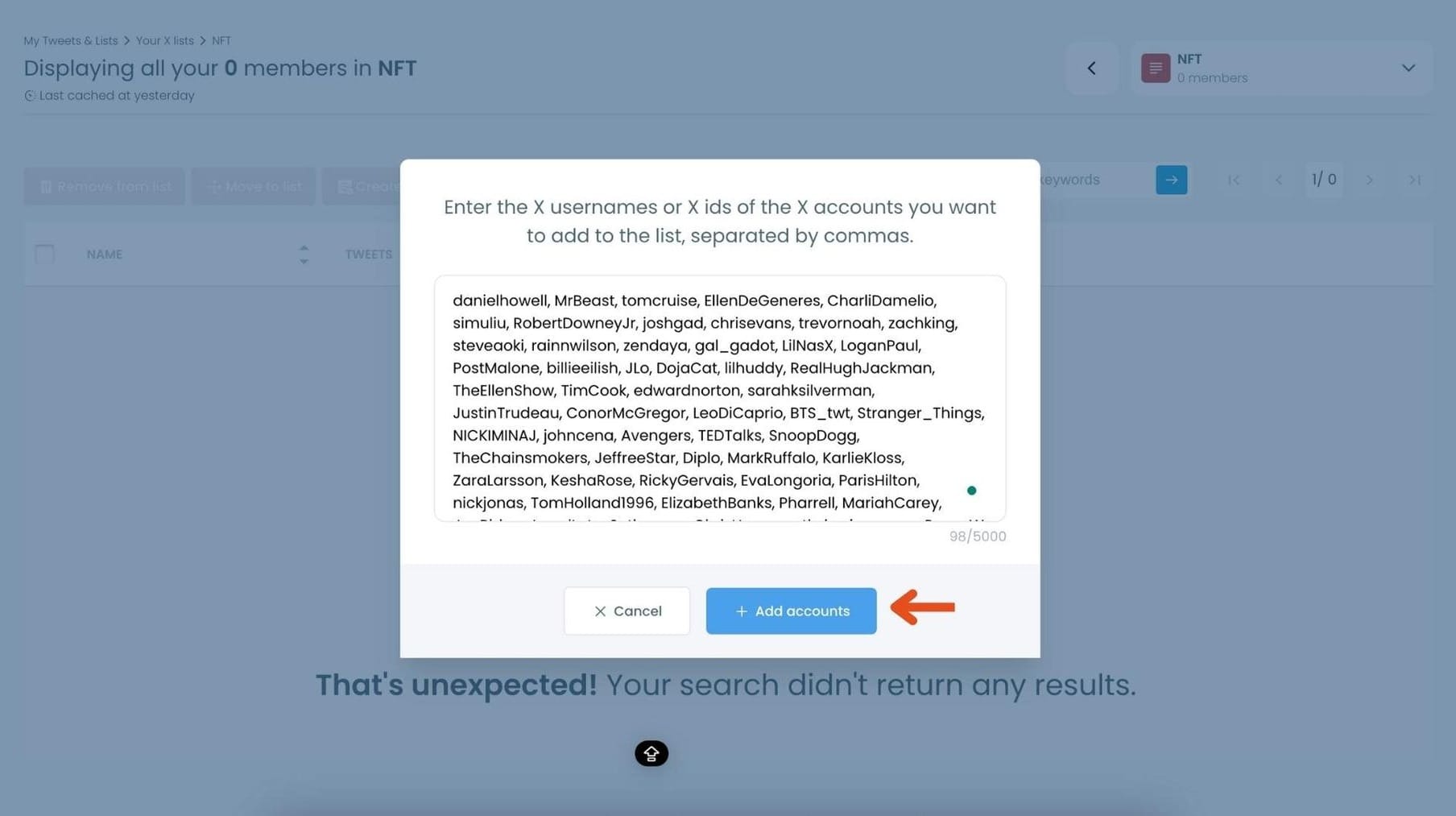
Once you’ve entered the accounts, click "Add accounts" to import them into your list.
Step #4: After importing, you’ll see the members of your list displayed along with details like their Twitter handle, follower count, and location.
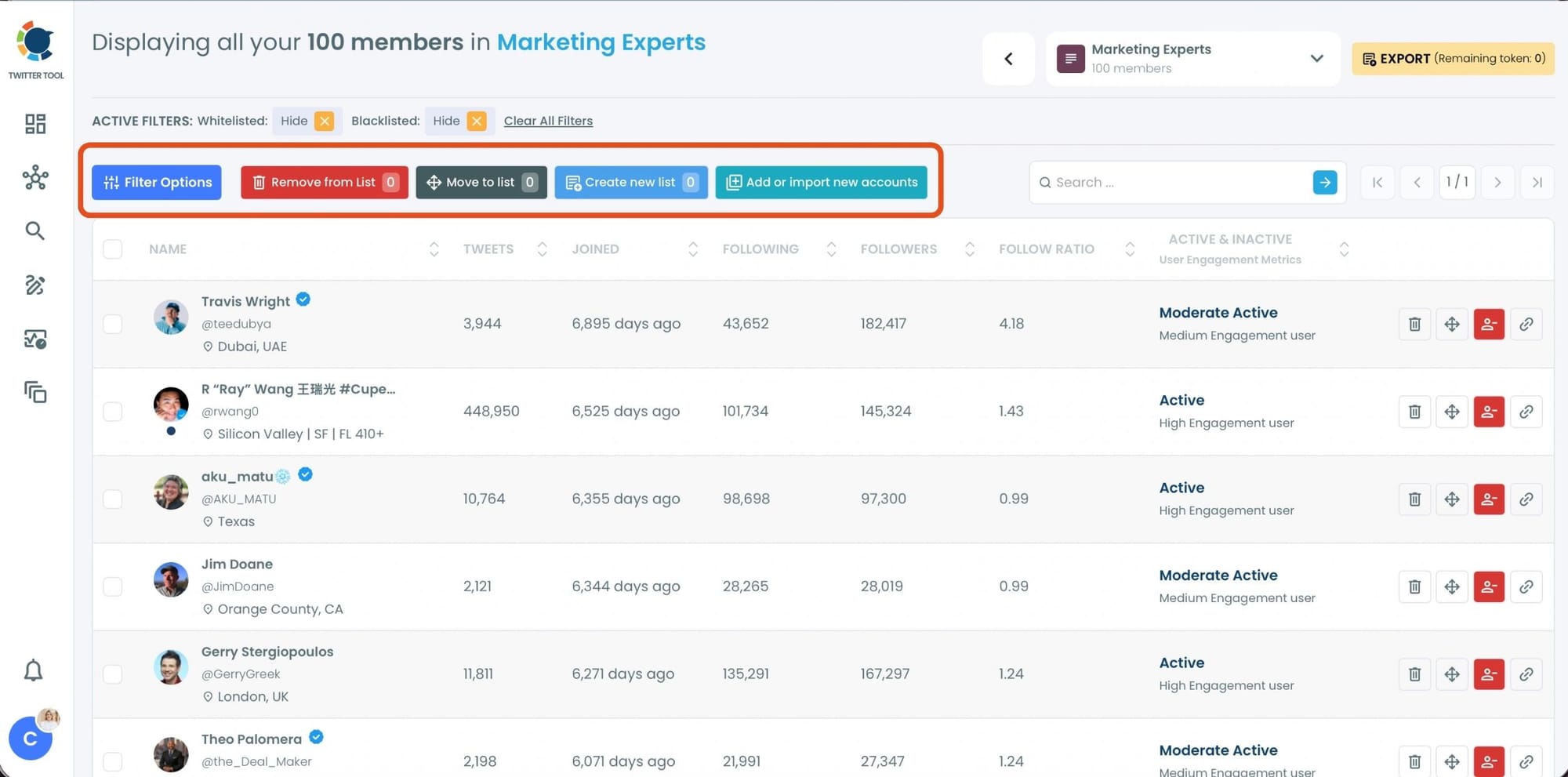
Use the options next to each account to remove them from the list, move them to another list, or edit their settings within the list.
Why This Works
Circleboom insights show:
➡️ Users who rely on curated lists consume significantly higher-quality content
➡️ Exposure to misleading posts drops drastically when switching from timeline to lists
Because you control the source.
The Best Approach: Combine Both Strategies
To effectively combat misinformation on X:
1. Clean Your Following
Remove fake, bot, and low-quality accounts
2. Build Trusted Lists
Focus only on reliable sources
Together, this creates:
- a cleaner timeline
- a more accurate information flow
- better decision-making
Additional Tips to Avoid Fake News on X
Even with a clean setup, habits matter.
- Don’t trust viral tweets instantly
- Check sources before sharing
- Be cautious with breaking news
- Avoid engaging with suspicious accounts
- Prioritize verified and credible profiles
Conclusion
X is one of the most powerful platforms for real-time information.
But without control, it can quickly become a source of misinformation.
The solution is not to leave the platform.
The solution is to use it better.
- Clean your following
- Build your own trusted feeds
- Control what you consume
With Circleboom Twitter, both of these processes become simple, fast, and scalable.
And once you take control of your timeline, X becomes what it was meant to be:
A powerful tool for staying informed, without the noise.

