
Getting reported on Twitter (X) sounds serious, but it doesn’t mean your account will be suspended instantly. Reports are just signals sent to the platform. What really matters is what happens next.
When someone reports you, X reviews the situation and may take a closer look at your account.
And this is where many people miss an important detail: it’s not only about that one tweet or action. Your overall account quality can also come into play.
If your account is filled with fake followers, bot accounts, or suspicious followings, it can start to look unreliable. In some cases, this can make things worse during a review.
That’s why keeping your account clean is not optional anymore, it’s necessary.
What Happens When Someone Reports You on Twitter?
When someone reports your account, tweet, reply, or message, X receives that report and reviews it based on its rules. This process is not automatic punishment. It’s an evaluation.
During this review, X may check:
- the reported content itself
- the context around it
- your recent activity and behavior patterns
- whether there is repeated or suspicious behavior
➡️ If no rule is broken, nothing happens and your account continues as usual.
➡️ If something looks problematic, X can take action depending on the severity.
This can range from a simple warning to more serious outcomes like temporary restrictions, account locks, or even permanent suspension. And importantly, repeated reports combined with suspicious signals can increase the risk.
 Kevin Frank
Why Your Followers and Followings Can Put You at Risk
Here’s the part most people ignore. When your account is under review, it’s not only your content that matters.
X may also evaluate whether your account looks authentic or not. And your follower and following lists play a big role in that.
If a large portion of your followers are fake or bot accounts, your profile may look artificially inflated. The same goes for your following list. If you are following many spammy, inactive, or bot-like accounts, it creates another negative signal.
⚠️ A high follower count does not protect you. If those followers are fake, it can actually become a risk.
Fake followers don’t engage, don’t interact, and don’t add value. Instead, they make your account look manipulated. And if the platform detects patterns like this, it may treat your account more strictly.
How to Keep Your Account Safe Before It Becomes a Problem
The biggest mistake is waiting until something happens.
Account safety is something that should be maintained regularly. That means checking both sides of your network:
Fake followers should be removed. Suspicious or low-quality accounts in your following list should be unfollowed. This keeps your account clean, natural, and trustworthy.
But doing this manually is almost impossible, especially if you have hundreds or thousands of connections. It takes too much time and it’s hard to tell which accounts are actually fake.
That’s where using the right tool makes a big difference.
Using Circleboom Twitter to Clean Your Account
To manage this properly, Circleboom Twitter offers a much easier way.
Circleboom Twitter is an official X Enterprise Developer, which means it works directly with X’s official data. Instead of guessing, it analyzes your followers and followings and shows you what’s really going on.

It detects:
🟢 suspicious or low-quality accounts
🟢 accounts that don’t look real
And more importantly, it clearly marks them. So you don’t have to manually investigate each profile one by one.
Once these accounts are identified, you can take action immediately. You can remove fake followers and unfollow risky accounts directly from the dashboard. This makes it possible to clean your account in a structured and safe way.
How to Clean Your Twitter Account with Circleboom
How to Remove Fake Followers on Twitter (X) with Circleboom Twitter
Step #1: Go to the Circleboom Twitter website and log in with your credentials.
If you’re a new user, sign up, it’s quick and easy!

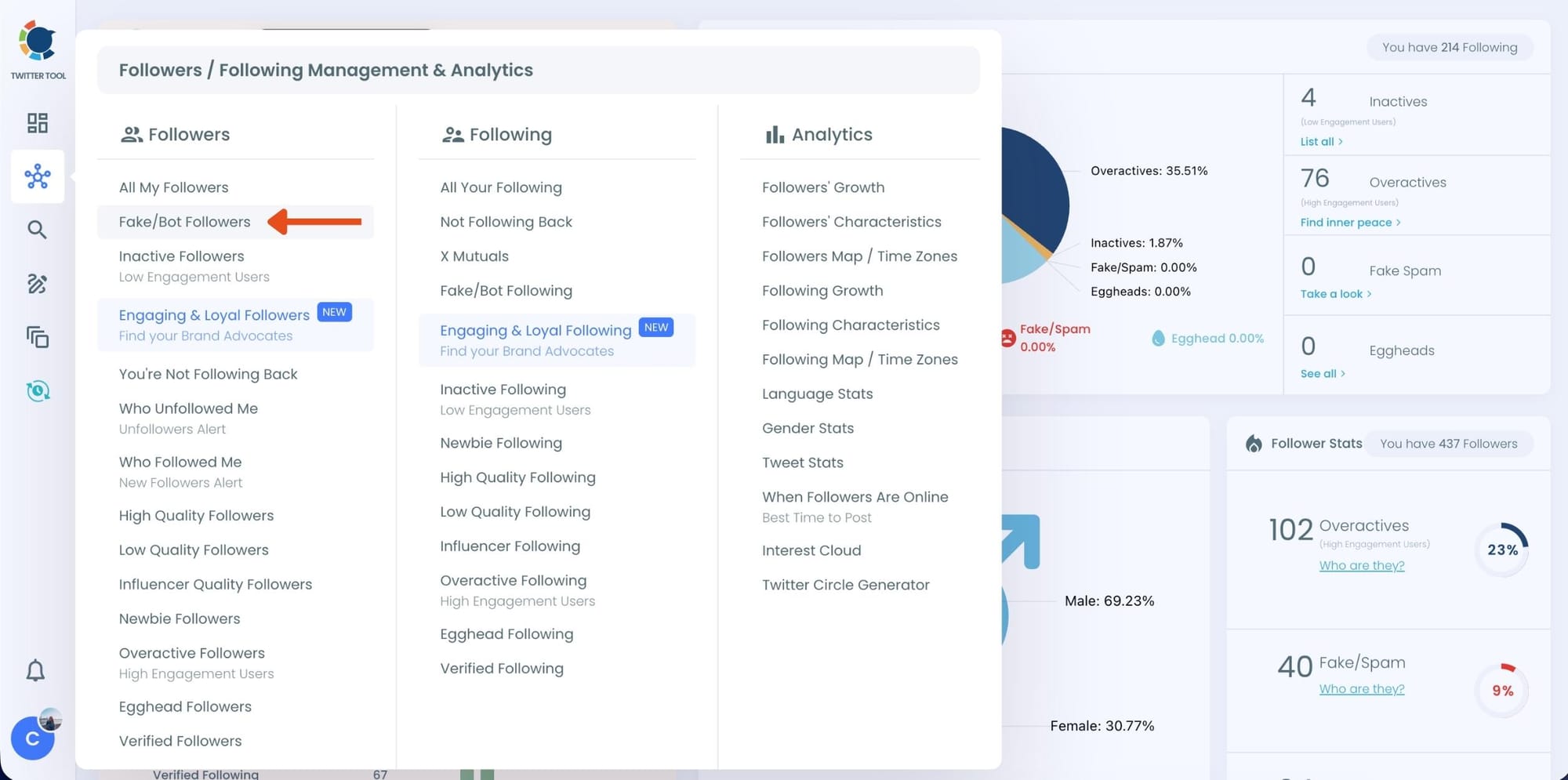
Step #2: On the left-side menu, click on the Followers / Following Management section. A dropdown menu will appear. Select Fake/Bot Followers to see the full list of your followers.
If you want to remove specific accounts, such as inactive users, you can directly select these categories from the dropdown menu instead of viewing all followers.
Step #3: You will see a complete list of your fake/bot followers.
Use the Filter Options on the left side to refine your list.
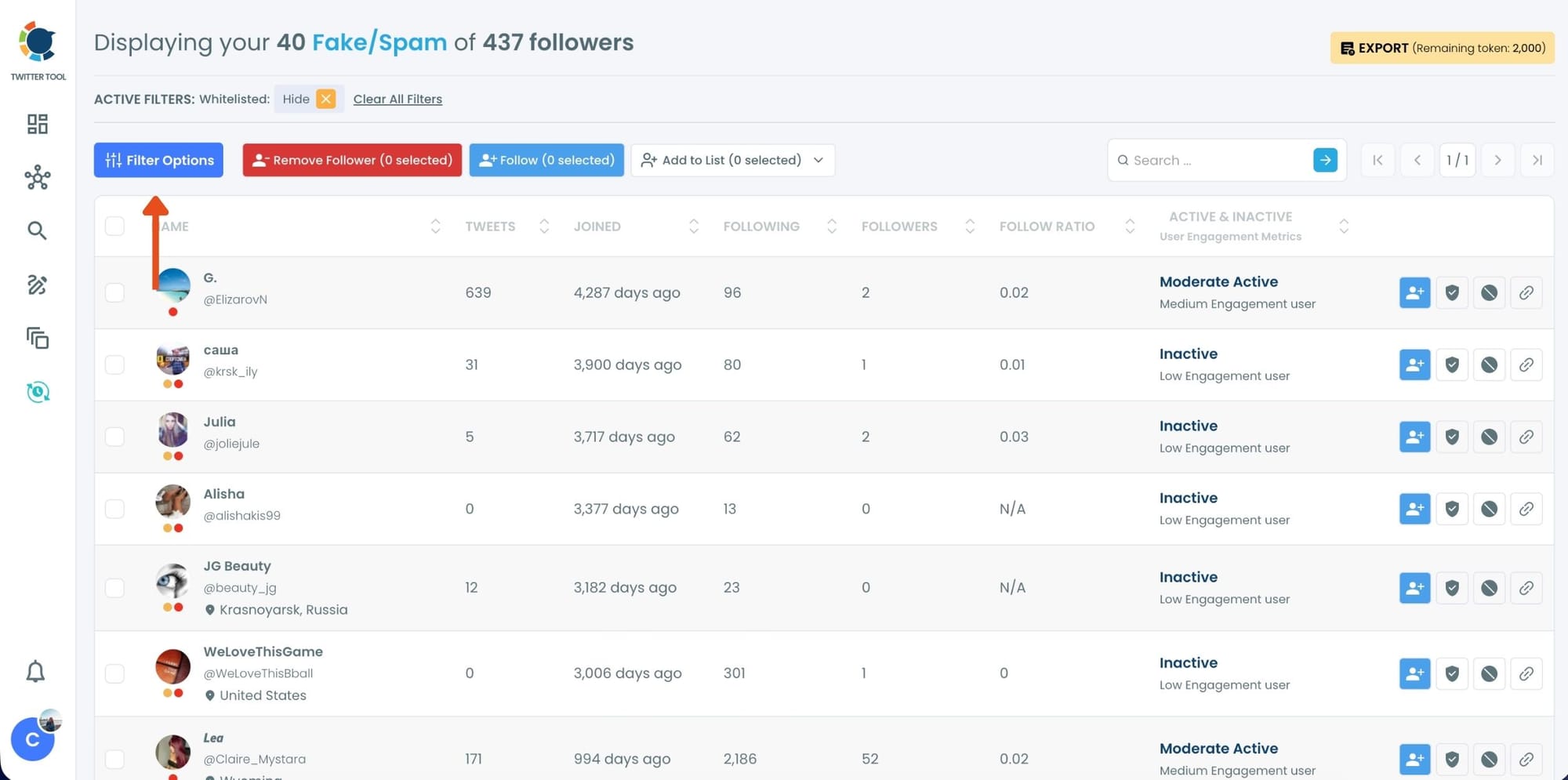
You can filter followers based on engagement levels, inactivity, verification status, follower/following count, and more.
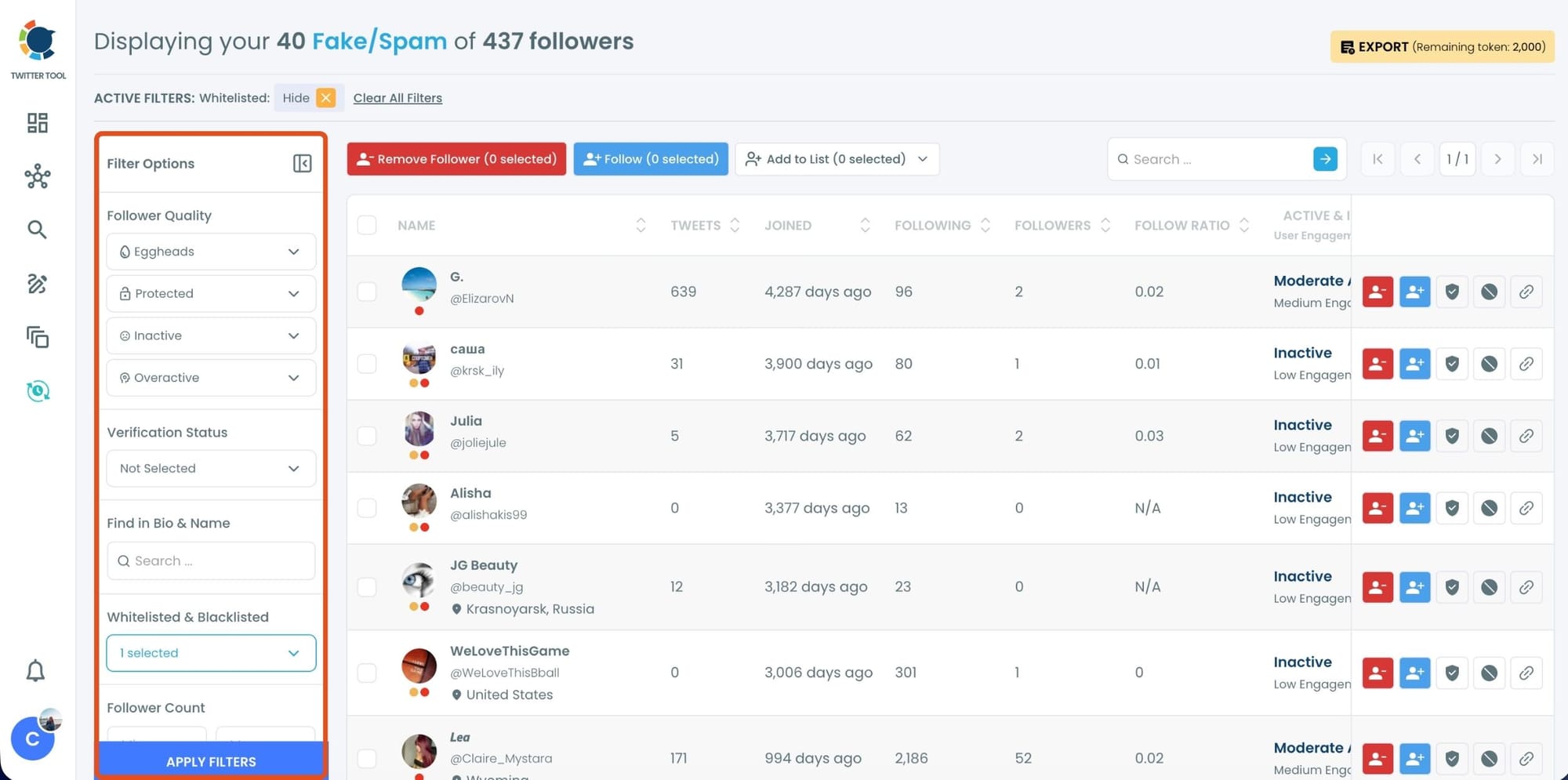
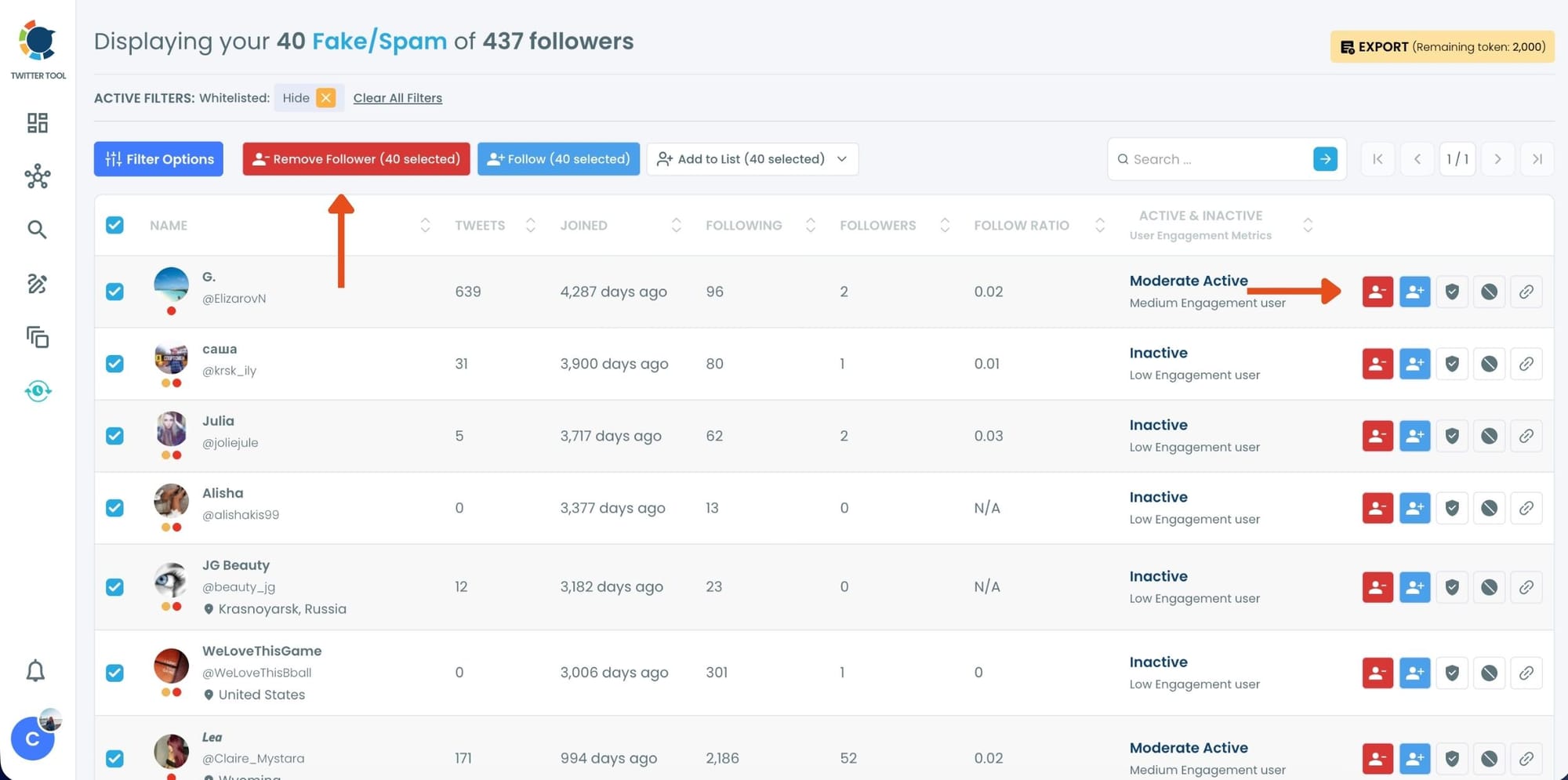
Step #4: Browse through your followers and check the boxes next to the users you want to remove.
You can also select multiple users at once. Once you have selected the users, click on the Remove Followers button at the top.
Alternatively, you can remove individual followers by clicking the red remove icon next to their name on the right side of the list.
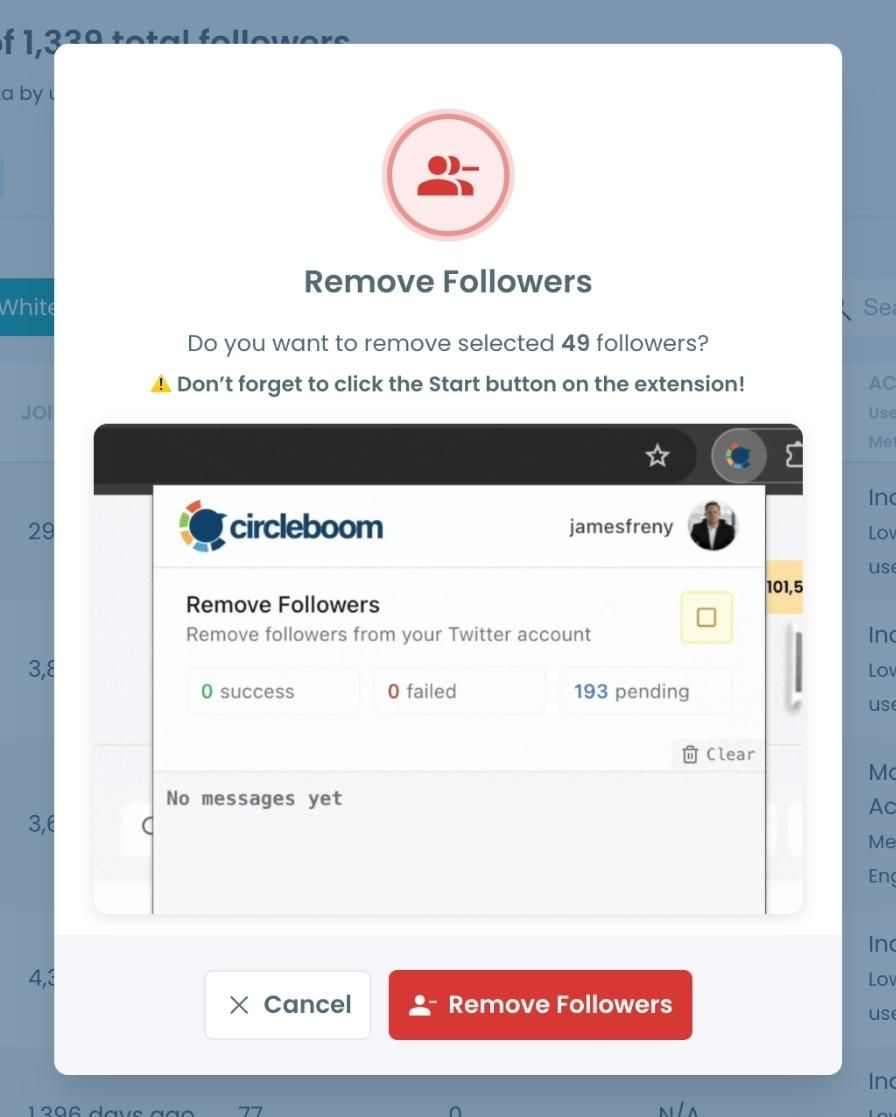
A confirmation message will appear asking if you are sure you want to remove the selected followers.
Click ''Remove Followers''.
Step #5: Since the removal action is processed via the Circleboom Remove Twitter/X Followers extension, you need to install it to complete the process.
Click on Download the Extension and install it from the Chrome Web Store.
Once installed, you can easily remove followers.

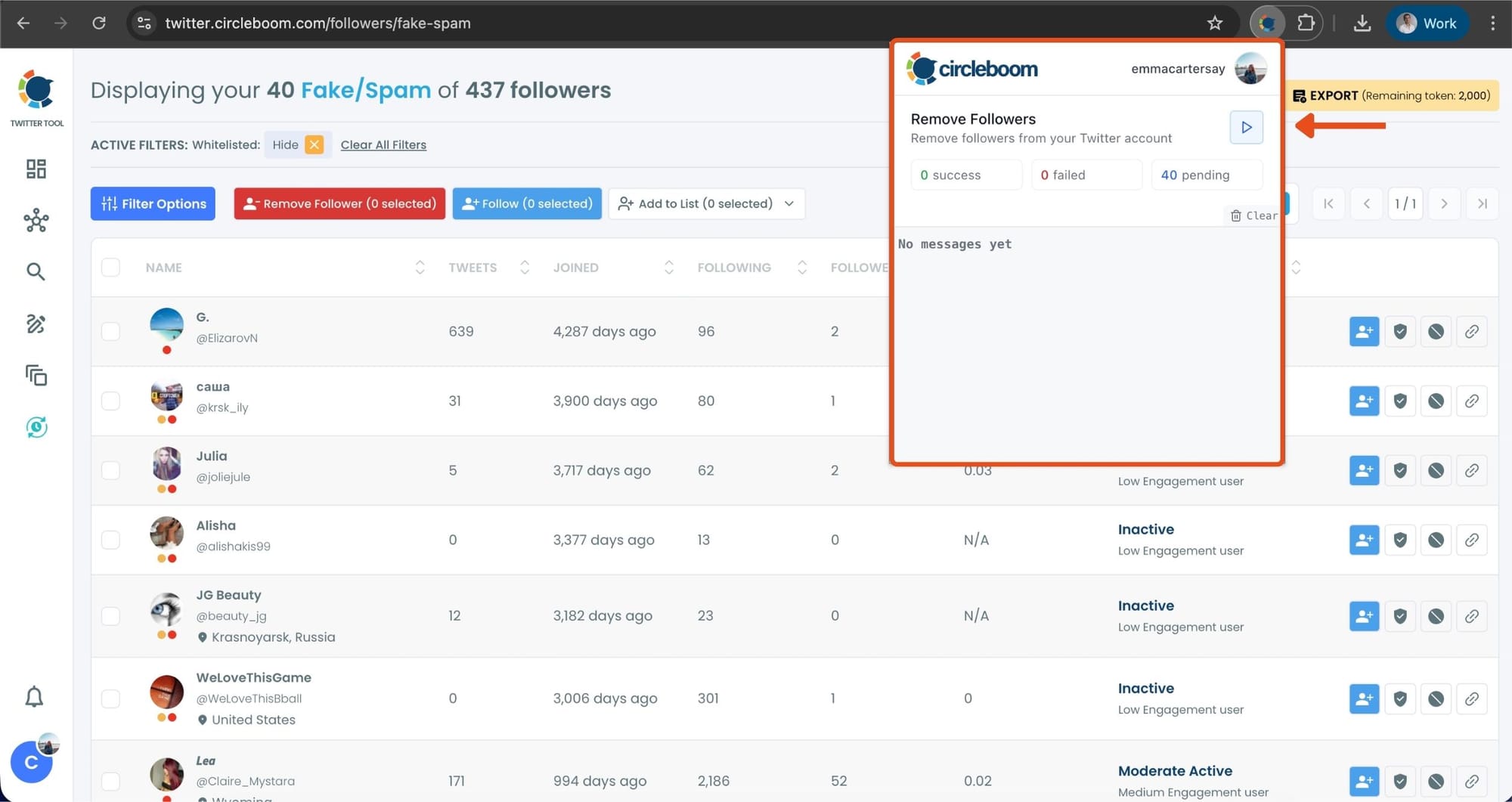
Step #6: After installing the extension, Circleboom will automatically add all your removal requests to the extension queue.
Click on the Start button to begin the removal process.
The extension will process your requests and remove the selected followers.
That's it!
Your selected followers have been removed automatically.
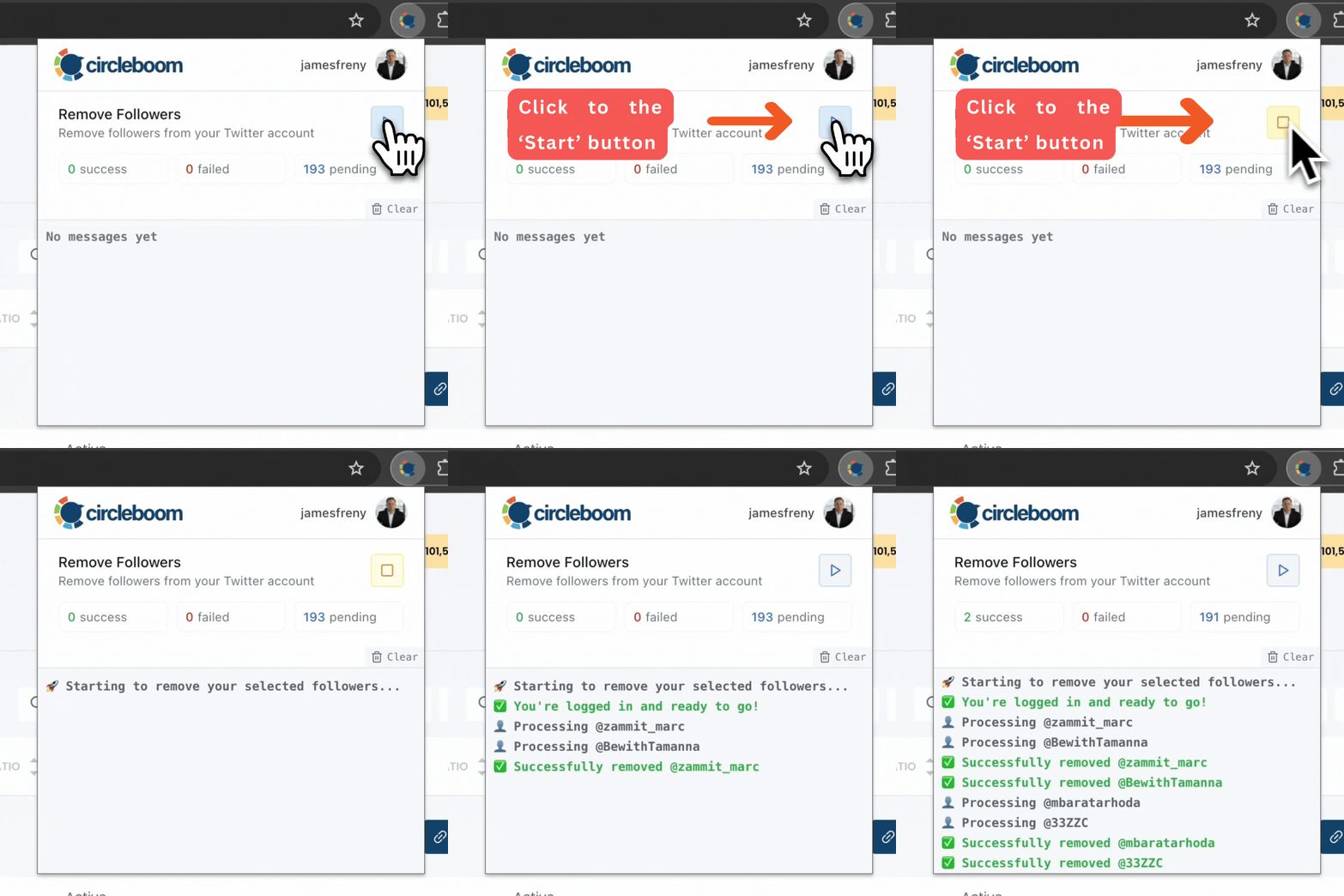
⚠️ Important Warning: Once the removal process begins, do not close your Chrome browser or the Circleboom tab. The tool will automatically remove followers in the background, but if you close the tab or exit Chrome, the process will stop.
How to Unfollow Fake and Low-Quality Accounts on Twitter (X) with Circleboom Twitter
Step #1: Log in to your Circleboom Twitter dashboard.
From the left-side menu, go to Followers / Following Management & Analytics, then click on All Your Following.
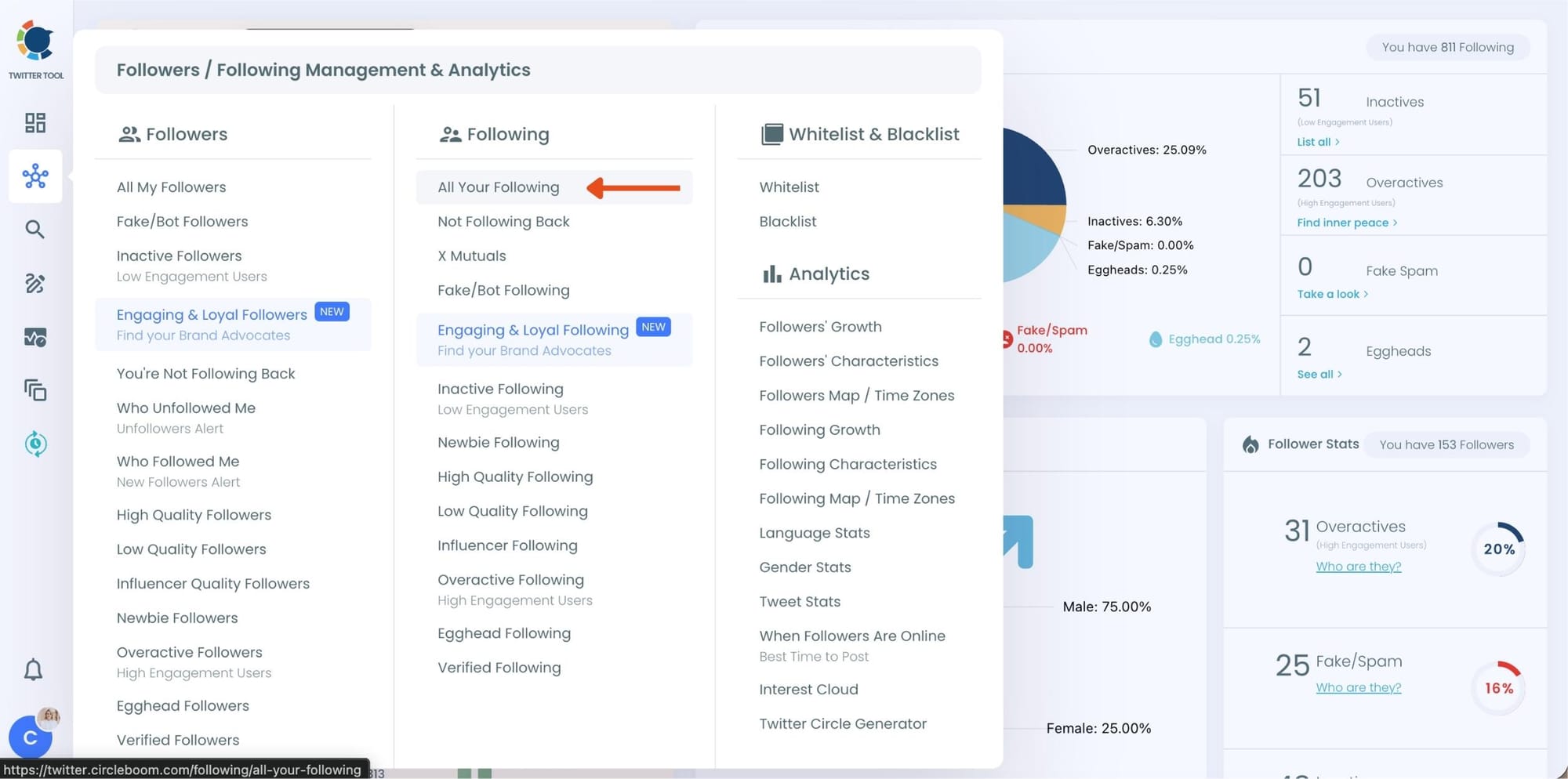
At this point, Circleboom loads your entire following list and displays each account with detailed metrics such as tweet count, join date, follower and following numbers, follow ratio, and activity level.
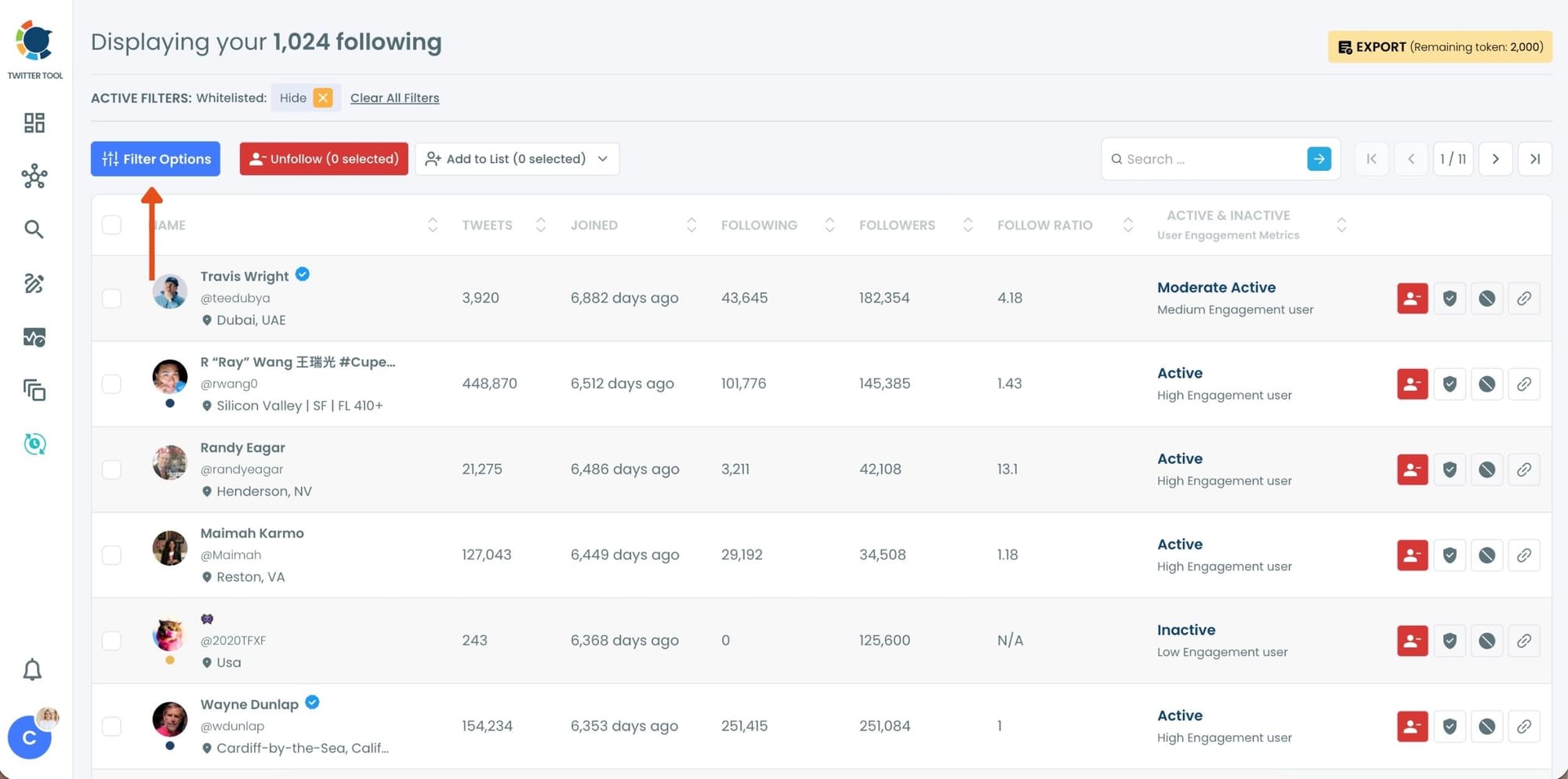
Step #2: Once your following list is visible, click on Filter Options at the top of the page.
Inside the filter panel, use the Follower Quality section to define what you want to see.
Select Fake/Spam and enable Show only. You can also adjust additional quality filters depending on how strict you want the cleanup to be.
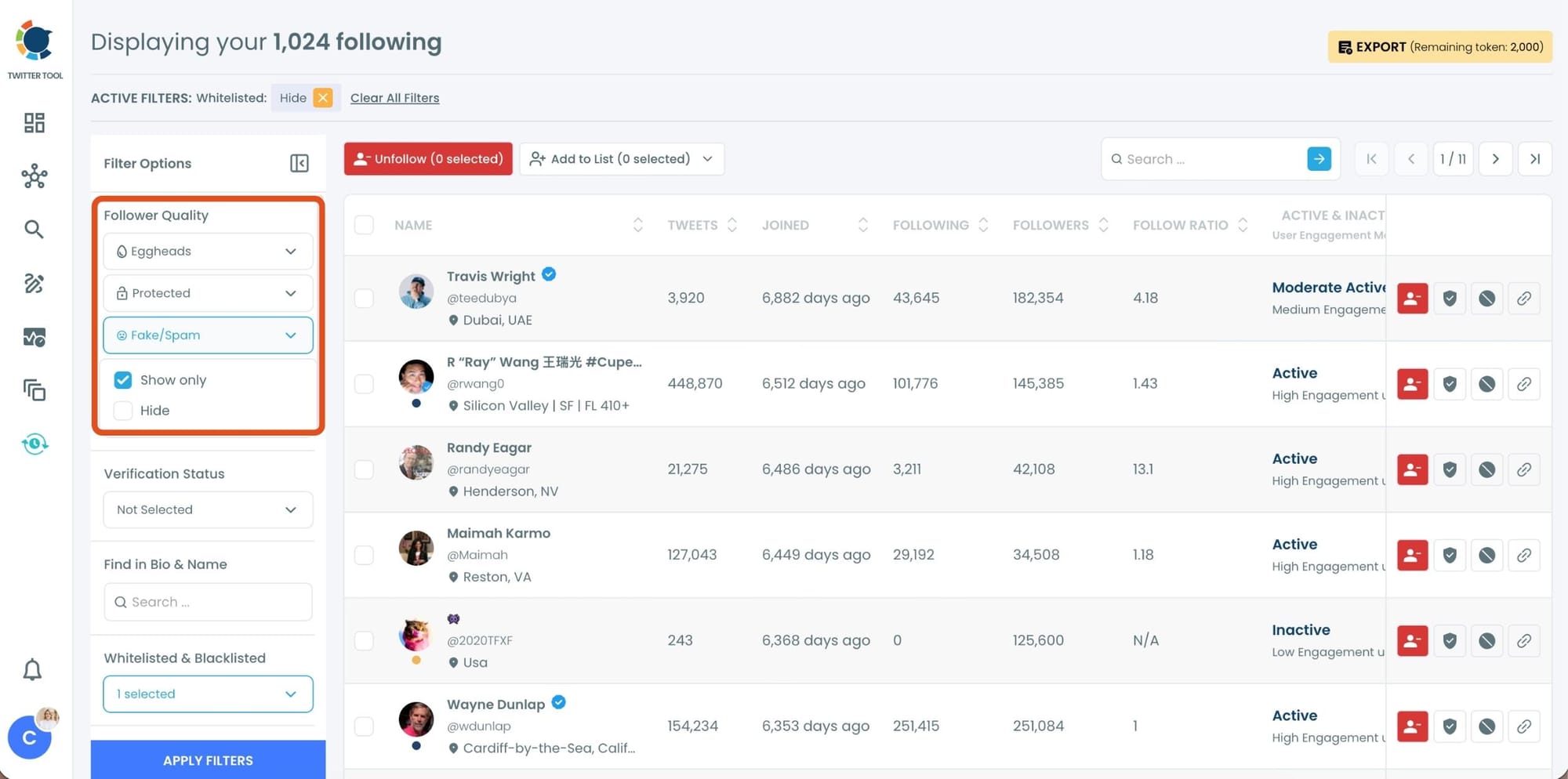
After setting your filters, apply them. Circleboom now lists only fake and low-quality following accounts.
Step #3: Circleboom now shows only low-quality or fake following accounts, each clearly labeled with engagement and activity indicators.
Select the accounts you want to remove by using the checkboxes on the left. You can select multiple accounts at once.
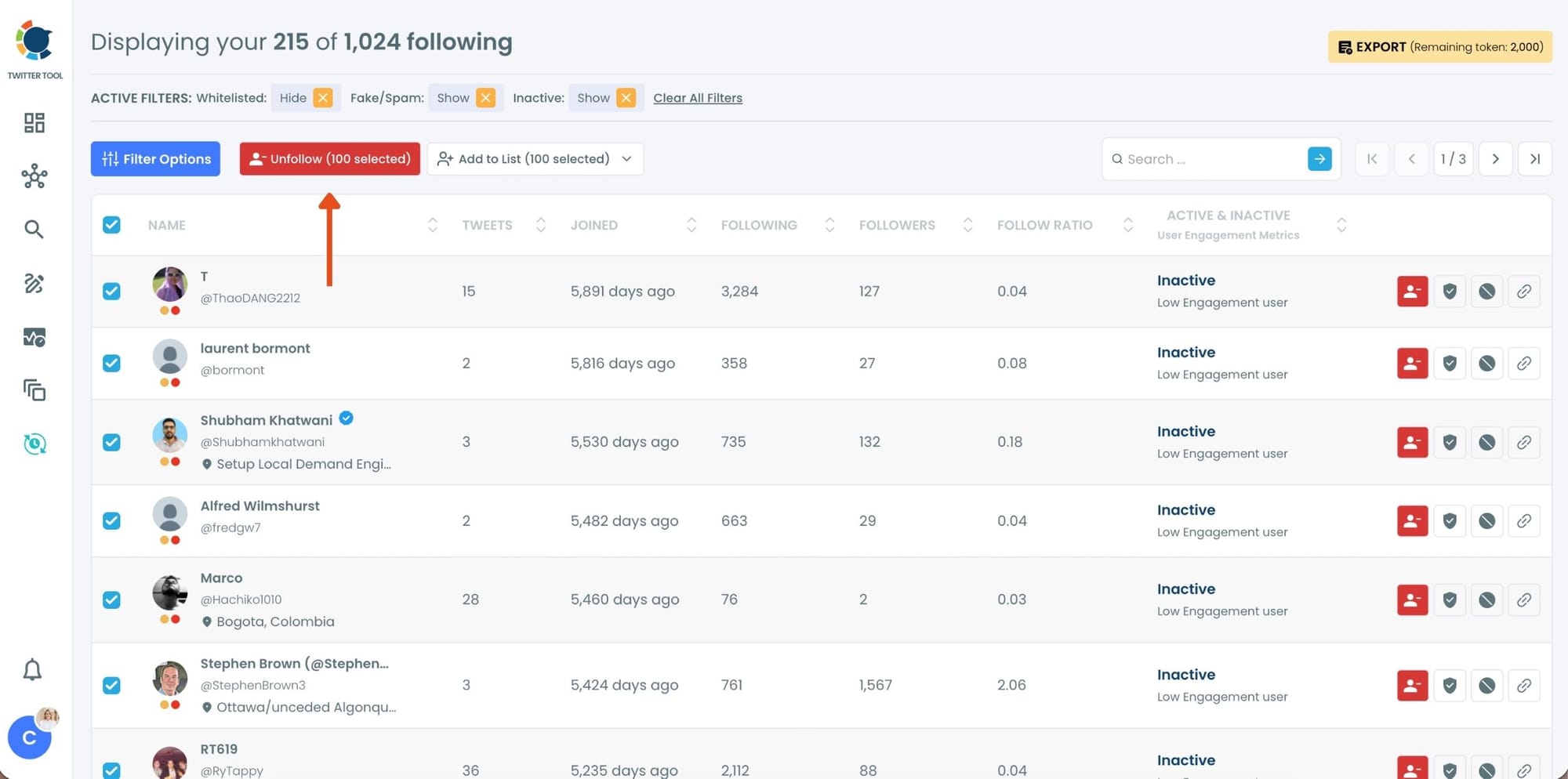
Click the red Unfollow button at the top of the list after making your selection.
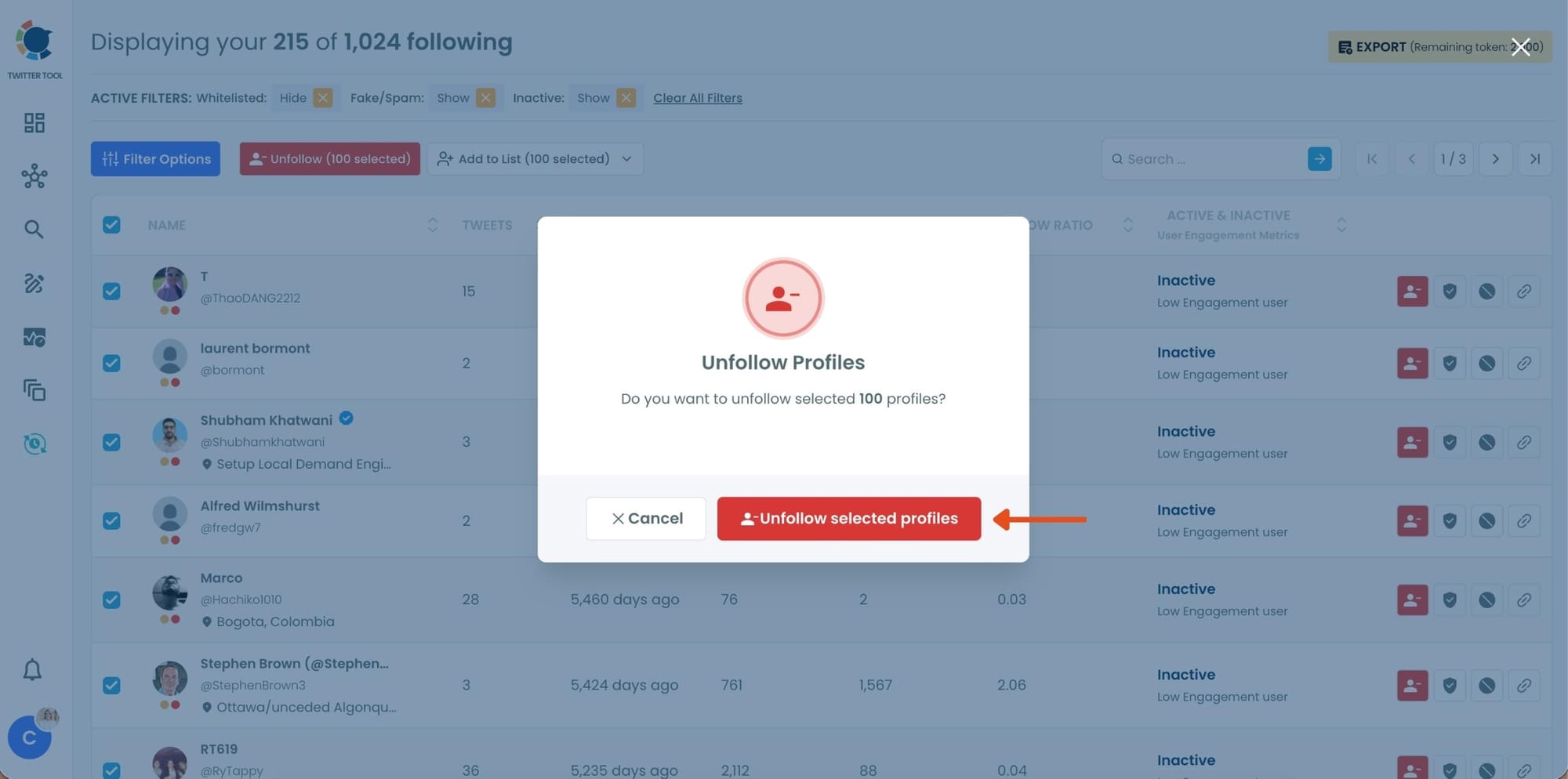
Step #4: Circleboom will show a confirmation pop-up to prevent accidental unfollow actions.
Confirm the action by clicking Unfollow selected profiles.
Conclusion
Being reported on Twitter does not automatically lead to punishment, but it can trigger a review. And during that review, your account is evaluated as a whole.
If your profile is filled with fake followers or suspicious followings, it can increase the risk and make your account look untrustworthy. That’s why relying on a big follower number is not a safe strategy.
🟠 A clean and real audience is far more valuable than a large but fake one.
Keeping your account healthy by regularly removing fake followers and cleaning your following list is one of the simplest ways to stay safe and avoid unnecessary risks.

