
Most advice for a new X account that does not show up in search opens with one verdict: you are shadowbanned. In most cases the account is simply not ready to be found yet, and the fix is set-up, not an appeal.
A new X account usually stays out of search because its profile is unfinished: a thin bio, an unconfirmed email or a handle nobody types. When it still will not appear, Circleboom tests the X account for both search restrictions, Search Suggestion Shadow and Total Search Blackout, as a company listed among X's Enterprise customers.
→ Test your new X account for both search restrictions
The sections below sort every cause by the part of search it hides.
Why a new X account doesn't show up in search at first
A new X account not showing in search is, by default, an account X has not finished indexing.
X's page of help with X search says account search gives preference to profiles with a complete name, username and bio. It asks you to confirm your email and finish set-up, and notes that profile changes can take a few days to appear. Posting, reposting and mentioning regularly keeps your search presence current.
Read that list as a checklist and most new accounts fail at least one line:
- The bio is empty or a single link.
- The confirmation email was never clicked.
- The handle was picked in a hurry and matches nothing people would type.
All of that is the platform waiting for enough information to match you against what people type.
The trouble starts when owners skip that checklist and jump to the worst explanation. They delete and recreate the account, which resets the clock, or they flood the timeline with repeated promotional posts, which adds the very signals that can earn a real restriction.
A faster way to separate the two cases is to check your new X account for a search restriction once the profile is complete. Circleboom runs that check on X from a username alone, so you learn quickly whether you are waiting on X or blocked by it.
Four reasons an X account is missing from search, sorted by what they hide
Each cause of a missing account hides a different part of X search, and the part that is missing tells you which cause you have.
Search on X has three areas worth separating:
- The exact @handle lookup.
- The People results and suggestions that appear as you type.
- Post results for a word or hashtag.
| Cause | People results | Posts in search | Direct profile link |
|---|---|---|---|
| Not indexed yet | Ranked low | Few to match | Works |
| Search Suggestion Shadow | Close circle only | Not this check | Works |
| Total Search Blackout | Not this check | Removed | Works |
| Not found account | Nothing | Nothing | Fails |
The first row is the normal state of a new account. The profile link works, but People results rank it below older accounts with similar names, and there are few posts to match yet.
The middle two rows are the restrictions Circleboom's test reads. The last row is not a search problem at all: when nothing resolves, not even the direct link, the account itself is missing.
Match the missing part of search to a row before you change anything.
Telling a not-yet-indexed X account from a restricted one
A not-yet-indexed account fails quietly and evenly; a restricted one fails on one specific part of search. When I check a new account, the first comparison I make is between the exact handle and the display name, searched from a browser that is not signed in to X.
If the handle resolves and the display name does not, the account is findable and losing a name match, which points to the first row. If even friends who follow the account see it in suggestions while strangers do not, the close-circle pattern of the second row fits better. If posts you know you published never appear for a word they contain, the third row is the one to test.
For a new X account not showing in search, that comparison narrows four causes to one or two before any tool runs.
X search suggestion ban versus a full search blackout
A search suggestion ban narrows who can find the account; a full search blackout removes what the account posts from search.
Search Suggestion Shadow keeps the account reachable by existing connections but drops it from search suggestions and People results for anyone outside its close circle. That creates a ceiling on growth into new audiences while followers notice nothing.
Total Search Blackout goes further. It removes the account's tweets and hashtags from search results entirely, regardless of a searcher's filter settings, and Circleboom's documentation notes it is often triggered by account health issues.
The longer explanation of a Twitter search suggestion ban covers why that version is so easy to miss. Your friends report that they can see you, so you assume strangers can too.
For a new account, the practical difference is the fix. A suggestion restriction calls for cleaner signals and patience while you keep posting normally. A blackout is the louder warning that something about account health needs attention first.
Could a setting be hiding my account from X search?
Yes, one setting can: protected posts. X's page on public and protected posts says protected posts appear in search only for approved followers. A new account that switched on protection during set-up will not show its posts to strangers who search.
X treats protection as an account state of its own, and Circleboom's follower filters list protected accounts as a separate state for the same reason. If you want the posts searchable, turn protection off in X's privacy settings and give search a few days to catch up.
People also ask whether someone can deliberately hide from a Twitter search, and the answer shapes how you read your own result. A setting you chose limits your own visibility, and you can undo it in seconds.
A searcher's settings matter as well. Someone with strict content filters may see fewer results than someone without them.
That is why the Total Search Blackout check is useful: it describes removal regardless of a searcher's filter settings, so a failed result cannot be explained away by one person's preferences.
What it means when X says the account can't be found
When X reports that an account does not exist or cannot be found, the account itself is unavailable, which is a different problem from an account that exists but ranks low. Search tests cannot fix it, because there is nothing for search to show.
Start with the simple causes. A typo in the handle, or a handle you changed after sharing it, sends people to an address with nobody behind it.
If the owner sees a notice about the account's status on signing in, the problem is the account's standing, and it is settled with X, not through search.
The fuller list of reasons and fixes is in the guide on why an X account is not found anymore. For a brand-new account, a changed handle is a likely culprit, because owners tweak the name in the first days and forget that the old link stopped working.
The ten-second test is the direct link. Type the profile address with the current handle into a browser.
If the profile loads, your new X account exists and the issue is search, so the table above applies. If it does not load, no amount of profile editing will make a new X account show up in search until the account itself is restored or the right handle is shared.
How Circleboom reads the two X search restrictions
Circleboom's Twitter Shadowban Test checks an X account for five visibility restrictions, two of them about search, and returns a summary verdict plus a separate result for each check. It needs a username, not a login, which keeps a new account's credentials out of the process entirely.
Circleboom is an official X Enterprise Developer, so the check reads account data the way X permits rather than through scraping, and it does not touch the account it tests. That matters for a new profile whose standing you are trying to protect, not complicate.
The other three checks (Reply Lock, Reply Visibility Filter and Early Engagement Seed) cover replies and early distribution. They are worth reading in the same result, but for a search symptom the two search checks carry the answer.
When you are ready, run the search restriction checks for your new X account and keep the result as a baseline.
When the X test is clean but the account is still hard to find
If the test is clean and the account is still hard to find, the gap is usually words. Searching Twitter bios and profiles for your niche shows which terms established accounts use, and those are the terms your own bio should carry.
A handle that matches what people say out loud helps just as much as the bio.
The username generator for Twitter suggests handle ideas from one starting word and marks which ones are still available.
The roundup of a Twitter username generator for available handles covers how to pick between the options once you have a shortlist.
Labels, limits and checks in one place: how X's temporary label relates to shadowbans and reach limits, and how to check an account.
How to check why a new X account is not showing in search
To find out why a new X account is not showing in search, rule out the account's own set-up first, then test for the two search restrictions from the account's username. The check below starts on Circleboom's free Twitter Shadowban Test page, needs no login, and ends by matching the result to the table above.
Run the X shadowban check from the tool page
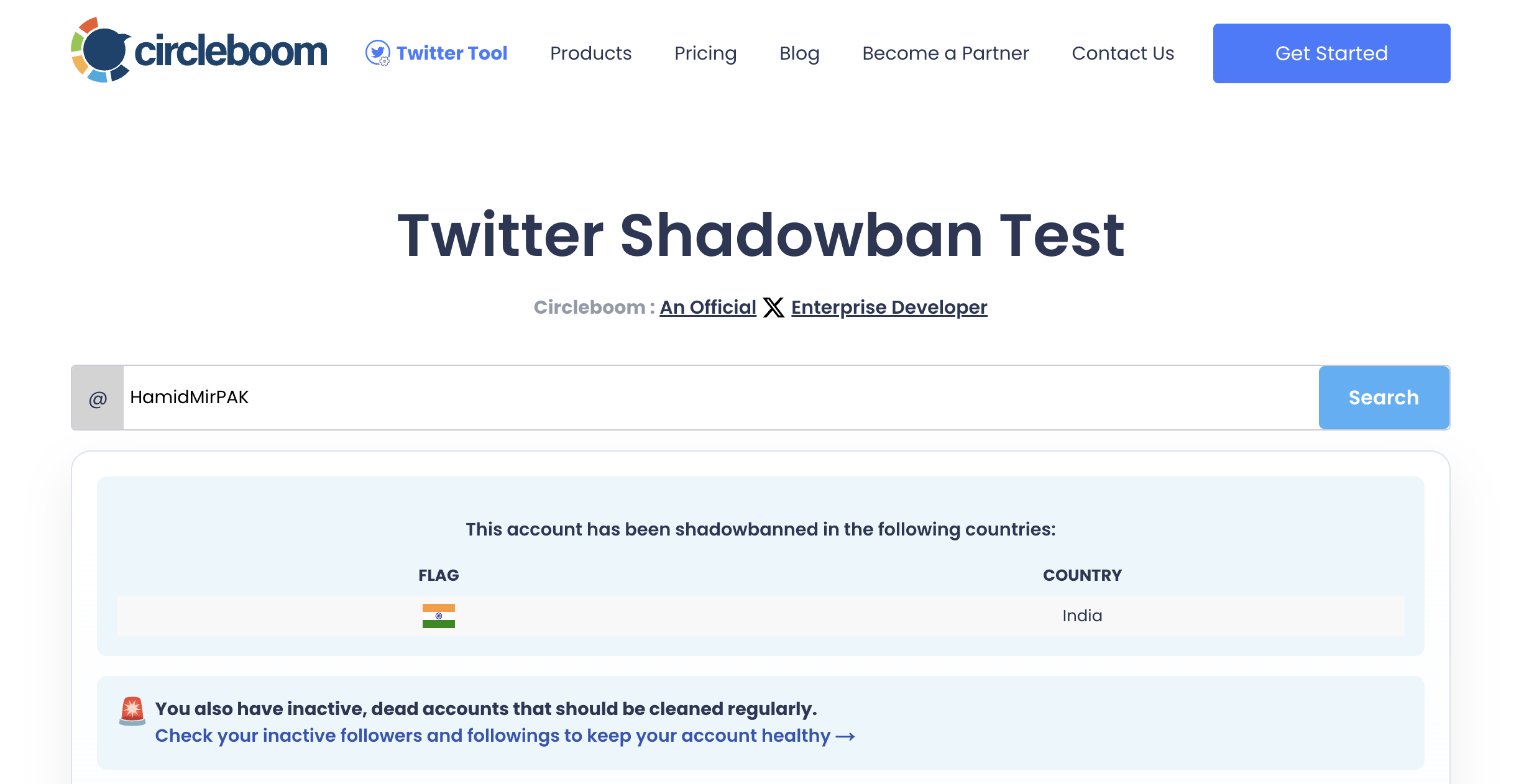
- Open the Twitter Shadowban Test page in any browser; no login or connected X account is required.
- Type the account's username into the field, using only letters, numbers and the _ character; the @ is already in place.
- Click Search and read the summary banner at the top of the result before opening any single check.
Match the two X search checks to your symptom
- Expand Search Suggestion Shadow and note whether it reads no issues found; an issue here explains why non-followers do not see you in People results.
- Expand Total Search Blackout and compare it with what you see; an issue here explains why your posts and hashtags never appear in search.
Reading the banner first tells you whether anything is wrong before the detail tells you what, and matching each check to a row of the table keeps you from fixing a part of search that was never broken.
In short: open the tool page, enter the handle, read the banner, then read the two search checks against the table.
A clean result on both search checks is good news with homework attached.
It means X is not hiding the account. The remaining fix lives in the profile and in activity:
- A bio that names what you do.
- A handle people can guess.
- A confirmed email.
- Posts that give search something to match.
A clean result sends you back to the profile checklist. An issue on either search check moves you to cleanup, covered in the questions below.
Summary: getting a new X account into search
A new X account not showing in search is, most of the time, an unfinished profile waiting to be indexed: complete the name, handle and bio, confirm the email, post normally and give changes a few days.
When the account is complete and still missing, the part of search that is missing tells you the cause, and two named checks confirm or clear a real restriction.
Settings and account state come before any of that. Protected posts stay out of strangers' searches by design, and an account that cannot be found at all is an account problem, not a ranking one.
A free test that reads both search restrictions from a username saves days of guessing and keeps you from rebuilding an account that had nothing wrong with it.
→ Find out if your new X account is blocked from search
Frequently asked: new X accounts and search
My test found a search restriction, so how do I get back into search?
Clean the signals tied to the account and secure it, then re-test. Circleboom's guidance for a failed check is to remove fake, bot and inactive followers, delete spammy or repetitive tweets and rebalance the follower-to-following ratio. Change the password, revoke unknown connected apps, turn on two-factor authentication, and avoid aggressive follow and unfollow bursts while visibility recovers.
Does X rank new, low-reputation accounts lower in search?
New accounts start with little history for X to rank, and Circleboom's Tweepcred Calculator gives a sense of where an account stands by returning a reputation score, a rank label and an estimated distribution potential. Read the result as a rough estimate for comparison, not a ranking X itself reports.
Can I run the Shadowban Test on someone else's X account?
Yes. The test takes any X username typed into the page, so you can check a business partner's or client's new account the same way you check your own, without access to that account.