
A new account that spends its first month under a hidden restriction loses the stretch when first impressions are formed, and nobody tells the owner it is happening.
The usual reflex, posting more and following more, repeats the exact pattern that tends to trip the limit.
Searching by hand: logged-out searches and friends' screenshots, one view at a time, with no name for what is wrong. With Circleboom: Circleboom checks a new X account against five named restrictions from one username, through X's official Enterprise API access.
→ Diagnose your new Twitter account across five shadowban checks
The steps below go from the check to a recovery routine you can start the same day.
Why a new Twitter account shadowbanned in its first days is hard to spot
From the owner's chair, a restricted new account behaves like any other. Posts publish, replies appear to post, and the only symptom is numbers that stay near zero, which is also what a brand-new account with no audience looks like.
That overlap is what makes manual checking unreliable. A logged-out search shows one place. A friend's screenshot shows one reply.
Neither says whether the limit sits on search, on replies or on how X distributes your posts right after publishing.
The mistake I see most often with fresh accounts is changing the content first, and content work cannot reach a restriction that sits on replies or search.
So the first job is to verify whether a new Twitter account is shadowbanned before anything else changes.
What Circleboom's Shadowban Test checks on a new X account
Circleboom's Shadowban Test checks an X account for five distinct visibility restrictions and returns a summary verdict plus one result per restriction. The five fall into three groups by the area they limit:
- Search: Search Suggestion Shadow hides the account from suggestions and People results for strangers, and Total Search Blackout removes its posts and hashtags from search entirely.
- Replies: Reply Lock hides replies and threads from other users while they look posted to the owner, and Reply Visibility Filter places replies behind a Show more barrier.
- Distribution: Early Engagement Seed is about the first handful of followers each post is shown to; if that group stays silent, distribution stops there.
For a new account the reply and distribution groups matter most. Circleboom's guidance ties fast growth, high-volume posting and automation to Reply Lock and Early Engagement Seed issues, and those are first-week habits.
The test needs nothing but a username, so you can audit a new Twitter account for shadowban restrictions without logging in or connecting it.
Circleboom holds Enterprise developer status with X, so the check reads X data through approved access rather than scraping. A fragile new account gets a diagnosis without handing its login to anyone.
How to check if a new Twitter account is shadowbanned
The check runs from the public Twitter Shadowban Test page in five steps; nothing to sign in to, nothing to authorise.
Run the check from the tool page
- Open the Twitter Shadowban Test page in any browser, signed in to nothing.
- Type the new account's username into the field after the @ prefix, using only letters, numbers and the _ symbol.
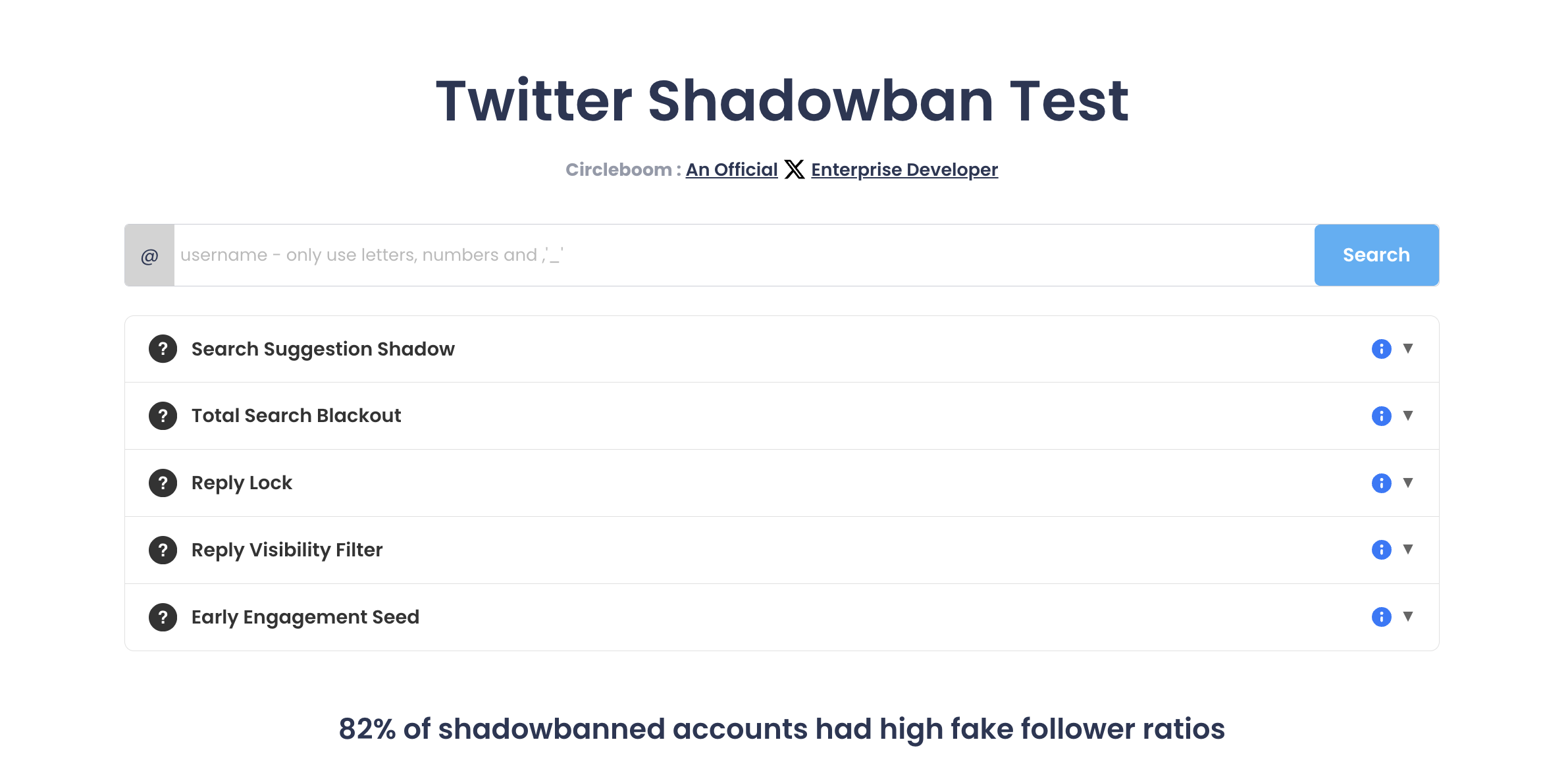
- Click Search and let the result page load the summary banner and the five rows below it.
Read the five results in order
- Read the summary banner before the rows. An all-clear reads "Fantastic! The account has no shadow bans in any country"; any other banner names the types of restriction it found.
- Expand every row that shows an issue. Each row reads "No issues found" or carries an issue label, and the expanded text explains what that restriction limits and how it affects visibility.
Reading the banner first tells you whether there is anything to act on. Expanding the flagged rows tells you which area to work on, so the recovery that follows targets the right problem instead of all of them at once.
Row by row: how each line of the Shadowban Test result reads when it passes and when it flags a problem.
Hidden limit or visible X penalty: label, lock or suspension
If your new X account is shadowbanned, nothing on screen will say so: a shadowban is the only one of the four that X does not show you. The other three announce themselves, and each has its own path, so name the situation before you start a recovery routine.
Shadowban-style restriction. The account works, the profile looks normal, and reach, replies or search quietly stall. The five-check test above is how you name it.
Temporary label. A visible warning sits on the profile, and visitors see it before they see your posts. The fix aims at the label itself, and our page on Twitter temporary label removal covers that path.
Locked account. X stops you at sign-in or blocks actions such as posting and following until you verify the account, usually with a code sent by text. Nothing is hidden; you simply cannot act until verification is done.
Suspension. The account is suspended outright, and X sends notice by email with instructions and an appeal path. Circleboom's help documentation notes that aggressive following and unfollowing to gain followers is treated as aggressive behaviour and is one cause. If that is where a fresh profile landed, read the walkthrough for when Twitter suspended my new Twitter account.
The visible problems come with instructions from X. The invisible one only comes with a test.
How to keep a new Twitter account from getting shadowbanned again
A new account stays clear by pacing its activity and keeping its signals clean, because the behaviours that trip a restriction in week one are behaviours, not bad luck. Two tools do the work: a follow pace with a ceiling, and a checklist for the day the test fails.
The follow-pace math for a first day
Here is an illustrative case, not a measured one. A new account follows 1,000 accounts on its first afternoon, by hand, in one sitting. To X, that is one large spike with no history before it.
Run the same 1,000 follows through Circleboom and the documented pace changes the picture:
- The rate is 50 follows per 15-minute window, so the first 400 need at least eight windows, two hours of spacing at minimum.
- The daily ceiling is 400, so the 1,000 follows spread over three days: 400, then 400, then 200.
- Anything still queued at the daily cap resumes automatically the following day, with no restart.
The same 1,000 follows read as a spike in one afternoon and as a routine across three days.
X's own follow rules beside the pace
X keeps its own rules alongside that pace. Its page about following on X explains that it sets follow limits and treats aggressive following as a rule issue.
Its authenticity policy lists follow churn and engagement spam among prohibited behaviours, so unfollowing in a burst after following in a burst doubles the problem.
Circleboom's unfollow pace has the same shape: 50 every 15 minutes, up to 800 a day. Those caps are Circleboom's pacing to help protect the account, and X still applies its own judgment.
The risk of the opposite approach is covered in our post on whether mass follow and unfollow on Twitter can result in Twitter suspension.
Posting volume in the first weeks
Follows are only half of the pattern. The same guidance puts high-volume posting and automation beside fast growth, so the posting side needs a ceiling too.
For a new Twitter account that has already been shadowbanned once, that means:
- A steady, modest cadence instead of a launch-day flood.
- No automated posting until the account has some history.
- No repeated promo copy.
Each repeated post is one more signal the recovery checklist below would have to clean up later.
The point is consistency over volume.
A small account that posts the same amount every day gives X a pattern that looks like a person, which is exactly what a new profile cannot yet prove any other way.
The recovery checklist after a failed check
When the test flags a restriction, Circleboom's guidance points to two jobs: scrub the suspect signals from the account, then harden its security. Work through them in this order:
- Remove Fake/Bot and inactive followers. Removing followers runs through the Circleboom Chrome extension because X's API does not support it, and the process pauses itself for 1 to 20 minutes when it hits a rate limit.
- Delete spammy or repetitive posts. Promo posts repeated in the first days are the usual candidates.
- Rebalance the follower/following ratio slowly. Unfollow at the paced rate, never in one sweep, and avoid any follow or unfollow burst while visibility recovers.
- Secure the account. Change the password, remove connected apps you do not recognise and turn on two-factor authentication.
- Review the account, then recheck. Rerun the test every week or two to see whether the flagged row has cleared.
What the cleanup looks like at new-account scale
Circleboom's own example of step 1 and step 2 together is an account that removes 1,500 Fake/Bot followers and deletes 40 repetitive promo tweets after a failed check.
A brand-new account usually works with smaller numbers, but the logic is the same: fewer suspect signals tied to the account.
On a young account whose timeline is mostly launch promos, step 2 can be one move: delete all tweets and restart the timeline clean.
For step 5, a Twitter account analysis gives you the wider picture of the account between test runs.
None of these steps forces X to lift a restriction on a schedule. They remove the signals that may have triggered it and stop new ones from piling up.
Should you fix the new X account or start another one?
In most cases, fix the shadowbanned new account you already have, because a replacement starts with the one trait no cleanup can change: it is brand new.
Circleboom's follower audits treat recently created accounts as statistically more likely to be bots or spam, so a second fresh profile walks back into the same scrutiny with zero history and zero followers.
The cleanup in the checklist works on the existing account's signals, and Reply Lock, the check fresh accounts trip most, is described as typically temporary during X's authenticity review.
Restarting throws away whatever real followers you gathered and resets that evaluation instead of finishing it.
Starting over resets the account's age to zero, and age is the only signal you cannot clean.
A separate post weighs whether a fresh start ever helps. It asks whether you can reset your Twitter algorithm or need a new account.
Your first-week recovery checklist for a new Twitter account
Pull the routine together into five actions you can start today:
- Run the Shadowban Test on the new account's username and note which row is flagged.
- Confirm it is a hidden restriction, not a label, a lock or a suspension.
- Stop every follow and unfollow burst; let a paced queue carry any follows you still plan.
- Clean followers and repetitive posts, then secure the password, apps and two-factor settings.
- Rerun the check on a regular rhythm until all five rows come back clean.
Still planning follows? Our post on how many people you can follow on Twitter in one day covers the daily numbers.
A shadowbanned new account usually recovers on the same timeline as its habits change, not on the day the cleanup ends.
The test behind this routine is run by a listed X Enterprise customer, so checking a fragile account costs nothing but a username.
→ Find out if your new Twitter account is shadowbanned
New account shadowban FAQ
What if my new account still fails the check after cleanup?
Give it time without new bursts and recheck every week or two. Reply Lock in particular is described as typically temporary while X evaluates the account, so a row that stays flagged right after cleanup is expected; what matters is that no fresh spike in follows or posts restarts the pattern.
What should a brand-new X profile set up before it starts posting?
A real profile photo and a bio that names the person or brand behind the account, both in place before the first follow. Circleboom's Egghead Followers audit treats a missing photo as a common mark of suspect accounts, so the photo is the cheapest warning sign a new profile can remove.