
A one-person shop that lists two or three new pieces a week has enough material to post on X every day. With one planning session a week, that shop can keep its account active through packing days, market weekends and restocks, without opening X between orders.
The work it takes to promote an Etsy shop on X sits in the setup, not the posting. This guide covers the profile, the photos, the checklist every shop post should pass, and the scheduling that keeps it all running.
How do you promote an Etsy shop on X without posting all day?
Batch a week of product, process and listing posts, attach the product photos, and schedule each post for a time your followers are online. Circleboom writes, schedules and publishes those posts on X from its X Post Planner, with X's official Enterprise API access behind every post.
→ Promote your Etsy shop on X with a week of scheduled posts
Why a small shop's X account stalls
Most shop accounts on X do not fail because of the products.
They stall because posting depends on free moments, and a solo seller has none between making, photographing, packing and answering buyers.
Three mistakes come up again and again when sellers try to promote an Etsy shop on Twitter by hand:
- Posting only "new item listed," so followers learn nothing new from the second post on.
- Posting in bursts on quiet days, then going silent for two weeks.
- Linking to listings without any way to tell whether the link was ever clicked.
All three are planning problems, and all three are fixed before the first post goes out.
The X Post Planner documentation is plain on the timing side: three posts a week at steady times, kept up for months, builds more momentum than heavy posting followed by silence.
If you would rather see the tool before the checklist, you can promote your Etsy shop on Twitter with scheduled posts and follow along.
Get the shop profile ready before the first post
The profile is the landing page for every post, so finish it first if you plan to promote your Etsy shop on X. X's own guide on setting up a business on X covers the basics a shop needs:
- A clear avatar, usually the shop logo or the maker's face.
- A header image that shows the work itself.
- A bio that says what you make and who it is for.
- A Professional Account, X's account type for businesses and creators.
Put the Etsy shop link in the profile as well. A buyer who likes a post checks the profile before clicking anything, and a profile that answers "what is this shop?" in one line keeps that buyer moving.
What a shop post needs before you schedule it
Every shop post should pass the same five checks before it gets a time. This checklist comes from the X Post Planner's "final mile" guidance, which notes that most publishing mistakes happen after the idea is already good, and from the planner's media limits:
- Photos: up to 4 images, JPG or PNG, 5 MB or less each, cropped so the product survives a phone screen.
- Listing link: the exact listing, tested, with UTM tags so visits from X can be told apart.
- Hashtags: one or two that a buyer would search, not a block of ten.
- Call to action: a reason to click today, such as "last one in this size" or "back in stock."
- Time slot: a scheduled time when your followers are online.
A post that fails one check is not ready, however good the photo is.
The rest of this section expands on the two checks sellers most often get wrong.
Product photos within X's media limits
A shop post can carry up to four product photos, each a JPG or PNG of up to 5 MB.
The limit that trips sellers is the mixing rule: images and video cannot go in the same tweet, and neither can a poll and an image. A product video, a photo set and a "which color next?" poll are three separate posts.
Four photos is the useful maximum. Use all four on hero products:
- the whole piece
- a detail
- the back or base
- the piece in use for scale
Check each one in the mobile preview before scheduling, because a crop that looks fine on a laptop can cut off the product on a phone.
When a week of product posts needs photos, preparing them one by one is the slow way. The guide to bulk schedule tweets with images shows how to load many photo posts at once.
A listing link that can be measured
Tag every listing link with UTM parameters before it goes into a post. A source tag that names X as the source tells any analytics tool that reads UTM tags that the visit came from X, and a campaign tag can separate one product's posts from another's.
The walkthrough on UTM parameters for social media posts covers the format.
A call to action that gives a reason to click
"Just listed" is a label, not a reason. A buyer scrolling X needs to know why this post is worth leaving the timeline for, and a shop has better reasons than most accounts:
- Stock: "the last one in this size."
- Timing: "back in stock," or the last day to order before a holiday.
- Fit: "sized for a small hand" or "made to order in your color."
The best call to action in a shop post is a fact about the product, not an instruction to the reader.
A time slot your followers will see
A post that goes out while your followers are online collects its first likes and replies in the first minutes, and the X Post Planner documentation notes that this early response is what pushes a post further.
The planner's Find your best posting time button offers six suggested slots based on when your own followers are active.
Posts sent with Queue Up Next follow the queue schedule in Circleboom's account settings. Set those queue slots at your strongest daily times once, and every queued shop post lands in a good slot without a second thought.
Which hashtags help Etsy shoppers find products on X?
When you promote an Etsy shop on X, the hashtags that help most are the product and craft words a buyer would type. Think of the material, the object and the style, such as a ceramics or vintage tag, rather than a long list of general ones.
One or two per post is enough to describe the product without burying the caption.
Inside the X Post Planner, the AI assistant has an Add Hashtags quick action that appends relevant hashtags to the draft you are writing. Read what it adds and delete any tag that does not describe the product.
For a wider list of options, the Twitter hashtag generator post explains how generated tags are picked.
You can also open the hashtag generator for Twitter directly when you plan the week's captions.
Hashtags that work on X may not belong on every other platform.
When a post also goes to Instagram or LinkedIn, the planner's Cross Posting guidance says to check hashtags per channel. Adjust them in the per-platform text box.
Where Circleboom's X Post Planner fits
Circleboom's X Post Planner is the workspace where a shop's posts get written, paired with photos and scheduled on X in one place. The editor, the image tools, the AI assistant and the scheduling buttons sit on one screen, and drafts wait in Collections until you schedule them.
Circleboom is listed as an official developer in X's Enterprise customers listing, so the shop account you connect is handled through X's own approved access.
For a seller whose X account is part of the storefront, that is the difference between a tool you can leave running and one you have to watch.
Drafts in Collections can be searched by keyword and filtered by collection, which helps a shop that plans by season.
Keep a collection for each product line or for a holiday push, and the posts you wrote months ago are still there when that season comes back.
Posting the same week by hand means stopping work fourteen times; scheduling it means one session, and that one session is how most solo sellers can promote an Etsy shop on Twitter at all.
To start the session, schedule your Etsy shop posts on X in the planner.
Hands-on view of smart scheduling, bulk scheduling and Auto Retweet, the three ways to fill a shop's posting week without daily effort.
How to promote an Etsy shop on X in one weekly session
The process below runs in three phases, in this order.
Get into the planner
- Open Circleboom Twitter Management and sign in with the X account your shop uses.
- Go to the X Post Planner menu and select Write & Plan Your Post.

Build each shop post against the checklist
- Write the post text in the editor, ending with the call to action and the UTM-tagged listing link.
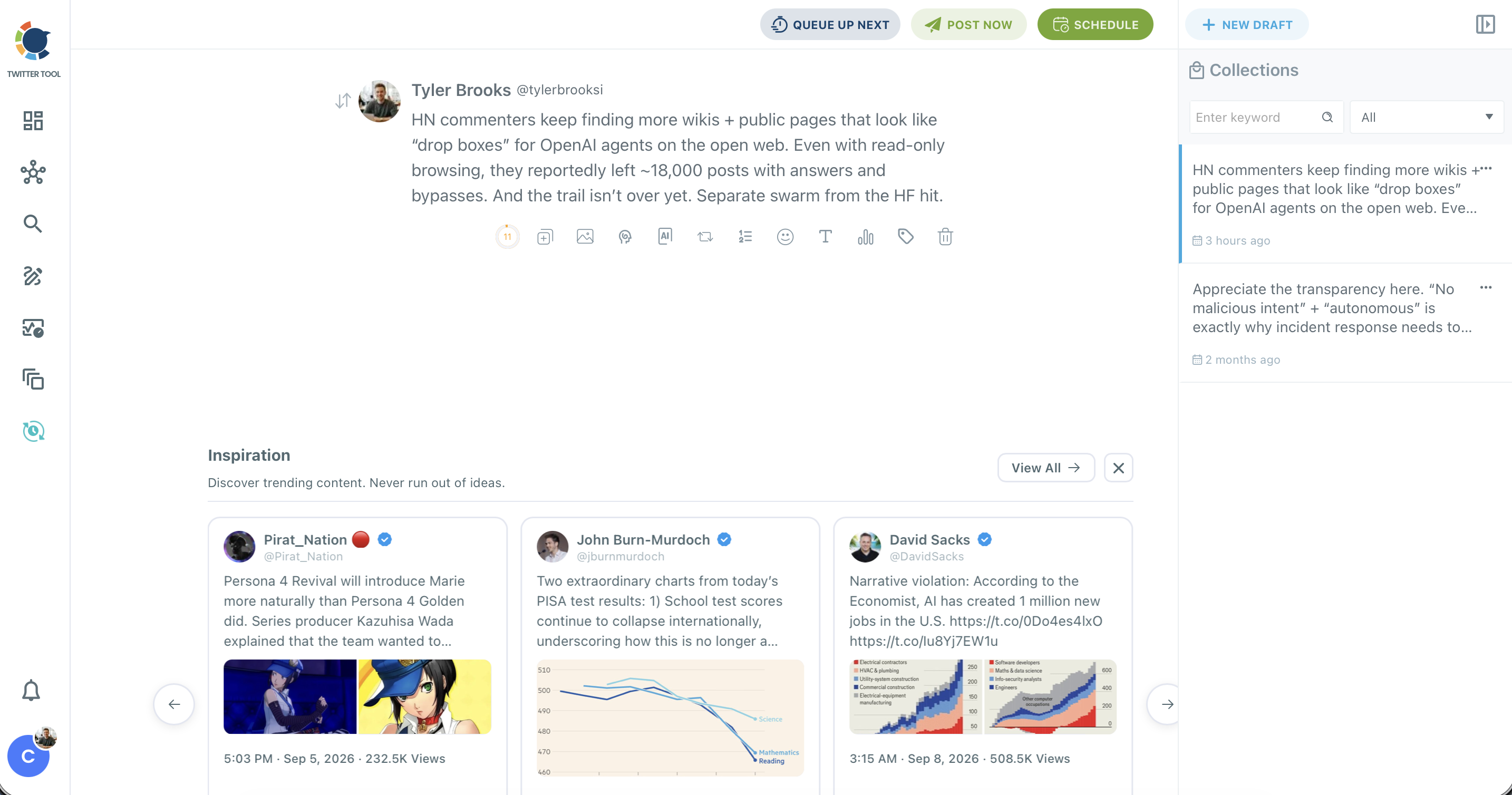
- Attach the product photos with the image icon: upload from your device or add them from Google Photos, up to four per post.
- Apply Add Hashtags from the AI assistant, then trim the result to one or two tags.
- Save the post to Collections and repeat steps 3 to 5 for the rest of the week.
Schedule the week
- Click Schedule on each post and choose Find your best posting time, which offers six AI-suggested slots based on when your followers are active.
- Confirm the schedule, or use Queue Up Next to drop a post into the next open queue slot.
Building every post before scheduling any of them means the checklist gets applied the same way to all of them, and the timing step works from a finished week instead of half-written drafts.
How do you know if X sends buyers to your listings?
Two numbers show whether the effort to promote your Etsy shop on Twitter is paying off: the URL clicks each post earned on X, and the tagged visits that reached the shop.
Circleboom's Post Engagement Analytics lists every tweet with its impressions, engagement rate and URL clicks, and sorting by URL clicks puts the posts that sent people to your listings at the top.
The UTM tags then confirm the other end.
If a post earned clicks and the tagged visits show up, X is doing its job and the listing page decides the sale. If a post earned likes and no clicks, the photo worked and the call to action did not.
Give the numbers two weeks before changing anything.
A single week is too short to tell a weak post from a post that went out on a slow day, and the point is to find the post types that send clicks, not one lucky post.
A post with high URL clicks has proven that its link has demand. Post Engagement Analytics guidance suggests rewriting that post with a new opening line and scheduling it into a good slot a few weeks later, which sends fresh traffic to the same listing.
Once a post proves itself, use it again.
The planner can resend it to a new slot, and Cross Posting sends the same product post to Instagram, Facebook, LinkedIn, Threads and Bluesky from the scheduling panel.
Which next move fits your shop
Pick the branch that matches where your shop is today:
- If your profile is unfinished, fix the avatar, header, bio and shop link before scheduling anything.
- If you post but never see clicks, add UTM tags and a sharper call to action to every listing post for two weeks.
- If you have photos but no time, batch one week of posts in a single session and schedule them into suggested slots.
- If clicks come in but sales do not, look at the listing page, not at X.
Whichever branch you are on, the work to promote an Etsy shop on Twitter happens in one place, under the same checklist.
→ Run your Etsy shop's posting week on X from one planner
Still wondering how Etsy buyers find you on X
What should I post about my Etsy shop besides new listings?
Mix product posts with process posts, such as the making, the packing and the restock, plus a recurring weekly series and the occasional question. The X Post Planner's Get a Post Idea tool suggests angles when you are stuck, and these tweet ideas for brands give more starting points.
How do I find accounts on X whose followers would like my products?
Use Circleboom's Find Influencers, which searches X by keyword across names, bios and tweets and returns accounts with real reach in that niche. Add the best fits to an X list and follow their posts before reaching out.
Can I schedule a poll asking buyers which design to make next?
Yes. X does not let you schedule polls natively, but Circleboom can schedule Twitter polls in advance. Each poll takes up to four options of 25 characters and runs from 5 minutes to 7 days.
How soon can a scheduled shop post go out?
At least 15 minutes after you schedule it. For anything more urgent, such as a flash restock, Post Now publishes the post immediately.