Shadowban.yuzurisa still loads, but on our test account it could not run 3 of its 5 checks. We ran the same X account through yuzurisa and five alternatives on the same day to see which ones still give a useful answer.
For years, yuzurisa was the shadowban test everyone linked to. Reddit threads, help forums, even other shadowban tools pointed to it.
So when people still search for "shadowban.yuzurisa" thousands of times a month, they are not looking for nostalgia. They want an answer to one question: am I shadowbanned on X?
On November 26, 2026, I typed the same username, @circleboom, into six shadowban checkers, one after another, and took a screenshot of every result.
Here is what happened.
Is yuzurisa still working?
Partly. The page loads, it accepts a username and it returns a result. But the result is mostly empty.
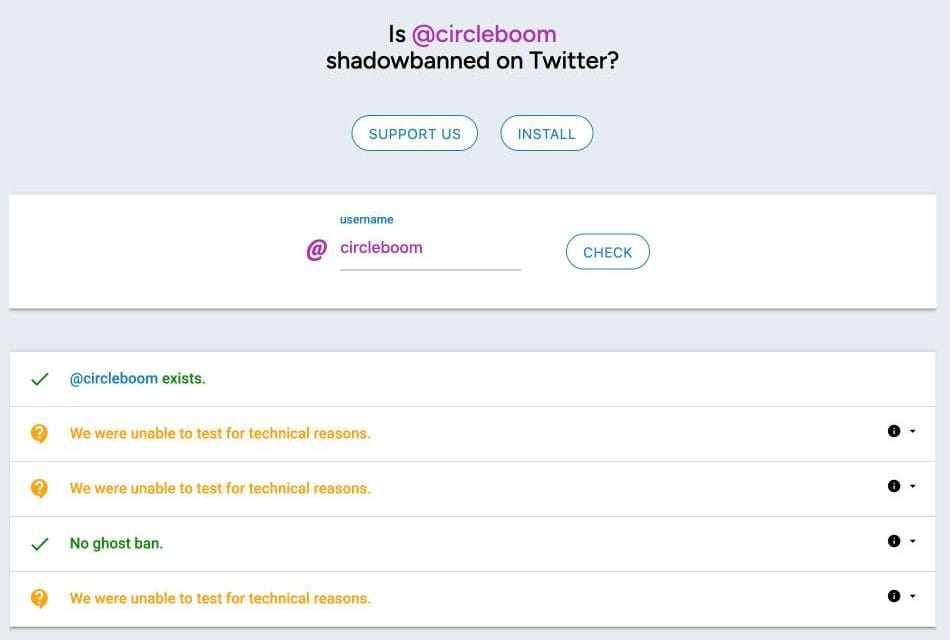
For our account, yuzurisa confirmed two things: the account exists, and there is no ghost ban. The other three checks returned the same line: "We were unable to test for technical reasons."
Three out of five is not a test. It is a guess with a green tick on top.
Why yuzurisa is not good enough anymore
The problem is not the idea. Yuzurisa's four checks (search suggestion ban, search ban, ghost ban and reply deboosting) became the standard names every shadowban tool still uses.
The problem is how it gets its data, and what it does when that fails.
It reads X like a logged out visitor. Yuzurisa looks at X from the outside, the way a visitor without an account would. Since 2023, X has closed most of what logged out visitors can see, including search. When those doors close, the checks cannot run.
It does not tell you what to do instead. When a check fails, you get "technical reasons" and nothing else. No manual way to check it yourself, no next step.
It stops at the result. Even when a check works, there is no explanation of what the restriction means for your account, how long it usually lasts or what triggers it.
It still talks about Twitter. The page asks "Is @username shadowbanned on Twitter?" and the copy has not caught up with how X works today. That is a small thing, but it tells you how long it has been since the tool was updated.
If you are a creator or a small business, that matters. A shadowban quietly cuts off the people who would have clicked your link, booked your service or bought your product. A test that cannot tell you whether you are restricted leaves you guessing for days while that traffic is gone.
How we tested
- Same account: @circleboom, a public brand account, in every tool.
- Same day: November 26, 2026, all six tools within one hour.
- No login: we used each tool the way a first time visitor would, without signing up.
- What we looked at: what the tool told us, whether any check failed, whether it explained the result, and how much advertising or upselling stood between us and the answer.
Only free, no signup versions were tested, so every tool is compared on the same terms.
The best yuzurisa alternatives tested
1. Circleboom Twitter Shadowban Test

The Circleboom Twitter Shadowban Test is our pick for the top spot. It is the only tool in this test that combines an official API lookup, account and country status, plain explanations of every shadowban type and a direct path to the fix, with no ads in the way.
It is the only tool in this test that X itself lists as an Official X Enterprise Developer. We checked X's enterprise customer directory on the same day: Circleboom is there. None of the other five tools in this test are.
X explains what that listing means: its enterprise customers get commercial level access to the X API, plus dedicated account and developer support.
For a shadowban checker, that matters in three ways:
- Approved data, not scraping. Circleboom reads the account through X's official API instead of copying the public website, so the lookup did not break the way yuzurisa's checks did.
- No password, no risk. You only type a username. Nothing connects to your account, so the test itself can never become a reason for a restriction.
- The fix runs on the same official access. When you clean up bot or inactive followers with Circleboom, every action goes through X's official API at safe, steady batch sizes. Unofficial growth apps that log in with your password are one of the most common shadowban triggers.
Here is what the result page looks like after the search:
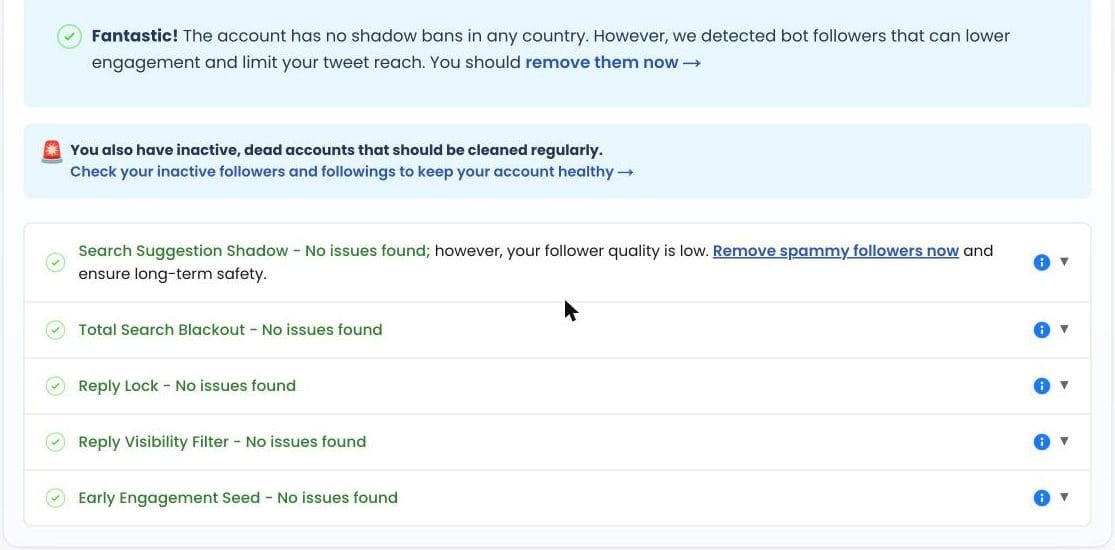
The page is built in three layers. A summary sits at the top. Right under it are two shortcuts that point to the most common causes of a shadowban: bot followers and inactive accounts. Below that, five restriction types are listed one by one, each with its own line.
Every line opens into a plain language explanation. This is what you see when you open Reply Lock, the restriction most people know as a ghost ban:
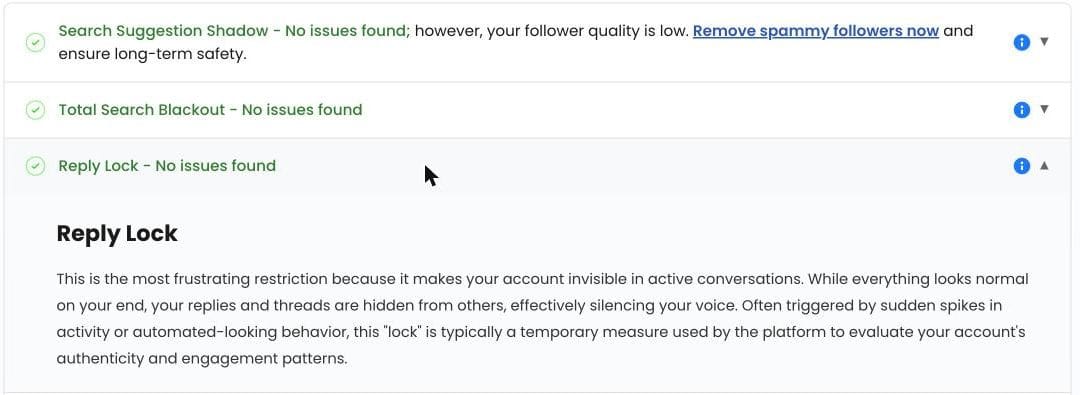
What we got:
- Account and country status. It confirms the account and shows whether X restricts it in any country, a restriction most other tools on this list did not report at all.
- Plain explanations of each shadowban type. Each restriction on the page opens into a short explanation of what it does to your account and what usually triggers it.
- A next step, not just a verdict. The result links straight to the fixes that matter most for a shadowban: finding bot followers and clearing inactive accounts.
- No ads in the way. No full screen ads, no pop ups between you and the result.
- No login, any public account. You can check your own account or a brand you are about to work with.
Good to know: like every tool on this list, Circleboom cannot see inside X's systems. For the reply based checks, our guide on how to test your Twitter account for a shadowban shows how to confirm a ghost ban or reply deboosting by hand in a few minutes.
Best for: anyone who wants an answer and a fix in the same place, from a tool X has approved.
2. Hisubway
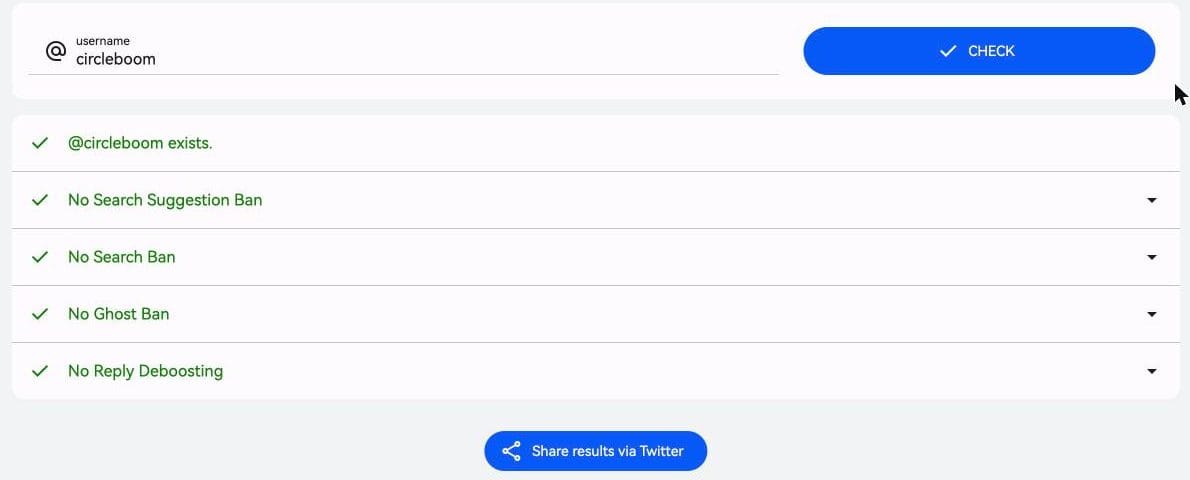
Hisubway looks and works almost exactly like yuzurisa, with the same four checks. Unlike yuzurisa, all of them returned a result for our account.
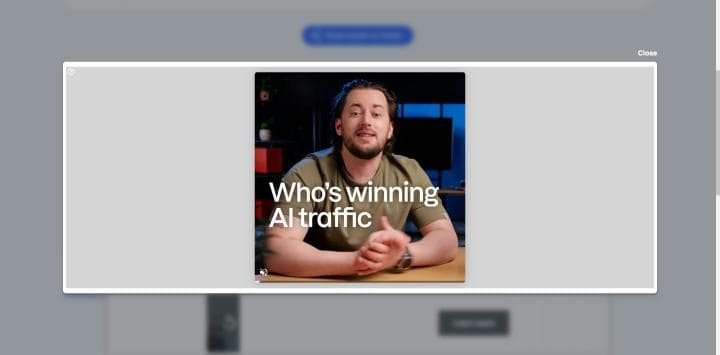
The catch is advertising. The page is surrounded by ads, and after the result loaded, a full screen video ad covered everything.
There is also no explanation of what each result means, and no next step if something fails.
Best for: a quick second opinion, if you can live with the ads.
3. OpenTweet
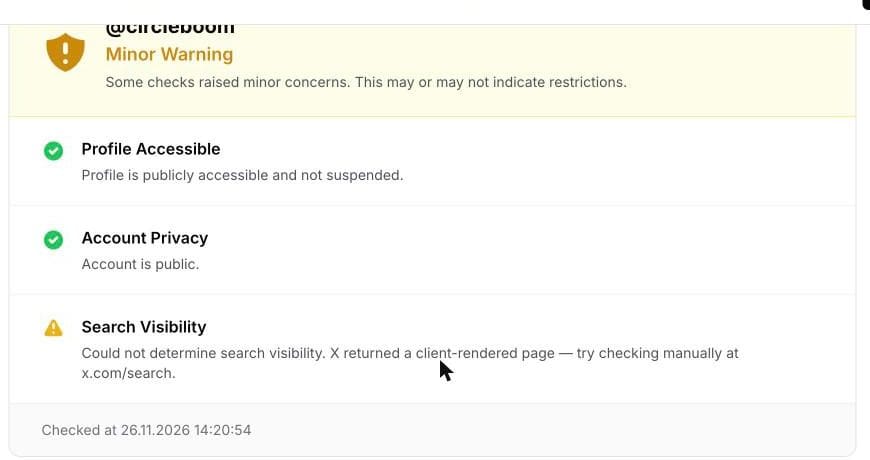
OpenTweet checks fewer things: whether the profile is accessible, whether the account is public, and search visibility.
For our account, the search visibility check failed: "Could not determine search visibility." Even so, the result was labeled Minor Warning, followed by "A few red flags on @circleboom, let's fix that" and a trial offer for its scheduling product.
A check that could not run should not turn into a warning. If you are already worried about a shadowban, that kind of result adds stress without adding information.
Best for: a basic profile check, read with care.
4. SocialCal
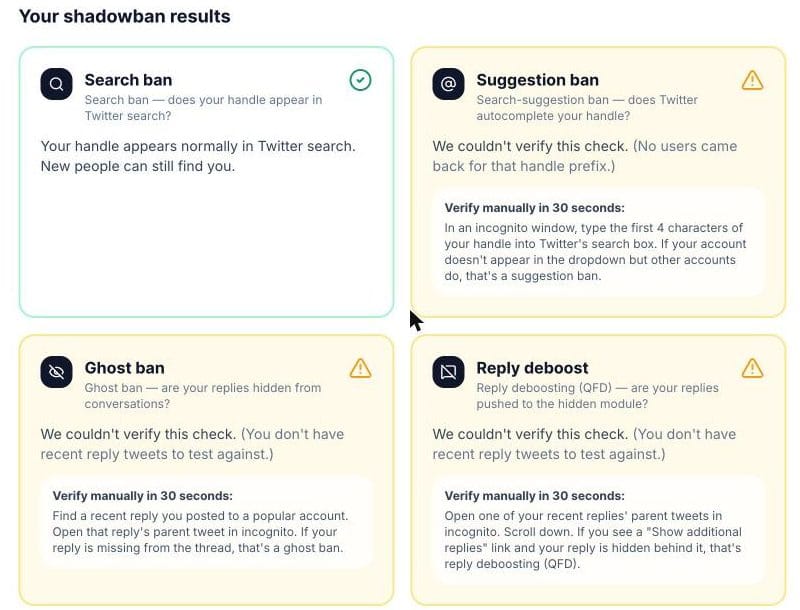
SocialCal runs the four standard checks and is honest when one fails. For our account, only the search ban check returned a result. The other three said "We couldn't verify this check."
What it does well: each failed check comes with a "Verify manually in 30 seconds" box.
What it gets wrong: the manual steps tell you to use an incognito window. X search now requires a login, so a private window sends you to the sign in page instead. Use a second account that does not follow you.
Best for: people who want manual steps next to the result.
5. SocialRails
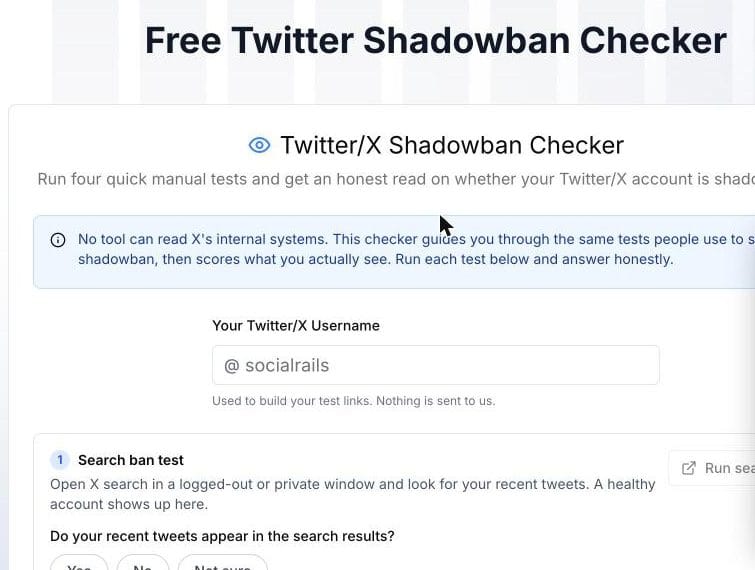
SocialRails does not run any automatic check. It says so openly: "No tool can read X's internal systems." Instead, it walks you through four manual tests and asks you to answer yes, no or not sure.
That honesty is welcome, but it means the tool is only as good as your own testing. Its first step also asks you to search X in a logged out or private window, which no longer works.
Best for: people who prefer a checklist to an automatic result.
Also worth knowing: Shadowban Scanner
Shadowban Scanner is a browser extension, not a website. It adds shadowban information inside X while you browse. We did not install it for this test, so it is not ranked, but it is a different approach if you want ongoing monitoring instead of a one time check.
Yuzurisa alternatives compared
| Tool | X Enterprise | What it gave us | Ads or upsell |
|---|---|---|---|
| Circleboom | Yes | Status, explanations, fixes | None |
| Yuzurisa | No | 2 of 5 checks | None |
| Hisubway | No | 4 checks, no guidance | Heavy |
| OpenTweet | No | 2 of 3 checks | Trial offer |
| SocialCal | No | 1 of 4 checks | Light |
| SocialRails | No | Manual tests only | Light |
Note: all results are for the same public account, @circleboom, tested on November 26, 2026. None of the tools needed a login. "X Enterprise" means the company is listed in X's enterprise customer directory. "2 of 5 checks" means the tool returned a result for two checks and said it could not test or verify the rest. Two tools also disagreed: hisubway reported no ghost ban, while SocialCal said there were no recent replies to test against. Results can differ from account to account and from day to day.
The real cause behind most shadowbans: bot and inactive followers
Here is the part no checker on this list can tell you: why it happened.
In most cases, the answer is sitting in your follower list.
When Twitter explained how it ranks accounts in its 2018 post Setting the record straight on shadow banning, it named the signals it uses to spot accounts that "manipulate or detract from healthy conversation." One of them was how other accounts interact with you, including who follows you.
Bot and inactive followers hurt you in two ways.
Bots make your account look suspicious. Hundreds of fake followers, often from an old giveaway or a "get followers fast" service, tell X that something about your account is not organic. That is exactly the kind of signal that leads to a search ban or a ghost ban.
Inactive followers make every post stall. X first shows each new post to a small group of your followers. If that group is full of accounts that stopped using X years ago, nobody reacts, and the post never travels further. Picture a bakery with 6,000 followers, 2,000 of them dormant: every morning special starts its life in front of people who will never see it.
The result looks like a shadowban, and often turns into one.
Find bot followers with Circleboom
Inside Circleboom, the Fake/Bot Followers list flags suspicious followers using their activity, follower to following ratio, account age and posting frequency, and lets you remove them in bulk.
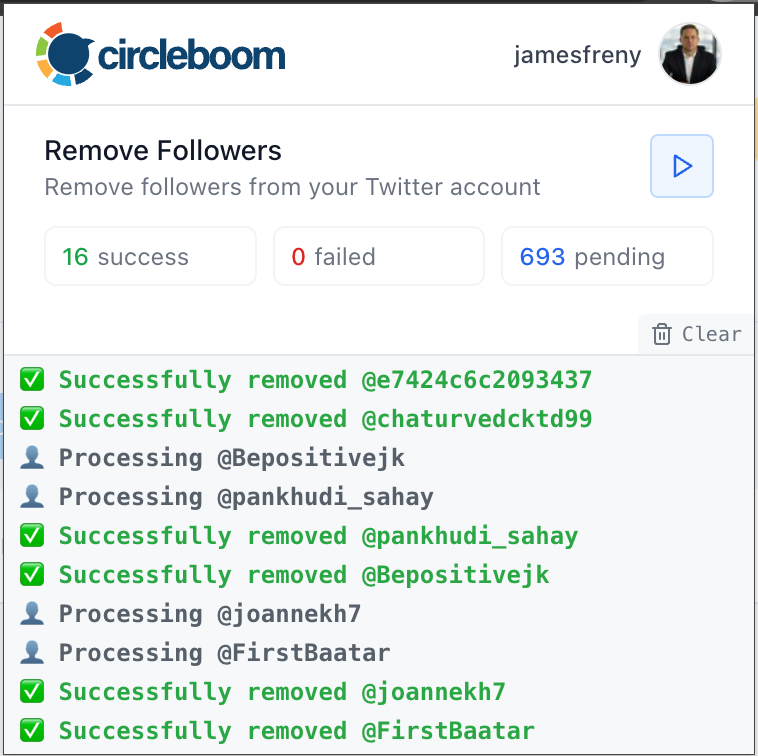
Clear inactive followers with Circleboom
Unfollow Inactive Twitter Accounts lists the accounts you follow, and the followers you have, that have gone quiet, oldest first. Removing them puts your new posts in front of people who actually engage.
Both run through X's official API as an Official X Enterprise Developer, in small batches at a steady pace, so the cleanup itself never looks like the burst of activity that triggers a restriction.
Keep in mind that the API provides a more accurate real-time data stream than the X interface itself. While the platform UI may experience lag, the API captures and reflects new developments instantaneously.
Circleboom has the official Enterprise API, we don't scrape data from X!
That is the fix every shadowban test points to, and it is why we ranked Circleboom first: it is the only tool here that takes you from "am I shadowbanned?" to "here is what caused it" with approved access.
What to do after any shadowban test
A checker tells you where to look. It does not fix anything.
If a test shows a restriction, or your reach dropped overnight and you cannot explain it:
- Find the cause. Most restrictions follow a burst of follows, repeated replies or a wave of bot followers. Our guide on how to check if you are shadowbanned on Twitter helps you tell a real shadowban from a normal reach drop.
- Clean your followers. Remove bot followers first, then inactive ones, as described above.
- Check for a temporary label. If X shows a warning on your profile, that is a different problem. The Temporary Label Checker explains how to remove it.
- Wait for the cause to stop, then test again. If it lasts longer than a week, read still shadowbanned on Twitter after a week.
For the full recovery plan, see how to get rid of a shadowban on Twitter.
FAQ
Is shadowban.yuzurisa still working?
Partly. The site loads and returns a result, but on our test account 3 of its 5 checks said "We were unable to test for technical reasons." Only the account check and the ghost ban check returned an answer.
Why does yuzurisa say "unable to test for technical reasons"?
Yuzurisa reads X the way a logged out visitor would. Since X closed most logged out access, including search, several of its checks cannot get the data they need.
What is the best yuzurisa alternative?
In our test, the Circleboom Twitter Shadowban Test. It reads the account through X's official API, shows account and country status, explains each shadowban type and links to the fixes, with no ads. It needs no login and works with any public account.
Can bot followers get you shadowbanned on Twitter?
They can contribute. X has named "who follows you" among the signals it uses to rank accounts, so a follower list full of fake accounts works against you. Removing them is the first fix to try.
Is Circleboom approved by X?
Circleboom is listed in X's enterprise customer directory as an Official X Enterprise Developer, which X describes as commercial level API access with dedicated account and developer support.
Are shadowban checkers accurate?
No checker can see inside X's systems, so every result is an indicator. If two tools disagree, confirm by hand: ask someone who does not follow you to search for your posts and open one of your replies.
Can I check for a shadowban without logging in?
Yes. Every tool in this test works without a login. The manual checks are different: X search needs an account, so use a second account that does not follow you instead of a private window.
So, what replaces yuzurisa?
A tool that still answers. Yuzurisa gave us two answers and three shrugs. The best alternatives give you a result, tell you what it means and show you what to do next.