One blog post, seven social posts, seven days of publishing, and roughly ten minutes of generating time. That is what a single article yields when you run it through an AI rewrite once per platform instead of pasting the same link everywhere.
The rest of this guide shows the exact settings for each day and the order that keeps every post original.
What one blog post gives you.
• Seven posts, one per day.
• A native version per platform.
• Clicks you can trace.
Circleboom Publish rewrites one article URL into a fresh draft for LinkedIn, X, Instagram, Facebook, Pinterest or Bluesky, tuned to the goal and tone you pick. Repurpose your blog content with AI into posts for every platform.
Why one blog post should feed a full week of social posts
A blog post that gets shared once is read once. Most teams publish the article, drop one link on LinkedIn, maybe a second on X, and move on to the next draft.
The post took hours to research and write, and it got a single afternoon of attention on social media.
AI content repurposing fixes the math. You keep the research, the examples and the argument, and you change only the packaging: the length, the hook, the tone and the call to action for each network.
The work you already did becomes the raw material for a week of posts instead of one.
I have seen the same mistake in almost every content calendar I review: the blog and the social plan are built by different people on different days, so the article never gets more than a launch-day mention.
If you want to see the manual route first, the walkthrough on how to repurpose blog content for social media covers it step by step. It works, but it is slow, which is why most people stop after two posts.
The faster route is to turn one article into AI content for each network and spend your time editing instead of writing from zero. Circleboom Publish drafts a LinkedIn post, an X thread and an Instagram caption from the same blog link, each in the format its platform expects.
Does posting the same text everywhere hurt reach?
Yes, it can. Duplicate text limits reach on every platform, and in serious cases it can get an account restricted. A blog link pasted with the same caption into six networks reads as copy to each algorithm and as lazy to each audience.
Circleboom Publish also gives each network a very different amount of room, so one caption cannot fit all of them anyway:
| Platform | Text limit | What the room is for |
|---|---|---|
| X | 280 characters | One sharp point |
| Bluesky | 300 characters | One sharp point |
| Threads | 500 characters | A point plus context |
| 1,300 characters | A short argument | |
| 2,200 characters | A caption with a story | |
| 5,000 characters | A full summary |
The table shows why a single caption fails: what fits LinkedIn can run more than four times too long for X. This is the real job of repurposing: a new post from the article for each audience.
That is also why content repurposing across platforms multiplies reach instead of splitting it.
Google draws the same line for search. Its guide to creating helpful, reliable, people-first content names heavy automation used to churn out pages as a warning sign.
The lesson carries over to social posts: use AI to write a better version for each reader, then edit it, rather than mass-copying one text.
A repurposed post earns its reach when it adds a new angle, not a new link.
How Circleboom Publish rewrites an article for each network
The tool for this job is Generate Post from URL. It sits in the AI Features menu under the title "Generate a Post from an Article or News Link."
It reads the article behind any URL and fully rewrites it into a new, platform-native post. It is not limited to articles you found inside Circleboom; your own blog link works the same way.
The form asks five things before it drafts:
- Main Goal: Engagement, Awareness, Promotion, Website Traffic or Informative.
- Tone and Style: Informative, Motivational, Encouraging, Conversational, Technical or Humorous.
- Language: English by default, plus Español, 日本語, Français, Deutsch, Português and more.
- Target Platform: X, Bluesky, LinkedIn, Facebook, Instagram or Pinterest.
- Two toggles: include the original link, and generate as a thread post.
Those settings are what make each day of the week different. Change the goal and the tone, and the same article becomes a professional LinkedIn summary on Monday and a playful Bluesky post on Saturday.
The draft opens in the composer, so you edit it, add an image and schedule it like any other post.
Writing a platform-specific post by hand takes about twenty minutes. The generator drafts one in under a minute. That gap is why the switch pays.
You can repurpose a blog post with AI in under a minute per platform and spend the saved time on the edit.
Posting to X safely through Circleboom Publish
Since X is one of the platforms in this plan, account safety matters too. Circleboom is an official X Enterprise developer, so the posts you schedule to X go out through approved access, with no workaround that puts your account at risk.
Repurpose a draft before it has a URL
AI content repurposing does not need a published link to start. Generate Post from Text, the sister tool in the same AI Features menu, takes pasted text instead of a URL: a draft, your outline, meeting notes or a single section of the article.
The rest of the form is identical, with the same goal, tone, language, platform and thread options.
This matters for launch planning. If the article goes live on Thursday, you can paste the draft on Tuesday, generate the week's posts, and have them waiting in the composer before the link exists.
Once the article is published, switch back to the URL tool, because a real link gives the AI the final text and lets you include the link in the post.
Long sections work well here too, since a detailed chapter of the draft can become a thread by itself. The guide on how to auto-generate Twitter threads from any text shows what that output looks like on X.
How to do AI content repurposing for one blog post, step by step
The steps below produce one post. Repeat the middle phase once for each day of your plan.
Open the generator and load the article
- Log in to Circleboom Publish and connect the accounts you want to post to.

- Open the AI Features menu and choose "Generate a Post from an Article or News Link."
- Paste your blog post's address into the Enter Article URL field and wait for the content to load.
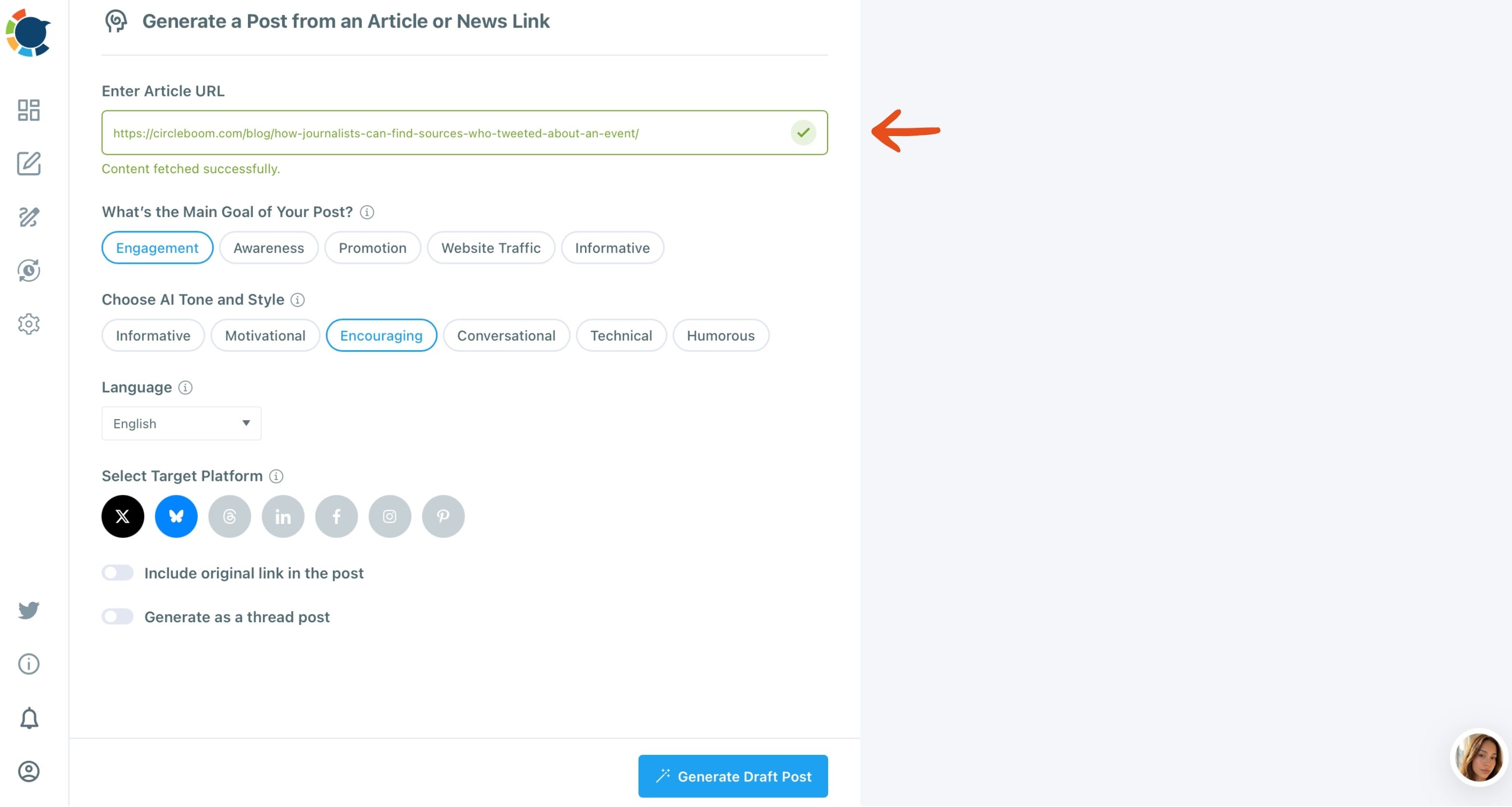
Set the goal, tone and platform for this day's post
- Pick the Main Goal that matches the day: Informative for a summary, Website Traffic when you want the click.
- Choose the Tone and Style and the Language, matching the audience on that network rather than your own habit.
- Select the Target Platform for this version, such as LinkedIn on day one.
- Set the two toggles: turn on "Include original link in the post" when the goal is traffic, and "Generate as a thread post" for X or Bluesky.
Generate, edit and schedule the draft
- Click Generate Draft Post. The button stays disabled until at least the URL and a target platform are filled in.
- Edit the draft in the composer, adding your own line, an image and any platform-native element the generator does not produce.
- Schedule the post with "Pick your best post time," or click Post to Queue to drop it into the account's next open slot.
That order works because the article goes in once and only the settings change between days. The goal and tone carry the variety, and the edit in step 9 is where your own voice goes back in, so no two posts read alike.
Quick recap:
- Load the article once.
- Change goal, tone and platform per day.
- Edit, then schedule or queue.
A seven-day plan for one blog post
Here is a week of AI content repurposing built only from options the form really offers. Every row is one run of the generator on the same article URL.
| Day | Platform | Goal and tone | Link or thread |
|---|---|---|---|
| Monday | Informative, Informative | Link on | |
| Tuesday | X | Engagement, Conversational | Thread on |
| Wednesday | Awareness, Encouraging | Link off | |
| Thursday | Website Traffic, Conversational | Link on | |
| Friday | Website Traffic, Informative | Link on | |
| Saturday | Bluesky | Engagement, Humorous | Link on |
| Sunday | X | Promotion, Motivational | Link on |
How each day of the plan reads
Monday opens on LinkedIn because a professional, informative summary is the natural first audience for most blog posts. The draft gives the argument in short paragraphs and points to the full article.
Tuesday is the thread day. A long post has enough depth for several connected posts on X, so the thread toggle earns its place here.
You can schedule a Twitter thread for the hour your followers are most active.
Watch the Tuesday slot happen: a long article becomes an AI-written X thread, one connected post at a time.
Wednesday turns the same idea into an Instagram caption with an encouraging tone. Instagram needs a visual, so this is the post where you add an image in the composer before it goes out.
Thursday and Friday chase the click. Facebook gets a conversational summary with the link, and Pinterest gets a pin that sends readers to the article.
If Pinterest is new for your blog, the guide on how to add your blog posts to Pinterest covers the board setup. The AI Pinterest pin generator writes the pin text itself.
The weekend lightens up. Saturday's Bluesky post uses the Humorous tone for a lighter take, and Sunday closes the loop on X with a single motivational post that promotes the article one more time.
The time math behind the plan
The math is the strongest argument for AI content repurposing. As an illustrative calculation using the numbers from Circleboom's own product notes:
- By hand: 7 posts at about 20 minutes each is roughly 2 hours 20 minutes.
- With the generator: 7 drafts at under a minute each is under 10 minutes, plus your edit.
Spend half of the saved time editing and you still finish the week's social plan in well under an hour. The same rule scales: five articles across three platforms is 15 posts, about five hours by hand and roughly fifteen minutes of drafting with the generator.
Track which repurposed post brought the clicks
AI content repurposing only pays off when you can see the result. Seven posts from one article raise a fair question: which one sent the readers?
A bare link cannot tell you. Before you schedule, wrap the blog link with the UTM Link Builder in the composer: click the link icon next to the URL, fill in source, medium and campaign, and Circleboom swaps in the tagged link for you.
After a week, Google Analytics shows the clicks per post, so you can see whether LinkedIn's summary or X's thread did the real work. The guide to UTM parameters for social media posts explains how to name the tags so each day stays separate in your reports.
Use the source tag for the platform and the campaign tag for the article, and the comparison takes one glance.
Some new articles need no weekly plan at all. For those, you can post RSS to social media so every fresh post on your blog is shared automatically to X, Facebook, LinkedIn, Bluesky, Threads or Google Business Profile.
Your repurposing checklist for the next blog post
Run this list the day your next article is ready, and the week of social posts is done before lunch:
- Paste the article URL, or the draft text if it is not live yet.
- Change the goal, tone and platform for each day of the plan.
- Turn on the thread toggle for the X and Bluesky days that need depth.
- Edit every draft and add the image or element the platform expects.
- Tag the link with UTM parameters, then schedule or queue each post.
One article and one honest edit per post is all AI content repurposing asks of you. Pick the blog post you are proudest of and give it the week it deserves.
→ Start your AI content repurposing with one post this week
Repurposing FAQ
Can the generator turn my blog post into a Twitter thread instead of one post?
Yes. Turn on "Generate as a thread post" and pick X or Bluesky, and Circleboom Publish breaks the article into connected posts instead of one summary.
The walkthrough on how to generate a Twitter thread from an article URL shows the full output on X.
Can I repurpose an English blog post into another language?
Yes. The Language field is set per request, so the same English article can become a post in Español, Deutsch, 日本語 or another listed language for an audience that reads it. Review the draft before you publish, as you would any AI draft.
Does the generated post keep the link to my blog?
Only if you ask it to. The "Include original link in the post" toggle decides whether the article URL appears in the draft, so turn it on for traffic days and off for posts that should stand on their own.