
Sometimes a tweet spreads in a way you did not want. Not because it was wrong, but because of who picked it up.
A scam ring quote tweets it to run a crypto reply farm underneath. A cluster of freshly created accounts with no profile photos amplifies it into a corner of the platform you have no interest in being in. A single post gets used as a rally point, and suddenly the same forty accounts are in every one of your replies for a week.
X gives you one response to this: open a profile, click block, go back, repeat. For forty accounts that is an evening. For four hundred it is not a plan at all.
The native retweeter list does not help either. It shows a partial, unordered preview with no filtering and no export, so you cannot even see the full set you are dealing with, let alone act on it.
With Circleboom Twitter, you can paste a tweet URL, retrieve the accounts that retweeted it, filter that list down to the ones that are actually a problem, and send the selection to a bulk block queue.
What Is Circleboom Twitter?
Circleboom is an Official X Enterprise Developer, so retweeter data comes through X's official Enterprise API rather than a scraper.

The blocking itself runs through the Twitter X Mass Blocker Chrome extension, which executes each block sequentially inside X's normal interface rather than going around it.
- Retrieves the full retweeter list of any public tweet by URL, enriched with follower count, follow ratio, account age, and location
- Queues multiple tweet URLs in a Block Cart so retweeters from several posts combine into one operation
- Filters the set by follower quality, account age, follow ratio, bio keywords, location, and verification before anything is blocked
- Protects accounts you care about with a whitelist that is excluded from every bulk action
- Exports the retweeter list to CSV when you want the data rather than the block
- Keeps a Mass Unblock surface for reviewing and reversing what you blocked
The important part is the order: retrieve, filter, review, then act. Blocking is the last step, not the first.
How to Mass Block Retweeters on Twitter with Circleboom Twitter
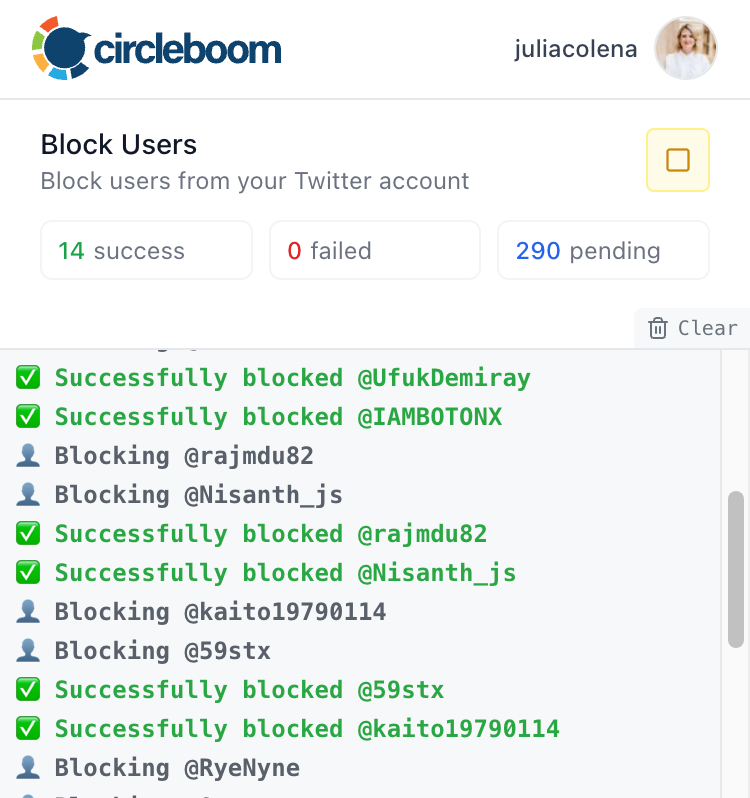
- Install the Twitter X Mass Blocker Chrome extension and log into Circleboom in Chrome. Blocking does not happen inside the Circleboom web interface. Circleboom builds and holds the queue, and the extension performs the actual block actions in your browser. Both pieces are required.
- Open Mass Block X Accounts and switch to the "Accounts who retweeted a tweet" tab. The default tab handles followers and following of any account. The second tab is the one you want when the problem is attached to a specific post rather than to a specific account's audience.
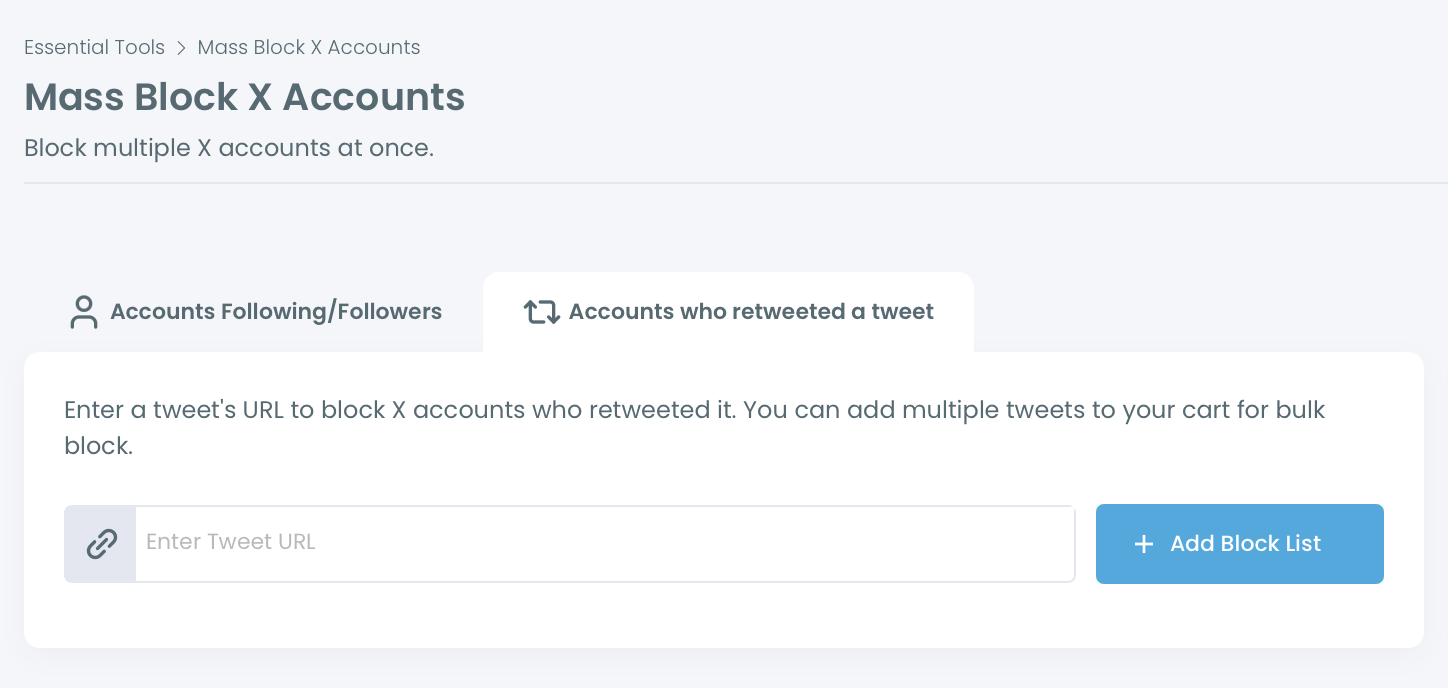
- Paste the tweet URL and click "+ Add Block List." The tweet joins the cart below the input, showing the display name, username, a preview of the post text, and the retweet count. A link icon and a remove button sit on each row.
- Add more tweet URLs if the problem spread across several posts. This is what the Block Cart is for. A harassment wave or a spam campaign rarely attaches to one tweet, and combining the retweeter sets from every affected post covers the whole amplification pattern instead of one slice of it.
- Check the combined total in "Your Block Cart," and read it as an estimate. Circleboom says this outright: the total is theoretical. Duplicates, locked accounts, suspended accounts, and bots mean the number you end up reviewing will not match what X displays. Expect the real figure to be lower.
- Click "Get X Retweeters for Blocking." Circleboom retrieves the retweeters and displays them in a structured table showing name, tweet count, join date, following, followers, follow ratio, and an activity classification of Active, Moderate Active, or Inactive.
- Open Filter Options and narrow the set before you select anything. This is the step that separates a moderation action from a mistake. Follower Quality toggles cover eggheads with no profile photo, protected accounts, fake or spam signals, inactive accounts, and overactive accounts. You also get verification status, a bio and display name keyword search, follower count, following count, tweet count, follow ratio ranges, a join date range, and a location field.
- Filter on the signals that describe your actual problem. For a bot amplification wave, the combination that works is join date within the last few months, no profile photo, and a very low follow ratio. For a scam network, add bio keyword filtering on the terms they all share. For a coordinated harassment cluster, the account age filter usually does most of the work on its own.
- Sample before you commit. Open ten or fifteen profiles from the filtered list using the per row profile link. If more than one or two look like ordinary people who happened to share your post, your filter is too broad and you should tighten it rather than proceed.
- Whitelist anyone who must never be caught by a bulk action. Whitelisted accounts are permanently excluded from every bulk operation across Circleboom, not just this one. Do this before you select, not after.
- Select the accounts and click "Add to Mass Block List." The red button shows how many accounts you have selected. This adds them to the queue. Nothing is blocked yet.
- Open the Chrome extension and click Start. The extension reads the queued list and blocks each account one after another, working within X's normal interface rate limits. Leave the tab open while it runs.
- Check the History panel afterward. Previous block list sessions are stored with a timestamp and the number of tweets involved, so you have a record of what you did and when, which matters if you ever need to explain or undo it.
Before You Block: The Part Most Guides Skip
Blocking is the strongest action available to you on X, and mass blocking applies it to hundreds of people at once based on a filter.
⚠️ There is no one click rollback. Reversing a mass block means going to the Accounts I've Blocked surface and unblocking through Mass Unblock, which is a real workflow rather than an undo button. Treat the selection step as the point of no easy return.
Three questions worth answering before you start.
Is the problem the tweet or the account? If one specific post attracted a bad crowd, the retweeter tab is right. If a particular account keeps sending its followers at you, blocking that account's follower list is the better move, and blocking everyone who follows a specific account covers that path. Blocking another user's entire follower list and blocking all followers of a spam account automatically are the same idea from different angles.
Would muting do the job? Blocking is visible, permanent, and closes the relationship. Muting removes the noise from your experience without telling anyone. For accounts that are annoying rather than harmful, muting is usually the proportionate response. The difference between muting and blocking and what each actually does are worth reading before you commit to the stronger one.
Are these accounts actually bad, or just not your audience? A tweet that travels beyond your usual circle picks up people who are unfamiliar rather than hostile. Blocking them is a decision you cannot see the cost of. If the retweeter set is mixed, export it and look at it properly instead of blocking on a filter.
📌 One case where the answer is always no: giveaway and campaign retweeters. If you ran a contest and people shared it, that is your most engaged audience, not a problem. Export them, add them to a list, or run a draw. Do not send them anywhere near a block queue.
Why the Native X Retweeter View Is Not Enough
X shows you a preview of who retweeted a post. It is partial, it has no ordering you control, it cannot be filtered, and it cannot be exported.
That matters for a moderation decision, because you are being asked to act on a population you cannot see. You cannot tell whether the amplification came from fifty bots or from five hundred ordinary accounts and fifty bots, and those are completely different situations with completely different correct responses.
There is also no bulk action of any kind attached to it. Even after you scroll the preview and identify the accounts, blocking them means visiting each profile. How to block a follower on X covers the single account flow, and whether batch blocking is possible at all is one of the more common questions for a reason.
If what you actually want is the data rather than the block, viewing the full list of retweets from someone else's post and extracting retweet lists for targeting cover the export route, which is the same retrieval with a different ending.
When Mass Blocking Retweeters Is the Right Call
Coordinated harassment tied to specific posts. When a tweet becomes the origin point for a pile on, the retweeters are the accounts that chose to amplify it. Blocking them removes the amplification network rather than playing whack a mole in the replies. When it spread across several posts, put all of them in the Block Cart.
Scam and impersonation spread. Scam tweets get amplified by the network running them. Those accounts share visible characteristics: recent creation dates, no profile photo, terrible follow ratios, repeated bio phrasing. Why X allows so many scam accounts to operate explains the scale, and what separates bots from ordinary automated accounts helps you avoid blocking legitimate automation.
Bot amplification distorting your metrics. When a post gets picked up by a spam network, the engagement numbers stop meaning anything and the account attracts more of the same. Why your posts get liked by spam bot accounts, bots that keep following you, and how to stop bots from following you on X all describe the same underlying problem. It is worth running a bot check on your own follower base as well, since amplification networks often follow before they amplify.
Preemptive defence in a targeted niche. If a known spam network operates in your space, blocking the retweeters of its posts stops those accounts before they reach you. Blocking X bots and getting rid of X bots generally cover the wider cleanup, and clearing spam followers and following handles the accounts already inside your audience.
What Happens If You Get This Wrong
You block people who were just sharing your post. A block is permanent and one sided, and the person usually never finds out why. Filter tightly and sample before you commit.
You block someone you needed. A journalist, a customer, a partner. The whitelist exists for exactly this, and using it costs nothing.
You cannot reverse it quickly. Undoing a large block means working through Mass Unblock. Finding your blocked list and unblocking in bulk and viewing everyone you have blocked cover the recovery path, but the fix takes longer than the mistake did.
You use a hammer where a lighter tool fits. If someone should simply stop following you, removing a follower without blocking leaves the door open. Soft blocking exists for exactly the cases where a full block is more than the situation warrants. Whether you should block fake followers at all is a genuinely open question worth thinking about.
You treat a symptom instead of the cause. If the same networks keep finding you, the pattern is upstream. Why followers do not engage and whether a new account solves a bot problem are both worth reading before you conclude that blocking is the whole answer.
FAQ
Can you actually mass block everyone who retweeted a tweet?
Not through X itself. X has no bulk block and no exportable retweeter list. With Circleboom Twitter, you can retrieve the full retweeter list of any public tweet, filter it, select accounts, and block the selection in bulk through the Chrome extension.
Do I need the Chrome extension?
Yes. Circleboom retrieves the accounts and builds the queue, but the Twitter X Mass Blocker extension performs the block actions sequentially inside your browser, operating within X's normal interface behavior. Without it there is a queue and no execution.
Can I block retweeters from more than one tweet at once?
Yes, that is what the Block Cart does. Add each tweet URL, and the retweeter sets combine into one list. This is the right approach when a problem spread across several posts rather than one.
Why is the retweeter count different from what X shows?
Because the total in the cart is theoretical. Duplicates, locked accounts, suspended accounts, and spam accounts all reduce the number that ends up in your reviewable list. Circleboom flags this directly rather than letting you assume the numbers will match.
Can I undo a mass block?
Yes, but not with one click. Blocked accounts are reviewable through the Accounts I've Blocked surface, which supports individual and bulk unblocking. Plan on reviewing before you block rather than relying on the reversal.
Will mass blocking get my account restricted?
Blocks execute sequentially through the extension inside X's normal interface rate limits rather than hammering an API. That said, any large volume action is worth spacing out, and the more common risk is social rather than technical: blocking a wide, mixed audience is visible and gets talked about.
Should I block or just mute?
Mute if the accounts are noise. Block if they are a threat, a scam, or a coordinated group. Muting someone on X and seeing your muted accounts cover the lighter option, which is reversible and invisible.
What if I want the retweeter list without blocking anyone?
Then use the export route instead. The Export Accounts Who Retweeted feature returns the full list as a CSV with follower count, follow ratio, account quality flags, verification status, bio, and location per account, which is the right tool for ad targeting, outreach, or a giveaway draw.
Final Thoughts
The reason mass blocking retweeters on Twitter feels impossible is that X was never built to let you see a full retweeter list, never mind act on one. You get a preview, a block button, and a lot of clicking.
The workflow that actually solves it is retrieval first and blocking last. Pull the accounts behind the post, filter down to the ones causing the problem, look at a sample with your own eyes, and only then send the selection to the queue.
With Circleboom Twitter, you can retrieve every account that retweeted a post on X, narrow the list by account age, quality signals, and bio keywords, and block the selection in bulk without opening a single profile by hand.
https://circleboom.com/twitter-management-tool/twitter-search-tool/mass-block-twitter-accounts