

How do you compare your hashtag use with a competitor's on X when no profile shows a tag count? You need the same measurement taken on every account at once. This guide walks through a competitor hashtag analysis from picking the accounts to deciding what to change.
Manual: tallying tags on each rival's timeline gives uneven samples that nobody can check. Circleboom: one run counts hashtags for up to five accounts on X and shows each as average hashtags per 500 tweets, retrieved through official Enterprise APIs.
→ competitor hashtag analysis
The steps come first, then three ways to read the result.
Why hashtag use on X is hard to compare by eye
Hashtag use is hard to compare by eye because X shows it one post at a time. To know an account's habit you need hundreds of its posts counted under one rule, and a timeline gives you whatever loaded while you scrolled.
The mistake I see most often is a comparison built from unequal samples. Someone reads forty posts from one rival and two hundred from another, then reports both tallies in one slide as if they matched.
A second trap is post type. A timeline mixes original posts with replies, reposts and quotes. Count the replies for one account and skip them for another, and the two figures no longer describe the same thing.
The stakes are practical. Hashtags are one of the most visible habits on a timeline, and a habit copied from a wrong impression of your rivals shows up on every post you publish. A competitor hashtag analysis replaces that impression with a count.
The fix is to let one tool retrieve the posts and apply one counting rule to every account. That is the point where you can compare hashtag use across competitor accounts and trust that a gap is a gap.
Which Twitter accounts belong in a hashtag comparison?
The accounts that belong in the comparison are direct peers: accounts that share your market, your language, your rough scale and your reason for posting. A hashtag figure from a global entertainment brand tells a regional service account almost nothing.
Have this list in hand before you start:
- Your own handle, if you want your account as one of the columns.
- Up to four competitor handles, or up to five if you leave yourself out.
- A check that each account is public.
- A check that none has more than 3,000,000 followers, the report's ceiling.
If you do not know who your peers are yet, the tags of your niche are a good place to look. The accounts posting under them regularly are your candidates. The same search works when you want to find and follow people on Twitter with certain hashtags.
Keep one distinction in mind while you choose. A direct peer is an account you can fairly measure yourself against. A category leader is worth studying, but its totals are not targets for an account a tenth of its size.
Once the set is chosen, keep it. Swapping an account between runs changes the group, and a changed group can look like a change in your position when nothing about your own posting moved.
What Circleboom's hashtag panel measures on X
Circleboom's hashtag panel measures how many hashtags each account used across 500 posts. It is titled Average hashtags per 500 tweets and it sits in the Content type & format section of the X Competitor Analysis & Benchmark Report.
The report retrieves up to about 3,200 recent posts per account and lays the same sections side by side for every account in the set. Because Circleboom is a verified Enterprise partner of X, those posts are official records, so the count is not thinned by posts a scraper failed to load.
Circleboom gives you a competitor hashtag analysis on Twitter in one dated report, with your own account measured exactly like the rest.
Two details of the report keep the panel clean. The Followers and Following toggle changes only the audience sections, so the hashtag panel reads the same in both views. And the neighboring panels on format mix and link and media share describe other packaging choices, which you can leave aside for this task.
The unit is deliberate. A rate per 500 posts puts a daily poster and an occasional poster on one scale, which a raw total could never do.
Unlike a hand tally, the panel also comes with a date and a saved copy. Each run is stored under Your saved analysis, so the figure you quote in a meeting can be opened again later.
How to run a competitor hashtag analysis on X step by step
The process, in order: open the report, build the set, start the run, then convert the panel.
Log in and open the benchmark report
- Log in to Circleboom and connect the X account you manage.

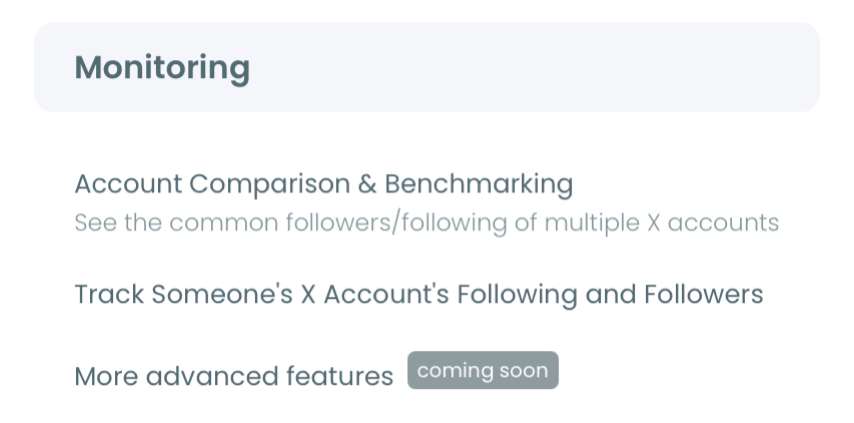
- Go to the Monitoring menu and select X Competitor Analysis & Benchmark Report, the first item in that menu.
Build the account set and start the run
- Enter each handle under Account Handles. Every account has its own @ field, and the + button adds a slot until the set reaches five.
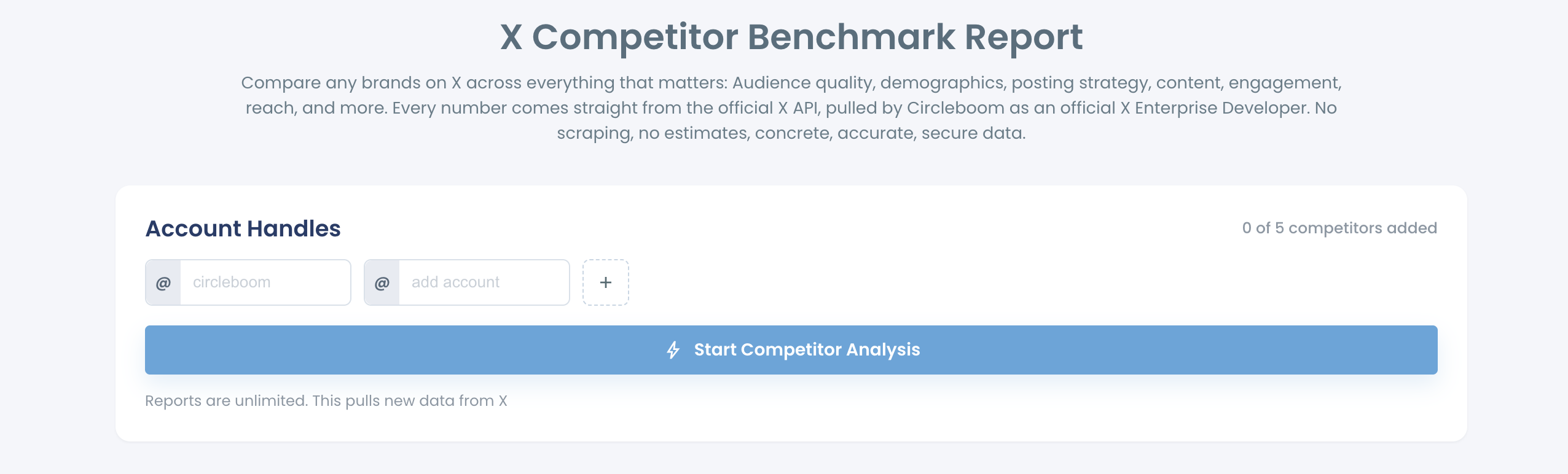
- Click Start Competitor Analysis and pick Just this once for a single report, or Keep it up to date every month for a recurring one.
- Check the token cost on screen before you confirm. Competitor Tokens are charged per competitor per report, and your own account does not use one.
Convert the hashtag panel into a per-post figure
- Open the finished run with View report and scroll to the Content type & format section.
- Divide each account's value in Average hashtags per 500 tweets by 500 and write the per-post result next to each handle.
This sequence holds together because every choice that could bias the count is made before any number appears. The set is fixed, the sample is pulled once for all accounts, and the only arithmetic left is the same division for every column.
In short, the run goes like this:
- Log in and open the report from the Monitoring menu.
- Add your account and your chosen peers.
- Start the analysis once or on a monthly schedule.
- Divide every hashtag value by 500.
With per-post figures written down, the competitor hashtag analysis moves from collecting to reading.
Three readings of the hashtag panel on X and what each supports
The panel supports three readings: a rival far above you, a rival level with you, and a rival far below you. Each reading points to one action, and each starts with the same conversion to hashtags per post.
The figures below are illustrative. They show the arithmetic, not any real account.
| Reading | Your value | Rival's value | Per post (you / rival) | Action it supports |
|---|---|---|---|---|
| Rival far above you | 150 | 1,500 | 0.3 / 3 | Keep your habit and study their tags |
| Rival level with you | 180 | 210 | 0.36 / 0.42 | Stop looking at hashtags |
| Rival far below you | 1,000 | 105 | 2 / about 0.2 | Trim your own tagging |
How far is far? The report sets no threshold, so judge each account against the rest of your set. A value several times higher or lower than the others is far. A difference of a few dozen per 500 posts is noise, because it converts to a few hundredths of a hashtag per post.
When a rival is far above you
A rival far above you tags much more heavily than you do, and the supported action is to study their tags without copying their count. At 1,500 per 500 posts an account averages three hashtags on every post, which can look spammy.
Before you conclude anything, look at what those tags are. A heavy figure can come from the same few branded tags repeated on every post, which is a labeling choice and not a discovery tactic.
You can check that on the rival's own posts. X's advanced search is the native route for searching one account's posts for a tag. Circleboom also has a post on how to search specific words a Twitter account said.
When a rival is level with you
A rival level with you tags about as often as you do, and the supported action is to stop looking at hashtags. At 180 against 210, both accounts tag roughly four posts in ten, assuming one tag per tagged post.
That flat result is useful. It tells you hashtag use is not what separates the two accounts, so any gap in results has to come from somewhere else.
The same logic applies to any metric that lands flat across the whole set. You stop looking there and move to the measures that do separate the accounts, such as how often each one posts.
I treat a level reading as permission to close the question. Time spent tuning a habit you already share with your peers is time taken from the differences that do exist.
When a rival is far below you
A rival far below you barely tags while you tag heavily, and the supported action is to trim your own tagging and watch what happens. At 1,000 per 500 posts you average two hashtags per post. At 105, the rival uses roughly one hashtag every five posts.
This is the reading people least expect. If you tagged hard on the assumption that everyone else does, the panel shows the assumption was wrong.
The report's own tip is that one or two relevant hashtags do better than a stack of them. If you are the outlier in your set, cut back to the tags that name a post's subject and leave the rest of your posts clean.
Then measure again. Repeat the competitor hashtag analysis on the same accounts after a few weeks of the lighter habit, and compare the two dated runs side by side.
Whichever reading you get, the figure describes density. It is a prompt for a closer look, never a target to hit.
Where to get relevant hashtags for your own Twitter posts
Relevant hashtags for your own posts come from the subject of each post, and a generator gives you candidates to choose from. Comparing competitor hashtag use tells you how often peers tag. It does not suggest tags for you.
The report's own recommendation is narrow: use relevant hashtags where they help identify the subject. That turns tag choice into a per-post question. What is this post about, and would someone search that word?
Circleboom's Twitter Hashtag Generator proposes tags for a post you are writing. Take the one or two that name the subject and discard the rest.
Before you pick tags by hand, see the Twitter Hashtag Generator suggest hashtags for a draft post.
Fit matters more than popularity
Popularity is a weaker guide than fit. A list of the best trending hashtags on Twitter shows what is busy right now, and a busy tag helps only when your post belongs in that conversation.
X gives the same advice in its help page on hashtags, which recommends holding back on how many you add to one post. Fewer, better-matched tags is the platform's own position.
If a competitor is running a campaign tag right now, you may want to watch it as it develops. The real-time tweet tracker follows a keyword or tag as new posts arrive. That is a listening task the benchmark report leaves to tweet search.
What a wrong hashtag reading costs you on X
Without a same-basis count, you set your hashtag habit against a guess. You either strip tags your niche does use, or you keep stacking tags none of your peers bother with, and your timeline carries the cost on every post.
With the count, the decision takes a few minutes. You see where you stand among four peers, you convert one panel, and you change your habit only if you are the outlier.
The costliest error is the unit mistake: someone reads a three-digit panel value as a per-post figure and reports that a rival is spamming.
One division prevents that. A competitor hashtag analysis is only as good as the reading, so do the division first and argue about strategy second.
→ Start a hashtag comparison with your competitors
What to know when the hashtag numbers look huge
How do I check how many people saw a hashtag?
The benchmark report does not measure that. It counts hashtags per account, not the audience of one tag. For a tag's footprint on X, use Circleboom's Twitter Hashtag Counter, which works on the tag itself. The post on Twitter hashtag search and trend search covers the search side.
Will matching a competitor's hashtag count raise my impressions?
No. Circleboom's panel describes how often an account on X uses hashtags, and the rule for reading it is to compare topic and post context, not to treat density as a performance target. Copying a count copies a habit without the subjects, timing and audience behind the rival's results.
Why did a competitor's hashtag figure move between two reports?
The sample changed. Each new Circleboom run on X refreshes a rolling window of recent posts, so new posts enter and older ones drop out. Confirm the direction across more than one run before calling it a shift in the rival's approach.
Does the hashtag figure cover a competitor's whole posting history?
No. Circleboom retrieves up to about 3,200 recent tweets per account, so the figure reflects recent behavior on Twitter. That window spans a shorter period for a frequent poster than for an occasional one.
Can I put the hashtag comparison into a client deck?
Yes. Create Branded Presentation in Circleboom builds an export of the X report with your own logo. State the run date and the account set next to any figure you quote from it.

