Most content repurposing strategies start in the wrong place. They take a blog post or a webinar and cut it into ten new formats, as if the problem were a shortage of shapes.
I think the bigger win sits in your Sent Items: the posts that already worked, which most of your followers never saw. Reuse those first, and repurpose into new formats only once a post has proven itself.
The most reliable of all content repurposing strategies is to repost your proven top performers, chosen by real impressions and engagement and refreshed before they go out, and Circleboom Publish lets you send them again to X, Facebook, LinkedIn and your other accounts from Repost From Sent Items.
→ Repurpose your top posts with Repost From Sent Items
Below: how to pick them, how to refresh them, and how to keep a list ready.
Why repurposing into new formats first is the wrong order
The usual version of repurposing is a production line. One long piece goes in, and a set of quote cards, a thread, a carousel and a short clip comes out. It feels efficient, because one idea becomes many posts.
The problem shows up in the results, not the workload. Each of those new pieces behaves like a brand-new post.
Some land, most do not, and there is no way to know which until after they go out. One idea has turned into ten guesses.
Meanwhile the posts already known to be good sit untouched in the account's history. A post that earned real replies months earlier is never seen again, because published gets treated as finished.
The wrong question drives this. On every empty day the question is what to make, and the honest answer on a busy week is nothing good.
So the day gets something rushed and unproven, or nothing at all, and neither helps the account. Skipped days cost the most, because every platform rewards accounts that keep showing up.
That is the belief to drop. A published post is not used up. For most of your followers it never happened.
The cheapest post you will ever publish is one you already wrote and already know works.
So flip the order. Before I make anything new from a piece of content, I resurface proven posts instead of starting over. Only after a post has proven itself twice does it earn a new format.
This is not a lazy shortcut. It is the version of repurposing that comes with evidence attached.
Let the numbers pick what you reuse
In any content repurposing strategy, the posts worth reusing are the ones your analytics say performed, not the ones you remember fondly. Memory picks the post you were proud of. Data picks the post your audience responded to, and those are often different posts.
Two facts make reposting a proven post work better than most new posts.
The first is reach. Feed algorithms show any single post to only a slice of your followers, and every account keeps gaining followers who joined after that post came and went.
Here is an illustrative calculation. Say a post reached 1,000 of your 5,000 followers, and you have gained 1,500 followers since. Of today's 6,500 followers, 5,500 have never seen it.
For most of your audience, a repost of your best post is new content.
The second is evidence. A new post is always a guess. A repost carries real performance data from its first run, so you already know the idea, the hook and the format can hold attention.
Finding the posts that already performed
The candidates come from each platform's Content Performance Analytics, where every published post shows its impressions and engagement. In Circleboom's post analytics, that view exists for every connected platform, so the shortlist for Facebook comes from Facebook's numbers and the shortlist for X comes from X's.
If you are new to reading those numbers, our walkthrough of Twitter content performance analysis shows how to separate a post that was seen from a post that was acted on.
My filter is simple: high engagement relative to impressions, and a topic that is still true today. A post that went wide but earned nothing is not a candidate. A post about last year's pricing is not either, however well it did.
Read each platform on its own terms. Facebook's reactions are richer than a single like count, so a post with many comments may matter more than one with many reactions.
LinkedIn splits profiles and Company Pages, so a post that worked on your profile is not automatically proven for the Page. Video platforms like YouTube and TikTok lean on watch data first.
The shortlist is per platform for that reason: a winner on one network is only a hypothesis on another.
Reposting versus duplicating: two different jobs
Circleboom has two actions that look alike and do different jobs. Duplicate copies a post so you can change one variable and test an unproven idea against itself. Repost From Sent Items resends an idea that has already proven itself.
They work together. A proven post refreshed for a repost can itself become the next A/B test: change the hook, send both versions on different days, and let the numbers pick again.
An illustrative example of that loop: say a how-to post did well on LinkedIn. For the repost, keep the body and write two new opening lines.
One version goes out this month and the other next month, and Content Performance Analytics shows which hook held attention better. The winner goes back on the shortlist with its new opening, and the original idea has now been tested three times instead of once.
Will reposting the same post hurt my account?
Reposting the exact same text can hurt, because platforms treat identical posts as duplicate content, and that can limit an account's reach. A refreshed repost does not have that problem. The fix is to change something real before the post goes back out.
On X, Circleboom will not let the same tweet go out again within one week, which protects you from the most obvious duplicate. But the risk applies on every platform, and a week is a floor, not a plan.
Our guide on how to repost a tweet covers the X side of the mechanics in more detail.
The refresh does not need to be big. Before I reschedule a proven post, I open the AI writer in the composer and do one of three things:
- Rephrase the hook so the first line reads differently.
- Update a number, a date reference or an example that has aged.
- Add one new detail: a tip, a question or a result from since it first ran.
That small change is the difference between a copy and a new version of a proven idea.
Google's guidance on the open web points the same way. Its spam policies name republishing content without adding original content or value as a problem.
Its guidance on creating helpful content asks whether you are mainly summarizing without adding much value. A social feed is not a search index, but the principle carries over: reuse is fine when something is added.
How I bring a proven post back with Circleboom Publish
Circleboom Publish has a dedicated entry point for this, called Repost From Sent Items, inside the Create New Post on All Platforms composer. It opens every post you have published in the past, across every connected account, and lets you send one out again as it was or edited first.
For X, it matters that this runs on approved access. Circleboom is one of the companies on X's official Enterprise developers list.
A repost to X goes out through the same compliant route as any new post, with no workaround that could put the account at risk.
The flow I use starts in the analytics, never in the composer. Once I know which post I want, I open the composer and click Repost From Sent Items.
The Sent Items list can be filtered by platform, account, Share Group and date, so a post from months ago is a few clicks away.
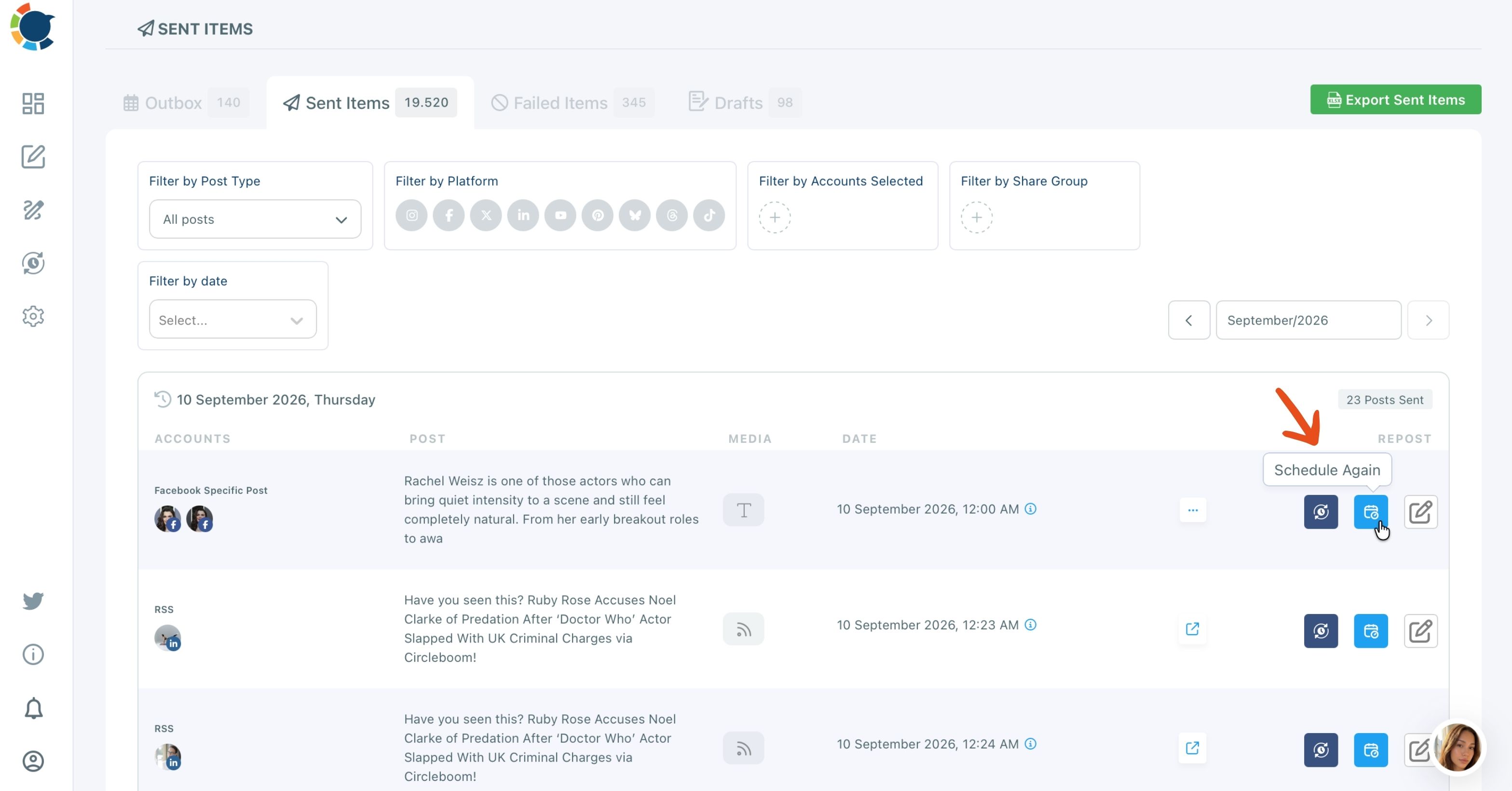
Editing the repost and sending it to the queue
From there I open the post for editing instead of sending it as it is. That is where the refresh happens: a rewritten hook, a swapped image or an updated detail.
I also check the account selection and any platform fields on the copy, because editing does not change the target account on its own.
Then it goes out like any new post, with Post Now, Schedule or Post to Queue. Most of my reposts go to the Queue, so they fill the next open slot without me picking a time.
The Queue is where reposts and new posts meet. Each account has recurring time slots in Time and Queue Settings, and Add Best Times to Post fills those slots with the times that account's own followers are most active.
A repost dropped into the Queue lands at one of those times automatically, so the second run gets a better shot at the early engagement every feed looks for.
Unlike rewriting a post from scratch, this keeps the parts you already know work and changes only what needs to look current. That is the whole reason to reuse old social media posts that already performed instead of drafting a new one on an empty day.
See it on X: a past top tweet brought back with a refreshed hook instead of a brand-new draft.
Building a shortlist of posts worth repeating
A shortlist is what turns reposting from a rescue move into a repeatable content repurposing strategy. I keep a standing list of proven, evergreen posts per platform, so on a day with nothing new ready, the answer is already written.
Evergreen is the filter that matters most. A post tied to a launch, a holiday or a news item expires.
A post that teaches something, answers a common question or states a lasting opinion does not. Our explainer on what an evergreen tweet is sets out the test I use before a post goes on the list.
Spacing reposts and moving winners to new formats
Spacing matters as much as selection. A proven post sent again too soon starts to look like spam to the people who did see it the first time. I space reposts out and rotate through the list rather than leaning on one favorite.
I also keep reposts a minority of the week. New posts are how an account finds out what works next, and reposts are how it keeps the calendar full in the meantime.
A feed that is all reruns tells followers nothing new is happening, which is its own kind of quiet.
A repost is only as strong as the data behind it. If a post never performed, sending it again just repeats a weak result, so the list gets pruned when the numbers say so.
Platforms differ in how reposting looks to followers. On Facebook, for example, sharing an older post again works differently from a fresh publish, and our guide on how to repost on Facebook walks through the native options.
Once a post has proven itself twice, it has earned a new format. That is the moment to cross post from Twitter to Instagram and give a winning tweet a second audience.
For the full workflow behind that move, our guide on how to turn tweets into Instagram posts and Reels covers it step by step.
Your best next post is already written
Content repurposing strategies usually ask what new thing you can make. The better first question is which proven post most of your audience has never seen.
Pick it from the numbers, change one real thing, and send it back out.
→ Repost your best content on a schedule
Questions about reusing old posts
How long should I wait before reposting a proven post?
Space reposts out rather than resending the same post within a short window, and rotate through a shortlist instead of repeating one favorite. On X, Circleboom blocks the same tweet from going out again within one week, so treat that as the minimum there, not the target.
Can I switch on Auto Repost for an old tweet?
No. Auto Repost on X, Bluesky and Threads is set in the composer before a post is sent and cannot be added to a post that is already published. To bring back an old post, use Repost From Sent Items instead.