
Ready to see who's been quietly leaving?
Circleboom Twitter's Who Unfollowed Me feature tracks every unfollow event on your account, shows you exactly who left and when, and lets you act on it directly from the dashboard.
See Who Unfollowed You →No. It never has.
Your follower count drops by one and that's the entire signal Twitter gives you. No name. No timestamp. No context. Just a number that's slightly smaller than it was before, and no way to know who left or when.
You might notice it if you're watching closely. You might not notice at all. Either way, the platform isn't going to tell you.
Circleboom Twitter fills that gap with its Who Unfollowed Me feature. It tracks your follower list over time, identifies every account that has unfollowed you, and lets you set up alerts so you're notified by email on a daily or weekly basis without having to log in and check manually.
 infocircleboom.com
Does Twitter notify you when someone unfollows you?
No, Twitter does not notify you when someone unfollows you. The platform provides no built-in way to see who unfollowed you, when it happened, or how many unfollows occurred in a given period.
The only visible change is a decrease in your follower count.
To get notified when someone unfollows you on Twitter, you need to use Circleboom Twitter, which tracks your follower list and sends unfollower alerts automatically.
infocircleboom.com
What Is Circleboom Twitter?
Circleboom is an Official X Enterprise Developer, which means it connects directly to X's official APIs. All follower data is sourced from public, verified API access. No scraping, no credential sharing, nothing outside the platform's compliance framework.

Here's what Circleboom Twitter gives you for follower management:
- See exactly which accounts have unfollowed you over any time period
- Set up daily or weekly email alerts for unfollow activity
- Filter unfollowers by follower count, account age, activity, and more
- Take direct action by unfollowing back
- Export your unfollowers list as a CSV file for deeper analysis
If Twitter won't tell you when someone unfollows you, Circleboom Twitter will.
How to See Who Unfollowed You on Twitter with Circleboom Twitter
Here’s how it works.
Step#1: As the first step, please go to Circleboom Twitter and login with your active e-mail address.
If you haven't got a Circleboom account yet, you can get one in almost no time!

Step#2: You will see the "Followers" tab on the left. Navigate to it!
Then you will see the "Who Unfollowed Me?" option there.
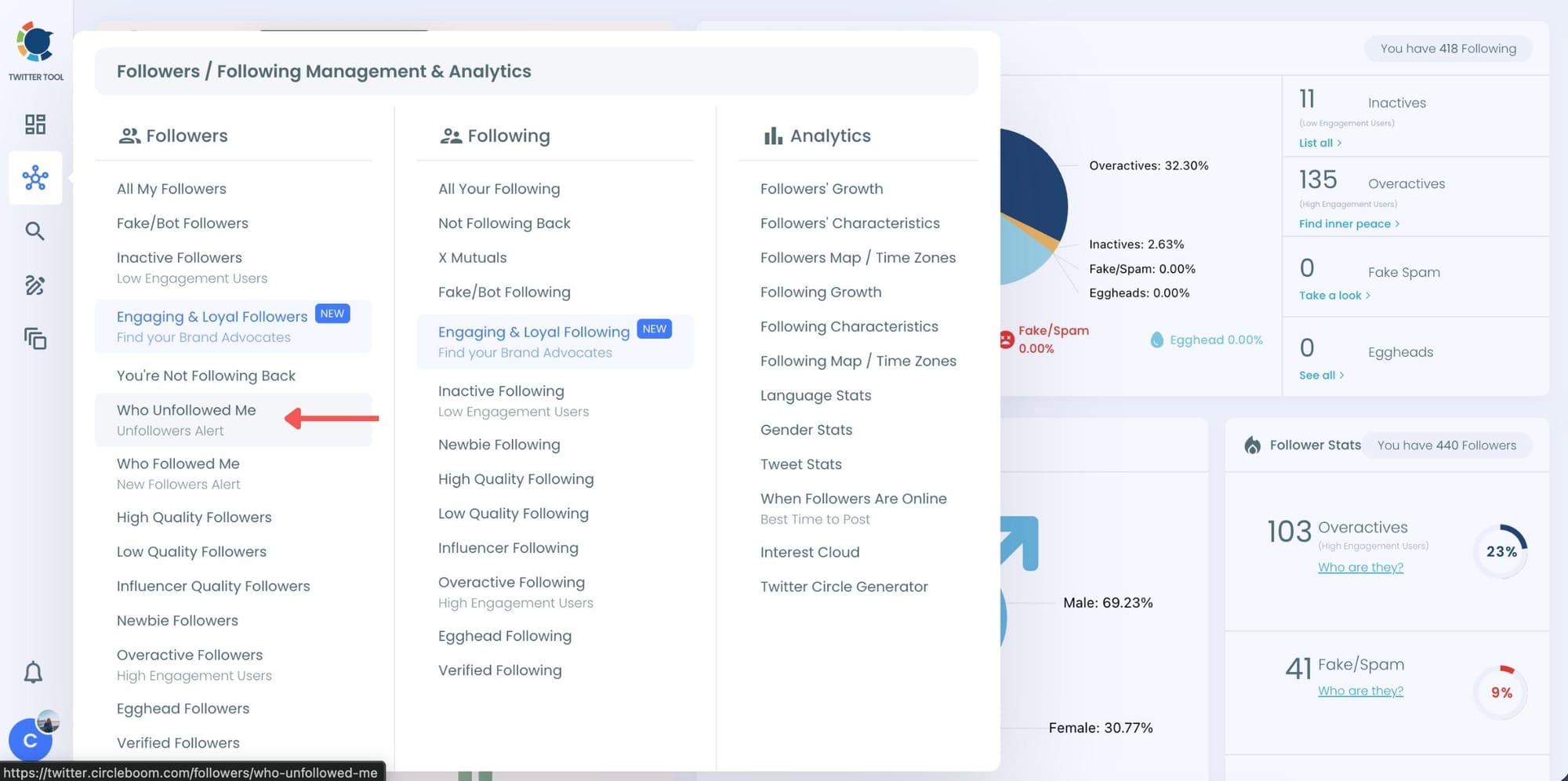
Step #3: You will be able to check your Twitter unfollowers. If you wish, you can visit their Twitter profile and unfollow them!
Here are your Twitter unfollowers identified by Circleboom:
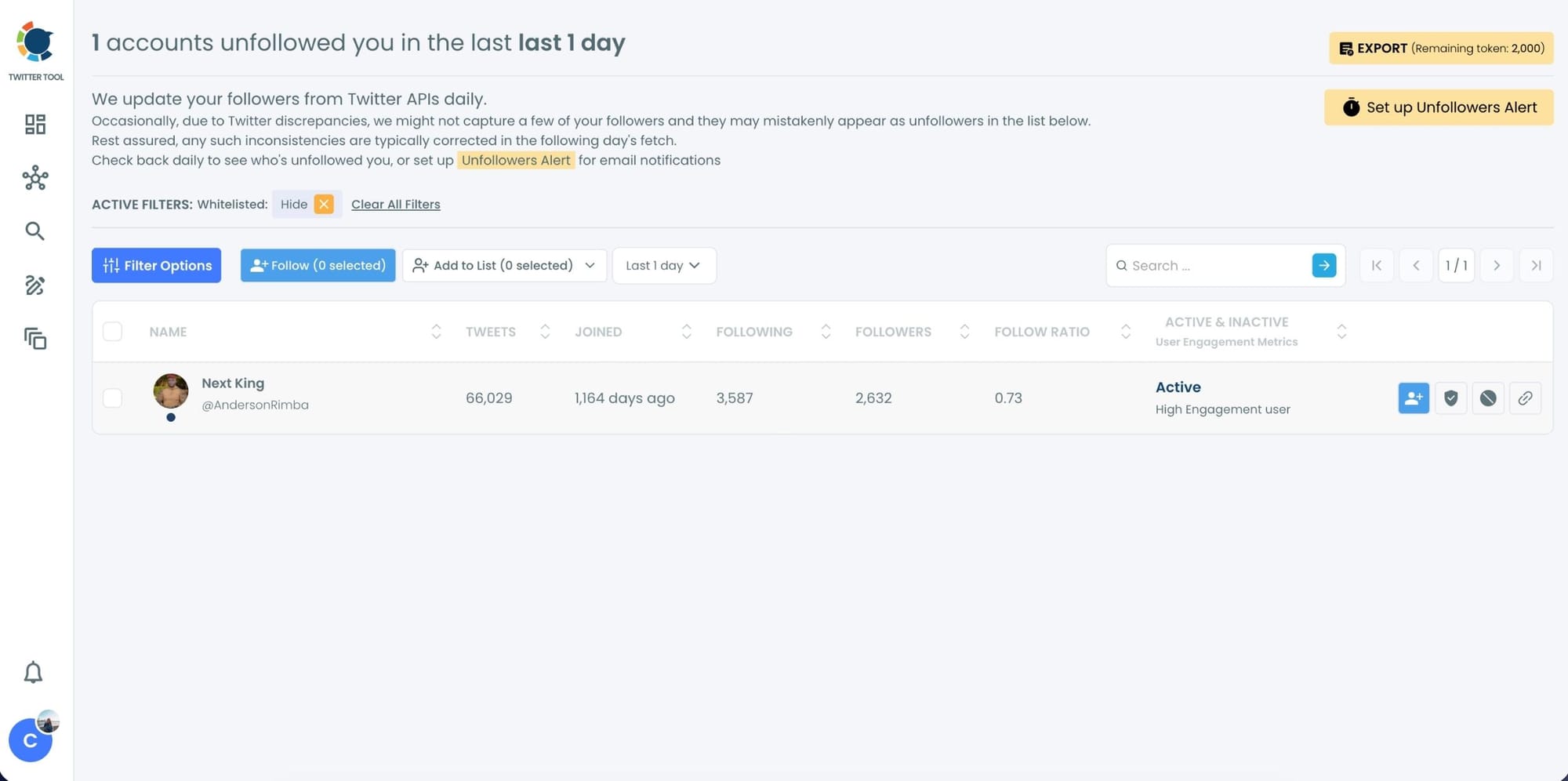
And, you can set up "Unfollowers Alert" to get notified immediately as someone unfollows you on Twitter!
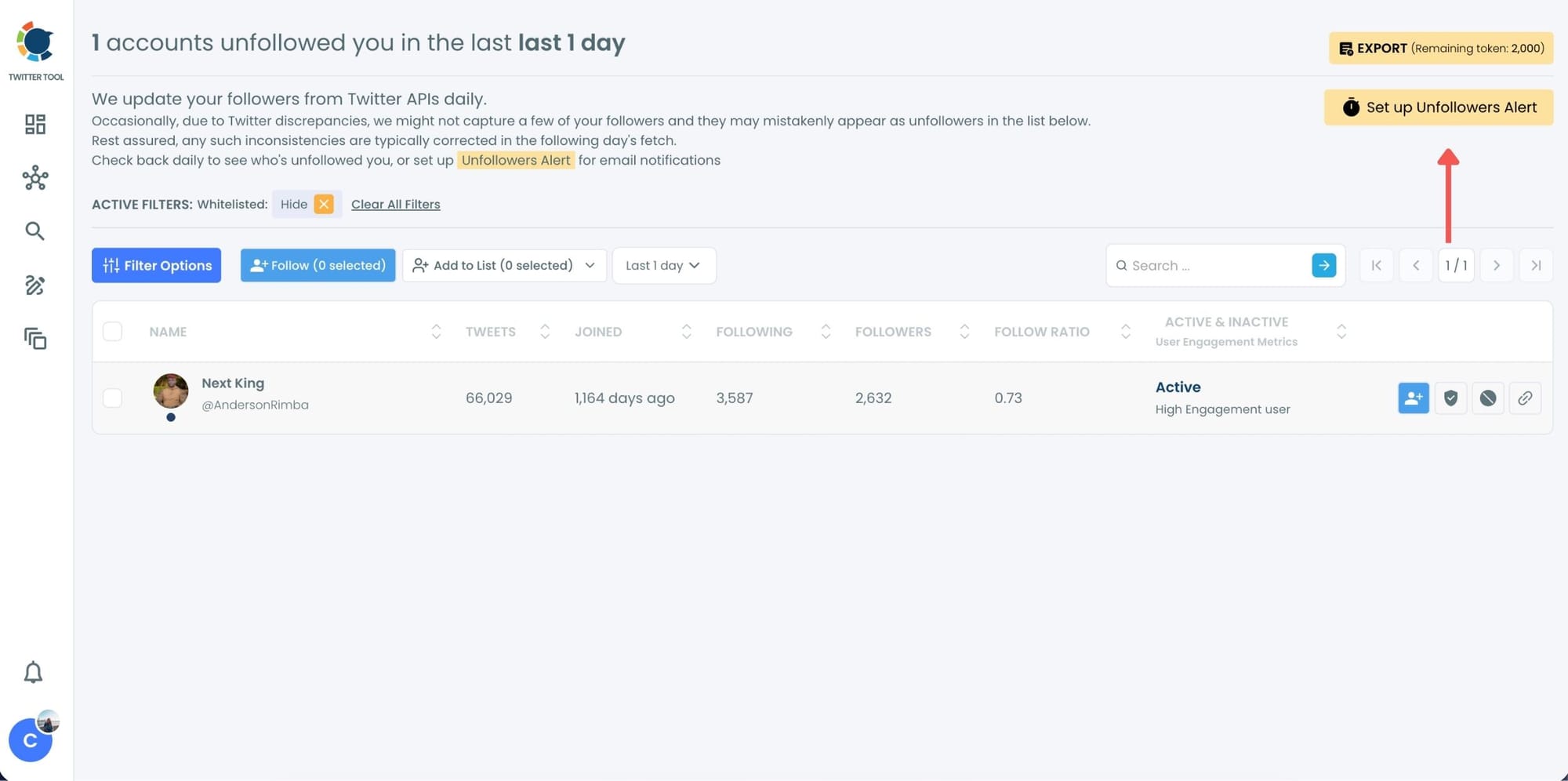
Set Up Unfollower Alerts (Daily or Weekly)
If you don’t want to check manually, Circleboom also offers Unfollower Alerts.
These alerts:
- Track unfollowers automatically
- Send you daily or weekly email reports
- Show exactly who unfollowed you during that period
How to Set Up Alerts:
1. Choose Unfollower Alert
2. Select daily or weekly frequency
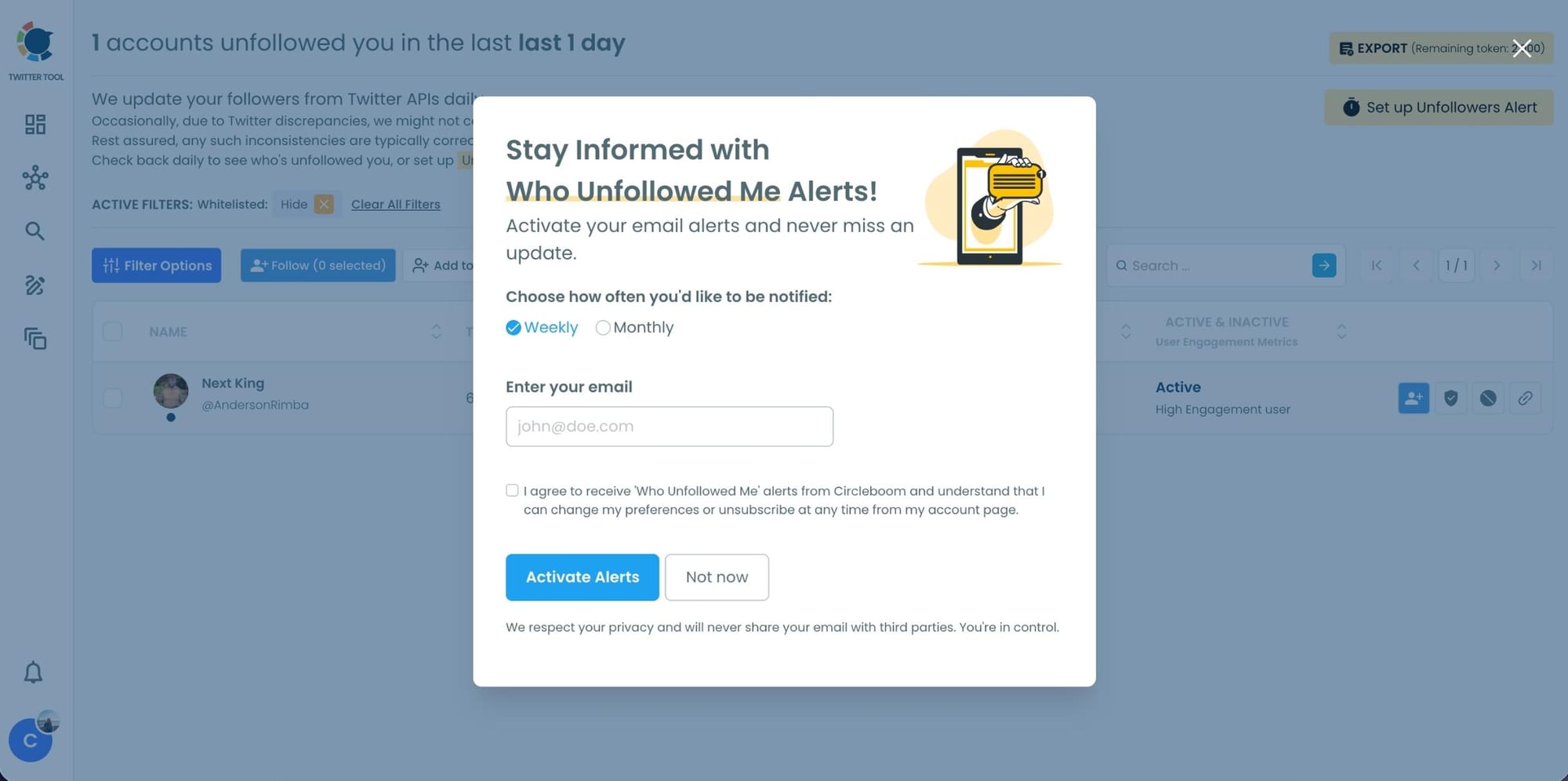
3. Receive email updates without logging in
It turns unfollowers from a surprise into routine data.
Why Twitter Doesn't Tell You Who Unfollowed You
This is a deliberate product decision, not an oversight.
Twitter made the choice early on not to notify users about unfollows. The reasoning is fairly obvious: if every unfollow triggered a notification, the platform would become more anxious and transactional. People would think twice before unfollowing anyone, which makes the whole system feel heavier than it needs to be. Keeping unfollows silent reduces friction.
That might be good product design for casual users. For anyone who actively manages an audience, it creates a real blind spot.
📌 The absence of unfollow notifications isn't a bug. It's been a consistent design choice since Twitter launched. The platform has added a lot of features over the years. Unfollow alerts have never been one of them.
The result is that your follower count is a number with no explanation attached. It goes up when people follow you. It goes down when they don't. But why it went down, and who made it go down, is completely invisible unless you have something tracking it.
What makes this harder is that follower counts fluctuate for multiple reasons. Accounts get suspended, deactivated, or deleted, and those get removed from your followers automatically. Someone could unfollow you deliberately, or their account could simply be gone. Without timestamps and names, there's no way to tell the difference.
What You Actually Get with Circleboom's Unfollower Alerts
Twitter gives you silence. Circleboom Twitter gives you three things it doesn't.
The list of who unfollowed you. Every account that previously followed you and no longer does is surfaced in a structured table. Each entry includes the username, display name, profile image, bio, follower count, following count, tweet count, account creation date, and activity indicators. You're not just seeing a name. You're seeing enough to understand who the account is and whether the unfollow is worth paying attention to.
The timeline of when it happened. You can filter unfollowers by the last day, last three days, last week, or last month. That means you can connect unfollow events to specific content, campaigns, or periods of inactivity. If you posted something on a Tuesday and saw a spike in unfollows the following two days, that's a pattern. Without timestamps, that connection is invisible.
Alerts that come to you. Once you enable unfollower alerts in Circleboom Twitter, you receive email summaries on the schedule you choose: daily or weekly. You don't need to log in to check. The data comes to you. That's the part that makes the difference for most people, because manually checking a follower list is something you do once and then forget about.
⚠️ One thing worth knowing: not every drop in follower count is a deliberate unfollow. Suspended accounts, deactivated profiles, and deleted accounts are all removed from your followers automatically.
Circleboom Twitter tracks the change either way, but a lost follower isn't always someone who chose to leave.
Why It Matters to Know Who Unfollowed You
Your follower count tells you almost nothing on its own. A count going down could mean your content isn't landing. It could mean you picked up a batch of low-quality followers who naturally churn out. It could mean nothing at all. Without the who and the when, the number is noise.
Sudden drops tied to specific content are actionable. If you post something and lose a noticeable number of followers in the next 24 hours, that's feedback. Maybe the topic was off-brand. Maybe the tone missed. Knowing when unfollows cluster helps you understand what your audience actually responds to, not just what gets likes.
Knowing who left helps you decide whether to unfollow back. If someone who you're following unfollows you, you might want to clean that up. One-sided follow relationships inflate your following count without providing any reciprocal engagement. Circleboom Twitter lets you take that action directly from the unfollower dashboard without switching tools.
Patterns across unfollowers can reveal audience mismatch. If the accounts leaving your audience consistently share a certain profile type, that tells you something about who you're attracting versus who's staying. That's the kind of signal that shapes a content strategy over time.
A smaller, engaged audience beats a larger, hollow one. Follower count means less than it used to. Accounts that follow and never engage are essentially invisible in the algorithm. Understanding churn, and reducing it, matters more than padding the number. Circleboom Twitter's Engaging and Loyal Followers feature shows you which followers are actually interacting with your content, so you can see the full picture alongside your unfollower data.
Frequently Asked Questions
Does Twitter notify you when someone unfollows you?
No. Twitter does not send any notification when an account unfollows you. The only visible indicator is a reduction in your follower count, and Twitter provides no way to see which account caused it or when it happened. Circleboom Twitter's Who Unfollowed Me feature was built specifically to solve this.
Can you see who unfollowed you on Twitter for free?
Circleboom Twitter offers a free trial that gives you access to the Who Unfollowed Me feature. After that, continued access requires a subscription. Twitter itself provides no free native tool to see unfollowers.
How do unfollower alerts work in Circleboom Twitter?
Once you enable alerts in Circleboom Twitter, the system monitors your follower list continuously. When accounts are detected as unfollowers, you receive an email summary on the schedule you've set, either daily or weekly. You don't need to log in or check the dashboard manually for the alerts to work.
Will the person who unfollowed me know I checked?
No. Viewing your unfollower list in Circleboom Twitter does not notify the account that unfollowed you. It's the same as looking at your own follower list. No notification is triggered on their end.
Does Circleboom show historical unfollowers or only from when I start tracking?
Circleboom Twitter captures unfollow data from the point you connect your account. For unfollows that happened before you started using the tool, historical data depends on what was already captured. Going forward, all unfollow events are tracked and timestamped automatically.
What's the difference between an unfollow and a block?
When someone unfollows you, they stop seeing your tweets in their feed but your account remains visible to them. When someone blocks you, they cannot see your profile or tweets and you cannot see theirs. Both result in a loss of a follower, but a block is a more deliberate and complete disconnection. Circleboom Twitter tracks unfollows specifically, not blocks.
How often should I check my unfollowers?
With email alerts set up in Circleboom Twitter, you don't need to check at all. The summaries come to you. If you prefer to review the data yourself, looking at it weekly gives you enough of a time window to spot patterns without reacting to individual events that might not be meaningful.
Final Thoughts
Twitter's silence on unfollows is intentional and it's not changing. The platform decided a long time ago that you don't need to know, and that decision has held.
But you do have options. Circleboom Twitter's Who Unfollowed Me feature gives you the name, the timing, and the alerts that Twitter keeps to itself. Set it up once, choose your alert schedule, and you'll never have to wonder who left again.
See who unfollowed you on Twitter and set up automatic alerts with Circleboom Twitter.
infocircleboom.com
