Most free social media analytics tools are not short on data. What they lack is the connection between your platforms, and between a post and the sale it led to.
Free native tools: one platform per dashboard, no view of which post led to a sale. Circleboom Publish: shows post analytics, best posting times and UTM-tagged links for X, Instagram, Facebook, LinkedIn and six more platforms in one place.
→ Get social media analytics for every platform in one place
The free options, their gaps and a decision tree for your setup follow.
How I built this comparison
I compared the free social media analytics tools a small business or solo marketer already has access to: Meta's insights for Facebook and Instagram, LinkedIn Page analytics, YouTube Analytics, TikTok Studio, X's own analytics and Google Analytics. Circleboom Post Analytics sits in the table as the paid option they get measured against.
All facts were checked on October 28, 2026, against each platform's own help center and Circleboom's feature documentation.
The five criteria I used:
- Platforms per dashboard: does one view cover more than one network?
- Post-level depth: is there a per-post table and video retention data?
- Timing: are posting times based on your own audience?
- After the click: can you see which post sent a visit or a sale?
- Cost: what is free, and what needs a plan?
Sources and limits of this comparison
A note on evidence: I did not run new first-hand tests of each native dashboard for this piece. X's and Meta's help pages could not be read in full when I checked, so those rows stay general and carry no quotes.
Freemium scheduler plans are left out on purpose, because their free tiers change often and I could not verify them.
Native tools matter because the audiences are large. Pew Research Center's 2026 figures on social media use put YouTube at 84% of U.S. adults and Facebook at 70%.
Those audiences rarely live on one platform, which is why the real test is whether you can compare post analytics across all your platforms side by side.
Free social media analytics tools at a glance
| Tool | What you get free | Main gap | Best for |
|---|---|---|---|
| Meta Business Suite | Facebook and Instagram insights | Meta platforms only | Pages and professional accounts |
| LinkedIn Page analytics | Content, followers, visitors, competitors | LinkedIn Pages only | Company Pages |
| YouTube Analytics | Reach, engagement, audience tabs | YouTube only | Channels of any size |
| TikTok Studio | Built-in account analytics | TikTok only | TikTok creators |
| Google Analytics | Website traffic by UTM campaign | No on-platform engagement | Proving clicks and sales |
| Circleboom Post Analytics | Trial offer at time of writing | Paid after the trial | Several platforms in one view |
The table settles one thing fast: every free option is strong inside its own platform and blind outside it.
Meta's free insights cover Facebook and Instagram
Meta's own insights come with a Facebook Page or an Instagram professional account at no charge, and Meta Business Suite gathers both in one place. For a business that lives on Facebook and Instagram, that is a solid free starting point.
The value is real. Facebook's reactions and Instagram's saves and shares are the signals that matter most on those platforms, and Meta reports them natively.
The gap is the edge of Meta's world. Your LinkedIn Page, YouTube channel and Pinterest boards are not in it, and neither is the visit a post sent to your website.
LinkedIn Page analytics is free for every Page admin
LinkedIn's own Page analytics cover Content, Followers, Visitors, Search appearances, Competitors, Employer brand and Newsletter, and LinkedIn says they are available for all Page admin roles.
For a B2B company, the Competitors tab is the stand-out free feature, because it benchmarks your Page against others in your field.
The limits: it covers Company Pages, so a founder's personal Profile is read somewhere else, and nothing in it follows a click to your site.
YouTube Analytics is the deepest free dashboard
YouTube Analytics gives you more for free than any other native tool. Google's guide to getting started with YouTube Analytics lists Overview, Reach, Engagement, Audience, Content, Revenue and Trends tabs, with impressions and click-through rate under Reach and watch time under Engagement.
Revenue appears only for channels in the YouTube Partner Program. Everything else is open to any channel.
If your audience is mostly on YouTube, start here and pay for nothing until you post somewhere else as well.
TikTok Studio gives creators a built-in view
TikTok Studio includes built-in analytics for your own account and content. I could not read TikTok's support page in full when I checked, so look there for the current list of metrics before you plan around a specific one.
The structural gap is the same as everywhere else: TikTok numbers stay inside TikTok.
X analytics and the Premium question
X is the platform where "free" is hardest to pin down. If the native dashboard sits behind Premium on your account, the guide on how to check analytics on Twitter without Premium covers the alternative route.
See it live: what X analytics looks like when the native dashboard sits behind Premium, and the official route around it.
That route runs through Circleboom, an official X Enterprise Developer, so the numbers come through approved access instead of scraping. For a single post, the free tweet engagement calculator works out its engagement rate.
For accounts where X is the main channel, Twitter post analytics in Circleboom Twitter goes deeper on impressions, engagement and video.
If you want the wider field, the roundup of the best Twitter analytics tools compares the options for X specifically.
Google Analytics is free, but only sees what you tag
Google Analytics is the one free tool that can show which social post led to a visit or a sale. It does that only when the link was tagged before it was shared.
Google's guide to collecting campaign data with custom URLs says to always use utm_source, utm_medium and utm_campaign. It also notes the values are case-sensitive, and the tagged traffic shows up in the Traffic acquisition report.
Without tags, social traffic arrives as generic "social" or "referral," and no report can trace it back to a post. Google Analytics also shows nothing about likes, saves or watch time, so it is half of the picture by design.
Tagging only pays off when it is consistent. Use one campaign name for one promotion and a different source for each platform, and a launch week splits cleanly in the report: you see which platform sent the buyers, not just which one has the most followers.
Mixed spellings break that split, because the values are case-sensitive.
What every free analytics tool leaves out
Free social media analytics tools share three gaps, and none of them is a bug. Each tool is built to serve its own platform:
- One platform per dashboard. Comparing Instagram with LinkedIn means two tabs, two date pickers and a spreadsheet.
- No line from a post to a sale. Native tools stop at the click, and Google Analytics sees the click only when the link was tagged.
- No timing from your own audience across platforms. Each app reports its own numbers, and none of them suggests when to post on all your accounts at once.
Free tools tell you how each platform did; they cannot tell you which platform paid off.
The first gap also costs time. As an illustrative calculation, a monthly review across four platforms means four logins, four date ranges and four exports, then a spreadsheet to line them up before you can compare a single post.
That work repeats every month, and it is the first job to slip when a week gets busy.
History is the quiet fourth gap. Native windows favor the recent past. To see growth over months, the post on a free way to track Twitter follower growth shows what that takes on X.
Circleboom Post Analytics: what paying adds
Circleboom Publish gives every platform it supports the same three-part analytics view: Best Time to Post, Audience Analytics and Content Performance Analytics. If you post on several networks, it lets you track engagement, timing and clicks in one analytics tool instead of opening each app.
Content Performance Analytics has three parts:
- Overview and Graphs: 7D, 2W, 4W, 3M, 1Y or a custom range, two metrics charted at once, with the change against the previous period.
- Post Engagement Analytics: every published post in one table you can sort by any metric.
- Video Analytics: how many viewers stay to 25%, 50%, 75% and 100% of each video, from the start.
Audience Analytics adds follower growth, characteristics, a map, language and gender stats and an interest cloud for each platform.
Timing from each account's own followers
Best Time to Post reads the connected account's own followers, when they are online and engaging, instead of a generic chart. The suggestions sit in the Schedule modal of every composer as "Pick your best post time," on all ten platforms, Google Business Profile included.
That is the gap native tools cannot close, because each one sees only its own app.
The after-the-click half
The UTM Link Builder fills the second gap from inside the composer. Paste a link, click the link icon next to it, fill in Source, Medium, Name and, if you like, Content, and the tagged URL replaces the original link in the post.
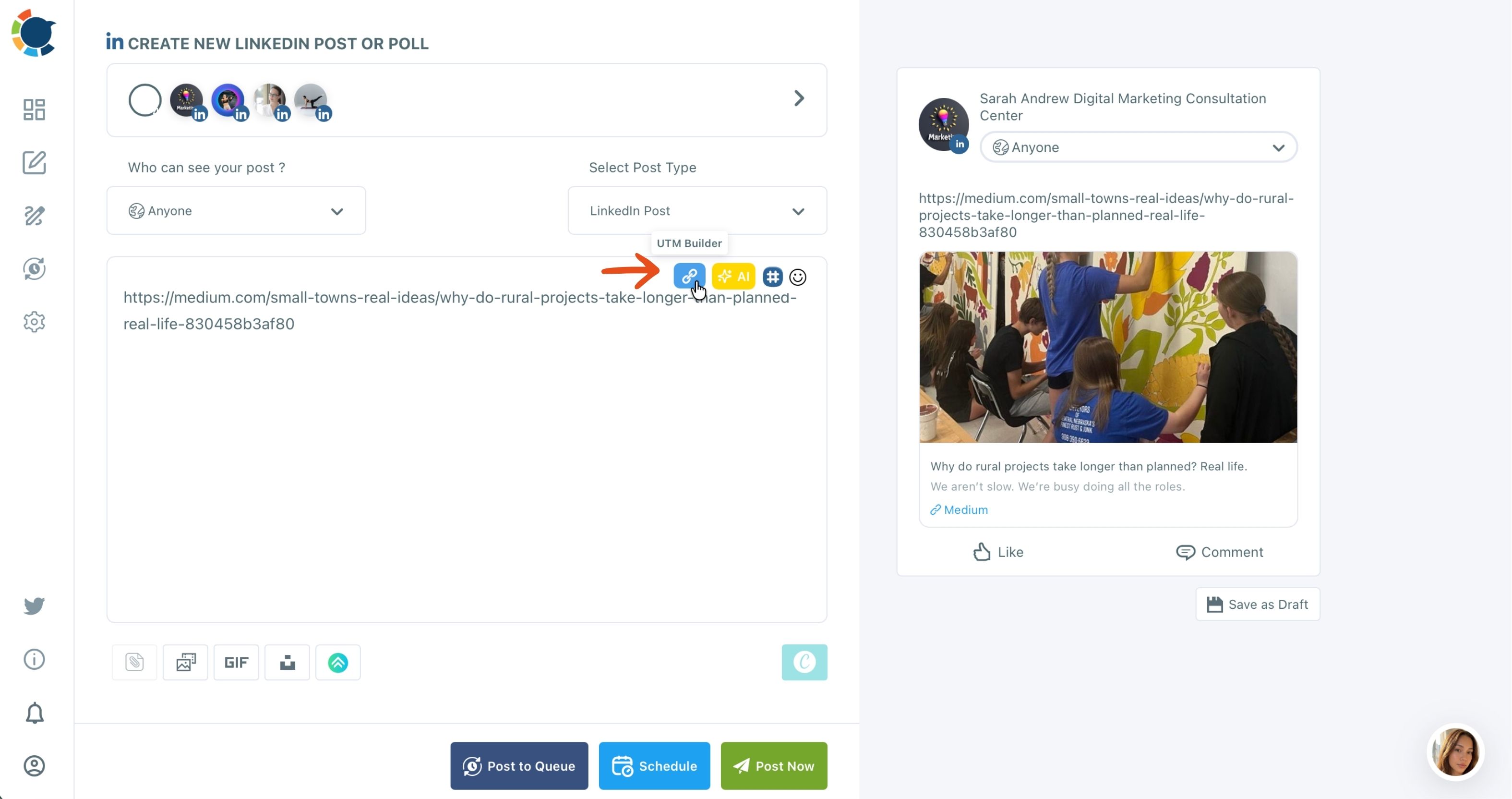
The clicks then show up in Google Analytics, not inside Circleboom. The two views work as a pair: Circleboom shows what happened on the platform, and Google Analytics shows what happened after the click.
Acting on the numbers in the same tool
The engagement table is not a dead end. From it you can reschedule a post or rewrite it with AI, and a proven post goes back out through Repost From Sent Items.
A free dashboard shows you the winner; this setup lets you reuse it in the next minute.
On cost: at the time of writing, Circleboom's pricing page shows a 90-day free offer. Plan prices change, so check the page itself before you decide.
Which free social media analytics tools are worth using?
The free social media analytics tools are worth using for as long as you post on one platform and do not sell through links. On the five criteria, my verdict is:
- Meta Business Suite: best for a business that lives on Facebook and Instagram.
- LinkedIn Page analytics: best for Company Pages, including the free Competitors view.
- YouTube Analytics: best for channels, and the deepest free dashboard here.
- Google Analytics: best for proving clicks and sales, as long as every link is tagged.
- Circleboom Post Analytics: best for several platforms read side by side, plus timing and tagging.
TikTok Studio and X's own analytics fit the same pattern as the first three: strong inside the platform, silent outside it.
The upgrade point is not a follower count. It is the second platform, or the first link you need to prove.
Pick your analytics setup by situation
Use this decision tree to settle it in one read:
- If you post on one platform and sell nothing through links: that platform's native analytics is enough.
- If YouTube is your main channel: YouTube Analytics covers almost everything for free.
- If you sell through links on any platform: add Google Analytics and tag every link before it goes out.
- If you post on two or more platforms: free tools mean one tab per platform, and a cross-platform view starts paying for itself.
- If you post on several platforms and sell through links: you need timing, per-post data and tagged links in one place.
That last group is who paid analytics is built for: one view, no extra tabs, and every link traceable.
→ Move past free analytics tools to cross-platform post analytics
Questions about free analytics tools
I found my best post in a free dashboard, so what now?
Put it back in front of people with a small refresh. In Circleboom Publish, Repost From Sent Items resends a published post as-is or edited, so a proven post fills a gap in the calendar instead of staying buried.
Is social media analytics the same as social media monitoring?
No. Analytics measures how your own posts and accounts performed, while monitoring tracks mentions and conversations about you elsewhere. The guide to social media monitoring tools covers that second job.
Are there free Twitter analytics tools for follower stats?
Yes, several cover follower stats on X at no cost, and the list of Twitter analytics tools for follower stats compares them by what they track.