
Publishing a blog post is only part of the work. If people don’t see it, even the best article can go unnoticed.
Many bloggers try to promote every new post on Twitter/X manually. They copy the link, write a tweet, and share it. This works, but it also becomes repetitive. If you publish frequently, it’s easy to forget promoting some posts.
A much easier solution is to automatically share your blog posts on Twitter.
You can do this by connecting your blog’s RSS feed to your Twitter account. Once the connection is set up, every time you publish a new article, it can be shared automatically on your social media.
This is exactly what I do with Circleboom Publish.

Circleboom Publish allows you to connect your RSS feed to your social media accounts so your blog posts are shared automatically. It’s also an official X Enterprise Developer, which means it works using the official platform infrastructure.
And it’s not limited to Twitter. You can connect your RSS feed to multiple platforms including Facebook, LinkedIn, Bluesky, Threads, Google Business Profile, and Pinterest.
What Is an RSS Feed?
An RSS feed is a special link that updates whenever new content is published on your website.
Most blogging platforms like WordPress automatically generate an RSS feed for your blog. This feed contains your latest posts and updates each time you publish something new.
Automation tools can read this feed. When a new article appears, they detect it and share it on connected social media accounts.
In simple terms, the RSS feed acts as a bridge between your blog and your social media platforms.
This allows you to promote every blog post automatically without having to share it manually.
How to Automatically Post Blog Content to Twitter with Circleboom Publish
Setting up RSS automation with Circleboom Publish only takes a few steps.
Step #1: Go to Circleboom Publish, and log in with your Circleboom account.
Don't have one yet? No worries, get yours in secs!

Step #2: Once you log in, add your Twitter/X account(s) to continue. Your other options are Facebook, Instagram, LinkedIn, Pinterest, Threads, Google My Business, and YouTube.
All these will take only a few seconds, nothing more.

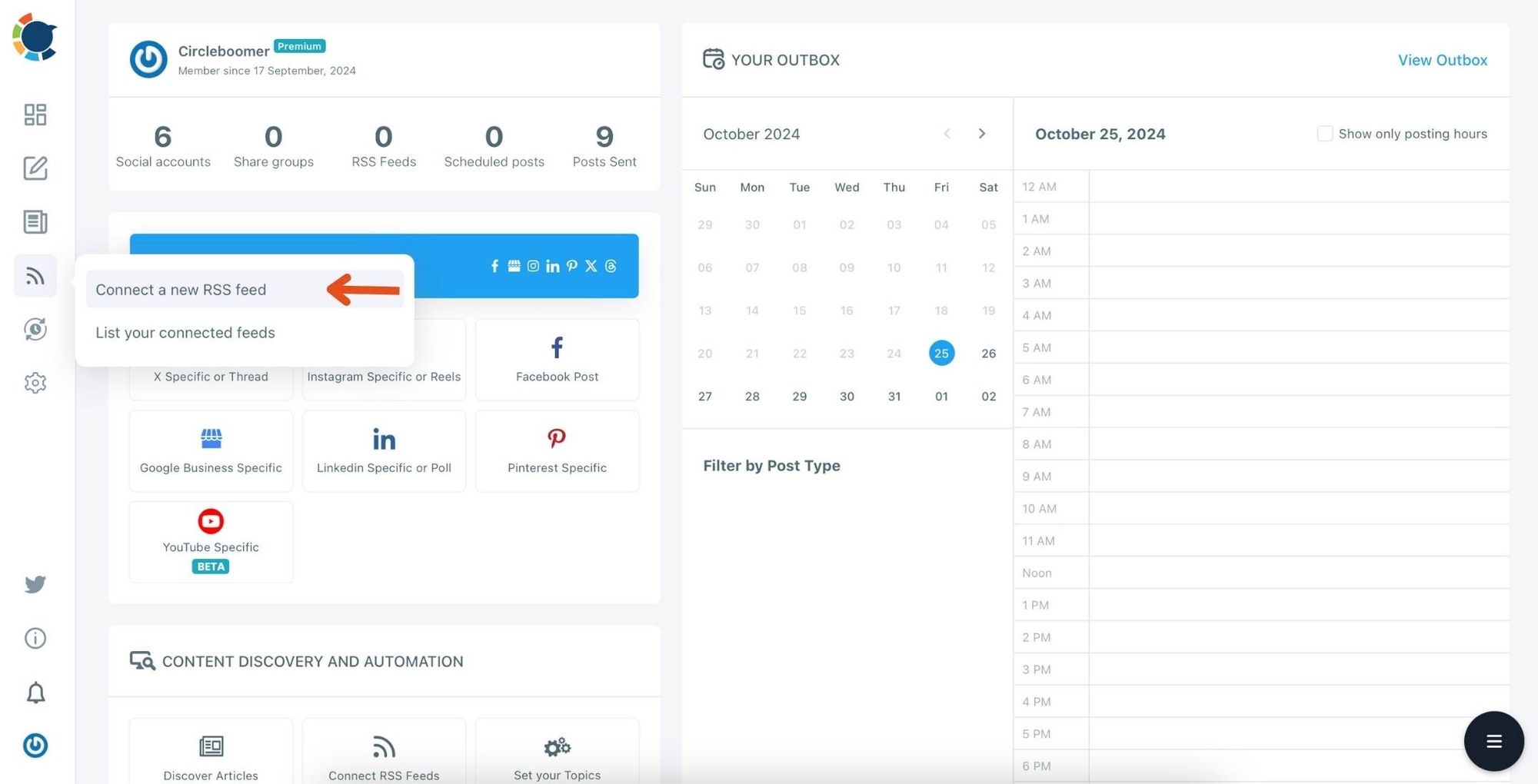
Step #3: Click on the "Connect a New RSS Feeds" on the left-hand menu.
Or you can continue with the "Connect RSS Feeds" button on the bottom of the dashboard.
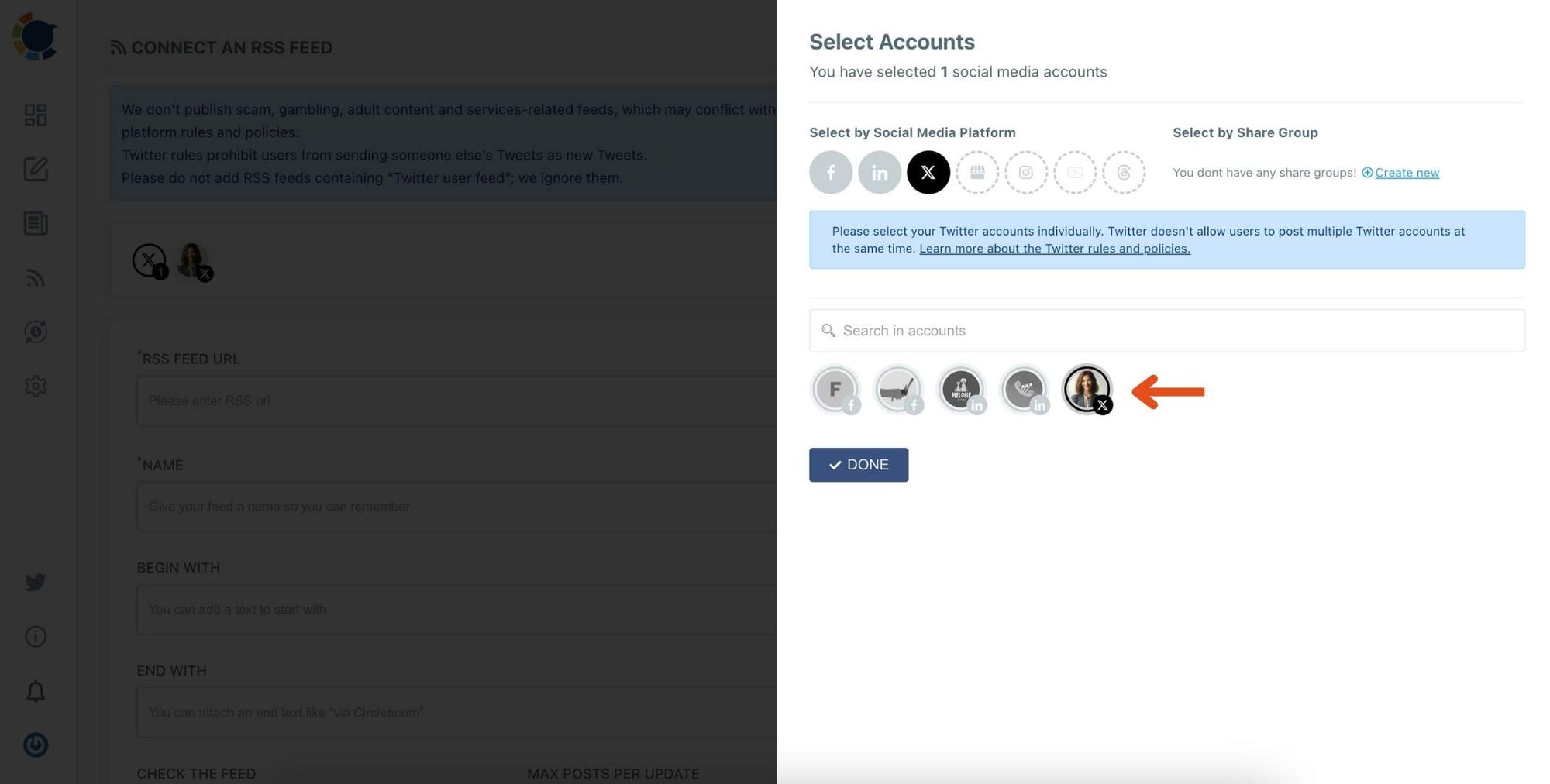
Step #4: Here, you need to select the Twitter account to which you want to connect RSS feeds. To do this, you should first click on the "Select Account" tab.
Then, pick up the Twitter accounts that you want to auto-post from RSS feeds.
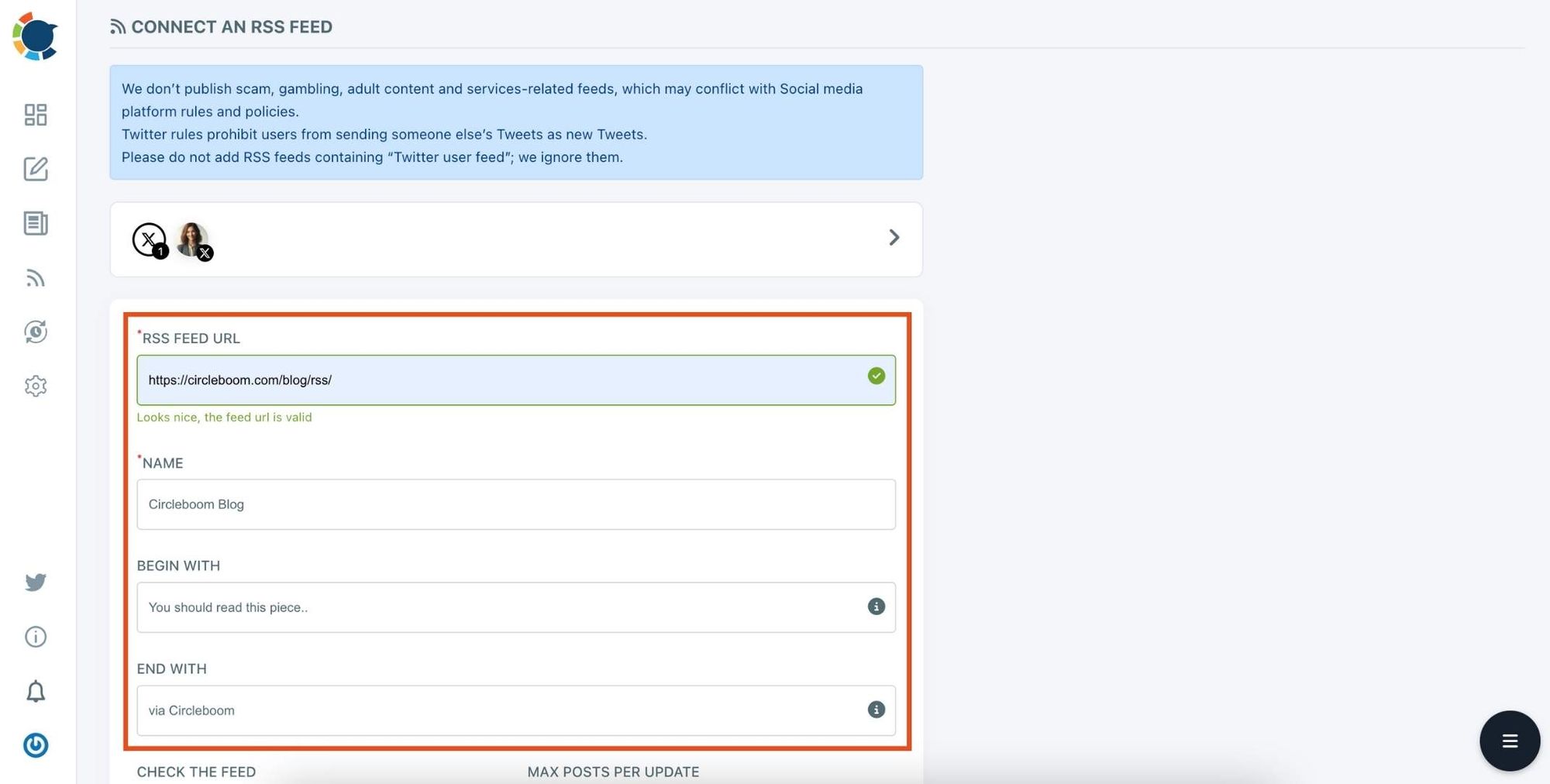
Step #5: Now, add your RSS feeds to the "RSS FEED URL" box to connect them to your Twitter account.
You can also name the feed you want to auto-post to Twitter or add a specific text to publish with RSS tweets.
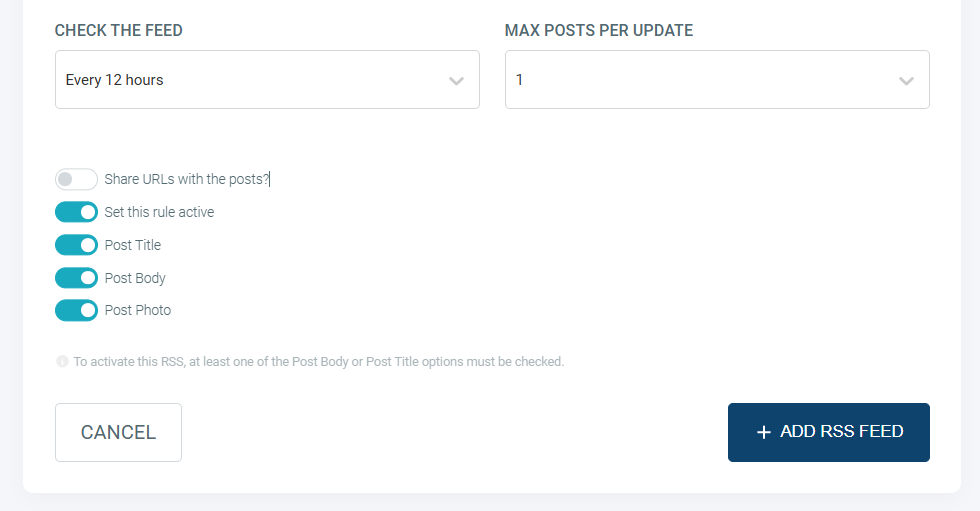
Step #6: Then, you can set time intervals and frequency to auto-post from RSS Feeds. Once you complete all the steps, finish the process by clicking on the "+ ADD RSS FEED" button.
Auto-posting RSS Feeds to Twitter is that easy!
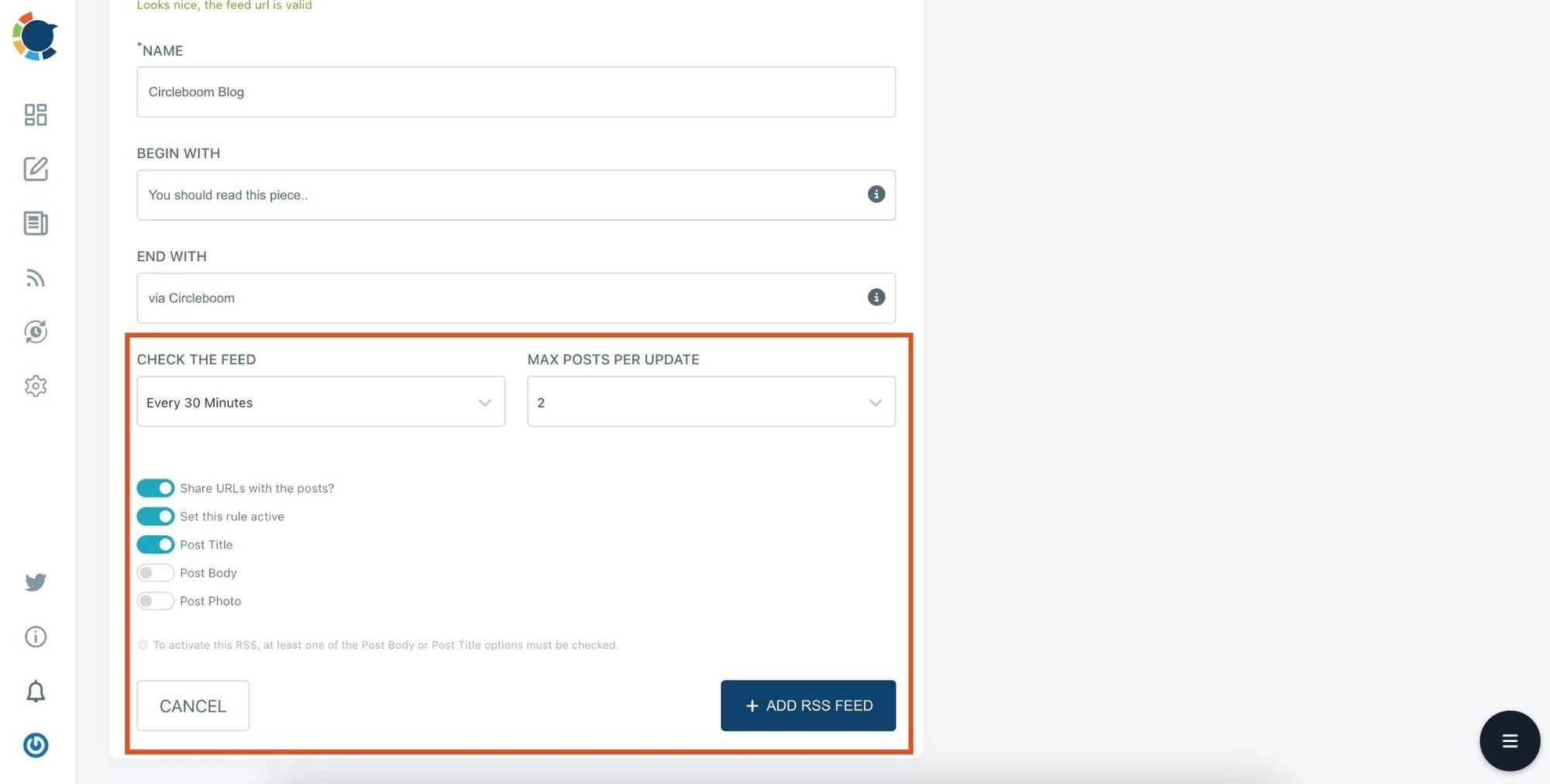
You can add multiple RSS feeds by following these steps!
Why I Use Circleboom Publish
There are many tools that can automate content sharing, but I use Circleboom Publish.
Circleboom Publish is an official X Enterprise Developer, which means it works directly with the official X platform infrastructure.
With Circleboom Publish, you can connect your RSS feed and automatically share your blog posts across multiple platforms.
 infocircleboom.com
Besides Twitter/X, it also supports:
- Bluesky
- Threads
- Google Business Profile
This means a single blog post can automatically reach multiple social networks without needing to manually post on each platform.
Instead of promoting content one by one, everything can be managed from one dashboard.
Why Automatically Sharing Blog Posts on Twitter Helps
Automatically posting blog content to Twitter has several advantages.
➡️ It saves time. You don’t need to manually create a tweet every time you publish a new article.
➡️ It ensures consistency. Every blog post gets promoted, which means you never forget to share an article.
➡️ It helps keep your Twitter/X account active. Regular posts make your profile look more active and can bring more attention to your content.
Finally, it helps drive traffic to your blog. When your articles are automatically shared, more people have the chance to discover them.
Final Thoughts
Promoting blog posts manually on Twitter can quickly become repetitive, especially if you publish frequently.
By connecting your blog’s RSS feed, you can automate the entire process and make sure every article gets shared.
This is why I use Circleboom Publish. It allows me to connect my RSS feed and automatically share new blog posts on Twitter and other social platforms.
Once the setup is complete, every new article gets promoted automatically, helping bring more visibility and traffic to the blog without extra work.