

Managing multiple Twitter accounts sounds simple until you try to post every single day.
I run more than one X account and staying active daily is not optional if you want reach, engagement, and growth. But posting manually every day quickly turns into a routine that eats your time.
Writing tweets, choosing posting times, switching accounts, repeating the same steps again and again… it doesn’t scale.
That’s why I don’t post tweets manually anymore.
Instead, I bulk schedule my tweets. I prepare everything in advance, upload them once, and let them publish automatically. This workflow is only possible with Circleboom Twitter, because X itself does not provide a real bulk scheduling option.
Keep in mind that the API provides a more accurate real-time data stream than the X interface itself. While the platform UI may experience lag, the API captures and reflects new developments instantaneously.
Circleboom has the official Enterprise API, we don't scrape data from X!

What bulk scheduling really means
Bulk scheduling is not just scheduling one tweet and picking a time.
It means preparing dozens or even hundreds of tweets in one go and scheduling them all at once. You write your content in batches, organize it properly, upload it, and then step away from daily posting.
Once the schedule is set, tweets go live automatically without you needing to log in every day.
For anyone managing multiple accounts or posting daily, this completely changes how you work.
Why I bulk schedule tweets instead of posting daily
The biggest reason is consistency without pressure.
When you post manually, missing a day is easy.
You get busy, tired, or distracted, and suddenly your account goes silent. With bulk scheduling, your timeline stays active even when you are not.
Other reasons bulk scheduling matters:
- You save hours every week by working in batches
- You can plan content calmly instead of rushing daily
- You reduce mistakes because you review everything before publishing
- You stay active during holidays, travel, or busy periods
- You can manage multiple accounts from one workflow
Once you experience this, going back to daily manual posting feels unnecessary.
 Kevin Frank
The limitation of X: no real bulk scheduling
X allows you to schedule individual tweets, but that’s where it ends.
⛔ There is no native feature that lets you upload a list of tweets and schedule them all at once. There is no CSV upload. There is no bulk planner. Everything has to be done one by one.
If you are posting frequently or managing multiple accounts, this becomes repetitive and inefficient very quickly.
That gap is exactly why I use Circleboom Twitter. ⬇️
The tool I use: Circleboom Twitter
Circleboom Twitter is an official X Enterprise developer, which matters when you care about account safety and proper API usage.

More importantly, it solves the bulk scheduling problem properly.
With Circleboom Twitter, you can:
➡️ Upload tweets using a CSV file
➡️ Automatically schedule and publish posts
➡️ Manage multiple Twitter accounts from one dashboard
➡️ Plan content days or weeks ahead without manual posting
Instead of writing and scheduling tweets one by one, you prepare your content once and upload it.
How bulk scheduling works inside Circleboom Twitter
The system is simple and practical.
You create a CSV file where each row represents a tweet. In that file, you define the tweet text and the publish time. If you want, you can also include links or media URLs.
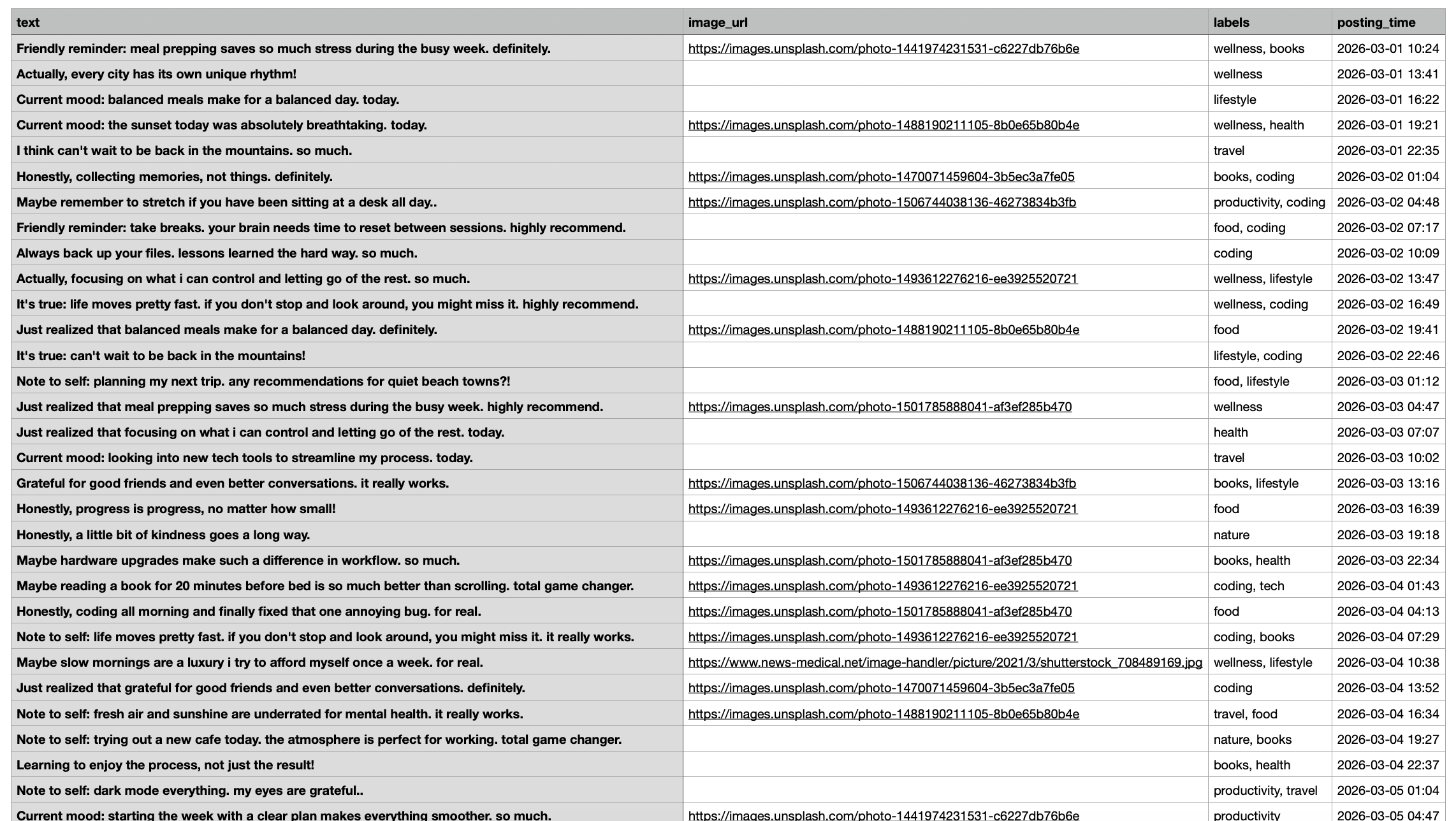
Once the file is ready, you upload it to Circleboom Twitter.
Circleboom reads the file, turns each row into a scheduled tweet, and places them on your calendar. From there, tweets are published automatically based on the times you set.
 infocircleboom.com
No daily posting. No reminders. No manual work.
What you can include in a bulk tweet upload
Bulk scheduling is flexible, not restrictive.
In a CSV upload, you can include:
✅ Tweet text for each post
✅ Different posting times for different days
 Fatih Kemal Oksuzoglu
✅ Links to blogs, products, or campaigns
✅ Media via public image URLs if needed
This makes it ideal for evergreen content, campaigns, announcements, and long-term posting plans.
How to Bulk Schedule Tweets Step by Step
Step #1: After logging in to Circleboom Twitter, click Bulk Schedule
This opens the bulk scheduling interface and allows you to import multiple tweets at once instead of creating them one by one.

Step #2: Upload your CSV file
Upload your CSV file by dragging it into the upload area or selecting it from your computer.
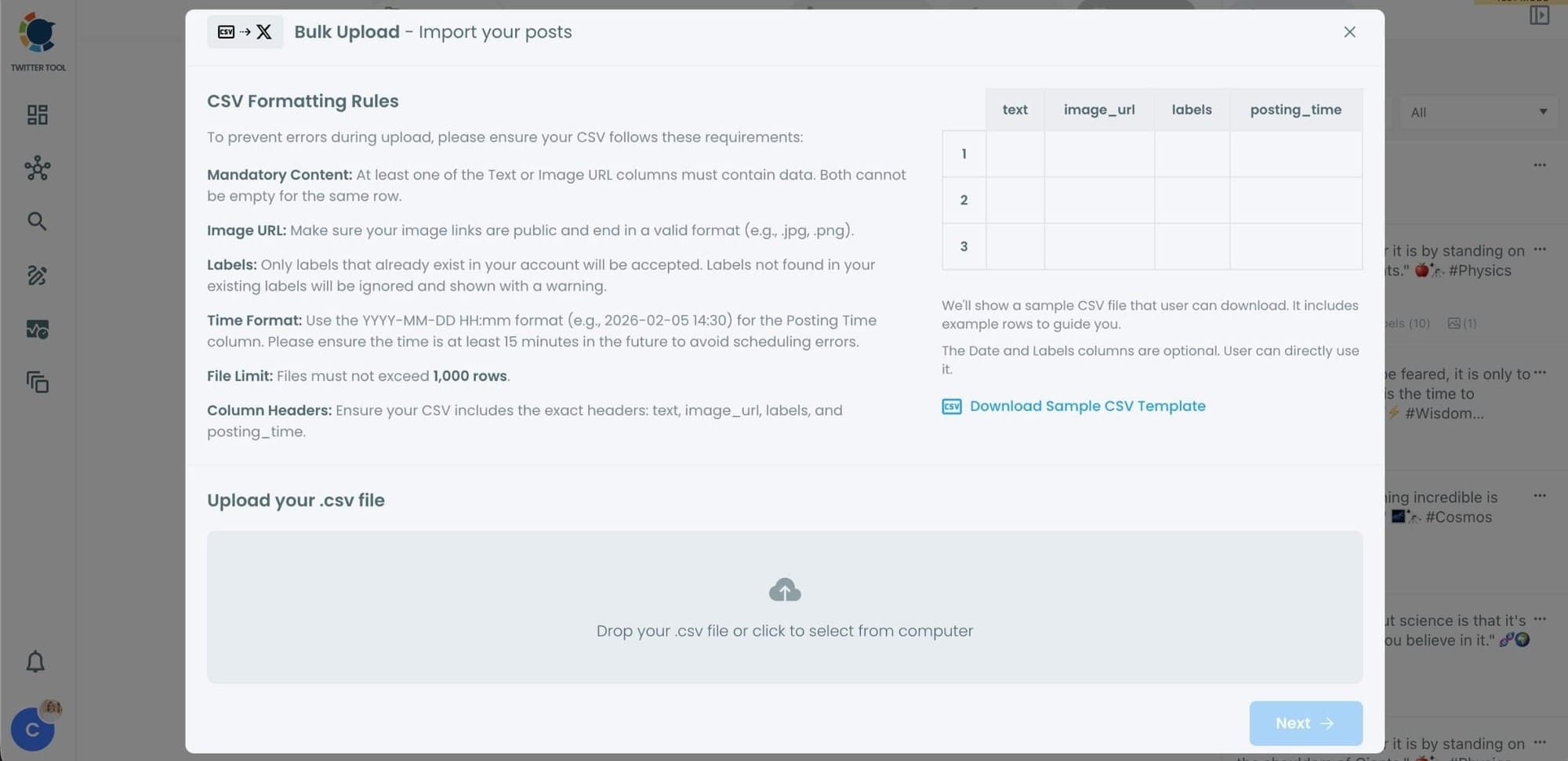
Before uploading, make sure your CSV file follows the required format.
Your file should include the correct column headers, and each row should represent a single tweet.
You can include tweet text, image URLs, labels, and posting times.
Preparing the file in the correct format prevents errors during scheduling.
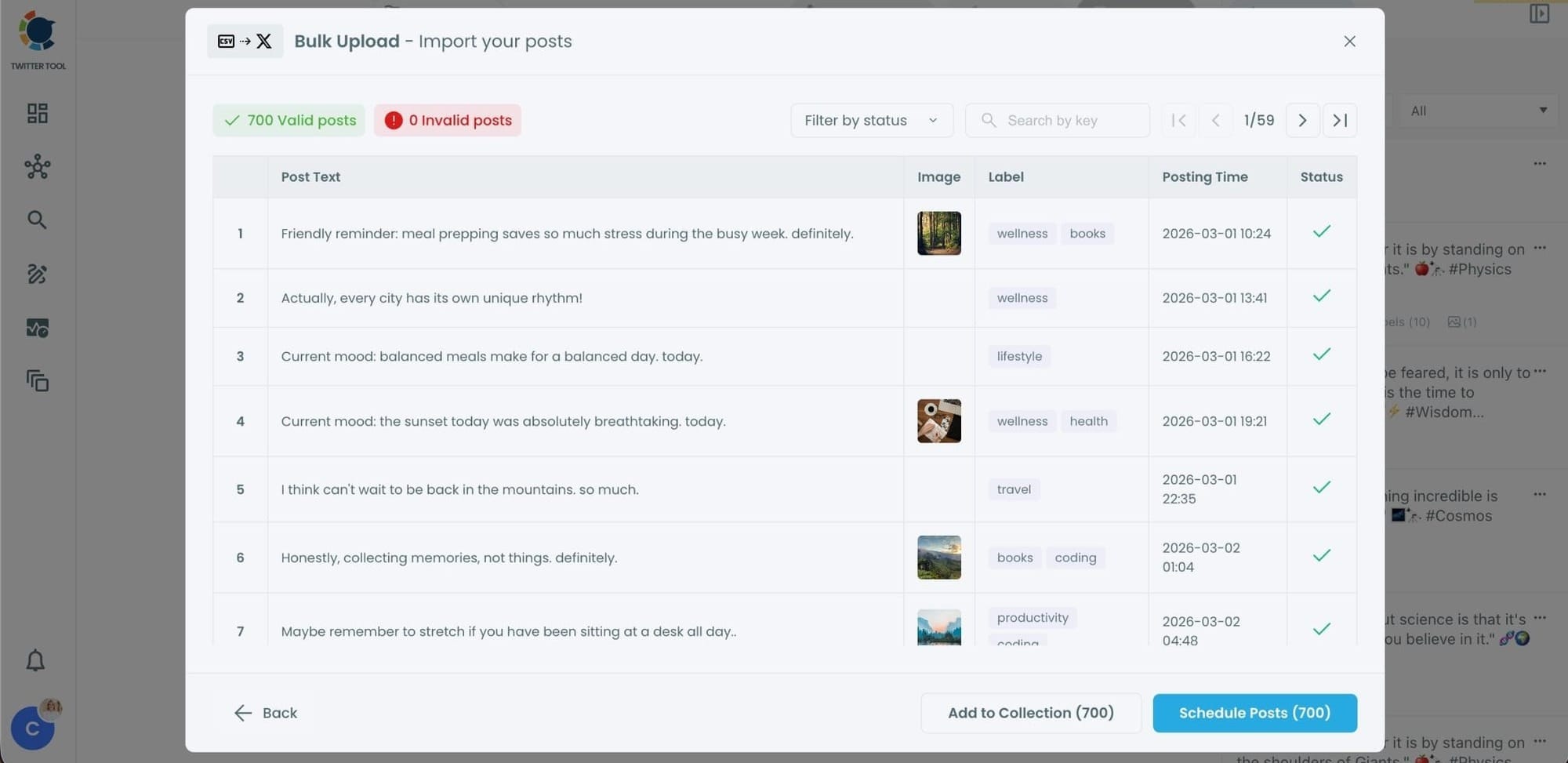
Step #3: Review your imported tweets
After uploading the CSV file, Circleboom shows all your tweets in a preview list.
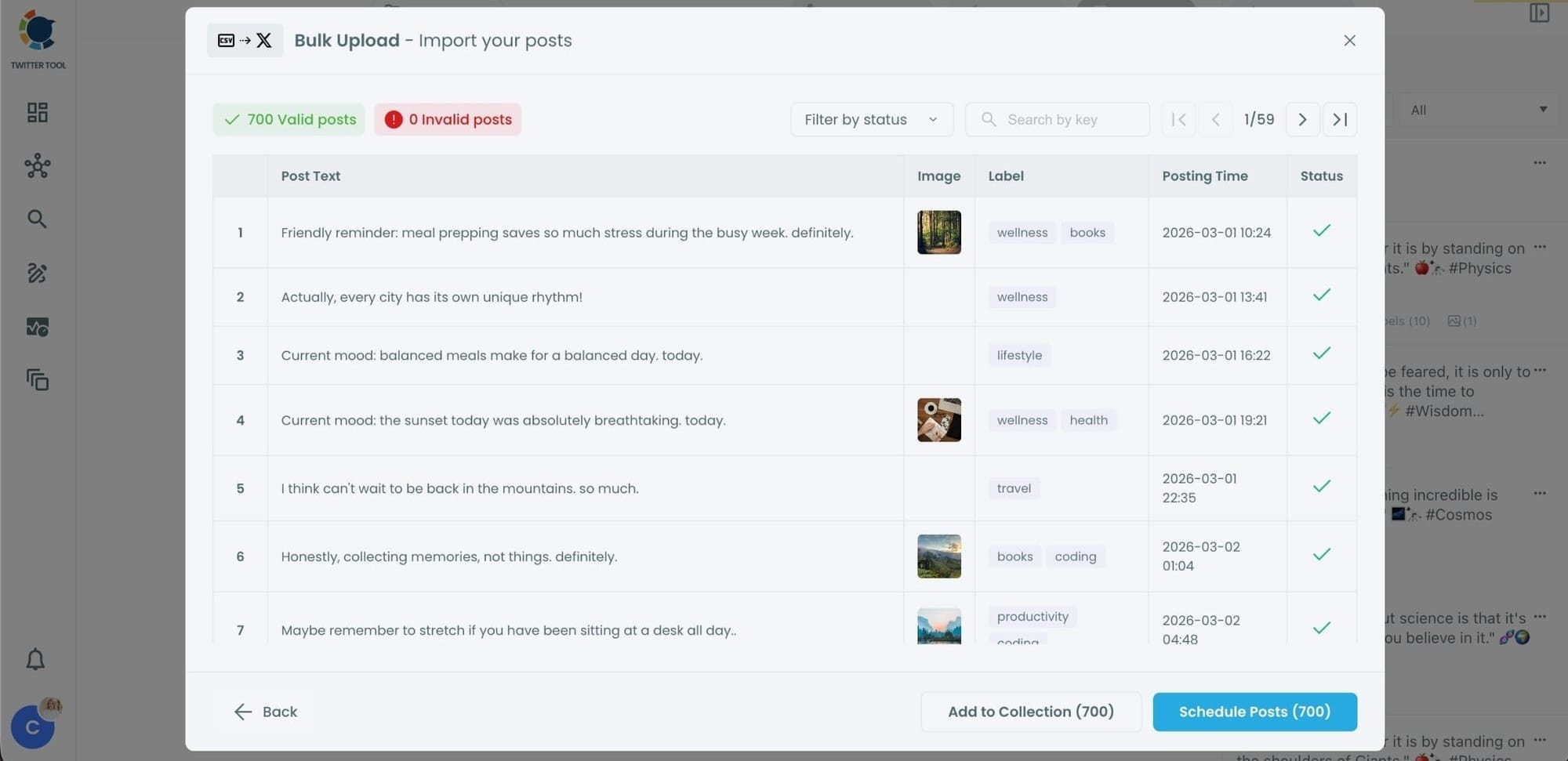
At this stage:
- Valid tweets are marked clearly
- Invalid tweets are shown with the reason for the error
- You can also add tweets to Collections if you want to organize or reuse them later
This step helps you catch and fix problems before anything is scheduled.
Step #4: Schedule all tweets at once
Once everything looks correct, click Schedule Posts.
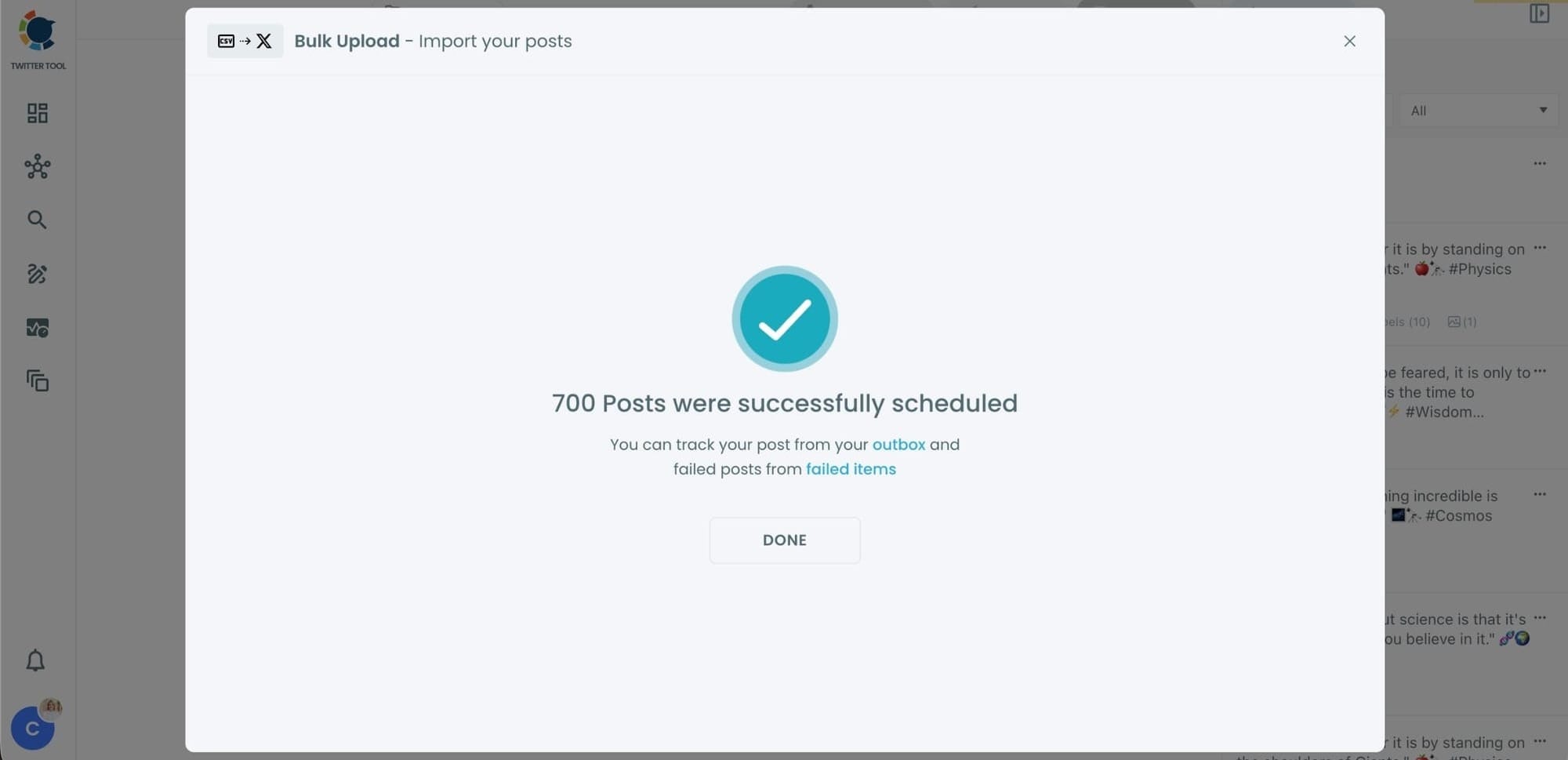
Circleboom automatically schedules all valid tweets based on the posting times in your CSV file.
Even hundreds of tweets can be scheduled in seconds, without manual work.
Step #5: Manage scheduled tweets from the Outbox
After scheduling, all your tweets appear in the Outbox and calendar view.
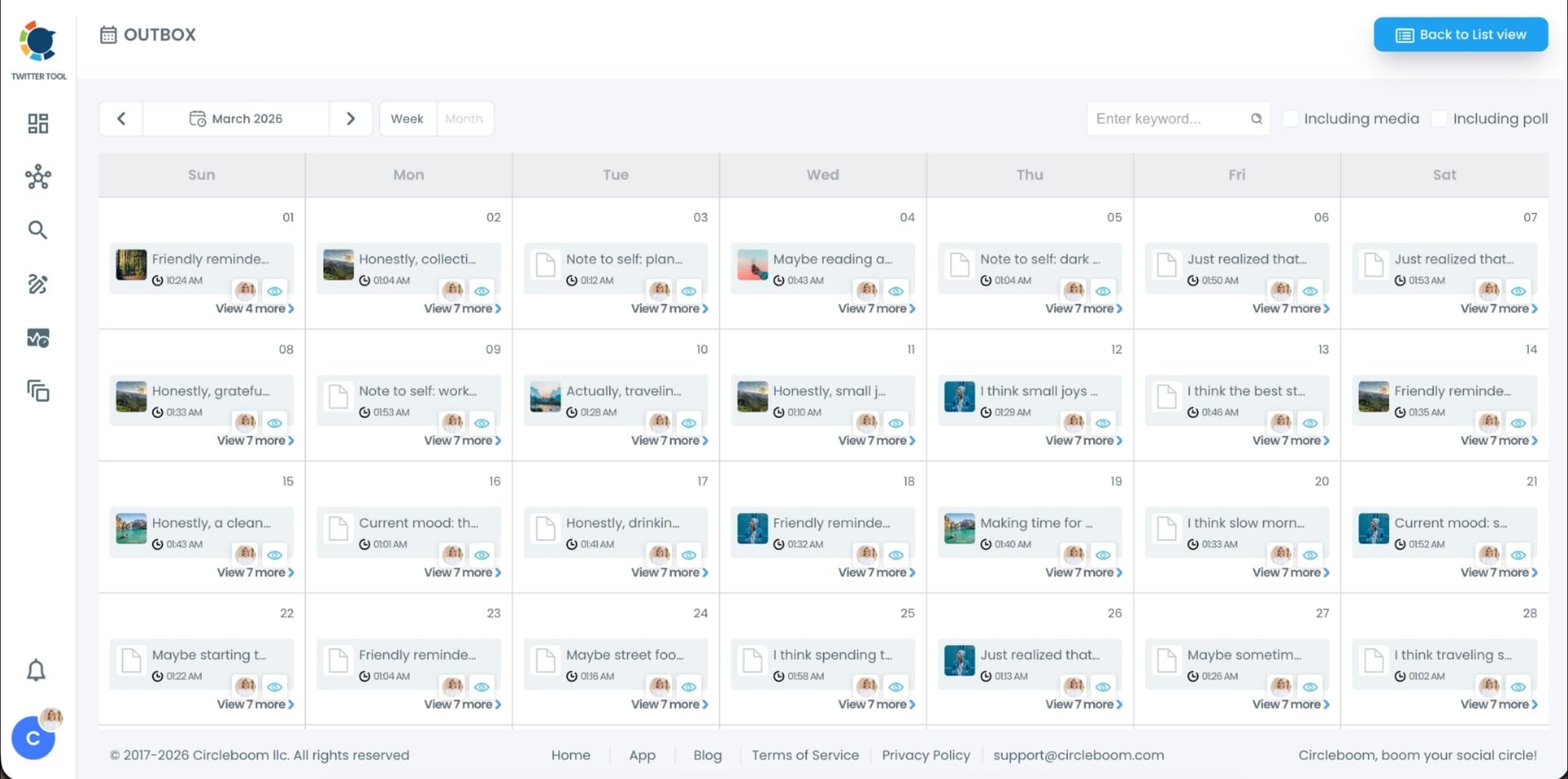
From here, you can:
- See all scheduled tweets by date and time
- Make changes if needed
- Edit or remove scheduled posts
- Keep track of your content easily
This gives you full control even after bulk scheduling is completed.
Common mistakes to avoid when bulk scheduling tweets
Bulk scheduling is powerful, but it still needs to be used smartly.
Some common mistakes to avoid:
- Scheduling too many tweets too close together
- Uploading duplicate tweets repeatedly without variation
 Kevin Frank
- Forgetting to double-check links and formatting
- Filling every slot and leaving no room for real-time tweets
- Using non-public image links that cannot be accessed
Bulk scheduling works best when combined with flexibility.
My bulk scheduling routine for multiple accounts
I usually plan content weekly or monthly.
I write tweets in batches, review them calmly, and schedule them ahead of time. I still leave space for spontaneous tweets, replies, and trending topics, but the core content is already taken care of.
This way, every account stays active without daily effort, and I can focus on strategy instead of repetitive posting.
Final thoughts
Posting daily on X does not mean you have to post manually every day.
Bulk scheduling is how you stay consistent, organized, and stress-free when managing multiple accounts. Since X does not offer a true bulk scheduling feature, Circleboom Twitter is the tool that makes this workflow possible.
Once you switch to bulk scheduling, daily manual posting stops being a task and becomes a solved problem.


)
%3F)