

Most blog posts never make it onto X, not because the writer didn't want to thread them, but because manually rewriting an article into a sequence of tweets takes the better part of an hour. URL-based AI generation collapses that work into a paste-review-schedule loop that fits in a five-minute slot. This guide walks through the exact workflow, the configuration choices you have, and the editing pass that separates a usable thread from a publishable one.
A complete blog-to-thread workflow has four operational pieces:Paste the article URL into Circleboom's Generate a Thread from URL featureConfigure tweet count and numbering optionsReview the AI-generated draft and edit weak tweetsPublish immediately or schedule through the X Post Planner queue
→ Repurpose a blog post into a Twitter thread
The rest of this guide breaks down each piece and explains what to expect at each step.
Why the URL-Based Approach Works Better Than Manual Threading
Three constraints make manual threading impractical for routine use. Recognizing the constraints is what makes the case for automation:
- Time cost. A 1,500-word article converted manually into a 10-tweet thread takes 40–60 minutes for someone doing it carefully. That time block competes with writing the next article, and writing usually wins.
- Structural rewrite. Threads read differently than blogs. A blog rewards depth and gradual development; a thread rewards density and hooks. Manual conversion isn't just splitting paragraphs into tweets, it's restructuring the content for a different reading context.
- Routine friction. Anything that costs an hour per occurrence resists becoming routine. Most content workflows that depend on a one-hour task end up not happening; the workflows that survive cost minutes, not hours.
The URL-based AI generator removes the structural rewrite (the AI does the compression and sequencing) and the time cost (the generator runs in under a minute), which means the routine friction drops to acceptable levels. A workflow that costs five minutes per blog post will get run every week. A workflow that costs an hour will get skipped. The math is the entire story.
Anyone reviewing content marketing strategy fundamentals knows that distribution is the second half of the work; writing the article is only the first. URL-based threading is a way to make the distribution half routine instead of aspirational.
Phase 1: Set Up the Account and Open the Feature
Before generating threads, the account needs to be authorized and the feature located.
- Log in to Circleboom Twitter and authorize with OAuth. The connection uses official OAuth flow; there's no password sharing.
- Open the X Post Planner menu from the sidebar.
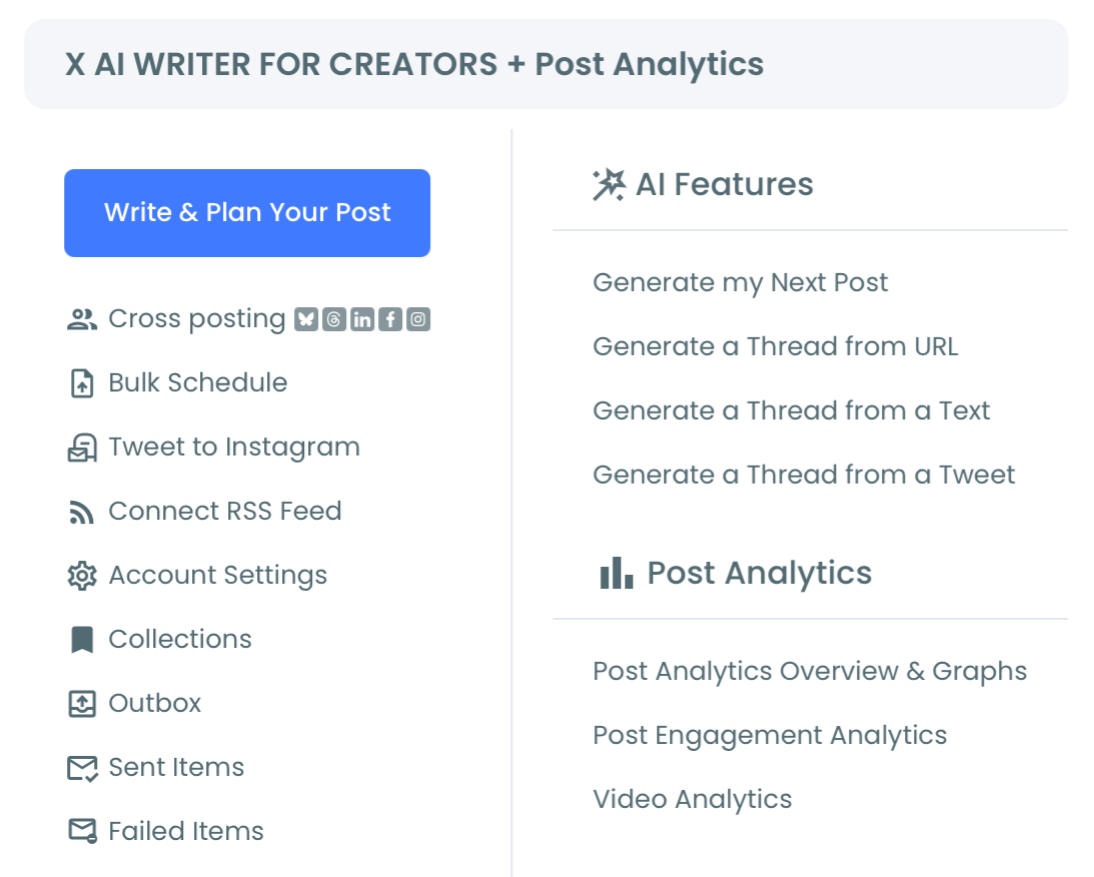
- Locate the AI Features section within X Post Planner and select Generate a Thread from URL. This is one of three thread-generation modes in Circleboom (the others are generating a thread from a tweet and generating from raw text); URL is the right choice when your source is a published web article.
Circleboom is listed in X's enterprise customer directory, so the publishing path runs through authorized Enterprise API access. Login, navigation, and generation all use API-safe operations.
Phase 2: Generate the Thread Draft
With the feature open, the actual generation is three configuration choices and a click.
- Paste the blog post URL into the input field. The generator accepts any public URL; pages behind a login or paywall produce weaker results because the extraction step has less text to work with.
- Set the tweet count. Choose a manual number (8, 10, 12, 15 are common targets) or let the system choose automatically based on article length. A 2,000-word post typically threads well at 10–12 tweets; a 500-word post threads cleanly at 4–5.
- Toggle numbering and continuation markers. Numbering (1/, 2/, 3/) helps readers track the thread structure. Continuation markers (+, →) signal that the thread continues. Most educational threads benefit from numbering; conversational threads often look cleaner without it.
- Click generate. The system fetches the URL, extracts the article content, summarizes it into key points, and assembles those points into a thread sequence. The whole generation takes under a minute for most articles.
The draft comes back with all tweets visible and editable. This is the same generation engine that produces auto-generated Twitter threads from any text input; the URL flow just adds the extraction step at the front.
Video walkthrough: AI-generated Twitter/X threads as a content repurposing workflow.
Phase 3: Edit the Draft Into a Publishable Thread
The AI gets the structure right most of the time. The polish layer is human.
- Rewrite the opening tweet. The opener is the tweet that determines whether someone scrolling decides to read the rest. The AI picks a reasonable opener, but it's the tweet most worth a manual rewrite. Aim for a one-line hook that signals what the thread will deliver without giving away the punchline.
- Tighten weak body tweets. Read through the body tweets and flag any that feel padded, redundant, or off-topic. Tighten the phrasing or delete the tweet entirely if it doesn't carry weight. Most threads benefit from cutting one or two body tweets that the AI included for completeness.
- Strengthen the closing tweet. The AI usually closes with a summary or a takeaway. Replace it with something that lands: a question, a call to action, or a link to the full blog post for readers who want depth. The closing tweet is your conversion mechanism for thread readers into blog visitors.
- Read the thread end-to-end once. Check that the flow makes sense, that no tweet contradicts another, and that the voice is consistent. Edit anything that breaks the flow.
The total edit pass typically takes 3–5 minutes for a 10-tweet thread. Heavier rewrites add time, but most drafts come out usable with light editing.
Phase 4: Schedule or Publish
The thread is ready to go live.
- Choose immediate publishing or scheduling. Immediate publishing posts the thread now through the Enterprise API. Scheduling adds it to the X Post Planner queue for a future time slot.
- Pick a time slot based on audience activity. Most accounts have peak engagement windows. Scheduling the thread for a peak window is a meaningful lift over publishing at a random time.
- Confirm and queue. The thread enters the publishing queue and goes live at the scheduled time. No manual action is required at publish time; the Enterprise API handles the post sequence.
Once the workflow is familiar, the per-post cost is five to seven minutes. The same loop applies to every blog post you publish from that point forward, which is what turns repurposing from a project into a habit.
The reason these steps work as a sequence is simple: the early steps (login, menu, feature) are one-time setup; the middle steps (paste, generate, edit) are the per-post work; the late steps (publish or schedule) are the distribution.
Running the whole sequence once for a single blog post takes under ten minutes; running it routinely for every published article turns one piece of content into two reliable distribution channels.
The Action Checklist
Before you close the tab, run through these items:
- Blog URL pasted and thread generated
- Opening tweet rewritten for hook quality
- Weak body tweets tightened or removed
- Closing tweet replaced with summary, question, or article link
- Numbering or continuation markers toggled appropriately
- Thread read end-to-end for flow
- Scheduled for a peak engagement window or published immediately
- Original blog post linked from the closing tweet (optional but recommended for traffic)
That checklist is the operational shape of the full repurposing workflow. Run it once and you've shipped one thread; run it weekly and you've turned your blog into a distribution funnel. For ongoing thread workflows, scheduling Twitter threads from a queue is how most creators handle volume without losing track of what's published when.
→ Schedule your AI-generated Twitter thread now
What to Know Before You Start
Will every blog URL produce a usable thread?
No. Pages with clear written content (blog posts, news articles, educational guides) extract cleanly. Pages that are heavily visual, behind a paywall, or built mostly with embeds and scripts produce weaker extractions because the AI has less text to work with. Test on a well-structured article first to see the best-case output.
How much should I edit the AI draft?
The opener almost always benefits from a manual rewrite. Body tweets typically need 0–2 light edits per 10-tweet thread. The closer is worth rewriting to add a CTA or a link. Expect 3–5 minutes of editing per 10-tweet draft; less if you trust the output.
Can I use the same blog post URL to generate multiple threads?
Yes. Running the same URL twice produces slightly different outputs because the AI's compression and sequencing vary across runs. Some creators generate two drafts, pick the stronger one, or combine the best tweets from each. The cost is a few extra minutes.
What tweet count should I default to?
For 1,500–2,500 word blog posts, 10 tweets is the safe default. For shorter posts (under 1,000 words), 5–7 tweets. For long-form articles (3,000+ words), 12–15. The system can also pick automatically based on content density.
Is bulk-running this on my whole back catalog safe?
Yes. The generation step is content processing only, not account activity, so there are no rate limits on how many URLs you process. The publishing and scheduling steps run through Enterprise API access at platform-safe pacing, so you can confidently process months of back catalog in one afternoon and schedule the resulting threads across the next few weeks.




)


