

Your Twitter history is a long one. Thousands of tweets, old opinions, outdated takes, embarrassing jokes, and posts that simply no longer represent who you are or what your brand stands for. Deleting them one by one is not realistic. Twitter does not offer a native bulk delete option. And the clock is always ticking.
The good news: deleting all your tweets at once is completely possible in 2026, and it takes far less effort than you might expect. This guide covers every method available, from deleting individual tweets to wiping your entire history in bulk, filtering by keyword, date, or engagement, and doing it all safely without risking your account.
The rules change every week, from payout boosts to reach suppression. Don’t get left behind. Join the Circleboom X Creator Growth Lab, your dedicated space for real-time algorithm updates, tested engagement strategies, and creator-to-creator insights.
How can I delete all my tweets at once?
To delete all tweets at once, you need a third-party tool since Twitter does not provide a native bulk delete feature. The fastest and safest way to delete all your tweets on Twitter is to use Circleboom, connect your Twitter account, and use the mass delete option to remove all tweets in bulk automatically.
To delete all tweets means removing every post from your Twitter timeline permanently and the fastest way to do it is by using Circleboom's Delete All Tweets tool, which lets you wipe your entire tweet history in one click, with filters for date, keyword, language, and engagement level.
You can also find our iOS app ⬇️

TABLE OF CONTENTS
- Why People Delete All Their Tweets
- Can Twitter Delete All Tweets Natively?
- What Is Circleboom's Delete All Tweets Feature?
- How to Delete All Tweets at Once with Circleboom: Step by Step
- Delete Tweets by Keyword
- Delete Tweets by Date Range
- Delete Tweets by Popularity (Engagement Level)
- Bulk Delete Tweets and Replies Together
- Delete All Twitter Likes at Once
- Delete Old Tweets from Years Ago Using Your Twitter Archive
- Delete Tweets on iPhone
- Can You Recover Deleted Tweets?
- Is It Safe to Delete All Tweets with Circleboom?
- Frequently Asked Questions
- Conclusion
Why People Delete All Their Tweets
The reasons are as varied as the people asking the question. Some of the most common:
You have changed. Opinions, beliefs, and personal brands evolve. Content you posted three or five years ago may no longer reflect who you are today, and you would rather not have it sitting in public view.
You are rebranding. Whether you are a creator pivoting to a new niche, a professional cleaning up their online presence before a job search, or a business repositioning its identity, a clean slate signals a fresh start.
Your account attracted bots and spam. Over time, many accounts accumulate low-quality content in their own feed as a result of retweets, replies to spam, and automated interactions. Wiping the slate is sometimes the cleanest solution.
You are simply done. Some people decide to leave Twitter and want to remove their content before going. Others just want to reduce their digital footprint for privacy reasons.
Whatever the reason, deleting all tweets is a legitimate, practical decision and Circleboom makes it fast, safe, and thorough.
Can Twitter Delete All Tweets Natively?
No. As of 2026, Twitter does not offer any built-in option to delete all tweets at once. The platform allows you to delete tweets one at a time which for anyone with thousands of posts is completely impractical. There is no "select all" function, no bulk delete button, and no archive wipe feature within the native Twitter interface.
This is why third-party tools exist for this purpose. And not all of them are equal. The most reliable, the most feature-rich, and the only one that is an Official X Enterprise Developer is Circleboom.

Keep in mind that the API provides a more accurate real-time data stream than the X interface itself. While the platform UI may experience lag, the API captures and reflects new developments instantaneously.
Circleboom has the official Enterprise API, we don't scrape data from X!
What Is Circleboom's Delete All Tweets Feature?
Circleboom's Delete All Tweets feature is a bulk tweet management tool that allows you to delete all your tweets on Twitter in one click, filter and delete specific subsets of your history, remove likes, retweets, and replies in bulk, and upload your Twitter archive to delete old tweets from years ago.
Circleboom connects to your Twitter account via Twitter's official API, executes deletions safely within Twitter's rate limits, and never puts your account at risk. It is used by organizations including NBC News, BBC, the American Red Cross, and L'Oréal a trust signal that reflects the seriousness and reliability of the platform.

How to Delete All Tweets at Once with Circleboom: Step by Step
Here is the full walkthrough for deleting all your tweets using Circleboom's Twitter management tool:
Step 1: Go to Circleboom and connect your account. Visit Circleboom Twitter and log in or create a free account. Connect your Twitter or X account by authorizing Circleboom through Twitter's official OAuth flow.
Step 2: Navigate to the Delete Tweets section. From the left-hand menu, find "Essential Tools" and click on "Delete All Tweets."
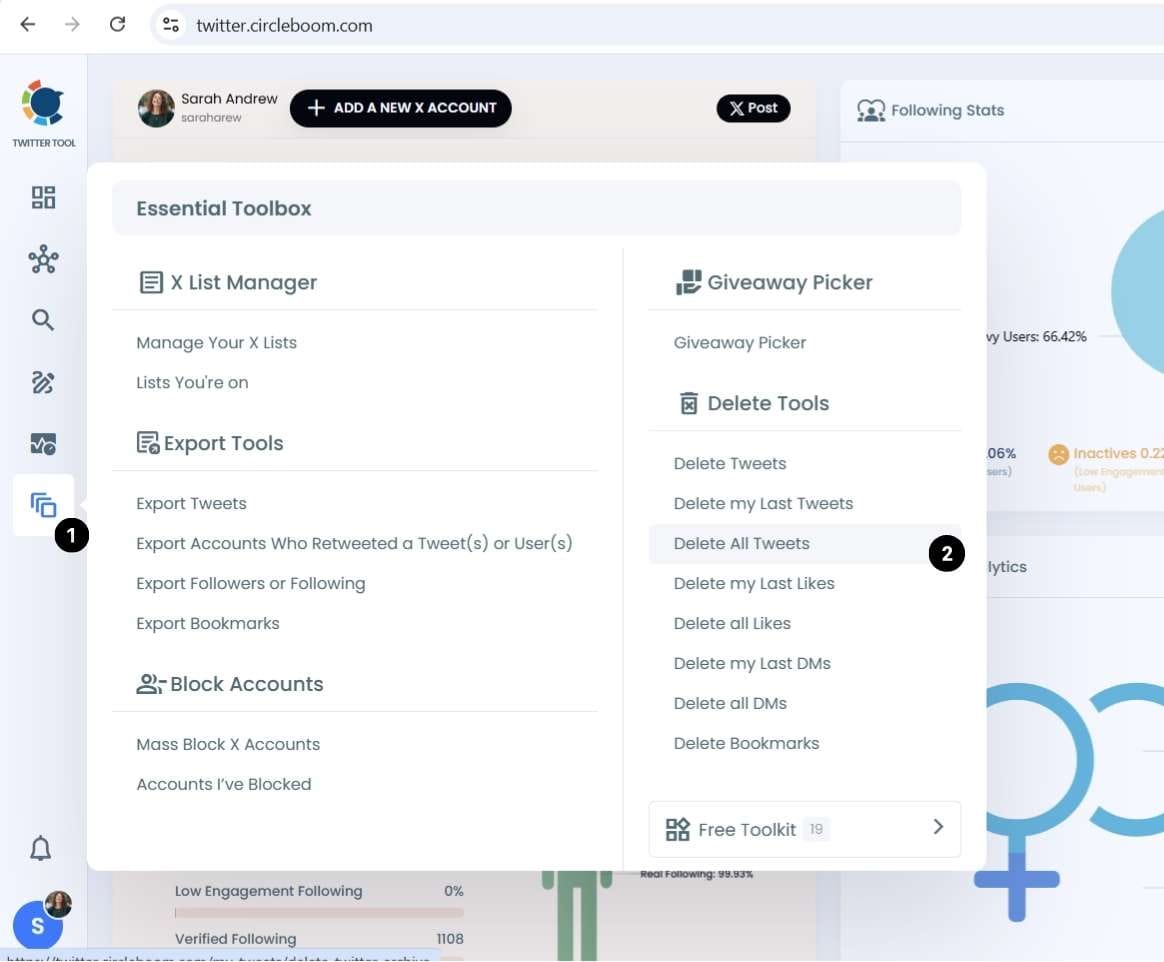
Step 3: Keep in mind that if you have more than 3200 tweets, you need to upload your tweet.js file (your tweet archive file) and you should download it before from X itself. You can find out here ⬇️ how to download your Twitter (X) Archive
 Kevin Frank
Choose your deletion method. You can delete everything at once using the mass delete option, or apply filters before deleting. Filters include date range, keyword, language, and engagement level. If you want to save specific tweets before deleting, you can mark them as favorites first.
Step 4: Confirm and execute. Once you have set your preferences, confirm the deletion. Circleboom processes your tweets in batches, respecting Twitter's rate limits, so the process runs automatically without any risk of triggering account restrictions.
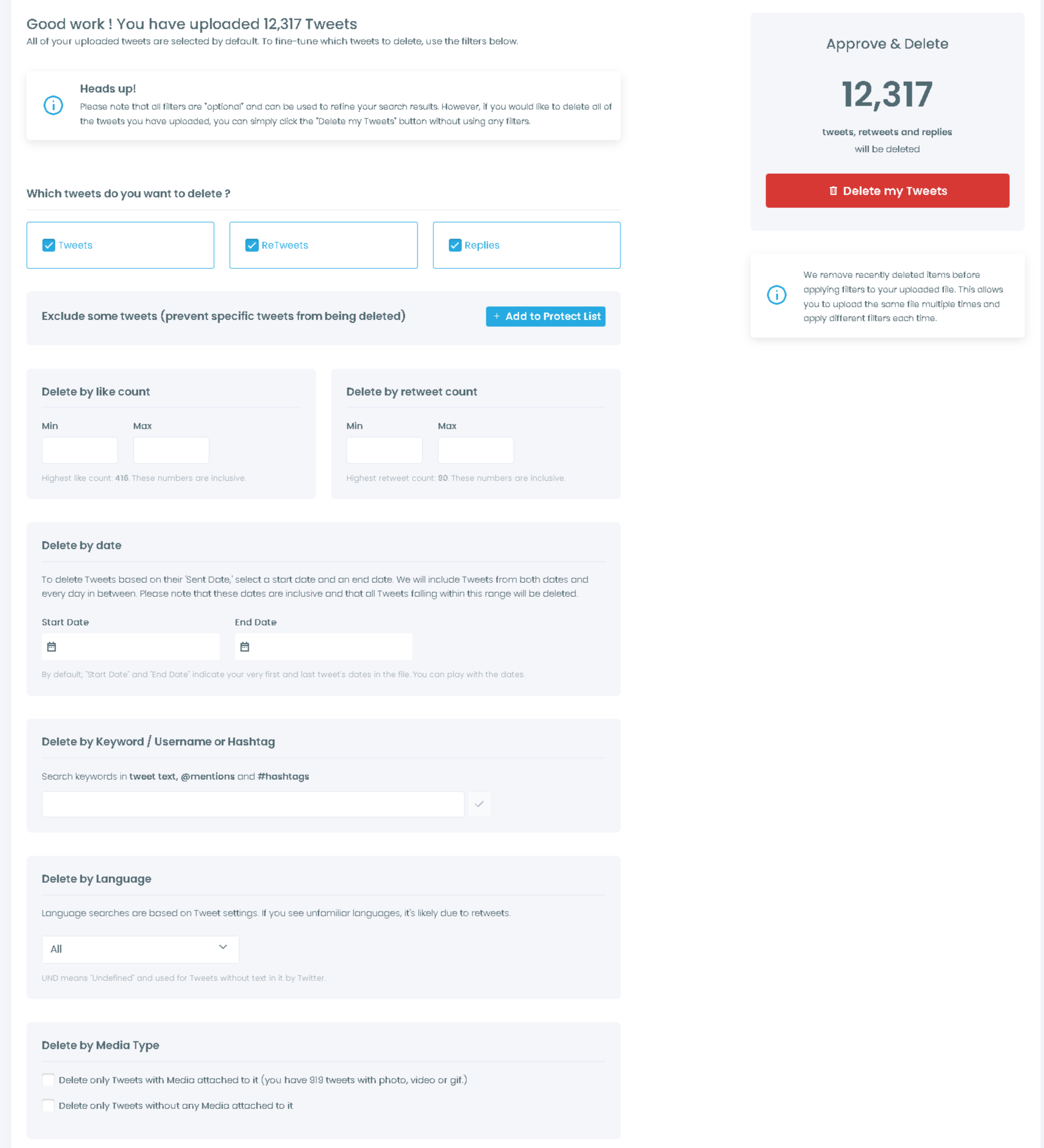
Step 5: Done. Your selected tweets are permanently removed from your Twitter timeline. This action cannot be undone, so take a moment before confirming if you have any doubts.
Delete Tweets by Keyword
Circleboom lets you search your tweet history by keyword and delete only the tweets that contain specific words, phrases, or hashtags. This is ideal when you want to remove posts on a particular topic without deleting your entire history.
For example, you can delete every tweet that mentions a former employer, a political topic you no longer want associated with your profile, or a product campaign that has ended. Circleboom's keyword search scans your full archive and surfaces every matching tweet, ready for bulk deletion with a single click.
To use this feature, go to the Delete Tweets section, enter your keyword in the search bar, review the results, and select all or specific tweets to delete.
Delete Tweets by Date Range
Circleboom's date range filter allows you to delete all tweets sent between any two dates you choose. This is particularly useful for cleaning up a specific period for example, deleting everything from more than two years ago, removing content from a previous role or chapter in your life, or wiping a specific campaign period.
The start date and end date are both inclusive. Circleboom will delete every tweet sent on or between those two dates. You can set the range as wide or narrow as you need.
Delete Tweets by Popularity (Engagement Level)
One of Circleboom's most distinctive deletion features is the ability to delete tweets by their engagement performance. You can filter your tweet history by like count, retweet count, and reply count, then delete only the tweets that fell below a threshold you define.
This is a smart way to clean up your feed without losing your best content. Delete the low-engagement posts that add noise without value, and keep the tweets that resonated with your audience. Circleboom's popularity filter makes this effortless: set your engagement threshold, review the filtered results, and delete in bulk.
Bulk Delete Tweets and Replies Together
Circleboom's bulk delete feature covers not just your original tweets but also your replies. Many accounts accumulate thousands of replies over time, including replies to spam accounts, old conversations, and exchanges that are no longer relevant.
With Circleboom, you can search within your tweets and replies, select individual items or all of them at once, and delete them in a single batch operation. The platform processes the deletions immediately and confirms each removal.
Delete All Twitter Likes at Once
Beyond tweets, Circleboom also lets you delete all your Twitter likes in bulk. Liked posts create a public record of your engagement history that you may want to clean up for privacy, professionalism, or a fresh start.
Circleboom's unlike tool lists all your liked tweets, lets you filter by keyword or date, and allows you to unlike everything at once or selectively. It is the fastest way to erase your like history without manually clicking the heart icon on thousands of individual posts.
Visit Circleboom's Unlike All Likes feature to get started.
Delete Old Tweets from Years Ago Using Your Twitter Archive
Twitter allows users to download their full tweet archive, which includes every post ever made on the account, including content that may no longer appear in normal searches due to Twitter's API limits.
Circleboom's Twitter Archive Delete feature lets you upload this archive file and delete old tweets from years ago that would otherwise be inaccessible. This is particularly important for accounts with long histories, as the standard API can only reach a limited number of recent tweets.
To use it: download your Twitter archive from Twitter's Settings, then upload the file to Circleboom's Archive Delete tool. Set your date filters, choose what to delete, and Circleboom processes the entire archive safely.
Delete Tweets on iPhone
Circleboom is available as an iOS app, which means you can delete all your tweets directly from your iPhone. The mobile experience mirrors the full desktop tool: connect your account, navigate to the delete section, apply any filters you need, and execute the bulk deletion from your phone.
This is ideal for users who prefer managing their Twitter account on mobile or want to clean up their tweet history on the go. The Circleboom Twitter iOS app is available on the App Store.
Can You Recover Deleted Tweets?
No. Once you delete tweets using Circleboom or any other method, they are permanently removed and cannot be recovered. Twitter does not retain deleted content on the user-facing side, and there is no recycle bin or undo function.
This is why Circleboom recommends downloading your Twitter archive before executing a bulk delete, especially if you want to preserve a record of your history even after removing it from the public-facing platform. You can download your archive from Twitter's Settings before starting any deletion.
Is It Safe to Delete All Tweets with Circleboom?
Yes. Circleboom is an Official X Enterprise Developer, formally certified by Twitter after an extensive evaluation process. It operates fully within Twitter's API rules and rate limits, which means deletions are executed in controlled batches rather than all at once in a way that could trigger account restrictions.
Your data is never shared with third parties without your permission. Circleboom strictly follows Twitter's rules and policies, and it has been trusted by major organizations and nonprofits around the world for years.
The only thing to be careful of is the irreversibility of deletion itself. Once tweets are deleted, they cannot be recovered. So if you have any hesitation, apply filters first to delete a subset before committing to a full wipe.
Frequently Asked Questions
Does Twitter have a native delete all tweets feature? No. Twitter does not offer any built-in option to delete all tweets at once. A third-party tool like Circleboom is required for bulk deletion.
How long does it take to delete all tweets with Circleboom? It depends on how many tweets your account has. Circleboom processes deletions in batches to stay within Twitter's rate limits. Accounts with tens of thousands of tweets may take several hours to fully process.
Can I delete only some tweets and keep others? Yes. Circleboom gives you full control. You can filter by keyword, date range, engagement level, or language and delete only the subset that matches your criteria. You can also manually select specific tweets to keep before bulk deleting the rest.
Will deleting tweets affect my follower count or account standing? No. Deleting tweets does not affect your follower count, following list, or account standing on Twitter. It simply removes the content from your public timeline.
Can I delete tweets from a specific year? Yes. Circleboom's date range filter lets you target tweets from any specific year or time period. You can also upload your Twitter archive to access and delete content from years ago that may not appear in standard API results.
Is Circleboom free to use for deleting tweets? Circleboom offers a free tier that includes basic tweet deletion functionality. More advanced features like bulk archive deletion, keyword filters, and engagement-based deletion are available on paid plans.
Does Circleboom delete retweets as well? Yes. Circleboom can delete your original tweets, your replies, and your retweets. Each type can be managed separately or all together.
Conclusion
Deleting all your tweets does not have to be a days-long ordeal of clicking through your history one post at a time. In 2026, the smartest and safest way to delete all your tweets on Twitter is with Circleboom's Delete All Tweets tool a bulk deletion platform that gives you complete control over what stays and what goes, without putting your account at risk.
Whether you want to delete everything at once, filter by date or keyword, remove old tweets from your uploaded archive, or clean up your likes and retweets alongside your posts, Circleboom handles all of it in one place, in one session, safely and permanently.
Your Twitter history belongs to you. So does the decision of what to do with it.





)

