
How do you clear out the replies nobody liked without touching the tweets that did well? X gives every post its own delete button and nothing more, so a reply-heavy account turns the job into hours of scrolling and second-guessing.
The fix is two filters and one check that most guides skip.
How do you delete replies that got no likes on X?
Load your recent posts in Circleboom's Delete My Last Tweets, set Post Type to replies and Like Count to a maximum of 0, then delete only what stays selected. Circleboom removes the filtered replies from your X account in bulk, working through the access of an verified X Enterprise developer.
→ Find and delete replies with no likes on your account
Why X makes zero-like replies so hard to clean up
X has no bulk delete.
Its help article on deleting on X walks through removing posts one at a time, which works for a single mistake and fails for a reply habit.
Replies pile up faster than original tweets. A short "agreed" under a big account takes seconds to write, so an active account can post far more replies than tweets, and many of them collect no likes at all.
Those replies sit on the Replies tab, the first place a curious visitor clicks to see how you talk to people.
That makes replies part of your reputation. A recruiter, client or sponsor who opens the tab is checking whether your replies add anything to the threads they sit in.
A tab full of unliked one-liners says you were present but not useful.
The manual route breaks down for three reasons:
- X shows no like count filter, so you judge every reply by eye.
- The Replies tab mixes replies with context posts, so you scroll past things you cannot act on.
- Each deletion takes its own menu, tap and confirmation.
Done by hand, the work grows with every reply you ever posted. Done with filters, it is the same few clicks for 30 replies or 3,000.
That gap is why a filter-based tool is the practical way to delete replies with no likes in bulk.
A manual cleanup abandoned halfway leaves the tab worse organized than before, half judged and half not.
Are your old replies inside the 3,200-post window?
Probably, if you post at a normal pace, but check before you start.
Circleboom's Delete My Last Tweets loads up to your latest 3,200 posts through the X API, and replies count toward that number like any other post. Anything older is outside the API's reach and needs your X archive.
Which situation are you in?
| Your account | What changes | Your route |
|---|---|---|
| Under 3,200 posts in total | Every reply loads | Delete My Last Tweets |
| Dead replies are recent | The latest posts cover them | Delete My Last Tweets |
| Dead replies are years old | They sit past the window | X archive and Delete All Tweets |
The archive route works the same way in spirit. In Delete All Tweets you keep only the Replies box ticked and set a like count range with Min and Max values, so the zero-like logic carries over to your full history. Circleboom's guide to its Twitter archive eraser explains that upload flow.
If you already know your target is old, go straight to the page where you can delete old tweets with your archive. X documents how to request that file on its page about accessing your X data.
For everyone else, the recent window is the faster path, because it needs no file at all.
What Delete My Last Tweets does with your X replies
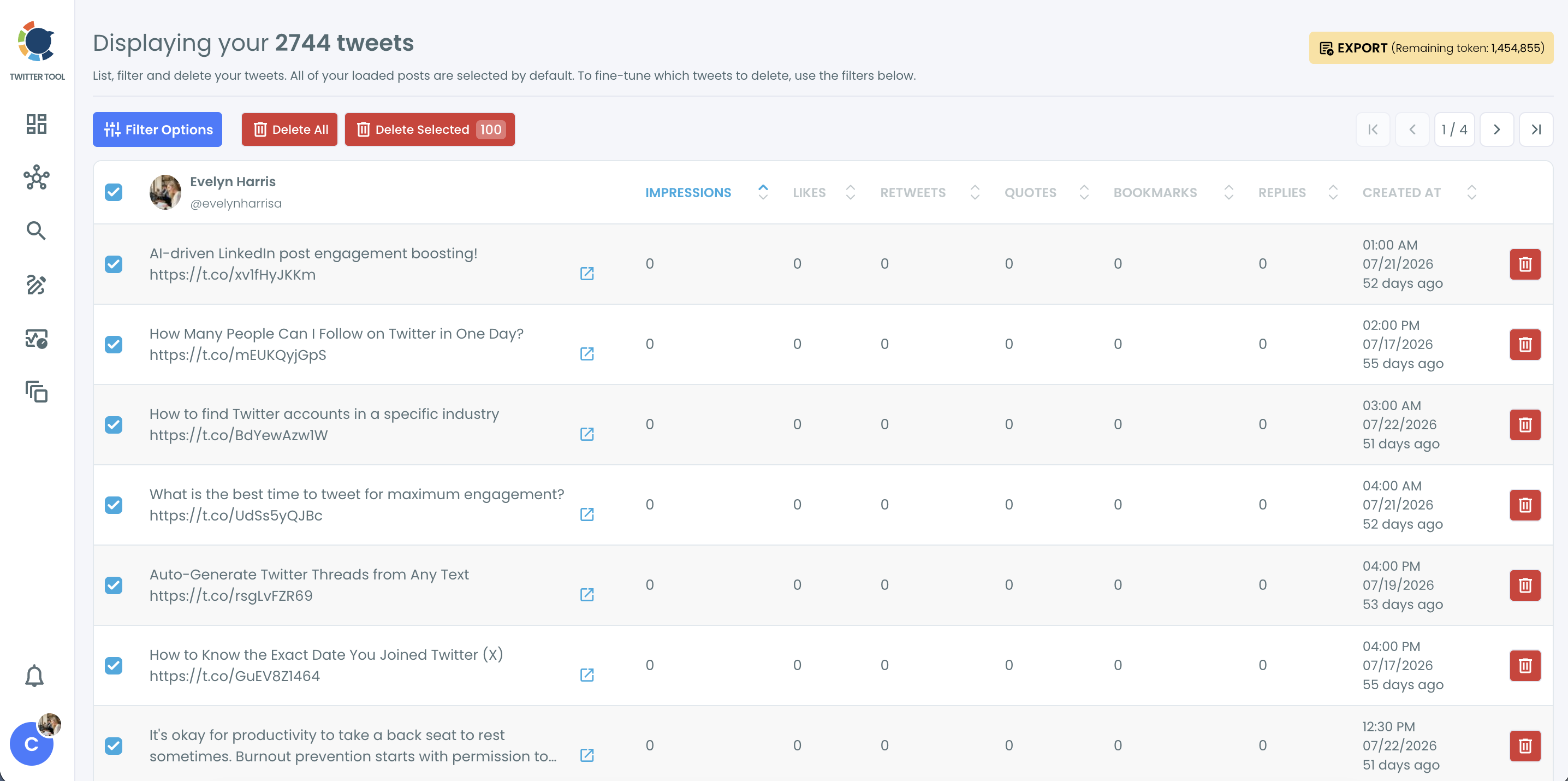
Circleboom's Delete My Last Tweets pulls your recent X posts into one table, lets you filter them by type and engagement, and deletes the ones you select in bulk. Each row shows the text, impressions, likes, retweets, quotes, bookmarks, replies and the creation date, so you can judge a reply by its numbers instead of your memory.
Two filters do the heavy lifting for this job:
- Post Type separates original tweets, retweets and replies.
- Like Count takes a minimum and a maximum, so a maximum of 0 isolates posts with no likes.
The deletion itself goes through X's official endpoint. X's API reference for its delete endpoint shows a post being removed by its ID with the account owner's own authorization, which is the sanctioned route any tool should use.
Circleboom is listed on X's Enterprise customer directory, so the access behind each deletion is the kind X approves, and your account is not handed to a scraper.
Compared with tapping through the Replies tab, the table judges every reply against the same numbers. You can clean up zero-like replies on X from the same table you use to review them.
A three-click bulk delete on X, from a full selection to the confirmation that sets it running.
How to delete replies with no likes on X, step by step
The process, in three phases.
Connect your account and open the tweet list
- Log in to Circleboom Twitter with the X account whose replies you want to clear.

- Open the Essential Toolbox from the dashboard menu and choose Delete Tools.

- Select Delete My Last Tweets and wait for your recent posts to load into the table.
Filter the list down to zero-like replies
- Click Filter Options to open the filter panel.
- Choose replies under Post Type and set Like Count to a maximum of 0.
- Click Apply Filters. Every loaded post starts out selected by default, so the filter has to be applied before you touch Delete Selected, or the selection still covers posts you meant to keep.
Delete the selection and confirm
- Compare the number on Delete Selected with what you expect, and untick any reply you still want to keep.
- Click Delete Selected and approve the "Delete Tweets?" pop-up.
Filtering first and counting second is what keeps the bulk action narrow. The page assumes you want everything until you tell it otherwise.
The order of these steps is the safety mechanism.
The short version:
- Load your latest posts in Delete My Last Tweets.
- Filter to replies with a Like Count of 0.
- Check the selected count, then delete.
Three mistakes that turn a reply cleanup on X into a mess
Most cleanups that go wrong fail in one of three places, and all three are avoidable on the same screen.
Pressing the wrong red button
The table has two red buttons next to each other. Delete All is built to remove all loaded posts in one action, which is the opposite of a targeted cleanup.
For a reply cleanup the button you want is Delete Selected, and only after the count on it matches what the filters should have left.
Ignoring replies that are still part of a live thread
A reply with no likes can still be an answer someone is relying on. Circleboom's guidance for recent posts is to check replies and quote tweets for context before removing them, because recent posts may sit inside active conversations or customer support threads.
Scan the filtered list for anything addressed to a customer or partner before you delete.
Skipping the check afterwards
Open your Replies tab on X once the progress indicator finishes. Circleboom recommends verifying the profile after a deletion to confirm the intended posts are gone, and it takes a minute.
The common slip is trusting the count and never looking, then finding a reply you meant to keep a week later.
If you are doing this away from your desk, there is a separate walkthrough on how to delete all your replies from an iPhone.
Should you filter X replies by impressions instead of likes?
Sometimes, yes. A reply with zero likes and a few thousand impressions was seen and ignored. A reply with zero likes and a handful of impressions was never seen at all.
Those are different problems, and the like filter treats them the same.
Delete My Last Tweets lets you set a minimum and maximum for impressions, replies and quotes as well as likes. Circleboom's own guidance gives an Impression Count maximum of 100 as an example for isolating posts that barely reached anyone.
Use the filters in these combinations:
- Like Count max 0: removes replies nobody endorsed, whatever their reach.
- Impression Count max 100: removes replies nobody saw, even if one stray like slipped in.
- Like Count max 0 plus Reply Count max 0: keeps zero-like replies that started a conversation.
I lean on the third combination most. A reply that drew an answer has done its job even without a like, and deleting it leaves the other person replying to nothing.
If you want more angles on choosing a cut-off, this piece on how to mass delete tweets based on popularity compares thresholds.
Whether you should delete old tweets to increase reach at all is argued separately, since X does not publish how it weighs an account's old posts and any promise about reach deserves care.
Can you delete original tweets with no likes the same way?
Yes. Set Post Type to original tweets and keep Like Count at a maximum of 0. The same table then shows your own posts that drew no likes, and the same check on the selected count applies before you delete.
Adding a Retweet Count maximum of 0 tightens it further, so a tweet that got shared but not liked stays. That pairing is the one Circleboom's documentation uses as its example of finding dead tweets in the latest 3,200.
When you want one place to manage that wider sweep, the page to clear out low-engagement tweets covers likes, retweets and impressions together.
I usually run the reply cleanup first and the original-tweet cleanup a few days later. Replies are lower risk, and doing them first shows you how many posts a given filter catches before you point it at the tweets people actually quote and link to.
Summary of the zero-like reply cleanup
Deleting replies that got no likes on X takes one window, two filters and one check. Make sure your target replies sit inside the latest 3,200 posts, filter Delete My Last Tweets to replies with a Like Count of 0, and confirm the selected count before you press delete.
The payoff is a Replies tab that shows the conversations people valued.
I treat it as a routine rather than a one-off rescue: the smaller the pile, the faster the review. It also gives you a repeatable rule to reuse whenever the tab fills up again, instead of an afternoon of judging replies one by one.
Circleboom handles the deletion through official access, and the export button on the same page gives you a record first if you want one.
→ Start removing your unliked X replies
Questions about the zero-like filter
Should I export my replies before deleting them?
Yes, if there is any chance you will want them later. Deletion on X is permanent and Circleboom has no undo, so the CSV you save with the Export button on the Delete My Last Tweets page is the only record of what you removed. Export uses tokens, and the pop-up shows the cost before you confirm.
Can I keep my no-like replies to certain people?
Yes. Use the Keyword / Username or Hashtag filter to find replies to a specific @username, then protect them with Exclude Some Tweets or untick their rows before you delete. The rest of the filtered selection goes as planned.
Is it safe to let a tool delete my X replies?
It is when the tool deletes through X's official API, as Circleboom does. Your login goes through X's own authorization screen, and every deletion is a standard API request on your behalf rather than a script imitating your clicks.
How long does deleting a few hundred replies take?
It depends on the batch size, because X's API paces large deletions. Keep the browser tab open until the progress indicator finishes.