
My feed was a mess. So I went through my following list and started clicking on profiles. Some hadn't posted in two years. Some had thousands of followings and eleven followers. Some had bios that made no sense and a join date from last month. I'd followed all of them at some point without realizing what they were.
The problem is that bots don't announce themselves. You click follow, they look fine, and six months later they're cluttering your feed with junk or they've gone completely silent.
Going through them manually took forever and I still felt like I was missing half of them.
That's when I started using Circleboom Twitter's Following Management feature. It pulls up your entire following list, runs it through a quality filter, and surfaces every suspicious account in one place. You review the list, select the ones you want gone, and unfollow them in one click. Done.
How do I find fake or bot accounts in my Twitter following list?
Twitter has no native way to filter your following list by account quality.
With Circleboom Twitter, you can open your full following list, apply the Fake and Bot filter to identify suspicious accounts using behavioral and profile signals, review the results, and unfollow them individually or in bulk with one click without leaving the dashboard.
 infocircleboom.com
What Is Circleboom Twitter?
Circleboom is an Official X Enterprise Developer, which means it works directly with X's official APIs. All data it retrieves is publicly available and all actions it performs are fully compliant with platform rules. No scraping, no credential sharing.

Here's what Circleboom Twitter gives you for following list management:
- Pull up your full following list in a structured, sortable dashboard
- Filter for fake and bot accounts using behavioral and profile quality signals
- Unfollow suspicious accounts individually or in bulk with one click
- Combine filters for egghead accounts, low activity, account age, and follower ratio
- Export the following data as a CSV for further analysis or auditing
If you want to find and remove fake or bot accounts from your Twitter following list, Circleboom Twitter makes it possible without manual checking.
How to Find and Unfollow Fake or Bot Accounts in Your Twitter Following List with Circleboom Twitter
Step #1: Log in to your Circleboom Twitter dashboard.
From the left-side menu, go to Followers / Following Management & Analytics, then click on All Your Following.
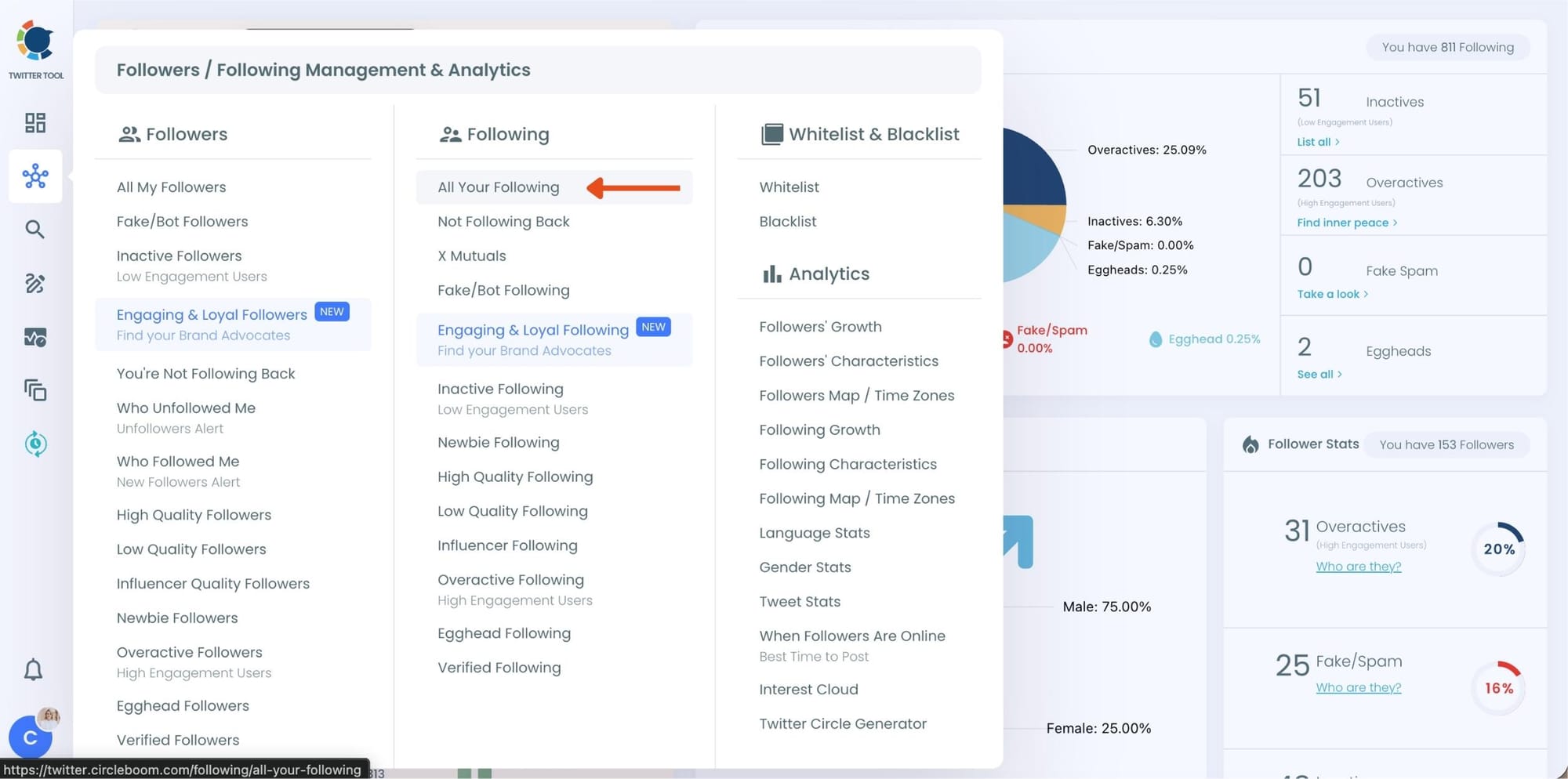
At this point, Circleboom loads your entire following list and displays each account with detailed metrics such as tweet count, join date, follower and following numbers, follow ratio, and activity level.
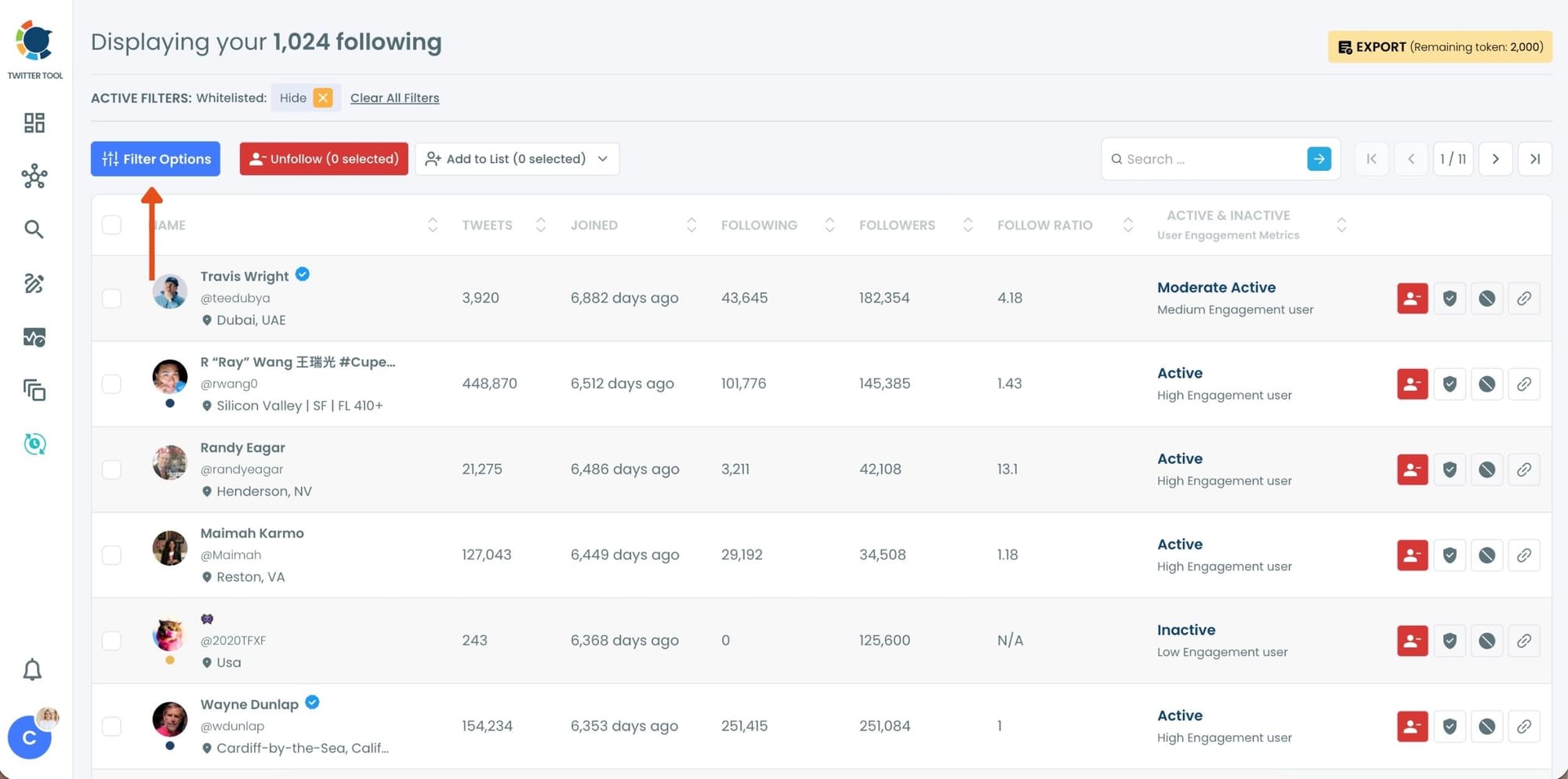
Step #2: Once your following list is visible, click on Filter Options at the top of the page.
Inside the filter panel, use the Follower Quality section to define what you want to see.
Select Fake/Spam and enable Show only. You can also adjust additional quality filters depending on how strict you want the cleanup to be.
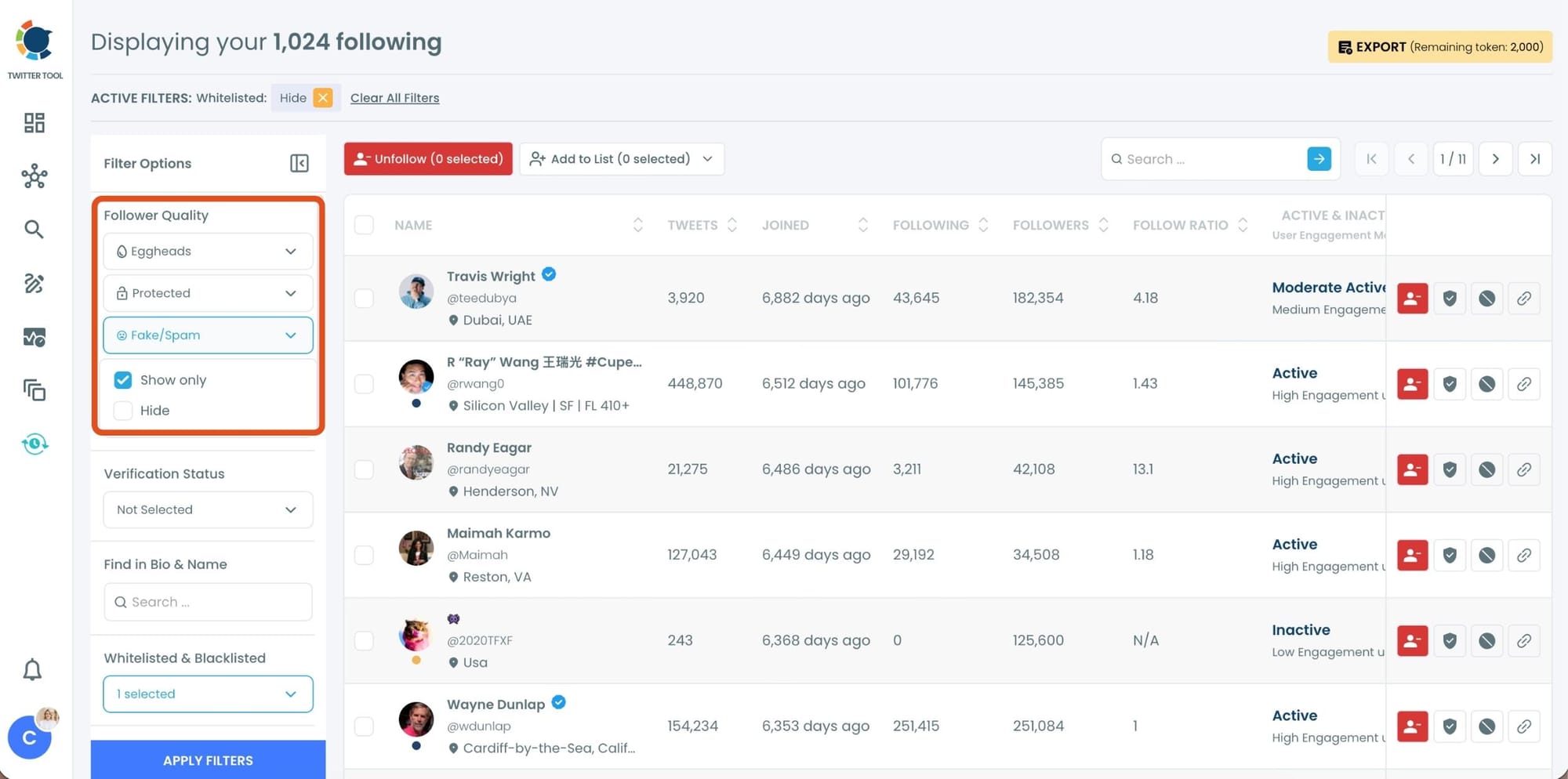
After setting your filters, apply them. Circleboom now lists only fake and low-quality following accounts.
Step #3: Circleboom now shows only low-quality or fake following accounts, each clearly labeled with engagement and activity indicators.
Select the accounts you want to remove by using the checkboxes on the left. You can select multiple accounts at once.
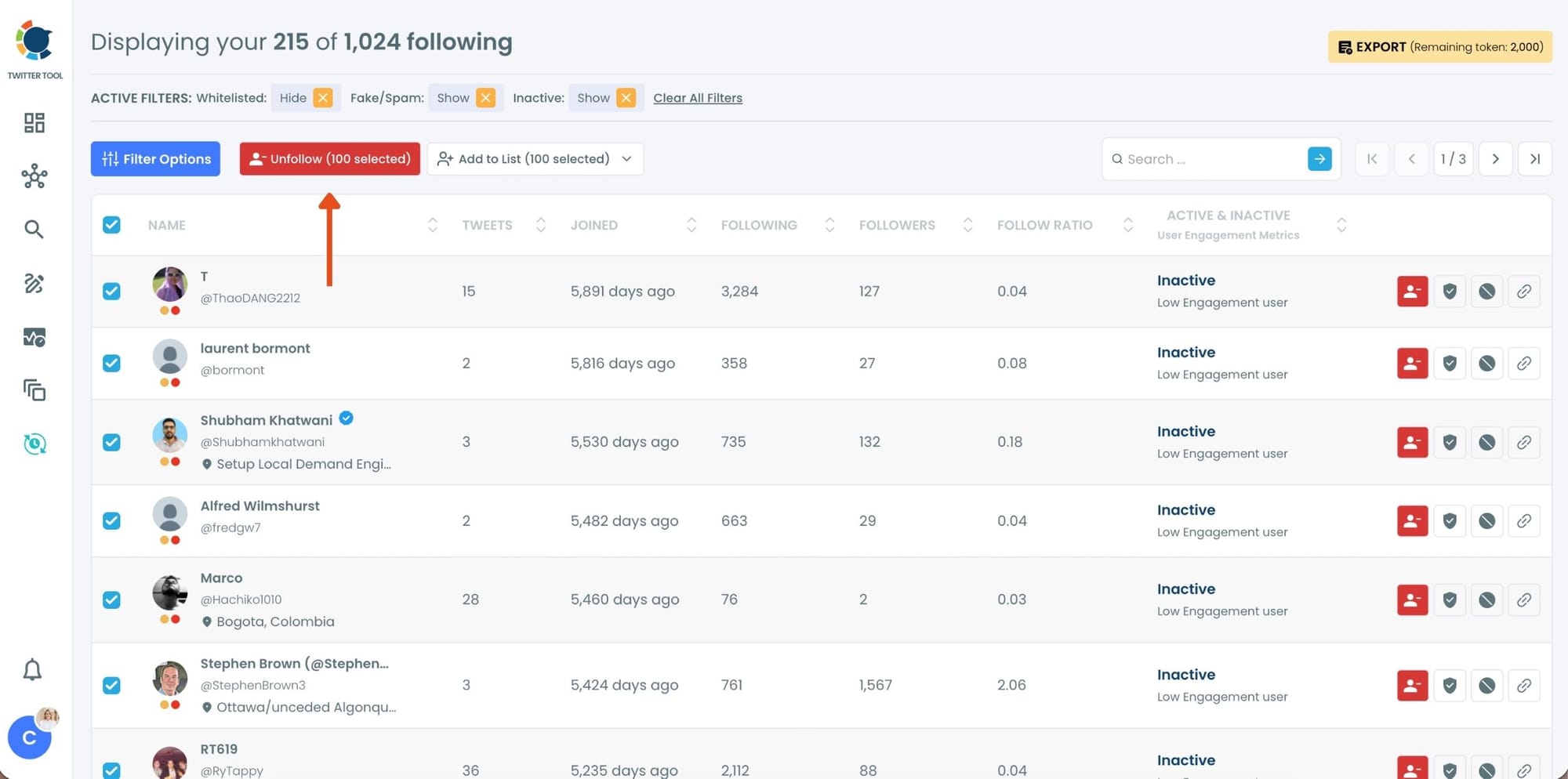
Click the red Unfollow button at the top of the list after making your selection.
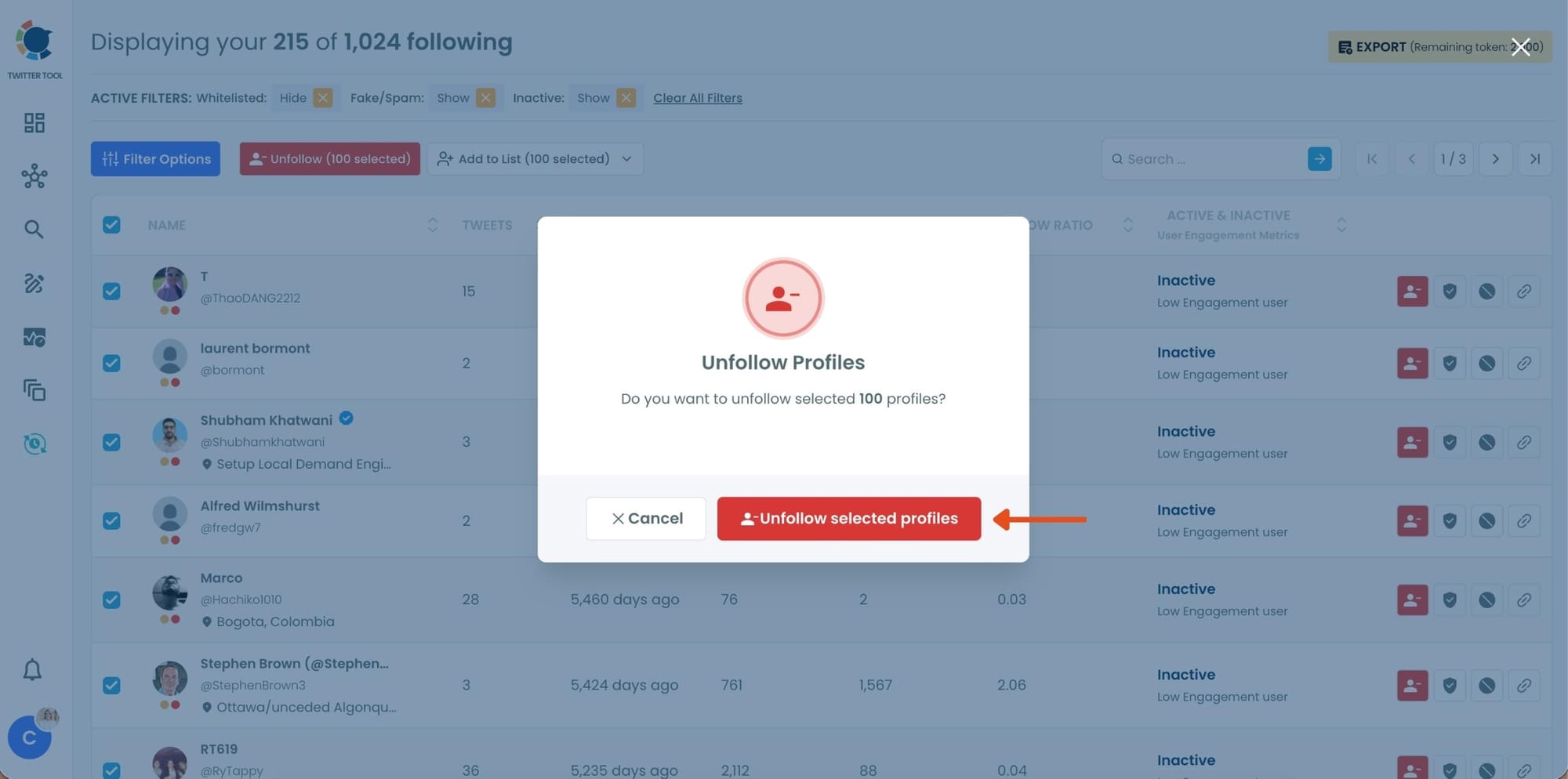
Step #4: Circleboom will show a confirmation pop-up to prevent accidental unfollow actions.
Confirm the action by clicking Unfollow selected profiles.
Why Your Following List Fills Up with Fake Accounts
Most people don't deliberately follow bot accounts. They appear through routes that feel normal at the time.
Follow-for-follow schemes. Participating in follow trains or follow-back groups means some of the accounts that follow you back are bots running automated follow scripts. You follow them because they followed you. Many are not real.
Hashtag and niche communities. Bot networks target active hashtags and niche communities to blend in. When you engage in a topic area, some of the accounts that appear in that space and that you eventually follow have no real person behind them.
Accounts that changed over time. An account you followed two years ago because they posted interesting content might have been abandoned, sold, or repurposed as a spam account since then. The follow stays in your list. The account is no longer what it was.
The platform's baseline bot population. X has always had a significant proportion of automated and low-quality accounts. Following accounts over time means some percentage of them will always fall into this category regardless of how carefully you select who to follow.
📌 The accounts you follow directly shape your feed, your engagement environment, and the signals Twitter's algorithm reads about your network. A following list full of bots and inactive accounts is not a neutral thing. It affects what you see and how your account is perceived.
Arif Akdogan
Why It Matters Who You Follow, Not Just Who Follows You
Most people obsess over their follower count and pay almost no attention to their following list. That's backwards.
Your following list determines what you see. The content in your feed comes from the accounts you follow. Following fake and bot accounts fills that feed with nothing useful, and in some cases fills it with spam or low-quality automated content.
Following fake accounts inflates your following count without any real value. A high following count with no reciprocal engagement signals an unbalanced network. For anyone evaluating your account, an inflated following number paired with low engagement is a credibility flag.
Twitter's algorithm reads your network as a quality signal. The accounts you follow are part of how Twitter's systems understand what kind of account you are and what content to show you. A network dense with bot and spam accounts sends the wrong signals.
A cleaner following list improves your genuine engagement opportunities. When you follow real, active accounts in your niche, their content appears in your feed, you engage with it, they engage back, and the network effect actually works. None of that happens with bots.
Unfollowing fake accounts is the foundation of a network that works. Before you focus on finding better accounts to follow, it helps to remove the ones that are pulling the quality of your network down. Circleboom Twitter's Engaging and Loyal Following feature shows you which accounts you follow are actually engaging with your content, so you can see both sides of the picture at once.
Frequently Asked Questions
How do I find fake or bot accounts I'm following on Twitter?
Twitter has no native tool for this. Circleboom Twitter's Fake and Bot Following feature retrieves your full following list and analyzes each account using behavioral and profile signals. Suspicious accounts are surfaced in a filtered list that you can review and act on directly from the dashboard.
What are the signs that an account in my following list is a bot?
The strongest signals are extreme follower to following ratio imbalances, default profile images with no customization, very low tweet counts relative to account age, accounts created recently in clusters, and extended periods with no activity. When multiple signals appear on the same account, the likelihood of it being a bot or low-quality account increases significantly.
Can I unfollow fake accounts in bulk on Twitter?
Not through Twitter's native tools. Twitter only supports unfollowing one account at a time. With Circleboom Twitter, you can select multiple accounts from the filtered fake and bot list and unfollow them in bulk with one click directly from the dashboard.
Will the accounts I unfollow know I unfollowed them?
No. Twitter does not notify accounts when someone unfollows them. The accounts you unfollow will see no indication that you removed them from your following list.
Does following fake accounts hurt my Twitter account?
It can. A following list heavy with bot and inactive accounts affects your feed quality, inflates your following count without real network value, and may send negative quality signals to Twitter's algorithm about your account's network. Cleaning your following list is a legitimate account health step.
How often should I audit my following list?
Running a full audit every few months is a reasonable baseline for active accounts. If you participate frequently in follow-based communities or have grown your following list quickly, more frequent checks are worth running. Circleboom Twitter makes the process fast enough that it doesn't need to be a major time commitment.
Can I whitelist accounts I want to protect before running a bulk unfollow?
Yes. Circleboom Twitter supports a whitelist function that lets you mark specific accounts as protected before taking any bulk action. Whitelisted accounts are excluded from bulk unfollows regardless of what filters are applied, so you can run a cleanup without worrying about accidentally removing accounts you want to keep.
Final Thoughts
The accounts you follow shape your entire experience on Twitter. Fake and bot accounts in that list add nothing to your feed, distort your following count, and quietly affect how your network reads to the algorithm and to anyone evaluating your account.
Circleboom Twitter's Fake and Bot Following feature finds them in seconds and lets you unfollow them with one click. Clean the list, and what's left is a network that actually works.
Find and remove fake or bot accounts from your Twitter following list with Circleboom Twitter.
infocircleboom.com